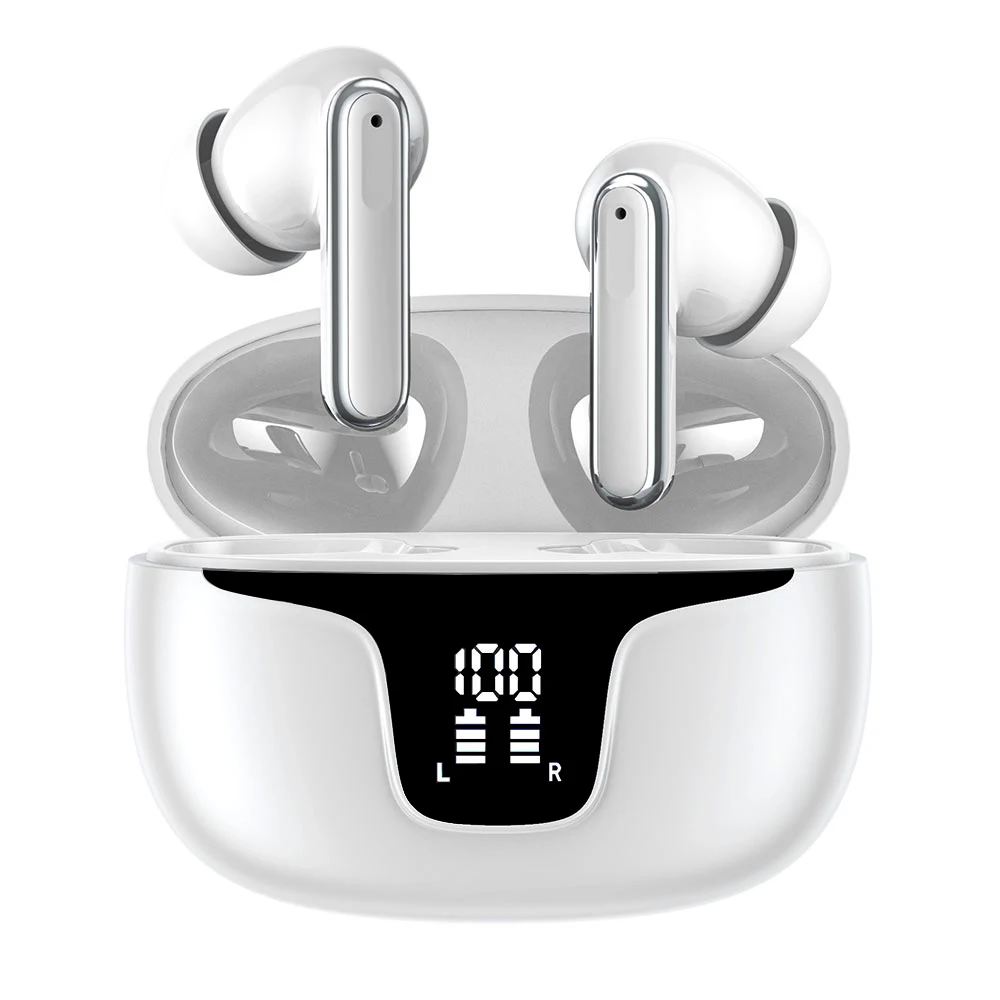
 | https://www.alibaba.com/product-detail/Bluetooth-Headphones-Wholesale-Wireless-Sports-Earphones\_1600306618819.html | 1600306618819 | Bluetooth Headphones Wholesale Wireless Sports Earphones Headphones Wireless Bluetooth 5.4 Tws Noise Cancelling Gaming Earphone - Buy Product on Alibaba.com | 6.5 | 7.3 | 10 | pieces | USD | Shenzhen Xiangxiangyu Technology Co., Ltd. | 2026-08-21T00:00:00.000Z |
### How to scrape supported list pages
This Actor accepts individual product links in `productUrls`. It accepts search result pages in `categoryUrls`.
1. Open a supported list page in your browser.
2. Run a search you need.
3. Copy the final URL from the address bar and paste it into `categoryUrls`.
The Actor follows the products shown on that page.
### Features
- Scrapes detailed wholesale product and supplier information from Alibaba.com product pages
- Accepts individual product URLs and search result pages
- Lets you limit the number of saved products and choose whether to continue through additional result pages
- Returns structured tiered prices and minimum orders, supplier names, product descriptions, and full-size product images for viewing, export, and analysis
### Pricing
This Actor uses pay-per-event pricing. Its running costs are included.
- **Actor start:** $0.03 once per run — One fixed charge for starting a run.
- **Result:** $0.00099 each ($0.99 per 1,000) — A product record collected directly from a supported list page.
- **Product detail:** $0.00399 each ($3.99 per 1,000) — A full product record collected from its product page.
The start charge applies once per run. Each saved product is charged either as a Result or a Product detail, never both.
| Results in one run | Result | Product detail |
| ---: | ---: | ---: |
| 100 | $0.13 | $0.43 |
| 1,000 | $1.02 | $4.02 |
[Apify's Free plan](https://apify.com/pricing) currently includes $5 in monthly usage credits. If the full $5 is available for this Actor, one run covers about 5,020 Results or 1,245 Product details. Other Apify usage reduces the available credit.
### Input
The Actor accepts the following input parameters:
| Field | Type | Description |
| --- | --- | --- |
| `productUrls` | array | Product URLs to scrape |
| `categoryUrls` | array | Supported list pages: search result pages |
| `maxResultsPerScrape` | integer | Maximum number of product records to save |
| `usePagination` | boolean | Whether to continue through additional result pages |
| `scrapeProductDetails` | boolean | Enabled returns Product detail records with the product-page fields listed below. Disabled returns Result records with the list-level fields. |
### What data you get in each mode
Every saved product is stored as one record. `scrapeProductDetails` decides which mode you receive; the lists below name every field each mode can return. A field is empty when the website does not show that information.
#### Result
A list-level product record with 16 declared fields:
`url`, `product_id`, `name`, `price`, `max_price`, `minimum_order_quantity`, `minimum_order_unit`, `currency`, `sku`, `main_image`, `images`, `seller_url`, `canonical_url`, `supplier_years`, `supplier_country`, `badges`
#### Product detail
A full product record with 25 declared fields:
`url`, `product_id`, `name`, `price`, `max_price`, `minimum_order_quantity`, `minimum_order_unit`, `currency`, `sku`, `mpn`, `main_image`, `images`, `description`, `description_html`, `attributes`, `rating_value`, `review_count`, `seller_name`, `seller_url`, `canonical_url`, `scraped_at`, `sold_count`, `supplier_years`, `supplier_country`, `badges`
### Output Example (full)
The Actor stores one structured record per product. Card-only records contain only fields available on the list; detail-only fields are omitted.
```json
{
"url": "https://www.alibaba.com/product-detail/Bluetooth-Headphones-Wholesale-Wireless-Sports-Earphones_1600306618819.html",
"product_id": "1600306618819",
"name": "Bluetooth Headphones Wholesale Wireless Sports Earphones Headphones Wireless Bluetooth 5.4 Tws Noise Cancelling Gaming Earphone - Buy Product on Alibaba.com",
"price": 6.5,
"max_price": 7.3,
"minimum_order_quantity": 10,
"minimum_order_unit": "pieces",
"currency": "USD",
"sku": "1600306618819",
"mpn": "1600306618819-00",
"main_image": "https://sc04.alicdn.com/kf/Hc34089a7e9a64b63a2df81a5276812963.jpg",
"images": [
"https://sc04.alicdn.com/kf/Hc34089a7e9a64b63a2df81a5276812963.jpg",
"https://sc04.alicdn.com/kf/H06ec846c9ea84f9883aa34867fb36349F.jpg",
"https://sc04.alicdn.com/kf/He33f8717f89448018f0f606259e35each.jpg",
"https://sc04.alicdn.com/kf/H215b4c46eeb645e68d11ab342b4d4f61T.jpg",
"https://sc04.alicdn.com/kf/H696db869dcc9418ba2f230c69229e8bdy.jpg",
"https://sc04.alicdn.com/kf/H79afb5163c5e480c8e629748f04e3256f.jpg"
],
"description": "Bluetooth Headphones Wholesale Wireless Sports Earphones Headphones Wireless Bluetooth 5.4 TWS Noise Cancelling Gaming Earphone",
"description_html": "
| https://www.alibaba.com/product-detail/Bluetooth-Headphones-Wholesale-Wireless-Sports-Earphones\_1600306618819.html | 1600306618819 | Bluetooth Headphones Wholesale Wireless Sports Earphones Headphones Wireless Bluetooth 5.4 Tws Noise Cancelling Gaming Earphone - Buy Product on Alibaba.com | 6.5 | 7.3 | 10 | pieces | USD | Shenzhen Xiangxiangyu Technology Co., Ltd. | 2026-08-21T00:00:00.000Z |
### How to scrape supported list pages
This Actor accepts individual product links in `productUrls`. It accepts search result pages in `categoryUrls`.
1. Open a supported list page in your browser.
2. Run a search you need.
3. Copy the final URL from the address bar and paste it into `categoryUrls`.
The Actor follows the products shown on that page.
### Features
- Scrapes detailed wholesale product and supplier information from Alibaba.com product pages
- Accepts individual product URLs and search result pages
- Lets you limit the number of saved products and choose whether to continue through additional result pages
- Returns structured tiered prices and minimum orders, supplier names, product descriptions, and full-size product images for viewing, export, and analysis
### Pricing
This Actor uses pay-per-event pricing. Its running costs are included.
- **Actor start:** $0.03 once per run — One fixed charge for starting a run.
- **Result:** $0.00099 each ($0.99 per 1,000) — A product record collected directly from a supported list page.
- **Product detail:** $0.00399 each ($3.99 per 1,000) — A full product record collected from its product page.
The start charge applies once per run. Each saved product is charged either as a Result or a Product detail, never both.
| Results in one run | Result | Product detail |
| ---: | ---: | ---: |
| 100 | $0.13 | $0.43 |
| 1,000 | $1.02 | $4.02 |
[Apify's Free plan](https://apify.com/pricing) currently includes $5 in monthly usage credits. If the full $5 is available for this Actor, one run covers about 5,020 Results or 1,245 Product details. Other Apify usage reduces the available credit.
### Input
The Actor accepts the following input parameters:
| Field | Type | Description |
| --- | --- | --- |
| `productUrls` | array | Product URLs to scrape |
| `categoryUrls` | array | Supported list pages: search result pages |
| `maxResultsPerScrape` | integer | Maximum number of product records to save |
| `usePagination` | boolean | Whether to continue through additional result pages |
| `scrapeProductDetails` | boolean | Enabled returns Product detail records with the product-page fields listed below. Disabled returns Result records with the list-level fields. |
### What data you get in each mode
Every saved product is stored as one record. `scrapeProductDetails` decides which mode you receive; the lists below name every field each mode can return. A field is empty when the website does not show that information.
#### Result
A list-level product record with 16 declared fields:
`url`, `product_id`, `name`, `price`, `max_price`, `minimum_order_quantity`, `minimum_order_unit`, `currency`, `sku`, `main_image`, `images`, `seller_url`, `canonical_url`, `supplier_years`, `supplier_country`, `badges`
#### Product detail
A full product record with 25 declared fields:
`url`, `product_id`, `name`, `price`, `max_price`, `minimum_order_quantity`, `minimum_order_unit`, `currency`, `sku`, `mpn`, `main_image`, `images`, `description`, `description_html`, `attributes`, `rating_value`, `review_count`, `seller_name`, `seller_url`, `canonical_url`, `scraped_at`, `sold_count`, `supplier_years`, `supplier_country`, `badges`
### Output Example (full)
The Actor stores one structured record per product. Card-only records contain only fields available on the list; detail-only fields are omitted.
```json
{
"url": "https://www.alibaba.com/product-detail/Bluetooth-Headphones-Wholesale-Wireless-Sports-Earphones_1600306618819.html",
"product_id": "1600306618819",
"name": "Bluetooth Headphones Wholesale Wireless Sports Earphones Headphones Wireless Bluetooth 5.4 Tws Noise Cancelling Gaming Earphone - Buy Product on Alibaba.com",
"price": 6.5,
"max_price": 7.3,
"minimum_order_quantity": 10,
"minimum_order_unit": "pieces",
"currency": "USD",
"sku": "1600306618819",
"mpn": "1600306618819-00",
"main_image": "https://sc04.alicdn.com/kf/Hc34089a7e9a64b63a2df81a5276812963.jpg",
"images": [
"https://sc04.alicdn.com/kf/Hc34089a7e9a64b63a2df81a5276812963.jpg",
"https://sc04.alicdn.com/kf/H06ec846c9ea84f9883aa34867fb36349F.jpg",
"https://sc04.alicdn.com/kf/He33f8717f89448018f0f606259e35each.jpg",
"https://sc04.alicdn.com/kf/H215b4c46eeb645e68d11ab342b4d4f61T.jpg",
"https://sc04.alicdn.com/kf/H696db869dcc9418ba2f230c69229e8bdy.jpg",
"https://sc04.alicdn.com/kf/H79afb5163c5e480c8e629748f04e3256f.jpg"
],
"description": "Bluetooth Headphones Wholesale Wireless Sports Earphones Headphones Wireless Bluetooth 5.4 TWS Noise Cancelling Gaming Earphone",
"description_html": "Bluetooth Headphones Wholesale Wireless Sports Earphones Headphones Wireless Bluetooth 5.4 TWS Noise Cancelling Gaming Earphone
", "attributes": { "model number": [ "XY-19" ], "color": [ "White", "Black" ], "noise cancelling": "Environmental Noise Cancellation (ENC)", "BT Wireless": "Bluetooth v5.4", "private mold": "Yes", "Estimated Battery Life": "more than 20 hours", "chipset": "JL", "Sound Quality": "High Fidelity (Hi-Fi), Stereo" }, "rating_value": 5, "review_count": 6, "seller_name": "Shenzhen Xiangxiangyu Technology Co., Ltd.", "canonical_url": "https://www.alibaba.com/product-detail/Bluetooth-Headphones-Wholesale-Wireless-Sports-Earphones_1600306618819.html", "scraped_at": "2026-08-21T00:00:00.000Z", "sold_count": 371 } ``` ### Use Cases - Compare wholesale price tiers and minimum orders - Research products and suppliers - Build structured sourcing and catalog datasets ### Integrate with AI and automation #### Use with AI through MCP Connect your AI assistant to the [Apify MCP server](https://docs.apify.com/integrations/mcp). It can discover and run Actors, then access the results in the same conversation. For example, ask your assistant to scrape a list of products from Alibaba.com, compare prices, or summarize the collected data. #### Run on a schedule After one successful run, use [Apify Schedules](https://docs.apify.com/actors/running/schedules) to repeat the same task hourly, daily, weekly, or with a custom cron schedule. Saved tasks are useful when you want to keep the same URLs and settings for every run. #### Connect with n8n [Create an n8n account](https://n8n.partnerlinks.io/ezvl1qy3f990) and add the verified Apify node to a workflow. Choose **Run an Actor and Get Dataset** when the workflow should start this Actor, wait for completion, and receive the product rows for the next node. See the [Apify integration for n8n](https://n8n.io/integrations/apify/). #### Connect with Make [Create a Make account](https://www.make.com/en/register?pc=vasarmilan) and add the Apify **Run an Actor** module. Follow it with **Get Dataset Items** to pass the product rows to Google Sheets, a database, email, or another Make module. For longer runs, use **Watch Actor Runs** followed by **Get Dataset Items**. [Read the Make integration guide](https://docs.apify.com/integrations/make). # Actor input Schema ## `productUrls` (type: `array`): Product URLs on Alibaba.com. ## `categoryUrls` (type: `array`): Category URLs on Alibaba.com. ## `maxResultsPerScrape` (type: `integer`): Maximum number of product records to save. ## `usePagination` (type: `boolean`): Enqueue the bounded pagination lookahead exposed by this actor. ## `scrapeProductDetails` (type: `boolean`): Enabled returns Product detail records with the product-page fields listed in the README. Disabled returns Result records with the list-level fields. ## Actor input object example ```json { "productUrls": [ "https://www.alibaba.com/product-detail/Bluetooth-Headphones-Wholesale-Wireless-Sports-Earphones_1600306618819.html" ], "categoryUrls": [ "https://www.alibaba.com/trade/search?SearchText=headphones&tab=all" ], "maxResultsPerScrape": 20, "usePagination": true, "scrapeProductDetails": true } ``` # Actor output Schema ## `dataset` (type: `string`): No description # API You can run this Actor programmatically using our API. Below are code examples in JavaScript, Python, and CLI, as well as the OpenAPI specification and MCP server setup. ## JavaScript example ```javascript import { ApifyClient } from 'apify-client'; // Initialize the ApifyClient with your Apify API token // Replace the '