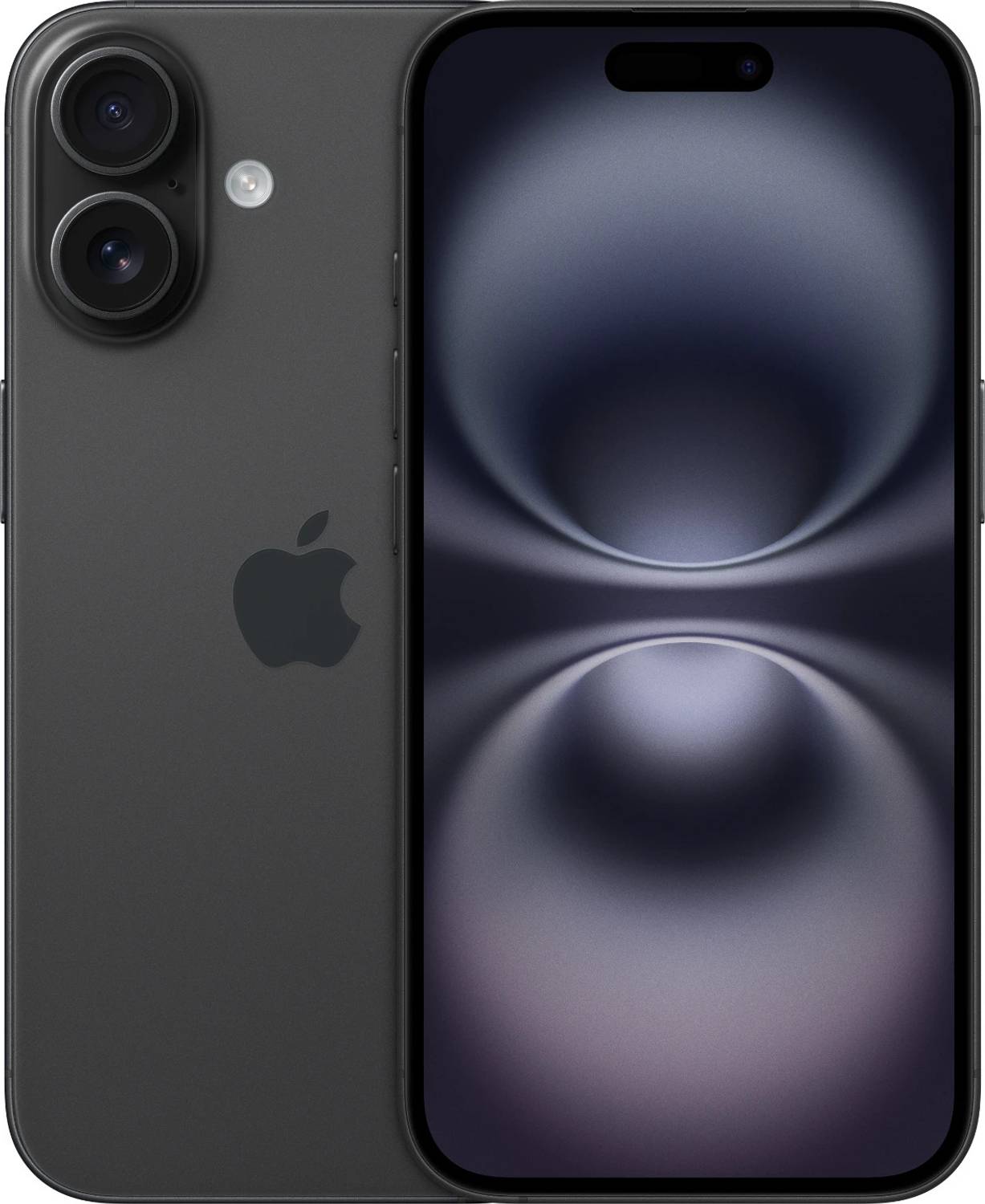
 | https://www.flipkart.com/apple-iphone-16-iwit-black-128-gb/p/itm8f17e67b91cd9 | MOBHCUW8YPERJQJP | Apple iPhone 16 - IWIT (Black, 128 GB) | 69900 | | INR | true | APPLE | GRAHGOODS RETAIL | 2026-08-20T03:35:16.711Z |
### How to scrape supported list pages
This Actor accepts individual product links in `productUrls`. It accepts category pages and search result pages in `categoryUrls`.
1. Open a supported list page in your browser.
2. Choose a category and run a search you need.
3. Copy the final URL from the address bar and paste it into `categoryUrls`.
The Actor follows the products shown on that page.
### Features
- Scrapes detailed marketplace product information from Flipkart product pages
- Accepts individual product URLs and category pages and search result pages
- Lets you limit the number of saved products and choose whether to continue through additional result pages
- Returns structured prices and stock, product specifications and highlights, seller details, and ratings and reviews for viewing, export, and analysis
### Pricing
This Actor uses pay-per-event pricing. Its running costs are included.
- **Actor start:** $0.03 once per run — One fixed charge for starting a run.
- **Result:** $0.00099 each ($0.99 per 1,000) — A product record collected directly from a supported list page.
- **Product detail:** $0.00399 each ($3.99 per 1,000) — A full product record collected from its product page.
The start charge applies once per run. Each saved product is charged either as a Result or a Product detail, never both.
| Results in one run | Result | Product detail |
| ---: | ---: | ---: |
| 100 | $0.13 | $0.43 |
| 1,000 | $1.02 | $4.02 |
[Apify's Free plan](https://apify.com/pricing) currently includes $5 in monthly usage credits. If the full $5 is available for this Actor, one run covers about 5,020 Results or 1,245 Product details. Other Apify usage reduces the available credit.
### Input
The Actor accepts the following input parameters:
| Field | Type | Description |
| --- | --- | --- |
| `productUrls` | array | Product URLs to scrape |
| `categoryUrls` | array | Supported list pages: category pages and search result pages |
| `maxResultsPerScrape` | integer | Maximum number of product records to save |
| `usePagination` | boolean | Whether to continue through additional result pages |
| `scrapeProductDetails` | boolean | Enabled returns Product detail records with the product-page fields listed below. Disabled returns Result records with the list-level fields. |
### What data you get in each mode
Every saved product is stored as one record. `scrapeProductDetails` decides which mode you receive; the lists below name every field each mode can return. A field is empty when the website does not show that information.
#### Result
A list-level product record with 15 declared fields:
`url`, `product_id`, `name`, `price`, `regular_price`, `currency`, `in_stock`, `sku`, `brand`, `main_image`, `images`, `rating_value`, `review_count`, `canonical_url`, `scraped_at`
#### Product detail
A full product record with 27 declared fields:
`url`, `product_id`, `name`, `price`, `regular_price`, `currency`, `in_stock`, `sku`, `mpn`, `brand`, `category`, `main_image`, `images`, `description`, `description_html`, `color`, `weight`, `features`, `attributes`, `rating_value`, `review_count`, `seller_name`, `canonical_url`, `scraped_at`, `seller_rating_value`, `seller_tenure`, `warranty`
### Output Example (full)
The Actor stores one structured record per product. Card-only records contain only fields available on the list; detail-only fields are omitted.
```json
{
"url": "https://www.flipkart.com/apple-iphone-16-iwit-black-128-gb/p/itm8f17e67b91cd9",
"product_id": "MOBHCUW8YPERJQJP",
"name": "Apple iPhone 16 - IWIT (Black, 128 GB)",
"price": 69900,
"regular_price": null,
"currency": "INR",
"in_stock": true,
"sku": "MOBHCUW8YPERJQJP",
"mpn": "MYE73HN/A",
"gtin": null,
"brand": "APPLE",
"category": "mobile",
"breadcrumbs": [
"Home",
"Mobiles & Accessories",
"Mobiles",
"APPLE Mobiles"
],
"breadcrumb_urls": [
"https://www.flipkart.com/",
"https://www.flipkart.com/mobiles-accessories/pr?sid=tyy&marketplace=FLIPKART",
"https://www.flipkart.com/mobiles/pr?sid=tyy,4io&marketplace=FLIPKART",
"https://www.flipkart.com/mobiles/apple~brand/pr?sid=tyy,4io&marketplace=FLIPKART"
],
"main_image": "https://rukmini1.flixcart.com/image/1500/1500/xif0q/mobile/n/q/h/-original-imahgfmzjj8gtqbc.jpeg?q=70",
"images": [
"https://rukmini1.flixcart.com/image/1500/1500/xif0q/mobile/n/q/h/-original-imahgfmzjj8gtqbc.jpeg?q=70",
"https://rukmini1.flixcart.com/image/1500/1500/xif0q/mobile/t/l/w/-original-imahggetkmdstkyh.jpeg?q=70",
"https://rukmini1.flixcart.com/image/1500/1500/xif0q/mobile/n/1/k/-original-imahggetx6hzzggx.jpeg?q=70",
"https://rukmini1.flixcart.com/image/1500/1500/xif0q/mobile/l/z/u/-original-imahggetjwwsgjcr.jpeg?q=70",
"https://rukmini1.flixcart.com/image/1500/1500/xif0q/mobile/u/w/s/-original-imahggesy9bhmnru.jpeg?q=70"
],
"description": "Buy Apple iPhone 16 online at best price with offers in India. Apple iPhone 16 - IWIT (Black, 128 GB) features and specifications include 128 GB ROM, 3561 mAh Battery, 48 MP back camera and 12 MP front camera. Compare iPhone 16 by price and performance to shop at Flipkart",
"description_html": "
| https://www.flipkart.com/apple-iphone-16-iwit-black-128-gb/p/itm8f17e67b91cd9 | MOBHCUW8YPERJQJP | Apple iPhone 16 - IWIT (Black, 128 GB) | 69900 | | INR | true | APPLE | GRAHGOODS RETAIL | 2026-08-20T03:35:16.711Z |
### How to scrape supported list pages
This Actor accepts individual product links in `productUrls`. It accepts category pages and search result pages in `categoryUrls`.
1. Open a supported list page in your browser.
2. Choose a category and run a search you need.
3. Copy the final URL from the address bar and paste it into `categoryUrls`.
The Actor follows the products shown on that page.
### Features
- Scrapes detailed marketplace product information from Flipkart product pages
- Accepts individual product URLs and category pages and search result pages
- Lets you limit the number of saved products and choose whether to continue through additional result pages
- Returns structured prices and stock, product specifications and highlights, seller details, and ratings and reviews for viewing, export, and analysis
### Pricing
This Actor uses pay-per-event pricing. Its running costs are included.
- **Actor start:** $0.03 once per run — One fixed charge for starting a run.
- **Result:** $0.00099 each ($0.99 per 1,000) — A product record collected directly from a supported list page.
- **Product detail:** $0.00399 each ($3.99 per 1,000) — A full product record collected from its product page.
The start charge applies once per run. Each saved product is charged either as a Result or a Product detail, never both.
| Results in one run | Result | Product detail |
| ---: | ---: | ---: |
| 100 | $0.13 | $0.43 |
| 1,000 | $1.02 | $4.02 |
[Apify's Free plan](https://apify.com/pricing) currently includes $5 in monthly usage credits. If the full $5 is available for this Actor, one run covers about 5,020 Results or 1,245 Product details. Other Apify usage reduces the available credit.
### Input
The Actor accepts the following input parameters:
| Field | Type | Description |
| --- | --- | --- |
| `productUrls` | array | Product URLs to scrape |
| `categoryUrls` | array | Supported list pages: category pages and search result pages |
| `maxResultsPerScrape` | integer | Maximum number of product records to save |
| `usePagination` | boolean | Whether to continue through additional result pages |
| `scrapeProductDetails` | boolean | Enabled returns Product detail records with the product-page fields listed below. Disabled returns Result records with the list-level fields. |
### What data you get in each mode
Every saved product is stored as one record. `scrapeProductDetails` decides which mode you receive; the lists below name every field each mode can return. A field is empty when the website does not show that information.
#### Result
A list-level product record with 15 declared fields:
`url`, `product_id`, `name`, `price`, `regular_price`, `currency`, `in_stock`, `sku`, `brand`, `main_image`, `images`, `rating_value`, `review_count`, `canonical_url`, `scraped_at`
#### Product detail
A full product record with 27 declared fields:
`url`, `product_id`, `name`, `price`, `regular_price`, `currency`, `in_stock`, `sku`, `mpn`, `brand`, `category`, `main_image`, `images`, `description`, `description_html`, `color`, `weight`, `features`, `attributes`, `rating_value`, `review_count`, `seller_name`, `canonical_url`, `scraped_at`, `seller_rating_value`, `seller_tenure`, `warranty`
### Output Example (full)
The Actor stores one structured record per product. Card-only records contain only fields available on the list; detail-only fields are omitted.
```json
{
"url": "https://www.flipkart.com/apple-iphone-16-iwit-black-128-gb/p/itm8f17e67b91cd9",
"product_id": "MOBHCUW8YPERJQJP",
"name": "Apple iPhone 16 - IWIT (Black, 128 GB)",
"price": 69900,
"regular_price": null,
"currency": "INR",
"in_stock": true,
"sku": "MOBHCUW8YPERJQJP",
"mpn": "MYE73HN/A",
"gtin": null,
"brand": "APPLE",
"category": "mobile",
"breadcrumbs": [
"Home",
"Mobiles & Accessories",
"Mobiles",
"APPLE Mobiles"
],
"breadcrumb_urls": [
"https://www.flipkart.com/",
"https://www.flipkart.com/mobiles-accessories/pr?sid=tyy&marketplace=FLIPKART",
"https://www.flipkart.com/mobiles/pr?sid=tyy,4io&marketplace=FLIPKART",
"https://www.flipkart.com/mobiles/apple~brand/pr?sid=tyy,4io&marketplace=FLIPKART"
],
"main_image": "https://rukmini1.flixcart.com/image/1500/1500/xif0q/mobile/n/q/h/-original-imahgfmzjj8gtqbc.jpeg?q=70",
"images": [
"https://rukmini1.flixcart.com/image/1500/1500/xif0q/mobile/n/q/h/-original-imahgfmzjj8gtqbc.jpeg?q=70",
"https://rukmini1.flixcart.com/image/1500/1500/xif0q/mobile/t/l/w/-original-imahggetkmdstkyh.jpeg?q=70",
"https://rukmini1.flixcart.com/image/1500/1500/xif0q/mobile/n/1/k/-original-imahggetx6hzzggx.jpeg?q=70",
"https://rukmini1.flixcart.com/image/1500/1500/xif0q/mobile/l/z/u/-original-imahggetjwwsgjcr.jpeg?q=70",
"https://rukmini1.flixcart.com/image/1500/1500/xif0q/mobile/u/w/s/-original-imahggesy9bhmnru.jpeg?q=70"
],
"description": "Buy Apple iPhone 16 online at best price with offers in India. Apple iPhone 16 - IWIT (Black, 128 GB) features and specifications include 128 GB ROM, 3561 mAh Battery, 48 MP back camera and 12 MP front camera. Compare iPhone 16 by price and performance to shop at Flipkart",
"description_html": "Buy Apple iPhone 16 online at best price with offers in India. Apple iPhone 16 - IWIT (Black, 128 GB) features and specifications include 128 GB ROM, 3561 mAh Battery, 48 MP back camera and 12 MP front camera. Compare iPhone 16 by price and performance to shop at Flipkart
", "color": "Black", "size": null, "weight": "170 g", "material": null, "style": null, "features": [ "128 GB ROM", "A18 Chip, 6 Core Processor | Hexa Core | 4.04 GHz Clock Speed", "48MP + 12MP Rear Camera", "12MP Front Camera", "6.1 inch All Screen OLED Display", "3561 mAh Battery" ], "attributes": { "Warranty Summary": "1 year warranty for phone and 1 year warranty for in Box Accessories.", "Battery Capacity": "3561 mAh", "Dual Battery": "No", "Width": "71.6 mm (7.16 cm)", "Depth": "7.8 mm (0.78 cm)", "Height": "147.6 mm (14.76 cm)", "Weight": "170 g", "Display Size": "15.49 cm (6.1 inch)", "Resolution": "2556 x 1179 Pixels", "Resolution Type": "Super Retina XDR Display", "GPU": "New 5 Core", "Display Type": "All Screen OLED Display", "HD Game Support": "Yes", "Other Display Features": "Dynamic Island, HDR Display, True Tone, Wide Colour (P3), Haptic Touch, Contrast Ratio: 2,000,000:1 (Typical), 1,000 nits Max Brightness (Typical), 1,600 nits Peak Brightness (HDR), 2,000 nits Peak Brightness (Outdoor), 1 nits Minimum Brightness, Fingerprint Resistant Oleophobic Coating, Support for Display of Multiple Languages and Characters Simultaneously", "Operating System": "iOS 18", "Processor Brand": "Apple", "Processor Type": "A18 Chip, 6 Core Processor", "Processor Core": "Hexa Core", "Primary Clock Speed": "4.04 GHz", "Operating Frequency": "5G FDD NR (Bands n1, n2, n3, n5, n7, n8, n12, n14, n20, n25, n26, n28, n29, n30, n66, n70, n71, n75, n76), 5G TDD NR (Bands n38, n40, n41, n48, n53, n77, n78, n79), 5G NR mmWave (Bands n258, n260, n261), 4G LTE FDD (B1, B2, B3, B4, B5, B7, B8, B12, B13, B14, B17, B18, B19, B20, B25, B26, B28, B29, B30, B32, B66, B71), 4G LTE TDD (B34, B38, B39, B40, B41, B42, B48, B53), 3G UMTS/HSPA+/DC?HSDPA (850 MHz, 900 MHz, 1700 MHz/2100 MHz, 1900 MHz, 2100 MHz), 2G GSM/EDGE (850 MHz , 900 MHz, 1800 MHz, 1900 MHz)", "Primary Camera Available": "Yes", "Primary Camera": "48MP + 12MP", "Primary Camera Features": "Dual Camera Setup: 48MP Fusion Camera (Focal Length: 26mm, f/1.6 Aperture, Sensor Shift Optical Image Stabilisation, 100% Focus Pixels, Support for Super-High-Resolution Photos (24MP and 48MP)) + 12MP Ultra Wide Camera (Focal Length: 13mm, f/2.4 Aperture, FOV: 120 Degree, 100% Focus Pixels), 2x Optical Zoom-in, 2x Optical Zoom Out, 4x Optical Zoom Range, Camera Control, Sapphire Crystal Lens Cover, Camera Features: Photonic Engine, Deep Fusion, Smart HDR 5, Next Generation Portraits with Focus and Depth Control, Portrait Lighting with Six Effects, Night Mode, Panorama (Upto 63MP), Latest Generation Photographic Styles, Spatial Photos, Macro Photography, Wide Color Capture for Photos and Live Photos, Lens Correction (Ultra Wide), Advanced Red Eye Correction, Auto Image Stabilization, Burst Mode, Photo Geotagging, Image Formats Captured: HEIF and JPEG", "Optical Zoom": "Yes", "Secondary Camera Available": "Yes", "Secondary Camera": "12MP Front Camera", "Secondary Camera Features": "12MP TrueDepth Camera Setup: (f/1.9 Aperture), Camera Feature: Autofocus with Focus Pixels, Photonic Engine, Deep Fusion, Smart HDR 5, Next Generation Portraits with Focus and Depth Control, Portrait Lighting with Six Effects, Animoji and Memoji, Night Mode, Photographic Styles, Wide Colour Capture for Photos and Live Photos, Lens Correction, Auto Image Stabilisation, Burst Mode, 4K Dolby Video Recording at 24 fps, 25 fps, 30 fps or 60 fps, 1080p Dolby Vision Video Recording at 25 fps, 30 fps or 60 fps, Cinematic Mode Upto 4K Dolby Vision at 30 fps, Slo Mo Video Support for 1080p at 120 fps, Timelapse Video With Stabilization, Night Mode Timelapse, QuickTake Video Upto 4K at 60 fps in Dolby Vision, Cinematic Video Stabilization (4K, 1080p, and 720p), Spatial Audio and Stereo Recording", "Flash": "Rear: True Tone Flash | Front: Retina Flash", "HD Recording": "Yes", "Full HD Recording": "Yes", "Video Recording": "Yes", "Video Recording Resolution": "Rear Camera: 4K (at 24 fps/ 25 fps/ 30 fps/ 60 fps), 1080P (at 240p /120 fps/60 fps/30 fps/ 25 fps), 720P (at 30 fps) | Front Camera: 4K (at 24 fps/ 25 fps/ 30 fps/ 60 fps), 1080P (at 120 fps/60 fps/30 fps/ 25 fps)", "Digital Zoom": "10X", "Frame Rate": "240 fps, 120 fps, 60 fps, 30 fps, 25 fps, 24 fps", "Image Editor": "Yes", "Dual Camera Lens": "Primary Camera", "Smartphone": "Yes", "SIM Size": "Nano Sim + eSIM", "Mobile Tracker": "Yes", "Social Networking Phone": "Yes", "Instant Message": "Yes", "Business Phone": "Yes", "Java Application": "No", "Removable Battery": "No", "JAVA Support": "No", "MMS": "Yes", "SMS": "Yes", "Keypad": "No", "Voice Input": "Yes", "Graphics PPI": "460 PPI", "Predictive Text Input": "Yes", "Sensors": "Face ID, Barometer, High Dynamic Range Gyro, High-G Accelerometer, Proximity Sensor, Dual Ambient Light Sensors", "Supported Languages": "English (Australia, UK, US), Chinese (Simplified, Traditional, Traditional - Hong Kong), French (Canada, France), German, Italian, Japanese, Korean, Spanish (Latin America, Spain), Arabic, Bulgarian, Catalan, Croatian, Czech, Danish, Dutch, Finnish, Greek, Hebrew, Hindi, Hungarian, Indonesian, Kazakh, Malay, Norwegian, Polish, Portuguese (Brazil, Portugal), Romanian, Russian, Slovak, Swedish, Thai, Turkish, Ukrainian, Vietnamese", "Browser": "Safari", "Other Features": "Aluminium Design, Latest Generation Ceramic Shield Front, Colour Infused Glass Back, Rated IP68 (Maximum Depth of 6 Metres Upto 30 Minutes) Under IEC Standard 60529, New 16 Core Neural Engine, Enabled by TrueDepth Camera for Facial Recognition, Apple Pay, Apple Card, Emergency SOS via Satellite, Crash Detection, Roadside Assistance via Satellite, Messages via Satellite, Find My via Satellite, 5G (sub 6 GHz and mmWave) with 4x4 MIMO, Gigabit LTE with 4x4 MIMO and LAA, 2x2 MIMO, Second Generation Ultra Wideband Chip, Thread Networking Technology, NFC with Reader Mode, Express Cards with Power Reserve, FaceTime Video Calling Over Cellular or Wi-Fi, FaceTime HD (1080p) Video Calling Over 5G or Wi-Fi, Share Experiences like Movies, TV, Music and Other Apps in a FaceTime Call with SharePlay, Screen Sharing, Portrait Mode in FaceTime Video, Spatial Audio, Voice Isolation and Wide Spectrum Microphone Modes, Zoom with Rear Facing Camera, FaceTime Audio, Voice Over LTE (VoLTE), Wi-Fi Calling, Voice Isolation and Wide Spectrum Microphone Modes, Spatial Audio Playback, User Configurable Maximum Volume Limit, Supported Formats Include HEVC, H.264 and AV1, HDR with Dolby Vision, HDR10+/HDR10 and HLG, Upto 4K HDR AirPlay for Mirroring, Photos, and Video Out to Apple TV (2nd Generation or Later) or AirPlay Enabled Smart TV, Video Mirroring and Video Out Support: Upto 4K HDR Through Native DisplayPort Output Over USB-C or USB-C Digital AV Adapter (Model A2119, Adapter Sold Separately), USB-C Connector with Support For: Charging, DisplayPort, USB 2 (Upto 480Mb/s), Built-in Rechargeable Lithium-ion Battery, MagSafe Wireless Charging Upto 25W with 30W Adapter or Higher, Qi2 Wireless Charging Upto 15W, Qi Wireless Charging Upto 7.5W, Fast Charge Capable: Upto 50% Charge in Around 30 minutes with 20W Adapter or Higher Paired with USB?C Charging Cable, or 30W Adapter or Higher Paired with MagSafe Charger (All Available Separately), MagSafe: Wireless Charging Upto 25W with 30W Adapter or Higher, Magnet Array, Alignment Magnet, Accessory Identification NFC, Magnetometer, Accessibility: VoiceOver, Zoom, Magnifier, Voice Control, Switch Control, AssistiveTouch, Eye Tracking, RTT and TTY Support, Closed Captions, Live Captions, Personal Voice, Live Speech, Type to Siri, Vocal Shortcuts, Spoken Content, Rating for Hearing Aids: Hearing Aid Compatible, System Requirements: Apple ID (Required for Some Features), Internet Access, Syncing to a Mac or PC Requires: macOS Catalina 10.15 or Later Using the Finder, macOS High Sierra 10.13 to macOS Mojave 10.14.6 Using iTunes 12.9 or Later, Windows 10 or Later Using iTunes 12.12.10 or Later (Free Download From itunes.com/uk)", "Important Apps": "Apple Store, App Store, Books, Calculator, Calendar, Camera, Clips, Clock, Compass, Contacts, FaceTime, Files, Find My, Fitness, Freeform, GarageBand, Health, Home, iMovie, iTunes Store, Keynote, Magnifier, Mail, Maps, Measure, Messages, Music, News, Notes, Numbers, Pages, Passwords, Phone, Photos, Podcasts, Reminders, Safari, Settings, Shortcuts, Stocks, Tips, Translate, TV, Voice Memos, Wallet, Watch, Weather", "GPS Type": "GPS, GLONASS, GALILEO, QZSS, BEIDOU, Digital Compass, Wi-Fi, Cellular, iBeacon Micro Location", "FM Radio": "No", "FM Radio Recording": "No", "DLNA Support": "No", "Audio Formats": "AAC, APAC, MP3, Apple Lossless, FLAC, Dolby Digital, Dolby Digital Plus, and Dolby Atmos", "Music Player": "Apple Music", "Video Formats": "HEVC, H.264", "Brand": "Apple", "In The Box": "Handset, USB C Charge Cable (1m), Documentation", "Model Number": "MYE73HN/A", "Model Name": "iPhone 16", "Color": "Black", "Browse Type": "Smartphones", "SIM Type": "Dual Sim(Nano + eSIM)", "Hybrid Sim Slot": "No", "Touchscreen": "Yes", "OTG Compatible": "Yes", "Quick Charging": "Yes", "Additional Content": "IWIT", "Sound Enhancements": "Built-in Stereo Speaker", "Notch Design": "Punch Hole", "Headset Present": "No", "Dolby Speakers": "Yes", "Phablet": "No", "Call Wait/Hold": "Yes", "Conference Call": "Yes", "Hands Free": "Yes", "Video Call Support": "Yes", "Call Divert": "Yes", "Phone Book": "Yes", "Call Timer": "Yes", "Speaker Phone": "Yes", "Speed Dialing": "Yes", "Internal Storage": "128 GB", "Hot SWAP Support": "No", "Call Log Memory": "Yes", "Network Type": "5G, 4G VOLTE, 4G, 3G, 2G", "Supported Networks": "5G, 4G VoLTE, 4G LTE, UMTS, GSM", "Internet Connectivity": "5G, 4G, 3G, Wi-Fi, EDGE", "3G": "Yes", "GPRS": "Yes", "WAP": "No", "Micro USB Port": "No", "Mini USB Port": "No", "Bluetooth Support": "Yes", "Bluetooth Version": "v5.3", "Wi-Fi": "Yes", "Wi-Fi Version": "Wi-Fi 7 (802.11be)", "Wi-Fi Hotspot": "Yes", "Mini HDMI Port": "No", "NFC": "Yes", "USB Tethering": "Yes", "TV Out": "Yes", "Infrared": "No", "USB Connectivity": "Yes", "EDGE": "No", "Map Support": "Yes", "GPS Support": "Yes", "Name and address of the Importer": "Apple Inc. or Apple India Private Limited", "Name and address of the Packer": "Apple Inc. or Apple India Private Limited", "Country of Origin": "India", "Name and address of the Manufacturer": "Apple Inc. or Apple India Private Limited", "Generic Name": "Mobiles", "All details": "Features, description and more" }, "rating_value": 4.6, "review_count": 8475, "seller_name": "GRAHGOODS RETAIL", "seller_url": null, "variants": [], "canonical_url": "https://www.flipkart.com/apple-iphone-16-iwit-black-128-gb/p/itm8f17e67b91cd9", "scraped_at": "2026-08-20T03:35:16.711Z", "seller_rating_value": 4.6, "seller_tenure": "6 years with Flipkart", "warranty": "1 year warranty for phone and 1 year warranty for in Box Accessories." } ``` ### Use Cases - Monitor marketplace prices and availability - Compare product specifications and seller signals - Build Indian ecommerce product datasets ### Integrate with AI and automation #### Use with AI through MCP Connect your AI assistant to the [Apify MCP server](https://docs.apify.com/integrations/mcp). It can discover and run Actors, then access the results in the same conversation. For example, ask your assistant to scrape a list of products from Flipkart, compare prices, or summarize the collected data. #### Run on a schedule After one successful run, use [Apify Schedules](https://docs.apify.com/actors/running/schedules) to repeat the same task hourly, daily, weekly, or with a custom cron schedule. Saved tasks are useful when you want to keep the same URLs and settings for every run. #### Connect with n8n [Create an n8n account](https://n8n.partnerlinks.io/ezvl1qy3f990) and add the verified Apify node to a workflow. Choose **Run an Actor and Get Dataset** when the workflow should start this Actor, wait for completion, and receive the product rows for the next node. See the [Apify integration for n8n](https://n8n.io/integrations/apify/). #### Connect with Make [Create a Make account](https://www.make.com/en/register?pc=vasarmilan) and add the Apify **Run an Actor** module. Follow it with **Get Dataset Items** to pass the product rows to Google Sheets, a database, email, or another Make module. For longer runs, use **Watch Actor Runs** followed by **Get Dataset Items**. [Read the Make integration guide](https://docs.apify.com/integrations/make). # Actor input Schema ## `productUrls` (type: `array`): Product URLs on Flipkart. ## `categoryUrls` (type: `array`): Category URLs on Flipkart. ## `maxResultsPerScrape` (type: `integer`): Maximum number of product records to save. ## `usePagination` (type: `boolean`): Enqueue the bounded pagination lookahead exposed by this actor. ## `scrapeProductDetails` (type: `boolean`): Enabled returns Product detail records with the product-page fields listed in the README. Disabled returns Result records with the list-level fields. ## Actor input object example ```json { "productUrls": [ "https://www.flipkart.com/apple-iphone-16-iwit-black-128-gb/p/itm8f17e67b91cd9", "https://www.flipkart.com/redmi-note-14-se-5g-crimson-art-128-gb/p/itm10fbd7f3a50f1?pid=MOBHE48SXCFFFTTT", "https://www.flipkart.com/infinix-note-50x-5g-titanium-grey-128-gb/p/itm012aed121baec?pid=MOBHAYMD2FZ7HJFY" ], "categoryUrls": [ "https://www.flipkart.com/mobiles/pr?sid=tyy%2C4io" ], "maxResultsPerScrape": 20, "usePagination": true, "scrapeProductDetails": true } ``` # Actor output Schema ## `dataset` (type: `string`): No description # API You can run this Actor programmatically using our API. Below are code examples in JavaScript, Python, and CLI, as well as the OpenAPI specification and MCP server setup. ## JavaScript example ```javascript import { ApifyClient } from 'apify-client'; // Initialize the ApifyClient with your Apify API token // Replace the '