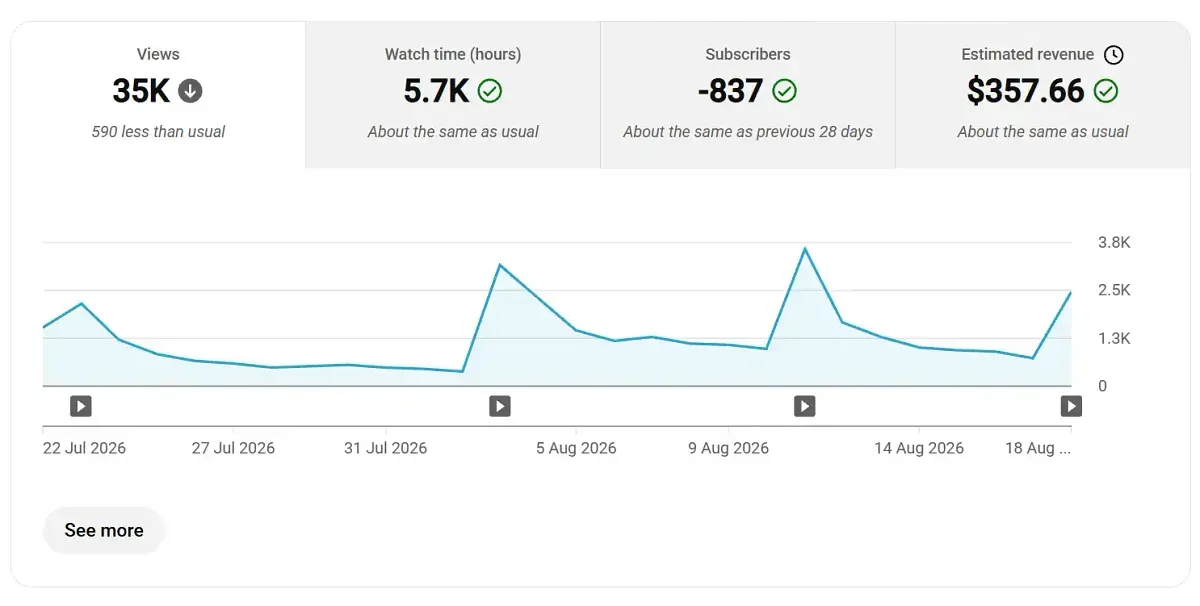
 | https://flippa.com/13725170-a-large-faceless-youtube-channel-posting-compilation-videos-about-karens | 13725170 | A large faceless YouTube channel posting compilation videos about Karens. | 11000 | USD | true | 2026-08-25T20:36:04.565Z |
### How to scrape supported list pages
This Actor accepts individual product links in `productUrls`. It accepts category pages, search result pages, and filtered result pages in `categoryUrls`.
1. Open a supported list page in your browser.
2. Choose a category, run a search, and apply the filters you need.
3. Copy the final URL from the address bar and paste it into `categoryUrls`.
The Actor follows the products shown on that page.
### Features
- Scrapes detailed online-business and digital-asset listing information from Flippa product pages
- Accepts individual product URLs and category pages, search result pages, and filtered result pages
- Lets you limit the number of saved products and choose whether to continue through additional result pages
- Returns structured asking prices, business summaries, profit metrics, locations, and listing engagement for viewing, export, and analysis
### Pricing
This Actor uses pay-per-event pricing. Its running costs are included.
- **Actor start:** $0.02 once per run — One fixed charge for starting a run.
- **Result:** $0.00089 each ($0.89 per 1,000) — A product record collected directly from a supported list page.
- **Product detail:** $0.00199 each ($1.99 per 1,000) — A full product record collected from its product page.
The start charge applies once per run. Each saved product is charged either as a Result or a Product detail, never both.
| Results in one run | Result | Product detail |
| ---: | ---: | ---: |
| 100 | $0.11 | $0.22 |
| 1,000 | $0.91 | $2.01 |
[Apify's Free plan](https://apify.com/pricing) currently includes $5 in monthly usage credits. If the full $5 is available for this Actor, one run covers about 5,595 Results or 2,502 Product details. Other Apify usage reduces the available credit.
### Input
The Actor accepts the following input parameters:
| Field | Type | Description |
| --- | --- | --- |
| `productUrls` | array | Product URLs to scrape |
| `categoryUrls` | array | Supported list pages: category pages, search result pages, and filtered result pages |
| `maxResultsPerScrape` | integer | Maximum number of product records to save |
| `usePagination` | boolean | Whether to continue through additional result pages |
| `scrapeProductDetails` | boolean | Enabled returns Product detail records with the product-page fields listed below. Disabled returns Result records with the list-level fields. |
### What data you get in each mode
Every saved product is stored as one record. `scrapeProductDetails` decides which mode you receive; the lists below name every field each mode can return. A field is empty when the website does not show that information.
#### Result
A list-level product record with 20 declared fields:
`url`, `product_id`, `name`, `price`, `currency`, `category`, `main_image`, `industry`, `monetization`, `site_age`, `monthly_profit`, `profit_multiple`, `revenue_multiple`, `location`, `sale_method`, `bid_count`, `verified_listing`, `confidential`, `canonical_url`, `scraped_at`
#### Product detail
A full product record with 31 declared fields:
`url`, `product_id`, `name`, `price`, `currency`, `in_stock`, `sku`, `category`, `main_image`, `images`, `description`, `description_html`, `attributes`, `canonical_url`, `scraped_at`, `bid_count`, `comment_count`, `confidential`, `industry`, `location`, `monetization`, `monthly_profit`, `profit_margin_percent`, `profit_multiple`, `reserve_met`, `revenue_multiple`, `sale_method`, `site_age`, `verified_listing`, `view_count`, `watcher_count`
### Output Example (full)
The Actor stores one structured record per product. Card-only records contain only fields available on the list; detail-only fields are omitted.
```json
{
"url": "https://flippa.com/13725170-a-large-faceless-youtube-channel-posting-compilation-videos-about-karens",
"product_id": "13725170",
"name": "A large faceless YouTube channel posting compilation videos about Karens.",
"price": 11000,
"currency": "USD",
"in_stock": true,
"sku": "13725170",
"category": "Youtube",
"main_image": "https://static2.flippa.com/listing_hero_889c278e-38b6-4d06-b23d-73c17c44abfd.png",
"images": [
"https://static2.flippa.com/listing_hero_889c278e-38b6-4d06-b23d-73c17c44abfd.png"
],
"description": "Public Freakout Videos has emerged as a distinct entity within digital entertainment, specializing in \"freakout\" videos that showcase moments of intense public emotion. This YouTube channel caters to audiences seeking both entertainment and surprise, leveraging the viral nature of such content. The primary revenue source is advertising, utilizing Google's AdSense platform to generate earnings. The channel efficiently operates within YouTube, focusing on curating, editing, and scheduling content to boost viewer engagement. It emphasizes viral potential and societal relevance when selecting videos, while its financial model hinges on substantial subscriber figures and view counts.\n\nAdSense is integral, allowing the channel to access a broad advertising network eager to reach its engaged audience. The channel enhances visibility through algorithmic and manual adjustments to video metadata. The main audience comprises digital natives attracted to the rawness and immediacy of the videos, ensuring wide demographic appeal. High engagement levels magnify ad impressions, increasing its value to advertisers.\n\nTechnologically, the channel capitalizes on YouTube's algorithm for video recommendations, thereby increasing its visibility. It employs data analytics tools to refine its content strategy, ensuring competitive relevance. Financially, the channel has experienced consistent growth since its launch in 2021, with ad revenue providing a stable income. This has allowed for investments in content curation and technology, reinforcing its position in digital entertainment. For acquisition, a new owner must possess an approved AdSense for YouTube account, which is essential for linking with the channel and subject to Google's approval.",
"description_html": "
| https://flippa.com/13725170-a-large-faceless-youtube-channel-posting-compilation-videos-about-karens | 13725170 | A large faceless YouTube channel posting compilation videos about Karens. | 11000 | USD | true | 2026-08-25T20:36:04.565Z |
### How to scrape supported list pages
This Actor accepts individual product links in `productUrls`. It accepts category pages, search result pages, and filtered result pages in `categoryUrls`.
1. Open a supported list page in your browser.
2. Choose a category, run a search, and apply the filters you need.
3. Copy the final URL from the address bar and paste it into `categoryUrls`.
The Actor follows the products shown on that page.
### Features
- Scrapes detailed online-business and digital-asset listing information from Flippa product pages
- Accepts individual product URLs and category pages, search result pages, and filtered result pages
- Lets you limit the number of saved products and choose whether to continue through additional result pages
- Returns structured asking prices, business summaries, profit metrics, locations, and listing engagement for viewing, export, and analysis
### Pricing
This Actor uses pay-per-event pricing. Its running costs are included.
- **Actor start:** $0.02 once per run — One fixed charge for starting a run.
- **Result:** $0.00089 each ($0.89 per 1,000) — A product record collected directly from a supported list page.
- **Product detail:** $0.00199 each ($1.99 per 1,000) — A full product record collected from its product page.
The start charge applies once per run. Each saved product is charged either as a Result or a Product detail, never both.
| Results in one run | Result | Product detail |
| ---: | ---: | ---: |
| 100 | $0.11 | $0.22 |
| 1,000 | $0.91 | $2.01 |
[Apify's Free plan](https://apify.com/pricing) currently includes $5 in monthly usage credits. If the full $5 is available for this Actor, one run covers about 5,595 Results or 2,502 Product details. Other Apify usage reduces the available credit.
### Input
The Actor accepts the following input parameters:
| Field | Type | Description |
| --- | --- | --- |
| `productUrls` | array | Product URLs to scrape |
| `categoryUrls` | array | Supported list pages: category pages, search result pages, and filtered result pages |
| `maxResultsPerScrape` | integer | Maximum number of product records to save |
| `usePagination` | boolean | Whether to continue through additional result pages |
| `scrapeProductDetails` | boolean | Enabled returns Product detail records with the product-page fields listed below. Disabled returns Result records with the list-level fields. |
### What data you get in each mode
Every saved product is stored as one record. `scrapeProductDetails` decides which mode you receive; the lists below name every field each mode can return. A field is empty when the website does not show that information.
#### Result
A list-level product record with 20 declared fields:
`url`, `product_id`, `name`, `price`, `currency`, `category`, `main_image`, `industry`, `monetization`, `site_age`, `monthly_profit`, `profit_multiple`, `revenue_multiple`, `location`, `sale_method`, `bid_count`, `verified_listing`, `confidential`, `canonical_url`, `scraped_at`
#### Product detail
A full product record with 31 declared fields:
`url`, `product_id`, `name`, `price`, `currency`, `in_stock`, `sku`, `category`, `main_image`, `images`, `description`, `description_html`, `attributes`, `canonical_url`, `scraped_at`, `bid_count`, `comment_count`, `confidential`, `industry`, `location`, `monetization`, `monthly_profit`, `profit_margin_percent`, `profit_multiple`, `reserve_met`, `revenue_multiple`, `sale_method`, `site_age`, `verified_listing`, `view_count`, `watcher_count`
### Output Example (full)
The Actor stores one structured record per product. Card-only records contain only fields available on the list; detail-only fields are omitted.
```json
{
"url": "https://flippa.com/13725170-a-large-faceless-youtube-channel-posting-compilation-videos-about-karens",
"product_id": "13725170",
"name": "A large faceless YouTube channel posting compilation videos about Karens.",
"price": 11000,
"currency": "USD",
"in_stock": true,
"sku": "13725170",
"category": "Youtube",
"main_image": "https://static2.flippa.com/listing_hero_889c278e-38b6-4d06-b23d-73c17c44abfd.png",
"images": [
"https://static2.flippa.com/listing_hero_889c278e-38b6-4d06-b23d-73c17c44abfd.png"
],
"description": "Public Freakout Videos has emerged as a distinct entity within digital entertainment, specializing in \"freakout\" videos that showcase moments of intense public emotion. This YouTube channel caters to audiences seeking both entertainment and surprise, leveraging the viral nature of such content. The primary revenue source is advertising, utilizing Google's AdSense platform to generate earnings. The channel efficiently operates within YouTube, focusing on curating, editing, and scheduling content to boost viewer engagement. It emphasizes viral potential and societal relevance when selecting videos, while its financial model hinges on substantial subscriber figures and view counts.\n\nAdSense is integral, allowing the channel to access a broad advertising network eager to reach its engaged audience. The channel enhances visibility through algorithmic and manual adjustments to video metadata. The main audience comprises digital natives attracted to the rawness and immediacy of the videos, ensuring wide demographic appeal. High engagement levels magnify ad impressions, increasing its value to advertisers.\n\nTechnologically, the channel capitalizes on YouTube's algorithm for video recommendations, thereby increasing its visibility. It employs data analytics tools to refine its content strategy, ensuring competitive relevance. Financially, the channel has experienced consistent growth since its launch in 2021, with ad revenue providing a stable income. This has allowed for investments in content curation and technology, reinforcing its position in digital entertainment. For acquisition, a new owner must possess an approved AdSense for YouTube account, which is essential for linking with the channel and subject to Google's approval.",
"description_html": "Public Freakout Videos has emerged as a distinct entity within digital entertainment, specializing in "freakout" videos that showcase moments of intense public emotion. This YouTube channel caters to audiences seeking both entertainment and surprise, leveraging the viral nature of such content. The primary revenue source is advertising, utilizing Google's AdSense platform to generate earnings. The channel efficiently operates within YouTube, focusing on curating, editing, and scheduling content to boost viewer engagement. It emphasizes viral potential and societal relevance when selecting videos, while its financial model hinges on substantial subscriber figures and view counts.
AdSense is integral, allowing the channel to access a broad advertising network eager to reach its engaged audience. The channel enhances visibility through algorithmic and manual adjustments to video metadata. The main audience comprises digital natives attracted to the rawness and immediacy of the videos, ensuring wide demographic appeal. High engagement levels magnify ad impressions, increasing its value to advertisers.
Technologically, the channel capitalizes on YouTube's algorithm for video recommendations, thereby increasing its visibility. It employs data analytics tools to refine its content strategy, ensuring competitive relevance. Financially, the channel has experienced consistent growth since its launch in 2021, with ad revenue providing a stable income. This has allowed for investments in content curation and technology, reinforcing its position in digital entertainment. For acquisition, a new owner must possess an approved AdSense for YouTube account, which is essential for linking with the channel and subject to Google's approval.
", "attributes": { "Business Location": "NC, United States", "Site Age": "10 years", "Monthly Profit": "USD $491 /mo", "Profit Margin": "90%", "Profit Multiple": "1.9x", "Revenue Multiple": "1.7x", "Active Followers / Subscribers": "1,013,477", "Total Posts": "606", "Months Monetised": "5 years+" }, "canonical_url": "https://flippa.com/13725170-a-large-faceless-youtube-channel-posting-compilation-videos-about-karens", "scraped_at": "2026-08-25T20:36:04.565Z", "bid_count": null, "comment_count": 0, "location": "NC, United States", "monthly_profit": 491, "profit_margin_percent": 90, "profit_multiple": 1.9, "reserve_met": null, "revenue_multiple": 1.7, "sale_method": "classified", "verified_listing": true, "view_count": 173, "watcher_count": 3 } ``` ### Use Cases - Compare asking prices and valuation multiples across digital assets - Track new online-business listings and engagement - Build acquisition research datasets from public listing information ### Integrate with AI and automation #### Use with AI through MCP Connect your AI assistant to the [Apify MCP server](https://docs.apify.com/integrations/mcp). It can discover and run Actors, then access the results in the same conversation. For example, ask your assistant to scrape a list of products from Flippa, compare prices, or summarize the collected data. #### Run on a schedule After one successful run, use [Apify Schedules](https://docs.apify.com/actors/running/schedules) to repeat the same task hourly, daily, weekly, or with a custom cron schedule. Saved tasks are useful when you want to keep the same URLs and settings for every run. #### Connect with n8n [Create an n8n account](https://n8n.partnerlinks.io/ezvl1qy3f990) and add the verified Apify node to a workflow. Choose **Run an Actor and Get Dataset** when the workflow should start this Actor, wait for completion, and receive the product rows for the next node. See the [Apify integration for n8n](https://n8n.io/integrations/apify/). #### Connect with Make [Create a Make account](https://www.make.com/en/register?pc=vasarmilan) and add the Apify **Run an Actor** module. Follow it with **Get Dataset Items** to pass the product rows to Google Sheets, a database, email, or another Make module. For longer runs, use **Watch Actor Runs** followed by **Get Dataset Items**. [Read the Make integration guide](https://docs.apify.com/integrations/make). # Actor input Schema ## `productUrls` (type: `array`): Product URLs on Flippa. ## `categoryUrls` (type: `array`): Category URLs on Flippa. ## `maxResultsPerScrape` (type: `integer`): Maximum number of product records to save. ## `usePagination` (type: `boolean`): Enqueue the bounded pagination lookahead exposed by this actor. ## `scrapeProductDetails` (type: `boolean`): Enabled returns Product detail records with the product-page fields listed in the README. Disabled returns Result records with the list-level fields. ## Actor input object example ```json { "productUrls": [ "https://flippa.com/13725170", "https://flippa.com/13712886" ], "categoryUrls": [ "https://flippa.com/buy/sitetype/saas" ], "maxResultsPerScrape": 20, "usePagination": true, "scrapeProductDetails": true } ``` # Actor output Schema ## `dataset` (type: `string`): No description # API You can run this Actor programmatically using our API. Below are code examples in JavaScript, Python, and CLI, as well as the OpenAPI specification and MCP server setup. ## JavaScript example ```javascript import { ApifyClient } from 'apify-client'; // Initialize the ApifyClient with your Apify API token // Replace the '