# Facebook Followers & Following Scraper (`apify/facebook-followers-following-scraper`) Actor
Extract data from Facebook pages and profiles about its followers and profiles it follows. Just enter the URL, and you'll get data such as follow type, profile's URL, image, title, and subtitle. You can integrate your workflow with tools such as Google Drive, Zapier, Make and much more.
- **URL**: https://apify.com/apify/facebook-followers-following-scraper.md
- **Developed by:** [Apify](https://apify.com/apify) (Apify)
- **Categories:** Social media
- **Features:** Limited permissions
- **Stats:** 17,220 total users, 250 monthly users, 100.0% runs succeeded, 69 bookmarks
- **User rating**: 4.73 out of 5 stars
## Pricing
from $4.50 / 1,000 results
This Actor is paid per event. You are not charged for the Apify platform usage, but only a fixed price for specific events.
Since this Actor supports Apify Store discounts, the price gets lower the higher subscription plan you have.
Learn more: https://docs.apify.com/actors/running/actors-in-store.md#pay-per-event
## What's an Apify Actor?
An Actor is a serverless cloud program that runs on the Apify platform. It has two run modes.
In Batch mode, an Actor accepts a well-defined JSON input, performs an action which can take anything from a few seconds to a few hours,
and optionally produces a well-defined JSON output, datasets with results, or files in key-value store.
In Standby mode, an Actor provides a web server which can be used as a website, API, or an MCP server.
Apify vocabulary and the platform model are defined once, in the agent quickstart at https://apify.com/agents.md.
## How to integrate an Actor?
If asked about integration, you help developers integrate Actors into their projects.
You adapt to their stack and deliver integrations that are safe, well-documented, and production-ready.
Do not guess an integration path. Every one of them is in the agent quickstart at https://apify.com/agents.md: the Apify MCP server, Agent Skills with the Apify CLI, the JavaScript and Python clients, the REST API, and the account-free path for an agent with no human to sign in. It also carries the rule on stating cost before the first paid run.
For examples already wired to this Actor's own input schema, see the [API](#api) section below.
Each client library has reference documentation the quickstart does not restate: [JavaScript/TypeScript](https://docs.apify.com/api/client/js/docs.md) (`npm install apify-client`) and [Python](https://docs.apify.com/api/client/python/docs.md) (`pip install apify-client`).
# README
## What is Facebook Followers & Following Scraper?
Facebook Followers & Following Scraper is a simple and powerful tool that allows you to **extract data from Facebook posts and profiles about its followers and followings.**. To get that data, just **insert the URL of Facebook page or profile, and click "Save & Start" button**.
### What Facebook Followers & Following data can I extract?
With this Facebook API, you will be able to extract the following data from Facebook:
📝 Followers/following title
📕 Followers/following subtitle
🔗 Followers/following profile URL
🗂️ If the user is follower or following
### Why scrape Facebook Followers & Following?
🤺 **Competition monitoring** to identify what audience they have
🔍 **Market research or analysis**
🔥 **Monitoring trends and brand sentiment** and use the data for your business strategy
🥸 **Social media analysis** and identifying hot spots of misinformation
### How do I use Facebook Followers & Following Scraper?
Facebook Followers & Following Scraper was designed to be easy to start with even if you've never extracted data from the web before. Here's how you can scrape Facebook followers and following with this tool:
1. [Create](https://console.apify.com/sign-up) a free Apify account using your email.
2. Open [**Facebook Followers & Following Scraper**](https://apify.com/apify/facebook-followers-following-scraper)
3. Add one or more Facebook page/profile URLs to scrape its followers and following on Facebook.
4. Click "Start" and wait for the data to be extracted.
5. Download your data in JSON, XML, CSV, Excel, or HTML.
If you want more guidance on how to use Facebook Followers & Following Scraper, here's a full video that explains it:
https://www.youtube.com/watch?v=Wd_MUsNQDso
#### 🔼 Input
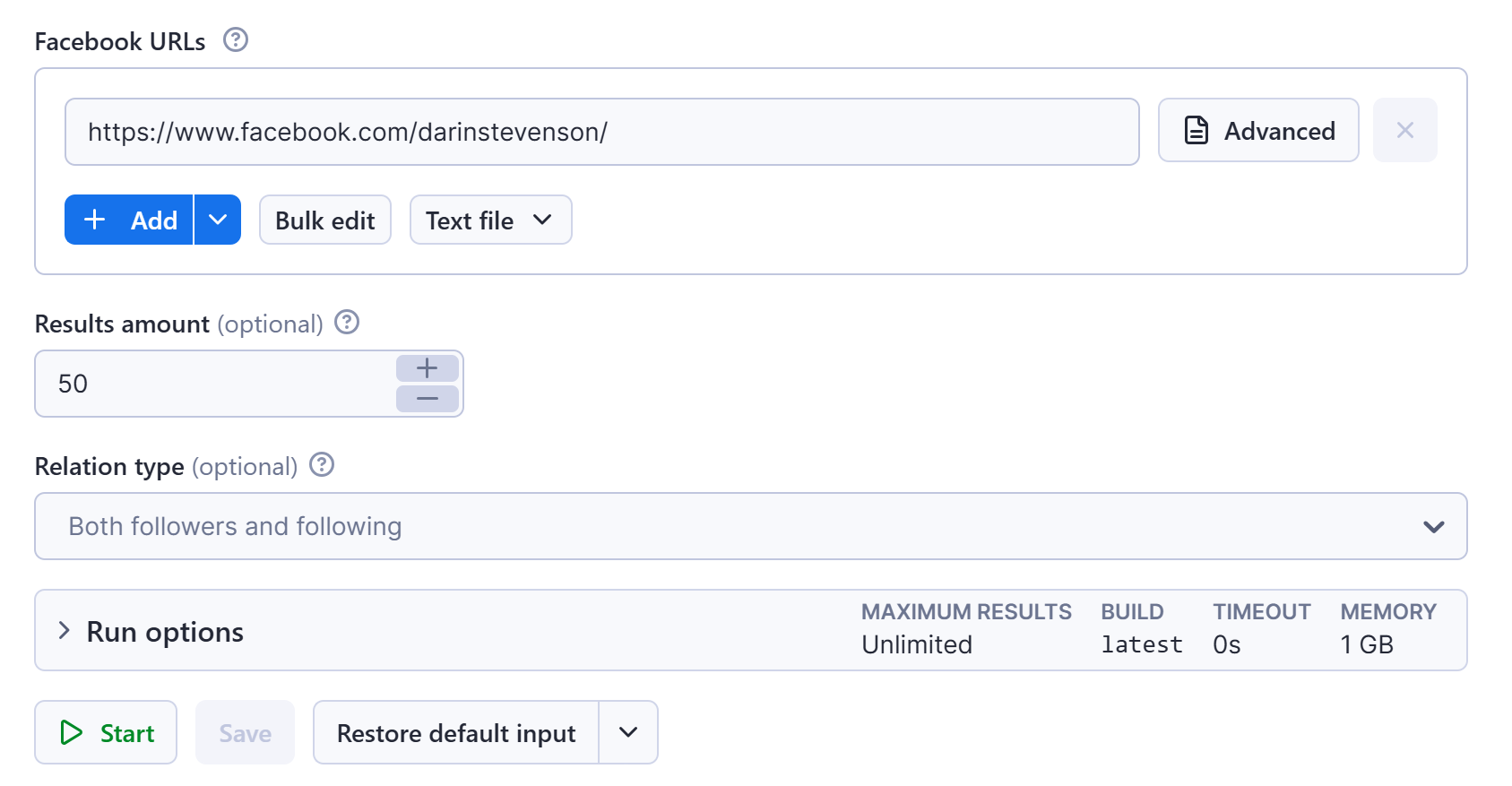
The input for Facebook Posts Scraper should be **URLs of Facebook pages or Facebook profiles** you want to scrape followers and following from. Doing this, you’ll overcome the problem of how to see followers and following on Facebook. The only think you need to do is fill in the input form like this:
### 🔽 Output sample
The results will be wrapped into a dataset which you can find in the **Storage** tab. Here's an excerpt from the dataset you'd get if you apply the input parameters above:
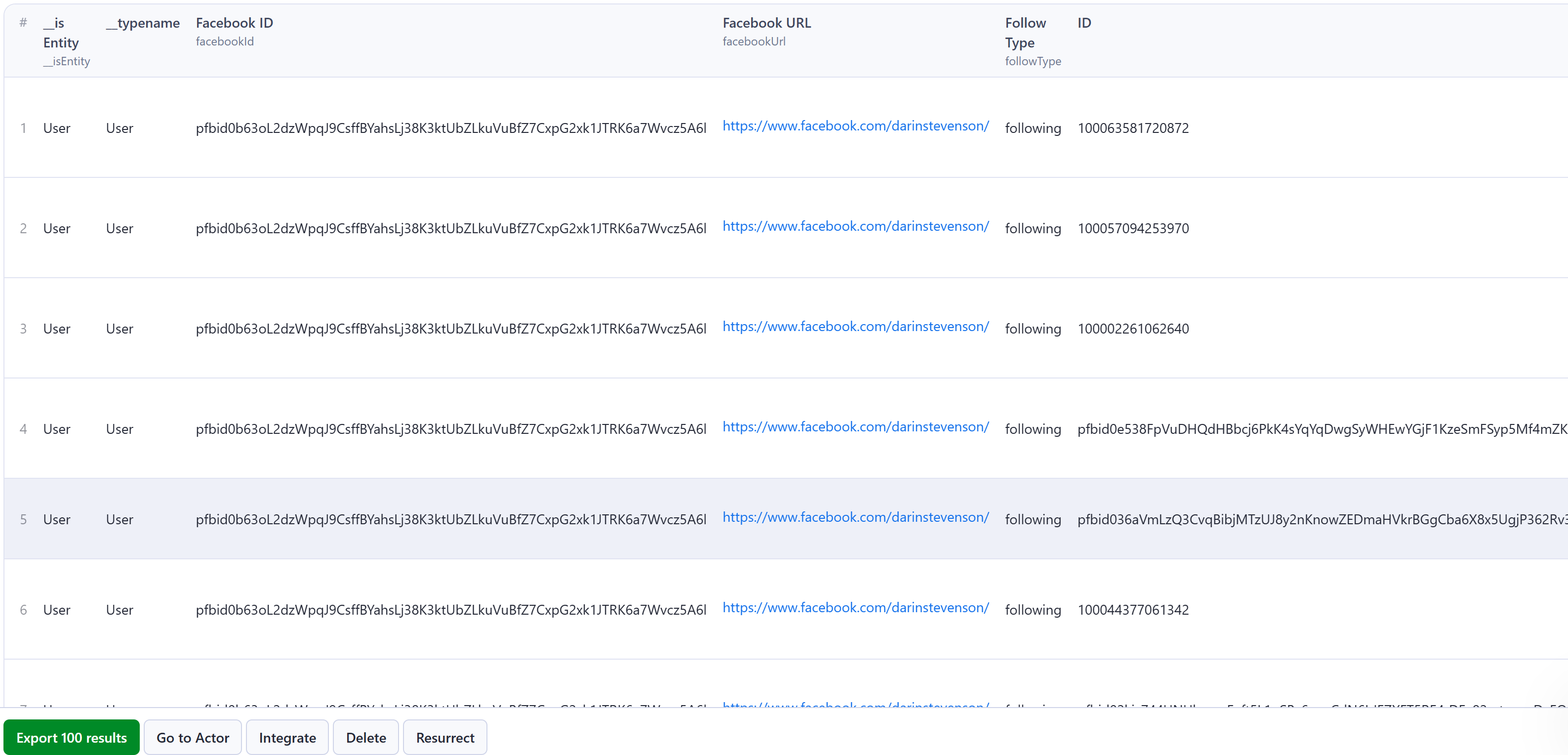
You can choose in which format to download your Facebook data: CSV, Excel spreadsheet, JSON, JSONL, HTML table, or XML.
### Want to scrape Facebook search or comments?
It’s not only about **Facebook Followers & Following, right?** You can use the dedicated scrapers below if you want to scrape specific Facebook data. Each of them is built particularly for the relevant Facebook scraping case; be it reviews, ads, comments, or photos. Feel free to browse them:
### Integrate your Facebook Followers & Following Scraper results!
Last but not least, **Facebook Followers & Following Scraper** can be connected with almost any cloud service or web app thanks to [integrations](https://apify.com/integrations) on the Apify platform.
These include:
- [Make](https://docs.apify.com/platform/integrations/make)
- [Zapier](https://docs.apify.com/platform/integrations/zapier)
- [Slack](https://docs.apify.com/platform/integrations/slack)
- [Airbyte](https://docs.apify.com/platform/integrations/airbyte)
- [GitHub](https://docs.apify.com/platform/integrations/github)
- [Google Drive](https://docs.apify.com/platform/integrations/drive)
- and [much more](https://docs.apify.com/platform/integrations).
Alternatively, you can use [webhooks](https://docs.apify.com/platform/integrations/webhooks) to carry out an action whenever an event occurs, e.g. get a notification whenever **Facebook Followers & Following Scraper** successfully finishes a run.
### ❓FAQ
#### How much does Facebook Followers & Following Scraper cost?
Facebook Followers & Following uses the Pay-per-result pricing model, so your costs can be easily calculated: it will cost you **$8.20 to scrape 1,000 results** on the Free plan, so $0.0082 per item. Apify provides you with $5 free usage credits every month on the [Apify Free plan](https://apify.com/pricing), so you can **get 609 results from Facebook Followers & Following Scraper for free**.
But if you need to extract data regularly, you should get an Apify subscription. We recommend our $19/month Starter plan. It costs $7 per 1,000 results and could get you **over 2,700 Facebook Followers & Following Scraper results** every month.
#### How can I use Facebook Followers & Following Scraper with the Apify API
The Apify API gives you programmatic access to the Apify platform. The API is organized around RESTful HTTP endpoints that enable you to manage, schedule, and run Apify actors. The API also lets you access any datasets, monitor actor performance, fetch results, create and update versions, and more. To access the API using Node.js, use the `apify-client` NPM package. To access the API using Python, use the `apify-client` PyPI package.
Check out the [Apify API reference](https://docs.apify.com/api/v2) docs for full details or click on the [API tab](https://apify.com/apify/facebook-posts-scraper/api) for code examples.
#### Is it legal to scrape Facebook Followers & Following data?
Our [Facebook scrapers](https://apify.com/store/categories?search=facebook\&managedBy=APIFY) are ethical and **do not extract any private user data, such as email addresses, gender, or location**. They only extract what the user has chosen to share publicly. However, you should be aware that your results could contain personal data. You should not scrape personal data unless you have a legitimate reason to do so.
If you're unsure whether your reason is legitimate, consult your lawyers. You can also read our blog post on the [legality of web scraping](https://blog.apify.com/is-web-scraping-legal/) and [ethical scraping](https://blog.apify.com/what-is-ethical-web-scraping-and-how-do-you-do-it/).
### Your feedback
We’re always working on improving the performance of our Actors. So if you’ve got any technical feedback for Facebook Pages Scraper or simply found a bug, please create an issue on the Actor’s [Issues tab](https://apify.com/apify/facebook-followers-following-scraper/issues/open) in Apify Console.
# Changelog
This Actor's version history is a separate document: https://apify.com/apify/facebook-followers-following-scraper/changelog.md
# Actor input Schema
## `startUrls` (type: `array`):
Valid facebook page or profile URL
## `resultsLimit` (type: `integer`):
If this limit is not set as many results as possible are returned
## `followType` (type: `string`):
Select follows sub-section(s)
## Actor input object example
```json
{
"startUrls": [
{
"url": "https://www.facebook.com/LeonardoDiCaprio"
}
],
"resultsLimit": 40,
"followType": ""
}
```
# Actor output Schema
## `dataset` (type: `string`):
Dataset containing all scraped data
# API
You can run this Actor programmatically using our API. Below are code examples in JavaScript, Python, and CLI, as well as the OpenAPI specification and MCP server setup.
## JavaScript example
```javascript
import { ApifyClient } from 'apify-client';
// Initialize the ApifyClient with your Apify API token
// Replace the '' with your token
const client = new ApifyClient({
token: '',
});
// Prepare Actor input
const input = {
"startUrls": [
{
"url": "https://www.facebook.com/LeonardoDiCaprio"
}
],
"resultsLimit": 40,
"followType": ""
};
// Run the Actor and wait for it to finish
const run = await client.actor("apify/facebook-followers-following-scraper").call(input);
// Fetch and print Actor results from the run's dataset (if any)
console.log('Results from dataset');
console.log(`💾 Check your data here: https://console.apify.com/storage/datasets/${run.defaultDatasetId}`);
const { items } = await client.dataset(run.defaultDatasetId).listItems();
items.forEach((item) => {
console.dir(item);
});
// 📚 Want to learn more 📖? Go to → https://docs.apify.com/api/client/js/docs
```
## Python example
```python
from apify_client import ApifyClient
# Initialize the ApifyClient with your Apify API token
# Replace '' with your token.
client = ApifyClient("")
# Prepare the Actor input
run_input = {
"startUrls": [{ "url": "https://www.facebook.com/LeonardoDiCaprio" }],
"resultsLimit": 40,
"followType": "",
}
# Run the Actor and wait for it to finish
run = client.actor("apify/facebook-followers-following-scraper").call(run_input=run_input)
# Fetch and print Actor results from the run's dataset (if there are any)
print(f"💾 Check your data here: https://console.apify.com/storage/datasets/{run.default_dataset_id}")
for item in client.dataset(run.default_dataset_id).iterate_items():
print(item)
# 📚 Want to learn more 📖? Go to → https://docs.apify.com/api/client/python/docs/quick-start
```
## CLI example
```bash
echo '{
"startUrls": [
{
"url": "https://www.facebook.com/LeonardoDiCaprio"
}
],
"resultsLimit": 40,
"followType": ""
}' |
apify call apify/facebook-followers-following-scraper --silent --output-dataset
```
## MCP server setup
```json
{
"mcpServers": {
"apify": {
"type": "http",
"url": "https://mcp.apify.com/?tools=fetch-actor-details,apify/facebook-followers-following-scraper"
}
}
}
```
The hosted server signs you in with OAuth on first connect, so no API token belongs in this config. Clients without OAuth support can send an `Authorization: Bearer ` header instead, using a token from API & Integrations in Apify Console (https://console.apify.com/settings/integrations).
## OpenAPI specification
Download the OpenAPI definition: https://api.apify.com/v2/actors/hhgonmMEMGmpbDDAN/builds/epPexB6D7Rujxu8KW/openapi.json