# Target Scraper: Products, Prices & Store Stock (`cleanpull/target-scraper`) Actor
Target scraper for searches, categories, product URLs, TCINs and UPCs: price, sale price, UPC, DPCI, ratings and variants, plus units in stock at each store near a ZIP code. Changes-only alerts for price drops and restocks.
- **URL**: https://apify.com/cleanpull/target-scraper.md
- **Developed by:** [CleanPull](https://apify.com/cleanpull) (community)
- **Categories:** E-commerce, Automation
- **Features:** Limited permissions
- **Stats:** 5 total users, 1 monthly users, 100.0% runs succeeded, 0 bookmarks
- **User rating**: No ratings yet
## Pricing
from $0.68 / 1,000 product from a searches
This Actor is paid per event. You are not charged for the Apify platform usage, but only a fixed price for specific events.
Since this Actor supports Apify Store discounts, the price gets lower the higher subscription plan you have.
Learn more: https://docs.apify.com/actors/running/actors-in-store.md#pay-per-event
## What's an Apify Actor?
An Actor is a serverless cloud program that runs on the Apify platform. It has two run modes.
In Batch mode, an Actor accepts a well-defined JSON input, performs an action which can take anything from a few seconds to a few hours,
and optionally produces a well-defined JSON output, datasets with results, or files in key-value store.
In Standby mode, an Actor provides a web server which can be used as a website, API, or an MCP server.
Apify vocabulary and the platform model are defined once, in the agent quickstart at https://apify.com/agents.md.
## How to integrate an Actor?
If asked about integration, you help developers integrate Actors into their projects.
You adapt to their stack and deliver integrations that are safe, well-documented, and production-ready.
Do not guess an integration path. Every one of them is in the agent quickstart at https://apify.com/agents.md: the Apify MCP server, Agent Skills with the Apify CLI, the JavaScript and Python clients, the REST API, and the account-free path for an agent with no human to sign in. It also carries the rule on stating cost before the first paid run.
For examples already wired to this Actor's own input schema, see the [API](#api) section below.
Each client library has reference documentation the quickstart does not restate: [JavaScript/TypeScript](https://docs.apify.com/api/client/js/docs.md) (`npm install apify-client`) and [Python](https://docs.apify.com/api/client/python/docs.md) (`pip install apify-client`).
# README
## Target Scraper: Products, Prices & Store Stock
This **Target scraper** gets **Target product data** by **search term, category, product URL, TCIN or UPC**: price, regular price and discount, **UPC, DPCI and TCIN**, ratings with the star breakdown, variants with their own barcodes and prices, images, category path and description. Turn on **Store stock** and every product also carries **how many units each Target store near a ZIP code has**, with distance, pickup status and aisle. Schedule it and get only **price drops, restocks at a store, sell-outs and new listings**. It runs once, on a schedule or through the API, with no sign-in.
Also known as: Target scraper, Target product API, Target stock checker, Target inventory checker, Target price tracker, TCIN lookup, DPCI lookup, Target UPC lookup, Target store availability.
### How to scrape Target products and store stock
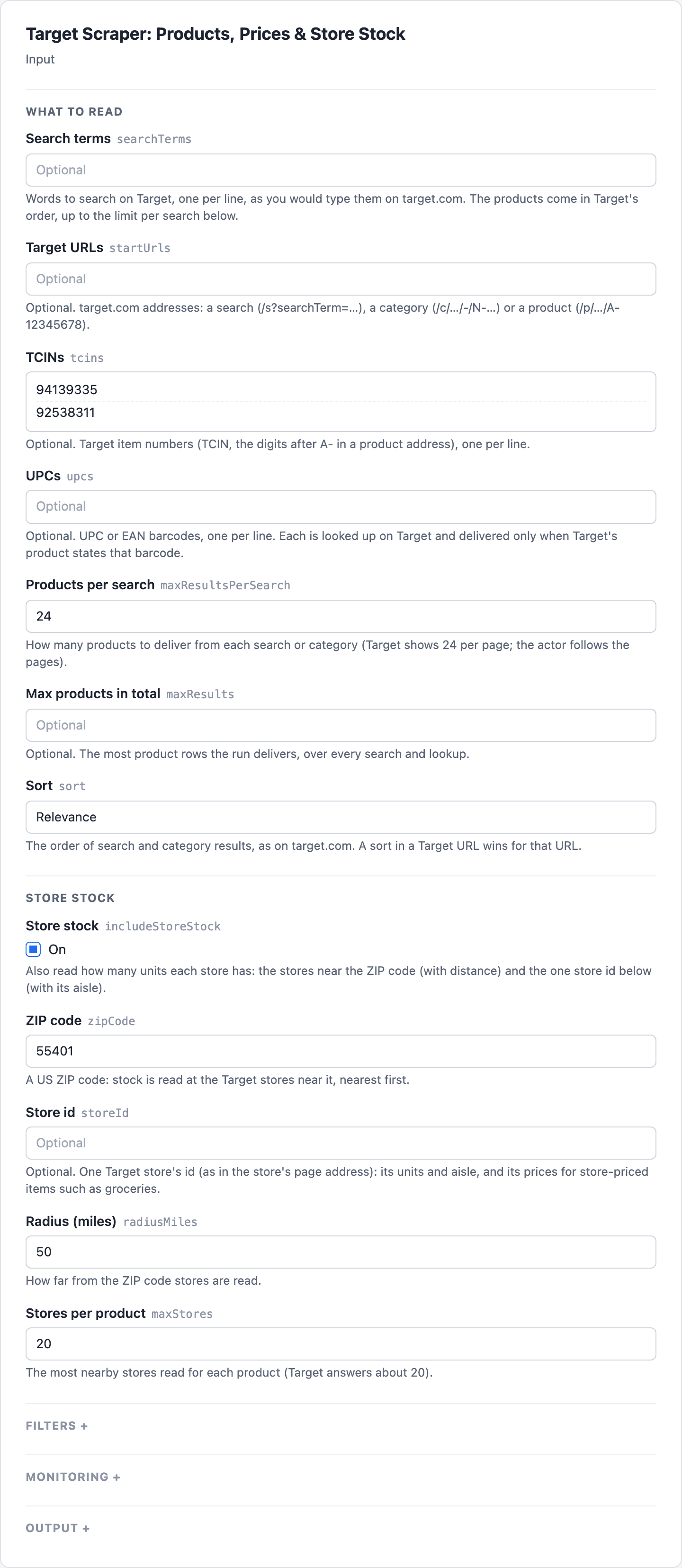
1. Open [Target Scraper](https://apify.com/cleanpull/target-scraper) on Apify and go to its input form.
2. Enter words in **Search terms**, one per line, or Target item numbers in **TCINs** and barcodes in **UPCs**. Category and product pages go in **Target URLs**.
3. Pick the **Sort** for search and category results. For units at stores, turn on **Store stock** and enter a **ZIP code**, or a **Store id** for one store with its aisle.
4. Start the run. Open the **Products** view to read each product's **Price**, **Regular price**, **Discount %**, **UPC**, **DPCI** and **Units nearby**, and the **Store stock** view for each store's **Units**, **Miles** and **Pickup** status.
5. To watch prices and restocks, turn on **Only changes since the last run**, give the run a **Monitor name**, save it as a task and schedule it daily. The **Changes** view then lists price drops, restocks at a store, sell-outs and new listings, with **Before** and **Now**.
 ### What the Target scraper gives you
- **"Which stores near 55401 have this in stock, and how many?"** Give TCINs or URLs, a **ZIP code** and **Store stock** on: about 20 stores per product, nearest first, each with units, distance, pickup status and date.
- **"Tell me when it is back in stock at my store."** Schedule with **Only changes since the last run**: a row comes back when a store goes from no units to some, with the store's name and id.
- **"Track Target prices on my list."** Price drops (and rises, if you want them) come back with the old and new price and the percent.
- **"What does Target sell for 'air fryer', cheapest first?"** Search terms or category URLs, sorted as on the site, with filters for price range and items on sale.
- **"What is this barcode at Target?"** UPCs are matched to Target's product and delivered only when Target states that same barcode.
- **"What is the TCIN, DPCI and UPC of each variant?"** A product with colors or sizes lists every variant with its own TCIN, UPC, DPCI and price.
- **"Grocery prices at my local store."** Give a store id: store-priced items (groceries, household) are priced for that store, and `pricingStoreId` says whose price it is.
### Target stock and price accuracy
- **Units, not just "in stock".** Each store row carries Target's own promised quantity (`quantity`), its in-store and pickup status, and how far the store is from your ZIP code.
- **Target's own data.** Read from the same data target.com's pages load, so prices, sale prices and stock match what shoppers see.
- **A blocked answer is never "nothing found".** A protection page or error is reported as a failure and never billed; "no results" is said only when Target says so.
- **Variants resolved.** Ask for a variant's TCIN and you get that variant (its price, UPC and stock), not its parent.
- **Only delivered rows are billed,** after they are saved. Each product is delivered once per run, however many searches list it.
- **Runs do not fail for one bad entry.** A malformed TCIN, UPC or URL is skipped with a warning; an empty input runs the form's example.
### Target scraper input
| Field | Key | What it does |
| -------------------------------- | ---------------------- | ------------------------------------------------------------------------------------------------------------------------------------------------------------- |
| Search terms | `searchTerms` | Words to search on Target, one per line |
| Target URLs | `startUrls` | target.com search, category (`/c/…/-/N-…`) or product (`/p/…/A-…`) addresses; a `sortBy` in the address is kept |
| TCINs | `tcins` | Target item numbers (or product addresses) |
| UPCs | `upcs` | UPC or EAN barcodes, each matched to its Target product |
| Products per search | `maxResultsPerSearch` | Products per search (default 24; pages of 24 are followed) |
| Max products in total | `maxResults` | Most product rows in total |
| Sort | `sort` | relevance (the default), featured, priceLow, priceHigh, rating, bestselling, newest |
| Store stock | `includeStoreStock` | Units at the stores near a ZIP code and at one store (with its aisle) |
| ZIP code | `zipCode` | The US ZIP code whose nearby stores are read, nearest first |
| Store id | `storeId` | One store's units and aisle; a store id also prices store-priced items for that store |
| Radius (miles) | `radiusMiles` | How far from the ZIP code stores are read (default 50) |
| Stores per product | `maxStores` | The most nearby stores read per product (default 20) |
| In stock at a store only | `inStockOnly` | Keep only products with units at one or more of the stores read (needs Store stock) |
| On sale only | `onSaleOnly` | Keep only products priced below their regular price |
| Min price (USD), Max price (USD) | `minPrice`, `maxPrice` | Price range |
| Only changes since the last run | `onlyChanges` | Only what changed since the last run with the same monitor name |
| Monitor name | `monitorName` | Keeps separate memories for different watch lists (default `default`) |
| Changes to report | `changeTypes` | new-listing, price-drop, price-rise, back-in-stock, out-of-stock, removed (all but price-rise by default) |
| Output fields | `fields` | Only these output fields (dotted paths such as `stores.quantity`) |
| History store | `stateStoreName` | Optional key-value store for earlier runs' readings (default `cleanpull-target-monitor`); pick one when running with a scoped token in Restricted access mode |
#### Example inputs
Stores near a ZIP code for a few products:
```json
{ "tcins": ["94139335", "92538311"], "zipCode": "55401", "includeStoreStock": true }
```
A daily restock and price-drop watch at one store:
```json
{
"startUrls": [{ "url": "https://www.target.com/p/-/A-94139335" }],
"storeId": "1375",
"includeStoreStock": true,
"onlyChanges": true,
"monitorName": "my-store",
"changeTypes": ["back-in-stock", "price-drop"]
}
```
A category, cheapest first, on sale only:
```json
{
"startUrls": [
{
"url": "https://www.target.com/c/drip-coffee-makers-espresso-kitchen-appliances-dining/-/N-658ml"
}
],
"sort": "priceLow",
"onSaleOnly": true,
"maxResultsPerSearch": 48
}
```
### Target scraper output
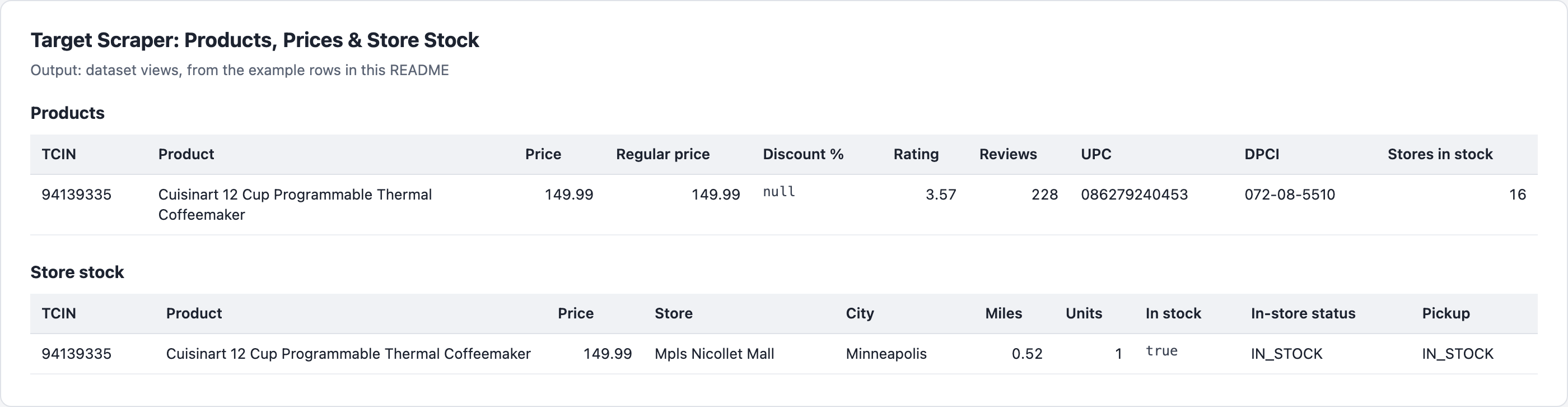 #### Example rows
One row per product. A real row (store stock on, `stores` shortened to two of its 20 stores, `images` and `bullets` shortened):
```json
{
"recordType": "product",
"tcin": "94139335",
"dpci": "072-08-5510",
"upc": "086279240453",
"url": "https://www.target.com/p/cuisinart-12-cup-programmable-thermal-coffeemaker/-/A-94139335",
"title": "Cuisinart 12 Cup Programmable Thermal Coffeemaker",
"brand": "Cuisinart",
"price": 149.99,
"priceMax": null,
"regPrice": 149.99,
"discountPercent": null,
"onSale": false,
"priceType": "reg",
"priceText": "$149.99",
"unitPrice": null,
"pricingStoreId": "3991",
"currency": "USD",
"rating": 3.57,
"reviewCount": 228,
"ratingDistribution": {
"1": 53,
"2": 14,
"3": 26,
"4": 22,
"5": 113
},
"badges": ["1k+ bought in last month"],
"promotions": [],
"image": "https://target.scene7.com/is/image/Target/GUEST_5deaa938-0419-4784-8501-46f003b24e1f",
"images": [
"https://target.scene7.com/is/image/Target/GUEST_a399f74b-c028-45eb-8dc6-23c3753adc12",
"https://target.scene7.com/is/image/Target/GUEST_952170b0-c740-465f-852b-f15c746e88e5"
],
"relationshipType": "SA",
"parentTcin": null,
"variants": null,
"itemType": "Coffee Makers",
"category": "Drip Coffee Makers",
"breadcrumbs": [
"Kitchen & Dining",
"Kitchen Appliances",
"Coffee & Espresso Makers",
"Drip Coffee Makers"
],
"departmentId": 72,
"description": "Brew fresh, full-flavored coffee hotter and faster with the innovative PerfecTemp® 12-Cup Programmable Thermal Coffeemak…",
"bullets": [
"12-cup thermal carafe",
"Expert coffee-making technology ensures hotter coffee temperature without sacrificing flavor or quality"
],
"source": "tcin",
"input": "94139335",
"searchTerm": null,
"categoryUrl": null,
"position": null,
"stores": [
{
"storeId": "1375",
"name": "Mpls Nicollet Mall",
"address": "900 Nicollet Mall",
"city": "Minneapolis",
"state": "Minnesota",
"postalCode": "55403-2530",
"phone": "612-338-0085",
"distanceMiles": 0.52,
"quantity": 1,
"inStock": true,
"inStoreStatus": "IN_STOCK",
"pickupStatus": "IN_STOCK",
"pickupDate": "2026-10-27",
"aisle": null
},
{
"storeId": "3200",
"name": "Minneapolis Dinkytown",
"address": "1329 5th St SE",
"city": "Minneapolis",
"state": "Minnesota",
"postalCode": "55414-1390",
"phone": "612-355-3857",
"distanceMiles": 1.77,
"quantity": 0,
"inStock": false,
"inStoreStatus": "NOT_SOLD_IN_STORE",
"pickupStatus": "UNAVAILABLE",
"pickupDate": null,
"aisle": null
}
],
"storesChecked": 20,
"storesInStock": 16,
"totalStoreQuantity": 26,
"nearestInStock": {
"storeId": "1375",
"name": "Mpls Nicollet Mall",
"distanceMiles": 0.52,
"quantity": 1
},
"stockZipCode": "55401",
"stockStoreId": null,
"storesNote": null,
"changeType": null,
"changes": [],
"previous": null,
"scrapedAt": "2026-10-27T01:55:02.986Z"
}
```
#### Fields
| Field | Meaning |
| --------------------------------------------------------------------------------------------------------------- | ------------------------------------------------------------------------------------------------------------------------------------------------------------------------- |
| `tcin`, `dpci`, `upc` | Target item number, Target's department-class-item code, the barcode (product lookups; search rows state no barcode) |
| `url`, `title`, `brand`, `image`, `images` | The product page and its pictures |
| `price`, `priceMax`, `regPrice`, `discountPercent`, `onSale`, `priceType`, `priceText`, `unitPrice`, `currency` | Price now (the lowest of a range, `priceMax` its top), regular price, discount, Target's price label |
| `pricingStoreId` | Whose price it is: 3991 is Target's online store; a store id for store-priced items when you gave `storeId` |
| `rating`, `reviewCount`, `ratingDistribution` | Average stars, reviews, and the 1-to-5 breakdown (product lookups). No reviews yet: `rating` null and `reviewCount` 0; both null when Target's answer does not state them |
| `badges`, `promotions` | "1k+ bought in last month", "Bestseller"; promotion texts |
| `relationshipType`, `parentTcin`, `variants` | SA stand-alone, VC variant, VAP parent; each variant's TCIN, attributes, UPC, DPCI, price |
| `itemType`, `category`, `breadcrumbs`, `departmentId`, `description`, `bullets` | Classification and text |
| `source`, `input`, `searchTerm`, `categoryUrl`, `position` | What you asked for, and the place in Target's results |
| `stores[]` | `storeId`, `name`, `address`, `city`, `state`, `postalCode`, `phone`, `distanceMiles`, `quantity`, `inStock`, `inStoreStatus`, `pickupStatus`, `pickupDate`, `aisle` |
| `storesChecked`, `storesInStock`, `totalStoreQuantity`, `nearestInStock` | Store stock at a glance |
| `stockZipCode`, `stockStoreId`, `storesNote` | Where stock was read, or why it was not |
| `changeType`, `changes`, `previous` | With Only changes since the last run: added, updated or removed, each change with before and after (and the store) |
| `scrapedAt` | When it was read (ISO 8601) |
The dataset has three views: **Products**, **Store stock** (one row per product and store) and **Changes**. The run summary (`RUN_SUMMARY`) has the outcome, counts, charges, requests (`pageReads`: requests to Target, retries included) and anything that could not be read; the final status ends with the pages read for the rows delivered.
### Target data for AI agents
- **Compact, typed JSON**: numbers as numbers, ISO dates, absolute URLs, stable ids (TCIN, store id).
- **Field selection**: `fields` returns only what the agent needs, such as `["tcin", "price", "stores.storeId", "stores.quantity"]`.
- **Stable schema**: every row has the same keys; what Target does not state is `null`.
- **Explanations, not failures**: a search with no results or an unknown UPC gives a free `recordType: "unreadable"` row with the reason.
- **MCP ready**: callable from any MCP client through Apify's MCP server.
### Pricing
| Event | Free | Bronze | Silver | Gold and above |
| ------------------------------------------------------------------------------------------ | ------ | ------ | ------ | -------------- |
| Product: a row from a search or category | $1.70 | $0.85 | $0.765 | $0.68 |
| Product lookup: a row looked up by TCIN or product URL | $8.00 | $4.00 | $3.60 | $3.20 |
| UPC lookup: a row found by its barcode (Target's search, then its answer) | $16.00 | $8.00 | $7.20 | $6.40 |
| Store stock: one lookup for one product (up to 20 stores near a ZIP code, or one store id) | $8.00 | $4.00 | $3.60 | $3.20 |
Per 1,000. Each run also has the standard start fee. A row is charged once, as the one event it took. A TCIN with stock at the 20 stores near a ZIP code is one product lookup and one stock lookup: $0.008 on Bronze. A lookup that fails or finds nothing is not billed, and neither are unchanged products with Only changes since the last run.
### Limits
- **US only**, as target.com. Store stock is what Target promises for pickup and in-store shopping; it can change during the day.
- **Search rows state no barcode.** UPC, star breakdown, category path and description come with product lookups (TCIN, product URL, UPC).
- **A parent of variants has no store stock of its own.** Its row lists the variants; look one up by TCIN for its stores.
- **Aisle** is given for the one store in `storeId`.
- **A search reads at most 50 pages** (1,200 results). A run with Only changes since the last run reads every search, so each one's memory stays current; `maxResults` counts the rows it delivers, removed rows included (those over it come in the next run).
- **In stock at a store only** (`inStockOnly`) delivers only products confirmed in stock: one whose stock could not be read is listed as not read, not delivered.
- **Nothing found**: when nothing could be read because none exists (a search with no results, an unknown UPC), the run still succeeds with one free `unreadable` row per item giving the reason. A run near its time limit stops starting products, delivers what it read and lists the rest the same way.
### FAQ
#### How much does Target product data cost per product per day?
One product checked daily by TCIN, with its units at the 20 stores near a ZIP code, is one product lookup and one stock lookup: $0.008 a day on Bronze (about $0.24 a month), and $0.016 on the Free plan, where every price is doubled. A search of 24 results, without store stock, costs about $0.02 a day on Bronze. With **Only changes since the last run**, unchanged products are not delivered or charged, and rows for products a search no longer lists are free. A lookup that fails or finds nothing is never billed. Higher Apify plans pay less (see Pricing below).
#### How often should I check Target stock and prices?
Daily suits most watch lists; store stock can change during the day, so a restock watch can run more often. With **Only changes since the last run** and a schedule, each run returns only the products that changed, and **Changes to report** picks which changes count (price rises are off by default). Stock changes compare the same stores (same **ZIP code** or **Store id**) between runs.
#### What is the difference between price, regular price and store price?
`price` is the price now (the lowest of a range, with `priceMax` its top), and `regPrice` the regular price, so `onSale` and `discountPercent` show a discount. `pricingStoreId` says whose price it is: 3991 is Target's online store, and with a **Store id**, store-priced items such as groceries are priced for that store.
#### Why is a UPC, rating or store stock missing?
- **Search rows state no barcode:** the UPC, star breakdown, category path and description come with product lookups (TCIN, product URL, UPC).
- **No reviews yet:** `rating` is null and `reviewCount` 0; both are null when Target's answer does not state them.
- **A parent of variants:** it has no store stock of its own; its row lists the variants, and a variant looked up by TCIN gets its stores.
- **Stock not read:** `storesNote` says why, and `stockZipCode` and `stockStoreId` say where stock was read.
- **Aisle:** given only for the one store in **Store id**.
- **Nothing found:** a search with no results or an unknown UPC gives a free `recordType: "unreadable"` row with the reason, and `RUN_SUMMARY` lists anything that could not be read.
#### Which Target stores and countries does it support?
US only, as target.com. Store stock is read at the stores near any US **ZIP code** (up to **Stores per product**, within **Radius (miles)**) and at one store by **Store id**. Stock is what Target promises for pickup and in-store shopping.
#### Can I use the Target scraper through the API?
Yes. Start runs through the Apify API or an API client, and read the dataset through its **Products**, **Store stock** and **Changes** views, or the `RUN_SUMMARY` record. **Output fields** (`fields`) trims each row to the keys you need, such as `stores.quantity`.
#### Does it work with Google Sheets, Make, Zapier or Claude?
Yes. Apify's integrations send each run's results to Google Sheets, Make, Zapier, webhooks and other tools, and a schedule keeps them updated. From Claude, the [MarketMage plugin](https://marketmage.io) compares and watches Target prices in a chat.
#### Is it allowed to scrape Target product data?
The actor reads public target.com product, search and store availability data as a signed-out shopper sees it: no login, no account and no customer data. Ratings are kept as counts and averages, with no review text. How you use the data, and following the laws and terms that apply to you, is your responsibility. This is not legal advice.
### Related actors
Other CleanPull actors for marketplace:
- [Walmart Scraper](https://apify.com/cleanpull/walmart-scraper): Walmart products, prices, UPC, sellers and stock.
- [Amazon Product Scraper](https://apify.com/cleanpull/amazon-product-scraper): Amazon price, Buy Box, every seller's offer and Best Sellers Rank by ASIN.
- [Marketplace Search Scanner](https://apify.com/cleanpull/marketplace-search-scanner): one keyword across Amazon, eBay, Etsy, Walmart and more, with market stats.
- [Barcode Price Checker](https://apify.com/cleanpull/barcode-price-checker): prices for a UPC, EAN or GTIN across stores.
### Use it from Claude
The [MarketMage plugin](https://marketmage.io) runs these actors from a Claude chat.
Found it useful? A rating on the Store helps others find it.
### Changelog
- **0.1.x, fixes** (2026-11-02): rows are delivered in Target's order (each search's results by `position`, TCINs and UPCs as given), also when products are read several at once; outside a monitor, a product past `maxResults` is no longer read while earlier ones are still being delivered. A product nobody has reviewed has `rating` null and `reviewCount` 0 (Target states 0 stars of 0 reviews for it, which was delivered as `rating: 0`). A rating of 5 from one or two reviews is Target's own figure. Prices and events unchanged.
- **0.1.x, fewer stock reads** (2026-10-31): for search results, stock at the stores near a ZIP code is read for blocks of up to 30 products per store in one request, when a block has more products than stores asked for. Two products' own reads name the nearby stores (and if they differ, stock is read product by product); each store's units, in-store and pickup status come from Target's product summary, the same values the per-product read gives. Anything else is read product by product, as before. Rows, prices and events unchanged.
- **0.1.1, fewer reads** (2026-10-30): price range and on-sale filters are sent to Target with a search, so filtered searches read far fewer pages (the price check on each row stays). In Only changes, products already watched are checked 24 at a time through Target's product summary (price and the one store's stock) and read in full only when something changed; unchanged TCINs no longer need their own product read. A variant TCIN now gets its own stock at the one store asked about. A product with a price range counts as on sale only when it is really discounted (its low end against the low regular price, or high against high). The run summary and final status give the pages read for the rows delivered. Prices and events unchanged.
- **0.1** (October 2026): products by search, category, URL, TCIN or UPC; prices, sale prices, UPC, DPCI, ratings and variants; units at the stores near a ZIP code and at one store with its aisle; filters; monitoring of price drops, restocks, sell-outs, new and removed listings.
# Actor input Schema
## `searchTerms` (type: `array`):
Words to search on Target, one per line, as you would type them on target.com. The products come in Target's order, up to the limit per search below.
## `startUrls` (type: `array`):
Optional. target.com addresses: a search (/s?searchTerm=…), a category (/c/…/-/N-…) or a product (/p/…/A-12345678). A search or category address may carry the site's sort (sortBy=PriceLow).
## `tcins` (type: `array`):
Optional. Target item numbers (TCIN, the digits after A- in a product address), one per line. Each product is read with its UPC, variants, star breakdown and description.
## `upcs` (type: `array`):
Optional. UPC or EAN barcodes, one per line. Each is looked up on Target and delivered only when Target's product states that barcode.
## `maxResultsPerSearch` (type: `integer`):
How many products to deliver from each search or category (Target shows 24 per page; the actor follows the pages).
## `maxResults` (type: `integer`):
Optional. The most product rows the run delivers, over every search and lookup.
## `sort` (type: `string`):
The order of search and category results, as on target.com. A sort in a Target URL wins for that URL.
## `includeStoreStock` (type: `boolean`):
Also read how many units each store has: the stores near the ZIP code (with distance) and the one store id below (with its aisle). Billed per stock lookup: one for the stores near the ZIP code (up to Max stores), one for the store id.
## `zipCode` (type: `string`):
A US ZIP code: stock is read at the Target stores near it, nearest first.
## `storeId` (type: `string`):
Optional. One Target store's id (as in the store's page address): its units and aisle, and its prices for store-priced items such as groceries. Also adds its in-store assortment to searches.
## `radiusMiles` (type: `integer`):
How far from the ZIP code stores are read.
## `maxStores` (type: `integer`):
The most nearby stores read for each product (Target answers about 20).
## `inStockOnly` (type: `boolean`):
Keep only products with units at one or more of the stores read (needs store stock). Search results already leave out products Target cannot sell.
## `onSaleOnly` (type: `boolean`):
Keep only products priced below their regular price.
## `minPrice` (type: `number`):
Optional. Keep only products at this price or higher.
## `maxPrice` (type: `number`):
Optional. Keep only products at this price or lower.
## `onlyChanges` (type: `boolean`):
Deliver only products that changed since they were last delivered under this monitor: new listings, price drops, back in stock or out of stock at a store, and products a search no longer lists. Unchanged products are not delivered or charged.
## `monitorName` (type: `string`):
Keeps separate memories for different watch lists. Use the same name on every scheduled run of one list.
## `changeTypes` (type: `array`):
Which changes count. Stock changes compare the same stores (same ZIP code or store id) between runs.
## `fields` (type: `array`):
Optional. Only these fields in each row (dotted paths for nested ones, such as stores.quantity). Empty: every field.
## `stateStoreName` (type: `string`):
Optional. A key-value store in your account where this actor keeps what it saw in earlier runs, so it can report changes. Empty: its own store, "cleanpull-target-monitor". Pick one here when you run it with a scoped API token in Restricted access mode, so the run may use it. Without access to a history store, a run still completes and compares within itself.
## Actor input object example
```json
{
"searchTerms": [
"lego",
"coffee maker"
],
"startUrls": [
{
"url": "https://www.target.com/s?searchTerm=lego"
},
{
"url": "https://www.target.com/c/drip-coffee-makers-espresso-kitchen-appliances-dining/-/N-658ml"
},
{
"url": "https://www.target.com/p/-/A-94139335"
}
],
"tcins": [
"94139335"
],
"upcs": [
"086279240453"
],
"maxResultsPerSearch": 48,
"maxResults": 500,
"sort": "priceLow",
"includeStoreStock": false,
"zipCode": "55401",
"storeId": "1375",
"radiusMiles": 25,
"maxStores": 10,
"inStockOnly": false,
"onSaleOnly": false,
"minPrice": 10,
"maxPrice": 100,
"onlyChanges": false,
"monitorName": "lego-minneapolis",
"changeTypes": [
"price-drop",
"back-in-stock"
],
"fields": [
"tcin",
"title",
"price",
"stores.storeId",
"stores.quantity"
]
}
```
# Actor output Schema
## `results` (type: `string`):
One row per product, with store stock and changes when asked for.
## `products` (type: `string`):
No description
## `storeStock` (type: `string`):
One row per product and store.
## `changes` (type: `string`):
No description
## `summary` (type: `string`):
Outcome (COMPLETE, PARTIAL, NO_CHANGES, EMPTY, FAILED), counts, charges, requests and items that could not be read.
# API
You can run this Actor programmatically using our API. Below are code examples in JavaScript, Python, and CLI, as well as the OpenAPI specification and MCP server setup.
## JavaScript example
```javascript
import { ApifyClient } from 'apify-client';
// Initialize the ApifyClient with your Apify API token
// Replace the '' with your token
const client = new ApifyClient({
token: '',
});
// Prepare Actor input
const input = {
"searchTerms": [
"lego"
],
"maxResultsPerSearch": 24
};
// Run the Actor and wait for it to finish
const run = await client.actor("cleanpull/target-scraper").call(input);
// Fetch and print Actor results from the run's dataset (if any)
console.log('Results from dataset');
console.log(`💾 Check your data here: https://console.apify.com/storage/datasets/${run.defaultDatasetId}`);
const { items } = await client.dataset(run.defaultDatasetId).listItems();
items.forEach((item) => {
console.dir(item);
});
// 📚 Want to learn more 📖? Go to → https://docs.apify.com/api/client/js/docs
```
## Python example
```python
from apify_client import ApifyClient
# Initialize the ApifyClient with your Apify API token
# Replace '' with your token.
client = ApifyClient("")
# Prepare the Actor input
run_input = {
"searchTerms": ["lego"],
"maxResultsPerSearch": 24,
}
# Run the Actor and wait for it to finish
run = client.actor("cleanpull/target-scraper").call(run_input=run_input)
# Fetch and print Actor results from the run's dataset (if there are any)
print(f"💾 Check your data here: https://console.apify.com/storage/datasets/{run.default_dataset_id}")
for item in client.dataset(run.default_dataset_id).iterate_items():
print(item)
# 📚 Want to learn more 📖? Go to → https://docs.apify.com/api/client/python/docs/quick-start
```
## CLI example
```bash
echo '{
"searchTerms": [
"lego"
],
"maxResultsPerSearch": 24
}' |
apify call cleanpull/target-scraper --silent --output-dataset
```
## MCP server setup
```json
{
"mcpServers": {
"apify": {
"type": "http",
"url": "https://mcp.apify.com/?tools=fetch-actor-details,cleanpull/target-scraper"
}
}
}
```
The hosted server signs you in with OAuth on first connect, so no API token belongs in this config. Clients without OAuth support can send an `Authorization: Bearer ` header instead, using a token from API & Integrations in Apify Console (https://console.apify.com/settings/integrations).
## OpenAPI specification
Download the OpenAPI definition: https://api.apify.com/v2/actors/DAVCMEdWUayXrmf2F/builds/E8AoBaCWt2JjESRWb/openapi.json