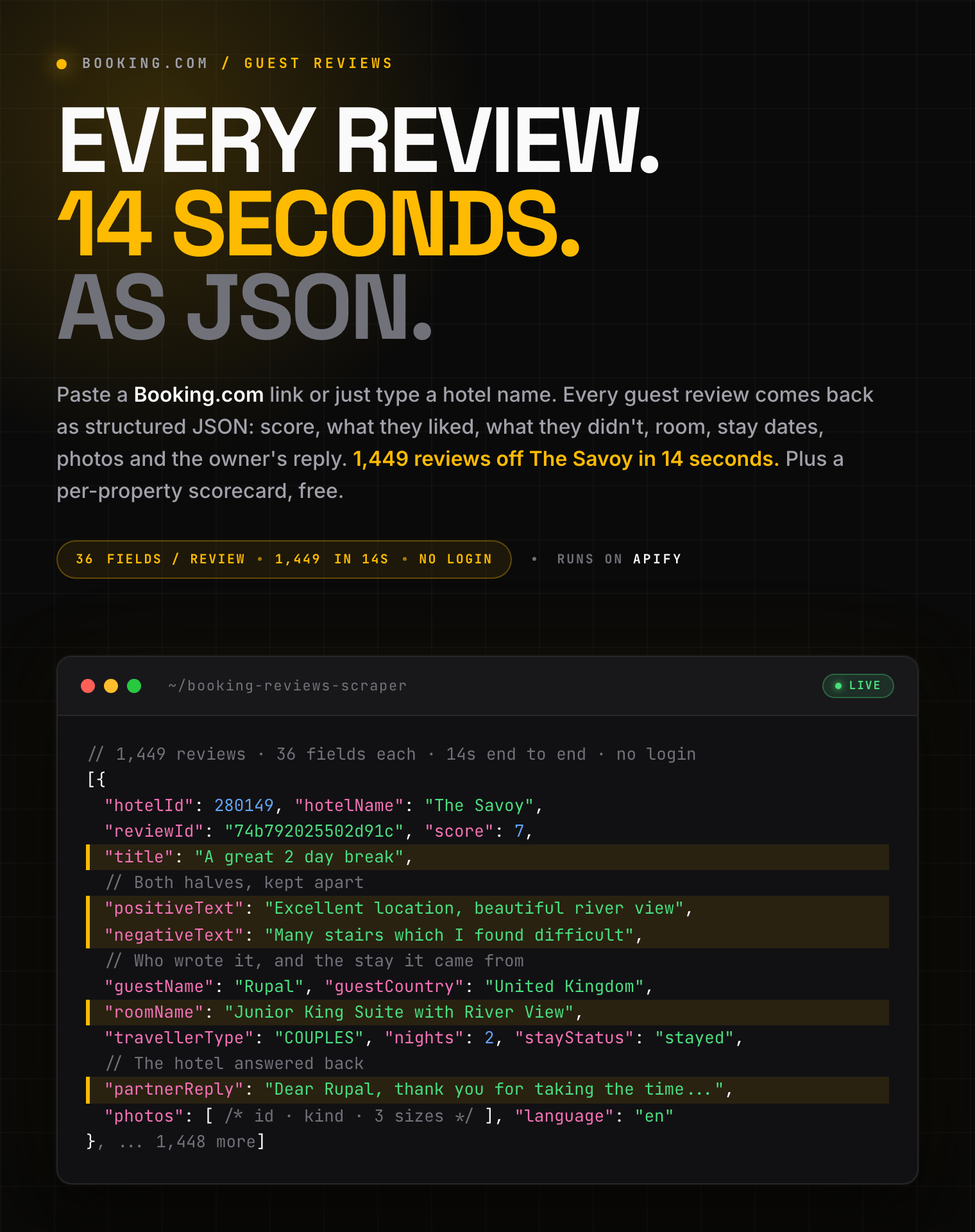
Every review a hotel ever got, in less time than it takes to read one.
1,449 reviews off The Savoy in 14 seconds. Score, both halves of the text, room, stay dates and the owner's reply on every single one.
| Clearpath Hotel Review Suite • Structured reviews from major travel platforms | ||
 Booking.com Reviews Booking.com Reviews➤ You are here |
 Tripadvisor Reviews Tripadvisor ReviewsHotels, dining, attractions |
 Yelp Reviews Yelp ReviewsLocal business feedback |
⚡ 1,449 reviews from one property in about 14 seconds. Reviews are collected in ordered concurrent pages and streamed to the dataset as they arrive, so a 40,000-review history never sits in memory waiting for a final flush.
🎁 No usage limits: free-plan and paid accounts get the same Actor, the same 200 properties per run and the same full review histories. You are charged per review returned, nothing more. No Booking.com account, no cookies, nothing to install.Paste a Booking.com link or just type a hotel name. Get **36 fields per review**, and a per-property scorecard on top. Join the two on `hotelId`. #### Copy to your AI assistant ``` clearpath/booking-reviews-scraper on Apify. Every public Booking.com guest review for a property, with scores, split positive/negative text, room and stay details. Call ApifyClient("TOKEN").actor("clearpath/booking-reviews-scraper").call(run_input={...}), then client.dataset(run["defaultDatasetId"]).list_items().items. Property summaries go to a separate "summary" dataset. Full spec: GET https://api.apify.com/v2/acts/clearpath~booking-reviews-scraper/builds/default (Bearer TOKEN) -> inputSchema, actorDefinition.storages.dataset, readme. Token: https://console.apify.com/account/integrations ``` ### Booking.com Review Data You Can Collect - **Detailed review records**: score, title, positive text, negative text, language, dates, helpful votes, photos, and property replies. - **Guest and stay context**: guest country, traveller type, room, check-in, check-out, length of stay, and stay status. - **Property rating intelligence**: total score, review count, category subscores, rating distribution, language distribution, and recurring topics. - **Large review histories**: up to 100,000 reviews per property and 200 properties per run, delivered progressively as they arrive. The default dataset contains one row per review. Property and run summaries go to the separate `summary` dataset, which keeps the primary review export clean for downstream analysis. ### How to Scrape Booking.com Reviews 1. Open **Booking.com Reviews Scraper** on Apify and click **Try for free**. 2. Paste a Booking.com property link such as `https://www.booking.com/hotel/gb/the-savoy.html`, or type a property name such as `The Savoy London`. Add several, one per line. 3. Set **Max reviews per property**. Use `0` for the full history. 4. Optionally narrow the run with the score band, traveller type, language, season or keyword filters. 5. Click **Start** and watch reviews arrive in the dataset while the run continues. 6. Export from the **Storage** tab as JSON, CSV, Excel, XML or HTML, or pull the same rows through the Apify API. #### Basic: collect recent reviews from one hotel ```json { "hotels": [ "https://www.booking.com/hotel/gb/the-savoy.html" ], "maxReviewsPerHotel": 100, "sortBy": "newest" } ``` This collects the 100 newest publicly available guest reviews and includes the property summary. #### Collect reviews from several properties ```json { "hotels": [ "The Savoy London", "Hotel Adlon Kempinski Berlin", "Ritz Paris" ], "maxReviewsPerHotel": 500 } ``` Include the city when you use a property name. A direct Booking.com property link is the most precise input when several properties share a name. #### Collect complaint-focused feedback ```json { "hotels": [ "https://www.booking.com/hotel/de/adlon-kempinski-berlin.html" ], "maxReviewsPerHotel": 1000, "sortBy": "newest", "scoreBand": "poor", "searchText": "noise" } ``` This configuration narrows the output to recent low-scoring reviews that mention noise. You are charged only for review rows returned. #### Collect every available review ```json { "hotels": [ "https://www.booking.com/hotel/gb/the-savoy.html" ], "maxReviewsPerHotel": 0, "sortBy": "oldest" } ``` Set `maxReviewsPerHotel` to `0` to request the complete available history, subject to the 100,000-review safety ceiling per property and your run spending limit. ### Booking.com Reviews Scraper Input Parameters | Parameter | Type | Default | Description | |-----------|------|---------|-------------| | `hotels` | array | *required* | Up to 200 Booking.com property links or property names. Duplicate inputs are removed before collection. | | `maxReviewsPerHotel` | integer | `100` | Reviews per property. Use `0` for every available review, up to 100,000. | | `sortBy` | string | `most_relevant` | Order results by relevance, newest, oldest, highest score, or lowest score. | | `includeSummary` | boolean | `true` | Add one property-level rating and distribution record to the `summary` dataset. | | `scoreBand` | string | `all` | Keep all scores or select superb, good, passable, poor, or very poor reviews. | | `guestType` | string | `ALL` | Keep all travellers or select families, couples, friends, solo travellers, or business travellers. | | `season` | string | `all` | Keep stays from any season, spring, summer, autumn, or winter. | | `reviewLanguages` | array | `[]` | Pick from 38 review languages. Empty means all. | | `reviewTopics` | array | `[]` | Topic IDs from a property's summary output. Empty means all topics. | | `searchText` | string | empty | Keep reviews that mention a word or phrase. | | `language` | string | `en-gb` | Language for translated labels such as traveller types and topic names. Original review text is unchanged. | Every input field is optional except `hotels`. The Actor validates limits and selectable values before collection begins, so invalid inputs fail with a short message that explains what to change. ### What Booking.com Review Data Is Returned? Each default-dataset item represents one guest review. Field names remain stable across properties, while unavailable values use `null` or an empty array. #### Review output fields | Group | Fields | |-------|--------| | Property | `hotelId`, `hotelName`, `hotelUrl` | | Review | `reviewId`, `reviewedDate`, `score`, `title`, `positiveText`, `negativeText`, `language` | | Review metadata | `isTrivial`, `isApproved`, `isTranslatable`, `helpfulVotes`, highlights, reply, photos | | Guest | name, anonymity, country, guest type, review count, join date, avatar | | Stay | traveller type, room, check-in, check-out, nights, stay status | | Provenance | `scrapedAt` | #### Review output example ```json { "hotelId": 280149, "hotelName": "The Savoy", "hotelUrl": "https://www.booking.com/hotel/gb/the-savoy.html", "matchConfidence": "exact", "searchedFor": "https://www.booking.com/hotel/gb/the-savoy.html", "reviewId": "f13b4829ef90d99b", "reviewedDate": "2026-08-23", "score": 10, "title": "Fantastic stay in London", "positiveText": "Excellent staff, a comfortable room and a perfect location.", "negativeText": null, "language": "en", "isTrivial": false, "isApproved": true, "isTranslatable": true, "editUrl": null, "helpfulVotes": 3, "positiveHighlights": [ { "text": "Excellent staff", "start": 0, "end": 15 } ], "negativeHighlights": [], "partnerReply": "Thank you for staying with us.", "photos": [ { "id": 686649050, "kind": "PROPERTY", "url": "https://r-xx.bstatic.com/xdata/images/xphoto/max1280x900/686649050.jpg?k=afbde5dc26075376661d3ee9d057f04cc4bb9bfb2ca646dbc043cbaa41cd6ac9&o=", "urls": { "max1280x900": "https://r-xx.bstatic.com/xdata/images/xphoto/max1280x900/686649050.jpg?k=afbde5dc26075376661d3ee9d057f04cc4bb9bfb2ca646dbc043cbaa41cd6ac9&o=", "square160": "https://r-xx.bstatic.com/xdata/images/xphoto/square144/686649050.jpg?k=afbde5dc26075376661d3ee9d057f04cc4bb9bfb2ca646dbc043cbaa41cd6ac9&o=", "square80": "https://r-xx.bstatic.com/xdata/images/xphoto/square80/686649050.jpg?k=afbde5dc26075376661d3ee9d057f04cc4bb9bfb2ca646dbc043cbaa41cd6ac9&o=" }, "tagConfidence": 58 } ], "guestName": "Tracey", "guestIsAnonymous": false, "guestCountry": "Spain", "guestCountryCode": "es", "guestType": "Couple", "guestShowCountryFlag": true, "guestReviewCount": 6, "guestJoinedDate": "2018-09-04", "guestAvatarUrl": "https://xx.bstatic.com/xdata/images/xphoto/square64/70870569.jpg?k=fb7e23edeb20134e50e0a4ac6423a3c000a2b6990d458630721dd6a3e6271a70&o=", "travellerType": "COUPLES", "roomName": "Superior Queen Room", "roomId": 28014901, "checkinDate": "2026-08-15", "checkoutDate": "2026-08-19", "nights": 4, "stayStatus": "stayed", "scrapedAt": "2026-08-31T10:15:30.000000+00:00" } ``` #### Property summary output When `includeSummary` is `true`, the `summary` dataset contains one `propertySummary` row per processed property. It provides context that would otherwise need a separate hotel-level dataset. ```json { "recordType": "propertySummary", "hotelId": 280149, "hotelName": "The Savoy", "hotelUrl": "https://www.booking.com/hotel/gb/the-savoy.html", "pageName": "the-savoy", "accommodationType": "HOTEL", "stars": 5, "starRatingType": "RATING", "chainIds": [], "address": "Strand, London WC2R 0EZ", "city": "London", "countryCode": "gb", "latitude": 51.5101, "longitude": -0.1204, "totalScore": 9.4, "reviewsCount": 1449, "reviewsMatchingFilters": 1449, "reviewsCaptured": 100, "reviewsPartial": false, "subscores": { "hotel_staff": { "label": "Staff", "score": 9.7, "cityLow": 7.4, "cityHigh": 9.6 }, "hotel_clean": { "label": "Cleanliness", "score": 9.6, "cityLow": 7.2, "cityHigh": 9.5 } }, "scoreBreakdown": [ { "value": "REVIEW_ADJ_SUPERB", "label": "Superb", "count": 1261 } ], "languageBreakdown": [ { "value": "en", "label": "English", "count": 1100, "countryFlag": "gb" } ], "travellerTypeBreakdown": [ { "value": "COUPLES", "label": "Couples", "count": 684 } ], "seasonBreakdown": [ { "value": "_06_08", "label": "June to August", "count": 532 } ], "roomTypeBreakdown": [ { "roomTypeId": 28014901, "label": "Superior Queen Room", "count": 186 } ], "topics": [ { "id": 270, "label": "Room" } ], "matchConfidence": "exact", "searchedFor": "https://www.booking.com/hotel/gb/the-savoy.html", "alternativeMatches": [], "scrapedAt": "2026-08-31T10:15:30.000000+00:00" } ``` Three counts prevent misleading analysis: - `reviewsCount` is the property's full review count when available. - `reviewsMatchingFilters` is the number that matches your filters. - `reviewsCaptured` is the number delivered in this run. `reviewsPartial` becomes `true` if part of a property's requested review history could not be collected. This lets downstream jobs distinguish a genuinely small review set from an incomplete one. #### Run summary output The run writes a final `runSummary` row to the `summary` dataset. ```json { "recordType": "runSummary", "exportedAt": "2026-08-31T10:16:02.000000+00:00", "propertiesRequested": 3, "propertiesProcessed": 3, "propertiesFailed": 0, "reviewsCollected": 1500, "reviewsCharged": 1500, "resultLimitReached": false } ``` Use this record for workflow checks, scheduled-run monitoring, and reconciliation between collected and charged review counts. The `OUTPUT` record contains the same fields plus `summaryDatasetId`, the explicit dataset ID for parent workflows and integrations. ```json { "recordType": "runSummary", "exportedAt": "2026-08-31T10:16:02.000000+00:00", "propertiesRequested": 3, "propertiesProcessed": 3, "propertiesFailed": 0, "reviewsCollected": 1500, "reviewsCharged": 1500, "resultLimitReached": false, "summaryDatasetId": "AbCdEfGhIjKlMnOpQ" } ``` ### Advanced Booking.com Review Collection Ready-made configurations for reputation monitoring, multilingual analysis, service recovery, and historical research. #### Monitor the newest reviews ```json { "hotels": [ "https://www.booking.com/hotel/gb/the-savoy.html", "https://www.booking.com/hotel/de/adlon-kempinski-berlin.html" ], "maxReviewsPerHotel": 50, "sortBy": "newest", "includeSummary": true } ``` Schedule this input and deduplicate by `reviewId`. A stable review identifier makes it straightforward to retain only records you have not seen before. #### Compare feedback across languages ```json { "hotels": [ "Ritz Paris" ], "maxReviewsPerHotel": 2000, "reviewLanguages": [ "en", "fr", "de" ], "language": "en-gb" } ``` The `reviewLanguages` filter controls which original reviews are returned. The `language` setting controls translated category labels and does not rewrite guest text. #### Find service problems by score and phrase ```json { "hotels": [ "Hotel Adlon Kempinski Berlin" ], "maxReviewsPerHotel": 5000, "scoreBand": "poor", "searchText": "breakfast", "sortBy": "newest" } ``` Combine the result with `guestType`, `season`, or `reviewLanguages` to isolate a specific audience or operating period. #### Filter by a property-specific review topic Run once with `includeSummary` enabled, read the available `topics`, then pass the relevant IDs into a second run. ```json { "hotels": [ "https://www.booking.com/hotel/gb/the-savoy.html" ], "maxReviewsPerHotel": 2000, "reviewTopics": [ "270" ] } ``` Topic IDs vary by property. Use the IDs returned for the same property instead of assuming that one ID represents the same topic everywhere. ### Working With Booking.com Review Data Key every review on `hotelId` + `reviewId`. The pair survives combining many hotels, and scheduled jobs use it to spot what they already have. Keep `scrapedAt`. Replies get edited, vote counts move, reviews get pulled. Without the observation time you cannot tell a change from a mistake. The default and `summary` datasets serve different jobs: - Use the default dataset for sentiment analysis, complaint routing, topic classification, guest segmentation, and searchable review archives. - Join `propertySummary` rows by `hotelId` when you need rating context, location, category subscores, or review-distribution denominators. - Read the final `runSummary` row before treating a scheduled export as complete. Compare `propertiesRequested`, `propertiesProcessed`, `propertiesFailed`, and `resultLimitReached` with the expected run. Treat `positiveText` and `negativeText` as two columns, not one. An empty complaint field is not praise, and an empty praise field is not a complaint. `score` is the guest's own verdict. `subscores` are property-level only, so never average them into a review. Backfill once, then top up. One full-history run, then small `newest` runs on a schedule, appending unseen `(hotelId, reviewId)` pairs. Cheaper than re-collecting everything nightly. Keep the newest copy of a row if `partnerReply` or `helpfulVotes` matter to you. Never join across platforms on name alone. Normalize name and address, then confirm with coordinates and the source link. Keep each platform's original score **and** its scale. Booking is 1 to 10; averaging it against a 1 to 5 site silently invents numbers. `matchConfidence`, `searchedFor` and `alternativeMatches` on the summary let you audit a shaky name match before it pollutes a combined profile. ### Booking.com Reviews Scraper Pricing **$1.99 per 1,000 reviews at the base rate.** Pay only for review rows returned in the default dataset. Property summaries and the run summary have no separate event charge. | Reviews | Base-rate cost | |---------|----------------| | 10 | $0.02 | | 100 | $0.20 | | 1,000 | $1.99 | Volume pricing is tiered by Apify plan. The configured rate is **$1.99 per 1,000** on the Free, Bronze, and Silver tiers, then **$0.99 per 1,000** on the Gold, Platinum, and Diamond tiers. **No free-plan restrictions.** Accounts on Apify's free plan run this Actor with the same limits as paid accounts: up to 200 properties per run and the full review history of each. What you pay is the per-review rate above, capped by whatever run spending limit you set. ### Booking.com Reviews Scraper FAQ #### What is Booking.com? Booking.com, often shortened to Booking, is a global travel marketplace for hotels, apartments, hostels, resorts, villas, and other accommodation. This Actor focuses on publicly available guest reviews and property-level rating context. #### What input should I use for the most accurate property match? **Use the property link whenever you have it.** A link resolves exactly, every time. Names go through Booking.com's own search box, which is good but not perfect: for some properties it returns the city or a landmark instead of the hotel. Measured on a 30-name list, 27 resolved and 3 did not, including "Hotel Ritz Paris", where Booking answers with Paris the city no matter how deep you look. When a name does not resolve, the run says so plainly and carries on with the rest of your list. The summary row records `matchConfidence`, `searchedFor` and `alternativeMatches` so you can audit any name-based match before trusting it. #### Do I need a Booking.com account or cookies? No. Provide public Booking.com property links or property names and run the Actor. The Actor does not ask you to export account credentials or session data. #### How many Booking.com reviews can I collect? You can request up to 100,000 reviews per property and up to 200 properties per run. Set `maxReviewsPerHotel` to `0` to request all available reviews within that ceiling. Your run spending limit can stop delivery earlier. #### Can I collect 40,000 reviews from one property? Yes. Set `maxReviewsPerHotel` to `40000`. Large runs appear progressively in the dataset while collection continues. #### How fresh is the review data? Each run collects the reviews publicly available at run time. Use `sortBy: "newest"` with a smaller limit for frequent monitoring, and deduplicate scheduled outputs with `reviewId`. #### Why are positive and negative comments separate? Booking.com reviews commonly separate what a guest liked from what they disliked. Keeping `positiveText` and `negativeText` separate makes complaint analysis, sentiment labeling, and service-recovery routing more precise. #### What happens when a property name is ambiguous? **Nothing is processed.** An ambiguous name is refused rather than guessed, because a confidently wrong hotel is worse than no hotel. The run logs the tie, writes an `unresolvedInput` row to the summary dataset listing every candidate it scored, and carries on with the rest of your list. Add the city, or paste the property link. #### How do filters affect the summary counts? `reviewsCount` describes the full property when available. `reviewsMatchingFilters` describes the selected subset. `reviewsCaptured` describes what the run delivered after your limit and spending cap. #### Does it work with localized Booking.com links? Yes. Booking serves the same property under a locale prefix, a language suffix, or both, and all of them resolve to the same hotel: ``` https://www.booking.com/hotel/gb/the-savoy.html https://www.booking.com/hotel/gb/the-savoy.de.html https://www.booking.com/de/hotel/gb/the-savoy.de.html https://www.booking.com/pt-br/reviews/gb/hotel/the-savoy.html ``` Paste whatever your browser shows. Review pages, tracking parameters and a trailing slash all work too. #### Can you scrape Booking.com reviews? Yes, the guest reviews on a property page are public: anyone can read them without an account. This Actor collects that same public information and returns it as structured rows instead of text on a page. You do not need a Booking.com login, cookies, or a partner agreement, and there is nothing to install. #### Does Booking.com have an API for reviews? Not a public one. The official APIs are partner and affiliate programmes: an API key means an approved commercial agreement, no free tier, no self-serve signup. Even then they are built for availability and bookings, not for a property's full guest-review history. This Actor reads the public reviews instead, and you pay per review rather than per contract. This Actor is the practical alternative. It reads the same public review data any visitor can see, returns it as structured rows, and needs no application process, no partner contract, and no per-endpoint quota to negotiate. You pay per review returned instead of per commercial agreement. #### Can I connect this to Google Sheets, Make or Zapier? Yes, through Apify's [integrations](https://docs.apify.com/platform/integrations): Google Sheets, Airtable, Slack, Make, Zapier, or your own webhook. Reviews and summaries live in separate datasets, so you can route each one somewhere different. #### How often should I schedule this Actor? **Reputation monitoring:** daily, `sortBy: "newest"`, 25 reviews, dedupe on `reviewId`. Cheap, and you see new feedback within a day. **Competitor benchmarking:** monthly full history per property is plenty. Apify's guides: [scheduling](https://docs.apify.com/platform/schedules), [integrations](https://docs.apify.com/platform/integrations). #### Can I export Booking.com reviews to CSV or Excel? Yes. Export from the run's Storage tab in JSON, CSV, Excel, XML, or HTML. JSON preserves nested fields such as photos, highlights, subscores, and breakdown arrays most accurately. #### Can I combine these reviews with Tripadvisor and Yelp data? Yes. [Tripadvisor Reviews Scraper](https://apify.com/clearpath/tripadvisor-reviews-scraper) covers hotels, dining and attractions; [Yelp Reviews Scraper](https://apify.com/clearpath/yelp-reviews-scraper) covers local businesses. Join on normalized name **plus** address and coordinates, never name alone. #### What happens if one property fails in a multi-property run? The Actor skips that property, records the failure in the run summary, and continues with the rest. A run-level problem returns a concise status and keeps rows already delivered. #### Is there a free trial, and are free accounts limited? No extra restrictions. Free-plan runs get the same 200 properties and the same full histories as paid ones. Your spend is bounded by your plan's monthly credit and whatever run limit you set. Paid plans reach the $0.99 per 1,000 rate from Gold upward. #### Is it legal to scrape Booking.com reviews? The Actor extracts publicly available data. Your purpose, retention and redistribution are yours to get right, under Booking.com's terms and applicable law including GDPR, CCPA and the Dutch GDPR Implementation Act. Review text and reviewer details can be personal data. Collect only what you need, on a lawful basis. ### More Clearpath scrapers for hotel and venue reviews -
**Booking.com**
- [Booking.com Reviews Scraper](https://apify.com/clearpath/booking-reviews-scraper)
- **Tripadvisor**
- [Tripadvisor Reviews Scraper](https://apify.com/clearpath/tripadvisor-reviews-scraper)
- **Yelp**
- [Yelp Reviews Scraper](https://apify.com/clearpath/yelp-reviews-scraper)
### Support
- **Bugs**: Issues tab
- **Features**: Email or issues
- **Email**: max@mapa.slmail.me
### Legal Compliance
Extracts publicly available data. Users must comply with Booking.com terms and data protection regulations, including GDPR, CCPA, and the Dutch GDPR Implementation Act where applicable.
***
*Turn Booking.com guest feedback into structured review and property-rating data.*
# Actor input Schema
## `hotels` (type: `array`):
Booking.com property links, property names, or a mix of both, one per line. Supports up to 200 properties per run.https://www.booking.com/hotel/gb/the-savoy.htmlThe Savoy London, add the city so the right property is matched.xu, which is how Booking.com marks US English.
## `reviewTopics` (type: `array`):
Topic IDs, for example 270 for Room. Each property's available topics and their IDs are listed in the summary output, so a first run tells you what to put here.
## `searchText` (type: `string`):
A word or phrase to search for inside the reviews, for example breakfast or air conditioning.
## Actor input object example
```json
{
"hotels": [
"https://www.booking.com/hotel/gb/the-savoy.html",
"Hotel Adlon Kempinski Berlin"
],
"maxReviewsPerHotel": 100,
"language": "en-gb",
"sortBy": "most_relevant",
"includeSummary": true,
"scoreBand": "all",
"guestType": "ALL",
"season": "all",
"reviewLanguages": [],
"reviewTopics": []
}
```
# Actor output Schema
## `reviews` (type: `string`):
No description
## `runSummary` (type: `string`):
No description
# API
You can run this Actor programmatically using our API. Below are code examples in JavaScript, Python, and CLI, as well as the OpenAPI specification and MCP server setup.
## JavaScript example
```javascript
import { ApifyClient } from 'apify-client';
// Initialize the ApifyClient with your Apify API token
// Replace the '