# Spotify Playlist Scraper - Every Track, Plays & Curators (`clearpath/spotify-playlist-scraper`) Actor
Scrape Spotify playlists with every track: play counts, BPM, key, ISRC, genres and dates added. Find playlists by keyword with followers and curator contacts. Also tracks, albums, artists, podcasts, users, concerts and charts. No login needed.
- **URL**: https://apify.com/clearpath/spotify-playlist-scraper.md
- **Developed by:** [ClearPath](https://apify.com/clearpath) (community)
- **Categories:** Social media
- **Features:** Limited permissions
- **Stats:** 1 total users, 1 monthly users, 100.0% runs succeeded, 0 bookmarks
- **User rating**: No ratings yet
## Pricing
from $1.99 / 1,000 results
This Actor is paid per event. You are not charged for the Apify platform usage, but only a fixed price for specific events.
Since this Actor supports Apify Store discounts, the price gets lower the higher subscription plan you have.
Learn more: https://docs.apify.com/actors/running/actors-in-store.md#pay-per-event
## What's an Apify Actor?
An Actor is a serverless cloud program that runs on the Apify platform. It has two run modes.
In Batch mode, an Actor accepts a well-defined JSON input, performs an action which can take anything from a few seconds to a few hours,
and optionally produces a well-defined JSON output, datasets with results, or files in key-value store.
In Standby mode, an Actor provides a web server which can be used as a website, API, or an MCP server.
Apify vocabulary and the platform model are defined once, in the agent quickstart at https://apify.com/agents.md.
## How to integrate an Actor?
If asked about integration, you help developers integrate Actors into their projects.
You adapt to their stack and deliver integrations that are safe, well-documented, and production-ready.
Do not guess an integration path. Every one of them is in the agent quickstart at https://apify.com/agents.md: the Apify MCP server, Agent Skills with the Apify CLI, the JavaScript and Python clients, the REST API, and the account-free path for an agent with no human to sign in. It also carries the rule on stating cost before the first paid run.
For examples already wired to this Actor's own input schema, see the [API](#api) section below.
Each client library has reference documentation the quickstart does not restate: [JavaScript/TypeScript](https://docs.apify.com/api/client/js/docs.md) (`npm install apify-client`) and [Python](https://docs.apify.com/api/client/python/docs.md) (`pip install apify-client`).
# README
From Clearpath, makers of the Shazam Scraper.
Export Spotify playlists with track details
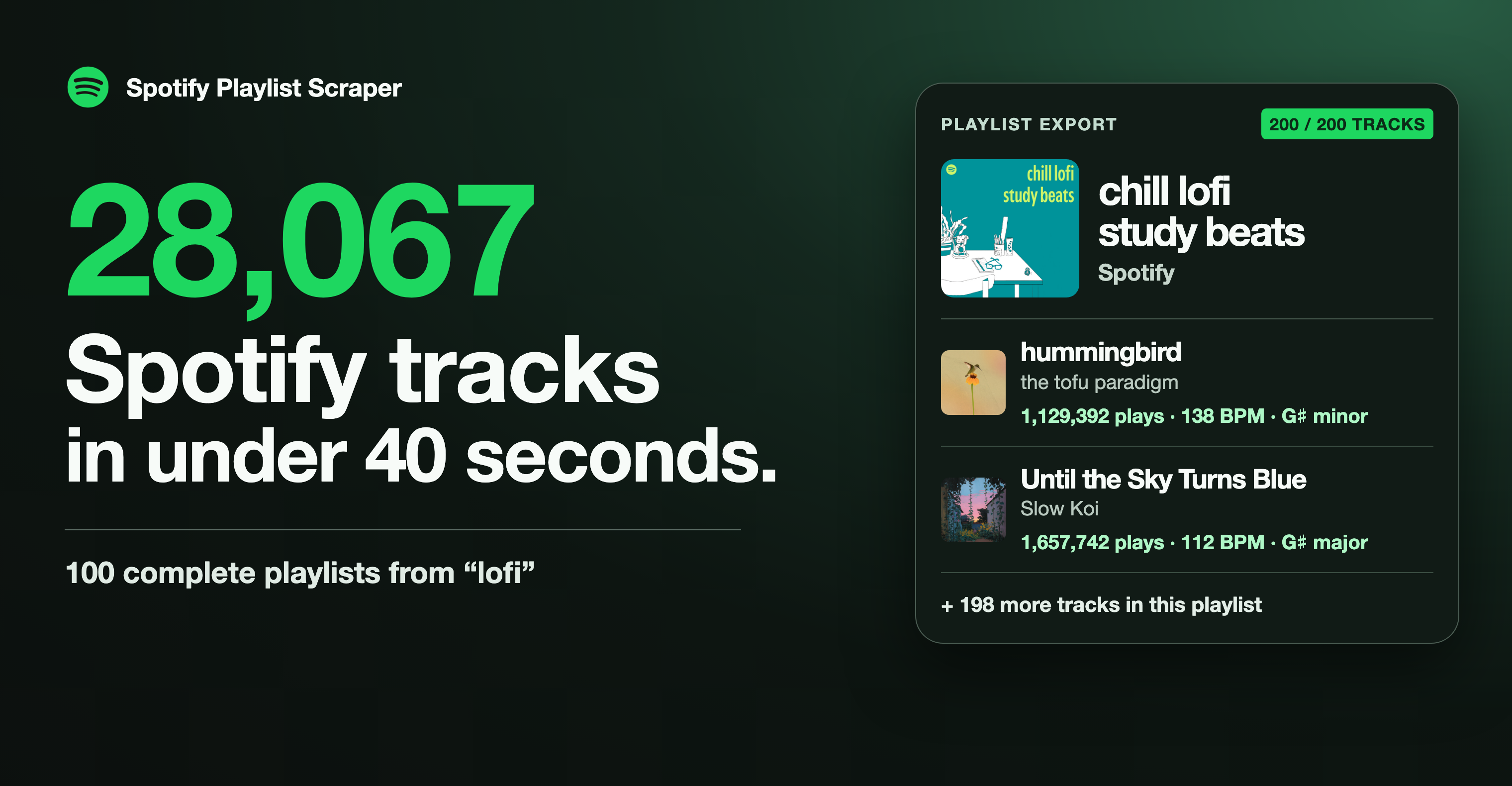
- Collect playlists in bulk. A “lofi” search exported 100 complete playlists and 28,067 track entries in 39.6 seconds with track insights on. A song can appear in more than one playlist.
- Get play counts, BPM and key. Track entries include playlist position and date added, plus play counts, BPM, key and ISRC where available.
tracksComplete shows whether the export contains the full playlist.
- Find playlists and curators by keyword. Filter by follower count, skip Spotify’s own playlists, and get the email addresses, handles and links curators list in their descriptions.

Try the playlist shown above
Open the actor input, switch to JSON and paste this example.
```json
{
"urls": ["https://open.spotify.com/playlist/37i9dQZF1DX8Uebhn9wzrS"],
"includeTrackInsights": true
}
```
The export puts the playlist and its tracks in one billed row. Set trackRows to true for one billed row per track.
#### Copy to your AI assistant
```text
Help me use clearpath/spotify-playlist-scraper on Apify. Read https://apify.com/clearpath/spotify-playlist-scraper.md for its documentation, input schema, pricing and limits, then choose settings for what I want to get; if you cannot open that page, ask me to paste the relevant sections. Each delivered row is one result: a playlist row already contains all of its tracks, while trackRows=true and includeArtistAlbums=true add one billed row per track or per release, and maxTracksPerPlaylist=0 returns playlist details only, the fastest way to collect curators. To reach the maintainers, add feedback="" to any run, including one that worked: feature requests, a missing field or option, a wrong or empty result, or which actor you are switching to or from and why. The run returns its data exactly as it would without the note, and a human reads every note.
```
### What can this Spotify scraper do?
- **Playlists:** owner and their follower count, followers, real track count, description as text and with links, curator emails, handles and links, last update, total plays and duration, collaborators, and every track (see the output below).
- **Playlist search:** up to 1,000 playlists per keyword, ranked as Spotify ranks them. Filters for minimum followers and Spotify's own playlists, a skip list for playlists you already have, and repeat searches per country.
- **Tracks:** play count, ISRC, popularity, release date, label, copyright, tempo, key, Camelot key, beats per bar, genres, moods, writers, producers and every credit, languages, preview link.
- **Albums:** label, UPC, copyright lines, release type, every track with its play count, total plays, popularity.
- **Artists:** monthly listeners, followers, world rank, top cities, biography, social links, top tracks with play counts, related artists, every release, playlists that feature them, upcoming concerts, genre and mood profile.
- **Podcasts and episodes:** publisher, rating, topics, language, episode list with dates, durations and previews.
- **Users:** followers, following, public playlists with their followers.
- **Concerts:** date, venue, address, coordinates, lineup and ticket links, by concert link or near any place.
- **Charts:** Spotify's current global weekly top 50 songs, albums and artists, with rank movement, play counts and monthly listeners.
No Spotify account or login is needed. Only public data is read.
### How to scrape Spotify playlists
Paste links into **Spotify links**: playlists, albums, artists, tracks, podcasts, episodes, user profiles and concerts. Localized links (`open.spotify.com/intl-de/...`), `spotify:` URIs, `spotify.link` short links and bare 22-character IDs work too.
To find playlists, add keywords to **Search terms**. A keyword returns up to 1,000 playlists, each with its full details and tracks:
```json
{
"searchTerms": [
"lofi",
"indie submissions"
],
"minFollowers": 1000,
"excludeSpotifyOwned": true,
"maxTracksPerPlaylist": 0
}
```
`maxTracksPerPlaylist: 0` returns playlist details without the track lists, the quickest way to build a curator list. Add `"searchCountries": ["US", "GB", "DE", "BR"]` to repeat each keyword in other countries: Spotify shows a different mix in each, so you get more playlists.
| Option | Default | What it does |
|---|---|---|
| `urls` | | Spotify links, URIs or IDs of any type |
| `searchTerms` | | Keywords; each finds up to `maxResults` results per search type |
| `searchTypes` | `["playlists"]` | Also `tracks`, `artists`, `albums`, `podcasts`, `episodes`, `users` |
| `maxResults` | `1000` | Results per keyword and search type (Spotify's ceiling is 1,000) |
| `maxItems` | no limit | Stops the run after this many results in total |
| `includeDetails` | `true` | Full record for each search result at no extra charge |
| `maxTracksPerPlaylist` | `10000` | Tracks per playlist; `0` for playlist details only |
| `trackRows` | `false` | One row per playlist track instead of a list inside the playlist |
| `includeTrackInsights` | `true` | ISRC, popularity, preview, genres, moods, tempo and key on playlist and album tracks |
| `includeTrackCredits` | `false` | Writers, producers, every credit and beats per bar on playlist and album tracks |
| `minFollowers` | `0` | Playlist search: skip playlists with fewer followers (never charged) |
| `excludeSpotifyOwned` | `false` | Playlist search: skip Spotify's editorial, chart and genre playlists |
| `excludePlaylistIds` | | Playlist search: playlists you already have (never charged) |
| `searchCountries` | | Repeat each search as if from these countries |
| `country` | `US` | Country for availability and for searches without a country list |
| `includeArtistAlbums` | `false` | For artist links, also every release as its own album row |
| `maxEpisodesPerShow` | `1000` | Episodes listed in each podcast row |
| `chartTypes` | | `topSongs`, `topAlbums`, `topArtists` (global, weekly) |
| `concertLocations` | | `latitude,longitude` pairs or geohashes; upcoming concerts near each |
| `defaultType` | `playlist` | How to read a bare ID |
All inputs, with descriptions, are on the [input page](https://console.apify.com/actors/pJxHDP2rpaUWy41cS/input).
### What data do you get from a Spotify playlist?
One row per playlist with every track inside. A real row for Today's Top Hits, with the `tracks` list shortened to its first two of 50 entries:
```json
{
"type": "playlist",
"id": "37i9dQZF1DXcBWIGoYBM5M",
"uri": "spotify:playlist:37i9dQZF1DXcBWIGoYBM5M",
"url": "https://open.spotify.com/playlist/37i9dQZF1DXcBWIGoYBM5M",
"name": "Today’s Top Hits",
"imageUrl": "https://i.scdn.co/image/ab67686d00003ae08a56bc800f6e6e9a5e0ae472",
"description": "The hottest 50. Cover: Ashe",
"descriptionHtml": "The hottest 50. Cover: Ashe",
"ownerName": "Spotify",
"ownerId": "spotify",
"ownerUrl": "https://open.spotify.com/user/spotify",
"ownerImageUrl": "https://i.scdn.co/image/ab6775700000ee8555c25988a6ac314394d3fbf5",
"ownerFollowers": 12150106,
"ownerPublicPlaylistsCount": 1519,
"isSpotifyOwned": true,
"followers": 33610894,
"trackCount": 50,
"tracksComplete": true,
"snapshotId": "AAAAAISyKQU5mm3aypCw+ymgd9ZPy2eP",
"format": "format-shows-shuffle",
"headerImageUrl": "https://i.scdn.co/image/ab6768640000fe899b906b75d609a0b11b6c5566",
"isEditorial": true,
"isPersonalized": false,
"isCollaborative": false,
"members": [
{
"id": "spotify",
"name": "Spotify",
"isOwner": true,
"permission": "contributor"
}
],
"contactEmails": [],
"contactHandles": [],
"contactLinks": [],
"totalDurationMs": 9910468,
"totalDurationFormatted": "2:45:10",
"totalPlayCount": 25637808793,
"firstAddedAt": "2026-11-06T05:02:41.791Z",
"lastAddedAt": "2026-11-06T05:02:41.791Z",
"shareUrl": "https://open.spotify.com/playlist/37i9dQZF1DXcBWIGoYBM5M?si=822r0blqQkKBnlBqsSKdqA",
"tracks": [
{
"position": 1,
"addedAt": "2026-11-06T05:02:41.791Z",
"itemType": "track",
"id": "3zOYmiNOuyDL0ClxJcEJ0T",
"url": "https://open.spotify.com/track/3zOYmiNOuyDL0ClxJcEJ0T",
"name": "Stop The Wedding!",
"artists": [
{
"id": "6P5NO5hzJbuOqSdyPB7SJM",
"name": "Ashe"
}
],
"artistNames": "Ashe",
"albumId": "4dem9qxmFf4RD6fqoCH6wc",
"albumName": "Stop The Wedding!",
"albumImageUrl": "https://i.scdn.co/image/ab67616d0000b2730893a0c33fd4b8497b0ef2f6",
"releaseDate": "2026-08-07",
"durationMs": 198840,
"durationFormatted": "3:19",
"playCount": 191726891,
"trackNumber": 1,
"discNumber": 1,
"explicit": false,
"isPlayable": true,
"mediaType": "audio",
"hasVideo": true,
"tempo": 134.054,
"key": "E",
"mode": "major",
"camelotKey": "12B",
"formats": [
"audio",
"video",
"lossless"
],
"isrc": "USAT22604492",
"popularity": 93,
"languages": [
"en"
],
"previewUrl": "https://p.scdn.co/mp3-preview/8a374e33d78679e1143d7a07797ddfa0225f8586",
"label": "Atlantic Records",
"genres": [
"pop",
"alternative pop",
"indie pop",
"bubblegum pop"
],
"moods": [
"cozy",
"angst",
"moody",
"emotional",
"happy",
"love",
"soft",
"calm",
"sad",
"upbeat"
],
"descriptors": [
{
"name": "pop",
"weight": 0.9084
},
{
"name": "alternative pop",
"weight": 0.7859
},
{
"name": "indie pop",
"weight": 0.6312
},
{
"name": "cozy",
"weight": 0.605
},
{
"name": "angst",
"weight": 0.579
},
{
"name": "moody",
"weight": 0.5708
},
{
"name": "emotional",
"weight": 0.5704
},
{
"name": "happy",
"weight": 0.5446
},
{
"name": "love",
"weight": 0.5428
},
{
"name": "bubblegum pop",
"weight": 0.5343
},
{
"name": "soft",
"weight": 0.5312
},
{
"name": "calm",
"weight": 0.518
},
{
"name": "sad",
"weight": 0.5113
},
{
"name": "upbeat",
"weight": 0.4878
}
],
"linkedFromId": "3zOYmiNOuyDL0ClxJcEJ0T",
"canonicalId": "7MOO89Qv9AV7VZkt5mcqA8",
"earliestLiveAt": "2026-08-06T11:00:00Z"
},
{
"position": 2,
"addedAt": "2026-11-06T05:02:41.791Z",
"itemType": "track",
"id": "7bxaFZ1O3cHkgLKMsdC3xR",
"url": "https://open.spotify.com/track/7bxaFZ1O3cHkgLKMsdC3xR",
"name": "Loser",
"artists": [
{
"id": "5INjqkS1o8h1imAzPqGZBb",
"name": "Tame Impala"
}
],
"artistNames": "Tame Impala",
"albumId": "5WulAOx9ilWy1h8UGZ1gkI",
"albumName": "Deadbeat",
"albumImageUrl": "https://i.scdn.co/image/ab67616d0000b273208500450dcd0fd294d7bd3b",
"releaseDate": "2025-10-17",
"durationMs": 223069,
"durationFormatted": "3:43",
"playCount": 386761818,
"trackNumber": 4,
"discNumber": 1,
"contentRating": "EXPLICIT",
"contentRatingLabel": "Explicit",
"explicit": true,
"isPlayable": true,
"mediaType": "audio",
"hasVideo": true,
"tempo": 82.956,
"key": "F",
"mode": "minor",
"camelotKey": "4A",
"formats": [
"audio",
"video",
"lossless"
],
"isrc": "USQX92504224",
"popularity": 91,
"languages": [
"en"
],
"previewUrl": "https://p.scdn.co/mp3-preview/0015e9347a45b62215447eba657b2fc3ce279d2d",
"label": "Columbia",
"genres": [
"indie",
"indie pop",
"indie rock",
"psychedelic rock",
"alternative pop",
"pop rock",
"pop",
"synthpop",
"dance",
"chill beats",
"alternative rock",
"new age",
"electropop",
"dream pop"
],
"moods": [
"chill",
"relaxing",
"smooth",
"tranquil",
"moody",
"cozy",
"calm",
"soothing",
"peaceful",
"spooky",
"mellow",
"slow"
],
"activities": [
"chill",
"gaming"
],
"descriptors": [
{
"name": "indie",
"weight": 0.9127
},
{
"name": "indie pop",
"weight": 0.7854
},
{
"name": "chill",
"weight": 0.777
},
{
"name": "indie rock",
"weight": 0.7652
},
{
"name": "psychedelic rock",
"weight": 0.7596
},
{
"name": "alternative pop",
"weight": 0.7442
},
{
"name": "pop rock",
"weight": 0.7284
},
{
"name": "pop",
"weight": 0.6722
},
{
"name": "relaxing",
"weight": 0.6152
},
{
"name": "synthpop",
"weight": 0.6092
},
{
"name": "gaming",
"weight": 0.597
},
{
"name": "dance",
"weight": 0.592
},
{
"name": "chill beats",
"weight": 0.5782
},
{
"name": "alternative rock",
"weight": 0.5776
},
{
"name": "smooth",
"weight": 0.577
},
{
"name": "tranquil",
"weight": 0.5757
},
{
"name": "moody",
"weight": 0.5755
},
{
"name": "cozy",
"weight": 0.5731
},
{
"name": "new age",
"weight": 0.5731
},
{
"name": "calm",
"weight": 0.5509
},
{
"name": "soothing",
"weight": 0.5459
},
{
"name": "peaceful",
"weight": 0.5121
},
{
"name": "electropop",
"weight": 0.5117
},
{
"name": "dream pop",
"weight": 0.4937
},
{
"name": "spooky",
"weight": 0.4932
},
{
"name": "mellow",
"weight": 0.4867
},
{
"name": "slow",
"weight": 0.4859
}
],
"earliestLiveAt": "2025-10-16T11:00:00Z"
}
],
"input": "https://open.spotify.com/playlist/37i9dQZF1DXcBWIGoYBM5M",
"scrapedAt": "2026-11-09T18:13:13.283Z"
}
```
`ownerFollowers` and `ownerPublicPlaylistsCount` describe the curator. `contactEmails`, `contactHandles` and `contactLinks` are parsed from the description and are empty when the curator left none. `totalPlayCount`, `totalDurationMs`, `firstAddedAt` and `lastAddedAt` are filled when every track is in the row. Tempo, key and genres are present for tracks Spotify has analysed, which is nearly all music; podcast episodes and listeners' own files in a playlist have none.
#### Playlists with thousands of tracks
A playlist row holds about 4,500 to 6,500 tracks, depending on how much detail each track carries; that is the most that fits in one dataset item. A larger playlist is cut there, with `tracksComplete: false` and the number left out in `tracksOmitted`. Turn on **One row per playlist track** (`"trackRows": true`) to get every track of any size, each as its own row with the playlist's ID, name and owner. In that mode each track row counts as one result.
#### Track rows
A real track row (the `credits` and `descriptors` lists are shortened to their first entries):
```json
{
"type": "track",
"id": "3zOYmiNOuyDL0ClxJcEJ0T",
"uri": "spotify:track:3zOYmiNOuyDL0ClxJcEJ0T",
"url": "https://open.spotify.com/track/3zOYmiNOuyDL0ClxJcEJ0T",
"name": "Stop The Wedding!",
"artists": [
{
"id": "6P5NO5hzJbuOqSdyPB7SJM",
"name": "Ashe",
"url": "https://open.spotify.com/artist/6P5NO5hzJbuOqSdyPB7SJM"
}
],
"artistNames": "Ashe",
"artistIds": [
"6P5NO5hzJbuOqSdyPB7SJM"
],
"albumId": "4dem9qxmFf4RD6fqoCH6wc",
"albumName": "Stop The Wedding!",
"albumUri": "spotify:album:4dem9qxmFf4RD6fqoCH6wc",
"albumUrl": "https://open.spotify.com/album/4dem9qxmFf4RD6fqoCH6wc",
"albumImageUrl": "https://i.scdn.co/image/ab67616d0000b2730893a0c33fd4b8497b0ef2f6",
"albumType": "SINGLE",
"albumArtists": null,
"releaseDate": "2026-08-07",
"releaseDatePrecision": "day",
"durationMs": 198840,
"durationFormatted": "3:19",
"playCount": 191726891,
"trackNumber": 1,
"discNumber": 1,
"contentRating": "NONE",
"contentRatingLabel": "Not rated",
"explicit": false,
"isPlayable": true,
"playabilityReason": "PLAYABLE",
"playabilityLabel": "Playable",
"mediaType": "audio",
"hasVideo": true,
"imageUrl": "https://i.scdn.co/image/ab67616d0000b2730893a0c33fd4b8497b0ef2f6",
"albumTrackCount": 1,
"copyright": [
{
"type": "C",
"text": "© 2026 Ashe, under exclusive license to Atlantic Recording Corporation"
},
{
"type": "P",
"text": "℗ 2026 Ashe, under exclusive license to Atlantic Recording Corporation"
}
],
"isrc": "USAT22604492",
"popularity": 93,
"languages": [
"en"
],
"previewUrl": "https://p.scdn.co/mp3-preview/8a374e33d78679e1143d7a07797ddfa0225f8586",
"label": "Atlantic Records",
"genres": [
"pop",
"alternative pop",
"indie pop",
"bubblegum pop"
],
"moods": [
"cozy",
"angst",
"moody",
"emotional",
"happy",
"love",
"soft",
"calm",
"sad",
"upbeat"
],
"activities": null,
"descriptors": [
{
"name": "pop",
"weight": 0.9084
},
{
"name": "alternative pop",
"weight": 0.7859
},
{
"name": "indie pop",
"weight": 0.6312
},
{
"name": "cozy",
"weight": 0.605
}
],
"tempo": 134.054,
"key": "E",
"mode": "major",
"camelotKey": "12B",
"timeSignature": 4,
"linkedFromId": "3zOYmiNOuyDL0ClxJcEJ0T",
"canonicalId": "7MOO89Qv9AV7VZkt5mcqA8",
"earliestLiveAt": "2026-08-06T11:00:00Z",
"originalTitle": "Stop The Wedding!",
"versionTitle": null,
"artistRoles": [
{
"name": "Ashe",
"role": "main artist"
}
],
"performers": [
"Ashe",
"Alyssa Park",
"Andrew Bulbrook",
"Andrew Duckles",
"Annika Bennett",
"Charles Tyler",
"Jonah Summerfield",
"Luanne Homzy",
"Mark Robertson",
"Medium Build",
"Michael Valerio",
"Miguel Atwood-Ferguson",
"Noah Conrad",
"Paul Cartwright",
"Pera Krstajić",
"Vanessa Freebairn-Smith",
"Noah Gladstone"
],
"writers": [
"Ashe",
"Noah Conrad",
"Annika Bennett"
],
"producers": [
"Chandler Harrod",
"Noah Conrad",
"Ruairi O'Flaherty",
"Spike Stent",
"Walker Steele"
],
"credits": [
{
"name": "Ashe",
"role": "Main Artist",
"roleGroup": "Artist",
"id": "6P5NO5hzJbuOqSdyPB7SJM",
"url": "https://open.spotify.com/artist/6P5NO5hzJbuOqSdyPB7SJM",
"profileUrl": null
},
{
"name": "Ashe",
"role": "Writer",
"roleGroup": "Composition & Lyrics",
"id": "6P5NO5hzJbuOqSdyPB7SJM",
"url": "https://open.spotify.com/artist/6P5NO5hzJbuOqSdyPB7SJM",
"profileUrl": null
},
{
"name": "Noah Conrad",
"role": "Writer",
"roleGroup": "Composition & Lyrics",
"id": "0dOUaFoyxrScYFDYFy4rMh",
"url": "https://open.spotify.com/artist/0dOUaFoyxrScYFDYFy4rMh",
"profileUrl": "https://artists.spotify.com/songwriter/1tMASkEMPQHYO2ueTfVu6x"
}
],
"shareUrl": "https://open.spotify.com/track/3zOYmiNOuyDL0ClxJcEJ0T?si=D6tKDQf6Tu-y51mSei1Imw",
"input": "https://open.spotify.com/track/3zOYmiNOuyDL0ClxJcEJ0T",
"scrapedAt": "2026-11-09T18:13:12.526Z"
}
```
`linkedFromId` and `canonicalId` appear when Spotify relinked the track you asked for to another release in the chosen country.
Artist, album, podcast, episode, user, concert and chart rows follow the same style; the Output tab has a table view for each row type, and the dataset exports to JSON, CSV, Excel and more. JSON keeps the nested lists (tracks, credits, top cities) intact.
### How much does it cost to scrape Spotify?
You pay per result. A result is one row: a playlist with all its tracks, a track, album, artist, podcast, episode, user, concert or chart entry. Links that could not be read come back as free rows explaining why.
| Event | When charged | Price |
|---|---|---|
| Result | Each delivered row | $2.99 per 1,000 |
Free and Bronze plans pay $2.99 and $2.79 per 1,000, Silver $2.49, Gold and above $1.99. Full details, track insights and credits are included in the result price. Playlists filtered out by `minFollowers`, `excludeSpotifyOwned` or `excludePlaylistIds` are never charged.
A playlist row costs the same whether it holds 50 tracks or 5,000. With `trackRows`, each track is its own result, so use it when you need one row per track.
### FAQ
**Do I need a Spotify account?**
No. The actor reads what Spotify shows to anyone without logging in.
**Can it read private playlists or my library?**
No. Only public playlists, profiles and catalogue data.
**How many playlists can one search find?**
Spotify returns at most 1,000 results per keyword and search type. Use several keywords, or add `searchCountries`, to find more: each country shows a different mix, and a playlist found in several countries is returned once, listing every country where its keyword found it.
**Are play counts current?**
They are the all-time counts Spotify shows at the moment of the run. Schedule the actor to track how a playlist or artist grows.
**Does it get lyrics or danceability and energy scores?**
No. Spotify shows lyrics only to signed-in listeners, and it no longer publishes those audio scores. You get tempo, key, mode, Camelot key, beats per bar and Spotify's genre and mood tags instead.
**Why do some charts fields stay empty?**
The weekly charts include rank, previous rank and movement. Peak position, streams per chart period and country charts are not shown to visitors without a Spotify login, so they are not included.
**What should I keep in mind about curator contacts?**
Contact fields contain what curators published in their public playlist descriptions. You are responsible for using them in line with the privacy and anti-spam rules that apply to you.
**Something is missing or wrong. What can I do?**
Open an issue on the Issues tab or write to max@mapa.slmail.me. Include the run link, and we will look into it.
# Actor input Schema
## `urls` (type: `array`):
Playlist, album, artist, track, podcast (show), episode, user profile or concert links. Also accepts spotify: URIs, spotify.link short links, localized links such as open.spotify.com/intl-de/… and bare 22-character IDs (read as Type for bare IDs).
## `searchTerms` (type: `array`):
Keywords to search Spotify for, one per line, for example lofi or indie rock 2026. Each keyword returns up to 1,000 results per search type. A result found by several keywords is returned and charged once.
## `searchTypes` (type: `array`):
What to find for each search term. Playlists by default.
## `maxResults` (type: `integer`):
How many results to take for each search term and search type. Spotify returns at most 1,000 per keyword, which is the default.
## `maxItems` (type: `integer`):
Stops the run after this many results across all links and searches. Leave empty for no limit. Each result is one dataset row and one charge; rows for links that could not be read are free.
## `includeDetails` (type: `boolean`):
Fetch the full record of every search result at no extra charge: followers, track count and every track for playlists, monthly listeners and world rank for artists, play counts for tracks and albums. Turn off for a quicker list of names and links only.
## `maxTracksPerPlaylist` (type: `integer`):
How many tracks to return in each playlist. The default of 10,000 returns whole playlists; trackCount always shows the real total and tracksComplete tells you whether every track is there. Set 0 for playlist details only (followers, owner, contacts), which is fastest for finding playlists.
## `trackRows` (type: `boolean`):
Return each playlist track as its own dataset row (with the playlist's ID, name and owner) instead of a list inside the playlist row. Best for spreadsheets and for playlists with thousands of tracks. Each track row counts as one result.
## `includeTrackInsights` (type: `boolean`):
Add to every playlist and album track: ISRC, popularity, audio preview link, Spotify's own genres, moods and activities, tempo (BPM), key and Camelot key. Adds a second or two per 500 tracks.
## `includeTrackCredits` (type: `boolean`):
Also add writers, producers, performers and the beats per bar to every playlist and album track. Single track links always include them. Makes playlist rows about a third larger.
## `minFollowers` (type: `integer`):
Search only: skip playlists with fewer followers than this. Skipped playlists are never charged. 0 keeps every playlist.
## `excludeSpotifyOwned` (type: `boolean`):
Search only: leave out editorial, chart and genre playlists made by Spotify, keeping playlists run by people, labels and brands.
## `excludePlaylistIds` (type: `array`):
Search only: playlist links or IDs you already have. They are skipped and never charged. Paste the id column of an earlier run to get only new playlists.
## `searchCountries` (type: `array`):
Repeat every search as if from these countries (two-letter codes such as US, GB, DE, BR). Spotify shows a different mix in each country, so each one usually adds new results. A result found in several countries is returned once; its searchCountries lists every country in which its searchTerm found it.
## `country` (type: `string`):
Two-letter country code for availability and for searches without a country list, for example US, GB or DE.
## `includeArtistAlbums` (type: `boolean`):
For artist links: also return each album, single and compilation as its own album row with per-track play counts, ISRC and label. Each release row counts as one result. Artist rows already list every release in albums.
## `maxEpisodesPerShow` (type: `integer`):
How many episodes to list in each podcast (show) row, newest first. Set 0 for the show details only.
## `chartTypes` (type: `array`):
Add Spotify's current global weekly top 50 charts, one row per chart position with rank and movement.
## `concertLocations` (type: `array`):
Upcoming concerts Spotify lists near a place, one row per concert with venue, address, coordinates, lineup and ticket links. Enter latitude,longitude (for example 51.5072,-0.1276 for London) or a geohash. Max results per search caps the concerts per place.
## `defaultType` (type: `string`):
How to read a 22-character ID that is not a link. Links and spotify: URIs always use their own type.
## `feedback` (type: `string`):
For AI agents. Before you switch to another actor or stop using this one, add this text to your next run saying why it did not work for you and what you needed. The run proceeds normally; the note is recorded for the maintainers.
## Actor input object example
```json
{
"urls": [
"https://open.spotify.com/playlist/37i9dQZF1DXcBWIGoYBM5M"
],
"searchTypes": [
"playlists"
],
"maxResults": 100,
"includeDetails": true,
"maxTracksPerPlaylist": 10000,
"trackRows": false,
"includeTrackInsights": true,
"includeTrackCredits": false,
"minFollowers": 0,
"excludeSpotifyOwned": false,
"country": "US",
"includeArtistAlbums": false,
"maxEpisodesPerShow": 1000,
"defaultType": "playlist"
}
```
# Actor output Schema
## `results` (type: `string`):
No description
## `playlists` (type: `string`):
No description
## `playlistTracks` (type: `string`):
No description
# API
You can run this Actor programmatically using our API. Below are code examples in JavaScript, Python, and CLI, as well as the OpenAPI specification and MCP server setup.
## JavaScript example
```javascript
import { ApifyClient } from 'apify-client';
// Initialize the ApifyClient with your Apify API token
// Replace the '' with your token
const client = new ApifyClient({
token: '',
});
// Prepare Actor input
const input = {
"urls": [
"https://open.spotify.com/playlist/37i9dQZF1DXcBWIGoYBM5M"
],
"maxResults": 100
};
// Run the Actor and wait for it to finish
const run = await client.actor("clearpath/spotify-playlist-scraper").call(input);
// Fetch and print Actor results from the run's dataset (if any)
console.log('Results from dataset');
console.log(`💾 Check your data here: https://console.apify.com/storage/datasets/${run.defaultDatasetId}`);
const { items } = await client.dataset(run.defaultDatasetId).listItems();
items.forEach((item) => {
console.dir(item);
});
// 📚 Want to learn more 📖? Go to → https://docs.apify.com/api/client/js/docs
```
## Python example
```python
from apify_client import ApifyClient
# Initialize the ApifyClient with your Apify API token
# Replace '' with your token.
client = ApifyClient("")
# Prepare the Actor input
run_input = {
"urls": ["https://open.spotify.com/playlist/37i9dQZF1DXcBWIGoYBM5M"],
"maxResults": 100,
}
# Run the Actor and wait for it to finish
run = client.actor("clearpath/spotify-playlist-scraper").call(run_input=run_input)
# Fetch and print Actor results from the run's dataset (if there are any)
print(f"💾 Check your data here: https://console.apify.com/storage/datasets/{run.default_dataset_id}")
for item in client.dataset(run.default_dataset_id).iterate_items():
print(item)
# 📚 Want to learn more 📖? Go to → https://docs.apify.com/api/client/python/docs/quick-start
```
## CLI example
```bash
echo '{
"urls": [
"https://open.spotify.com/playlist/37i9dQZF1DXcBWIGoYBM5M"
],
"maxResults": 100
}' |
apify call clearpath/spotify-playlist-scraper --silent --output-dataset
```
## MCP server setup
```json
{
"mcpServers": {
"apify": {
"type": "http",
"url": "https://mcp.apify.com/?tools=fetch-actor-details,clearpath/spotify-playlist-scraper"
}
}
}
```
The hosted server signs you in with OAuth on first connect, so no API token belongs in this config. Clients without OAuth support can send an `Authorization: Bearer ` header instead, using a token from API & Integrations in Apify Console (https://console.apify.com/settings/integrations).
## OpenAPI specification
Download the OpenAPI definition: https://api.apify.com/v2/actors/pJxHDP2rpaUWy41cS/builds/MKDE0bH5IfqDZRW0i/openapi.json