# Woolworths AU Scraper - Prices & Stock by Store, Specials (`clearpath/woolworths-scraper`) Actor

Woolworths Australia prices and stock for any of the 1,142 supermarkets. Search, paste any link, look up barcodes, or scrape specials with offer dates and the full catalog. Add nutrition, allergens, customer reviews, Everyday Market sellers, or every store's address and opening hours.

- **URL**: https://apify.com/clearpath/woolworths-scraper.md
- **Developed by:** [ClearPath](https://apify.com/clearpath) (community)
- **Categories:** E-commerce
- **Stats:** 2 total users, 1 monthly users, 100.0% runs succeeded, 0 bookmarks
- **User rating**: No ratings yet

## Pricing

from $0.99 / 1,000 product, store or category results

This Actor is paid per event. You are not charged for the Apify platform usage, but only a fixed price for specific events.
Since this Actor supports Apify Store discounts, the price gets lower the higher subscription plan you have.

Learn more: https://docs.apify.com/actors/running/actors-in-store.md#pay-per-event

## What's an Apify Actor?

Actors are web data automations that power AI and operations. They run on the Apify platform to scrape websites, process data, connect APIs, and automate workflows.
In Batch mode, an Actor accepts a well-defined JSON input, performs an action which can take anything from a few seconds to a few hours,
and optionally produces a well-defined JSON output, datasets with results, or files in key-value store.
In Standby mode, an Actor provides a web server which can be used as a website, API, or an MCP server.
Actors are written with capital "A".

## How to integrate an Actor?

If asked about integration, you help developers integrate Actors into their projects.
You adapt to their stack and deliver integrations that are safe, well-documented, and production-ready.
The best way to integrate Actors is as follows.

- **AI agents and MCP clients** — the [Apify MCP server](https://docs.apify.com/integrations/mcp.md) at `https://mcp.apify.com` (remote, streamable HTTP, OAuth on first use).
- **Agentic workflows and local Actor development** — [Agent Skills](https://apify.com/.well-known/agent-skills/index.json) with the [Apify CLI](https://docs.apify.com/cli/docs.md): `npm install -g apify-cli`, then `apify login`.
- **JavaScript/TypeScript projects** — the official [JS/TS client](https://docs.apify.com/api/client/js/docs.md): `npm install apify-client`.
- **Python projects** — the official [Python client](https://docs.apify.com/api/client/python/docs.md): `pip install apify-client`.
- **Any other language** — the [REST API](https://docs.apify.com/api/v2.md).

For usage examples, see the [API](#api) section below.

For more details, see Apify documentation as [Markdown index](https://docs.apify.com/llms.txt) and [Markdown full-text](https://docs.apify.com/llms-full.txt).

# README

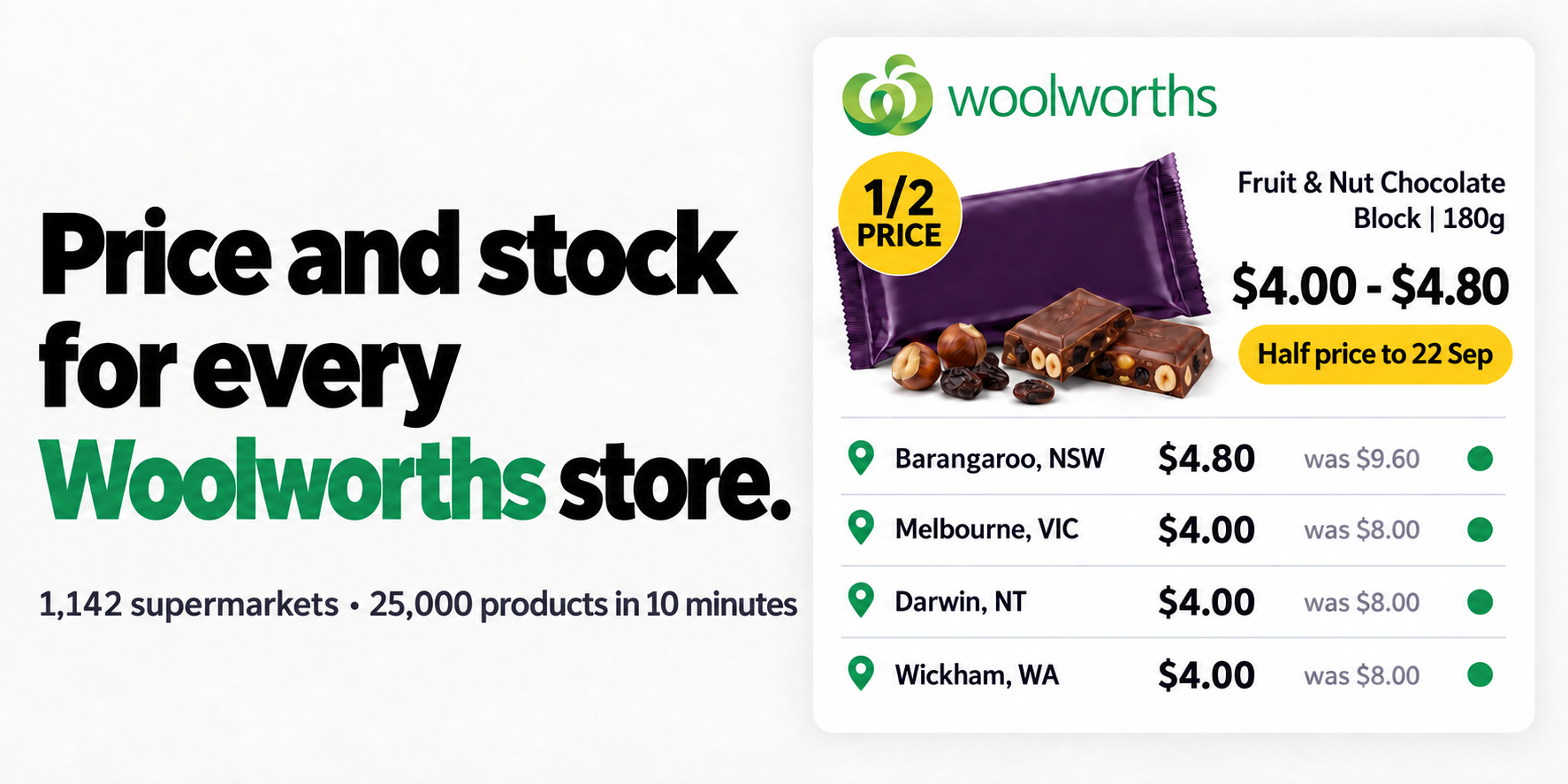
<p><a href="https://console.apify.com/actors/cfmAVd7XDm7dWNSPg/input"><img src="https://iili.io/noa2hRR.png" alt="Price and stock for every Woolworths store: the same half-price Cadbury Fruit &amp; Nut block costs $4.80 in Barangaroo and $4.00 in Melbourne, Darwin and Wickham."></a></p>

<table>
<tr>
<td colspan="2" style="padding:10px 14px;background:#006D77;border:none;border-radius:4px 4px 0 0">
<span style="color:#FAFAF9;font-size:14px;font-weight:700;letter-spacing:0.5px">Clearpath Australian Groceries</span>
<span style="color:#E0F2F1;font-size:13px">&nbsp;&nbsp;&bull;&nbsp;&nbsp;Price and stock for every store, Woolworths and Coles</span>
</td>
</tr>
<tr>
<td style="padding:12px 16px;border:1px solid #E7E5E4;border-radius:0 0 0 4px;background:#C9E8E6;border-right:none;border-top:none;vertical-align:top;width:50%">
<span style="white-space:nowrap"><img src="https://iili.io/noYRFou.png" width="20" height="20" style="vertical-align:middle">&nbsp;&nbsp;<a href="https://apify.com/clearpath/woolworths-scraper" style="color:#006D77;text-decoration:none;font-weight:700;font-size:13px">Woolworths Scraper</a></span><br>
<span style="color:#006D77;font-size:12px;font-weight:600">&#10148; You are here</span>
</td>
<td style="padding:12px 16px;border:1px solid #E7E5E4;border-radius:0 0 4px 0;background:#E0F2F1;border-top:none;vertical-align:top;width:50%">
<span style="white-space:nowrap"><img src="https://apify-image-uploads-prod.s3.us-east-1.amazonaws.com/DSvMCAwsufMyZeLyt-actor-FzxNShGGntfilAEDe-9OiAyL7bAA-coles-scraper-icon-v1.png" width="20" height="20" style="vertical-align:middle">&nbsp;&nbsp;<a href="https://apify.com/clearpath/coles-scraper" style="color:#1C1917;text-decoration:none;font-weight:700;font-size:13px">Coles Scraper</a></span><br>
<span style="color:#78716C;font-size:12px">Prices and stock, 870 stores</span>
</td>
</tr>
</table>

### Why choose this Woolworths scraper?

- **Each store's own price, stock and offer dates.** Pick stores by number or postcode, or run all 1,142 Woolworths supermarkets. Every store gets its own rows. In one run the same half-price Cadbury Fruit & Nut block was $4.80 in Barangaroo and $4.00 in Melbourne, Darwin and Wickham, and the peppermint block was not sold in Barangaroo at all. Where Woolworths limits an order by stock, you also get the units on the shelf.
- **The whole catalogue, and runs that finish.** A full-catalogue run on Apify saved 25,098 products across all 24 departments, with no duplicates, in 10 minutes. When a run approaches its time limit it stops on its own and keeps everything already collected.
- **Everything Woolworths shows.** Barcode, ingredients, allergens, dietary claims and unit price come on every product row. Add the nutrition panel, country of origin and in-store aisle, customer reviews with the star breakdown, the 1,142-store directory with opening hours and facilities, the full category tree, or Everyday Market listings by seller.

<p><a href="https://console.apify.com/actors/cfmAVd7XDm7dWNSPg/input"><img src="https://iili.io/no7D3gI.png" width="250" height="48" alt="Get Woolworths prices"></a></p>

### Try it

Open the [input page](https://console.apify.com/actors/cfmAVd7XDm7dWNSPg/input), switch to JSON and paste this. It searches Tim Tam in the nearest Woolworths to the Sydney, Melbourne and Brisbane postcodes and returns up to 10 products per store: at most 30 results, under $0.07.

```json
{
  "searchTerms": ["tim tam"],
  "postcodes": ["2000", "3000", "4000"],
  "maxItems": 10
}
```

Add `"includeDetails": true` for the nutrition panel, country of origin and in-store aisle, or `"includeReviews": true` for customer reviews. Both are charged as add-ons.

#### Copy to your AI assistant

```
clearpath/woolworths-scraper on Apify. Scrapes Woolworths Australia only (not NZ or South Africa): product search (searchTerms), any woolworths.com.au product, category, specials, search, store or offer link (startUrls; paste the links, a link list file is not read), exact barcode lookup (barcodes, EAN/GTIN, no fuzzy matches), specials (all, halfprice, multibuy, lowershelfprice, everydaylowprice, seasonal, onlineonly, bundles), whole departments with departments=[...] on its own, no other setting needed (slugs: fruit-veg, poultry-meat-seafood, dinner, deli, dairy-eggs-fridge, bakery, lunch-box, freezer, snacks-confectionery, pantry, international-foods, drinks, beer-wine-spirits, beauty, personal-care, health-wellness, cleaning-maintenance, baby, pet, electronics, home-lifestyle; an unrecognised slug is skipped), fullCatalog=true (every department, about 25,000 products, duplicates removed; departments narrows it), storeDirectory=true (all 1,142 supermarkets with hours and facilities) and categories=true (the 2,696-node tree, one row per category with its browse link: the way to find an aisle or shelf link to pass back in startUrls); combine them in one run. Price, stock, availability and offer dates are per store: set storeIds (the number at the end of a store link, e.g. 1002 in /shop/storelocator/nsw-chatswood-1002), postcodes (nearest supermarket) or allStores=true; without them results come from Woolworths' default online store, and storeDirectory=true is how to discover store numbers. Each store gets its own rows and each row costs an extra store-price event. Store rows are built from that store's online list, so a product ranged only in another region will not appear in its searches: use a product link or a barcode for those. Barcode, ingredients, allergens, dietary claims, Health Star Rating and unit price are on every product row already; set includeDetails=true for the nutrition panel, country of origin, directions, warnings, in-store aisle and variants, and note that product links and barcodes always come with details and are charged the same add-on. For reviews set includeReviews=true: reviews arrive as their own rows (type "review") and every product row gains rating, reviewCount and the ratingDistribution star breakdown; maxReviewsPerProduct omitted or 0 means all, which can exceed 1,000 for one product. Everyday Market (third-party marketplace) listings are excluded by default because they far outnumber supermarket products: set includeEverydayMarket=true to include them, or name sellers in everydayMarketSellers for one seller's listings. Filters brands, dietary, allergenFree, minHealthStarRating, onlySpecials and inStockOnly apply to searches, category links, specials and the catalogue. sortBy orders listings: relevance (default), priceAscending, priceDescending, unitPriceAscending, unitPriceDescending, nameAscending, nameDescending, newest or specialsFirst, and a link that already carries a sort keeps it. maxItems applies per search term, link, specials type, department or seller, per store (rows for the directory and the category tree); omitted or 0 means no limit, so set it to bound cost. One run takes at most 100 search terms, 1,000 links, 1,000 barcodes, 50 sellers, 2,000 store IDs and 500 postcodes; more than that fails the run with a message. Every dataset row carries a type field: product, store, review or category. A full-catalogue, allStores or unlimited run takes minutes and outlives the synchronous run endpoints, so start the run, poll it and then read its dataset. Cost: $1.49 per 1,000 rows (Free plan) down to $0.99 (Gold and above), details +$0.49 down to +$0.29, store price +$0.49 down to +$0.29, reviews $0.79 down to $0.49 per 1,000, plus $0.005 per run start, so batch inputs into one run. Full spec: GET https://api.apify.com/v2/actors/clearpath~woolworths-scraper/builds/default (Authorization: Bearer TOKEN) returns inputSchema, actorDefinition.storages.dataset and readme.
```

### What can this Woolworths scraper do?

- 🔍 **Search Woolworths** by keyword, the same products you see on woolworths.com.au, in any sort order
- 🔗 **Paste any Woolworths link**: product, category, specials, search results, store page or multi-buy offer. Filters and sorting in the link are kept
- 🏷️ **Look up products by barcode** (EAN/GTIN), exact matches only
- 💲 **Scrape specials**: everything discounted, or just half price, buy more save more, lower shelf price, everyday low price, seasonal, online-only or bundles
- 🗂️ **Scrape whole departments** picked from a list: Fruit & Veg, Bakery, Pantry, Drinks, Baby, Pet and the rest
- 📦 **Pull the full Woolworths catalogue** department by department: about 25,000 products, duplicates removed
- 🏪 **Choose stores** by store number, by postcode (nearest supermarket) or all 1,142 at once
- 📍 **Export the Woolworths store directory**: address, phone, coordinates, opening hours for the coming week and facilities
- ⭐ **Collect customer reviews** with rating, text, author, date and the 1-to-5 star breakdown per product
- 🛍️ **Scrape Everyday Market sellers**: third-party listings by seller name, off by default
- 🥗 **Filter** by brand, dietary and lifestyle claim, allergen-free claim, minimum Health Star Rating, on special only or in stock only
- 🧾 **Combine everything in one run**: searches, links, barcodes, specials, catalogue, stores, reviews and sellers run side by side

### How to scrape Woolworths products, prices and specials

#### Search products in specific stores

```json
{
  "searchTerms": ["full cream milk", "bread"],
  "storeIds": ["1002", "3304"],
  "maxItems": 50,
  "sortBy": "priceAscending"
}
```

The store number is at the end of a Woolworths store page link, for example `1002` in `woolworths.com.au/shop/storelocator/nsw-chatswood-1002`. Leave stores empty to use Woolworths' default online store.

#### Scrape Woolworths half-price specials

```json
{
  "specials": "halfprice",
  "maxItems": 0
}
```

`maxItems: 0` returns every half-price product. The other types are `all`, `multibuy`, `lowershelfprice`, `everydaylowprice`, `seasonal`, `onlineonly` and `bundles`. Woolworths turns its specials over on Wednesday, so a weekly Wednesday schedule keeps a specials tracker current.

#### Get this week's Woolworths catalogue

```json
{
  "specials": "all",
  "maxItems": 0
}
```

The catalogue as data: every product on special or price-dropped this week, with the was price, the saving, the offer description and the dates the offer runs (`offerValidFrom`, `offerValidTo`). Woolworths turns its catalogue over on Wednesday morning and offers end on a Tuesday, so schedule this weekly on Wednesday. Add `postcodes` to get the catalogue as it prices at your own supermarket. This returns the catalogue's products, not the printed PDF.

#### Paste Woolworths links

```json
{
  "startUrls": [
    { "url": "https://www.woolworths.com.au/shop/browse/dairy-eggs-fridge/milk?sortBy=PriceAsc" },
    { "url": "https://www.woolworths.com.au/shop/browse/specials/half-price" },
    { "url": "https://www.woolworths.com.au/shop/productdetails/36066" },
    { "url": "https://www.woolworths.com.au/shop/storelocator/nsw-chatswood-1002" }
  ],
  "maxItems": 100
}
```

Category, specials and search links return their product lists, with any filter and sort order in the link kept. Product links return one product with its details. Store links return the store's address, hours and facilities. Paste the links themselves: a link list file is not read.

#### Look up products by barcode

```json
{
  "barcodes": ["9300617044901", "9310072000282"],
  "includeDetails": true
}
```

Only exact barcode matches are returned, and each comes with its details. A barcode Woolworths does not range returns nothing and is reported in the log.

#### Compare prices and stock across every Woolworths store

```json
{
  "searchTerms": ["tim tam"],
  "allStores": true,
  "maxItems": 5
}
```

Up to 5 products for each of the 1,142 supermarkets, one row per store per product: up to about 5,700 results. Start small, because rows multiply by the number of stores.

#### Get every Woolworths store location and opening hours

```json
{
  "storeDirectory": true,
  "maxItems": 0
}
```

The input form fills in a maximum of 100, which would also limit the directory to 100 stores. Set `maxItems` to 0 or leave it empty for all 1,142, which takes about 15 seconds.

#### Collect Woolworths product reviews

```json
{
  "searchTerms": ["tim tam"],
  "includeReviews": true,
  "maxReviewsPerProduct": 20,
  "maxItems": 10
}
```

Reviews arrive as their own rows, newest first, and every product row gets `rating`, `reviewCount` and the `ratingDistribution` star breakdown. Leave `maxReviewsPerProduct` empty or set 0 for every review a product has, which can be more than a thousand.

#### Scrape whole departments

```json
{
  "departments": ["bakery", "dairy-eggs-fridge"],
  "postcodes": ["3000"],
  "maxItems": 500
}
```

Pick departments from the list in the input form, no category link needed. `maxItems` counts per department and per store, so this returns up to 500 bakery and 500 dairy products for the supermarket nearest postcode 3000. For one aisle or shelf instead of a whole department, paste its link into `startUrls`.

#### Scrape the full Woolworths catalogue with nutrition and barcodes

```json
{
  "fullCatalog": true,
  "includeDetails": true,
  "maxItems": 0
}
```

Every product Woolworths sells online for the chosen store. Barcodes, ingredients, allergens and dietary claims are already on every row without `includeDetails`; the switch adds the nutrition panel, country of origin, directions, warnings, in-store aisle and variants, makes each product slower to collect and adds the details charge. Start with a small `maxItems` per department.

#### Scrape an Everyday Market seller

```json
{
  "everydayMarketSellers": ["JOYBUY ONLINE"],
  "maxItems": 500
}
```

Everyday Market is Woolworths' third-party marketplace: products listed and shipped by other sellers, not stocked in supermarkets. It is far larger than the supermarket range, so these listings are left out of searches, links and specials unless you ask for them with `includeEverydayMarket`. Use the seller name exactly as Woolworths writes it. Marketplace rows have `isEverydayMarket: true`, a `sellerName`, delivery estimates, and no store.

#### Filter results

```json
{
  "searchTerms": ["yoghurt"],
  "dietary": ["Gluten Free"],
  "allergenFree": ["Dairy Free"],
  "minHealthStarRating": "4",
  "onlySpecials": true,
  "inStockOnly": true,
  "maxItems": 50
}
```

Filters apply to searches, category links, specials and the catalogue. `brands`, `dietary` and `allergenFree` match any of the values you give, written the way Woolworths writes them.

#### Input parameters

| Parameter | Type | Default | Meaning |
|---|---|---|---|
| `searchTerms` | array | | Products to search for, up to 100 per run |
| `startUrls` | array | | Woolworths product, category, specials, search, store or offer links, up to 1,000 |
| `barcodes` | array | | Barcodes (EAN/GTIN), exact matches only, up to 1,000 |
| `specials` | string | `none` | `all`, `halfprice`, `multibuy`, `lowershelfprice`, `everydaylowprice`, `seasonal`, `onlineonly` or `bundles` |
| `departments` | array | | Department slugs, for example `bakery`, `pantry`, `dairy-eggs-fridge`. Narrows the catalogue to those departments |
| `fullCatalog` | boolean | `false` | Every department, duplicates removed |
| `storeDirectory` | boolean | `false` | Add all 1,142 supermarkets with address, hours and facilities |
| `categories` | boolean | `false` | Add the full category tree, one row per category, name, path, level and link |
| `everydayMarketSellers` | array | | Everyday Market seller names, up to 50 |
| `storeIds` | array | | Store numbers to get prices and stock for, up to 2,000 |
| `postcodes` | array | | Australian postcodes, each uses the nearest supermarket, up to 500 |
| `allStores` | boolean | `false` | Run searches, links, specials and catalogue in all 1,142 supermarkets |
| `includeDetails` | boolean | `false` | Add nutrition, country of origin, directions, warnings, aisle and variants. Charged per product |
| `includeReviews` | boolean | `false` | Add review rows and the star breakdown. Charged per review |
| `maxReviewsPerProduct` | integer | no limit (form: 20) | Newest reviews first. `0` = every review |
| `includeEverydayMarket` | boolean | `false` | Also return third-party marketplace listings in searches, links and specials |
| `maxItems` | integer | no limit (form: 100) | Products per search term, link, specials type, department or seller, per store. Rows for the directory and the category tree. `0` = no limit |
| `sortBy` | string | `relevance` | `priceAscending`, `priceDescending`, `unitPriceAscending`, `unitPriceDescending`, `nameAscending`, `nameDescending`, `newest` or `specialsFirst` |
| `brands` | array | | Only these brands |
| `dietary` | array | | Dietary and lifestyle claims, for example Gluten Free, Vegan, Halal |
| `allergenFree` | array | | Allergen-free claims, for example Dairy Free, Peanut Free |
| `minHealthStarRating` | string | | `0.5` to `5` in steps of 0.5 |
| `onlySpecials` | boolean | `false` | Keep only discounted products |
| `inStockOnly` | boolean | `false` | Skip products that are out of stock |

### What data can you extract from Woolworths?

| Group | Fields |
|---|---|
| Product | `id`, `barcode`, `name`, `displayName`, `brand`, `size`, `description`, `url`, `imageUrl`, `imageUrls` |
| Price | `price`, `wasPrice`, `unitPrice`, `unitOfMeasure`, `unitPriceText`, `instorePrice`, `instoreWasPrice` |
| Specials | `isOnSpecial`, `isHalfPrice`, `promotionType`, `offerDescription`, `offerValidFrom`, `offerValidTo`, `saveAmount`, `savePercent`, `multibuyQuantity`, `multibuyPrice`, `previousPrice`, `previousPriceUntil` |
| Store stock | `storeId`, `storeName`, `storeSuburb`, `storeState`, `storePostcode`, `priceScope`, `isAvailable`, `isInStock`, `stockQuantity`, `purchaseLimit`, `nextAvailableDate`, `availableForPickup`, `availableForDelivery` |
| Label | `ingredients`, `allergensContains`, `allergensMayContain`, `freeFrom`, `dietary`, `healthStarRating`, `countryOfOrigin`, `storageInstructions` |
| Product details | `nutrition`, `servingSize`, `servingsPerPack`, `countryOfOriginLabel`, `australianIngredientsPercent`, `directions`, `warnings`, `suitableFor`, `aisleDepartment`, `aisle`, `variants`, `variantOptions`, `videoUrl` |
| Reviews | `rating`, `ratingCount`, `reviewCount`, `ratingDistribution`, and review rows with `text`, `author`, `date`, `reviewSource` |
| Category | `departments`, `categories`, `internalDepartment`, `internalCategory`, `internalSubcategory`, `internalSegment` |
| Everyday Market | `isEverydayMarket`, `sellerName`, `sellerId`, `deliveryDaysMin`, `deliveryDaysMax`, `freeShipping` |
| Store directory | `address`, `suburb`, `state`, `postcode`, `phone`, `latitude`, `longitude`, `openingHours`, `facilities`, `division`, `url` |
| Run context | `type`, `sourceType`, `sourceInput`, `detailStatus`, `position`, `isSponsored`, `scrapedAt` |

Every field Woolworths returns is kept, 204 in all. Rows carry `type: "product"`, `"store"`, `"review"` or `"category"`, and the Output tab has a view for each. Export as JSON to keep nested fields such as `nutrition` and `openingHours` intact.

#### Product in a chosen store, with details

A real result for the Cadbury Fruit & Nut block at Woolworths Barangaroo Metro, with `includeDetails` and `includeReviews` on. This is the named part of the row, 56 of its 166 fields; every run also carries the rest of what Woolworths publishes for the product. The nutrition panel shows 4 of its 8 nutrients.

Nulls here are real: this block has no customer reviews on Woolworths, so `rating`, `ratingCount` and `reviewCount` are null and there is no `ratingDistribution`; confectionery carries no Health Star Rating; and `stockQuantity` is null because Woolworths caps this product by its 36-item purchase limit rather than by stock. Products that do have reviews, a Health Star Rating or a stock-based limit carry those values.

```json
{
  "type": "product",
  "id": 814559,
  "barcode": "9300617065029",
  "name": "Cadbury Dairy Milk Fruit & Nut Chocolate Block",
  "brand": "Cadbury",
  "size": "180g",
  "price": 4.8,
  "wasPrice": 9.6,
  "saveAmount": 4.8,
  "savePercent": 50.0,
  "isOnSpecial": true,
  "isHalfPrice": true,
  "promotionType": "HalfPrice",
  "offerDescription": null,
  "offerValidFrom": "2026-09-16",
  "offerValidTo": "2026-09-22",
  "unitPrice": 2.67,
  "unitOfMeasure": "100G",
  "unitPriceText": "$2.67 / 100G",
  "isAvailable": true,
  "isInStock": true,
  "stockQuantity": null,
  "purchaseLimit": 36,
  "priceScope": "store",
  "storeId": "8964",
  "storeName": "Barangaroo Metro",
  "storeSuburb": "Barangaroo",
  "storeState": "NSW",
  "storePostcode": "2000",
  "rating": null,
  "ratingCount": null,
  "reviewCount": null,
  "healthStarRating": null,
  "ingredients": "Full Cream Milk, Sugar, Sultanas, Cocoa Butter, Cocoa Mass, Milk Solids, Almonds, Emulsifiers (Soy Lecithin, 476), Vegetable Oil, Flavours.",
  "allergensContains": [
    "Milk",
    "Soy",
    "Almond"
  ],
  "allergensMayContain": [
    "Tree Nuts",
    "Peanuts",
    "Gluten",
    "Wheat"
  ],
  "freeFrom": [
    "Egg Free",
    "Fish Free"
  ],
  "dietary": [
    "Low Salt"
  ],
  "countryOfOrigin": null,
  "countryOfOriginLabel": "Made in Australia from imported and local ingredients",
  "storageInstructions": "Please store in cool, dry conditions.",
  "nutrition": [
    {
      "nutrient": "Energy",
      "perServing": "538.0kJ",
      "per100": "2150.0kJ"
    },
    {
      "nutrient": "Protein",
      "perServing": "2.0g",
      "per100": "8.0g"
    },
    {
      "nutrient": "Fat, Total",
      "perServing": "7.0g",
      "per100": "28.0g"
    },
    {
      "nutrient": "Saturated",
      "perServing": "3.7g",
      "per100": "14.7g"
    }
  ],
  "servingSize": "25.0 G",
  "servingsPerPack": "7.2",
  "aisleDepartment": "confectionery",
  "aisle": "chocolate blocks",
  "departments": [
    "Snacks & Confectionery"
  ],
  "categories": [
    "Chocolate Blocks"
  ],
  "isEverydayMarket": false,
  "sellerName": null,
  "imageUrl": "https://cdn0.woolworths.media/content/wowproductimages/large/814559.jpg",
  "url": "https://www.woolworths.com.au/shop/productdetails/814559/cadbury-dairy-milk-fruit-nut-chocolate-block",
  "sourceType": "search",
  "sourceInput": "cadbury dairy milk fruit nut block",
  "detailStatus": "enriched",
  "scrapedAt": "2026-09-17T06:59:53+00:00"
}
```

`detailStatus` is `enriched` when details were added, `not_requested` without `includeDetails`, and `unavailable` when Woolworths could not return them (the listing fields are still delivered). `priceScope` is `store` when the row belongs to a store you chose and `default` otherwise.

#### Store

```json
{
  "type": "store",
  "storeId": "1139",
  "storeName": "Belconnen",
  "division": "SUPERMARKETS",
  "address": "18 Benjamin Way",
  "suburb": "Belconnen",
  "state": "ACT",
  "postcode": "2617",
  "phone": "02 6132 9825",
  "latitude": -35.2386596,
  "longitude": 149.0652762,
  "isOpenNow": true,
  "openingHours": [
    {
      "day": "Today",
      "hours": "7:00 AM - 10:00 PM",
      "label": "Thu: 0700-2200"
    },
    {
      "day": "Tomorrow",
      "hours": "7:00 AM - 10:00 PM",
      "label": "Fri: 0700-2200"
    },
    {
      "day": "Saturday",
      "hours": "7:00 AM - 10:00 PM",
      "label": "Sat: 0700-2200"
    },
    {
      "day": "Sunday",
      "hours": "7:00 AM - 10:00 PM",
      "label": "Sun: 0700-2200"
    },
    {
      "day": "Monday",
      "hours": "7:00 AM - 10:00 PM",
      "label": "Mon: 0700-2200"
    },
    {
      "day": "Tuesday",
      "hours": "7:00 AM - 10:00 PM",
      "label": "Tue: 0700-2200"
    },
    {
      "day": "Wednesday",
      "hours": "7:00 AM - 10:00 PM",
      "label": "Wed: 0700-2200"
    },
    {
      "day": "Thursday",
      "hours": "7:00 AM - 10:00 PM",
      "label": "Thu: 0700-2200"
    }
  ],
  "facilities": [
    "Direct to boot - drive through",
    "Liquor (Adjacent BWS)",
    "Pick up",
    "Quiet Hour: Mon-Thurs 10:30am",
    "Seafood",
    "WiFi"
  ],
  "url": "https://www.woolworths.com.au/shop/storelocator/act-belconnen-1139",
  "sourceType": "storeDirectory",
  "sourceInput": null,
  "storeNo": "1139",
  "name": "Belconnen",
  "addressLine1": "18 Benjamin Way",
  "addressLine2": null,
  "gMTZone": "10:0",
  "isOpen": true,
  "partnerUrl": null,
  "categorisedFacilities": [],
  "nearbyPartners": null,
  "scrapedAt": "2026-09-17T06:09:51+00:00"
}
```

#### Review

```json
{
  "type": "review",
  "productId": 258076,
  "productName": "Tasty Mix Chips Variety Box 20 pack",
  "productUrl": "https://www.woolworths.com.au/shop/productdetails/258076/tasty-mix-chips-variety-box",
  "barcode": "9310015255656",
  "rating": 5,
  "text": "Good portion sizes for kids lunches even snacks on weekends",
  "author": "Catchangeslives",
  "date": "2026-01-15T23:27:00.000Z",
  "reviewSource": "BazaarVoice",
  "client": "woolworths",
  "position": 1,
  "scrapedAt": "2026-09-17T06:21:52+00:00"
}
```

#### Category

```json
{
  "type": "category",
  "categoryId": "1_CED9B86",
  "name": "Meat",
  "slug": "meat",
  "url": "https://www.woolworths.com.au/shop/browse/specials/online-only-specials/poultry-meat-seafood/meat",
  "level": 4,
  "parentId": "specialsgroup.onlineonly.1_D5A2236",
  "path": "Specials > Online Only Specials > Poultry, Meat & Seafood > Meat",
  "childCount": 1,
  "isSpecial": false,
  "isRestricted": false,
  "isEverydayMarket": false,
  "productCount": null,
  "displayOrder": 7
}
```

#### Result counts and the category tree

Runs with searches, listing links, specials or the catalogue also save `LISTING_METADATA` in the run's key-value store: the total Woolworths reports per search, link or specials type and store, the available filters and subcategories, and any suggested search term. Runs with `categories` or the full catalogue also save `CATEGORIES`, the whole tree of 2,696 categories.

### Do Woolworths prices differ by store?

Yes, and the offer dates do too. The same half-price Cadbury Dairy Milk block in one run:

| Store | Price | Was | Half price to |
|---|---|---|---|
| Barangaroo Metro, NSW | $4.80 | $9.60 | 22 Sep 2026 |
| Qv, Melbourne VIC | $4.00 | $8.00 | 22 Sep 2026 |
| Darwin City, NT | $4.00 | $8.00 | 22 Sep 2026 |
| Wickham, WA | $4.00 | $8.00 | 22 Sep 2026 |

In the same run the peppermint block was not sold in Barangaroo at all (`price: null`, `isAvailable: false`), and stock showed 31 units in Wickham and 24 in Melbourne. Without store numbers or postcodes you get Woolworths' default online store.

**One limit worth knowing:** store rows are built from Woolworths' online product list, so a product that is only ranged in another region will not appear in that store's searches. Paste a product link or a barcode and you get that product's price at any store you choose.

### How much does it cost to scrape Woolworths?

Pay per result, plus $0.005 for each run you start. Charges per 1,000:

| Apify plan | Result (product, store or category) | Product details | Price for a chosen store | Review |
|---|---|---|---|---|
| Free | $1.49 | +$0.49 | +$0.49 | $0.79 |
| Bronze | $1.39 | +$0.49 | +$0.49 | $0.69 |
| Silver | $1.29 | +$0.39 | +$0.39 | $0.59 |
| Gold | $0.99 | +$0.29 | +$0.29 | $0.49 |
| Platinum | $0.99 | +$0.29 | +$0.29 | $0.49 |
| Diamond | $0.99 | +$0.29 | +$0.29 | $0.49 |

The details add-on is charged for each product that comes back with details: with `includeDetails`, and for product links and barcodes, which always include them. The store-price add-on is charged once per product per store you chose, so a row from a chosen store costs the result plus that add-on.

| Example on the Free plan | Results | Charges |
|---|---|---|
| Search 3 products in 3 stores, 10 each | 90 | $0.18 |
| Store directory, all 1,142 supermarkets | 1,142 | $1.70 |
| 1,000 products with details | 1,000 | $1.98 |
| Every half-price special | ~7,200 | $10.73 |
| Full catalogue | ~25,100 | $37.40 |
| 1,000 reviews | 1,000 | $0.79 |

Each figure adds $0.005 for the run start, so batch your inputs into one run. Set a maximum cost per run in the run options to stop a large run at your budget.

### FAQ

**Can I get prices for a specific Woolworths store or postcode?**
Yes. Use `storeIds`, `postcodes` (nearest supermarket) or `allStores`. Each store gets its own rows, so the same product appears once per store with that store's price, stock and offer dates.

**How many Woolworths stores are there?**
The directory returns 1,142 Woolworths supermarkets: 348 in NSW, 280 in VIC, 264 in QLD, 117 in WA, 69 in SA, 32 in TAS, 20 in ACT and 12 in NT. That is every store number Woolworths publishes.

**When do Woolworths specials change?**
Weekly, on Wednesday. Each offer runs Wednesday to Tuesday, and `offerValidFrom` and `offerValidTo` give the exact dates for the store the row belongs to. Schedule the actor on Wednesdays to track each new specials week.

**Can I get nutrition, ingredients, allergens and barcodes?**
Barcode, ingredients, allergens, dietary claims and the Health Star Rating are on every product row already. Turn on `includeDetails` for the nutrition panel, country of origin label, directions, warnings, in-store aisle and variants.

**Can I look up a product by barcode?**
Yes. Put the barcode in `barcodes`. Only exact matches are returned, so a barcode Woolworths does not sell gives no row rather than something unrelated.

**What is Everyday Market?**
Woolworths' third-party marketplace: products listed and shipped by other sellers rather than stocked in supermarkets. There are far more marketplace listings than supermarket products, so they are left out by default. Turn on `includeEverydayMarket` to include them in searches, links and specials, or name sellers in `everydayMarketSellers` to get one seller's listings.

**Can I get customer reviews?**
Yes, with `includeReviews`. Reviews come as their own rows with rating, text, author and date, and every product row gets the 1-to-5 star breakdown. Popular products can have well over a thousand reviews, so set `maxReviewsPerProduct` unless you want all of them.

**Can I get the full Woolworths product list with prices?**
Yes, with `fullCatalog`. A run on Apify saved 25,098 products across all 24 departments, with duplicates removed, in 10 minutes.

**Why did my search return products that do not match?**
Woolworths' own search is fuzzy and will offer loosely related products when nothing matches exactly. The actor returns what Woolworths returns; `LISTING_METADATA` records the total Woolworths reported and any term it suggested instead.

**Are sponsored products included?**
Yes. Woolworths places sponsored products among search and category results, and they are saved like any other product with `isSponsored: true`. Filter on that field to remove them.

**What happens if the run reaches its time limit?**
The actor stops shortly before the limit and saves everything it collected. The run ends successfully and the status message says it stopped early.

**Do I need a Woolworths account?**
No. The actor collects the public prices and products shown on woolworths.com.au.

**Does this cover Woolworths in New Zealand or South Africa?**
No. This is Woolworths Australia (woolworths.com.au) only.

**Can I compare Woolworths with Coles?**
Yes, with the [Coles Scraper](https://apify.com/clearpath/coles-scraper). It has the same inputs and the same per-store price and stock data, so the two datasets line up.

### More scrapers from our friends at Zen Studio

Sister scrapers for product, price and seller data.

- <img src="https://apify-image-uploads-prod.s3.us-east-1.amazonaws.com/NWYsOG96fMDy8ycdf-actor-ghXSMZcW3GxsCrkiR-5hnvsKv4Yt-1688-wholesale-scraper-logo.png" width="16" height="16" style="vertical-align:middle;border-radius:3px"> **1688 阿里巴巴**
  - [1688 Wholesale Scraper](https://apify.com/zen-studio/1688-wholesale-scraper)
- <img src="https://apify-image-uploads-prod.s3.us-east-1.amazonaws.com/NWYsOG96fMDy8ycdf-actor-PsAKYWM55HG4AHXjK-ItywU7Bp0s-taobao-search-scraper-logo.png" width="16" height="16" style="vertical-align:middle;border-radius:3px"> **Taobao 淘宝**

  - [Taobao Product Scraper](https://apify.com/zen-studio/taobao-search-scraper)
- <img src="https://apify-image-uploads-prod.s3.us-east-1.amazonaws.com/NWYsOG96fMDy8ycdf-actor-uZy6tbKLKnSVtT4BN-emXnT123uR-jd-com-scraper-logo-square.png" width="16" height="16" style="vertical-align:middle;border-radius:3px"> **JD.com 京东**

  - [JD.com Scraper](https://apify.com/zen-studio/jd-com-search-scraper)

**More from Clearpath**

- <img src="https://apify-image-uploads-prod.s3.us-east-1.amazonaws.com/DSvMCAwsufMyZeLyt-actor-FzxNShGGntfilAEDe-9OiAyL7bAA-coles-scraper-icon-v1.png" width="16" height="16" style="vertical-align:middle;border-radius:3px"> **Coles**
  - [Coles Scraper](https://apify.com/clearpath/coles-scraper)
- <img src="https://apify-image-uploads-prod.s3.us-east-1.amazonaws.com/DSvMCAwsufMyZeLyt-actor-9K7ejaAYnpuwNl2sr-0xGZJDXdTD-joybuy-scraper-logo.webp" width="16" height="16" style="vertical-align:middle;border-radius:3px"> **Joybuy**
  - [Joybuy Scraper](https://apify.com/clearpath/joybuy-scraper)
  - [Joybuy Product Detail Scraper](https://apify.com/clearpath/joybuy-product-detail-scraper)
- <img src="https://apify-image-uploads-prod.s3.us-east-1.amazonaws.com/DSvMCAwsufMyZeLyt-actor-P5fALt8vY7xXgJh56-cIPO73yOhI-shein-product-scraper-logo.jpg" width="16" height="16" style="vertical-align:middle;border-radius:3px"> **SHEIN**

  - [SHEIN Product Scraper](https://apify.com/clearpath/shein-product-scraper)
  - [SHEIN Trends Scraper](https://apify.com/clearpath/shein-trends-scraper)
- <img src="https://apify-image-uploads-prod.s3.us-east-1.amazonaws.com/DSvMCAwsufMyZeLyt-actor-R9SL2PPdhdhLQwdck-tbaq4J8sxX-shopy-by-shopify-scraper-logo.jpg" width="16" height="16" style="vertical-align:middle;border-radius:3px"> **Shopify**

  - [Shopify Product Search](https://apify.com/clearpath/shop-by-shopify-product-scraper)
  - [Shopify Store Leads](https://apify.com/clearpath/shopify-store-leads)

### Support

- **Bugs**: Issues tab
- **Features**: Email or issues
- **Email**: max@mapa.slmail.me

### Legal Compliance

Extracts publicly available product, price, review and store information. Users must comply with Woolworths' terms of use and applicable data protection laws. Not affiliated with or endorsed by Woolworths.

***

*Scrape Woolworths Australia products, prices, stock by store, specials, barcodes, nutrition, reviews and store locations.*

# Actor input Schema

## `searchTerms` (type: `array`):

Products to search for on Woolworths, one per line. Up to 100 per run.

## `startUrls` (type: `array`):

Paste any Woolworths link: a product, category, specials page, search results, store page or multi-buy offer. Filters and sorting in the link are kept. Up to 1,000 per run. Paste the links themselves, a link list file is not read.

## `barcodes` (type: `array`):

Look up products by barcode (EAN/GTIN). Only exact matches are returned. Up to 1,000 per run.

## `specials` (type: `string`):

Scrape everything on special or with a lower price, or one kind of deal.

## `departments` (type: `array`):

Whole departments, picked from the list. For one aisle or shelf, paste its link above instead.

## `fullCatalog` (type: `boolean`):

Every product Woolworths sells, department by department, duplicates removed. Pick Departments above to narrow it. Everyday Market listings are not included.

## `storeDirectory` (type: `boolean`):

Every Woolworths supermarket: address, phone, coordinates, opening hours for the next 7 days and facilities.

## `everydayMarketSellers` (type: `array`):

Seller names exactly as shown on Woolworths, for example JOYBUY ONLINE. Returns the seller's Everyday Market listings.

## `maxItems` (type: `integer`):

Per search term, link, department, specials type or seller, per store. Leave empty or set 0 for no limit. Keeps a run small and the cost predictable.

## `storeIds` (type: `array`):

Woolworths store numbers, for example 1002 in woolworths.com.au/shop/storelocator/nsw-chatswood-1002. Each store gets its own rows.

## `postcodes` (type: `array`):

Australian postcodes. Each one uses the nearest Woolworths supermarket. Up to 500 per run.

## `allStores` (type: `boolean`):

Your searches, links, specials and catalog in every Woolworths supermarket (about 1,140). Rows multiply by the number of stores: combine with a small maximum.

## `includeDetails` (type: `boolean`):

Adds the nutrition panel, country of origin label, directions, warnings, aisle and every variant. Barcode, ingredients, allergens and dietary claims are always included. Charged as an add-on per product. Product links and barcodes always come with details and are charged the same add-on.

## `includeReviews` (type: `boolean`):

Adds review rows (rating, text, date, author) and the star rating breakdown for each product. Each review is charged as a review event.

## `maxReviewsPerProduct` (type: `integer`):

Newest reviews first. Leave empty or set 0 for all reviews.

## `includeEverydayMarket` (type: `boolean`):

Also return Everyday Market listings (products from third-party sellers, shipped by the seller) in searches, links and specials. Off by default: they are not sold in stores and can outnumber Woolworths products many times.

## `categories` (type: `boolean`):

Adds one row per Woolworths category: name, path, level and link. Use it to build a category list or to find the exact category link you want to scrape.

## `sortBy` (type: `string`):

Order results the way Woolworths sorts them. Links that already contain a sort order keep it.

## `brands` (type: `array`):

Only these brands, exactly as Woolworths writes them.

## `dietary` (type: `array`):

For example Gluten Free, Vegan, Halal, Kosher, Organic, Low Sugar. Products match any of them.

## `allergenFree` (type: `array`):

For example Dairy Free, Egg Free, Peanut Free, Soy Free, Tree Nut Free. Products match any of them.

## `minHealthStarRating` (type: `string`):

Only products rated at least this.

## `onlySpecials` (type: `boolean`):

Keep only discounted products.

## `inStockOnly` (type: `boolean`):

Skip products that are out of stock.

## Actor input object example

```json
{
  "searchTerms": [
    "milk"
  ],
  "specials": "none",
  "fullCatalog": false,
  "storeDirectory": false,
  "maxItems": 100,
  "allStores": false,
  "includeDetails": false,
  "includeReviews": false,
  "maxReviewsPerProduct": 20,
  "includeEverydayMarket": false,
  "categories": false,
  "sortBy": "relevance",
  "onlySpecials": false,
  "inStockOnly": false
}
```

# Actor output Schema

## `results` (type: `string`):

No description

## `listingMetadata` (type: `string`):

No description

## `categories` (type: `string`):

No description

# API

You can run this Actor programmatically using our API. Below are code examples in JavaScript, Python, and CLI, as well as the OpenAPI specification and MCP server setup.

## JavaScript example

```javascript
import { ApifyClient } from 'apify-client';

// Initialize the ApifyClient with your Apify API token
// Replace the '<YOUR_API_TOKEN>' with your token
const client = new ApifyClient({
    token: '<YOUR_API_TOKEN>',
});

// Prepare Actor input
const input = {
    "searchTerms": [
        "milk"
    ],
    "maxItems": 100,
    "maxReviewsPerProduct": 20
};

// Run the Actor and wait for it to finish
const run = await client.actor("clearpath/woolworths-scraper").call(input);

// Fetch and print Actor results from the run's dataset (if any)
console.log('Results from dataset');
console.log(`💾 Check your data here: https://console.apify.com/storage/datasets/${run.defaultDatasetId}`);
const { items } = await client.dataset(run.defaultDatasetId).listItems();
items.forEach((item) => {
    console.dir(item);
});

// 📚 Want to learn more 📖? Go to → https://docs.apify.com/api/client/js/docs

```

## Python example

```python
from apify_client import ApifyClient

# Initialize the ApifyClient with your Apify API token
# Replace '<YOUR_API_TOKEN>' with your token.
client = ApifyClient("<YOUR_API_TOKEN>")

# Prepare the Actor input
run_input = {
    "searchTerms": ["milk"],
    "maxItems": 100,
    "maxReviewsPerProduct": 20,
}

# Run the Actor and wait for it to finish
run = client.actor("clearpath/woolworths-scraper").call(run_input=run_input)

# Fetch and print Actor results from the run's dataset (if there are any)
print(f"💾 Check your data here: https://console.apify.com/storage/datasets/{run.default_dataset_id}")
for item in client.dataset(run.default_dataset_id).iterate_items():
    print(item)

# 📚 Want to learn more 📖? Go to → https://docs.apify.com/api/client/python/docs/quick-start

```

## CLI example

```bash
echo '{
  "searchTerms": [
    "milk"
  ],
  "maxItems": 100,
  "maxReviewsPerProduct": 20
}' |
apify call clearpath/woolworths-scraper --silent --output-dataset

```

## MCP server setup

```json
{
    "mcpServers": {
        "apify": {
            "type": "http",
            "url": "https://mcp.apify.com/?tools=fetch-actor-details,clearpath/woolworths-scraper"
        }
    }
}
```

The hosted server signs you in with OAuth on first connect, so no API token belongs in this config. Clients without OAuth support can send an `Authorization: Bearer <APIFY_API_TOKEN>` header instead, using a token from API & Integrations in Apify Console (https://console.apify.com/settings/integrations).

## OpenAPI specification

Download the OpenAPI definition: https://api.apify.com/v2/actors/cfmAVd7XDm7dWNSPg/builds/Vd0fqBqafhXj5tEvY/openapi.json