| Yelp review data ready for analysis |
| 🌐 Multilingual coverage |
Collect all published review languages or select only the markets you need. |
| 👤 Reviewer context |
Name, location, Elite year, activity counts, and profile image on each available profile. |
| 💬 Owner replies |
Public business responses with author, role, and response date. |
| 🔍 Review status |
Optionally include filtered reviews, labelled so rating analysis stays accurate. |
#### Copy to your AI assistant
```
clearpath/yelp-reviews-scraper on Apify. Scrapes every Yelp review in every published language, with reviewer profile, owner reply, photos and review status. Call ApifyClient("TOKEN").actor("clearpath/yelp-reviews-scraper").call(run_input={...}), then client.dataset(run["defaultDatasetId"]).list_items().items. Business summaries land in a separate dataset, id at OUTPUT.summaryDatasetId. Full spec: GET https://api.apify.com/v2/acts/clearpath~yelp-reviews-scraper/builds/default (Bearer TOKEN). Token: https://console.apify.com/account/integrations
```
### Key Features
- **Multilingual reviews**: collect every language Yelp publishes for the business, or select specific two-letter language codes.
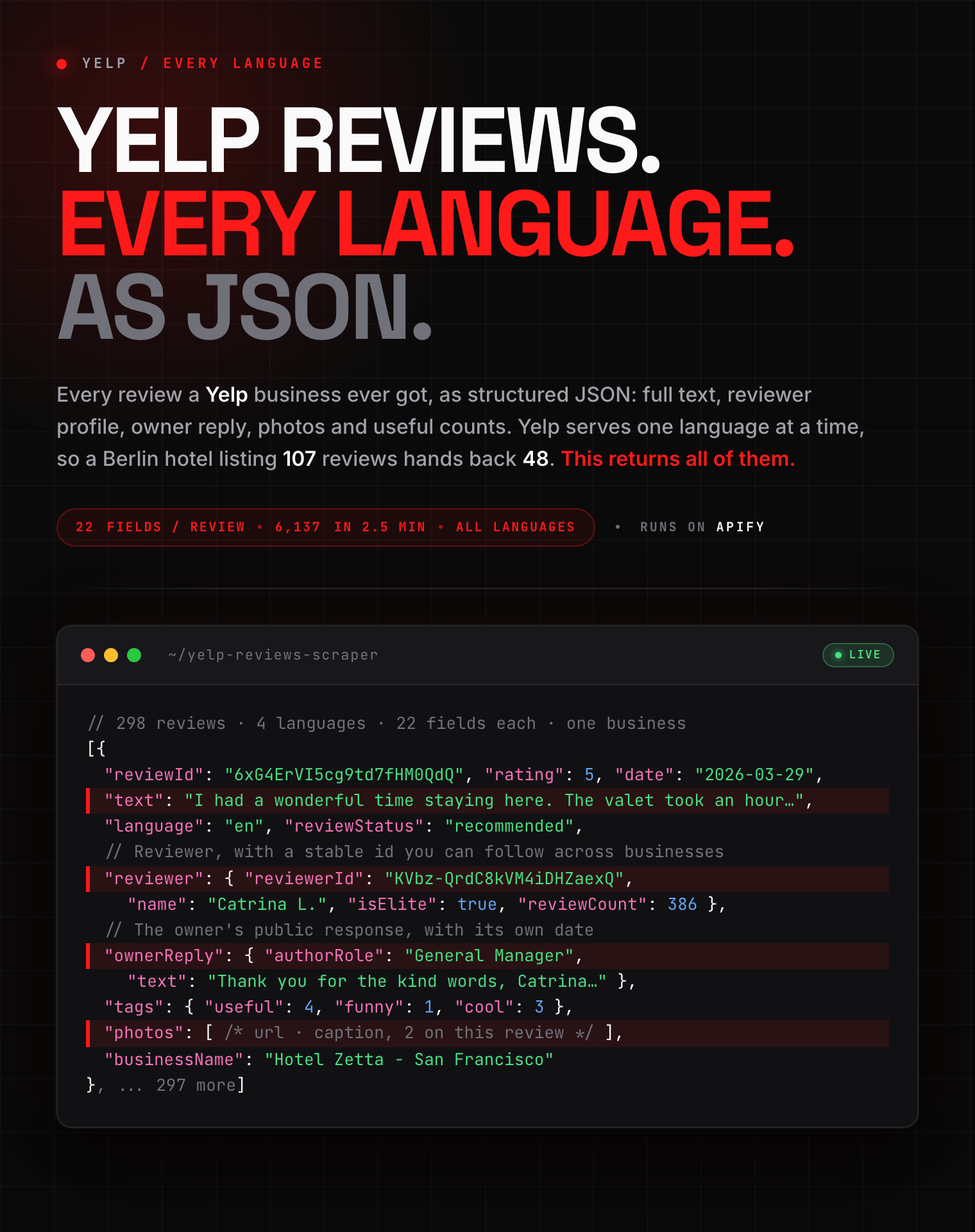
- **22 fields per review**, plus a 10-field reviewer profile: rating, full text, language, date, visit date, owner reply, photos, videos, and useful / funny / cool counts.
- **Business summary included**: rating, review count, language breakdown, categories, address, coordinates, and photo count in a separate dataset.
- **Names or links**: paste `https://www.yelp.com/biz/...` or just `Hotel Zetta San Francisco` with a city.
- **Nothing to configure**: proxying and retries are handled for you.
- **Bulk-ready runs**: process up to 200 businesses and request up to 50,000 reviews per business.
### How to Scrape Yelp Reviews
#### Basic: every review from one business
```json
{
"businesses": [
"https://www.yelp.com/biz/hotel-zetta-san-francisco-san-francisco-3"
]
}
```
Links from any Yelp country domain work and all identify the same business: `yelp.com`, `yelp.de`, `yelp.co.uk`, `yelp.com.au`, `de.yelp.ch`, `m.yelp.com`. Paste whatever your browser gave you.
#### By name, several businesses at once
```json
{
"businesses": [
"Hotel Zetta San Francisco",
"Gary Danko",
"Tartine Bakery"
],
"searchLocation": "San Francisco, CA"
}
```
`searchLocation` is only used for names. Links already identify the business, so it is ignored for those.
#### The 100 newest reviews per business
```json
{
"businesses": [
"https://www.yelp.com/biz/gary-danko-san-francisco"
],
"maxReviewsPerBusiness": 100,
"sortBy": "newest"
}
```
### Input Parameters
| Parameter | Type | Default | Description |
|-----------|------|---------|-------------|
| `businesses` | array | *required* | Yelp business links (any country domain) or business names, one per line |
| `searchLocation` | string | | City or area, used only when you enter names instead of links |
| `maxReviewsPerBusiness` | integer | all | Stop after this many reviews per business. Empty collects every review |
| `sortBy` | string | `newest` | `newest`, `oldest`, `highest_rating`, `lowest_rating`, `most_prolific` |
| `reviewLanguages` | array | all | Pick from the language dropdown. Empty collects every language |
| `includeFilteredReviews` | boolean | `false` | Also collect reviews Yelp keeps off the main listing |
| `includeSummary` | boolean | `true` | Add one business summary row to a separate `summary` dataset |
#### Choosing the right input
**Use links when the exact branch matters.** A link identifies the listing directly, which is the safest choice for hotel chains, restaurant groups, and businesses with similar names.
**Use names for exploratory work.** Add `searchLocation` so the closest match is picked in the city you meant.
Either way, every row carries `searchQuery` alongside the resolved `businessName` and `businessUrl`, so a wrong match is visible in the output rather than buried in it.
**Leave `reviewLanguages` empty** for reputation monitoring. Set codes only when the analysis targets one market.
The limit applies *after* sorting, so `maxReviewsPerBusiness: 100` with `sortBy: "newest"` gives you the 100 newest reviews, not an arbitrary page.
For large lists, start with the default concurrency of 4. Increase it when several independent businesses need to finish faster. Lower it if run stability matters more than speed. Concurrency changes how many businesses are processed together; it does not change the result schema or the per-business limit.
### Yelp Review Scraper Use Cases
#### Hotel reputation monitoring
Track feedback for one hotel or a whole portfolio. Sort by newest, keep the permalink, and use `publishedAt` as your cursor.
The summary row gives you the rating and totals for a dashboard tile. The review rows keep the text, language, reviewer context, and owner response behind it.
#### Competitive benchmarking
Put nearby businesses into one run and compare rating distributions, complaint themes, response coverage, and review velocity.
`businessId`, `businessName` and `businessUrl` sit on every row, so a combined export stays attributable.
#### Multilingual sentiment analysis
Collect all available languages, then group or route rows using the `language` field. This supports market-level topic analysis without mixing translated text into the original review. If your model or workflow supports only selected languages, set `reviewLanguages` before collection to reduce run size and cost.
#### Service recovery and response audits
Sort by lowest rating to build a support queue.
`ownerReply` shows which complaints got a public response and how fast. Keep `reviewStatus` in the analysis so filtered reviews are not counted towards the displayed star rating.
#### Lead generation and account research
Qualify businesses from the summary dataset by category, location, rating, review volume, and whether the listing is claimed.
Join it to the review dataset to find recurring complaints, weak response coverage, or fast review growth.
Review data can inform outreach. It should not be used to infer sensitive traits about reviewers.
### What Data Can You Extract from Yelp?
Every review row includes:
- **The review**: rating (1 to 5), full text, language, publish date, visit date, permalink
- **The reviewer**: stable reviewer ID, name, home city, Elite and Elite All-Star status, review count, friend count, photo count, profile image
- **Engagement**: useful / funny / cool counts, and Yelp's reaction counters
- **Owner reply**: text, author name, author role, reply date
- **Media**: review photos with captions, video thumbnails
- **Status**: whether the review counts towards the business's star rating
| Field group | Included data |
|-------------|---------------|
| Review identity | `reviewId`, `reviewUrl`, `publishedAt`, `date`, `experienceDate` |
| Review content | `rating`, `ratingScale`, `text`, `language`, `tags`, `reactions` |
| Reviewer | Name, location, activity counts, Elite status and year, profile image |
| Business response | Reply text, author name, author role, publication date |
| Business context | `businessId`, `businessName`, `businessUrl`, `searchQuery` |
Unavailable values are returned as `null`. This is expected for reviewer details that are not public, reviews whose text is unavailable, or optional media and owner replies. Keep `ratingScale: "1-5"` when combining this dataset with hotel sources that use a different rating scale.
#### Output Example
```json
{
"type": "review",
"reviewId": "6xG4ErVI5cg9td7fHM0QdQ",
"reviewUrl": "https://www.yelp.com/biz/hotel-zetta-san-francisco-san-francisco-3?hrid=6xG4ErVI5cg9td7fHM0QdQ",
"reviewStatus": "recommended",
"countsTowardsRating": true,
"rating": 5,
"ratingScale": "1-5",
"text": "I had a wonderful time staying here. The customer service they provide is worth it, considering the cost of staying per night.\n\nI used their valet service and unfortunately my dad had to wait almost an hour for his car to arrive. The management team were quick to apologize and credited the whole cost of the valet parking.\n\nI love their location. Walking distance to Target and Trader Joe's and so many other food spots.",
"language": "en",
"publishedAt": "2026-03-29T13:39:55-07:00",
"date": "2026-03-29",
"experienceDate": null,
"reviewer": {
"reviewerId": "KVbz-QrdC8kVM4iDHZaexQ",
"name": "Catrina L.",
"location": "Dublin, United States",
"reviewCount": 386,
"friendCount": 248,
"photoCount": 558,
"isElite": true,
"eliteYear": "2026",
"isEliteAllStar": false,
"profileImage": "https://s3-media0.fl.yelpcdn.com/photo/h_WaD4L0sHzN4aNLBi2Qew/90s.jpg"
},
"tags": {
"useful": 4,
"funny": 1,
"cool": 3
},
"reactions": {
"helpful": 3,
"thanks": 1
},
"ownerReply": {
"text": "Thank you for the kind words, Catrina. We are glad the team could make the valet situation right, and we hope to welcome you back soon.",
"authorName": "Jordan M.",
"authorRole": "General Manager",
"publishedAt": "2026-04-01T09:12:00-07:00"
},
"photos": [
{
"url": "https://s3-media0.fl.yelpcdn.com/bphoto/ElM4W5mS-r5Uh1eUlYjRAQ/348s.jpg",
"caption": "King Room"
},
{
"url": "https://s3-media0.fl.yelpcdn.com/bphoto/0Jd_vUSY9pfmb4c4BAiR5A/348s.jpg",
"caption": "Game room on the second floor"
}
],
"videos": null,
"businessId": "4IZUuGz6odBxqY6jISF8GQ",
"businessName": "Hotel Zetta - San Francisco",
"businessUrl": "https://www.yelp.com/biz/hotel-zetta-san-francisco-san-francisco-3",
"searchQuery": "Hotel Zetta San Francisco"
}
```
The `summary` dataset holds one row per business:
```json
{
"type": "business",
"businessId": "4IZUuGz6odBxqY6jISF8GQ",
"businessName": "Hotel Zetta - San Francisco",
"businessUrl": "https://www.yelp.com/biz/hotel-zetta-san-francisco-san-francisco-3",
"alias": "hotel-zetta-san-francisco-san-francisco-3",
"rating": 3.8,
"ratingScale": "1-5",
"reviewCount": 298,
"reviewsCollected": 314,
"reviewsByLanguage": {
"en": 295,
"ja": 1,
"nl": 1,
"de": 1
},
"filteredReviewCounts": {
"notRecommended": 7,
"removed": 9
},
"categories": ["Hotels"],
"location": {
"address": "55 5th St",
"city": "San Francisco",
"region": "CA",
"postalCode": "94103",
"country": "US",
"formatted": "55 5th St\nSan Francisco, CA 94103\nUnited States",
"neighborhoods": ["Union Square", "SoMa"],
"timezone": "America/Los_Angeles",
"latitude": 37.783382,
"longitude": -122.407056
},
"photoCount": 601,
"primaryPhoto": "https://s3-media0.fl.yelpcdn.com/bphoto/qotKEAFeJigwU61pTc_vWA/o.jpg",
"priceRange": "$$$",
"phone": "(415) 543-8555",
"specialties": "Connect, celebrate, cozy up: Hotel Zetta is San Francisco's creative retreat.",
"isPermanentlyClosed": false,
"isYelpGuaranteed": false,
"isClaimed": true,
"isAdvertiser": false,
"isOnlineOnly": false,
"consumerAlert": null,
"searchQuery": "Hotel Zetta San Francisco"
}
```
### Advanced Usage
Ready-made configurations for reputation monitoring, competitor benchmarking, multilingual review analysis, and sentiment research.
#### Only negative reviews, for support triage
```json
{
"businesses": ["https://www.yelp.com/biz/hotel-zetta-san-francisco-san-francisco-3"],
"sortBy": "lowest_rating",
"maxReviewsPerBusiness": 50
}
```
#### One language only, for a local-market study
```json
{
"businesses": ["Hotel Adlon Kempinski"],
"searchLocation": "Berlin, Germany",
"reviewLanguages": ["de"]
}
```
#### Everything, including the reviews Yelp filters out
```json
{
"businesses": ["https://www.yelp.com/biz/gary-danko-san-francisco"],
"includeFilteredReviews": true
}
```
Filtered rows always arrive with `countsTowardsRating: false`. Filter on that field to keep your averages matching the rating Yelp displays.
`reviewStatus` names which group a row came from:
- **`not_recommended`**: Yelp's ranking no longer shows it.
- **`removed`**: Yelp took it down for breaking its rules. Text and reviewer are withheld.
- **`filtered`**: a review limit stopped the sweep before the two groups could be told apart. Raise `maxReviewsPerBusiness` for the precise label.
#### A competitor set, newest first
```json
{
"businesses": [
"https://www.yelp.com/biz/hotel-zetta-san-francisco-san-francisco-3",
"https://www.yelp.com/biz/hotel-zelos-san-francisco-san-francisco-3",
"https://www.yelp.com/biz/hotel-zeppelin-san-francisco-san-francisco-2"
],
"sortBy": "newest",
"maxReviewsPerBusiness": 200
}
```
### Run from Python
Install the official client with `pip install apify-client`, then call the Actor and read the default review dataset:
```python
from apify_client import ApifyClient
client = ApifyClient("YOUR_APIFY_TOKEN")
run = client.actor("clearpath/yelp-reviews-scraper").call(
run_input={
"businesses": [
"https://www.yelp.com/biz/hotel-zetta-san-francisco-san-francisco-3"
],
"maxReviewsPerBusiness": 100,
"sortBy": "newest",
"includeSummary": True,
}
)
reviews = client.dataset(run["defaultDatasetId"]).list_items().items
for review in reviews:
print(review["businessName"], review["rating"], review["text"])
```
Schedule the Actor in the Apify Console and send completed-run notifications to a webhook, Make, Zapier, or Google Sheets. **Daily** suits most reputation monitoring; **hourly** only for high-volume businesses.
Use `reviewId` as the deduplication key and `publishedAt` as the event timestamp.
Do not deduplicate on text alone: short reviews repeat verbatim between people, and an edited review keeps its identifier.
### Data Quality Notes
- A business name can resolve to the wrong branch when several listings are similar. Compare `searchQuery` with the resolved business fields, or use links.
- `reviewCount` describes reviews that contribute to Yelp's displayed rating. Rows with `countsTowardsRating: false` must stay outside a reconstructed average.
- Deleted or withheld content cannot be restored. A valid row may contain a rating and date with `text: null`.
- Profile and response fields reflect what is publicly available at run time. Absence does not necessarily mean a reviewer or business owner has never supplied the information.
- A warning in the run log about missing reviews means the output is incomplete for that business. Retry the run before using it for an audit or benchmark.
### Pricing: Pay Per Event (PPE)
**$0.79 per 1,000 reviews**, the same on every Apify plan. No volume tiers to work up to.
| Event | Per review | Per 1,000 |
|-------|------------|-----------|
| Review | $0.00079 | $0.79 |
Business summary rows are never charged. They come from the same page as the reviews, so billing for one would be charging for the shape of the response. Small standard platform events, such as Actor start, are shown in Apify before you run the Actor.
| Reviews | Cost |
|---------|------|
| 100 | $0.08 |
| 500 | $0.40 |
| 1,000 | $0.79 |
Free users can preview the Actor for **10 lifetime runs**, limited to the first business and up to 10 reviews per run.
### FAQ
**What is Yelp?**
Yelp is a local business directory and review platform used for restaurants, hotels, shops, and local services. Users rate businesses from one to five stars and publish written reviews. This Actor turns the public review and business details into structured rows.
**Why do I get more reviews than the business's review count?**
If `includeFilteredReviews` is enabled, `reviewsCollected` can exceed the displayed `reviewCount`. Filtered reviews do not count toward Yelp's business rating or displayed review total.
**Can I collect only certain languages?**
Yes. Set `reviewLanguages` to two-letter codes such as `en`, `de`, or `fr`. Leave it empty to collect all published languages.
**How many reviews can I extract?**
Up to 50,000 reviews per business and up to 200 businesses per run. Set `maxReviewsPerBusiness` to control dataset size and cost.
**How fresh is the data?**
Each run collects the currently public Yelp listing. Freshness ultimately depends on when Yelp publishes or updates a review.
**What are filtered reviews?**
Yelp keeps some reviews off the main listing, either because its ranking no longer shows them or because it removed them for breaking its content rules. Neither group counts towards the star rating. Turn on `includeFilteredReviews` to collect them; each row is labelled so you can keep them separate.
**Why do some filtered reviews have no text?**
Some removed reviews retain a rating and date while their text or reviewer is unavailable. Those fields are returned as `null` instead of being invented.
**How do I export the data?**
JSON, CSV, Excel, XML, or HTML from the run's Storage tab, or through the Apify API. JSON preserves the nested `reviewer`, `ownerReply` and `photos` fields; CSV flattens them.
**Can I use a Yelp link from my own country, like yelp.de or yelp.co.uk?**
Yes. A business carries the same identifier on every Yelp domain, so a link from any country site resolves to the same business and the same reviews. Language subdomains such as `de.yelp.ch`, mobile `m.yelp.com` links, and links with tracking parameters all work unchanged.
**Can I get the business listing data instead of reviews?**
The `summary` dataset already gives you the business record: rating, the 1 to 5 star breakdown, review count, categories, address, coordinates, price range, phone, and photo count.
For place data across a whole city or category rather than one business at a time, use [Google Maps Scraper](https://apify.com/zen-studio/google-maps-scraper).
**Can I collect hotel or restaurant reviews from other platforms?**
Yes, and the field shapes line up so you can stack them. [Booking.com Reviews](https://apify.com/clearpath/booking-reviews-scraper) and [Tripadvisor Reviews](https://apify.com/clearpath/tripadvisor-reviews-scraper) cover the same properties from a different guest population, [Expedia Hotels & Reviews](https://apify.com/clearpath/expedia-hotels-scraper-pro) covers 30+ regional sites, and [TheFork Restaurant Reviews](https://apify.com/clearpath/thefork-restaurant-reviews) covers European restaurants.
**Is it legal to scrape Yelp reviews?**
This Actor extracts only publicly visible data, nothing behind a login. Reviews and reviewer names are personal data, so you are responsible for complying with Yelp's terms and with data protection law in your jurisdiction, including GDPR and CCPA.
**What happens if a business name matches the wrong place?**
Every row carries `searchQuery` alongside the resolved `businessName` and `businessUrl`, so a mismatch is visible in the output. Use business links when you need certainty.
How to run the scraper and put it on a schedule (official Apify videos):
https://www.youtube.com/watch?v=1OW8gOqlZbY
https://www.youtube.com/watch?v=1jI7WcVQmwM
### More Clearpath review and place scrapers
**⭐ Travel and hospitality reviews**
- 
 Booking.com
 Tripadvisor
 Expedia Hotels
 **TheFork**
- [TheFork Restaurant Reviews](https://apify.com/clearpath/thefork-restaurant-reviews)
**📍 Places**
-
**TheFork**
- [TheFork Restaurant Reviews](https://apify.com/clearpath/thefork-restaurant-reviews)
**📍 Places**
-  **Google Maps**
- [Google Maps Scraper](https://apify.com/zen-studio/google-maps-scraper)
### Support
- **Bugs**: Issues tab
- **Features**: Email or issues
- **Email**: max@mapa.slmail.me
### Legal Compliance
Extracts publicly available data. Users must comply with Yelp terms and data protection regulations (GDPR, CCPA).
***
*Structured Yelp reviews for reputation monitoring, hospitality research, competitive intelligence, and local-market analysis.*
# Actor input Schema
## `businesses` (type: `array`):
Yelp business links, or just business names. One per line.
**Google Maps**
- [Google Maps Scraper](https://apify.com/zen-studio/google-maps-scraper)
### Support
- **Bugs**: Issues tab
- **Features**: Email or issues
- **Email**: max@mapa.slmail.me
### Legal Compliance
Extracts publicly available data. Users must comply with Yelp terms and data protection regulations (GDPR, CCPA).
***
*Structured Yelp reviews for reputation monitoring, hospitality research, competitive intelligence, and local-market analysis.*
# Actor input Schema
## `businesses` (type: `array`):
Yelp business links, or just business names. One per line.