# 🔥 Zillow Rental Application Submitter | Auto Apply Bot (`clearpath/zillow-rental-application-submitter`) Actor
Automate Zillow rental applications instantly. Submit to properties in 3 seconds vs 10+ minutes manually. Custom messages, ZPID/URL support, automatic validation. Chain with search actors for complete search-to-apply automation. $35/month unlimited applications. US/Canada phone numbers.
- **URL**: https://apify.com/clearpath/zillow-rental-application-submitter.md
- **Developed by:** [ClearPath](https://apify.com/clearpath) (community)
- **Categories:** Real estate, Automation, Lead generation
- **Stats:** 3 total users, 1 monthly users, 100.0% runs succeeded, NaN bookmarks
- **User rating**: No ratings yet
## Pricing
$35.00/month + usage
To use this Actor, you pay a monthly rental fee to the developer. The rent is subtracted from your prepaid usage every month after the free trial period.
You also pay for the Apify platform usage, which gets cheaper the higher Apify subscription plan you have.
Learn more: https://docs.apify.com/platform/actors/running/actors-in-store#rental-actors
## What's an Apify Actor?
Actors are a software tools running on the Apify platform, for all kinds of web data extraction and automation use cases.
In Batch mode, an Actor accepts a well-defined JSON input, performs an action which can take anything from a few seconds to a few hours,
and optionally produces a well-defined JSON output, datasets with results, or files in key-value store.
In Standby mode, an Actor provides a web server which can be used as a website, API, or an MCP server.
Actors are written with capital "A".
## How to integrate an Actor?
If asked about integration, you help developers integrate Actors into their projects.
You adapt to their stack and deliver integrations that are safe, well-documented, and production-ready.
The best way to integrate Actors is as follows.
In JavaScript/TypeScript projects, use official [JavaScript/TypeScript client](https://docs.apify.com/api/client/js.md):
```bash
npm install apify-client
```
In Python projects, use official [Python client library](https://docs.apify.com/api/client/python.md):
```bash
pip install apify-client
```
In shell scripts, use [Apify CLI](https://docs.apify.com/cli/docs.md):
````bash
# MacOS / Linux
curl -fsSL https://apify.com/install-cli.sh | bash
# Windows
irm https://apify.com/install-cli.ps1 | iex
```bash
In AI frameworks, you might use the [Apify MCP server](https://docs.apify.com/platform/integrations/mcp.md).
If your project is in a different language, use the [REST API](https://docs.apify.com/api/v2.md).
For usage examples, see the [API](#api) section below.
For more details, see Apify documentation as [Markdown index](https://docs.apify.com/llms.txt) and [Markdown full-text](https://docs.apify.com/llms-full.txt).
# README
## 🏠 Zillow Rental Application Request Submitter | Automatically Apply for Rentals
**Programmatically submit rental applications to Zillow listings** - Automate the entire application process with instant batch submissions.
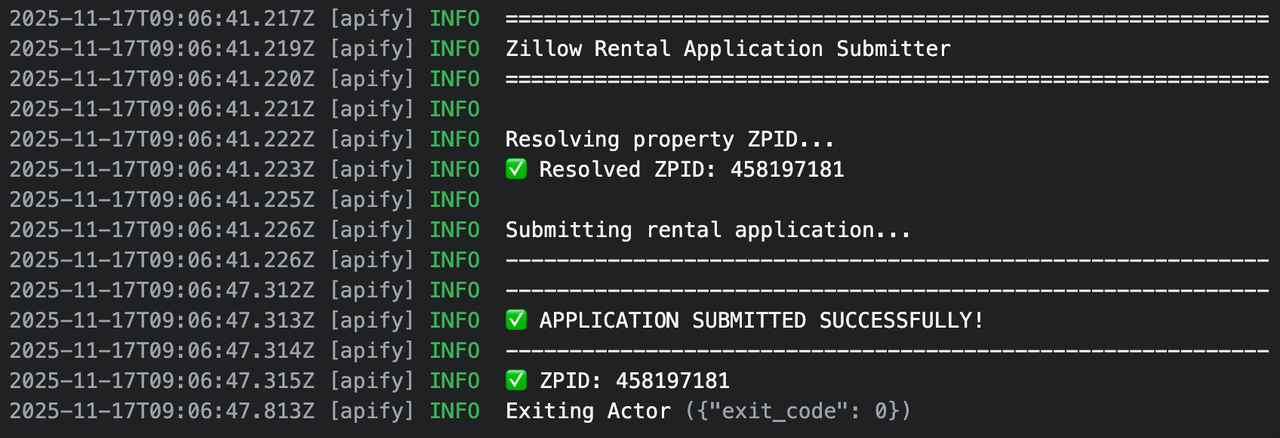
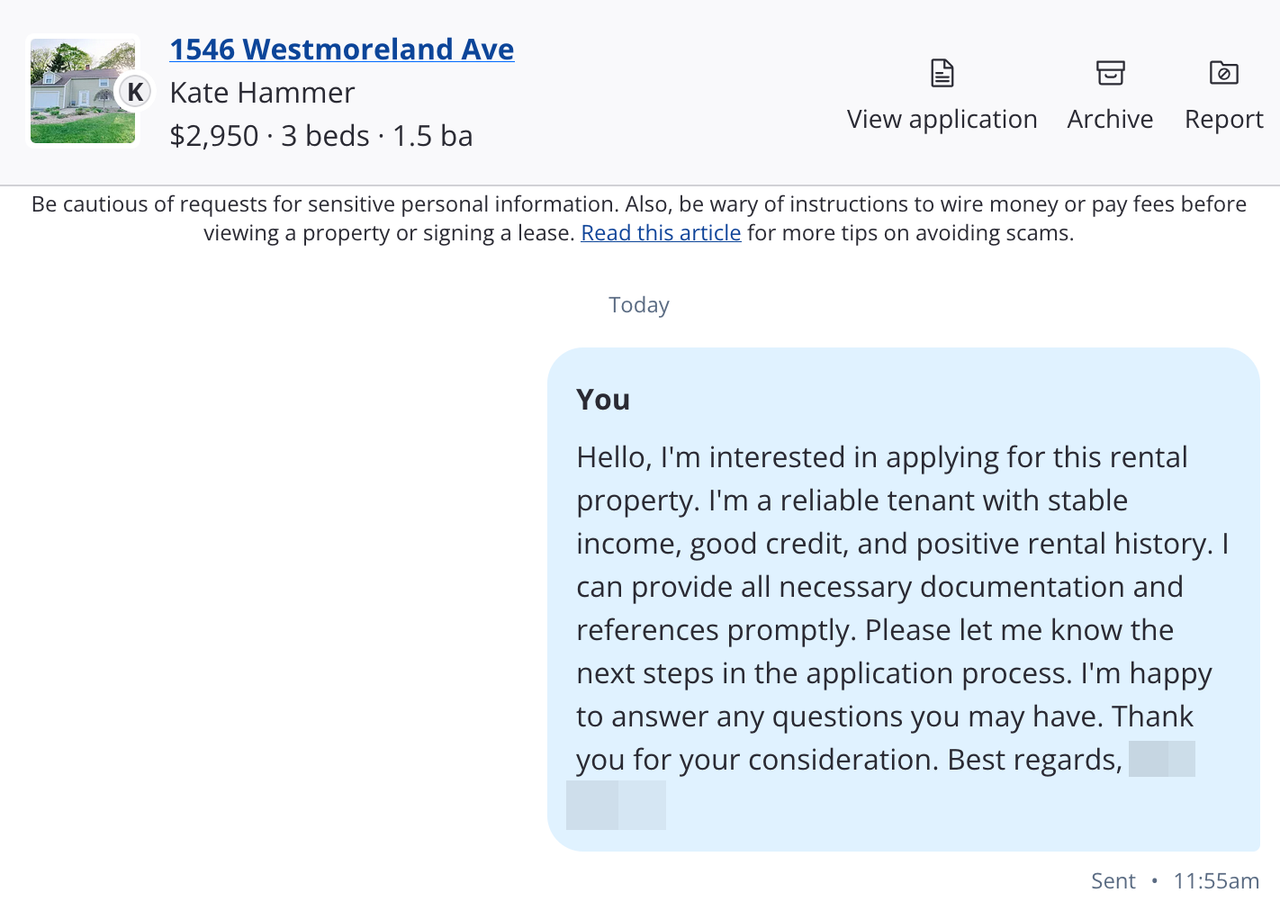 Never fill out rental application forms manually again. Submit applications to dozens of Zillow properties in seconds with customizable messages, automatic validation, and comprehensive success tracking. Perfect for competitive rental markets where speed matters.
### Features
- **⚡ Instant Rental Request Submissions** - Apply in 3 seconds vs 10+ minutes manually
- **🔗 Integrate with any other Zillow Actor** - Chain with search actors for automation
- **✉️ Custom Messages** - Personalize with templates and variables
- **💰 $35/Month unlimited usage** - No per-application fees
---
### 🚀 Quick Start
#### Basic - Single Property by ZPID
```json
{
"zpid": 2069918407,
"name": "Sarah Johnson",
"email": "sarah.johnson@gmail.com",
"phoneNumber": "+12125551234"
}
````
#### Batch - Multiple Properties by URL
```json
{
"propertyUrl": "https://www.zillow.com/homedetails/137A-Christopher-St-1B-New-York-NY-10014/458222521_zpid/",
"name": "Michael Chen",
"email": "michael.chen@gmail.com",
"phoneNumber": "+14165551234"
}
```
#### Advanced - Custom Message
```json
{
"zpid": 2069918407,
"name": "Alex Rivera",
"email": "alex.rivera@gmail.com",
"phoneNumber": "+13105551234",
"message": "Hello,\n\nI'm very interested in your property and would love to schedule a viewing. I'm a software engineer at a stable tech company with excellent credit (750+) and strong rental history.\n\nI can provide:\n- Proof of income (recent pay stubs)\n- Credit report\n- Previous landlord references\n- Employment verification\n\nI'm looking to move in by the 1st of next month and can sign a lease immediately upon approval.\n\nThank you for your consideration!\n\nBest regards,\n{name}"
}
```
***
### ⚡ Key Features
#### Instant Automated Submission
- **3-second applications** - Submit instantly vs 10+ minutes manually
- **Automatic validation** - Phone, email, and required fields checked
- **Success tracking** - Know exactly which applications succeeded or failed
#### 🔗 Apify Integration
- **Chain with search actors** - Use with zillow-bulk-scraper or zip-code-search
- **Workflow automation** - Build complete search-to-apply pipelines
- **Programmatic access** - Full API integration for custom workflows
#### ✉️ Custom Message Templates
- **Professional default** - Pre-written template included
- **Fully customizable** - Personalize every aspect of your message
- **Variable interpolation** - Use {name} placeholder for automatic insertion
#### 🎯 Flexible Input
- **ZPID or URL** - Direct property ID or full Zillow URLs
- **Speaking URLs supported** - Works with friendly URLs like /apartments/city/building-name/
- **Automatic extraction** - Converts any format to property ID
***
### 🎯 Use Cases
#### For Individual Renters
- **Competitive rental markets** - Be first to apply in hot markets like NYC, SF, LA where properties rent within hours
- **Apartment hunting automation** - Apply to 50+ matching properties instantly when new listings appear
- **Remote relocations** - Submit applications from anywhere without visiting properties
- **Time savings** - Spend 3 seconds per application instead of 10+ minutes filling forms manually
- **Application blitzes** - Apply to every property in your target area in minutes
- **Market research** - Test application process across multiple properties and landlords
#### For Real Estate Professionals
- **Client services** - Submit applications on behalf of clients with their information
- **Property managers** - Streamline tenant application workflows for managed properties
- **Relocation specialists** - Automate applications for corporate relocations
- **Rental agents** - Apply to multiple properties for clients in one batch
- **Market analysis** - Test landlord responsiveness across different properties
- **Portfolio expansion** - Quickly identify accepting landlords for new client placements
#### For Developers & Automation Specialists
- **Search-to-apply pipelines** - Chain zillow-bulk-scraper → filter → auto-apply workflows
- **Scheduled automation** - Run nightly to apply to new listings matching criteria
- **Multi-platform integration** - Combine with other rental platforms for comprehensive coverage
- **Custom filtering** - Build intelligent selection logic before batch application
- **API orchestration** - Integrate into existing property management systems
- **Data collection** - Track application acceptance rates and landlord response times
***
### 📝 Input Parameters
| Parameter | Type | Description | Default |
|-----------|------|-------------|---------|
| **zpid** | integer | Zillow Property ID (8-10 digits). Either ZPID or Property URL is required. | Optional\* |
| **propertyUrl** | string | Full Zillow property URL. Supports both direct URLs (with \_zpid/) and speaking URLs. Either ZPID or Property URL is required. | Optional\* |
| **name** | string | Your full name as it should appear on the application (e.g., "Sarah Johnson") | **Required** |
| **email** | string | Your email address for application correspondence | **Required** |
| **phoneNumber** | string | US/Canada phone in international format: +1XXXXXXXXXX (exactly 12 characters) | **Required** |
| **message** | string | Your message to the landlord/property manager. Uses professional default if not provided. | Professional template |
\*Note: Either `zpid` OR `propertyUrl` must be provided (not both required, but at least one). If both are provided, `zpid` takes precedence.
#### Phone Number Format
- **Format**: +1XXXXXXXXXX (exactly 12 characters)
- **Example**: +12125551234 (New York), +14165551234 (Toronto), +13105551234 (Los Angeles)
- **Supported**: US and Canada only
- **Validation**: Automatic validation before submission
#### Default Message Template
If you don't provide a custom message, this professional template is used automatically:
```
Hello,
I'm interested in applying for this rental property. I'm a reliable tenant with stable income, good credit, and positive rental history. I can provide all necessary documentation and references promptly.
Please let me know the next steps in the application process. I'm happy to answer any questions you may have.
Thank you for your consideration.
Best regards,
{name}
```
The `{name}` placeholder is automatically replaced with your actual name.
***
### 📊 Output
Each application returns comprehensive submission details:
```json
{
"zpid": 2069918407,
"propertyUrl": "https://www.zillow.com/homedetails/2069918407_zpid/",
"applicantName": "Sarah Johnson",
"applicantEmail": "sarah.johnson@gmail.com",
"message": "Hello,\n\nI'm interested in applying...",
"success": true,
"scrapedAt": "2025-11-16T15:47:37.080255"
}
```
**Success Response:**
- `zpid` - Property ID that was applied to
- `propertyUrl` - Full URL to the property listing
- `applicantName` - Your name as submitted
- `applicantEmail` - Your email as submitted
- `message` - The exact message sent to the landlord
- `success` - true (application submitted successfully)
- `scrapedAt` - Timestamp of submission
**Error Response:**
```json
{
"zpid": 123456789,
"propertyUrl": "https://www.zillow.com/homedetails/123456789_zpid/",
"applicantName": "Sarah Johnson",
"applicantEmail": "sarah.johnson@gmail.com",
"message": "Hello,\n\nI'm interested in applying...",
"success": false,
"error": "Login required for this property - applications not supported for authenticated properties",
"scrapedAt": "2025-11-16T15:47:37.080255"
}
```
**Error Response Fields:**
- Same fields as success, plus:
- `success` - false (application failed)
- `error` - Description of why the application failed
***
### 🔌 Apify Integration - Call from Other Actors
**Perfect for automation workflows**: Chain this actor with search actors to build complete search-to-apply pipelines.
#### Python - Chain with Search Results
```python
from apify_client import ApifyClient
client = ApifyClient("your_apify_token")
## Step 1: Search for properties with zillow-bulk-scraper
print("Searching for rental properties...")
search_run = client.actor("your-search-actor-id").call(run_input={
"locations": ["New York NY"],
"propertyType": "forRent",
"minPrice": 2500,
"maxPrice": 4000,
"minBedrooms": 2,
"homeTypes": ["apartment"]
})
## Step 2: Get search results
search_results = client.dataset(search_run["defaultDatasetId"]).iterate_items()
## Step 3: Filter and apply to matching properties
for item in search_results:
prop = item["rawData"]["property"]
zpid = prop["zpid"]
## Apply your custom filtering logic
if prop.get("daysOnZillow", 999) <= 7: ## Only new listings
print(f"Applying to ZPID {zpid}...")
## Call rental application actor
app_run = client.actor("your-application-actor-id").call(run_input={
"zpid": zpid,
"name": "Sarah Johnson",
"email": "sarah.johnson@gmail.com",
"phoneNumber": "+12125551234"
})
## Check application result
app_results = list(client.dataset(app_run["defaultDatasetId"]).iterate_items())
if app_results and app_results[0]["success"]:
print(f"✅ Successfully applied to ZPID {zpid}")
else:
error = app_results[0].get("error", "Unknown error") if app_results else "No response"
print(f"❌ Failed to apply to ZPID {zpid}: {error}")
```
#### JavaScript - Batch Application from Search
```javascript
import { ApifyClient } from 'apify-client';
const client = new ApifyClient({ token: 'your_apify_token' });
// Step 1: Search for properties
console.log('Searching for rental properties...');
const searchRun = await client.actor('your-search-actor-id').call({
locations: ['Los Angeles CA'],
propertyType: 'forRent',
minPrice: 3000,
maxPrice: 5000,
minBedrooms: 3,
homeTypes: ['singleFamily', 'townhome']
});
// Step 2: Get search results
const { items } = await client.dataset(searchRun.defaultDatasetId).listItems();
// Step 3: Apply to all matching properties in parallel
const applications = items
.filter(item => item.rawData.property.daysOnZillow <= 3) // Only very new listings
.map(item => {
const zpid = item.rawData.property.zpid;
console.log(`Applying to ZPID ${zpid}...`);
return client.actor('your-application-actor-id').call({
zpid,
name: 'Michael Chen',
email: 'michael.chen@gmail.com',
phoneNumber: '+13105551234',
message: 'Custom message here...'
});
});
// Wait for all applications to complete
const results = await Promise.all(applications);
// Report results
console.log(`\n📊 Application Summary:`);
console.log(`Total applications: ${results.length}`);
results.forEach(async (run, index) => {
const { items: appResults } = await client.dataset(run.defaultDatasetId).listItems();
const result = appResults[0];
if (result.success) {
console.log(`✅ ZPID ${result.zpid}: Success`);
} else {
console.log(`❌ ZPID ${result.zpid}: ${result.error}`);
}
});
```
#### Integration Pattern: Search → Filter → Apply
**Recommended Workflow:**
1. Use `zillow-bulk-scraper` or `zip-code-search` to find matching properties
2. Filter results programmatically (price, location, features, days on market)
3. Call this actor with filtered property ZPIDs for batch application
4. Track success/failure rates and landlord responses
***
### Pricing
**$35 per month** - Unlimited applications, unlimited runs, no hidden fees.
- ✅ **Unlimited applications per month** - Submit to as many properties as needed
- ✅ **Unlimited runs** - Schedule as often as required
- ✅ **All features included** - Batch processing, custom messages, API access
- ✅ **No per-application fees** - One flat monthly rate
- ✅ **Cancel anytime** - No long-term contracts
Perfect for **apartment hunters**, **real estate agents**, **property managers**, and **automation developers** who need fast, reliable rental application submission at scale.
***
### 💡 Advanced Usage
#### Batch Application to Multiple Properties
Apply to 50+ properties in one run by calling the actor multiple times in parallel:
```python
from apify_client import ApifyClient
import asyncio
client = ApifyClient("your_apify_token")
## List of properties to apply to
properties = [
{"zpid": 2069918407, "url": "https://zillow.com/..."},
{"zpid": 458222521, "url": "https://zillow.com/..."},
{"zpid": 123456789, "url": "https://zillow.com/..."},
## ... 50 more properties
]
## Your application details
applicant_info = {
"name": "Sarah Johnson",
"email": "sarah.johnson@gmail.com",
"phoneNumber": "+12125551234"
}
## Apply to all properties
for prop in properties:
run_input = {**applicant_info, "zpid": prop["zpid"]}
print(f"Applying to ZPID {prop['zpid']}...")
run = client.actor("your-actor-id").call(run_input=run_input)
## Check result
results = list(client.dataset(run["defaultDatasetId"]).iterate_items())
if results and results[0]["success"]:
print(f"✅ Success: {prop['zpid']}")
else:
error = results[0].get("error", "Unknown") if results else "No response"
print(f"❌ Failed: {prop['zpid']} - {error}")
```
#### Scheduled Automation - Apply to New Listings Daily
Set up automated applications to new listings matching your criteria:
```javascript
import { ApifyClient } from 'apify-client';
const client = new ApifyClient({ token: 'your_apify_token' });
// Create scheduled run (daily at 8 AM)
const schedule = await client.schedules().create({
name: 'Daily Auto-Apply to New Rentals',
actorId: 'your-application-actor-id',
cronExpression: '0 8 * * *', // Daily at 8 AM
timezone: 'America/New_York',
input: {
zpid: 2069918407, // Update with dynamic ZPID from search
name: 'Alex Rivera',
email: 'alex.rivera@gmail.com',
phoneNumber: '+14165551234'
}
});
console.log(`Scheduled automation created: ${schedule.id}`);
```
#### Custom Message Templates by Property Type
Customize your message based on property characteristics:
```javascript
function getMessageForProperty(property) {
const bedrooms = property.rawData.property.bedrooms;
const price = property.rawData.property.price.value;
if (bedrooms >= 3 && price > 3500) {
// Luxury family home
return `Hello,\n\nI'm interested in this beautiful ${bedrooms}-bedroom property. My family and I are looking for a long-term rental in a quality neighborhood, and your property perfectly fits our needs.\n\nWe have excellent credit, stable employment, and can provide strong references from previous landlords.\n\nBest regards,\n{name}`;
} else if (bedrooms === 1) {
// Studio/1BR
return `Hello,\n\nI'm a young professional interested in your ${bedrooms}-bedroom apartment. I work in tech with a stable income and am looking for a clean, well-maintained property.\n\nI'm a quiet, responsible tenant who takes great care of rental properties.\n\nBest regards,\n{name}`;
} else {
// Standard application
return null; // Use default template
}
}
```
***
### 🔌 API Integration
#### Python
```python
from apify_client import ApifyClient
## Initialize the Apify client
client = ApifyClient("your_apify_token")
## Prepare application input
run_input = {
"zpid": 2069918407,
"name": "Sarah Johnson",
"email": "sarah.johnson@gmail.com",
"phoneNumber": "+12125551234",
"message": "Hello,\n\nI'm interested in applying for this property..."
}
## Submit application
print("Submitting rental application...")
run = client.actor("your-actor-id").call(run_input=run_input)
## Get application result
print("Checking application status...")
for item in client.dataset(run["defaultDatasetId"]).iterate_items():
if item["success"]:
print(f"✅ Application submitted successfully!")
print(f" ZPID: {item['zpid']}")
print(f" Property: {item['propertyUrl']}")
print(f" Applicant: {item['applicantName']}")
print(f" Email: {item['applicantEmail']}")
else:
print(f"❌ Application failed")
print(f" ZPID: {item['zpid']}")
print(f" Error: {item.get('error', 'Unknown error')}")
```
#### JavaScript/TypeScript
```javascript
import { ApifyClient } from 'apify-client';
// Initialize the Apify client
const client = new ApifyClient({ token: 'your_apify_token' });
// Prepare application input
const input = {
propertyUrl: 'https://www.zillow.com/homedetails/137A-Christopher-St-1B-New-York-NY-10014/458222521_zpid/',
name: 'Michael Chen',
email: 'michael.chen@gmail.com',
phoneNumber: '+14165551234'
};
// Submit application
console.log('Submitting rental application...');
const run = await client.actor('your-actor-id').call(input);
// Get application result
console.log('Checking application status...');
const { items } = await client.dataset(run.defaultDatasetId).listItems();
items.forEach((item) => {
if (item.success) {
console.log('✅ Application submitted successfully!');
console.log(` ZPID: ${item.zpid}`);
console.log(` Property: ${item.propertyUrl}`);
console.log(` Applicant: ${item.applicantName}`);
console.log(` Email: ${item.applicantEmail}`);
} else {
console.log('❌ Application failed');
console.log(` ZPID: ${item.zpid}`);
console.log(` Error: ${item.error || 'Unknown error'}`);
}
});
```
***
### 📊 Data Export
Export your application records in multiple formats:
- **JSON** - Perfect for programmatic analysis and record keeping
- **CSV** - Import into spreadsheets for tracking success rates
- **Excel** - Create professional application logs with formatting
***
### 🤖 Automation
#### Scheduled Runs
Set up automated application submission:
- **Daily monitoring** - Apply to new listings every morning
- **Instant response** - Be first to apply when properties match criteria
- **Competitive edge** - Beat other applicants in hot markets
#### Webhooks
Receive real-time notifications:
- **Success alerts** - Know immediately when applications are submitted
- **Error notifications** - Get alerted if applications fail
- **Integration endpoints** - Send results to your CRM or tracking system
#### API Access
Build custom workflows:
- **Search-to-apply pipelines** - Automate the entire apartment hunting process
- **CRM integration** - Track applications in your property management system
- **Custom dashboards** - Monitor application success rates over time
***
### ❓ FAQ
**Q: How does automated application submission work?**
A: The actor programmatically submits rental applications through Zillow's application system. You provide property details (ZPID or URL) and your information (name, email, phone), and the actor handles the rest.
**Q: How fast is application submission?**
A: Applications are submitted instantly - typically under 3 seconds per property. Batch submissions process multiple applications in parallel for maximum efficiency.
**Q: Does this work with all Zillow rental properties?**
A: The actor works with properties that accept application requests without login. Some properties require tenant login for direct applications - these will return an error with details. Support for login-required properties is currently in development.
**Q: What phone number formats are supported?**
A: Currently US and Canada only, in international format: +1XXXXXXXXXX (e.g., +12125551234). The phone number must be exactly 12 characters.
**Q: Can I customize the application message?**
A: Yes! You can provide a fully custom message, or use the professional default template. Use the {name} placeholder to automatically insert your name.
**Q: How do I know if an application succeeded?**
A: Each application returns a success/failure status in the output. Success means the application was submitted; failure includes an error description explaining what went wrong.
**Q: Can I apply to multiple properties at once?**
A: Yes! Call the actor multiple times (in parallel or sequentially) with different ZPIDs. Each run processes one property, so you can batch by running multiple actors simultaneously.
**Q: Can I integrate this with search actors?**
A: Absolutely! This is the recommended workflow: Use [zillow-bulk-scraper](https://console.apify.com/actors/o7HmXfwKe2eunRYXI/) or [zip-code-search](https://console.apify.com/actors/qEF4wZM7dQpm1ebJ3/) to find properties, filter results programmatically, then call this actor to apply to matching properties.
**Q: What information is included in the application?**
A: The application includes your name, email, phone number, and your message to the landlord. All fields are validated before submission.
**Q: Will I get a confirmation email?**
A: Yes! Zillow automatically sends a confirmation email to the email address you provided, confirming that your application request was submitted to the landlord.
**Q: Will my Zillow profile information be visible to landlords?**
A: Yes. Zillow automatically detects your account using the email you provide. If you have a Zillow renter profile with additional information (credit score, rental history, income verification, etc.), landlords will be able to view this profile information along with your application.
**Q: Is my information secure?**
A: Yes. The actor only submits your information directly to Zillow's application system. No personal data is stored or logged (except in your dataset output for your own records).
**Q: What's the cost?**
A: Simple rental pricing: **$35 per month** for unlimited applications, unlimited runs, and all features. No per-application fees or hidden charges.
**Q: Can I schedule automated applications?**
A: Yes! Set up scheduled runs through Apify to automatically apply to properties on a daily, weekly, or custom schedule.
**Q: What happens if a property doesn't accept applications?**
A: The actor will return an error message explaining why the application couldn't be submitted (e.g., "Login required for this property"). Your run will still succeed - only that specific property application will show as failed.
**Q: Can I track my application history?**
A: Yes! All application results are stored in the dataset output, including success/failure status, timestamps, and the exact message sent to each landlord.
***
### 🚀 Getting Started
#### 1. Account Setup
1. [Sign up for Apify](https://console.apify.com/sign-up) (free tier available, no credit card required)
2. Subscribe to Zillow Rental Application Submitter for $35/month
3. Get your API token from account settings
#### 2. Prepare Your Application
1. **Gather property details** - ZPID or URL from Zillow listing
2. **Prepare your information** - Name, email, phone (+1XXXXXXXXXX format)
3. **Customize message** (optional) - Write a personalized message or use the default
#### 3. Submit Your First Application
1. Click "Start" with your input configuration
2. Monitor progress in real-time through the run log
3. Check dataset output for success confirmation
4. Review the exact message that was sent to the landlord
#### 4. Scale & Automate
1. Use Apify API to integrate with search actors
2. Set up webhooks for real-time success notifications
3. Create scheduled runs for daily application automation
4. Build search-to-apply pipelines for complete automation
5. Track success rates across different properties and markets
***
### 📧 Support
- **Email**: max@mapa.slmail.me
- **Feature Requests**: Email or submit via issues
- **Response Time**: Typically within 24 hours
***
### ⚖️ Legal Compliance
This actor automates submission of rental applications through Zillow's public application system. Users are responsible for:
- **Truthful information**: Only submit accurate, truthful information in applications
- **Legitimate intent**: Use only for genuine rental applications, not spam or abuse
- **Terms compliance**: Follow Zillow's Terms of Service and applicable laws
- **Privacy**: Comply with data protection regulations (GDPR, CCPA)
**Responsible Use**: This tool is intended for legitimate rental application purposes. Do not use for spam, harassment, fraudulent applications, or any activities that violate platform terms or housing laws.
***
[🚀 **Start Submitting Rental Applications Now**](https://console.apify.com/actors/vGu8Ujn448eqOjb6g)
***
*Automate your apartment hunt and never fill out rental forms manually again - submit to dozens of properties in seconds with professional, customizable applications at one simple monthly price.*
# Actor input Schema
## `zpid` (type: `integer`):
8-10 digit Zillow Property ID. Either ZPID or Property URL is required. You can find the ZPID in the property URL (e.g., https://www.zillow.com/homedetails/458222521\_zpid/)
## `propertyUrl` (type: `string`):
Full Zillow property URL. Either ZPID or Property URL is required. Supports both direct URLs (with \_zpid/) and speaking URLs (like /apartments/city/building-name/)
## `name` (type: `string`):
Your full name as it should appear on the rental application (e.g., Sarah Johnson, Michael Chen, etc.)
## `email` (type: `string`):
Your email address for application correspondence (should be the same as your Zillow's Account Email)
## `phoneNumber` (type: `string`):
Your US or Canada phone number in international format: +1XXXXXXXXXX (exactly 12 characters). Examples: +12125551234 (New York), +14165551234 (Toronto), +13105551234 (Los Angeles)
## `message` (type: `string`):
Your message to the landlord/property manager. A professional default message is provided.
## Actor input object example
```json
{
"zpid": 458222521,
"propertyUrl": "https://www.zillow.com/homedetails/137A-Christopher-St-1B-New-York-NY-10014/458222521_zpid/",
"name": "Sarah Johnson",
"email": "sarah.johnson@gmail.com",
"phoneNumber": "+14165551234",
"message": "Hello,\nI'm interested in applying for this rental property. I'm a reliable tenant with stable income, good credit, and positive rental history. I can provide all necessary documentation and references promptly.\nPlease let me know the next steps in the application process. I'm happy to answer any questions you may have.\nThank you for your consideration.\nBest regards,\n{name}"
}
```
# API
You can run this Actor programmatically using our API. Below are code examples in JavaScript, Python, and CLI, as well as the OpenAPI specification and MCP server setup.
## JavaScript example
```javascript
import { ApifyClient } from 'apify-client';
// Initialize the ApifyClient with your Apify API token
// Replace the '' with your token
const client = new ApifyClient({
token: '',
});
// Prepare Actor input
const input = {
"zpid": 2069918407,
"name": "John Smith",
"email": "your.email@example.com",
"phoneNumber": "+12125551234",
"message": `Hello,
I'm interested in applying for this rental property. I'm a reliable tenant with stable income, good credit, and positive rental history. I can provide all necessary documentation and references promptly.
Please let me know the next steps in the application process. I'm happy to answer any questions you may have.
Thank you for your consideration.
Best regards,
{name}`
};
// Run the Actor and wait for it to finish
const run = await client.actor("clearpath/zillow-rental-application-submitter").call(input);
// Fetch and print Actor results from the run's dataset (if any)
console.log('Results from dataset');
console.log(`💾 Check your data here: https://console.apify.com/storage/datasets/${run.defaultDatasetId}`);
const { items } = await client.dataset(run.defaultDatasetId).listItems();
items.forEach((item) => {
console.dir(item);
});
// 📚 Want to learn more 📖? Go to → https://docs.apify.com/api/client/js/docs
```
## Python example
```python
from apify_client import ApifyClient
# Initialize the ApifyClient with your Apify API token
# Replace '' with your token.
client = ApifyClient("")
# Prepare the Actor input
run_input = {
"zpid": 2069918407,
"name": "John Smith",
"email": "your.email@example.com",
"phoneNumber": "+12125551234",
"message": """Hello,
I'm interested in applying for this rental property. I'm a reliable tenant with stable income, good credit, and positive rental history. I can provide all necessary documentation and references promptly.
Please let me know the next steps in the application process. I'm happy to answer any questions you may have.
Thank you for your consideration.
Best regards,
{name}""",
}
# Run the Actor and wait for it to finish
run = client.actor("clearpath/zillow-rental-application-submitter").call(run_input=run_input)
# Fetch and print Actor results from the run's dataset (if there are any)
print("💾 Check your data here: https://console.apify.com/storage/datasets/" + run["defaultDatasetId"])
for item in client.dataset(run["defaultDatasetId"]).iterate_items():
print(item)
# 📚 Want to learn more 📖? Go to → https://docs.apify.com/api/client/python/docs/quick-start
```
## CLI example
```bash
echo '{
"zpid": 2069918407,
"name": "John Smith",
"email": "your.email@example.com",
"phoneNumber": "+12125551234",
"message": "Hello,\\nI'\''m interested in applying for this rental property. I'\''m a reliable tenant with stable income, good credit, and positive rental history. I can provide all necessary documentation and references promptly.\\nPlease let me know the next steps in the application process. I'\''m happy to answer any questions you may have.\\nThank you for your consideration.\\nBest regards,\\n{name}"
}' |
apify call clearpath/zillow-rental-application-submitter --silent --output-dataset
```
## MCP server setup
```json
{
"mcpServers": {
"apify": {
"command": "npx",
"args": [
"mcp-remote",
"https://mcp.apify.com/?tools=clearpath/zillow-rental-application-submitter",
"--header",
"Authorization: Bearer "
]
}
}
}
```
## OpenAPI specification
```json
{
"openapi": "3.0.1",
"info": {
"title": "🔥 Zillow Rental Application Submitter | Auto Apply Bot",
"description": "Automate Zillow rental applications instantly. Submit to properties in 3 seconds vs 10+ minutes manually. Custom messages, ZPID/URL support, automatic validation. Chain with search actors for complete search-to-apply automation. $35/month unlimited applications. US/Canada phone numbers.",
"version": "0.0",
"x-build-id": "cD1BDXVPcng3iULeD"
},
"servers": [
{
"url": "https://api.apify.com/v2"
}
],
"paths": {
"/acts/clearpath~zillow-rental-application-submitter/run-sync-get-dataset-items": {
"post": {
"operationId": "run-sync-get-dataset-items-clearpath-zillow-rental-application-submitter",
"x-openai-isConsequential": false,
"summary": "Executes an Actor, waits for its completion, and returns Actor's dataset items in response.",
"tags": [
"Run Actor"
],
"requestBody": {
"required": true,
"content": {
"application/json": {
"schema": {
"$ref": "#/components/schemas/inputSchema"
}
}
}
},
"parameters": [
{
"name": "token",
"in": "query",
"required": true,
"schema": {
"type": "string"
},
"description": "Enter your Apify token here"
}
],
"responses": {
"200": {
"description": "OK"
}
}
}
},
"/acts/clearpath~zillow-rental-application-submitter/runs": {
"post": {
"operationId": "runs-sync-clearpath-zillow-rental-application-submitter",
"x-openai-isConsequential": false,
"summary": "Executes an Actor and returns information about the initiated run in response.",
"tags": [
"Run Actor"
],
"requestBody": {
"required": true,
"content": {
"application/json": {
"schema": {
"$ref": "#/components/schemas/inputSchema"
}
}
}
},
"parameters": [
{
"name": "token",
"in": "query",
"required": true,
"schema": {
"type": "string"
},
"description": "Enter your Apify token here"
}
],
"responses": {
"200": {
"description": "OK",
"content": {
"application/json": {
"schema": {
"$ref": "#/components/schemas/runsResponseSchema"
}
}
}
}
}
}
},
"/acts/clearpath~zillow-rental-application-submitter/run-sync": {
"post": {
"operationId": "run-sync-clearpath-zillow-rental-application-submitter",
"x-openai-isConsequential": false,
"summary": "Executes an Actor, waits for completion, and returns the OUTPUT from Key-value store in response.",
"tags": [
"Run Actor"
],
"requestBody": {
"required": true,
"content": {
"application/json": {
"schema": {
"$ref": "#/components/schemas/inputSchema"
}
}
}
},
"parameters": [
{
"name": "token",
"in": "query",
"required": true,
"schema": {
"type": "string"
},
"description": "Enter your Apify token here"
}
],
"responses": {
"200": {
"description": "OK"
}
}
}
}
},
"components": {
"schemas": {
"inputSchema": {
"type": "object",
"required": [
"name",
"email",
"phoneNumber"
],
"properties": {
"zpid": {
"title": "ZPID (Zillow Property ID)",
"minimum": 10000000,
"maximum": 9999999999,
"type": "integer",
"description": "8-10 digit Zillow Property ID. Either ZPID or Property URL is required. You can find the ZPID in the property URL (e.g., https://www.zillow.com/homedetails/458222521_zpid/)"
},
"propertyUrl": {
"title": "Property URL",
"pattern": "^https?://.*zillow\\.com/.*$",
"type": "string",
"description": "Full Zillow property URL. Either ZPID or Property URL is required. Supports both direct URLs (with _zpid/) and speaking URLs (like /apartments/city/building-name/)"
},
"name": {
"title": "Full Name",
"minLength": 2,
"type": "string",
"description": "Your full name as it should appear on the rental application (e.g., Sarah Johnson, Michael Chen, etc.)"
},
"email": {
"title": "Email Address",
"type": "string",
"description": "Your email address for application correspondence (should be the same as your Zillow's Account Email)"
},
"phoneNumber": {
"title": "Phone Number (US/Canada)",
"pattern": "^\\+1[0-9]{10}$",
"minLength": 12,
"maxLength": 12,
"type": "string",
"description": "Your US or Canada phone number in international format: +1XXXXXXXXXX (exactly 12 characters). Examples: +12125551234 (New York), +14165551234 (Toronto), +13105551234 (Los Angeles)"
},
"message": {
"title": "Application Message",
"type": "string",
"description": "Your message to the landlord/property manager. A professional default message is provided."
}
}
},
"runsResponseSchema": {
"type": "object",
"properties": {
"data": {
"type": "object",
"properties": {
"id": {
"type": "string"
},
"actId": {
"type": "string"
},
"userId": {
"type": "string"
},
"startedAt": {
"type": "string",
"format": "date-time",
"example": "2025-01-08T00:00:00.000Z"
},
"finishedAt": {
"type": "string",
"format": "date-time",
"example": "2025-01-08T00:00:00.000Z"
},
"status": {
"type": "string",
"example": "READY"
},
"meta": {
"type": "object",
"properties": {
"origin": {
"type": "string",
"example": "API"
},
"userAgent": {
"type": "string"
}
}
},
"stats": {
"type": "object",
"properties": {
"inputBodyLen": {
"type": "integer",
"example": 2000
},
"rebootCount": {
"type": "integer",
"example": 0
},
"restartCount": {
"type": "integer",
"example": 0
},
"resurrectCount": {
"type": "integer",
"example": 0
},
"computeUnits": {
"type": "integer",
"example": 0
}
}
},
"options": {
"type": "object",
"properties": {
"build": {
"type": "string",
"example": "latest"
},
"timeoutSecs": {
"type": "integer",
"example": 300
},
"memoryMbytes": {
"type": "integer",
"example": 1024
},
"diskMbytes": {
"type": "integer",
"example": 2048
}
}
},
"buildId": {
"type": "string"
},
"defaultKeyValueStoreId": {
"type": "string"
},
"defaultDatasetId": {
"type": "string"
},
"defaultRequestQueueId": {
"type": "string"
},
"buildNumber": {
"type": "string",
"example": "1.0.0"
},
"containerUrl": {
"type": "string"
},
"usage": {
"type": "object",
"properties": {
"ACTOR_COMPUTE_UNITS": {
"type": "integer",
"example": 0
},
"DATASET_READS": {
"type": "integer",
"example": 0
},
"DATASET_WRITES": {
"type": "integer",
"example": 0
},
"KEY_VALUE_STORE_READS": {
"type": "integer",
"example": 0
},
"KEY_VALUE_STORE_WRITES": {
"type": "integer",
"example": 1
},
"KEY_VALUE_STORE_LISTS": {
"type": "integer",
"example": 0
},
"REQUEST_QUEUE_READS": {
"type": "integer",
"example": 0
},
"REQUEST_QUEUE_WRITES": {
"type": "integer",
"example": 0
},
"DATA_TRANSFER_INTERNAL_GBYTES": {
"type": "integer",
"example": 0
},
"DATA_TRANSFER_EXTERNAL_GBYTES": {
"type": "integer",
"example": 0
},
"PROXY_RESIDENTIAL_TRANSFER_GBYTES": {
"type": "integer",
"example": 0
},
"PROXY_SERPS": {
"type": "integer",
"example": 0
}
}
},
"usageTotalUsd": {
"type": "number",
"example": 0.00005
},
"usageUsd": {
"type": "object",
"properties": {
"ACTOR_COMPUTE_UNITS": {
"type": "integer",
"example": 0
},
"DATASET_READS": {
"type": "integer",
"example": 0
},
"DATASET_WRITES": {
"type": "integer",
"example": 0
},
"KEY_VALUE_STORE_READS": {
"type": "integer",
"example": 0
},
"KEY_VALUE_STORE_WRITES": {
"type": "number",
"example": 0.00005
},
"KEY_VALUE_STORE_LISTS": {
"type": "integer",
"example": 0
},
"REQUEST_QUEUE_READS": {
"type": "integer",
"example": 0
},
"REQUEST_QUEUE_WRITES": {
"type": "integer",
"example": 0
},
"DATA_TRANSFER_INTERNAL_GBYTES": {
"type": "integer",
"example": 0
},
"DATA_TRANSFER_EXTERNAL_GBYTES": {
"type": "integer",
"example": 0
},
"PROXY_RESIDENTIAL_TRANSFER_GBYTES": {
"type": "integer",
"example": 0
},
"PROXY_SERPS": {
"type": "integer",
"example": 0
}
}
}
}
}
}
}
}
}
}
```
Never fill out rental application forms manually again. Submit applications to dozens of Zillow properties in seconds with customizable messages, automatic validation, and comprehensive success tracking. Perfect for competitive rental markets where speed matters.
### Features
- **⚡ Instant Rental Request Submissions** - Apply in 3 seconds vs 10+ minutes manually
- **🔗 Integrate with any other Zillow Actor** - Chain with search actors for automation
- **✉️ Custom Messages** - Personalize with templates and variables
- **💰 $35/Month unlimited usage** - No per-application fees
---
### 🚀 Quick Start
#### Basic - Single Property by ZPID
```json
{
"zpid": 2069918407,
"name": "Sarah Johnson",
"email": "sarah.johnson@gmail.com",
"phoneNumber": "+12125551234"
}
````
#### Batch - Multiple Properties by URL
```json
{
"propertyUrl": "https://www.zillow.com/homedetails/137A-Christopher-St-1B-New-York-NY-10014/458222521_zpid/",
"name": "Michael Chen",
"email": "michael.chen@gmail.com",
"phoneNumber": "+14165551234"
}
```
#### Advanced - Custom Message
```json
{
"zpid": 2069918407,
"name": "Alex Rivera",
"email": "alex.rivera@gmail.com",
"phoneNumber": "+13105551234",
"message": "Hello,\n\nI'm very interested in your property and would love to schedule a viewing. I'm a software engineer at a stable tech company with excellent credit (750+) and strong rental history.\n\nI can provide:\n- Proof of income (recent pay stubs)\n- Credit report\n- Previous landlord references\n- Employment verification\n\nI'm looking to move in by the 1st of next month and can sign a lease immediately upon approval.\n\nThank you for your consideration!\n\nBest regards,\n{name}"
}
```
***
### ⚡ Key Features
#### Instant Automated Submission
- **3-second applications** - Submit instantly vs 10+ minutes manually
- **Automatic validation** - Phone, email, and required fields checked
- **Success tracking** - Know exactly which applications succeeded or failed
#### 🔗 Apify Integration
- **Chain with search actors** - Use with zillow-bulk-scraper or zip-code-search
- **Workflow automation** - Build complete search-to-apply pipelines
- **Programmatic access** - Full API integration for custom workflows
#### ✉️ Custom Message Templates
- **Professional default** - Pre-written template included
- **Fully customizable** - Personalize every aspect of your message
- **Variable interpolation** - Use {name} placeholder for automatic insertion
#### 🎯 Flexible Input
- **ZPID or URL** - Direct property ID or full Zillow URLs
- **Speaking URLs supported** - Works with friendly URLs like /apartments/city/building-name/
- **Automatic extraction** - Converts any format to property ID
***
### 🎯 Use Cases
#### For Individual Renters
- **Competitive rental markets** - Be first to apply in hot markets like NYC, SF, LA where properties rent within hours
- **Apartment hunting automation** - Apply to 50+ matching properties instantly when new listings appear
- **Remote relocations** - Submit applications from anywhere without visiting properties
- **Time savings** - Spend 3 seconds per application instead of 10+ minutes filling forms manually
- **Application blitzes** - Apply to every property in your target area in minutes
- **Market research** - Test application process across multiple properties and landlords
#### For Real Estate Professionals
- **Client services** - Submit applications on behalf of clients with their information
- **Property managers** - Streamline tenant application workflows for managed properties
- **Relocation specialists** - Automate applications for corporate relocations
- **Rental agents** - Apply to multiple properties for clients in one batch
- **Market analysis** - Test landlord responsiveness across different properties
- **Portfolio expansion** - Quickly identify accepting landlords for new client placements
#### For Developers & Automation Specialists
- **Search-to-apply pipelines** - Chain zillow-bulk-scraper → filter → auto-apply workflows
- **Scheduled automation** - Run nightly to apply to new listings matching criteria
- **Multi-platform integration** - Combine with other rental platforms for comprehensive coverage
- **Custom filtering** - Build intelligent selection logic before batch application
- **API orchestration** - Integrate into existing property management systems
- **Data collection** - Track application acceptance rates and landlord response times
***
### 📝 Input Parameters
| Parameter | Type | Description | Default |
|-----------|------|-------------|---------|
| **zpid** | integer | Zillow Property ID (8-10 digits). Either ZPID or Property URL is required. | Optional\* |
| **propertyUrl** | string | Full Zillow property URL. Supports both direct URLs (with \_zpid/) and speaking URLs. Either ZPID or Property URL is required. | Optional\* |
| **name** | string | Your full name as it should appear on the application (e.g., "Sarah Johnson") | **Required** |
| **email** | string | Your email address for application correspondence | **Required** |
| **phoneNumber** | string | US/Canada phone in international format: +1XXXXXXXXXX (exactly 12 characters) | **Required** |
| **message** | string | Your message to the landlord/property manager. Uses professional default if not provided. | Professional template |
\*Note: Either `zpid` OR `propertyUrl` must be provided (not both required, but at least one). If both are provided, `zpid` takes precedence.
#### Phone Number Format
- **Format**: +1XXXXXXXXXX (exactly 12 characters)
- **Example**: +12125551234 (New York), +14165551234 (Toronto), +13105551234 (Los Angeles)
- **Supported**: US and Canada only
- **Validation**: Automatic validation before submission
#### Default Message Template
If you don't provide a custom message, this professional template is used automatically:
```
Hello,
I'm interested in applying for this rental property. I'm a reliable tenant with stable income, good credit, and positive rental history. I can provide all necessary documentation and references promptly.
Please let me know the next steps in the application process. I'm happy to answer any questions you may have.
Thank you for your consideration.
Best regards,
{name}
```
The `{name}` placeholder is automatically replaced with your actual name.
***
### 📊 Output
Each application returns comprehensive submission details:
```json
{
"zpid": 2069918407,
"propertyUrl": "https://www.zillow.com/homedetails/2069918407_zpid/",
"applicantName": "Sarah Johnson",
"applicantEmail": "sarah.johnson@gmail.com",
"message": "Hello,\n\nI'm interested in applying...",
"success": true,
"scrapedAt": "2025-11-16T15:47:37.080255"
}
```
**Success Response:**
- `zpid` - Property ID that was applied to
- `propertyUrl` - Full URL to the property listing
- `applicantName` - Your name as submitted
- `applicantEmail` - Your email as submitted
- `message` - The exact message sent to the landlord
- `success` - true (application submitted successfully)
- `scrapedAt` - Timestamp of submission
**Error Response:**
```json
{
"zpid": 123456789,
"propertyUrl": "https://www.zillow.com/homedetails/123456789_zpid/",
"applicantName": "Sarah Johnson",
"applicantEmail": "sarah.johnson@gmail.com",
"message": "Hello,\n\nI'm interested in applying...",
"success": false,
"error": "Login required for this property - applications not supported for authenticated properties",
"scrapedAt": "2025-11-16T15:47:37.080255"
}
```
**Error Response Fields:**
- Same fields as success, plus:
- `success` - false (application failed)
- `error` - Description of why the application failed
***
### 🔌 Apify Integration - Call from Other Actors
**Perfect for automation workflows**: Chain this actor with search actors to build complete search-to-apply pipelines.
#### Python - Chain with Search Results
```python
from apify_client import ApifyClient
client = ApifyClient("your_apify_token")
## Step 1: Search for properties with zillow-bulk-scraper
print("Searching for rental properties...")
search_run = client.actor("your-search-actor-id").call(run_input={
"locations": ["New York NY"],
"propertyType": "forRent",
"minPrice": 2500,
"maxPrice": 4000,
"minBedrooms": 2,
"homeTypes": ["apartment"]
})
## Step 2: Get search results
search_results = client.dataset(search_run["defaultDatasetId"]).iterate_items()
## Step 3: Filter and apply to matching properties
for item in search_results:
prop = item["rawData"]["property"]
zpid = prop["zpid"]
## Apply your custom filtering logic
if prop.get("daysOnZillow", 999) <= 7: ## Only new listings
print(f"Applying to ZPID {zpid}...")
## Call rental application actor
app_run = client.actor("your-application-actor-id").call(run_input={
"zpid": zpid,
"name": "Sarah Johnson",
"email": "sarah.johnson@gmail.com",
"phoneNumber": "+12125551234"
})
## Check application result
app_results = list(client.dataset(app_run["defaultDatasetId"]).iterate_items())
if app_results and app_results[0]["success"]:
print(f"✅ Successfully applied to ZPID {zpid}")
else:
error = app_results[0].get("error", "Unknown error") if app_results else "No response"
print(f"❌ Failed to apply to ZPID {zpid}: {error}")
```
#### JavaScript - Batch Application from Search
```javascript
import { ApifyClient } from 'apify-client';
const client = new ApifyClient({ token: 'your_apify_token' });
// Step 1: Search for properties
console.log('Searching for rental properties...');
const searchRun = await client.actor('your-search-actor-id').call({
locations: ['Los Angeles CA'],
propertyType: 'forRent',
minPrice: 3000,
maxPrice: 5000,
minBedrooms: 3,
homeTypes: ['singleFamily', 'townhome']
});
// Step 2: Get search results
const { items } = await client.dataset(searchRun.defaultDatasetId).listItems();
// Step 3: Apply to all matching properties in parallel
const applications = items
.filter(item => item.rawData.property.daysOnZillow <= 3) // Only very new listings
.map(item => {
const zpid = item.rawData.property.zpid;
console.log(`Applying to ZPID ${zpid}...`);
return client.actor('your-application-actor-id').call({
zpid,
name: 'Michael Chen',
email: 'michael.chen@gmail.com',
phoneNumber: '+13105551234',
message: 'Custom message here...'
});
});
// Wait for all applications to complete
const results = await Promise.all(applications);
// Report results
console.log(`\n📊 Application Summary:`);
console.log(`Total applications: ${results.length}`);
results.forEach(async (run, index) => {
const { items: appResults } = await client.dataset(run.defaultDatasetId).listItems();
const result = appResults[0];
if (result.success) {
console.log(`✅ ZPID ${result.zpid}: Success`);
} else {
console.log(`❌ ZPID ${result.zpid}: ${result.error}`);
}
});
```
#### Integration Pattern: Search → Filter → Apply
**Recommended Workflow:**
1. Use `zillow-bulk-scraper` or `zip-code-search` to find matching properties
2. Filter results programmatically (price, location, features, days on market)
3. Call this actor with filtered property ZPIDs for batch application
4. Track success/failure rates and landlord responses
***
### Pricing
**$35 per month** - Unlimited applications, unlimited runs, no hidden fees.
- ✅ **Unlimited applications per month** - Submit to as many properties as needed
- ✅ **Unlimited runs** - Schedule as often as required
- ✅ **All features included** - Batch processing, custom messages, API access
- ✅ **No per-application fees** - One flat monthly rate
- ✅ **Cancel anytime** - No long-term contracts
Perfect for **apartment hunters**, **real estate agents**, **property managers**, and **automation developers** who need fast, reliable rental application submission at scale.
***
### 💡 Advanced Usage
#### Batch Application to Multiple Properties
Apply to 50+ properties in one run by calling the actor multiple times in parallel:
```python
from apify_client import ApifyClient
import asyncio
client = ApifyClient("your_apify_token")
## List of properties to apply to
properties = [
{"zpid": 2069918407, "url": "https://zillow.com/..."},
{"zpid": 458222521, "url": "https://zillow.com/..."},
{"zpid": 123456789, "url": "https://zillow.com/..."},
## ... 50 more properties
]
## Your application details
applicant_info = {
"name": "Sarah Johnson",
"email": "sarah.johnson@gmail.com",
"phoneNumber": "+12125551234"
}
## Apply to all properties
for prop in properties:
run_input = {**applicant_info, "zpid": prop["zpid"]}
print(f"Applying to ZPID {prop['zpid']}...")
run = client.actor("your-actor-id").call(run_input=run_input)
## Check result
results = list(client.dataset(run["defaultDatasetId"]).iterate_items())
if results and results[0]["success"]:
print(f"✅ Success: {prop['zpid']}")
else:
error = results[0].get("error", "Unknown") if results else "No response"
print(f"❌ Failed: {prop['zpid']} - {error}")
```
#### Scheduled Automation - Apply to New Listings Daily
Set up automated applications to new listings matching your criteria:
```javascript
import { ApifyClient } from 'apify-client';
const client = new ApifyClient({ token: 'your_apify_token' });
// Create scheduled run (daily at 8 AM)
const schedule = await client.schedules().create({
name: 'Daily Auto-Apply to New Rentals',
actorId: 'your-application-actor-id',
cronExpression: '0 8 * * *', // Daily at 8 AM
timezone: 'America/New_York',
input: {
zpid: 2069918407, // Update with dynamic ZPID from search
name: 'Alex Rivera',
email: 'alex.rivera@gmail.com',
phoneNumber: '+14165551234'
}
});
console.log(`Scheduled automation created: ${schedule.id}`);
```
#### Custom Message Templates by Property Type
Customize your message based on property characteristics:
```javascript
function getMessageForProperty(property) {
const bedrooms = property.rawData.property.bedrooms;
const price = property.rawData.property.price.value;
if (bedrooms >= 3 && price > 3500) {
// Luxury family home
return `Hello,\n\nI'm interested in this beautiful ${bedrooms}-bedroom property. My family and I are looking for a long-term rental in a quality neighborhood, and your property perfectly fits our needs.\n\nWe have excellent credit, stable employment, and can provide strong references from previous landlords.\n\nBest regards,\n{name}`;
} else if (bedrooms === 1) {
// Studio/1BR
return `Hello,\n\nI'm a young professional interested in your ${bedrooms}-bedroom apartment. I work in tech with a stable income and am looking for a clean, well-maintained property.\n\nI'm a quiet, responsible tenant who takes great care of rental properties.\n\nBest regards,\n{name}`;
} else {
// Standard application
return null; // Use default template
}
}
```
***
### 🔌 API Integration
#### Python
```python
from apify_client import ApifyClient
## Initialize the Apify client
client = ApifyClient("your_apify_token")
## Prepare application input
run_input = {
"zpid": 2069918407,
"name": "Sarah Johnson",
"email": "sarah.johnson@gmail.com",
"phoneNumber": "+12125551234",
"message": "Hello,\n\nI'm interested in applying for this property..."
}
## Submit application
print("Submitting rental application...")
run = client.actor("your-actor-id").call(run_input=run_input)
## Get application result
print("Checking application status...")
for item in client.dataset(run["defaultDatasetId"]).iterate_items():
if item["success"]:
print(f"✅ Application submitted successfully!")
print(f" ZPID: {item['zpid']}")
print(f" Property: {item['propertyUrl']}")
print(f" Applicant: {item['applicantName']}")
print(f" Email: {item['applicantEmail']}")
else:
print(f"❌ Application failed")
print(f" ZPID: {item['zpid']}")
print(f" Error: {item.get('error', 'Unknown error')}")
```
#### JavaScript/TypeScript
```javascript
import { ApifyClient } from 'apify-client';
// Initialize the Apify client
const client = new ApifyClient({ token: 'your_apify_token' });
// Prepare application input
const input = {
propertyUrl: 'https://www.zillow.com/homedetails/137A-Christopher-St-1B-New-York-NY-10014/458222521_zpid/',
name: 'Michael Chen',
email: 'michael.chen@gmail.com',
phoneNumber: '+14165551234'
};
// Submit application
console.log('Submitting rental application...');
const run = await client.actor('your-actor-id').call(input);
// Get application result
console.log('Checking application status...');
const { items } = await client.dataset(run.defaultDatasetId).listItems();
items.forEach((item) => {
if (item.success) {
console.log('✅ Application submitted successfully!');
console.log(` ZPID: ${item.zpid}`);
console.log(` Property: ${item.propertyUrl}`);
console.log(` Applicant: ${item.applicantName}`);
console.log(` Email: ${item.applicantEmail}`);
} else {
console.log('❌ Application failed');
console.log(` ZPID: ${item.zpid}`);
console.log(` Error: ${item.error || 'Unknown error'}`);
}
});
```
***
### 📊 Data Export
Export your application records in multiple formats:
- **JSON** - Perfect for programmatic analysis and record keeping
- **CSV** - Import into spreadsheets for tracking success rates
- **Excel** - Create professional application logs with formatting
***
### 🤖 Automation
#### Scheduled Runs
Set up automated application submission:
- **Daily monitoring** - Apply to new listings every morning
- **Instant response** - Be first to apply when properties match criteria
- **Competitive edge** - Beat other applicants in hot markets
#### Webhooks
Receive real-time notifications:
- **Success alerts** - Know immediately when applications are submitted
- **Error notifications** - Get alerted if applications fail
- **Integration endpoints** - Send results to your CRM or tracking system
#### API Access
Build custom workflows:
- **Search-to-apply pipelines** - Automate the entire apartment hunting process
- **CRM integration** - Track applications in your property management system
- **Custom dashboards** - Monitor application success rates over time
***
### ❓ FAQ
**Q: How does automated application submission work?**
A: The actor programmatically submits rental applications through Zillow's application system. You provide property details (ZPID or URL) and your information (name, email, phone), and the actor handles the rest.
**Q: How fast is application submission?**
A: Applications are submitted instantly - typically under 3 seconds per property. Batch submissions process multiple applications in parallel for maximum efficiency.
**Q: Does this work with all Zillow rental properties?**
A: The actor works with properties that accept application requests without login. Some properties require tenant login for direct applications - these will return an error with details. Support for login-required properties is currently in development.
**Q: What phone number formats are supported?**
A: Currently US and Canada only, in international format: +1XXXXXXXXXX (e.g., +12125551234). The phone number must be exactly 12 characters.
**Q: Can I customize the application message?**
A: Yes! You can provide a fully custom message, or use the professional default template. Use the {name} placeholder to automatically insert your name.
**Q: How do I know if an application succeeded?**
A: Each application returns a success/failure status in the output. Success means the application was submitted; failure includes an error description explaining what went wrong.
**Q: Can I apply to multiple properties at once?**
A: Yes! Call the actor multiple times (in parallel or sequentially) with different ZPIDs. Each run processes one property, so you can batch by running multiple actors simultaneously.
**Q: Can I integrate this with search actors?**
A: Absolutely! This is the recommended workflow: Use [zillow-bulk-scraper](https://console.apify.com/actors/o7HmXfwKe2eunRYXI/) or [zip-code-search](https://console.apify.com/actors/qEF4wZM7dQpm1ebJ3/) to find properties, filter results programmatically, then call this actor to apply to matching properties.
**Q: What information is included in the application?**
A: The application includes your name, email, phone number, and your message to the landlord. All fields are validated before submission.
**Q: Will I get a confirmation email?**
A: Yes! Zillow automatically sends a confirmation email to the email address you provided, confirming that your application request was submitted to the landlord.
**Q: Will my Zillow profile information be visible to landlords?**
A: Yes. Zillow automatically detects your account using the email you provide. If you have a Zillow renter profile with additional information (credit score, rental history, income verification, etc.), landlords will be able to view this profile information along with your application.
**Q: Is my information secure?**
A: Yes. The actor only submits your information directly to Zillow's application system. No personal data is stored or logged (except in your dataset output for your own records).
**Q: What's the cost?**
A: Simple rental pricing: **$35 per month** for unlimited applications, unlimited runs, and all features. No per-application fees or hidden charges.
**Q: Can I schedule automated applications?**
A: Yes! Set up scheduled runs through Apify to automatically apply to properties on a daily, weekly, or custom schedule.
**Q: What happens if a property doesn't accept applications?**
A: The actor will return an error message explaining why the application couldn't be submitted (e.g., "Login required for this property"). Your run will still succeed - only that specific property application will show as failed.
**Q: Can I track my application history?**
A: Yes! All application results are stored in the dataset output, including success/failure status, timestamps, and the exact message sent to each landlord.
***
### 🚀 Getting Started
#### 1. Account Setup
1. [Sign up for Apify](https://console.apify.com/sign-up) (free tier available, no credit card required)
2. Subscribe to Zillow Rental Application Submitter for $35/month
3. Get your API token from account settings
#### 2. Prepare Your Application
1. **Gather property details** - ZPID or URL from Zillow listing
2. **Prepare your information** - Name, email, phone (+1XXXXXXXXXX format)
3. **Customize message** (optional) - Write a personalized message or use the default
#### 3. Submit Your First Application
1. Click "Start" with your input configuration
2. Monitor progress in real-time through the run log
3. Check dataset output for success confirmation
4. Review the exact message that was sent to the landlord
#### 4. Scale & Automate
1. Use Apify API to integrate with search actors
2. Set up webhooks for real-time success notifications
3. Create scheduled runs for daily application automation
4. Build search-to-apply pipelines for complete automation
5. Track success rates across different properties and markets
***
### 📧 Support
- **Email**: max@mapa.slmail.me
- **Feature Requests**: Email or submit via issues
- **Response Time**: Typically within 24 hours
***
### ⚖️ Legal Compliance
This actor automates submission of rental applications through Zillow's public application system. Users are responsible for:
- **Truthful information**: Only submit accurate, truthful information in applications
- **Legitimate intent**: Use only for genuine rental applications, not spam or abuse
- **Terms compliance**: Follow Zillow's Terms of Service and applicable laws
- **Privacy**: Comply with data protection regulations (GDPR, CCPA)
**Responsible Use**: This tool is intended for legitimate rental application purposes. Do not use for spam, harassment, fraudulent applications, or any activities that violate platform terms or housing laws.
***
[🚀 **Start Submitting Rental Applications Now**](https://console.apify.com/actors/vGu8Ujn448eqOjb6g)
***
*Automate your apartment hunt and never fill out rental forms manually again - submit to dozens of properties in seconds with professional, customizable applications at one simple monthly price.*
# Actor input Schema
## `zpid` (type: `integer`):
8-10 digit Zillow Property ID. Either ZPID or Property URL is required. You can find the ZPID in the property URL (e.g., https://www.zillow.com/homedetails/458222521\_zpid/)
## `propertyUrl` (type: `string`):
Full Zillow property URL. Either ZPID or Property URL is required. Supports both direct URLs (with \_zpid/) and speaking URLs (like /apartments/city/building-name/)
## `name` (type: `string`):
Your full name as it should appear on the rental application (e.g., Sarah Johnson, Michael Chen, etc.)
## `email` (type: `string`):
Your email address for application correspondence (should be the same as your Zillow's Account Email)
## `phoneNumber` (type: `string`):
Your US or Canada phone number in international format: +1XXXXXXXXXX (exactly 12 characters). Examples: +12125551234 (New York), +14165551234 (Toronto), +13105551234 (Los Angeles)
## `message` (type: `string`):
Your message to the landlord/property manager. A professional default message is provided.
## Actor input object example
```json
{
"zpid": 458222521,
"propertyUrl": "https://www.zillow.com/homedetails/137A-Christopher-St-1B-New-York-NY-10014/458222521_zpid/",
"name": "Sarah Johnson",
"email": "sarah.johnson@gmail.com",
"phoneNumber": "+14165551234",
"message": "Hello,\nI'm interested in applying for this rental property. I'm a reliable tenant with stable income, good credit, and positive rental history. I can provide all necessary documentation and references promptly.\nPlease let me know the next steps in the application process. I'm happy to answer any questions you may have.\nThank you for your consideration.\nBest regards,\n{name}"
}
```
# API
You can run this Actor programmatically using our API. Below are code examples in JavaScript, Python, and CLI, as well as the OpenAPI specification and MCP server setup.
## JavaScript example
```javascript
import { ApifyClient } from 'apify-client';
// Initialize the ApifyClient with your Apify API token
// Replace the '' with your token
const client = new ApifyClient({
token: '',
});
// Prepare Actor input
const input = {
"zpid": 2069918407,
"name": "John Smith",
"email": "your.email@example.com",
"phoneNumber": "+12125551234",
"message": `Hello,
I'm interested in applying for this rental property. I'm a reliable tenant with stable income, good credit, and positive rental history. I can provide all necessary documentation and references promptly.
Please let me know the next steps in the application process. I'm happy to answer any questions you may have.
Thank you for your consideration.
Best regards,
{name}`
};
// Run the Actor and wait for it to finish
const run = await client.actor("clearpath/zillow-rental-application-submitter").call(input);
// Fetch and print Actor results from the run's dataset (if any)
console.log('Results from dataset');
console.log(`💾 Check your data here: https://console.apify.com/storage/datasets/${run.defaultDatasetId}`);
const { items } = await client.dataset(run.defaultDatasetId).listItems();
items.forEach((item) => {
console.dir(item);
});
// 📚 Want to learn more 📖? Go to → https://docs.apify.com/api/client/js/docs
```
## Python example
```python
from apify_client import ApifyClient
# Initialize the ApifyClient with your Apify API token
# Replace '' with your token.
client = ApifyClient("")
# Prepare the Actor input
run_input = {
"zpid": 2069918407,
"name": "John Smith",
"email": "your.email@example.com",
"phoneNumber": "+12125551234",
"message": """Hello,
I'm interested in applying for this rental property. I'm a reliable tenant with stable income, good credit, and positive rental history. I can provide all necessary documentation and references promptly.
Please let me know the next steps in the application process. I'm happy to answer any questions you may have.
Thank you for your consideration.
Best regards,
{name}""",
}
# Run the Actor and wait for it to finish
run = client.actor("clearpath/zillow-rental-application-submitter").call(run_input=run_input)
# Fetch and print Actor results from the run's dataset (if there are any)
print("💾 Check your data here: https://console.apify.com/storage/datasets/" + run["defaultDatasetId"])
for item in client.dataset(run["defaultDatasetId"]).iterate_items():
print(item)
# 📚 Want to learn more 📖? Go to → https://docs.apify.com/api/client/python/docs/quick-start
```
## CLI example
```bash
echo '{
"zpid": 2069918407,
"name": "John Smith",
"email": "your.email@example.com",
"phoneNumber": "+12125551234",
"message": "Hello,\\nI'\''m interested in applying for this rental property. I'\''m a reliable tenant with stable income, good credit, and positive rental history. I can provide all necessary documentation and references promptly.\\nPlease let me know the next steps in the application process. I'\''m happy to answer any questions you may have.\\nThank you for your consideration.\\nBest regards,\\n{name}"
}' |
apify call clearpath/zillow-rental-application-submitter --silent --output-dataset
```
## MCP server setup
```json
{
"mcpServers": {
"apify": {
"command": "npx",
"args": [
"mcp-remote",
"https://mcp.apify.com/?tools=clearpath/zillow-rental-application-submitter",
"--header",
"Authorization: Bearer "
]
}
}
}
```
## OpenAPI specification
```json
{
"openapi": "3.0.1",
"info": {
"title": "🔥 Zillow Rental Application Submitter | Auto Apply Bot",
"description": "Automate Zillow rental applications instantly. Submit to properties in 3 seconds vs 10+ minutes manually. Custom messages, ZPID/URL support, automatic validation. Chain with search actors for complete search-to-apply automation. $35/month unlimited applications. US/Canada phone numbers.",
"version": "0.0",
"x-build-id": "cD1BDXVPcng3iULeD"
},
"servers": [
{
"url": "https://api.apify.com/v2"
}
],
"paths": {
"/acts/clearpath~zillow-rental-application-submitter/run-sync-get-dataset-items": {
"post": {
"operationId": "run-sync-get-dataset-items-clearpath-zillow-rental-application-submitter",
"x-openai-isConsequential": false,
"summary": "Executes an Actor, waits for its completion, and returns Actor's dataset items in response.",
"tags": [
"Run Actor"
],
"requestBody": {
"required": true,
"content": {
"application/json": {
"schema": {
"$ref": "#/components/schemas/inputSchema"
}
}
}
},
"parameters": [
{
"name": "token",
"in": "query",
"required": true,
"schema": {
"type": "string"
},
"description": "Enter your Apify token here"
}
],
"responses": {
"200": {
"description": "OK"
}
}
}
},
"/acts/clearpath~zillow-rental-application-submitter/runs": {
"post": {
"operationId": "runs-sync-clearpath-zillow-rental-application-submitter",
"x-openai-isConsequential": false,
"summary": "Executes an Actor and returns information about the initiated run in response.",
"tags": [
"Run Actor"
],
"requestBody": {
"required": true,
"content": {
"application/json": {
"schema": {
"$ref": "#/components/schemas/inputSchema"
}
}
}
},
"parameters": [
{
"name": "token",
"in": "query",
"required": true,
"schema": {
"type": "string"
},
"description": "Enter your Apify token here"
}
],
"responses": {
"200": {
"description": "OK",
"content": {
"application/json": {
"schema": {
"$ref": "#/components/schemas/runsResponseSchema"
}
}
}
}
}
}
},
"/acts/clearpath~zillow-rental-application-submitter/run-sync": {
"post": {
"operationId": "run-sync-clearpath-zillow-rental-application-submitter",
"x-openai-isConsequential": false,
"summary": "Executes an Actor, waits for completion, and returns the OUTPUT from Key-value store in response.",
"tags": [
"Run Actor"
],
"requestBody": {
"required": true,
"content": {
"application/json": {
"schema": {
"$ref": "#/components/schemas/inputSchema"
}
}
}
},
"parameters": [
{
"name": "token",
"in": "query",
"required": true,
"schema": {
"type": "string"
},
"description": "Enter your Apify token here"
}
],
"responses": {
"200": {
"description": "OK"
}
}
}
}
},
"components": {
"schemas": {
"inputSchema": {
"type": "object",
"required": [
"name",
"email",
"phoneNumber"
],
"properties": {
"zpid": {
"title": "ZPID (Zillow Property ID)",
"minimum": 10000000,
"maximum": 9999999999,
"type": "integer",
"description": "8-10 digit Zillow Property ID. Either ZPID or Property URL is required. You can find the ZPID in the property URL (e.g., https://www.zillow.com/homedetails/458222521_zpid/)"
},
"propertyUrl": {
"title": "Property URL",
"pattern": "^https?://.*zillow\\.com/.*$",
"type": "string",
"description": "Full Zillow property URL. Either ZPID or Property URL is required. Supports both direct URLs (with _zpid/) and speaking URLs (like /apartments/city/building-name/)"
},
"name": {
"title": "Full Name",
"minLength": 2,
"type": "string",
"description": "Your full name as it should appear on the rental application (e.g., Sarah Johnson, Michael Chen, etc.)"
},
"email": {
"title": "Email Address",
"type": "string",
"description": "Your email address for application correspondence (should be the same as your Zillow's Account Email)"
},
"phoneNumber": {
"title": "Phone Number (US/Canada)",
"pattern": "^\\+1[0-9]{10}$",
"minLength": 12,
"maxLength": 12,
"type": "string",
"description": "Your US or Canada phone number in international format: +1XXXXXXXXXX (exactly 12 characters). Examples: +12125551234 (New York), +14165551234 (Toronto), +13105551234 (Los Angeles)"
},
"message": {
"title": "Application Message",
"type": "string",
"description": "Your message to the landlord/property manager. A professional default message is provided."
}
}
},
"runsResponseSchema": {
"type": "object",
"properties": {
"data": {
"type": "object",
"properties": {
"id": {
"type": "string"
},
"actId": {
"type": "string"
},
"userId": {
"type": "string"
},
"startedAt": {
"type": "string",
"format": "date-time",
"example": "2025-01-08T00:00:00.000Z"
},
"finishedAt": {
"type": "string",
"format": "date-time",
"example": "2025-01-08T00:00:00.000Z"
},
"status": {
"type": "string",
"example": "READY"
},
"meta": {
"type": "object",
"properties": {
"origin": {
"type": "string",
"example": "API"
},
"userAgent": {
"type": "string"
}
}
},
"stats": {
"type": "object",
"properties": {
"inputBodyLen": {
"type": "integer",
"example": 2000
},
"rebootCount": {
"type": "integer",
"example": 0
},
"restartCount": {
"type": "integer",
"example": 0
},
"resurrectCount": {
"type": "integer",
"example": 0
},
"computeUnits": {
"type": "integer",
"example": 0
}
}
},
"options": {
"type": "object",
"properties": {
"build": {
"type": "string",
"example": "latest"
},
"timeoutSecs": {
"type": "integer",
"example": 300
},
"memoryMbytes": {
"type": "integer",
"example": 1024
},
"diskMbytes": {
"type": "integer",
"example": 2048
}
}
},
"buildId": {
"type": "string"
},
"defaultKeyValueStoreId": {
"type": "string"
},
"defaultDatasetId": {
"type": "string"
},
"defaultRequestQueueId": {
"type": "string"
},
"buildNumber": {
"type": "string",
"example": "1.0.0"
},
"containerUrl": {
"type": "string"
},
"usage": {
"type": "object",
"properties": {
"ACTOR_COMPUTE_UNITS": {
"type": "integer",
"example": 0
},
"DATASET_READS": {
"type": "integer",
"example": 0
},
"DATASET_WRITES": {
"type": "integer",
"example": 0
},
"KEY_VALUE_STORE_READS": {
"type": "integer",
"example": 0
},
"KEY_VALUE_STORE_WRITES": {
"type": "integer",
"example": 1
},
"KEY_VALUE_STORE_LISTS": {
"type": "integer",
"example": 0
},
"REQUEST_QUEUE_READS": {
"type": "integer",
"example": 0
},
"REQUEST_QUEUE_WRITES": {
"type": "integer",
"example": 0
},
"DATA_TRANSFER_INTERNAL_GBYTES": {
"type": "integer",
"example": 0
},
"DATA_TRANSFER_EXTERNAL_GBYTES": {
"type": "integer",
"example": 0
},
"PROXY_RESIDENTIAL_TRANSFER_GBYTES": {
"type": "integer",
"example": 0
},
"PROXY_SERPS": {
"type": "integer",
"example": 0
}
}
},
"usageTotalUsd": {
"type": "number",
"example": 0.00005
},
"usageUsd": {
"type": "object",
"properties": {
"ACTOR_COMPUTE_UNITS": {
"type": "integer",
"example": 0
},
"DATASET_READS": {
"type": "integer",
"example": 0
},
"DATASET_WRITES": {
"type": "integer",
"example": 0
},
"KEY_VALUE_STORE_READS": {
"type": "integer",
"example": 0
},
"KEY_VALUE_STORE_WRITES": {
"type": "number",
"example": 0.00005
},
"KEY_VALUE_STORE_LISTS": {
"type": "integer",
"example": 0
},
"REQUEST_QUEUE_READS": {
"type": "integer",
"example": 0
},
"REQUEST_QUEUE_WRITES": {
"type": "integer",
"example": 0
},
"DATA_TRANSFER_INTERNAL_GBYTES": {
"type": "integer",
"example": 0
},
"DATA_TRANSFER_EXTERNAL_GBYTES": {
"type": "integer",
"example": 0
},
"PROXY_RESIDENTIAL_TRANSFER_GBYTES": {
"type": "integer",
"example": 0
},
"PROXY_SERPS": {
"type": "integer",
"example": 0
}
}
}
}
}
}
}
}
}
}
```