# Alibaba Scraper: Products, Suppliers & Prices, No Login (`cliqtomedia/alibaba-scraper`) Actor
Scrape Alibaba.com products, price tiers and suppliers to compare wholesale prices and find manufacturers. Get MOQ, supplier country, years, verified status, rating and images. Filter by price, MOQ, country and verified suppliers. No login.
- **URL**: https://apify.com/cliqtomedia/alibaba-scraper.md
- **Developed by:** [Cliqto Media](https://apify.com/cliqtomedia) (community)
- **Categories:** E-commerce
- **Features:** Limited permissions
- **Stats:** 3 total users, 2 monthly users, 100.0% runs succeeded, 0 bookmarks
- **User rating**: No ratings yet
## Pricing
from $0.74 / 1,000 product from searches
This Actor is paid per event. You are not charged for the Apify platform usage, but only a fixed price for specific events.
Since this Actor supports Apify Store discounts, the price gets lower the higher subscription plan you have.
Learn more: https://docs.apify.com/actors/running/actors-in-store.md#pay-per-event
## What's an Apify Actor?
An Actor is a serverless cloud program that runs on the Apify platform. It has two run modes.
In Batch mode, an Actor accepts a well-defined JSON input, performs an action which can take anything from a few seconds to a few hours,
and optionally produces a well-defined JSON output, datasets with results, or files in key-value store.
In Standby mode, an Actor provides a web server which can be used as a website, API, or an MCP server.
Apify vocabulary and the platform model are defined once, in the agent quickstart at https://apify.com/agents.md.
## How to integrate an Actor?
If asked about integration, you help developers integrate Actors into their projects.
You adapt to their stack and deliver integrations that are safe, well-documented, and production-ready.
Do not guess an integration path. Every one of them is in the agent quickstart at https://apify.com/agents.md: the Apify MCP server, Agent Skills with the Apify CLI, the JavaScript and Python clients, the REST API, and the account-free path for an agent with no human to sign in. It also carries the rule on stating cost before the first paid run.
For examples already wired to this Actor's own input schema, see the [API](#api) section below.
Each client library has reference documentation the quickstart does not restate: [JavaScript/TypeScript](https://docs.apify.com/api/client/js/docs.md) (`npm install apify-client`) and [Python](https://docs.apify.com/api/client/python/docs.md) (`pip install apify-client`).
# README
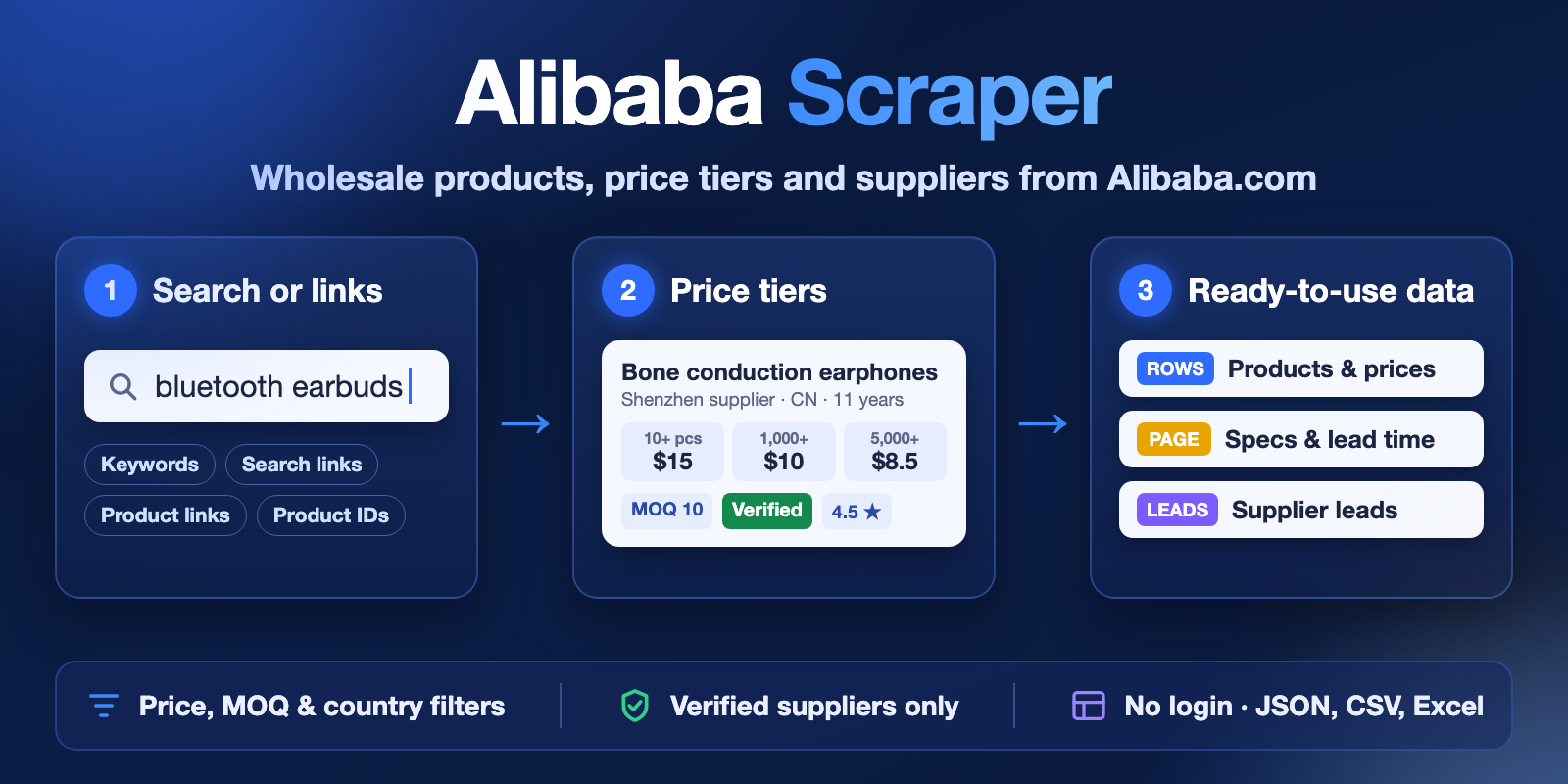
Alibaba Scraper collects wholesale products, price tiers and suppliers from Alibaba.com. You start from search words, Alibaba search links, product links or product IDs.
It is for importers, resellers, sourcing agents and market researchers. The smallest run is one search word with 10 products: it takes less than a minute and costs about $0.016.
[](https://console.apify.com/actors/COU3bU6NHrvkP7ls7/input)
### Table of contents
- [What it does](#what-it-does)
- [How it works](#how-it-works)
- [Quick start](#quick-start)
- [Use cases](#use-cases)
- [Input](#input)
- [Output](#output)
- [Pricing](#pricing)
- [Limits](#limits)
- [API, export and integrations](#api-export-and-integrations)
- [Troubleshooting](#troubleshooting)
- [FAQ](#faq)
- [Related Actors](#related-actors)
- [Support](#support)
### What it does
The Actor reads public Alibaba.com pages and saves one row for each product or supplier. A product row has the price range, minimum order (MOQ), currency, supplier name and country, years on Alibaba, verified status, rating, image and product link. With **Open each product page** on, it also adds the full price table by quantity, unit, lead time, certifications, category and product attributes.
Data source: public pages of [Alibaba.com](https://www.alibaba.com/), the B2B marketplace of Alibaba Group. It works only with public pages and does not log in, does not send messages to suppliers and does not read buyer data.
#### Good fit
- **Compare wholesale prices.** See each price tier (`priceRanges`) and the minimum order for the same product type from many suppliers.
- **Find manufacturers.** Keep only verified suppliers from one country, then export names, years and links.
- **Check a product list.** Paste product links or IDs and get fresh prices, MOQ, lead time and specs.
- **Build a supplier list.** **Suppliers from search** gives one row per supplier with sample products and how many of their products the run saw.
- **Watch the market.** Run the same search every week and compare prices and new suppliers.
> **👉 [Try it now: open the input form](https://console.apify.com/actors/COU3bU6NHrvkP7ls7/input)**
### How it works
1. You choose what to collect: products from search, product pages by link, or suppliers from search.
2. The Actor reads Alibaba search results or product pages. Price, MOQ, country and verified filters go to Alibaba itself; supplier rating and "skip ads" are applied by the Actor. Repeated products are saved once.
3. It saves product or supplier rows to the dataset and writes a short run summary (`RUN_SUMMARY`) with counts, stop reason and warnings.
If Alibaba blocks a request, the Actor tries again through Apify Proxy with a new connection. Pages that still fail are counted in the summary; the rows it already saved stay in the dataset.
> **👉 [Try it now: open the input form](https://console.apify.com/actors/COU3bU6NHrvkP7ls7/input)**
### Quick start
[](https://console.apify.com/actors/COU3bU6NHrvkP7ls7/input)
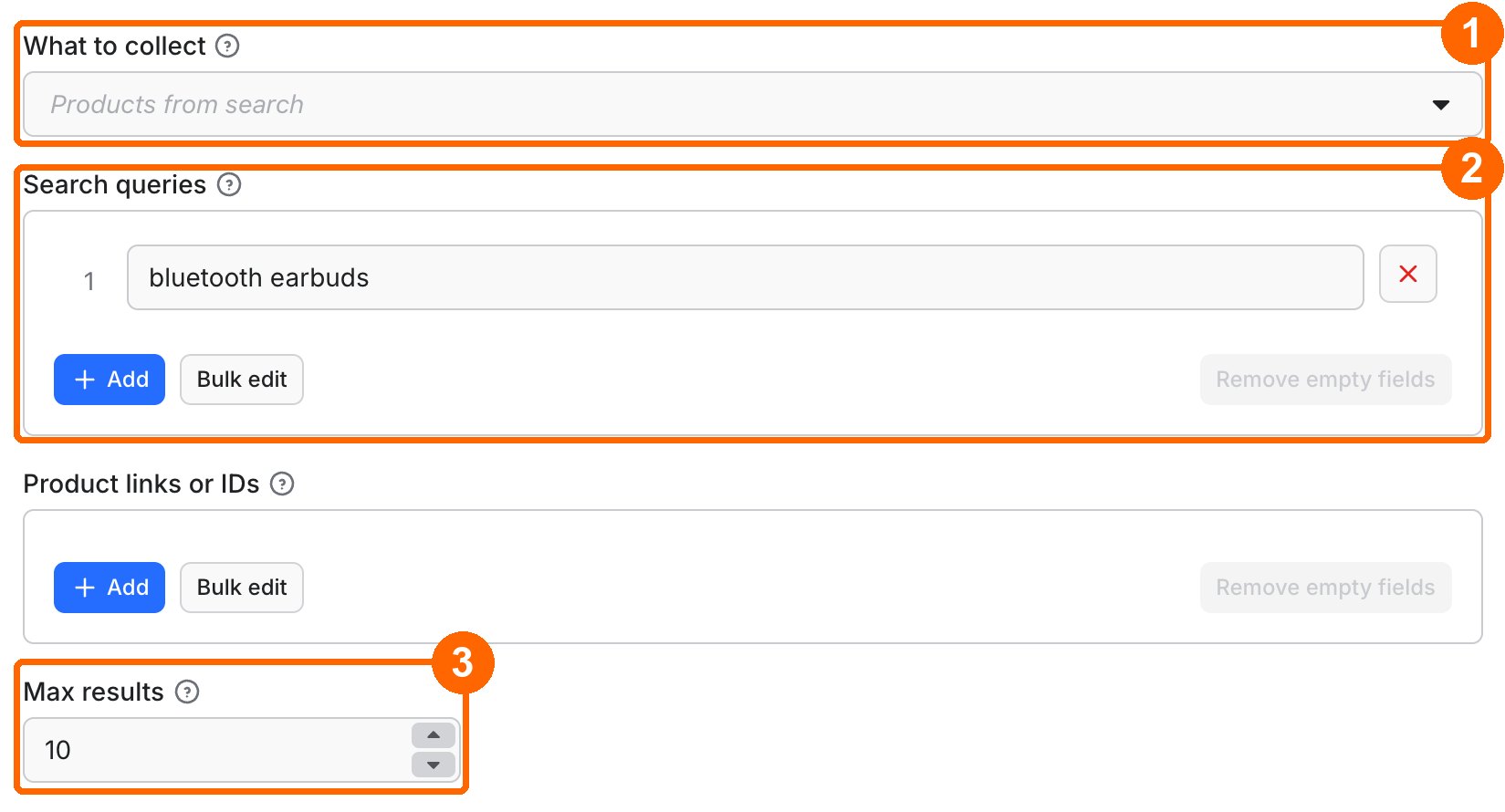
1. Open the **Input** tab. **What to collect** is already set to **Products from search** (box 1 in the picture).
2. In **Search queries** (`searchQueries`), keep `bluetooth earbuds` or type your own words (box 2).
3. Keep **Max results** (`maxItems`) at 10 for a first test, or set a bigger number (box 3).
4. Click **Start**.
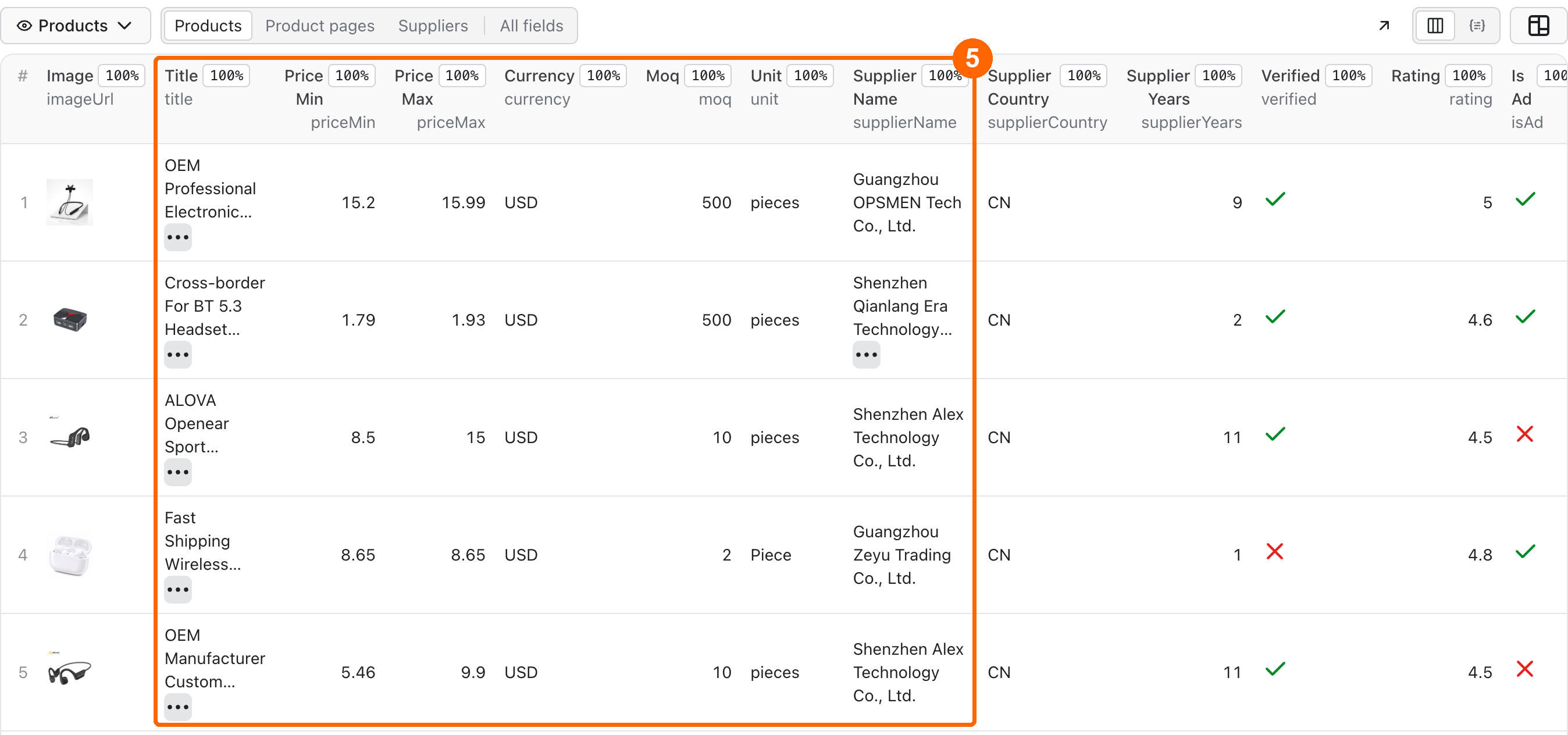
5. When the run ends, open the **Output** tab. In the **Products** table, check the title, price, MOQ and supplier columns (box 5).
[](https://api.apify.com/v2/key-value-stores/nTgARhPEyfqONY77o/records/output-table-20261114.png)
Expected result: 10 product rows for "bluetooth earbuds" with price range, MOQ, supplier, country and link, in less than a minute.
> **👉 [Try it now: open the input form](https://console.apify.com/actors/COU3bU6NHrvkP7ls7/input)**
### Use cases
| Buyer job | Input path | Output entity | Key fields | Next integration |
| --- | --- | --- | --- | --- |
| Compare wholesale prices for a product type | `mode=search`, `searchQueries`, `includeDetails` | Product | `priceRanges`, `priceMin`, `moq`, `unit` | CSV / Excel export |
| Find verified factories in one country | `searchQueries`, `supplierCountry`, `verifiedOnly` | Product | `supplierName`, `supplierYears`, `verified`, `supplierUrl` | Google Sheets |
| Refresh prices of a product list | `mode=product`, `productUrls` | Product | `priceRanges`, `moq`, `leadTimeDays`, `certifications` | Schedule + Sheets or Slack |
| Build a supplier list | `mode=supplier`, `searchQueries` | Supplier | `supplierName`, `supplierCountry`, `productsSeen`, `sampleProducts` | CRM import via CSV |
| Cheap products with a small order | `minPrice`, `maxPrice`, `maxMoq` | Product | `priceMin`, `moq`, `supplierCountry` | Notion or Slack delivery |
> **👉 [Try it now: open the input form](https://console.apify.com/actors/COU3bU6NHrvkP7ls7/input)**
### Input
#### Input fields
| Field | Plain name | Type | Required | Default / prefill | Allowed values | Effect | Example | Recommendation |
| --- | --- | --- | --- | --- | --- | --- | --- | --- |
| `mode` | What to collect | text | no | `search` | `search`, `product`, `supplier` | Products from search, product pages by link, or suppliers from search | `supplier` | Use `product` for your own link list |
| `searchQueries` | Search queries | list of text | in `search` and `supplier` modes | prefill `["bluetooth earbuds"]` | any words or an Alibaba search link | One Alibaba search per line | `["yoga mat"]` | Up to 50 lines |
| `productUrls` | Product links or IDs | list of text | in `product` mode | empty | alibaba.com product links or product IDs | Opens these product pages | `1601809446680` | Up to 1,000 lines |
| `maxItems` | Max results | number | no | default 100, prefill 10 | 1–5,000 | Rows for the whole run; the run stops when it is reached | 500 | Start with 10 |
| `includeDetails` | Open each product page | yes/no | no | off | on / off | Search mode: adds the full price table, unit, lead time, certifications, category and attributes | on | Slower; charged as a product-page row |
| `sortBy` | Sort by | text | no | `relevance` | `relevance`, `sales` | Order of search results | `sales` | |
| `minPrice` / `maxPrice` | Min / max price (USD) | number | no | empty | 0 and up | Alibaba filter by unit price | 5 / 20 | `minPrice` must not be above `maxPrice` |
| `maxMoq` | Max minimum order | number | no | empty | 1 and up | Alibaba filter: MOQ at most this | 100 | For small test orders |
| `supplierCountry` | Supplier country | text | no | empty | two-letter code | Alibaba filter by supplier country | `VN` | `CN`, `VN`, `IN`, `US`… |
| `verifiedOnly` | Verified suppliers only | yes/no | no | off | on / off | Alibaba filter: suppliers checked by an inspection company | on | |
| `verifiedProOnly` | Verified Pro suppliers only | yes/no | no | off | on / off | Alibaba filter: Verified Pro suppliers | on | |
| `minReviewScore` | Min supplier rating | number | no | empty | 0–5 | Skips products whose supplier rating is lower | 4.5 | Skipped products are not saved or charged |
| `skipAds` | Skip sponsored products | yes/no | no | off | on / off | Leaves out ad cards | on | Skipped products are not saved or charged |
| `proxyConfiguration` | Proxy | proxy | no | empty | Apify Proxy settings | Your own proxy choice | | Not needed: the Actor uses Apify Proxy on its own when Alibaba blocks |
| `deliveryConnector` | Send results to | connector | no | empty | your Slack, Notion or other MCP connector | Posts a short summary after the run | Slack | See "Send results to Slack or Notion" |
| `deliveryTarget` | Notion page or channel | text | no | empty | Notion page link or Slack channel ID | Where the summary goes | `C0123456789` | Notion needs a page link |
Empty input is not allowed: give at least one search query in `search` and `supplier` modes, or one product link or ID in `product` mode. Repeated products are saved once. A wrong link gets a free `invalid_input` row with the reason.
#### Interacting settings
| When | Input A | Input B | Effective behavior | Example | Cost/result effect |
| --- | --- | --- | --- | --- | --- |
| Product pages in search | `includeDetails` | `maxItems` | Every saved product page is opened | 100 products, details on | Slower (about 40 per minute, about 2,000 in the default 1-hour timeout); product-page price per row |
| Several queries | `searchQueries` | `maxItems` | `maxItems` is for the whole run, not per query | 3 queries, 100 | The first query can use all 100 rows |
| Strict own filters | `minReviewScore`, `skipAds` | `maxItems` | The run stops paging when pages give almost no matching cards | rating 4.9 | Fewer rows; skipped cards are free |
| Supplier mode | `mode=supplier` | `maxItems` | `maxItems` counts suppliers, not products | 20 | 20 supplier rows with sample products |
#### Input examples
##### Price tiers for one product type
```json
{
"searchQueries": ["bluetooth earbuds"],
"maxItems": 20,
"includeDetails": true
}
```
Expected behavior: one search, 20 products, each product page opened.
Expected output: product rows with `priceRanges`, `moq`, `leadTimeDays`, `certifications`.
Limit or cost note: about $0.058 on the Free plan.
##### Verified factories in Vietnam
```json
{
"mode": "supplier",
"searchQueries": ["cotton t-shirt"],
"supplierCountry": "VN",
"verifiedOnly": true,
"maxItems": 20
}
```
Expected behavior: reads search results with Alibaba's country and verified filters and groups them by supplier.
Expected output: supplier rows with `supplierName`, `supplierYears`, `productsSeen`, `sampleProducts`.
Limit or cost note: about $0.058 on the Free plan.
##### Refresh a product list
```json
{
"mode": "product",
"productUrls": [
"https://www.alibaba.com/product-detail/OEM-Professional-Electronic-Bluetooth-Hearing-Protection_1601809446680.html",
"1601809446680"
],
"maxItems": 100
}
```
Expected behavior: the two lines are the same product, so it is saved once.
Expected output: one product row with the full price table and specs.
Limit or cost note: about $0.008 on the Free plan.
> **👉 [Try it now: open the input form](https://console.apify.com/actors/COU3bU6NHrvkP7ls7/input)**
### Output
#### Output fields
| Field | Meaning | Type | Can be empty? | Example / enum | Source / notes |
| --- | --- | --- | --- | --- | --- |
| `recordType` | Row type | text | no | `product`, `supplier` | Check `status` to tell found rows from `not_found` and `invalid_input` rows |
| `status` | Row quality | text | no | `complete`, `partial`, `not_found`, `invalid_input`, `error` | `partial`: the product page failed, search data kept |
| `productId` | Alibaba product ID | text | product rows | `1601809446680` | |
| `title` | Product name | text | product rows | `OEM Professional Electronic Bluetooth Hearing Protection Earbuds…` | |
| `priceRanges` | Price by quantity | list | can be `[]` | `[{"minQty":500,"maxQty":999,"price":15.99}]` | `[]` when Alibaba shows only a range |
| `priceMin` / `priceMax` / `currency` | Lowest and highest unit price | number / number / text | yes | `15.2` / `15.99` / `USD` | |
| `moq` / `unit` | Minimum order and unit | number / text | yes | `500` / `pieces` | |
| `leadTimeDays` | Days to ship after order | number | yes | `30` | Needs product pages |
| `certifications` / `attributes` | Certificates and product specs | list | yes | `["RF", "EMC"]` | Needs product pages |
| `categoryName` | Alibaba category | text | yes | `Hearing Protection` | Needs product pages |
| `rating` / `reviewCount` | Supplier rating and reviews | number | yes | `5` / `1` | 0–5 |
| `supplierName` / `supplierId` / `supplierUrl` | Supplier | text | yes | `Guangzhou OPSMEN Tech Co., Ltd.` | |
| `supplierCountry` / `supplierYears` | Country and years on Alibaba | text / number | yes | `CN` / `9` | |
| `verified` / `verifiedPro` / `goldSupplier` / `tradeAssurance` | Supplier badges | yes/no | yes | `true` / `false` / `true` / `true` | `verified` and `verifiedPro` come from search results; empty in Product mode |
| `supplierResponseRate` / `supplierResponseTime` | How fast the supplier answers | number / text | yes | `97.1` / `≤3h` | |
| `supplierEmployees` / `supplierBusinessType` | Company size and type | text | yes | `101-200` / `Manufacturer,Trading Company` | Needs product pages |
| `isAd` | Sponsored card | yes/no | yes | `true` | |
| `imageUrl` / `images` | Main image and all images | link / list | yes | `https://sc04.alicdn.com/kf/….png` | |
| `query` / `page` / `position` | Where the row came from | text / number / number | yes | `bluetooth earbuds` / `1` / `1` | Search rows |
| `sampleProducts` / `productsSeen` | Supplier's products the run saw | list / number | supplier rows | `5` | Supplier rows |
| `url` | Product link | link | yes | `https://www.alibaba.com/product-detail/…_1601809446680.html` | |
| `input` / `errorMessage` | Your line and the reason it failed | text | yes | | `invalid_input`, `not_found`, `error` rows |
| `fetchedAt` | Time the row was saved | date-time | no | `2026-11-14T13:31:11.044Z` | UTC |
#### Output entities and surfaces
| Situation | Dataset/API/KVS/live view | Result shape | User action |
| --- | --- | --- | --- |
| Normal item | Dataset views **Products**, **Product pages** and **Suppliers** | one row per product or supplier | Open, filter or export |
| Domain-empty result | `not_found` row; `RUN_SUMMARY.queriesWithoutResults` | no product rows | Check the words or relax filters |
| Partial result | Rows with `status=partial`; `RUN_SUMMARY.status` is `partial` | search fields filled, page fields empty | Run those links again in `product` mode |
| Technical failure or retry | `RUN_SUMMARY.stopReason` = `SOURCE_ERROR`, `sourceError`, run log | run status `FAILED`, saved rows kept | Run again later; report the run ID if it repeats |
#### Output example
```json
{
"recordType": "product",
"status": "complete",
"productId": "1601809446680",
"title": "OEM Professional Electronic Bluetooth Hearing Protection Earbuds SNR32 NRR26 Noise Reduction Shooting Hunting Ear Muffs",
"url": "https://www.alibaba.com/product-detail/OEM-Professional-Electronic-Bluetooth-Hearing-Protection_1601809446680.html",
"priceRanges": [
{ "minQty": 500, "maxQty": 999, "price": 15.99, "promoPrice": null },
{ "minQty": 1000, "maxQty": 4999, "price": 15.7, "promoPrice": null },
{ "minQty": 5000, "maxQty": null, "price": 15.2, "promoPrice": null }
],
"priceMin": 15.2,
"priceMax": 15.99,
"currency": "USD",
"moq": 500,
"unit": "pieces",
"categoryName": "Hearing Protection",
"certifications": ["ANSI/SVIA", "RF", "EMC"],
"rating": 5,
"reviewCount": 1,
"supplierName": "Guangzhou OPSMEN Tech Co., Ltd.",
"supplierCountry": "CN",
"supplierYears": 9,
"supplierUrl": "https://opsmen.en.alibaba.com/",
"verified": true,
"goldSupplier": true,
"tradeAssurance": true,
"supplierResponseRate": 97.1,
"supplierResponseTime": "≤3h",
"isAd": true,
"leadTimeDays": 30,
"query": "bluetooth earbuds",
"position": 1,
"fetchedAt": "2026-11-14T13:31:11.044Z"
}
```
This example is trimmed (no `images`, `attributes` or `tags`) and shows one product from the "bluetooth earbuds" search with **Open each product page** on. `null` means Alibaba did not show this value. We do not promise that every field is filled for every product.
#### Send results to Slack or Notion
Pick your connector in the optional `deliveryConnector` field. After the run saves its data, the Actor posts a short summary (a few rows and a link to the full dataset) there. Put a Notion page link or a Slack channel ID in `deliveryTarget`: in Notion every run is added on top of that one page, so your workspace does not fill up with new pages. Without a page link, Notion delivery is skipped and `RUN_SUMMARY` says why. A delivery error never fails the run and costs nothing extra. Connect a service once in Apify Console → MCP connectors.
#### Use case → fields
| Buyer job | Input path | Output entity | Key fields | Next integration |
| --- | --- | --- | --- | --- |
| Price comparison | `searchQueries`, `includeDetails` | Product | `priceRanges`, `moq`, `unit` | Sheets, Excel |
| Supplier search | `mode=supplier`, `verifiedOnly` | Supplier | `supplierName`, `supplierUrl`, `productsSeen` | CRM via CSV |
| Product list refresh | `mode=product`, `productUrls` | Product | `priceMin`, `leadTimeDays`, `certifications` | Schedule + Slack |
> **👉 [Try it now: open the input form](https://console.apify.com/actors/COU3bU6NHrvkP7ls7/input)**
### Pricing
#### Pricing unit
You pay per event. Platform usage (compute, proxy) is included; you pay only the events below.
| Event | When it is charged | Free plan | Gold plan and higher |
| --- | --- | ---: | ---: |
| Actor start | Once per run, per GB of memory | $0.005 | $0.005 |
| Product from search | One unique product saved from search results | $0.00105 | $0.000735 |
| Product page | One product saved from its product page (`product` mode, or search with **Open each product page**) | $0.00265 | $0.001855 |
| Supplier | One unique supplier saved (`supplier` mode) | $0.00265 | $0.001855 |
| Checked, not found | A search query with no results (also when your filters removed all), or a product link Alibaba has no product for | $0.0005 | $0.0005 |
Bronze and Silver plans get 10% and 20% off the Free price for products, product pages and suppliers.
The Actor start fee is charged once per GB of run memory (at least once). With the default 512 MB it is one start fee; if you raise memory to 2 GB, it is two.
A run with no results costs the start fee and $0.0005 for each empty query or missing product, for example $0.0055 for one empty query. Wrong links (`invalid_input`), products skipped by your filters, repeated products, failed pages and `error` rows are never charged. If you set a maximum cost per run, the Actor stops before it goes over and keeps the rows it saved.
#### Cost examples
Free plan prices.
| Scenario | Input scope | Expected item/event count | Base charge | Optional charge | Stop/cap behavior |
| --- | --- | ---: | ---: | ---: | --- |
| First test | 1 search word, 10 products | 10 products | $0.016 | none | stops at `maxItems` |
| Price list | 1 search word, 100 products | 100 products | $0.11 | none | stops at `maxItems` |
| Large price list | several search words, 1,000 products | 1,000 products | $1.06 | none | stops at `maxItems` |
| Full product pages | 100 products with **Open each product page** | 100 product pages | $0.27 | none | stops at `maxItems` |
| Supplier list | 100 suppliers | 100 suppliers | $0.27 | none | stops at `maxItems` |
| No results | 1 query with no results | 1 not-found | $0.0055 | none | stops after the query |
> **👉 [Try it now: open the input form](https://console.apify.com/actors/COU3bU6NHrvkP7ls7/input)**
### Limits
- Only public pages of alibaba.com. No login, no messages to suppliers, no prices behind "contact supplier".
- Up to 5,000 rows per run, 50 search queries and 1,000 product links or IDs.
- Speed: about 1,200 products per minute from search, about 40 product pages per minute. 5,000 search rows took about 4 minutes in our test, 300 product pages about 7.5 minutes.
- With **Open each product page**, about 2,000 rows fit in the default 1-hour run timeout. For more, raise **Timeout** in the run options. If the timeout comes first, the Actor stops 40 seconds before it, keeps every saved row and lists the unread queries in `RUN_SUMMARY`.
- Deep search pages often repeat the same products. Repeats are skipped for free and the Actor moves on to the next query, so one query may give fewer rows than you asked for.
- With **Min supplier rating** or **Skip sponsored products**, the run stops paging after 6 search pages without a matching product, plus 1 more page for every 2 rows saved. Skipped products are free.
- If 3 product pages in a row cannot be read, the Actor treats Alibaba as unavailable and stops the run (status `FAILED`, saved rows kept).
- Alibaba search results change with time and location. Two runs a day apart can show different products.
- Prices are what Alibaba shows at `fetchedAt`, usually in USD. Final prices are agreed with the supplier.
> **👉 [Try it now: open the input form](https://console.apify.com/actors/COU3bU6NHrvkP7ls7/input)**
### API, export and integrations
- **API:** start the Actor with `POST https://api.apify.com/v2/acts/cliqtomedia~alibaba-scraper/runs` and the same JSON as the input form. Read rows from the run's dataset.
- **Export:** download the dataset as JSON, CSV, Excel, XML or HTML from the **Output** tab or the API. Use `?view=details` for the full product fields or `?view=suppliers` for supplier rows.
- **Scheduling:** create a schedule in Apify Console to refresh prices every day or week.
- **Webhooks / no-code:** use Apify integrations (Make, Zapier, n8n, Google Sheets, webhooks) on the "run succeeded" event and read the default dataset.
- **SDK / MCP / agent:** call the Actor from the Apify JavaScript or Python client, or from an AI agent through Apify MCP (below).
#### Use with AI agents (MCP)
- MCP server URL with only this Actor: `https://mcp.apify.com?tools=cliqtomedia/alibaba-scraper`.
- Smallest useful input: `{"searchQueries": ["bluetooth earbuds"], "maxItems": 10}`.
- Key output fields: `title` (product name), `priceMin` and `priceMax` (unit price), `moq` (minimum order), `supplierName` and `supplierCountry` (supplier), `url` (product link).
- A 10-product run takes less than a minute and costs about $0.016 on the Free plan. Keep `maxItems` small for quick answers; turn on `includeDetails` only when you need price tiers by quantity and specs.
> **👉 [Try it now: open the input form](https://console.apify.com/actors/COU3bU6NHrvkP7ls7/input)**
### Troubleshooting
#### The run has fewer rows than I asked for
Symptom: `maxItems` is 500, but the dataset has 300 rows.
Likely reason: Alibaba has fewer results, deep pages repeated products, or your filters removed products.
Check: `RUN_SUMMARY` fields `limitReached`, `counts.duplicatesSkipped` and `counts.filteredOut`.
Action: add more search queries or relax the filters.
#### The run stopped with `limitReached: FILTER_PAGES`
Symptom: few rows and the message says the filter matched too few products.
Likely reason: **Min supplier rating** or **Skip sponsored products** removed almost every product on the pages.
Check: `RUN_SUMMARY.counts.filteredOut` and `unprocessedInputs`.
Action: lower **Min supplier rating**, or use Alibaba filters such as **Verified suppliers only** instead.
#### Some rows have `status: partial`
Symptom: product rows without lead time, certifications or the full price table.
Likely reason: Alibaba did not open that product page in time; the search data was kept.
Check: `RUN_SUMMARY.counts.productPagesFailed`.
Action: run these product links again in `product` mode later.
#### The run failed with a source error
Symptom: run status `FAILED`, `RUN_SUMMARY.stopReason` is `SOURCE_ERROR`, `sourceError` says what failed. Rows saved before the stop stay in the dataset.
Likely reason: Alibaba blocked all tries for a while. This is a technical failure, not "no products". The Actor stops early (for example after 3 product pages in a row fail) so a blocked run costs little: failed pages are not charged.
Check: the run log and `RUN_SUMMARY`.
Action: try again in a few minutes. If it repeats, open an issue with the run ID.
#### I see a row with `status: not_found` or `invalid_input`
Symptom: a row with your line in `input` and a reason in `errorMessage`.
Likely reason: `not_found` — the query had no results or the product is gone (charged $0.0005); `invalid_input` — the line is not an Alibaba product link or ID (free).
Check: the `errorMessage` text.
Action: fix the link. Product links look like `https://www.alibaba.com/product-detail/…_1601809446680.html`.
> **👉 [Try it now: open the input form](https://console.apify.com/actors/COU3bU6NHrvkP7ls7/input)**
### FAQ
#### Do I need an Alibaba account or cookies?
No. The Actor reads only public pages and needs no login, cookies or API key.
#### Why did my run with no results still cost money?
The start fee and $0.0005 for each checked query or product that was not found are charged, because the Actor did the work. One empty query costs about $0.0055. Products that were not saved are never charged.
#### Why are price tiers empty for some products?
Some suppliers show only a price range, not a table by quantity. Then `priceRanges` is `[]` and `priceMin` / `priceMax` hold the range. Turn on **Open each product page** to get the full table where it exists.
#### Can I get supplier contact details?
The Actor saves what Alibaba shows in public: name, country, years, badges, response rate and the supplier page link. It does not save emails or phone numbers.
#### Are results the same as on my screen?
Alibaba changes results by time and location, so the order and some products can differ. Prices are what Alibaba showed at `fetchedAt`.
> **👉 [Try it now: open the input form](https://console.apify.com/actors/COU3bU6NHrvkP7ls7/input)**
### Related Actors
- [AliExpress Scraper](https://apify.com/cliqtomedia/aliexpress-scraper) — choose it when you need retail prices and reviews for single units, not wholesale tiers.
- [Taobao & 1688 Scraper](https://apify.com/cliqtomedia/taobao-1688-scraper) — choose it when you buy from China's home wholesale market in yuan.
- [Amazon Product Scraper](https://apify.com/cliqtomedia/amazon-scraper) — choose it when you want to check what the product sells for on Amazon.
- [Temu Scraper](https://apify.com/cliqtomedia/temu-scraper) — choose it when you compare against low-price retail competition.
- [Marketplace Fee Calculator](https://apify.com/cliqtomedia/marketplace-fee-calculator) — choose it when you work out your payout after marketplace fees.
> **👉 [Try it now: open the input form](https://console.apify.com/actors/COU3bU6NHrvkP7ls7/input)**
### Support
For a bug, question or feature request, open the Actor's **Issues** tab on Apify. Include the run ID, the mode you used and the message from the status line or `RUN_SUMMARY`. Never send tokens, cookies or private data.
⭐ Found it useful? [Rate this Actor](https://apify.com/cliqtomedia/alibaba-scraper/reviews).
Something wrong? [Report a problem](https://apify.com/cliqtomedia/alibaba-scraper/issues) — we fix reported problems.
> **👉 [Try it now: open the input form](https://console.apify.com/actors/COU3bU6NHrvkP7ls7/input)**
# Changelog
This Actor's version history is a separate document: https://apify.com/cliqtomedia/alibaba-scraper/changelog.md
# Actor input Schema
## `mode` (type: `string`):
Search: one row per product from Alibaba search. Product: full product pages for the links you give. Supplier: unique suppliers found in search, with their sample products.
## `searchQueries` (type: `array`):
Keywords as you would type them on Alibaba.com, for example bluetooth earbuds. An Alibaba search link also works. Used in Search and Supplier modes.
## `productUrls` (type: `array`):
Alibaba product links (https://www.alibaba.com/product-detail/...\_1601809446680.html) or bare product IDs. Used in Product mode.
## `maxItems` (type: `integer`):
Total rows for the whole run, across all queries or product links. The run stops when it is reached. You pay only for rows saved. With product pages (Product mode or Open each product page), about 2,000 rows fit in the default 1-hour timeout.
## `includeDetails` (type: `boolean`):
Search mode only. Adds attributes, unit, lead time, certifications, category and the full price table from each product page. Slower (about 40 pages per minute), and charged as a product-page row.
## `sortBy` (type: `string`):
Order of search results.
## `minPrice` (type: `number`):
Alibaba filter: lowest unit price.
## `maxPrice` (type: `number`):
Alibaba filter: highest unit price.
## `maxMoq` (type: `integer`):
Alibaba filter: keep products whose minimum order quantity is at most this.
## `supplierCountry` (type: `string`):
Two-letter country code of the supplier, for example CN, VN, IN, US.
## `verifiedOnly` (type: `boolean`):
Alibaba filter: suppliers checked by a third-party inspection company.
## `verifiedProOnly` (type: `boolean`):
Alibaba filter: Verified Pro suppliers.
## `minReviewScore` (type: `number`):
Skip products whose supplier rating (0–5) is lower. Skipped products are not saved or charged.
## `skipAds` (type: `boolean`):
Leave out sponsored (ad) cards. Skipped products are not saved or charged.
## `proxyConfiguration` (type: `object`):
Not needed in most cases: the Actor uses Apify Proxy on its own when Alibaba blocks direct requests.
## `deliveryConnector` (type: `string`):
Your Slack, Notion or other MCP connector. After the run the Actor posts a short summary there. Connect services once in Apify Console → MCP connectors.
## `deliveryTarget` (type: `string`):
Where to post the summary: a Notion page link (each run is added on top of that page) or a Slack channel ID. Notion needs a page here; without it the summary is not sent and the run summary says why.
## Actor input object example
```json
{
"mode": "search",
"searchQueries": [
"bluetooth earbuds"
],
"maxItems": 10,
"includeDetails": false,
"sortBy": "relevance",
"verifiedOnly": false,
"verifiedProOnly": false,
"skipAds": false
}
```
# Actor output Schema
## `products` (type: `string`):
Search and product rows: price, MOQ, supplier, rating, images.
## `productPages` (type: `string`):
Price tiers, attributes, lead time and certifications from product pages.
## `suppliers` (type: `string`):
Supplier mode: one row per supplier.
## `runSummary` (type: `string`):
Status, stop reason, counts and queries without results.
# API
You can run this Actor programmatically using our API. Below are code examples in JavaScript, Python, and CLI, as well as the OpenAPI specification and MCP server setup.
## JavaScript example
```javascript
import { ApifyClient } from 'apify-client';
// Initialize the ApifyClient with your Apify API token
// Replace the '' with your token
const client = new ApifyClient({
token: '',
});
// Prepare Actor input
const input = {
"searchQueries": [
"bluetooth earbuds"
],
"maxItems": 10
};
// Run the Actor and wait for it to finish
const run = await client.actor("cliqtomedia/alibaba-scraper").call(input);
// Fetch and print Actor results from the run's dataset (if any)
console.log('Results from dataset');
console.log(`💾 Check your data here: https://console.apify.com/storage/datasets/${run.defaultDatasetId}`);
const { items } = await client.dataset(run.defaultDatasetId).listItems();
items.forEach((item) => {
console.dir(item);
});
// 📚 Want to learn more 📖? Go to → https://docs.apify.com/api/client/js/docs
```
## Python example
```python
from apify_client import ApifyClient
# Initialize the ApifyClient with your Apify API token
# Replace '' with your token.
client = ApifyClient("")
# Prepare the Actor input
run_input = {
"searchQueries": ["bluetooth earbuds"],
"maxItems": 10,
}
# Run the Actor and wait for it to finish
run = client.actor("cliqtomedia/alibaba-scraper").call(run_input=run_input)
# Fetch and print Actor results from the run's dataset (if there are any)
print(f"💾 Check your data here: https://console.apify.com/storage/datasets/{run.default_dataset_id}")
for item in client.dataset(run.default_dataset_id).iterate_items():
print(item)
# 📚 Want to learn more 📖? Go to → https://docs.apify.com/api/client/python/docs/quick-start
```
## CLI example
```bash
echo '{
"searchQueries": [
"bluetooth earbuds"
],
"maxItems": 10
}' |
apify call cliqtomedia/alibaba-scraper --silent --output-dataset
```
## MCP server setup
```json
{
"mcpServers": {
"apify": {
"type": "http",
"url": "https://mcp.apify.com/?tools=fetch-actor-details,cliqtomedia/alibaba-scraper"
}
}
}
```
The hosted server signs you in with OAuth on first connect, so no API token belongs in this config. Clients without OAuth support can send an `Authorization: Bearer ` header instead, using a token from API & Integrations in Apify Console (https://console.apify.com/settings/integrations).
## OpenAPI specification
Download the OpenAPI definition: https://api.apify.com/v2/actors/COU3bU6NHrvkP7ls7/builds/I7db5rc8b2hjIrE7Y/openapi.json