# Google Maps Service Area Business (SAB) Finder (`coregent/google-maps-service-area-business-finder`) Actor
Find Google Maps Service Area Businesses (SABs) — contractors, cleaners, plumbers, and other home-service providers that serve named regions instead of operating from a public storefront. Returns a flat 11-field row per SAB, including the named service-area list.
- **URL**: https://apify.com/coregent/google-maps-service-area-business-finder.md
- **Developed by:** [Delowar Munna](https://apify.com/coregent) (community)
- **Categories:** Lead generation, Automation, Developer tools
- **Stats:** 2 total users, 1 monthly users, 100.0% runs succeeded, NaN bookmarks
- **User rating**: No ratings yet
## Pricing
from $3.60 / 1,000 business-results
This Actor is paid per event. You are not charged for the Apify platform usage, but only a fixed price for specific events.
Since this Actor supports Apify Store discounts, the price gets lower the higher subscription plan you have.
Learn more: https://docs.apify.com/platform/actors/running/actors-in-store#pay-per-event
## What's an Apify Actor?
Actors are a software tools running on the Apify platform, for all kinds of web data extraction and automation use cases.
In Batch mode, an Actor accepts a well-defined JSON input, performs an action which can take anything from a few seconds to a few hours,
and optionally produces a well-defined JSON output, datasets with results, or files in key-value store.
In Standby mode, an Actor provides a web server which can be used as a website, API, or an MCP server.
Actors are written with capital "A".
## How to integrate an Actor?
If asked about integration, you help developers integrate Actors into their projects.
You adapt to their stack and deliver integrations that are safe, well-documented, and production-ready.
The best way to integrate Actors is as follows.
In JavaScript/TypeScript projects, use official [JavaScript/TypeScript client](https://docs.apify.com/api/client/js.md):
```bash
npm install apify-client
```
In Python projects, use official [Python client library](https://docs.apify.com/api/client/python.md):
```bash
pip install apify-client
```
In shell scripts, use [Apify CLI](https://docs.apify.com/cli/docs.md):
````bash
# MacOS / Linux
curl -fsSL https://apify.com/install-cli.sh | bash
# Windows
irm https://apify.com/install-cli.ps1 | iex
```bash
In AI frameworks, you might use the [Apify MCP server](https://docs.apify.com/platform/integrations/mcp.md).
If your project is in a different language, use the [REST API](https://docs.apify.com/api/v2.md).
For usage examples, see the [API](#api) section below.
For more details, see Apify documentation as [Markdown index](https://docs.apify.com/llms.txt) and [Markdown full-text](https://docs.apify.com/llms-full.txt).
# README
## Google Maps Service Area Business (SAB) Finder

Find **mobile and home-service businesses on Google Maps** — the "service area" leads other scrapers miss. This actor specifically isolates **Service Area Businesses (SABs)**: contractors, cleaners, plumbers, electricians, and other providers that **don't have a public storefront** but instead serve named regions (neighborhoods, suburbs, cities). Returns a clean, flat **11-field row** per SAB, including the named service-area list.
Built for **lead-generation agencies, home-service marketplaces (Angi/Thumbtack-style), and local SEO auditors** that need the contractor leads standard Google Maps scrapers skip.
---
### ✨ Why this scraper
- **SAB-focused** — filters out brick-and-mortar storefronts by default; keeps only businesses with hidden street addresses (the "Service area" / "Online business" Maps signal).
- **Named service areas** — extracts the list of neighborhoods, suburbs, or cities each business serves.
- **Pay-Per-Event** — one flat event per saved row. Filtered-out storefronts and duplicate placeIds are **not** charged.
- **Maps-only, no website visits** — V1 stays fast and cheap by skipping external website crawling.
- **CSV-friendly output** — flat structure, no nested objects, drops cleanly into Sheets / Excel / CRMs.
---
### 🚀 Quick start — sample inputs
#### Example 1 — minimal (PRD example)
```json
{
"queries": ["House Cleaners in Denver", "Electricians in Boulder"],
"maxResults": 20,
"onlySABs": true,
"minRating": 4.5
}
````
#### Example 2 — broader run with location bias and custom proxy
```json
{
"queries": ["Plumbers in Austin", "HVAC contractors", "Roofing companies"],
"maxResults": 200,
"onlySABs": true,
"minRating": 4.0,
"locationBias": "30.2672,-97.7431",
"proxyConfiguration": {
"useApifyProxy": false,
"proxyUrls": ["http://user:pass@proxy.iproyal.com:12321"]
}
}
```
> The actor blocks Apify Residential proxy. If you need residential routing, supply your own provider via `proxyConfiguration.proxyUrls` as shown — see **🚦 Proxy policy** below.
***
### 📦 Output
The dataset has one view: **Service area businesses** — a flat 11-column table.
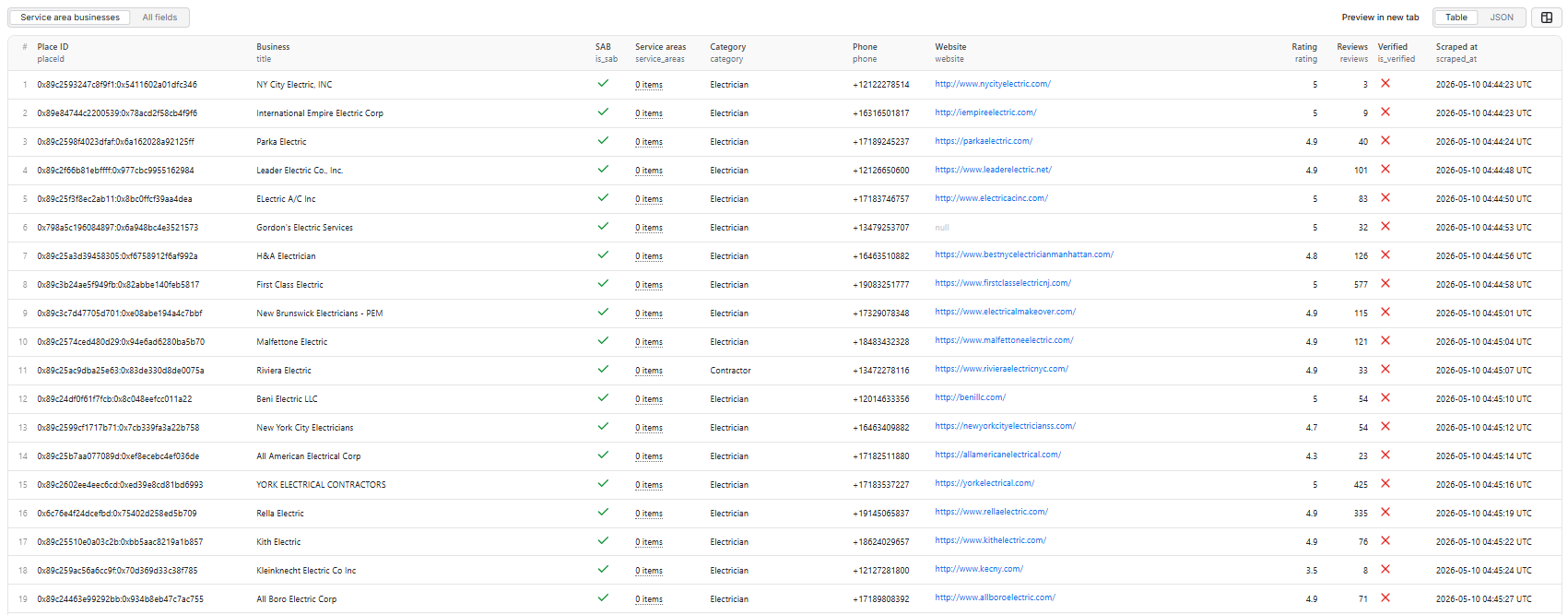 *Service area businesses — table view.*
#### Output fields (11)
`placeId`, `title`, `is_sab`, `service_areas`, `category`, `phone`, `website`, `rating`, `reviews`, `is_verified`, `scraped_at`.
#### Sample record — Service area businesses
```json
{
"placeId": "0x89c2598f4023dfaf:0x6a162028a92125ff",
"title": "Parka Electric",
"is_sab": true,
"service_areas": [],
"category": "Electrician",
"phone": "+17189245237",
"website": "https://parkaelectric.com/",
"rating": 4.9,
"reviews": 40,
"is_verified": false,
"scraped_at": "2026-05-10T04:44:24.190Z"
}
```
> **Why is `service_areas` an empty array here?** Many businesses are tagged as service-area on Maps but don't publicly list their served regions, or list them in a non-standard way the parser doesn't catch. The `is_sab` flag is still set correctly. See the FAQ entry below for details.
***
### ⚙️ Inputs
| Field | Type | Default | Purpose |
| -------------------- | ------- | --------------------------- | ----------------------------------------------------------------------------- |
| `queries` | array | required | Search terms (e.g. `"Plumbers in Austin"`). One row per search. |
| `maxResults` | integer | `10` | Total business rows pushed to the dataset across all queries (hard cap 5000). |
| `onlySABs` | boolean | `true` | Drop physical-storefront listings; keep only Service Area Businesses. |
| `minRating` | number | `0` | Drop businesses below this Google rating. |
| `locationBias` | string | `""` | `lat,lng` (e.g. `"39.7392,-104.9903"`) or city name to bias every search. |
| `proxyConfiguration` | object | `{ "useApifyProxy": true }` | Standard Apify proxy editor. Apify Residential is rejected — see below. |
***
### 💰 Pricing
**Pay-Per-Event**. One flat event per saved row — final per-event price is configured on the Apify console:
| Event | Charged when |
| ----------------- | ----------------------------------------------------------------------------------------------------------------- |
| `business-result` | Once per unique business row that passed all filters and was successfully written to the dataset (per `placeId`). |
**Not charged**:
- Duplicates (same `placeId` across queries — Crawlee dedupes the request queue).
- Rows filtered out by `onlySABs` (physical storefronts when `onlySABs` is on).
- Rows filtered out by `minRating`.
- Rows where the detail panel never loaded.
- Anything after the user-configured per-run spending cap is reached.
The actor honors the user-configured per-run spending cap (Apify `eventChargeLimitReached`) and stops cleanly when reached.
***
### 🚦 Proxy policy
Use **Apify Datacenter** proxy (the default) or **no proxy** for normal runs — both work reliably for Google Maps search and place detail panels at this actor's concurrency (`max=5`).
**Apify Residential proxy is not supported.** The actor will fail at startup if `proxyConfiguration.apifyProxyGroups` includes `RESIDENTIAL`. Reason: in pay-per-event actors, residential bandwidth (~$/GB) is billed to the developer, not the run user, so a single bandwidth-heavy run could exceed the per-result event revenue.
If you genuinely need residential routing, supply your own residential provider via the proxy editor's **Custom proxy URLs** field — that traffic goes through your provider, not Apify, and is unaffected:
```
http://user:pass@proxy.iproyal.com:12321
http://user:pass@proxy.brightdata.com:22225
http://user:pass@proxy.oxylabs.io:7777
```
***
### 📊 Run summary
After each run, a `RUN_SUMMARY` entry is written to the key-value store:
```json
{
"total_scanned": 47,
"sabs_found": 31,
"filtered_out": 19,
"charged_events": 20,
"runtime_seconds": 184,
"scraped_at": "2026-05-09T15:00:00.000Z"
}
```
- `total_scanned` — place detail panels successfully opened.
- `sabs_found` — of those, how many were SABs (hidden address).
- `filtered_out` — rows dropped by `onlySABs` or `minRating`.
- `charged_events` — rows pushed to the dataset (= billable events).
***
### ⚙️ Filters
| Filter | Stage | Effect |
| ----------- | --------------- | ----------------------------------------------- |
| `onlySABs` | Pre-charge | Drop physical-storefront listings (default ON). |
| `minRating` | Post-extraction | Drop rows with `rating < minRating`. |
Filters are applied **before** dataset push or event charges. Duplicate `placeId`s are deduped by Crawlee's request queue (each placeId is fetched at most once).
***
### 🚧 Limitations (V1)
- **No external website visits** — emails, social profiles, and on-site contact data are out of scope for V1 (see PRD §18 "Future Features").
- **No service-area polygon coordinates** — only the named area list (neighborhoods/cities). Polygon extraction is deferred to V2.
- **SAB / verified detection is heuristic** — Google Maps DOM evolves; we use stable `data-item-id` attributes and aria-label patterns where possible. Edge cases will exist.
- **Per-run hard cap is 5,000 rows** to bound runtime and cost.
***
### ❓ FAQ
**What's a "Service Area Business" (SAB)?**
A business that doesn't operate from a public physical storefront — instead, on Google Maps, it shows a "Service area" label and a list of regions (neighborhoods, suburbs, cities) it serves. Plumbers, mobile cleaners, electricians, locksmiths, and most home-service contractors fall into this category.
**Why is `service_areas` empty on some SABs?**
Some businesses are tagged as service-area on Maps but don't list their served regions, or list them in a non-standard way the heuristic doesn't catch. The `is_sab` flag is still set; only the `service_areas` array may be `[]`.
**Can I use Apify Residential proxy?**
No — the actor rejects Apify Residential at startup. Apify Datacenter, no proxy, and user-supplied custom proxy URLs all work fine. See **🚦 Proxy policy** above.
**How am I billed for runs that produce few results?**
Only for rows actually written to the dataset. A run that finds 100 candidates but filters 90 of them out (storefronts dropped by `onlySABs`) charges only 10 events.
**Can I export to CSV?**
Yes — every field is flat (the `service_areas` array exports as a JSON-encoded string in CSV). Use Apify's CSV / Excel export from the dataset page, or call the dataset API with `format=csv`.
***
### 🛠️ Technical notes
- **Stack**: Node.js 18+ · Apify SDK 3 · Crawlee · Puppeteer (headless Chrome).
- **Pipeline**: single PuppeteerCrawler with two route handlers (search → place detail).
- **Concurrency**: `min=1`, `max=5`.
- **Memory**: 2 GB min · 4 GB default · 8 GB max (more memory ⇒ more Apify CPU shares ⇒ faster JS execution per page).
- **Navigation**: `waitUntil: 'domcontentloaded'`; navigation timeout 30 s; per-handler timeout 120 s.
- **Resource blocking**: aborts `image`, `media`, `font` resource types plus heavy URL fragments (`/maps/vt/`, `lh3-6.googleusercontent.com`, `googletagmanager`, `fonts.gstatic.com`, etc.) at the network layer to cut per-page CPU and bandwidth.
- **Anti-blocking**: explicit desktop Chrome User-Agent, synthetic mouse-wheel scroll on the search feed (real wheel events trigger Maps' lazy-load more reliably than programmatic scrollTop), `--disable-blink-features=AutomationControlled` Chrome flag.
- **Diagnostics**: On the first failed Maps render (no feed, no panel, or zero cards), the actor saves the page HTML + URL to the key-value store as `debug-no-feed-html` / `debug-no-panel-html` / `debug-zero-cards-html`.
# Actor input Schema
## `queries` (type: `array`):
List of Google Maps search terms, one per row. Each term is run as its own search (e.g. "Plumbers in Austin", "House Cleaners in Denver").
## `maxResults` (type: `integer`):
Hard cap on the total number of business rows pushed to the dataset across all queries combined. Once reached, the run stops cleanly.
## `onlySABs` (type: `boolean`):
When enabled (default), keep only businesses whose street address is hidden — i.e. true Service Area Businesses (SABs). Disable to also include physical-storefront listings.
## `minRating` (type: `number`):
Drop businesses with a Google rating below this value. Rows with no rating are kept (treated as 0 only for the comparison when this is 0).
## `locationBias` (type: `string`):
Optional lat,lng (e.g. "39.7392,-104.9903") or city name (e.g. "Denver, CO") to bias every search toward a specific area. Leave empty to use the location implied by each query.
## `proxyConfiguration` (type: `object`):
Apify Proxy configuration. Defaults to Apify Datacenter (useApifyProxy: true). Apify Residential is NOT supported and will fail the run at startup; if you need residential routing, supply your own provider via Custom proxy URLs (proxyConfiguration.proxyUrls).
## Actor input object example
```json
{
"queries": [
"Electricians in New York"
],
"maxResults": 10,
"onlySABs": true,
"minRating": 0,
"locationBias": "",
"proxyConfiguration": {
"useApifyProxy": true
}
}
```
# Actor output Schema
## `overview` (type: `string`):
Flat 11-field table view of every business row pushed to the dataset, including the SAB flag and the named service-area list.
# API
You can run this Actor programmatically using our API. Below are code examples in JavaScript, Python, and CLI, as well as the OpenAPI specification and MCP server setup.
## JavaScript example
```javascript
import { ApifyClient } from 'apify-client';
// Initialize the ApifyClient with your Apify API token
// Replace the '' with your token
const client = new ApifyClient({
token: '',
});
// Prepare Actor input
const input = {
"queries": [
"Electricians in New York"
],
"proxyConfiguration": {
"useApifyProxy": true
}
};
// Run the Actor and wait for it to finish
const run = await client.actor("coregent/google-maps-service-area-business-finder").call(input);
// Fetch and print Actor results from the run's dataset (if any)
console.log('Results from dataset');
console.log(`💾 Check your data here: https://console.apify.com/storage/datasets/${run.defaultDatasetId}`);
const { items } = await client.dataset(run.defaultDatasetId).listItems();
items.forEach((item) => {
console.dir(item);
});
// 📚 Want to learn more 📖? Go to → https://docs.apify.com/api/client/js/docs
```
## Python example
```python
from apify_client import ApifyClient
# Initialize the ApifyClient with your Apify API token
# Replace '' with your token.
client = ApifyClient("")
# Prepare the Actor input
run_input = {
"queries": ["Electricians in New York"],
"proxyConfiguration": { "useApifyProxy": True },
}
# Run the Actor and wait for it to finish
run = client.actor("coregent/google-maps-service-area-business-finder").call(run_input=run_input)
# Fetch and print Actor results from the run's dataset (if there are any)
print("💾 Check your data here: https://console.apify.com/storage/datasets/" + run["defaultDatasetId"])
for item in client.dataset(run["defaultDatasetId"]).iterate_items():
print(item)
# 📚 Want to learn more 📖? Go to → https://docs.apify.com/api/client/python/docs/quick-start
```
## CLI example
```bash
echo '{
"queries": [
"Electricians in New York"
],
"proxyConfiguration": {
"useApifyProxy": true
}
}' |
apify call coregent/google-maps-service-area-business-finder --silent --output-dataset
```
## MCP server setup
```json
{
"mcpServers": {
"apify": {
"command": "npx",
"args": [
"mcp-remote",
"https://mcp.apify.com/?tools=coregent/google-maps-service-area-business-finder",
"--header",
"Authorization: Bearer "
]
}
}
}
```
## OpenAPI specification
```json
{
"openapi": "3.0.1",
"info": {
"title": "Google Maps Service Area Business (SAB) Finder",
"description": "Find Google Maps Service Area Businesses (SABs) — contractors, cleaners, plumbers, and other home-service providers that serve named regions instead of operating from a public storefront. Returns a flat 11-field row per SAB, including the named service-area list.",
"version": "1.0",
"x-build-id": "CGFewWcpuKDJ9dltD"
},
"servers": [
{
"url": "https://api.apify.com/v2"
}
],
"paths": {
"/acts/coregent~google-maps-service-area-business-finder/run-sync-get-dataset-items": {
"post": {
"operationId": "run-sync-get-dataset-items-coregent-google-maps-service-area-business-finder",
"x-openai-isConsequential": false,
"summary": "Executes an Actor, waits for its completion, and returns Actor's dataset items in response.",
"tags": [
"Run Actor"
],
"requestBody": {
"required": true,
"content": {
"application/json": {
"schema": {
"$ref": "#/components/schemas/inputSchema"
}
}
}
},
"parameters": [
{
"name": "token",
"in": "query",
"required": true,
"schema": {
"type": "string"
},
"description": "Enter your Apify token here"
}
],
"responses": {
"200": {
"description": "OK"
}
}
}
},
"/acts/coregent~google-maps-service-area-business-finder/runs": {
"post": {
"operationId": "runs-sync-coregent-google-maps-service-area-business-finder",
"x-openai-isConsequential": false,
"summary": "Executes an Actor and returns information about the initiated run in response.",
"tags": [
"Run Actor"
],
"requestBody": {
"required": true,
"content": {
"application/json": {
"schema": {
"$ref": "#/components/schemas/inputSchema"
}
}
}
},
"parameters": [
{
"name": "token",
"in": "query",
"required": true,
"schema": {
"type": "string"
},
"description": "Enter your Apify token here"
}
],
"responses": {
"200": {
"description": "OK",
"content": {
"application/json": {
"schema": {
"$ref": "#/components/schemas/runsResponseSchema"
}
}
}
}
}
}
},
"/acts/coregent~google-maps-service-area-business-finder/run-sync": {
"post": {
"operationId": "run-sync-coregent-google-maps-service-area-business-finder",
"x-openai-isConsequential": false,
"summary": "Executes an Actor, waits for completion, and returns the OUTPUT from Key-value store in response.",
"tags": [
"Run Actor"
],
"requestBody": {
"required": true,
"content": {
"application/json": {
"schema": {
"$ref": "#/components/schemas/inputSchema"
}
}
}
},
"parameters": [
{
"name": "token",
"in": "query",
"required": true,
"schema": {
"type": "string"
},
"description": "Enter your Apify token here"
}
],
"responses": {
"200": {
"description": "OK"
}
}
}
}
},
"components": {
"schemas": {
"inputSchema": {
"type": "object",
"required": [
"queries"
],
"properties": {
"queries": {
"title": "Search queries",
"type": "array",
"description": "List of Google Maps search terms, one per row. Each term is run as its own search (e.g. \"Plumbers in Austin\", \"House Cleaners in Denver\").",
"default": [
"Electricians in New York"
],
"items": {
"type": "string"
}
},
"maxResults": {
"title": "Max results (total across all queries)",
"minimum": 1,
"maximum": 5000,
"type": "integer",
"description": "Hard cap on the total number of business rows pushed to the dataset across all queries combined. Once reached, the run stops cleanly.",
"default": 10
},
"onlySABs": {
"title": "Only Service Area Businesses",
"type": "boolean",
"description": "When enabled (default), keep only businesses whose street address is hidden — i.e. true Service Area Businesses (SABs). Disable to also include physical-storefront listings.",
"default": true
},
"minRating": {
"title": "Minimum rating",
"minimum": 0,
"maximum": 5,
"type": "number",
"description": "Drop businesses with a Google rating below this value. Rows with no rating are kept (treated as 0 only for the comparison when this is 0).",
"default": 0
},
"locationBias": {
"title": "Location bias",
"type": "string",
"description": "Optional lat,lng (e.g. \"39.7392,-104.9903\") or city name (e.g. \"Denver, CO\") to bias every search toward a specific area. Leave empty to use the location implied by each query.",
"default": ""
},
"proxyConfiguration": {
"title": "Proxy configuration",
"type": "object",
"description": "Apify Proxy configuration. Defaults to Apify Datacenter (useApifyProxy: true). Apify Residential is NOT supported and will fail the run at startup; if you need residential routing, supply your own provider via Custom proxy URLs (proxyConfiguration.proxyUrls).",
"default": {
"useApifyProxy": true
}
}
}
},
"runsResponseSchema": {
"type": "object",
"properties": {
"data": {
"type": "object",
"properties": {
"id": {
"type": "string"
},
"actId": {
"type": "string"
},
"userId": {
"type": "string"
},
"startedAt": {
"type": "string",
"format": "date-time",
"example": "2025-01-08T00:00:00.000Z"
},
"finishedAt": {
"type": "string",
"format": "date-time",
"example": "2025-01-08T00:00:00.000Z"
},
"status": {
"type": "string",
"example": "READY"
},
"meta": {
"type": "object",
"properties": {
"origin": {
"type": "string",
"example": "API"
},
"userAgent": {
"type": "string"
}
}
},
"stats": {
"type": "object",
"properties": {
"inputBodyLen": {
"type": "integer",
"example": 2000
},
"rebootCount": {
"type": "integer",
"example": 0
},
"restartCount": {
"type": "integer",
"example": 0
},
"resurrectCount": {
"type": "integer",
"example": 0
},
"computeUnits": {
"type": "integer",
"example": 0
}
}
},
"options": {
"type": "object",
"properties": {
"build": {
"type": "string",
"example": "latest"
},
"timeoutSecs": {
"type": "integer",
"example": 300
},
"memoryMbytes": {
"type": "integer",
"example": 1024
},
"diskMbytes": {
"type": "integer",
"example": 2048
}
}
},
"buildId": {
"type": "string"
},
"defaultKeyValueStoreId": {
"type": "string"
},
"defaultDatasetId": {
"type": "string"
},
"defaultRequestQueueId": {
"type": "string"
},
"buildNumber": {
"type": "string",
"example": "1.0.0"
},
"containerUrl": {
"type": "string"
},
"usage": {
"type": "object",
"properties": {
"ACTOR_COMPUTE_UNITS": {
"type": "integer",
"example": 0
},
"DATASET_READS": {
"type": "integer",
"example": 0
},
"DATASET_WRITES": {
"type": "integer",
"example": 0
},
"KEY_VALUE_STORE_READS": {
"type": "integer",
"example": 0
},
"KEY_VALUE_STORE_WRITES": {
"type": "integer",
"example": 1
},
"KEY_VALUE_STORE_LISTS": {
"type": "integer",
"example": 0
},
"REQUEST_QUEUE_READS": {
"type": "integer",
"example": 0
},
"REQUEST_QUEUE_WRITES": {
"type": "integer",
"example": 0
},
"DATA_TRANSFER_INTERNAL_GBYTES": {
"type": "integer",
"example": 0
},
"DATA_TRANSFER_EXTERNAL_GBYTES": {
"type": "integer",
"example": 0
},
"PROXY_RESIDENTIAL_TRANSFER_GBYTES": {
"type": "integer",
"example": 0
},
"PROXY_SERPS": {
"type": "integer",
"example": 0
}
}
},
"usageTotalUsd": {
"type": "number",
"example": 0.00005
},
"usageUsd": {
"type": "object",
"properties": {
"ACTOR_COMPUTE_UNITS": {
"type": "integer",
"example": 0
},
"DATASET_READS": {
"type": "integer",
"example": 0
},
"DATASET_WRITES": {
"type": "integer",
"example": 0
},
"KEY_VALUE_STORE_READS": {
"type": "integer",
"example": 0
},
"KEY_VALUE_STORE_WRITES": {
"type": "number",
"example": 0.00005
},
"KEY_VALUE_STORE_LISTS": {
"type": "integer",
"example": 0
},
"REQUEST_QUEUE_READS": {
"type": "integer",
"example": 0
},
"REQUEST_QUEUE_WRITES": {
"type": "integer",
"example": 0
},
"DATA_TRANSFER_INTERNAL_GBYTES": {
"type": "integer",
"example": 0
},
"DATA_TRANSFER_EXTERNAL_GBYTES": {
"type": "integer",
"example": 0
},
"PROXY_RESIDENTIAL_TRANSFER_GBYTES": {
"type": "integer",
"example": 0
},
"PROXY_SERPS": {
"type": "integer",
"example": 0
}
}
}
}
}
}
}
}
}
}
```
*Service area businesses — table view.*
#### Output fields (11)
`placeId`, `title`, `is_sab`, `service_areas`, `category`, `phone`, `website`, `rating`, `reviews`, `is_verified`, `scraped_at`.
#### Sample record — Service area businesses
```json
{
"placeId": "0x89c2598f4023dfaf:0x6a162028a92125ff",
"title": "Parka Electric",
"is_sab": true,
"service_areas": [],
"category": "Electrician",
"phone": "+17189245237",
"website": "https://parkaelectric.com/",
"rating": 4.9,
"reviews": 40,
"is_verified": false,
"scraped_at": "2026-05-10T04:44:24.190Z"
}
```
> **Why is `service_areas` an empty array here?** Many businesses are tagged as service-area on Maps but don't publicly list their served regions, or list them in a non-standard way the parser doesn't catch. The `is_sab` flag is still set correctly. See the FAQ entry below for details.
***
### ⚙️ Inputs
| Field | Type | Default | Purpose |
| -------------------- | ------- | --------------------------- | ----------------------------------------------------------------------------- |
| `queries` | array | required | Search terms (e.g. `"Plumbers in Austin"`). One row per search. |
| `maxResults` | integer | `10` | Total business rows pushed to the dataset across all queries (hard cap 5000). |
| `onlySABs` | boolean | `true` | Drop physical-storefront listings; keep only Service Area Businesses. |
| `minRating` | number | `0` | Drop businesses below this Google rating. |
| `locationBias` | string | `""` | `lat,lng` (e.g. `"39.7392,-104.9903"`) or city name to bias every search. |
| `proxyConfiguration` | object | `{ "useApifyProxy": true }` | Standard Apify proxy editor. Apify Residential is rejected — see below. |
***
### 💰 Pricing
**Pay-Per-Event**. One flat event per saved row — final per-event price is configured on the Apify console:
| Event | Charged when |
| ----------------- | ----------------------------------------------------------------------------------------------------------------- |
| `business-result` | Once per unique business row that passed all filters and was successfully written to the dataset (per `placeId`). |
**Not charged**:
- Duplicates (same `placeId` across queries — Crawlee dedupes the request queue).
- Rows filtered out by `onlySABs` (physical storefronts when `onlySABs` is on).
- Rows filtered out by `minRating`.
- Rows where the detail panel never loaded.
- Anything after the user-configured per-run spending cap is reached.
The actor honors the user-configured per-run spending cap (Apify `eventChargeLimitReached`) and stops cleanly when reached.
***
### 🚦 Proxy policy
Use **Apify Datacenter** proxy (the default) or **no proxy** for normal runs — both work reliably for Google Maps search and place detail panels at this actor's concurrency (`max=5`).
**Apify Residential proxy is not supported.** The actor will fail at startup if `proxyConfiguration.apifyProxyGroups` includes `RESIDENTIAL`. Reason: in pay-per-event actors, residential bandwidth (~$/GB) is billed to the developer, not the run user, so a single bandwidth-heavy run could exceed the per-result event revenue.
If you genuinely need residential routing, supply your own residential provider via the proxy editor's **Custom proxy URLs** field — that traffic goes through your provider, not Apify, and is unaffected:
```
http://user:pass@proxy.iproyal.com:12321
http://user:pass@proxy.brightdata.com:22225
http://user:pass@proxy.oxylabs.io:7777
```
***
### 📊 Run summary
After each run, a `RUN_SUMMARY` entry is written to the key-value store:
```json
{
"total_scanned": 47,
"sabs_found": 31,
"filtered_out": 19,
"charged_events": 20,
"runtime_seconds": 184,
"scraped_at": "2026-05-09T15:00:00.000Z"
}
```
- `total_scanned` — place detail panels successfully opened.
- `sabs_found` — of those, how many were SABs (hidden address).
- `filtered_out` — rows dropped by `onlySABs` or `minRating`.
- `charged_events` — rows pushed to the dataset (= billable events).
***
### ⚙️ Filters
| Filter | Stage | Effect |
| ----------- | --------------- | ----------------------------------------------- |
| `onlySABs` | Pre-charge | Drop physical-storefront listings (default ON). |
| `minRating` | Post-extraction | Drop rows with `rating < minRating`. |
Filters are applied **before** dataset push or event charges. Duplicate `placeId`s are deduped by Crawlee's request queue (each placeId is fetched at most once).
***
### 🚧 Limitations (V1)
- **No external website visits** — emails, social profiles, and on-site contact data are out of scope for V1 (see PRD §18 "Future Features").
- **No service-area polygon coordinates** — only the named area list (neighborhoods/cities). Polygon extraction is deferred to V2.
- **SAB / verified detection is heuristic** — Google Maps DOM evolves; we use stable `data-item-id` attributes and aria-label patterns where possible. Edge cases will exist.
- **Per-run hard cap is 5,000 rows** to bound runtime and cost.
***
### ❓ FAQ
**What's a "Service Area Business" (SAB)?**
A business that doesn't operate from a public physical storefront — instead, on Google Maps, it shows a "Service area" label and a list of regions (neighborhoods, suburbs, cities) it serves. Plumbers, mobile cleaners, electricians, locksmiths, and most home-service contractors fall into this category.
**Why is `service_areas` empty on some SABs?**
Some businesses are tagged as service-area on Maps but don't list their served regions, or list them in a non-standard way the heuristic doesn't catch. The `is_sab` flag is still set; only the `service_areas` array may be `[]`.
**Can I use Apify Residential proxy?**
No — the actor rejects Apify Residential at startup. Apify Datacenter, no proxy, and user-supplied custom proxy URLs all work fine. See **🚦 Proxy policy** above.
**How am I billed for runs that produce few results?**
Only for rows actually written to the dataset. A run that finds 100 candidates but filters 90 of them out (storefronts dropped by `onlySABs`) charges only 10 events.
**Can I export to CSV?**
Yes — every field is flat (the `service_areas` array exports as a JSON-encoded string in CSV). Use Apify's CSV / Excel export from the dataset page, or call the dataset API with `format=csv`.
***
### 🛠️ Technical notes
- **Stack**: Node.js 18+ · Apify SDK 3 · Crawlee · Puppeteer (headless Chrome).
- **Pipeline**: single PuppeteerCrawler with two route handlers (search → place detail).
- **Concurrency**: `min=1`, `max=5`.
- **Memory**: 2 GB min · 4 GB default · 8 GB max (more memory ⇒ more Apify CPU shares ⇒ faster JS execution per page).
- **Navigation**: `waitUntil: 'domcontentloaded'`; navigation timeout 30 s; per-handler timeout 120 s.
- **Resource blocking**: aborts `image`, `media`, `font` resource types plus heavy URL fragments (`/maps/vt/`, `lh3-6.googleusercontent.com`, `googletagmanager`, `fonts.gstatic.com`, etc.) at the network layer to cut per-page CPU and bandwidth.
- **Anti-blocking**: explicit desktop Chrome User-Agent, synthetic mouse-wheel scroll on the search feed (real wheel events trigger Maps' lazy-load more reliably than programmatic scrollTop), `--disable-blink-features=AutomationControlled` Chrome flag.
- **Diagnostics**: On the first failed Maps render (no feed, no panel, or zero cards), the actor saves the page HTML + URL to the key-value store as `debug-no-feed-html` / `debug-no-panel-html` / `debug-zero-cards-html`.
# Actor input Schema
## `queries` (type: `array`):
List of Google Maps search terms, one per row. Each term is run as its own search (e.g. "Plumbers in Austin", "House Cleaners in Denver").
## `maxResults` (type: `integer`):
Hard cap on the total number of business rows pushed to the dataset across all queries combined. Once reached, the run stops cleanly.
## `onlySABs` (type: `boolean`):
When enabled (default), keep only businesses whose street address is hidden — i.e. true Service Area Businesses (SABs). Disable to also include physical-storefront listings.
## `minRating` (type: `number`):
Drop businesses with a Google rating below this value. Rows with no rating are kept (treated as 0 only for the comparison when this is 0).
## `locationBias` (type: `string`):
Optional lat,lng (e.g. "39.7392,-104.9903") or city name (e.g. "Denver, CO") to bias every search toward a specific area. Leave empty to use the location implied by each query.
## `proxyConfiguration` (type: `object`):
Apify Proxy configuration. Defaults to Apify Datacenter (useApifyProxy: true). Apify Residential is NOT supported and will fail the run at startup; if you need residential routing, supply your own provider via Custom proxy URLs (proxyConfiguration.proxyUrls).
## Actor input object example
```json
{
"queries": [
"Electricians in New York"
],
"maxResults": 10,
"onlySABs": true,
"minRating": 0,
"locationBias": "",
"proxyConfiguration": {
"useApifyProxy": true
}
}
```
# Actor output Schema
## `overview` (type: `string`):
Flat 11-field table view of every business row pushed to the dataset, including the SAB flag and the named service-area list.
# API
You can run this Actor programmatically using our API. Below are code examples in JavaScript, Python, and CLI, as well as the OpenAPI specification and MCP server setup.
## JavaScript example
```javascript
import { ApifyClient } from 'apify-client';
// Initialize the ApifyClient with your Apify API token
// Replace the '' with your token
const client = new ApifyClient({
token: '',
});
// Prepare Actor input
const input = {
"queries": [
"Electricians in New York"
],
"proxyConfiguration": {
"useApifyProxy": true
}
};
// Run the Actor and wait for it to finish
const run = await client.actor("coregent/google-maps-service-area-business-finder").call(input);
// Fetch and print Actor results from the run's dataset (if any)
console.log('Results from dataset');
console.log(`💾 Check your data here: https://console.apify.com/storage/datasets/${run.defaultDatasetId}`);
const { items } = await client.dataset(run.defaultDatasetId).listItems();
items.forEach((item) => {
console.dir(item);
});
// 📚 Want to learn more 📖? Go to → https://docs.apify.com/api/client/js/docs
```
## Python example
```python
from apify_client import ApifyClient
# Initialize the ApifyClient with your Apify API token
# Replace '' with your token.
client = ApifyClient("")
# Prepare the Actor input
run_input = {
"queries": ["Electricians in New York"],
"proxyConfiguration": { "useApifyProxy": True },
}
# Run the Actor and wait for it to finish
run = client.actor("coregent/google-maps-service-area-business-finder").call(run_input=run_input)
# Fetch and print Actor results from the run's dataset (if there are any)
print("💾 Check your data here: https://console.apify.com/storage/datasets/" + run["defaultDatasetId"])
for item in client.dataset(run["defaultDatasetId"]).iterate_items():
print(item)
# 📚 Want to learn more 📖? Go to → https://docs.apify.com/api/client/python/docs/quick-start
```
## CLI example
```bash
echo '{
"queries": [
"Electricians in New York"
],
"proxyConfiguration": {
"useApifyProxy": true
}
}' |
apify call coregent/google-maps-service-area-business-finder --silent --output-dataset
```
## MCP server setup
```json
{
"mcpServers": {
"apify": {
"command": "npx",
"args": [
"mcp-remote",
"https://mcp.apify.com/?tools=coregent/google-maps-service-area-business-finder",
"--header",
"Authorization: Bearer "
]
}
}
}
```
## OpenAPI specification
```json
{
"openapi": "3.0.1",
"info": {
"title": "Google Maps Service Area Business (SAB) Finder",
"description": "Find Google Maps Service Area Businesses (SABs) — contractors, cleaners, plumbers, and other home-service providers that serve named regions instead of operating from a public storefront. Returns a flat 11-field row per SAB, including the named service-area list.",
"version": "1.0",
"x-build-id": "CGFewWcpuKDJ9dltD"
},
"servers": [
{
"url": "https://api.apify.com/v2"
}
],
"paths": {
"/acts/coregent~google-maps-service-area-business-finder/run-sync-get-dataset-items": {
"post": {
"operationId": "run-sync-get-dataset-items-coregent-google-maps-service-area-business-finder",
"x-openai-isConsequential": false,
"summary": "Executes an Actor, waits for its completion, and returns Actor's dataset items in response.",
"tags": [
"Run Actor"
],
"requestBody": {
"required": true,
"content": {
"application/json": {
"schema": {
"$ref": "#/components/schemas/inputSchema"
}
}
}
},
"parameters": [
{
"name": "token",
"in": "query",
"required": true,
"schema": {
"type": "string"
},
"description": "Enter your Apify token here"
}
],
"responses": {
"200": {
"description": "OK"
}
}
}
},
"/acts/coregent~google-maps-service-area-business-finder/runs": {
"post": {
"operationId": "runs-sync-coregent-google-maps-service-area-business-finder",
"x-openai-isConsequential": false,
"summary": "Executes an Actor and returns information about the initiated run in response.",
"tags": [
"Run Actor"
],
"requestBody": {
"required": true,
"content": {
"application/json": {
"schema": {
"$ref": "#/components/schemas/inputSchema"
}
}
}
},
"parameters": [
{
"name": "token",
"in": "query",
"required": true,
"schema": {
"type": "string"
},
"description": "Enter your Apify token here"
}
],
"responses": {
"200": {
"description": "OK",
"content": {
"application/json": {
"schema": {
"$ref": "#/components/schemas/runsResponseSchema"
}
}
}
}
}
}
},
"/acts/coregent~google-maps-service-area-business-finder/run-sync": {
"post": {
"operationId": "run-sync-coregent-google-maps-service-area-business-finder",
"x-openai-isConsequential": false,
"summary": "Executes an Actor, waits for completion, and returns the OUTPUT from Key-value store in response.",
"tags": [
"Run Actor"
],
"requestBody": {
"required": true,
"content": {
"application/json": {
"schema": {
"$ref": "#/components/schemas/inputSchema"
}
}
}
},
"parameters": [
{
"name": "token",
"in": "query",
"required": true,
"schema": {
"type": "string"
},
"description": "Enter your Apify token here"
}
],
"responses": {
"200": {
"description": "OK"
}
}
}
}
},
"components": {
"schemas": {
"inputSchema": {
"type": "object",
"required": [
"queries"
],
"properties": {
"queries": {
"title": "Search queries",
"type": "array",
"description": "List of Google Maps search terms, one per row. Each term is run as its own search (e.g. \"Plumbers in Austin\", \"House Cleaners in Denver\").",
"default": [
"Electricians in New York"
],
"items": {
"type": "string"
}
},
"maxResults": {
"title": "Max results (total across all queries)",
"minimum": 1,
"maximum": 5000,
"type": "integer",
"description": "Hard cap on the total number of business rows pushed to the dataset across all queries combined. Once reached, the run stops cleanly.",
"default": 10
},
"onlySABs": {
"title": "Only Service Area Businesses",
"type": "boolean",
"description": "When enabled (default), keep only businesses whose street address is hidden — i.e. true Service Area Businesses (SABs). Disable to also include physical-storefront listings.",
"default": true
},
"minRating": {
"title": "Minimum rating",
"minimum": 0,
"maximum": 5,
"type": "number",
"description": "Drop businesses with a Google rating below this value. Rows with no rating are kept (treated as 0 only for the comparison when this is 0).",
"default": 0
},
"locationBias": {
"title": "Location bias",
"type": "string",
"description": "Optional lat,lng (e.g. \"39.7392,-104.9903\") or city name (e.g. \"Denver, CO\") to bias every search toward a specific area. Leave empty to use the location implied by each query.",
"default": ""
},
"proxyConfiguration": {
"title": "Proxy configuration",
"type": "object",
"description": "Apify Proxy configuration. Defaults to Apify Datacenter (useApifyProxy: true). Apify Residential is NOT supported and will fail the run at startup; if you need residential routing, supply your own provider via Custom proxy URLs (proxyConfiguration.proxyUrls).",
"default": {
"useApifyProxy": true
}
}
}
},
"runsResponseSchema": {
"type": "object",
"properties": {
"data": {
"type": "object",
"properties": {
"id": {
"type": "string"
},
"actId": {
"type": "string"
},
"userId": {
"type": "string"
},
"startedAt": {
"type": "string",
"format": "date-time",
"example": "2025-01-08T00:00:00.000Z"
},
"finishedAt": {
"type": "string",
"format": "date-time",
"example": "2025-01-08T00:00:00.000Z"
},
"status": {
"type": "string",
"example": "READY"
},
"meta": {
"type": "object",
"properties": {
"origin": {
"type": "string",
"example": "API"
},
"userAgent": {
"type": "string"
}
}
},
"stats": {
"type": "object",
"properties": {
"inputBodyLen": {
"type": "integer",
"example": 2000
},
"rebootCount": {
"type": "integer",
"example": 0
},
"restartCount": {
"type": "integer",
"example": 0
},
"resurrectCount": {
"type": "integer",
"example": 0
},
"computeUnits": {
"type": "integer",
"example": 0
}
}
},
"options": {
"type": "object",
"properties": {
"build": {
"type": "string",
"example": "latest"
},
"timeoutSecs": {
"type": "integer",
"example": 300
},
"memoryMbytes": {
"type": "integer",
"example": 1024
},
"diskMbytes": {
"type": "integer",
"example": 2048
}
}
},
"buildId": {
"type": "string"
},
"defaultKeyValueStoreId": {
"type": "string"
},
"defaultDatasetId": {
"type": "string"
},
"defaultRequestQueueId": {
"type": "string"
},
"buildNumber": {
"type": "string",
"example": "1.0.0"
},
"containerUrl": {
"type": "string"
},
"usage": {
"type": "object",
"properties": {
"ACTOR_COMPUTE_UNITS": {
"type": "integer",
"example": 0
},
"DATASET_READS": {
"type": "integer",
"example": 0
},
"DATASET_WRITES": {
"type": "integer",
"example": 0
},
"KEY_VALUE_STORE_READS": {
"type": "integer",
"example": 0
},
"KEY_VALUE_STORE_WRITES": {
"type": "integer",
"example": 1
},
"KEY_VALUE_STORE_LISTS": {
"type": "integer",
"example": 0
},
"REQUEST_QUEUE_READS": {
"type": "integer",
"example": 0
},
"REQUEST_QUEUE_WRITES": {
"type": "integer",
"example": 0
},
"DATA_TRANSFER_INTERNAL_GBYTES": {
"type": "integer",
"example": 0
},
"DATA_TRANSFER_EXTERNAL_GBYTES": {
"type": "integer",
"example": 0
},
"PROXY_RESIDENTIAL_TRANSFER_GBYTES": {
"type": "integer",
"example": 0
},
"PROXY_SERPS": {
"type": "integer",
"example": 0
}
}
},
"usageTotalUsd": {
"type": "number",
"example": 0.00005
},
"usageUsd": {
"type": "object",
"properties": {
"ACTOR_COMPUTE_UNITS": {
"type": "integer",
"example": 0
},
"DATASET_READS": {
"type": "integer",
"example": 0
},
"DATASET_WRITES": {
"type": "integer",
"example": 0
},
"KEY_VALUE_STORE_READS": {
"type": "integer",
"example": 0
},
"KEY_VALUE_STORE_WRITES": {
"type": "number",
"example": 0.00005
},
"KEY_VALUE_STORE_LISTS": {
"type": "integer",
"example": 0
},
"REQUEST_QUEUE_READS": {
"type": "integer",
"example": 0
},
"REQUEST_QUEUE_WRITES": {
"type": "integer",
"example": 0
},
"DATA_TRANSFER_INTERNAL_GBYTES": {
"type": "integer",
"example": 0
},
"DATA_TRANSFER_EXTERNAL_GBYTES": {
"type": "integer",
"example": 0
},
"PROXY_RESIDENTIAL_TRANSFER_GBYTES": {
"type": "integer",
"example": 0
},
"PROXY_SERPS": {
"type": "integer",
"example": 0
}
}
}
}
}
}
}
}
}
}
```