# Clutch Reviews Scraper - Extract Company Reviews & Client Data (`creatorharsh/clutch-reviews-scraper-extract-company-reviews-client-data`) Actor
Extract reviewer names, positions, current companies, cities, and review dates from Clutch.co. Use this information to find prospects’ LinkedIn profile URLs, identify potential business connections, and streamline B2B lead generation and prospecting.
- **URL**: https://apify.com/creatorharsh/clutch-reviews-scraper-extract-company-reviews-client-data.md
- **Developed by:** [Harsh Vardhan](https://apify.com/creatorharsh) (community)
- **Stats:** 1 total users, 1 monthly users, 83.3% runs succeeded, 0 bookmarks
- **User rating**: No ratings yet
## Pricing
Pay per usage
This Actor is paid per platform usage. The Actor is free to use, and you only pay for the Apify platform usage, which gets cheaper the higher subscription plan you have.
Learn more: https://docs.apify.com/actors/running/actors-in-store.md#pay-per-usage
## What's an Apify Actor?
An Actor is a serverless cloud program that runs on the Apify platform. It has two run modes.
In Batch mode, an Actor accepts a well-defined JSON input, performs an action which can take anything from a few seconds to a few hours,
and optionally produces a well-defined JSON output, datasets with results, or files in key-value store.
In Standby mode, an Actor provides a web server which can be used as a website, API, or an MCP server.
Apify vocabulary and the platform model are defined once, in the agent quickstart at https://apify.com/agents.md.
## How to integrate an Actor?
If asked about integration, you help developers integrate Actors into their projects.
You adapt to their stack and deliver integrations that are safe, well-documented, and production-ready.
Do not guess an integration path. Every one of them is in the agent quickstart at https://apify.com/agents.md: the Apify MCP server, Agent Skills with the Apify CLI, the JavaScript and Python clients, the REST API, and the account-free path for an agent with no human to sign in. It also carries the rule on stating cost before the first paid run.
For examples already wired to this Actor's own input schema, see the [API](#api) section below.
Each client library has reference documentation the quickstart does not restate: [JavaScript/TypeScript](https://docs.apify.com/api/client/js/docs.md) (`npm install apify-client`) and [Python](https://docs.apify.com/api/client/python/docs.md) (`pip install apify-client`).
# README
## Clutch Reviewer Data Scraper
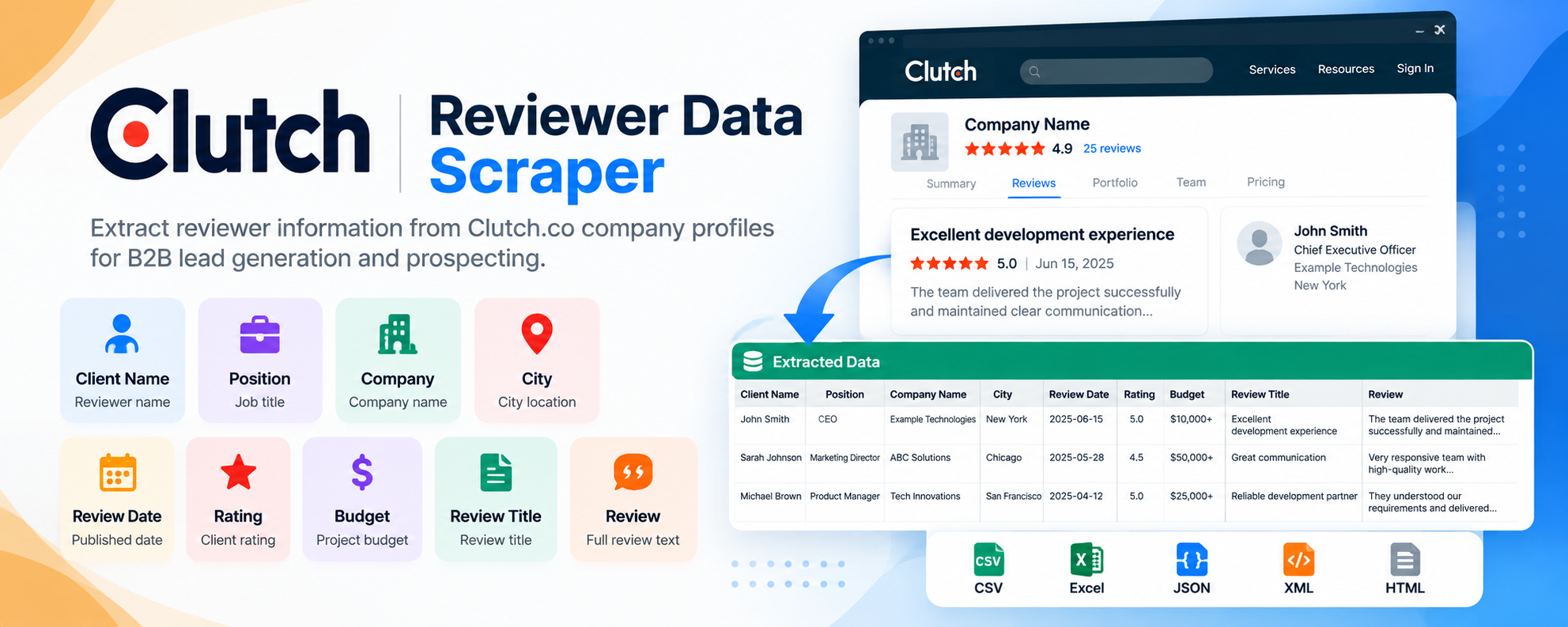
Extract reviewer information, ratings, project budgets, and client feedback from Clutch.co company profiles. This Actor collects publicly available reviewer names, positions, current companies, cities, review dates, ratings, budgets, review titles, and review text to help you identify potential business prospects and streamline B2B lead generation.
Simply enter a Clutch company profile URL, and the Actor automatically extracts the available information into a structured dataset.
### What Data Does This Actor Extract?
The Actor collects the following information from Clutch.co reviews:
| Field | Description |
| ------------ | ---------------------------------------------------------- |
| Client Name | Name of the person who submitted the review |
| Position | Professional position or job title of the reviewer |
| Company Name | Company associated with the reviewer |
| City | City associated with the reviewer |
| Review Date | Date the review was published |
| Rating | Rating given by the client |
| Budget | Project budget or engagement value mentioned in the review |
| Review Title | Title or heading of the review |
| Review | Full review text submitted by the client |
**Note:** The availability of individual fields depends on the information publicly displayed on the Clutch profile.
### Why Use This Actor?
Clutch reviews provide valuable information about people and organizations that have previously worked with service providers. By extracting reviewer details alongside project budgets, ratings, and feedback, you can identify potential prospects and conduct further research using professional networking platforms such as LinkedIn.
Whether you are building a prospect list, researching potential clients, or identifying business connections, this Actor simplifies the initial data collection process.
#### Key Benefits
- **Automated extraction:** Collect reviewer information and feedback without manually browsing Clutch profiles.
- **Structured data:** Receive organized records that are easy to review and process.
- **Prospect identification:** Use reviewer names, positions, and company information to find potential business contacts.
- **LinkedIn research:** Use extracted details to search for matching LinkedIn profile URLs.
- **Project insights:** Understand client ratings, project budgets, and feedback.
- **Time savings:** Reduce repetitive manual research and data entry.
- **Easy to use:** No technical knowledge or complicated configuration required.
### How to Use
Using the Actor is straightforward.
1. Open the Actor on Apify.
2. Enter the Clutch company profile URL.
3. Click **Start** to begin extraction.
4. Wait for the Actor to complete the run.
5. View or export the extracted information from the dataset.
#### Input Example
Enter a Clutch company profile URL in the input field.
```text
https://clutch.co/profile/your-company
```
Replace `your-company` with the actual company profile you want to process.
### Output Example
The Actor returns structured records containing the extracted reviewer and review information.
```json
{
"client_name": "John Smith",
"position": "Chief Executive Officer",
"company_name": "Example Technologies",
"city": "New York",
"review_date": "2025-06-15",
"rating": 5.0,
"budget": "$10,000 to $49,999",
"reviewTitle": "Excellent development experience",
"review": "The team delivered the project successfully and maintained clear communication throughout the engagement."
}
```
*The example above is illustrative. Actual values depend on the information available on the Clutch profile.*
Each record represents a review extracted from the supplied company profile.
### Use Cases
#### B2B Lead Generation
Identify individuals who have previously engaged software development agencies, marketing firms, or other service providers.
#### LinkedIn Prospecting
Use reviewer names, positions, and company information to search for matching LinkedIn profiles and identify potential business connections.
#### Client Discovery
Discover potential clients by researching people and organizations associated with existing Clutch reviews.
#### Business Development
Build structured prospect lists and understand the types of projects clients have previously commissioned.
#### Market Research
Analyze publicly available ratings, project budgets, and client feedback to understand customer expectations and engagement patterns.
#### Project Budget Research
Review reported project budgets to understand the investment levels associated with different client engagements.
### Exporting Your Data
Once the Actor completes its run, you can access the extracted information in the Apify dataset.
Apify allows you to export your results in supported formats, including:
- JSON
- CSV
- Excel
- XML
- HTML
These formats make it easy to use the extracted data in spreadsheets, CRM systems, and other business tools.
### Frequently Asked Questions
**1. What input is required?**
You only need to provide a Clutch company profile URL.
**2. What information does the Actor extract?**
It extracts reviewer names, positions, company names, cities, review dates, ratings, project budgets, review titles, and review text, depending on what is publicly available.
**3. Does the Actor extract LinkedIn profile URLs?**
No. The Actor extracts reviewer information from Clutch.co. You can use that information to search for matching LinkedIn profiles separately.
**4. Does the Actor extract full review text?**
Yes. The Actor extracts the review title and review text when publicly available.
**5. Do I need coding knowledge to use this Actor?**
No. Simply enter the company profile URL and start the Actor through the Apify interface.
**6. Can I export the extracted data?**
Yes. The results are stored in an Apify dataset and can be exported in supported formats such as CSV, Excel, and JSON.
### Important Information
This Actor collects publicly available information displayed on Clutch.co company profiles. The availability and completeness of extracted fields depend on the information provided on the source website.
Users are responsible for ensuring that their data collection and subsequent use comply with applicable laws, privacy requirements, and the source website's terms.
***
**Start extracting Clutch reviewer information, project details, and client feedback to simplify your B2B prospect research.**
# Actor input Schema
## `startUrls` (type: `array`):
One or more Clutch profile URLs, e.g. https://clutch.co/profile/your-company. Query strings and #anchors are ignored.
## `includeAnonymous` (type: `boolean`):
By default reviews without a reviewer name (or named 'Anonymous') are skipped. Enable to keep them.
## `maxReviews` (type: `integer`):
0 = no limit. Counts rows kept after filtering.
## Actor input object example
```json
{
"startUrls": [
"https://clutch.co/profile/your-company"
],
"includeAnonymous": false,
"maxReviews": 0
}
```
# Actor output Schema
## `reviews` (type: `string`):
One record per review: date, reviewer, title, company, location, org name, review date, review URL, rating, budget, review title and review text.
## `runSummary` (type: `string`):
Per-company totals: reported reviews, unique reviews seen, duplicates dropped, anonymous skipped, rows written and status.
# API
You can run this Actor programmatically using our API. Below are code examples in JavaScript, Python, and CLI, as well as the OpenAPI specification and MCP server setup.
## JavaScript example
```javascript
import { ApifyClient } from 'apify-client';
// Initialize the ApifyClient with your Apify API token
// Replace the '' with your token
const client = new ApifyClient({
token: '',
});
// Prepare Actor input
const input = {
"startUrls": [
"https://clutch.co/profile/your-company"
]
};
// Run the Actor and wait for it to finish
const run = await client.actor("creatorharsh/clutch-reviews-scraper-extract-company-reviews-client-data").call(input);
// Fetch and print Actor results from the run's dataset (if any)
console.log('Results from dataset');
console.log(`💾 Check your data here: https://console.apify.com/storage/datasets/${run.defaultDatasetId}`);
const { items } = await client.dataset(run.defaultDatasetId).listItems();
items.forEach((item) => {
console.dir(item);
});
// 📚 Want to learn more 📖? Go to → https://docs.apify.com/api/client/js/docs
```
## Python example
```python
from apify_client import ApifyClient
# Initialize the ApifyClient with your Apify API token
# Replace '' with your token.
client = ApifyClient("")
# Prepare the Actor input
run_input = { "startUrls": ["https://clutch.co/profile/your-company"] }
# Run the Actor and wait for it to finish
run = client.actor("creatorharsh/clutch-reviews-scraper-extract-company-reviews-client-data").call(run_input=run_input)
# Fetch and print Actor results from the run's dataset (if there are any)
print(f"💾 Check your data here: https://console.apify.com/storage/datasets/{run.default_dataset_id}")
for item in client.dataset(run.default_dataset_id).iterate_items():
print(item)
# 📚 Want to learn more 📖? Go to → https://docs.apify.com/api/client/python/docs/quick-start
```
## CLI example
```bash
echo '{
"startUrls": [
"https://clutch.co/profile/your-company"
]
}' |
apify call creatorharsh/clutch-reviews-scraper-extract-company-reviews-client-data --silent --output-dataset
```
## MCP server setup
```json
{
"mcpServers": {
"apify": {
"type": "http",
"url": "https://mcp.apify.com/?tools=fetch-actor-details,creatorharsh/clutch-reviews-scraper-extract-company-reviews-client-data"
}
}
}
```
The hosted server signs you in with OAuth on first connect, so no API token belongs in this config. Clients without OAuth support can send an `Authorization: Bearer ` header instead, using a token from API & Integrations in Apify Console (https://console.apify.com/settings/integrations).
## OpenAPI specification
Download the OpenAPI definition: https://api.apify.com/v2/actors/qV3bnQ34hEbjqnRfU/builds/esM6NIe2sEd9dKQw9/openapi.json