# Backlink Building Agent
The Backlink Building Agent automates backlink outreach by finding relevant pages & websites, extracting contacts from these websites, and then crafting personalized outreach sequences based on the content to these partners. These sequences can be used on email, LinkedIn, Twitter, & WhatsApp.
## Actor Statistics
- Total users: 210
- Monthly users: 41
- Runs succeeded: 56.86%
- Categories: AI, Open source, Agents
## Pricing
Pay per event
## Input Schema
- **keywords** (type: array): One or more keywords for which we'll prepare backlink outreach
- **businessName** (type: string): It needs so that AI models better understand competitors
- **shortBusinessDescription** (type: string): It needs so that AI models better understand competitors
- **name** (type: string): The name which will be appended to the outreach messages
- **excludeDomains** (type: array): One or more domains, which should be excluded from the outreach. This improves the outreach strategy
## API example
## Backlink Building Agent
- **OpenAPI Version:** `3.1.1`
- **API Version:** `0.1`
The Backlink Building Agent automates backlink outreach by finding relevant pages & websites, extracting contacts from these websites, and then crafting personalized outreach sequences based on the content to these partners. These sequences can be used on email, LinkedIn, Twitter, & WhatsApp.
### Servers
- **URL:** `https://api.apify.com/v2`
### Operations
#### Executes an Actor, waits for its completion, and returns Actor's dataset items in response.
- **Method:** `POST`
- **Path:** `/acts/daniil.poletaev~backlink-building-agent/run-sync-get-dataset-items`
- **Tags:** Run Actor
##### Request Body
###### Content-Type: application/json
- **`businessName` (required)**
`string` — It needs so that AI models better understand competitors
- **`excludeDomains` (required)**
`array` — One or more domains, which should be excluded from the outreach. This improves the outreach strategy
**Items:**
`string`
- **`keywords` (required)**
`array` — One or more keywords for which we'll prepare backlink outreach
**Items:**
`string`
- **`name` (required)**
`string` — The name which will be appended to the outreach messages
- **`shortBusinessDescription` (required)**
`string` — It needs so that AI models better understand competitors
**Example:**
```
{
"keywords": [
""
],
"businessName": "",
"shortBusinessDescription": "",
"name": "",
"excludeDomains": [
""
]
}
```
##### Responses
###### Status: 200 OK
#### Executes an Actor and returns information about the initiated run in response.
- **Method:** `POST`
- **Path:** `/acts/daniil.poletaev~backlink-building-agent/runs`
- **Tags:** Run Actor
##### Request Body
###### Content-Type: application/json
- **`businessName` (required)**
`string` — It needs so that AI models better understand competitors
- **`excludeDomains` (required)**
`array` — One or more domains, which should be excluded from the outreach. This improves the outreach strategy
**Items:**
`string`
- **`keywords` (required)**
`array` — One or more keywords for which we'll prepare backlink outreach
**Items:**
`string`
- **`name` (required)**
`string` — The name which will be appended to the outreach messages
- **`shortBusinessDescription` (required)**
`string` — It needs so that AI models better understand competitors
**Example:**
```
{
"keywords": [
""
],
"businessName": "",
"shortBusinessDescription": "",
"name": "",
"excludeDomains": [
""
]
}
```
##### Responses
###### Status: 200 OK
\####### Content-Type: application/json
- **`data`**
`object`
- **`actId`**
`string`
- **`buildId`**
`string`
- **`buildNumber`**
`string`
- **`containerUrl`**
`string`
- **`defaultDatasetId`**
`string`
- **`defaultKeyValueStoreId`**
`string`
- **`defaultRequestQueueId`**
`string`
- **`finishedAt`**
`string`, format: `date-time`
- **`id`**
`string`
- **`meta`**
`object`
- **`origin`**
`string`
- **`userAgent`**
`string`
- **`options`**
`object`
- **`build`**
`string`
- **`diskMbytes`**
`integer`
- **`memoryMbytes`**
`integer`
- **`timeoutSecs`**
`integer`
- **`startedAt`**
`string`, format: `date-time`
- **`stats`**
`object`
- **`computeUnits`**
`integer`
- **`inputBodyLen`**
`integer`
- **`rebootCount`**
`integer`
- **`restartCount`**
`integer`
- **`resurrectCount`**
`integer`
- **`status`**
`string`
- **`usage`**
`object`
- **`ACTOR_COMPUTE_UNITS`**
`integer`
- **`DATA_TRANSFER_EXTERNAL_GBYTES`**
`integer`
- **`DATA_TRANSFER_INTERNAL_GBYTES`**
`integer`
- **`DATASET_READS`**
`integer`
- **`DATASET_WRITES`**
`integer`
- **`KEY_VALUE_STORE_LISTS`**
`integer`
- **`KEY_VALUE_STORE_READS`**
`integer`
- **`KEY_VALUE_STORE_WRITES`**
`integer`
- **`PROXY_RESIDENTIAL_TRANSFER_GBYTES`**
`integer`
- **`PROXY_SERPS`**
`integer`
- **`REQUEST_QUEUE_READS`**
`integer`
- **`REQUEST_QUEUE_WRITES`**
`integer`
- **`usageTotalUsd`**
`number`
- **`usageUsd`**
`object`
- **`ACTOR_COMPUTE_UNITS`**
`integer`
- **`DATA_TRANSFER_EXTERNAL_GBYTES`**
`integer`
- **`DATA_TRANSFER_INTERNAL_GBYTES`**
`integer`
- **`DATASET_READS`**
`integer`
- **`DATASET_WRITES`**
`integer`
- **`KEY_VALUE_STORE_LISTS`**
`integer`
- **`KEY_VALUE_STORE_READS`**
`integer`
- **`KEY_VALUE_STORE_WRITES`**
`number`
- **`PROXY_RESIDENTIAL_TRANSFER_GBYTES`**
`integer`
- **`PROXY_SERPS`**
`integer`
- **`REQUEST_QUEUE_READS`**
`integer`
- **`REQUEST_QUEUE_WRITES`**
`integer`
- **`userId`**
`string`
**Example:**
```
{
"data": {
"id": "",
"actId": "",
"userId": "",
"startedAt": "2025-01-08T00:00:00.000Z",
"finishedAt": "2025-01-08T00:00:00.000Z",
"status": "READY",
"meta": {
"origin": "API",
"userAgent": ""
},
"stats": {
"inputBodyLen": 2000,
"rebootCount": 0,
"restartCount": 0,
"resurrectCount": 0,
"computeUnits": 0
},
"options": {
"build": "latest",
"timeoutSecs": 300,
"memoryMbytes": 1024,
"diskMbytes": 2048
},
"buildId": "",
"defaultKeyValueStoreId": "",
"defaultDatasetId": "",
"defaultRequestQueueId": "",
"buildNumber": "1.0.0",
"containerUrl": "",
"usage": {
"ACTOR_COMPUTE_UNITS": 0,
"DATASET_READS": 0,
"DATASET_WRITES": 0,
"KEY_VALUE_STORE_READS": 0,
"KEY_VALUE_STORE_WRITES": 1,
"KEY_VALUE_STORE_LISTS": 0,
"REQUEST_QUEUE_READS": 0,
"REQUEST_QUEUE_WRITES": 0,
"DATA_TRANSFER_INTERNAL_GBYTES": 0,
"DATA_TRANSFER_EXTERNAL_GBYTES": 0,
"PROXY_RESIDENTIAL_TRANSFER_GBYTES": 0,
"PROXY_SERPS": 0
},
"usageTotalUsd": 0.00005,
"usageUsd": {
"ACTOR_COMPUTE_UNITS": 0,
"DATASET_READS": 0,
"DATASET_WRITES": 0,
"KEY_VALUE_STORE_READS": 0,
"KEY_VALUE_STORE_WRITES": 0.00005,
"KEY_VALUE_STORE_LISTS": 0,
"REQUEST_QUEUE_READS": 0,
"REQUEST_QUEUE_WRITES": 0,
"DATA_TRANSFER_INTERNAL_GBYTES": 0,
"DATA_TRANSFER_EXTERNAL_GBYTES": 0,
"PROXY_RESIDENTIAL_TRANSFER_GBYTES": 0,
"PROXY_SERPS": 0
}
}
}
```
#### Executes an Actor, waits for completion, and returns the OUTPUT from Key-value store in response.
- **Method:** `POST`
- **Path:** `/acts/daniil.poletaev~backlink-building-agent/run-sync`
- **Tags:** Run Actor
##### Request Body
###### Content-Type: application/json
- **`businessName` (required)**
`string` — It needs so that AI models better understand competitors
- **`excludeDomains` (required)**
`array` — One or more domains, which should be excluded from the outreach. This improves the outreach strategy
**Items:**
`string`
- **`keywords` (required)**
`array` — One or more keywords for which we'll prepare backlink outreach
**Items:**
`string`
- **`name` (required)**
`string` — The name which will be appended to the outreach messages
- **`shortBusinessDescription` (required)**
`string` — It needs so that AI models better understand competitors
**Example:**
```
{
"keywords": [
""
],
"businessName": "",
"shortBusinessDescription": "",
"name": "",
"excludeDomains": [
""
]
}
```
##### Responses
###### Status: 200 OK
### Schemas
#### inputSchema
- **Type:**`object`
* **`businessName` (required)**
`string` — It needs so that AI models better understand competitors
* **`excludeDomains` (required)**
`array` — One or more domains, which should be excluded from the outreach. This improves the outreach strategy
**Items:**
`string`
* **`keywords` (required)**
`array` — One or more keywords for which we'll prepare backlink outreach
**Items:**
`string`
* **`name` (required)**
`string` — The name which will be appended to the outreach messages
* **`shortBusinessDescription` (required)**
`string` — It needs so that AI models better understand competitors
**Example:**
```
{
"keywords": [
""
],
"businessName": "",
"shortBusinessDescription": "",
"name": "",
"excludeDomains": [
""
]
}
```
#### runsResponseSchema
- **Type:**`object`
* **`data`**
`object`
- **`actId`**
`string`
- **`buildId`**
`string`
- **`buildNumber`**
`string`
- **`containerUrl`**
`string`
- **`defaultDatasetId`**
`string`
- **`defaultKeyValueStoreId`**
`string`
- **`defaultRequestQueueId`**
`string`
- **`finishedAt`**
`string`, format: `date-time`
- **`id`**
`string`
- **`meta`**
`object`
- **`origin`**
`string`
- **`userAgent`**
`string`
- **`options`**
`object`
- **`build`**
`string`
- **`diskMbytes`**
`integer`
- **`memoryMbytes`**
`integer`
- **`timeoutSecs`**
`integer`
- **`startedAt`**
`string`, format: `date-time`
- **`stats`**
`object`
- **`computeUnits`**
`integer`
- **`inputBodyLen`**
`integer`
- **`rebootCount`**
`integer`
- **`restartCount`**
`integer`
- **`resurrectCount`**
`integer`
- **`status`**
`string`
- **`usage`**
`object`
- **`ACTOR_COMPUTE_UNITS`**
`integer`
- **`DATA_TRANSFER_EXTERNAL_GBYTES`**
`integer`
- **`DATA_TRANSFER_INTERNAL_GBYTES`**
`integer`
- **`DATASET_READS`**
`integer`
- **`DATASET_WRITES`**
`integer`
- **`KEY_VALUE_STORE_LISTS`**
`integer`
- **`KEY_VALUE_STORE_READS`**
`integer`
- **`KEY_VALUE_STORE_WRITES`**
`integer`
- **`PROXY_RESIDENTIAL_TRANSFER_GBYTES`**
`integer`
- **`PROXY_SERPS`**
`integer`
- **`REQUEST_QUEUE_READS`**
`integer`
- **`REQUEST_QUEUE_WRITES`**
`integer`
- **`usageTotalUsd`**
`number`
- **`usageUsd`**
`object`
- **`ACTOR_COMPUTE_UNITS`**
`integer`
- **`DATA_TRANSFER_EXTERNAL_GBYTES`**
`integer`
- **`DATA_TRANSFER_INTERNAL_GBYTES`**
`integer`
- **`DATASET_READS`**
`integer`
- **`DATASET_WRITES`**
`integer`
- **`KEY_VALUE_STORE_LISTS`**
`integer`
- **`KEY_VALUE_STORE_READS`**
`integer`
- **`KEY_VALUE_STORE_WRITES`**
`number`
- **`PROXY_RESIDENTIAL_TRANSFER_GBYTES`**
`integer`
- **`PROXY_SERPS`**
`integer`
- **`REQUEST_QUEUE_READS`**
`integer`
- **`REQUEST_QUEUE_WRITES`**
`integer`
- **`userId`**
`string`
**Example:**
```
{
"data": {
"id": "",
"actId": "",
"userId": "",
"startedAt": "2025-01-08T00:00:00.000Z",
"finishedAt": "2025-01-08T00:00:00.000Z",
"status": "READY",
"meta": {
"origin": "API",
"userAgent": ""
},
"stats": {
"inputBodyLen": 2000,
"rebootCount": 0,
"restartCount": 0,
"resurrectCount": 0,
"computeUnits": 0
},
"options": {
"build": "latest",
"timeoutSecs": 300,
"memoryMbytes": 1024,
"diskMbytes": 2048
},
"buildId": "",
"defaultKeyValueStoreId": "",
"defaultDatasetId": "",
"defaultRequestQueueId": "",
"buildNumber": "1.0.0",
"containerUrl": "",
"usage": {
"ACTOR_COMPUTE_UNITS": 0,
"DATASET_READS": 0,
"DATASET_WRITES": 0,
"KEY_VALUE_STORE_READS": 0,
"KEY_VALUE_STORE_WRITES": 1,
"KEY_VALUE_STORE_LISTS": 0,
"REQUEST_QUEUE_READS": 0,
"REQUEST_QUEUE_WRITES": 0,
"DATA_TRANSFER_INTERNAL_GBYTES": 0,
"DATA_TRANSFER_EXTERNAL_GBYTES": 0,
"PROXY_RESIDENTIAL_TRANSFER_GBYTES": 0,
"PROXY_SERPS": 0
},
"usageTotalUsd": 0.00005,
"usageUsd": {
"ACTOR_COMPUTE_UNITS": 0,
"DATASET_READS": 0,
"DATASET_WRITES": 0,
"KEY_VALUE_STORE_READS": 0,
"KEY_VALUE_STORE_WRITES": 0.00005,
"KEY_VALUE_STORE_LISTS": 0,
"REQUEST_QUEUE_READS": 0,
"REQUEST_QUEUE_WRITES": 0,
"DATA_TRANSFER_INTERNAL_GBYTES": 0,
"DATA_TRANSFER_EXTERNAL_GBYTES": 0,
"PROXY_RESIDENTIAL_TRANSFER_GBYTES": 0,
"PROXY_SERPS": 0
}
}
}
```
[](https://apify.com/daniil.poletaev/backlink-building-agent)
### 🔗 Backlink Building Agent
The Backlink Building Agent is an automated agent designed to automate link-building efforts, a key component of building an SEO profile. It helps you position your website on keywords or search terms that are driving traffic or conversions (e.g., best email validation tool, best CRM for small businesses).
***
### How it works
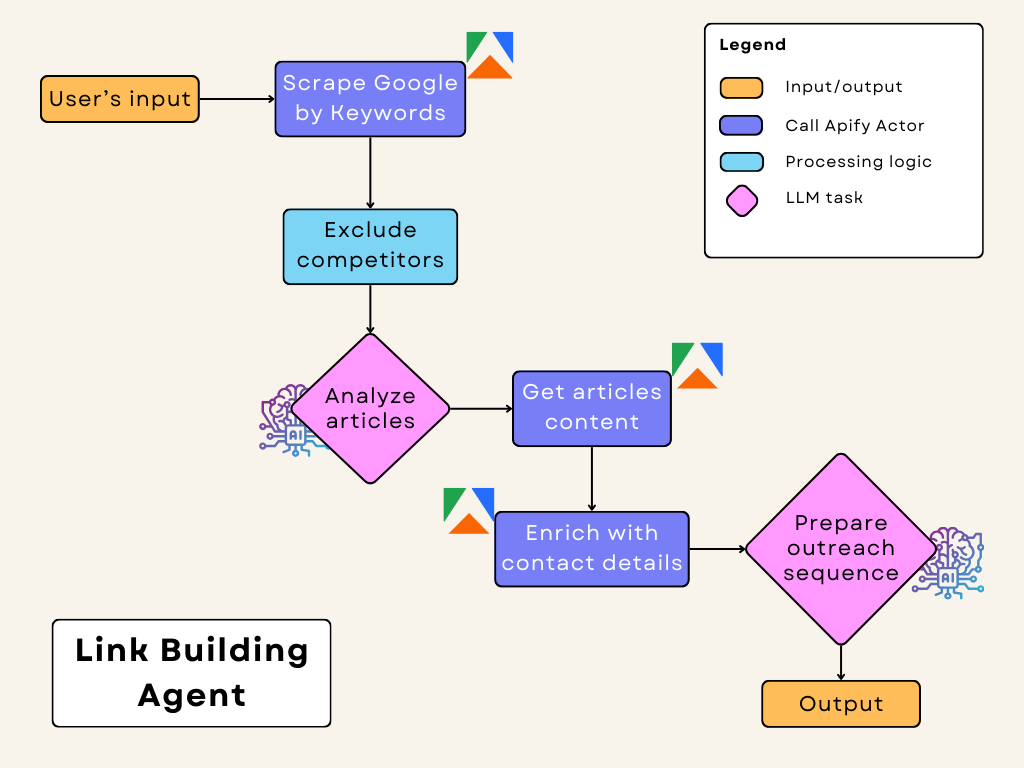
#### This actor is open source. You can check source code [here](https://github.com/danpoletaev/backlink-outreach-js).
#### It does the following:
- **Keyword Search:**\
Identify potential backlink partners via SERP results on keywords or search terms.
- **Filter & Analyze opportunities:**
Assess their relevance (filter out direct competitors).
- **Extract contact details:**\
Extract contact details from shortlisted pages or domains.
- **Generate personalized outreach:**\
Generate personalized outreach messages on email, Linkedin, Twitter, Facebook based on the Markdown of the targeted pages, with instructions on required anchor text or keywords.
**You can then integrate this output to any messaging platform or automation tool via Make, n8n, or to ingest it as key properties into your CRMs like Hubspot, Salesforce, or Attio.**
***
#### ⬇️ Input
Set your parameters using a simple JSON format. For example:
```json
{
"keywords": [
"best email validation tool",
"email validators"
],
"businessName": "Neverbounce",
"shortBusinessDescription": "NeverBounce offers real-time email verification to reduce bounce rates and improve deliverability. Clean your email list for better email marketing results.",
"name": "Dan",
"excludeDomains": [
"Zerobounce"
]
}
```
- **keywords:** These are the keywords or search terms that you want to target. This should be part of your SEO strategy, so keywords or search terms that are driving quality traffic and conversions to your website. Check out Ahrefs or Similarweb for more information, or use your CRM to determine the best keywords or search terms to target.
- **businessName:** Your company or project name.
- **shortBusinessDescription:** A brief description of your business to help our agent asses your business model.
- **name:** Your name or contact person.
- **excludeDomains:** Domains to skip in the search. Can be names or domains. Put a list of competitors that you want our Agent to skip.
***
#### ⬆️ Output
Here is a sample of the Output in JSON which you can use on marketing automation tools like Instantly or Hubspot:
- **Article Details:** URL, title, and description.
- **Contacts:** Email addresses and social media links.
- **Message Sequence:** Ready-to-use outreach messages for each communication channel consisting of 3 messages (1 message + 2 follow ups).
For example:
```json
{
"articleUrl": "https://example.com/backlink-opportunity",
"description": "Article meta description.",
"title": "Backlink Opportunity - Example Article",
"emails": ["contact@example.com"],
"facebooks": ["https://facebook.com/exampleprofile"],
"linkedIns": ["https://linkedin.com/in/exampleprofile"],
"twitters": ["https://twitter.com/exampleprofile"],
"sequence": {
"email": [
{
"subject": "Potential Collaboration: Best Google Search Scrapers and APIs",
"preview": "Hi, sharing insights on valuable Google SERP tools!",
"text": "Hi,\n\nI hope this message finds you well! I recently came across your platform and I thought your audience could benefit from my article comparing 15+ Google Search Scrapers and APIs for 2024. It covers practical use cases and insights that can enhance their data extraction processes.\n\nIf you find the content relevant, I would greatly appreciate a backlink in your resource section or an article mentioning this comparison.\n\nLooking forward to hearing from you!\n\nBest, \n[Your Name]"
},
{
"subject": "Following Up: Collaboration on Google Search Scrapers",
"preview": "Hi, just checking in on our last message!",
"text": "Hi,\n\nI wanted to follow up on my previous email regarding the article on Google Search Scrapers and APIs. I believe this could offer great value to your readers looking for efficient data extraction methods. \n\nIf you have any questions or need more information, feel free to let me know. I’d be excited to collaborate with you.\n\nThanks for your time!\n\nBest, \n[Your Name]"
},
{
"subject": "Last Chance to Enhance Your Resource Section!",
"preview": "Hi, don’t miss this opportunity!",
"text": "Hi, \n\nI wanted to reach out one last time regarding my article on the best Google Search Scrapers and APIs. This content could be a great addition to your resource section, especially for readers interested in efficient data extraction techniques.\n\nIf interested, please let me know by the end of the week. I appreciate your consideration!\n\nWarm regards, \n[Your Name]"
}
],
"twitter": [
{
"subject": "Collaboration Opportunity!",
"preview": "Check out this valuable resource on Google SERP tools!",
"text": "Hi! I recently published a comprehensive guide on the best Google Search Scrapers and APIs for 2024. It can help your audience with efficient data extraction from SERPs. If interested, let’s discuss a backlink opportunity that benefits both of us!"
},
{
"subject": "Friendly Reminder!",
"preview": "Touching base on my previous message!",
"text": "Hey, just checking in! I reached out about my article comparing 15+ Google Search Scrapers and APIs. It’s packed with insights and use cases that your readers may find beneficial. Would love to hear if you're interested in linking to it!"
},
{
"subject": "Final Reminder!",
"preview": "Wrapping up my outreach campaign!",
"text": "Hi, this is my final outreach regarding my article on Google Search Scrapers and APIs. If this resonates with your audience, I’d love a chance to connect and discuss potential collaboration before the end of the week! Thanks for considering!"
}
],
"linkedIn": [
{
"subject": "Exciting Collaboration Ahead!",
"preview": "Explore our shared interest in data extraction tools.",
"text": "Hi,\n\nI came across your profile and thought your audience would benefit from my recent article on the best Google Search Scrapers and APIs available in 2024. It dives deep into the advantages and use cases that could enhance their data extraction efforts.\n\nWould you be open to discussing a potential backlink to this resource? I’d love to partner up!"
},
{
"subject": "Checking In!",
"preview": "Curious if you had a chance to review my email.",
"text": "Hello, \n\nI hope you are doing well! I wanted to follow up on my previous message about my article on Google Search Scrapers and APIs. This could be a valuable resource for your audience, and I’d appreciate your thoughts on possible collaboration!\n\nLooking forward to your reply!"
},
{
"subject": "Last Chance for Collaboration!",
"preview": "Don’t miss out on this valuable resource!",
"text": "Hi, \n\nI wanted to reach out one final time about my article on the best Google Search Scrapers and APIs. If you think this could benefit your readers, I’d love to discuss linking opportunities!\n\nLet me know by the end of the week—thank you!"
}
]
}
}
```
Example of sequence:
```markdown
Hi Manthan!
Your article on the "10 Best APIs for Scraping Google in 2025" is fantastic!
I see potential for a collaboration that could be beneficial for both our audiences.
I'd love to discuss the idea of a backlink partnership if you're interested!
Thank you,
Dan
```
***
#### Tips for Best Results
- **Run Regularly:** Check for new opportunities on a regular basis.
- **Refine Your Keywords:** Experiment with different keywords to target the right audience based on your CRM data or performance channels.
- **Update Exclusions:** Keep your exclusion list current to avoid unwanted sites. Update it regularly. This will greatly improve filtering of potential opportunities!
- **Integrate and customize:** You can then integrate this output to any messaging platform or automation tool via Make, n8n, or to ingest it as key properties into your CRMs or databases like Hubspot, Salesforce, or Attio.
Let our AI-powered outreach handle the communication so you can focus on what really matters — growing your business and building meaningful partnerships with these publishers.
***
### FAQ
#### **💸 How much does it cost to run the Backlink Building Agent?**
This scraper uses a Pay-per-event pricing model, making costs straightforward to calculate: it will cost you **$0.05 to generate one sequence**. Apify provides $5 free usage credits every month on the [Apify Free plan](https://apify.com/pricing), letting you **generate over 100 places on Link Building Agent for free** with those credits.
#### **Can I integrate Backlink Building Agent with other apps?**
Yes. This Agent can be connected with almost any cloud service or web app thanks to [integrations on the Apify platform](https://apify.com/integrations). You can integrate with Make, Zapier, n8n, Slack, Airbyte, GitHub, Airtable, Instantly, Google Sheets, Google Drive, LangChain [and more](https://docs.apify.com/integrations).
Or you can use [webhooks](https://docs.apify.com/integrations/webhooks) to carry out an action whenever an event occurs, e.g. get a notification whenever Link Building Agent successfully finishes a run.
#### **Can I use Backlink Building Agent as its own API?**
Yes, by using Apify API. This API gives you programmatic access to the Apify platform. The API is organized around RESTful HTTP endpoints that enable you to manage, schedule, and run Apify [Actors](https://apify.com/actors). The API also lets you access any datasets, monitor Actor performance, fetch results, create and update versions, and more.
To access the API using Node.js, use the `apify-client` [NPM package](https://apify.com/compass/google-maps-extractor/api/client/nodejs). To access the API using Python, use the `apify-client` [PyPI package](https://apify.com/compass/google-maps-extractor/api/client/python).
Check out the [Apify API reference](https://docs.apify.com/api/v2) docs for full details or click on the [API tab](https://apify.com/compass/google-maps-extractor/api/client/nodejs) for code examples.
#### **Can I use this Agent in Python?**
Yes, by using Apify API. To access the API, use the `apify-client` PyPI package. You can find more details about the client in our [Docs for Python Client](https://docs.apify.com/api/client/python/).