# BiRefNet Background Remover — AI Image Cutout & Removal (`danitn11/birefnet-background-remover`) Actor
Remove image backgrounds automatically with BiRefNet. Get a clean transparent PNG cutout (and an optional mask) in seconds, from $0.007/image. No GPU or subscription — a pay-as-you-go remove.bg alternative.
- **URL**: https://apify.com/danitn11/birefnet-background-remover.md
- **Developed by:** [daniel tr](https://apify.com/danitn11) (community)
- **Categories:** Automation, Developer tools, AI
- **Stats:** 6 total users, 4 monthly users, 99.6% runs succeeded, 0 bookmarks
- **User rating**: No ratings yet
## Pricing
from $7.00 / 1,000 background removals
This Actor is paid per event and usage. You are charged both the fixed price for specific events and for Apify platform usage.
Since this Actor supports Apify Store discounts, the price gets lower the higher subscription plan you have.
Learn more: https://docs.apify.com/platform/actors/running/actors-in-store#pay-per-event
## What's an Apify Actor?
Actors are a software tools running on the Apify platform, for all kinds of web data extraction and automation use cases.
In Batch mode, an Actor accepts a well-defined JSON input, performs an action which can take anything from a few seconds to a few hours,
and optionally produces a well-defined JSON output, datasets with results, or files in key-value store.
In Standby mode, an Actor provides a web server which can be used as a website, API, or an MCP server.
Actors are written with capital "A".
## How to integrate an Actor?
If asked about integration, you help developers integrate Actors into their projects.
You adapt to their stack and deliver integrations that are safe, well-documented, and production-ready.
The best way to integrate Actors is as follows.
In JavaScript/TypeScript projects, use official [JavaScript/TypeScript client](https://docs.apify.com/api/client/js.md):
```bash
npm install apify-client
```
In Python projects, use official [Python client library](https://docs.apify.com/api/client/python.md):
```bash
pip install apify-client
```
In shell scripts, use [Apify CLI](https://docs.apify.com/cli/docs.md):
````bash
# MacOS / Linux
curl -fsSL https://apify.com/install-cli.sh | bash
# Windows
irm https://apify.com/install-cli.ps1 | iex
```bash
In AI frameworks, you might use the [Apify MCP server](https://docs.apify.com/platform/integrations/mcp.md).
If your project is in a different language, use the [REST API](https://docs.apify.com/api/v2.md).
For usage examples, see the [API](#api) section below.
For more details, see Apify documentation as [Markdown index](https://docs.apify.com/llms.txt) and [Markdown full-text](https://docs.apify.com/llms-full.txt).
# README
## BiRefNet Background Remover — AI Image Background Removal & Cutout ✂️
**Remove the background from any image automatically** with **BiRefNet**, a state-of-the-art segmentation model. Get a clean, transparent **PNG cutout** in **just a few seconds** — plus an optional black-and-white **mask** for compositing. No GPU, no subscription, no monthly fees: you pay a tiny fixed price per image. A fast, affordable **alternative to remove.bg, Photoroom, and Adobe's "Remove Background"**.
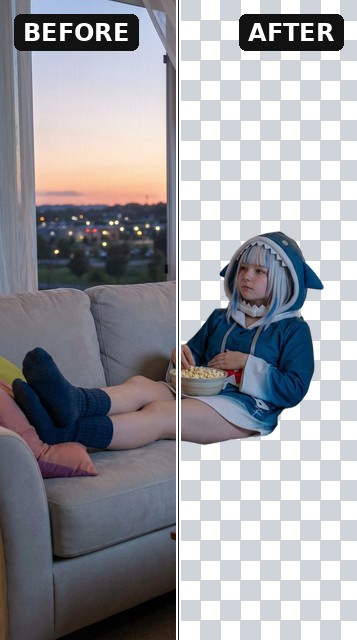
- ✂️ **Transparent cutout** — your subject on a clean alpha background (PNG or WebP).
- 🎭 **Optional mask** — the black-and-white segmentation mask, for compositing or downstream tools.
- 🪶 **Edge refinement** — smooth hair, fur, and fine detail out of the box.
Perfect for **e-commerce product shots**, marketplace listings, profile pictures, thumbnails, design assets, **catalog automation**, and **n8n / Make / Zapier** workflows and AI agents.
### See it in action
**Every output, from one run** — the original image, the transparent cutout (PNG/WebP with a real alpha channel), and the optional black-and-white segmentation mask:
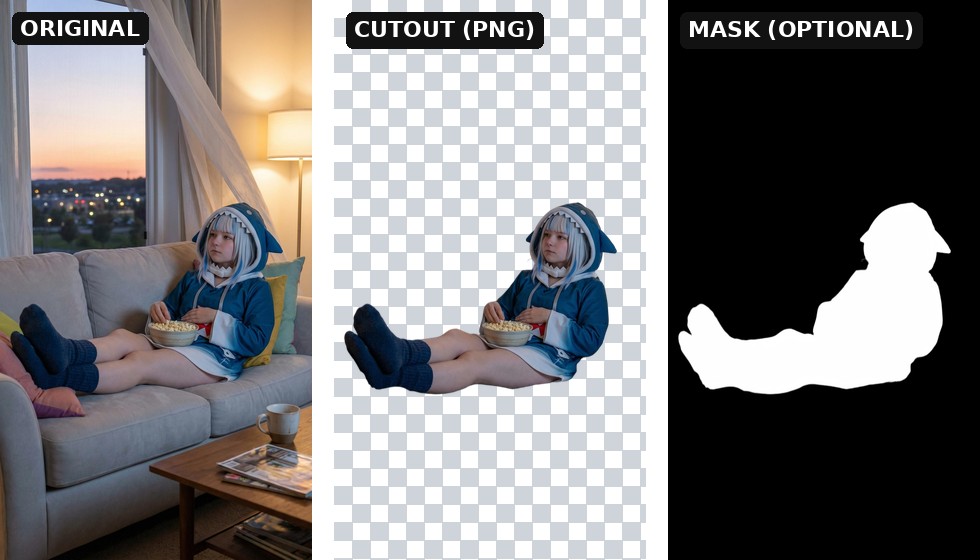
> The cutout is a true transparent file — the checkerboard only visualizes the removed background and isn't part of the image. Turn on **Also output the mask** to additionally get the segmentation mask.
### Why this Actor?
- ⚡ **Fast** — BiRefNet runs on dedicated GPUs and returns a cutout in **a few seconds**.
- 💸 **Cheap** — from **$0.007 per image** (as low as $7 per 1,000) — ~2× under Photoroom and 5–20× under remove.bg. Pay only for successful results; failed runs are never charged.
- 🎯 **Accurate** — BiRefNet is a top-performing dichotomous image segmentation model, great on hair, fur, and intricate edges.
- 🪟 **True transparency** — PNG/WebP output with a real alpha channel, ready to drop onto any background.
- 🎭 **Mask on demand** — flip one switch to also get the raw segmentation mask.
- 🔌 **Automation-ready** — call it from the Apify API, n8n, Make, Zapier, LangChain, or any AI agent via MCP.
### How it compares
| | This Actor (BiRefNet) | remove.bg / Photoroom |
| --- | --- | --- |
| Pricing model | Pay per image (from $0.007) | Monthly subscription / credits |
| Commitment | None — pay only for what you run | Recurring plan, credits expire |
| Failed runs | Never charged | Often consume credits |
| Transparent PNG | Yes | Yes (often paywalled at full res) |
| Segmentation mask | Yes, optional | Rarely exposed |
| API & automation | Native Apify API, n8n, Make, Zapier, MCP | Varies / limited |
| Watermark / resolution cap | None | Common on lower tiers |
Great when you want **background removal on demand** without a subscription — ideal for occasional use, automated pipelines, and pay-as-you-go scaling.
### How it works
1. Provide a public **image URL**.
2. Choose your **output format** (PNG or WebP) and, optionally, turn on **Also output the mask**.
3. The Actor removes the background and stores the cutout (and mask) in the run's dataset and key-value store.
4. Download the file(s) from the output, or pipe the URL into the next step of your workflow.
### Input example
```json
{
"imageUrl": "https://cdn.doggi-dev.net/ofai/plan_plan-cf945bca478a4ad5ac3e48a93130da47/output.jpg",
"outputFormat": "png",
"outputMask": true,
"refineForeground": true
}
````
| Field | Type | Default | Description |
| --- | --- | --- | --- |
| `imageUrl` | string | — (required) | Public URL of the image to process (JPG, PNG, WebP). |
| `outputFormat` | string | `png` | Cutout file format — `png` or `webp` (both keep transparency). |
| `outputMask` | boolean | `false` | Also return the black-and-white segmentation mask. |
| `refineForeground` | boolean | `true` | Clean up edges for smoother hair, fur, and fine detail. |
### Output example
```json
{
"imageUrl": "https://api.apify.com/v2/key-value-stores/.../records/cutout.png?signature=...",
"maskUrl": "https://api.apify.com/v2/key-value-stores/.../records/mask.png?signature=...",
"sourceImageUrl": "https://cdn.doggi-dev.net/ofai/plan_plan-cf945bca478a4ad5ac3e48a93130da47/output.jpg",
"outputFormat": "png",
"outputMask": true,
"refineForeground": true,
"width": 1024,
"height": 1024,
"requestId": "req-...",
"contentType": "image/png",
"model": "ZhengPeng7/BiRefNet"
}
```
The cutout is also stored in the run's key-value store under the key `cutout.png` (or `cutout.webp`), and the mask — when requested — under `mask.png` (or `mask.webp`).
### Pricing
You are charged **per processed image** at a price that drops with your Apify plan. The price is the same whether or not you also request the mask.
| Apify plan | Price per image | Per 1,000 images |
| --- | --- | --- |
| Free | $0.0100 | $10.00 |
| Bronze | $0.0090 | $9.00 |
| Silver | $0.0080 | $8.00 |
| Gold / Platinum / Diamond | $0.0070 | $7.00 |
That's still the **cheapest pay-as-you-go background-removal API** around — roughly **2× cheaper than Photoroom's API** (~$0.02/image) and **5–20× cheaper than remove.bg** ($0.05–0.20/image), with **no monthly subscription and no expiring credits**.
**Failed runs are never charged** — you only pay for cutouts you actually receive. (Apify also applies its standard tiny platform fees for the Actor start and each dataset record.)
### Tips for great results
- **Use a clear subject** — BiRefNet excels when the foreground stands out from the background.
- **Keep resolution reasonable** — very large images take a little longer; downscale first if you don't need full size.
- **Output PNG** for maximum compatibility, or **WebP** for smaller files — both preserve transparency.
- **Turn on the mask** when you want to composite, soften edges, or feed the selection into another tool.
- **Leave edge refinement on** for portraits and anything with hair or fur.
### 🎨 Need images to cut out? — FLUX.2 Klein Image Generator
No source image yet? **Generate one.** Our companion Actor, **[FLUX.2 Klein Image Generator](https://apify.com/danitn11/flux2-klein-image-generator)**, creates high-quality images from a text prompt (or edits an existing photo) in seconds — then pipe the `imageUrl` straight into this Actor to get a clean cutout.
**The complete pipeline:**
```
FLUX.2 Klein → image
→ BiRefNet Background Remover (this Actor) → transparent cutout
→ composite / list product / post to social
```
👉 **[Try FLUX.2 Klein Image Generator →](https://apify.com/danitn11/flux2-klein-image-generator)**
### Use it from the API
```bash
curl -X POST "https://api.apify.com/v2/acts/danitn11~birefnet-background-remover/runs?token=YOUR_TOKEN" \
-H "Content-Type: application/json" \
-d '{ "imageUrl": "https://example.com/photo.jpg", "outputFormat": "png", "outputMask": true }'
```
Works the same from the [Apify n8n node](https://apify.com/integrations), Make, Zapier, LangChain, or the Apify MCP server for AI agents.
For the full request/response shape (run-sync, async, polling, downloading the cutout), see the OpenAPI spec at [`openapi.yaml`](./openapi.yaml) — import it into Postman, Insomnia, or any OpenAPI client.
### Templates & integrations
Drop this Actor into a no-code workflow to automate background removal end to end. In each tool, search for the **Apify** connector, authenticate with your [Apify API token](https://console.apify.com/account/integrations), and select **`danitn11/birefnet-background-remover`** with the action **Run Actor** (or **Run Actor and get dataset items** to receive the cutout URL back).
- **n8n** — add the **Apify** node → *Run Actor*, map `imageUrl` from a previous step (e.g. a new row in a Sheet or an uploaded product photo), then push the resulting `imageUrl` to your storage or publishing node.
- **Make.com** — use the **Apify › Run an Actor** module, then a *Watch / Get dataset items* module to read back `imageUrl`. Chain into Shopify, Google Drive, or an image uploader.
- **Zapier** — trigger (new file, form submission, etc.) → **Apify: Run Actor** → action (update a product listing, save to Drive, send a Slack message).
**Common pattern — automated product-photo pipeline:**
```
New product photo (Sheet / form / webhook)
→ Run this Actor (imageUrl)
→ Get cutout imageUrl
→ Place on white/branded background / upload to store
```
### Use with AI agents (MCP server)
This Actor works as a tool for any MCP-compatible AI agent (Claude, Cursor, VS Code Copilot, custom agents) through [Apify's hosted MCP server](https://mcp.apify.com). Your agent can remove backgrounds as part of a larger task — "cut out this product and place it on white" — with billing through your Apify account.
**Server URL** (with this Actor preselected as a tool):
```
https://mcp.apify.com?tools=danitn11/birefnet-background-remover
```
Authenticate with OAuth (you'll be redirected on first connect) or an `Authorization: Bearer ` header.
**Claude Code**
```bash
claude mcp add --transport http apify "https://mcp.apify.com?tools=danitn11/birefnet-background-remover" -H "Authorization: Bearer "
```
**Claude Desktop / claude.ai** — add a custom connector with the server URL above (OAuth flow handles auth).
**Cursor / VS Code** — add to `.cursor/mcp.json` (or "MCP: Open User Configuration" in VS Code):
```json
{
"mcpServers": {
"apify": {
"url": "https://mcp.apify.com?tools=danitn11/birefnet-background-remover",
"headers": { "Authorization": "Bearer " }
}
}
}
```
**Local stdio (npx)**
```json
{
"mcpServers": {
"apify": {
"command": "npx",
"args": ["-y", "@apify/actors-mcp-server", "--tools", "danitn11/birefnet-background-remover"],
"env": { "APIFY_TOKEN": "" }
}
}
}
```
Then just ask your agent: *"Remove the background from this image and give me a transparent PNG."* The agent calls the Actor, waits for the result, and gets back the cutout URL from the output schema.
### FAQ
**How long does background removal take?**
Typically just a few seconds — BiRefNet runs on dedicated GPUs.
**What image formats are supported?**
Input: JPG, PNG, and WebP via a publicly accessible URL. Output: PNG or WebP — both with a transparent background.
**Do I get a transparent background?**
Yes. The cutout is a real alpha-channel PNG (or WebP), ready to drop onto any background.
**Can I get the mask too?**
Yes — turn on **Also output the mask** and the Actor returns the black-and-white segmentation mask as a second file.
**Is there a watermark or resolution cap?**
No. The output is clean and full-resolution, ready to publish.
**What model is used?**
BiRefNet (`ZhengPeng7/BiRefNet`) — a state-of-the-art bilateral reference network for high-accuracy image segmentation.
# Actor input Schema
## `imageUrl` (type: `string`):
Publicly accessible URL of the image to remove the background from (JPG, PNG, or WebP). Must be directly downloadable — no Google Drive share links, localhost, or auth-gated URLs. Example: https://cdn.doggi-dev.net/ofai/plan\_plan-cf945bca478a4ad5ac3e48a93130da47/output.jpg
## `outputFormat` (type: `string`):
File format for the cutout. PNG is lossless and widely supported; WebP is smaller. Both keep the transparent background.
## `outputMask` (type: `boolean`):
Return the black-and-white segmentation mask as a second file, alongside the cutout. Useful for compositing or feeding into other tools. Off by default.
## `refineForeground` (type: `boolean`):
Clean up the cutout edges for smoother hair, fur, and fine detail. Recommended; slightly slower. On by default.
## Actor input object example
```json
{
"imageUrl": "https://cdn.doggi-dev.net/ofai/plan_plan-cf945bca478a4ad5ac3e48a93130da47/output.jpg",
"outputFormat": "png",
"outputMask": false,
"refineForeground": true
}
```
# Actor output Schema
## `cutout` (type: `string`):
The subject with the background removed, stored in the run's key-value store. Ready to download or embed.
## `results` (type: `string`):
Dataset records with the cutout URL, mask URL, dimensions, and request ID.
# API
You can run this Actor programmatically using our API. Below are code examples in JavaScript, Python, and CLI, as well as the OpenAPI specification and MCP server setup.
## JavaScript example
```javascript
import { ApifyClient } from 'apify-client';
// Initialize the ApifyClient with your Apify API token
// Replace the '' with your token
const client = new ApifyClient({
token: '',
});
// Prepare Actor input
const input = {
"imageUrl": "https://cdn.doggi-dev.net/ofai/plan_plan-cf945bca478a4ad5ac3e48a93130da47/output.jpg"
};
// Run the Actor and wait for it to finish
const run = await client.actor("danitn11/birefnet-background-remover").call(input);
// Fetch and print Actor results from the run's dataset (if any)
console.log('Results from dataset');
console.log(`💾 Check your data here: https://console.apify.com/storage/datasets/${run.defaultDatasetId}`);
const { items } = await client.dataset(run.defaultDatasetId).listItems();
items.forEach((item) => {
console.dir(item);
});
// 📚 Want to learn more 📖? Go to → https://docs.apify.com/api/client/js/docs
```
## Python example
```python
from apify_client import ApifyClient
# Initialize the ApifyClient with your Apify API token
# Replace '' with your token.
client = ApifyClient("")
# Prepare the Actor input
run_input = { "imageUrl": "https://cdn.doggi-dev.net/ofai/plan_plan-cf945bca478a4ad5ac3e48a93130da47/output.jpg" }
# Run the Actor and wait for it to finish
run = client.actor("danitn11/birefnet-background-remover").call(run_input=run_input)
# Fetch and print Actor results from the run's dataset (if there are any)
print("💾 Check your data here: https://console.apify.com/storage/datasets/" + run["defaultDatasetId"])
for item in client.dataset(run["defaultDatasetId"]).iterate_items():
print(item)
# 📚 Want to learn more 📖? Go to → https://docs.apify.com/api/client/python/docs/quick-start
```
## CLI example
```bash
echo '{
"imageUrl": "https://cdn.doggi-dev.net/ofai/plan_plan-cf945bca478a4ad5ac3e48a93130da47/output.jpg"
}' |
apify call danitn11/birefnet-background-remover --silent --output-dataset
```
## MCP server setup
```json
{
"mcpServers": {
"apify": {
"command": "npx",
"args": [
"mcp-remote",
"https://mcp.apify.com/?tools=danitn11/birefnet-background-remover",
"--header",
"Authorization: Bearer "
]
}
}
}
```
## OpenAPI specification
```json
{
"openapi": "3.0.1",
"info": {
"title": "BiRefNet Background Remover — AI Image Cutout & Removal",
"description": "Remove image backgrounds automatically with BiRefNet. Get a clean transparent PNG cutout (and an optional mask) in seconds, from $0.007/image. No GPU or subscription — a pay-as-you-go remove.bg alternative.",
"version": "0.1",
"x-build-id": "vYKLLKPsyadY95joe"
},
"servers": [
{
"url": "https://api.apify.com/v2"
}
],
"paths": {
"/acts/danitn11~birefnet-background-remover/run-sync-get-dataset-items": {
"post": {
"operationId": "run-sync-get-dataset-items-danitn11-birefnet-background-remover",
"x-openai-isConsequential": false,
"summary": "Executes an Actor, waits for its completion, and returns Actor's dataset items in response.",
"tags": [
"Run Actor"
],
"requestBody": {
"required": true,
"content": {
"application/json": {
"schema": {
"$ref": "#/components/schemas/inputSchema"
}
}
}
},
"parameters": [
{
"name": "token",
"in": "query",
"required": true,
"schema": {
"type": "string"
},
"description": "Enter your Apify token here"
}
],
"responses": {
"200": {
"description": "OK"
}
}
}
},
"/acts/danitn11~birefnet-background-remover/runs": {
"post": {
"operationId": "runs-sync-danitn11-birefnet-background-remover",
"x-openai-isConsequential": false,
"summary": "Executes an Actor and returns information about the initiated run in response.",
"tags": [
"Run Actor"
],
"requestBody": {
"required": true,
"content": {
"application/json": {
"schema": {
"$ref": "#/components/schemas/inputSchema"
}
}
}
},
"parameters": [
{
"name": "token",
"in": "query",
"required": true,
"schema": {
"type": "string"
},
"description": "Enter your Apify token here"
}
],
"responses": {
"200": {
"description": "OK",
"content": {
"application/json": {
"schema": {
"$ref": "#/components/schemas/runsResponseSchema"
}
}
}
}
}
}
},
"/acts/danitn11~birefnet-background-remover/run-sync": {
"post": {
"operationId": "run-sync-danitn11-birefnet-background-remover",
"x-openai-isConsequential": false,
"summary": "Executes an Actor, waits for completion, and returns the OUTPUT from Key-value store in response.",
"tags": [
"Run Actor"
],
"requestBody": {
"required": true,
"content": {
"application/json": {
"schema": {
"$ref": "#/components/schemas/inputSchema"
}
}
}
},
"parameters": [
{
"name": "token",
"in": "query",
"required": true,
"schema": {
"type": "string"
},
"description": "Enter your Apify token here"
}
],
"responses": {
"200": {
"description": "OK"
}
}
}
}
},
"components": {
"schemas": {
"inputSchema": {
"type": "object",
"required": [
"imageUrl"
],
"properties": {
"imageUrl": {
"title": "Image URL",
"type": "string",
"description": "Publicly accessible URL of the image to remove the background from (JPG, PNG, or WebP). Must be directly downloadable — no Google Drive share links, localhost, or auth-gated URLs. Example: https://cdn.doggi-dev.net/ofai/plan_plan-cf945bca478a4ad5ac3e48a93130da47/output.jpg"
},
"outputFormat": {
"title": "Output format",
"enum": [
"png",
"webp"
],
"type": "string",
"description": "File format for the cutout. PNG is lossless and widely supported; WebP is smaller. Both keep the transparent background.",
"default": "png"
},
"outputMask": {
"title": "Also output the mask",
"type": "boolean",
"description": "Return the black-and-white segmentation mask as a second file, alongside the cutout. Useful for compositing or feeding into other tools. Off by default.",
"default": false
},
"refineForeground": {
"title": "Refine foreground edges",
"type": "boolean",
"description": "Clean up the cutout edges for smoother hair, fur, and fine detail. Recommended; slightly slower. On by default.",
"default": true
}
}
},
"runsResponseSchema": {
"type": "object",
"properties": {
"data": {
"type": "object",
"properties": {
"id": {
"type": "string"
},
"actId": {
"type": "string"
},
"userId": {
"type": "string"
},
"startedAt": {
"type": "string",
"format": "date-time",
"example": "2025-01-08T00:00:00.000Z"
},
"finishedAt": {
"type": "string",
"format": "date-time",
"example": "2025-01-08T00:00:00.000Z"
},
"status": {
"type": "string",
"example": "READY"
},
"meta": {
"type": "object",
"properties": {
"origin": {
"type": "string",
"example": "API"
},
"userAgent": {
"type": "string"
}
}
},
"stats": {
"type": "object",
"properties": {
"inputBodyLen": {
"type": "integer",
"example": 2000
},
"rebootCount": {
"type": "integer",
"example": 0
},
"restartCount": {
"type": "integer",
"example": 0
},
"resurrectCount": {
"type": "integer",
"example": 0
},
"computeUnits": {
"type": "integer",
"example": 0
}
}
},
"options": {
"type": "object",
"properties": {
"build": {
"type": "string",
"example": "latest"
},
"timeoutSecs": {
"type": "integer",
"example": 300
},
"memoryMbytes": {
"type": "integer",
"example": 1024
},
"diskMbytes": {
"type": "integer",
"example": 2048
}
}
},
"buildId": {
"type": "string"
},
"defaultKeyValueStoreId": {
"type": "string"
},
"defaultDatasetId": {
"type": "string"
},
"defaultRequestQueueId": {
"type": "string"
},
"buildNumber": {
"type": "string",
"example": "1.0.0"
},
"containerUrl": {
"type": "string"
},
"usage": {
"type": "object",
"properties": {
"ACTOR_COMPUTE_UNITS": {
"type": "integer",
"example": 0
},
"DATASET_READS": {
"type": "integer",
"example": 0
},
"DATASET_WRITES": {
"type": "integer",
"example": 0
},
"KEY_VALUE_STORE_READS": {
"type": "integer",
"example": 0
},
"KEY_VALUE_STORE_WRITES": {
"type": "integer",
"example": 1
},
"KEY_VALUE_STORE_LISTS": {
"type": "integer",
"example": 0
},
"REQUEST_QUEUE_READS": {
"type": "integer",
"example": 0
},
"REQUEST_QUEUE_WRITES": {
"type": "integer",
"example": 0
},
"DATA_TRANSFER_INTERNAL_GBYTES": {
"type": "integer",
"example": 0
},
"DATA_TRANSFER_EXTERNAL_GBYTES": {
"type": "integer",
"example": 0
},
"PROXY_RESIDENTIAL_TRANSFER_GBYTES": {
"type": "integer",
"example": 0
},
"PROXY_SERPS": {
"type": "integer",
"example": 0
}
}
},
"usageTotalUsd": {
"type": "number",
"example": 0.00005
},
"usageUsd": {
"type": "object",
"properties": {
"ACTOR_COMPUTE_UNITS": {
"type": "integer",
"example": 0
},
"DATASET_READS": {
"type": "integer",
"example": 0
},
"DATASET_WRITES": {
"type": "integer",
"example": 0
},
"KEY_VALUE_STORE_READS": {
"type": "integer",
"example": 0
},
"KEY_VALUE_STORE_WRITES": {
"type": "number",
"example": 0.00005
},
"KEY_VALUE_STORE_LISTS": {
"type": "integer",
"example": 0
},
"REQUEST_QUEUE_READS": {
"type": "integer",
"example": 0
},
"REQUEST_QUEUE_WRITES": {
"type": "integer",
"example": 0
},
"DATA_TRANSFER_INTERNAL_GBYTES": {
"type": "integer",
"example": 0
},
"DATA_TRANSFER_EXTERNAL_GBYTES": {
"type": "integer",
"example": 0
},
"PROXY_RESIDENTIAL_TRANSFER_GBYTES": {
"type": "integer",
"example": 0
},
"PROXY_SERPS": {
"type": "integer",
"example": 0
}
}
}
}
}
}
}
}
}
}
```