# Facebook Ad Library Scraper (`excitable_pickle/facebook-ads-library-scraper`) Actor
Scrape ads from facebook ads library search results and facebook pages. Cost: $0.75 per 1K ads
- **URL**: https://apify.com/excitable\_pickle/facebook-ads-library-scraper.md
- **Developed by:** [Pavan](https://apify.com/excitable_pickle) (community)
- **Stats:** 2 total users, 1 monthly users, 100.0% runs succeeded, 0 bookmarks
- **User rating**: No ratings yet
## Pricing
Pay per usage
This Actor is paid per platform usage. The Actor is free to use, and you only pay for the Apify platform usage, which gets cheaper the higher subscription plan you have.
Learn more: https://docs.apify.com/actors/running/actors-in-store.md#pay-per-usage
## What's an Apify Actor?
Actors are web data automations that power AI and operations. They run on the Apify platform to scrape websites, process data, connect APIs, and automate workflows.
In Batch mode, an Actor accepts a well-defined JSON input, performs an action which can take anything from a few seconds to a few hours,
and optionally produces a well-defined JSON output, datasets with results, or files in key-value store.
In Standby mode, an Actor provides a web server which can be used as a website, API, or an MCP server.
Actors are written with capital "A".
## How to integrate an Actor?
If asked about integration, you help developers integrate Actors into their projects.
You adapt to their stack and deliver integrations that are safe, well-documented, and production-ready.
The best way to integrate Actors is as follows.
- **AI agents and MCP clients** — the [Apify MCP server](https://docs.apify.com/integrations/mcp.md) at `https://mcp.apify.com` (remote, streamable HTTP, OAuth on first use).
- **Agentic workflows and local Actor development** — [Agent Skills](https://apify.com/.well-known/agent-skills/index.json) with the [Apify CLI](https://docs.apify.com/cli/docs.md): `npm install -g apify-cli`, then `apify login`.
- **JavaScript/TypeScript projects** — the official [JS/TS client](https://docs.apify.com/api/client/js/docs.md): `npm install apify-client`.
- **Python projects** — the official [Python client](https://docs.apify.com/api/client/python/docs.md): `pip install apify-client`.
- **Any other language** — the [REST API](https://docs.apify.com/api/v2.md).
For usage examples, see the [API](#api) section below.
For more details, see Apify documentation as [Markdown index](https://docs.apify.com/llms.txt) and [Markdown full-text](https://docs.apify.com/llms-full.txt).
# README

## Facebook Ad Library Scraper
### Claude & AI Agent MCP Integration
Integrate directly into Claude Desktop, Cursor, or your autonomous AI agent workflows using the Model Context Protocol endpoint:
```text
MCP Server URL: https://mcp.apify.com/?token=YOUR_APIFY_TOKEN_HERE&tools=actors,docs,excitable_pickle/facebook-ads-library-scraper
Apify Token: YOUR_APIFY_TOKEN_HERE
Execute Actor: excitable_pickle/facebook-ads-library-scraper
Prompt: "Extract live structured data, format into a clean markdown table, and highlight high-intent findings."
```
The Facebook ad library scraper is an Apify actor designed to extract ads from [Meta or Facebook ad library](https://www.facebook.com/ads/library) and also scrape ads run by given list of facebook pages.
With Meta ad library you can search all of the ads currently running across Meta technologies, as well as ads about social issues, elections or politics that have run in the past seven years, Ads that have run anywhere in the EU in the past year.
### Facebook ads library scraper data fields
You can get all the fields listed in below table (and more) from this scraper
| 💼 Ad ID | 🌐 Ad Archive ID | 🗄️ Archive Types |
| ------------------------------- | ----------------------------------- | --------------------------------- |
| 📚 Categories | 💻 Contains Digitally Created Media | 📊 Collation Count |
| 📊 Collation ID | 💵 Currency | 🕒 End Date |
| 🌐 Entity Type | 📈 Gated Type | ❌ Has User Reported |
| 🚨 Hidden Safety Data | 🔍 Hide Data Status | 🔄 Impressions With Index |
| 🌐 Is AAA Eligible | 🚀 Is Active | 📋 Is Profile Page |
| 📜 Page ID | 📜 Page Name | 🌐 Political Countries |
| 🌐 Reach Estimate | 🔍 Report Count | 📸 Snapshot of Ads creatives) |
| 💰 Spend | 🕒 Start Date | 🚩 State Media Run Label |
| 🚀 Publisher Platform | 📚 Menu Items | 🏢 Advertiser |
| 📊 Insights | 🚀 AAA Info |
### Features
**Proxy Support:** To enhance reliability and avoid rate limiting issues, the actor supports proxy usage. You can provide a list of proxies that will be rotated automatically to ensure smooth and uninterrupted scraping.
**Scalability and Performance:** The actor is built on the Apify platform, which ensures scalability and excellent performance. It utilizes parallel processing to scrape multiple pages simultaneously, maximizing efficiency and minimizing the overall scraping time.
**Data Export and Integration:** Once the scraping process is complete, you can easily export the extracted data in various formats such as JSON, CSV, or Excel. This allows for seamless integration with other tools and platforms for further analysis and utilization.
**Automatic Retry and Error Handling:** In case of temporary issues like network failures or timeouts, the actor has built-in automatic retry functionality. It intelligently handles errors to ensure a smooth and uninterrupted scraping experience.
### How to scrape facebook ad library
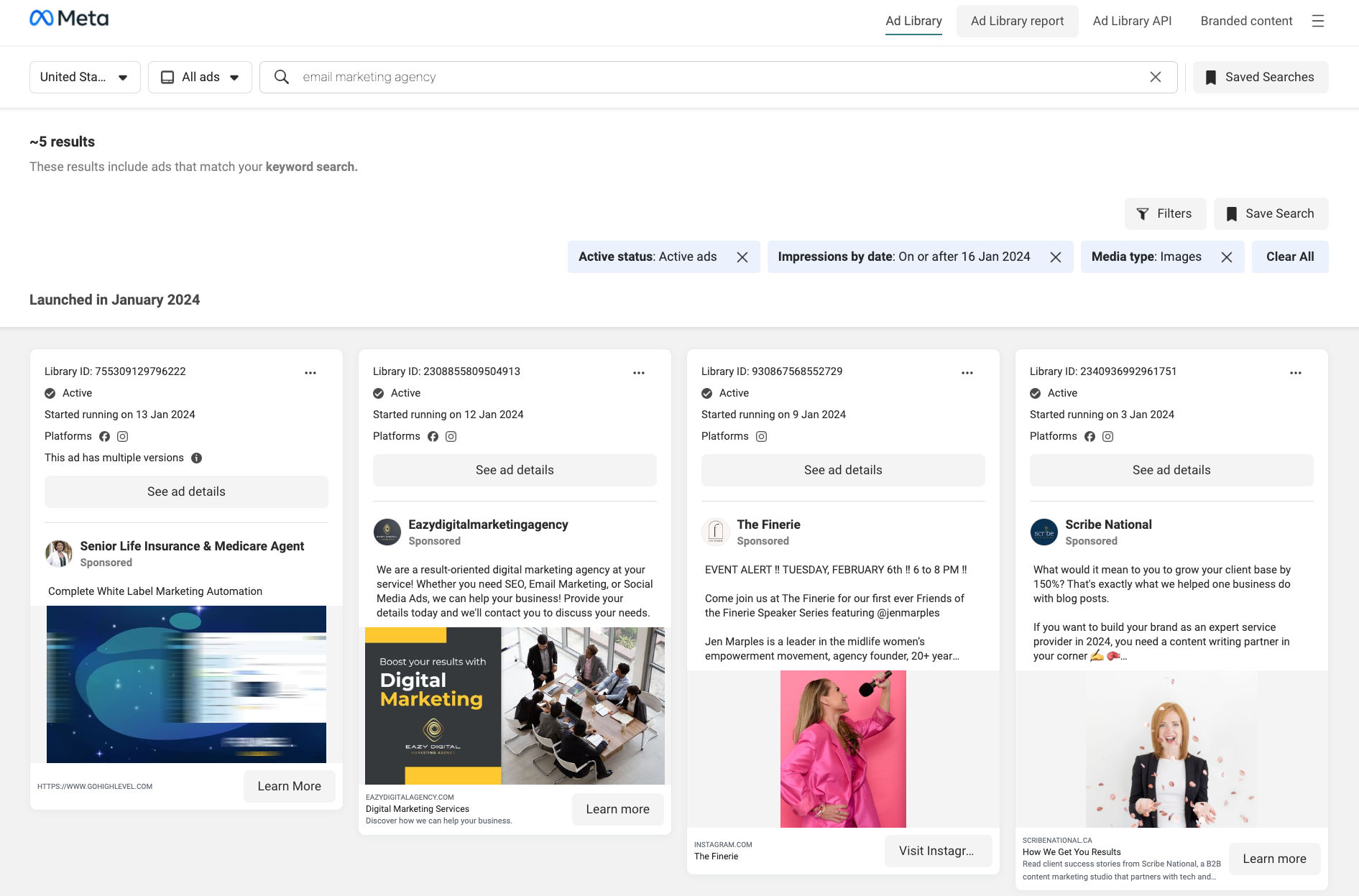
- Visit [facebook ad library](https://www.facebook.com/ads/library/) page and search for ads based on your requirements
- Copy the URL from the browser's address bar
- Go to [Facebook ad library scraper](https://apify.com/curious_coder/facebook-ads-library-scraper) on the Apify platform
- Click the Try for free button
- Enter the ad library search results page Url
- If you want to scrape additional ad details such as EU transparency, EU total reach, etc, enable "Scrape ad details" option
- Select a proxy
- Click the Start button
- When the run has finished, click the Export button to download the ads
### How to scrape ads run by facebook pages
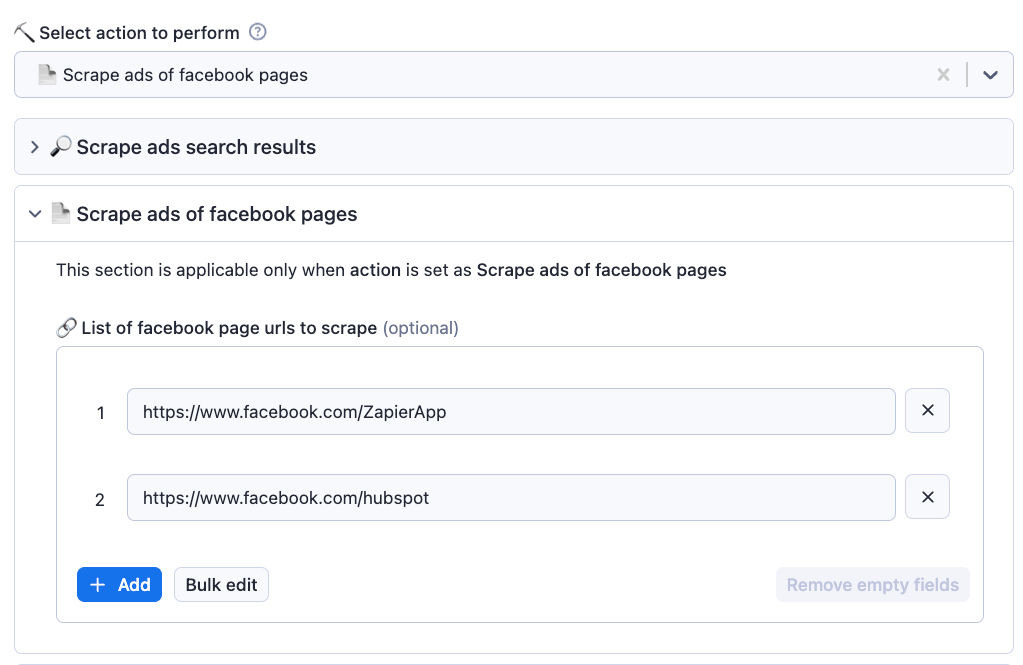
- Create a list of facebook page URLs to scrape ads
- Go to actor's input page
- Select action to perform as 'Scrape ads of facebook pages'
- Go to 'Scrape ads of facebook pages' section and click on 'Bulk edit' and paste the page URLs into the text box
- Select a proxy to use and run the scraper
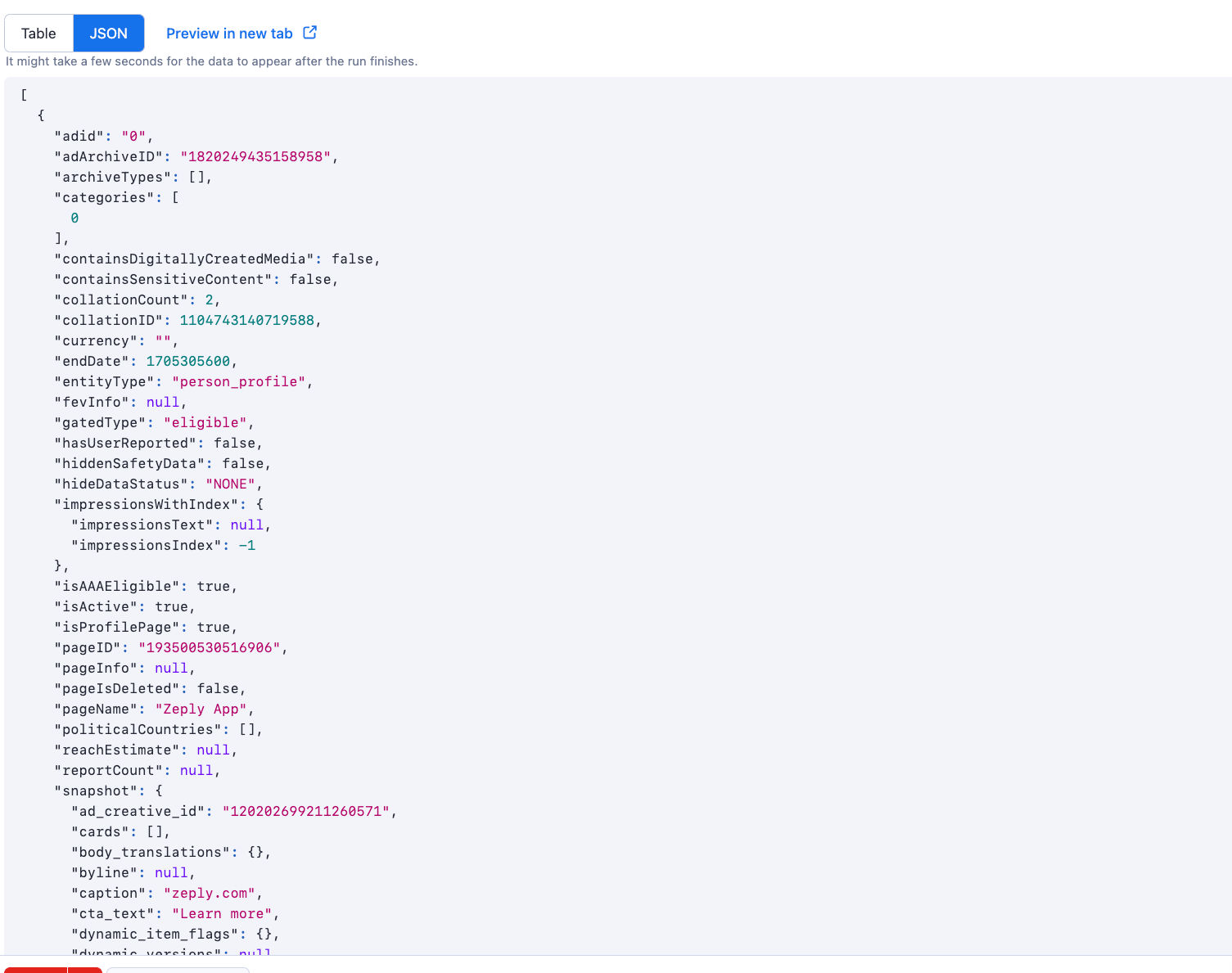
### Sample data
### Related Facebook Scrapers
For comprehensive Facebook data extraction, check out these related scrapers. The [Facebook Post Scraper](https://apify.com/curious_coder/facebook-post-scraper) extracts posts from Facebook pages, groups, profiles and facebook search with engagement metrics and comments. To scrape detailed profile information from Facebook pages and profiles, use the [Facebook Profile Scraper](https://apify.com/curious_coder/facebook-profile-scraper). For extracting comments from any Facebook post including author details and replies, check out the [Facebook Comment Scraper](https://apify.com/curious_coder/facebook-comment-scraper). You can also collect member information from Facebook groups using the [Facebook Group Member Scraper](https://apify.com/curious_coder/facebook-group-member-scraper). For finding email addresses from Facebook profiles, use the [Facebook Profile Email Finder](https://apify.com/curious_coder/facebook-profile-email-finder).
### Integrations
You can use [Make](https://www.make.com/en/register?pc=growthhack) to integrate Facebook ad library scraper to any other SaaS platform by designing your own automation flows.
### How to extract ads data from Facebook using API?
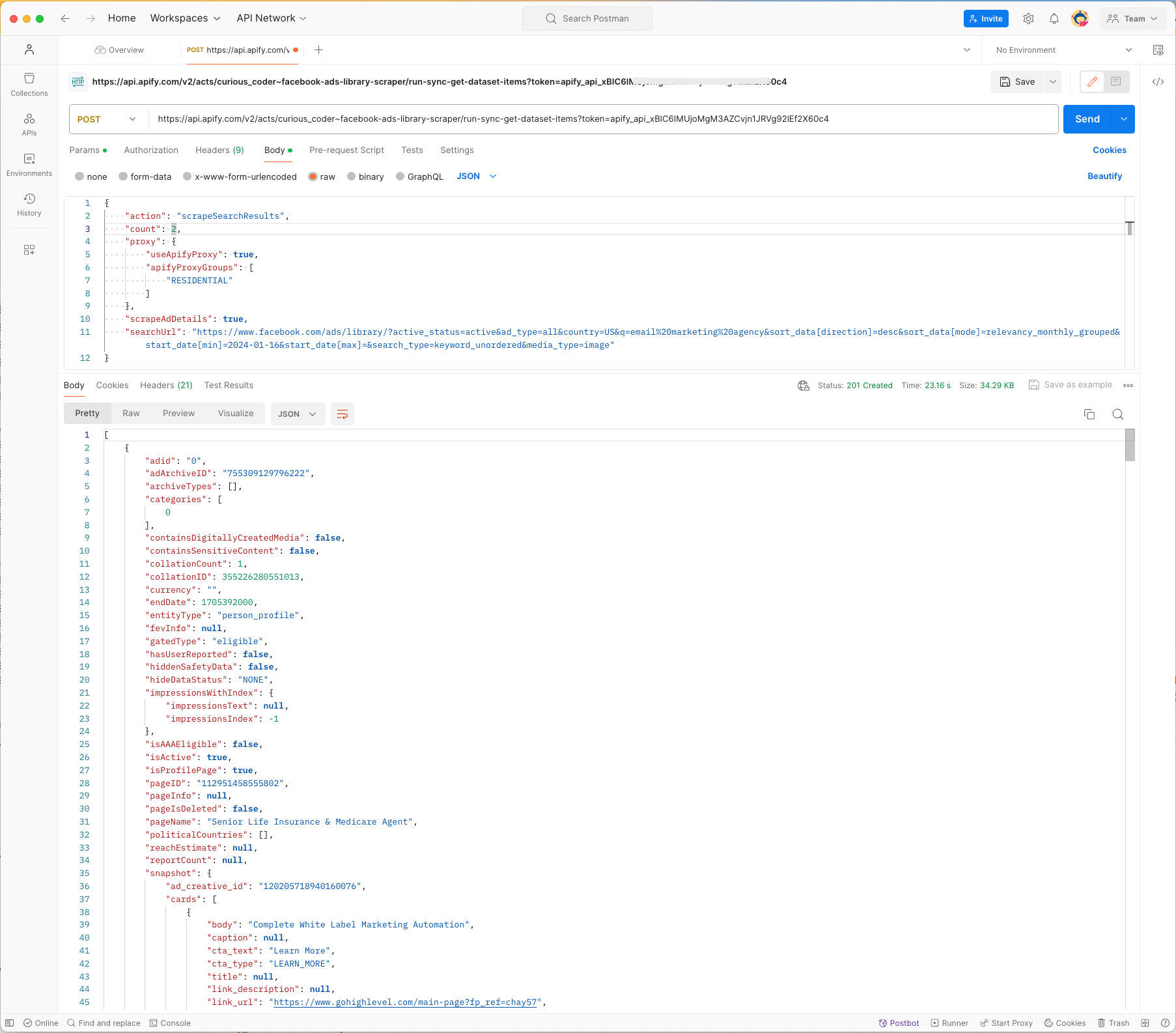
You can also run the scraper using API and get the collected data using the API. For more information, Go to [Facebook ad library scraper API integration](https://apify.com/curious_coder/facebook-ads-library-scraper/api/endpoints) page.
Here is an example of fetching the ads data via API using Postman:
### How much will it cost me to scrape Facebook ads ?
Based on historical data our scraper costs an average of $0.2 per thousand Facebook ads as usage credits.
You can scrape upto 25k Facebook ads per month with Apify starter plan
### Is it legal to scrape facebook ad library ?
Our scrapers are ethical and do not extract any private user data, such as email addresses, gender, or location. They only extract what the user has chosen to share publicly. We therefore believe that our scrapers, when used for ethical purposes by Apify users, are safe.
However, you should be aware that your results could contain personal data. Personal data is protected by the [GDPR](https://docs.apify.com/academy/get-most-of-actors/actor-readme#:~:text=protected%20by%20the-,GDPR,-in%20the%20European) in the European Union and by other regulations around the world.
You should not scrape personal data unless you have a legitimate reason to do so. If you're unsure whether your reason is legitimate, consult your lawyers. You can also read our blog post on the [legality of web scraping](https://blog.apify.com/is-web-scraping-legal/)
### Your feedback
We’re always working on improving the performance of our Actors. So if you’ve got any technical feedback for this scraper or simply found a bug, please create an issue on the actor’s [Issues](https://console.apify.com/actors/XtaWFhbtfxyzqrFmd/issues) tab in Apify Console
For additional information you can email us at
*Last updated:* 2026-01-30
*Keywords:* facebook ads scraper, meta ads scraper, facebook ads library scraper, scrape facebook ads
# Actor input Schema
## `urls` (type: `array`):
List of facebook ads search URLs or Page URLs to scrape ads from
## `scrapeAdDetails` (type: `boolean`):
Enable this option to scrape ads details such as EU Reach info
## `limitPerSource` (type: `integer`):
Limit number of ads scraped per input URL. Leave it blank to scrape all available ads
ℹ️ Actual number might exceed the given limit by upto 30
## `count` (type: `integer`):
Leave this field empty if you want to limit number of ads scraped
## `scrapePageAds.period` (type: `string`):
Search ads in given date range
## `scrapePageAds.activeStatus` (type: `string`):
No description
## `scrapePageAds.sortBy` (type: `string`):
Sort by impressions or date. Default: Impressions
## `scrapePageAds.countryCode` (type: `string`):
2-letter ISO country code (ISO 3166-1 alpha-2). This should be the official uppercase country code, such as `IN` for India, `US` for United States, etc. Use `ALL` for targeting all countries
## `runTag` (type: `string`):
Add this value to 'runTag' column in the output
## `proxy` (type: `object`):
You can use this option to customise the proxy country
## Actor input object example
```json
{
"urls": [
{
"url": "https://www.facebook.com/ads/library/?active_status=all&ad_type=all&country=IN&q=linkedin&search_type=keyword_unordered&media_type=all"
},
{
"url": "https://www.facebook.com/ZapierApp"
}
],
"count": 100,
"scrapePageAds.period": "",
"scrapePageAds.activeStatus": "all",
"scrapePageAds.sortBy": "impressions_desc",
"scrapePageAds.countryCode": "ALL"
}
```
# Actor output Schema
## `results` (type: `string`):
No description
## `summary` (type: `string`):
No description
# API
You can run this Actor programmatically using our API. Below are code examples in JavaScript, Python, and CLI, as well as the OpenAPI specification and MCP server setup.
## JavaScript example
```javascript
import { ApifyClient } from 'apify-client';
// Initialize the ApifyClient with your Apify API token
// Replace the '' with your token
const client = new ApifyClient({
token: '',
});
// Prepare Actor input
const input = {
"urls": [
{
"url": "https://www.facebook.com/ads/library/?active_status=all&ad_type=all&country=IN&q=linkedin&search_type=keyword_unordered&media_type=all"
},
{
"url": "https://www.facebook.com/ZapierApp"
}
],
"count": 100,
"scrapePageAds.period": "",
"scrapePageAds.activeStatus": "all",
"scrapePageAds.sortBy": "impressions_desc",
"scrapePageAds.countryCode": "ALL"
};
// Run the Actor and wait for it to finish
const run = await client.actor("excitable_pickle/facebook-ads-library-scraper").call(input);
// Fetch and print Actor results from the run's dataset (if any)
console.log('Results from dataset');
console.log(`💾 Check your data here: https://console.apify.com/storage/datasets/${run.defaultDatasetId}`);
const { items } = await client.dataset(run.defaultDatasetId).listItems();
items.forEach((item) => {
console.dir(item);
});
// 📚 Want to learn more 📖? Go to → https://docs.apify.com/api/client/js/docs
```
## Python example
```python
from apify_client import ApifyClient
# Initialize the ApifyClient with your Apify API token
# Replace '' with your token.
client = ApifyClient("")
# Prepare the Actor input
run_input = {
"urls": [
{ "url": "https://www.facebook.com/ads/library/?active_status=all&ad_type=all&country=IN&q=linkedin&search_type=keyword_unordered&media_type=all" },
{ "url": "https://www.facebook.com/ZapierApp" },
],
"count": 100,
"scrapePageAds.period": "",
"scrapePageAds.activeStatus": "all",
"scrapePageAds.sortBy": "impressions_desc",
"scrapePageAds.countryCode": "ALL",
}
# Run the Actor and wait for it to finish
run = client.actor("excitable_pickle/facebook-ads-library-scraper").call(run_input=run_input)
# Fetch and print Actor results from the run's dataset (if there are any)
print(f"💾 Check your data here: https://console.apify.com/storage/datasets/{run.default_dataset_id}")
for item in client.dataset(run.default_dataset_id).iterate_items():
print(item)
# 📚 Want to learn more 📖? Go to → https://docs.apify.com/api/client/python/docs/quick-start
```
## CLI example
```bash
echo '{
"urls": [
{
"url": "https://www.facebook.com/ads/library/?active_status=all&ad_type=all&country=IN&q=linkedin&search_type=keyword_unordered&media_type=all"
},
{
"url": "https://www.facebook.com/ZapierApp"
}
],
"count": 100,
"scrapePageAds.period": "",
"scrapePageAds.activeStatus": "all",
"scrapePageAds.sortBy": "impressions_desc",
"scrapePageAds.countryCode": "ALL"
}' |
apify call excitable_pickle/facebook-ads-library-scraper --silent --output-dataset
```
## MCP server setup
```json
{
"mcpServers": {
"apify": {
"type": "http",
"url": "https://mcp.apify.com/?tools=fetch-actor-details,excitable_pickle/facebook-ads-library-scraper"
}
}
}
```
The hosted server signs you in with OAuth on first connect, so no API token belongs in this config. Clients without OAuth support can send an `Authorization: Bearer ` header instead, using a token from API & Integrations in Apify Console (https://console.apify.com/settings/integrations).
## OpenAPI specification
Download the OpenAPI definition: https://api.apify.com/v2/actors/2eSF9SDTJyTFEkIYW/builds/xYf45UsSFuqnFfZJi/openapi.json