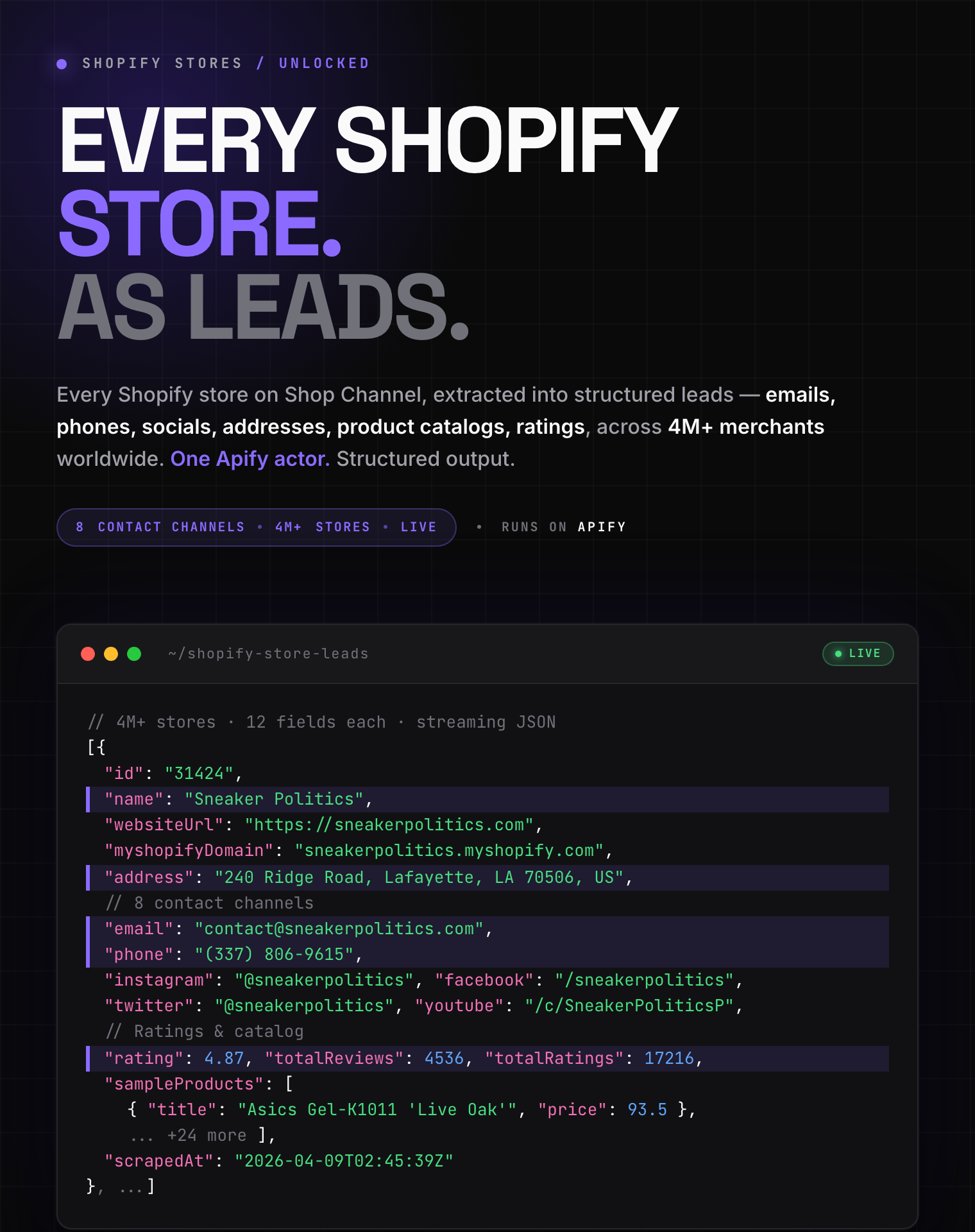
# Shopify Store Leads Scraper - Emails, Phones & Ratings (`excitable_pickle/shopify-store-detector-leads`) Actor

Scrape Shopify store leads by keyword or category. Extract emails, phone numbers, addresses, ratings, and social links. Find storeleads for B2B outreach, supplier discovery, and market research.

- **URL**: https://apify.com/excitable\_pickle/shopify-store-detector-leads.md
- **Developed by:** [Pavan](https://apify.com/excitable_pickle) (community)
- **Categories:** Lead generation, E-commerce, Automation
- **Stats:** 2 total users, 1 monthly users, 100.0% runs succeeded, 0 bookmarks
- **User rating**: 5.00 out of 5 stars

## Pricing

from $0.001 / actor start

This Actor is paid per event. You are not charged for the Apify platform usage, but only a fixed price for specific events.

Learn more: https://docs.apify.com/actors/running/actors-in-store.md#pay-per-event

## What's an Apify Actor?

Actors are web data automations that power AI and operations. They run on the Apify platform to scrape websites, process data, connect APIs, and automate workflows.
In Batch mode, an Actor accepts a well-defined JSON input, performs an action which can take anything from a few seconds to a few hours,
and optionally produces a well-defined JSON output, datasets with results, or files in key-value store.
In Standby mode, an Actor provides a web server which can be used as a website, API, or an MCP server.
Actors are written with capital "A".

## How to integrate an Actor?

If asked about integration, you help developers integrate Actors into their projects.
You adapt to their stack and deliver integrations that are safe, well-documented, and production-ready.
The best way to integrate Actors is as follows.

- **AI agents and MCP clients** — the [Apify MCP server](https://docs.apify.com/integrations/mcp.md) at `https://mcp.apify.com` (remote, streamable HTTP, OAuth on first use).
- **Agentic workflows and local Actor development** — [Agent Skills](https://apify.com/.well-known/agent-skills/index.json) with the [Apify CLI](https://docs.apify.com/cli/docs.md): `npm install -g apify-cli`, then `apify login`.
- **JavaScript/TypeScript projects** — the official [JS/TS client](https://docs.apify.com/api/client/js/docs.md): `npm install apify-client`.
- **Python projects** — the official [Python client](https://docs.apify.com/api/client/python/docs.md): `pip install apify-client`.
- **Any other language** — the [REST API](https://docs.apify.com/api/v2.md).

For usage examples, see the [API](#api) section below.

For more details, see Apify documentation as [Markdown index](https://docs.apify.com/llms.txt) and [Markdown full-text](https://docs.apify.com/llms-full.txt).

# README

<p align="center">
  <img src="https://cdn.jsdelivr.net/npm/simple-icons@v13/icons/shopify.svg" width="90" height="90" alt="Shopify Store Leads Scraper - Emails, Phones & Ratings Logo" />
</p>

## Shopify Store Leads Scraper - Emails, Phones & Ratings

Discover Shopify stores and extract emails, phone numbers, addresses, ratings, and social links. No store URL needed.

<table style="width:100%">
<tr>
<td style="padding:12px 16px;border:1px solid #E2E2E2;vertical-align:top;width:50%">
<strong>🔍 Search by keyword</strong><br>
<span>Enter a product term like "organic coffee" and find every store selling it</span>
</td>
<td style="padding:12px 16px;border:1px solid #E2E2E2;vertical-align:top;width:50%">
<strong>📂 Scrape by category</strong><br>
<span>Pick Electronics, Beauty, Home, etc. and get all stores in that niche</span>
</td>
</tr>
<tr>
<td colspan="2" style="padding:8px 16px;border:1px solid #E2E2E2;border-top:none;background:#f6fff8">
<span style="color:#555">12 fields per store &middot; <strong>Emails, phones, addresses</strong>, ratings &middot; <strong>Target by country, region, or worldwide</strong> &middot; Up to 10,000 stores per run &middot; <strong>Live data</strong></span>
</td>
</tr>
</table>

<p align="center">
<img src="https://iili.io/BjdABae.png" width="840" alt="Shopify Store Leads — structured output preview"/>
</p>

<table>
<tr><td colspan="4" style="padding:10px 14px;background:#006D77;border:none;border-radius:4px 4px 0 0"><span style="color:#FAFAF9;font-size:14px;font-weight:700;letter-spacing:0.5px">Clearpath lead generation suite</span><span style="color:#EDF6F9;font-size:13px">&nbsp;&nbsp;&bull;&nbsp;&nbsp;Business discovery, enrichment, and validation</span></td></tr>
<tr>
<td style="padding:12px 14px;border:1px solid #E7E5E4;border-top:none;border-right:none;border-radius:0 0 0 4px;background:#C9E8E6;vertical-align:top;width:25%"><span style="color:#006D77;white-space:nowrap"><img src="https://apify-image-uploads-prod.s3.us-east-1.amazonaws.com/DSvMCAwsufMyZeLyt-actor-R9SL2PPdhdhLQwdck-tbaq4J8sxX-shopy-by-shopify-scraper-logo.jpg" alt="Shopify Store Leads" width="20" height="20" style="vertical-align:middle;border-radius:4px"> &nbsp;<strong style="color:#006D77">Shopify&nbsp;Store&nbsp;Leads</strong></span><br><span style="color:#006D77;font-size:11px;font-weight:600">&#10148; You are here</span></td>
<td style="padding:12px 14px;border:1px solid #E7E5E4;border-top:none;border-right:none;background:#E0F2F1;vertical-align:top;width:25%"><span style="color:#1C1917;white-space:nowrap"><img src="https://apify-image-uploads-prod.s3.us-east-1.amazonaws.com/DSvMCAwsufMyZeLyt-actor-4VOKn4ssqn7AQJIUP-tDQgAGNQZE-local-business-leads-scraper.png" alt="Fast Business Leads Scraper" width="20" height="20" style="vertical-align:middle;border-radius:4px"> &nbsp;<a href="https://apify.com/excitable_pickle/local-business-lead-extractor" style="color:#1C1917;text-decoration:none;font-weight:700">Fast&nbsp;Business&nbsp;Leads</a></span><br><span style="color:#78716C;font-size:11px">Local businesses in seconds</span></td>
<td style="padding:12px 14px;border:1px solid #E7E5E4;border-top:none;border-right:none;background:#E0F2F1;vertical-align:top;width:25%"><span style="color:#1C1917;white-space:nowrap"><img src="https://apify-image-uploads-prod.s3.us-east-1.amazonaws.com/DSvMCAwsufMyZeLyt-actor-eWT8czb4kT3gH1OWt-TbfGFya2hE-dfdsfdsfdsd.png" alt="Email Finder API" width="20" height="20" style="vertical-align:middle;border-radius:4px"> &nbsp;<a href="https://apify.com/excitable_pickle/email-finder-api" style="color:#1C1917;text-decoration:none;font-weight:700">Email&nbsp;Finder&nbsp;API</a></span><br><span style="color:#78716C;font-size:11px">B2B email discovery</span></td>
<td style="padding:12px 14px;border:1px solid #E7E5E4;border-top:none;border-radius:0 0 4px 0;background:#E0F2F1;vertical-align:top;width:25%"><span style="color:#1C1917;white-space:nowrap"><img src="https://apify-image-uploads-prod.s3.us-east-1.amazonaws.com/DSvMCAwsufMyZeLyt-actor-PfVrah2zLQNPdRmn0-e4fLvgSjdq-email-validation-api-actor.png" alt="Email Validator" width="20" height="20" style="vertical-align:middle;border-radius:4px"> &nbsp;<a href="https://apify.com/excitable_pickle/email-validation-api" style="color:#1C1917;text-decoration:none;font-weight:700">Email&nbsp;Validator</a></span><br><span style="color:#78716C;font-size:11px">List cleaning and checks</span></td>
</tr>
</table>

#### Copy to your AI assistant

Copy this block into ChatGPT, Claude, Cursor, or any LLM to start using this actor.

```
excitable_pickle/shopify-store-leads on Apify. Call: ApifyClient("TOKEN").actor("excitable_pickle/shopify-store-leads").call(run_input={...}), then client.dataset(run["defaultDatasetId"]).list_items().items for results. Key inputs: query (string, optional if a category, storeLocation or filter is set), maxItems (integer), category (string), storeLocation (string: ISO country code like GB, a region like EUROPE/ENGLISH_SPEAKING, or GLOBAL), skipPreviouslyScraped (boolean: skip stores already delivered for this same search; only runs made with it on are counted, so turn it on from the first run). Full actor spec (input schema with all params/enums/defaults, output dataset fields, README): GET https://api.apify.com/v2/acts/excitable_pickle~shopify-store-leads/builds/default (Bearer TOKEN) → inputSchema, actorDefinition.storages.dataset, readme. Pricing: pay per result, $5.99 per 1,000 stores on the Free tier down to $4.99 on Business. Get token: https://console.apify.com/account/integrations
```

### Quick start

Minimal input — just a search term:

```json
{
    "query": "organic coffee"
}
```

With filters:

```json
{
    "query": "yoga mat",
    "maxItems": 200,
    "priceMin": 20,
    "priceMax": 80,
    "inStock": true,
    "category": "gid://shopify/ProductCategory/69"
}
```

Discover all stores in a category:

```json
{
    "category": "gid://shopify/ProductCategory/7",
    "maxItems": 500
}
```

Target a country or region:

```json
{
    "query": "skincare",
    "storeLocation": "GB",
    "maxItems": 200
}
```

### Input parameters

| Parameter | Type | Default | Description |
|-----------|------|---------|-------------|
| `query` | string | — | Product keyword (or leave empty to scrape a category) |
| `category` | string | — | Product category filter (15 categories available) |
| `storeLocation` | string | — | Find stores based in a country, a region (Europe, North America, English-speaking…), or worldwide |
| `maxItems` | integer | `50` | Maximum stores to return (1–10,000) |
| `skipPreviouslyScraped` | boolean | `false` | Skip stores already returned by earlier runs of the same search (turn on from your first run) |
| `priceMin` | integer | — | Only stores selling products above this price |
| `priceMax` | integer | — | Only stores selling products below this price |
| `onSale` | boolean | `false` | Only stores with products on sale |
| `inStock` | boolean | `false` | Only stores with products in stock |
| `shipsFrom` | boolean | `false` | Only local sellers (applied automatically with `storeLocation`) |
| `shipsTo` | string | — | Only stores shipping to a specific country (57 countries) |

**Category values** (for API users):

| Category | Value |
|----------|-------|
| Women | `gid://shopify/ProductCategory/1` |
| Men | `gid://shopify/ProductCategory/2` |
| Accessories | `gid://shopify/ProductCategory/3` |
| Beauty | `gid://shopify/ProductCategory/5` |
| Home | `gid://shopify/ProductCategory/6` |
| Electronics | `gid://shopify/ProductCategory/7` |
| Luggage & bags | `gid://shopify/ProductCategory/9` |
| Toys & games | `gid://shopify/ProductCategory/10` |
| Pet supplies | `gid://shopify/ProductCategory/15` |
| Fitness & nutrition | `gid://shopify/ProductCategory/69` |
| Baby & toddler | `gid://shopify/ProductCategory/209` |
| Food & drinks | `gid://shopify/ProductCategory/251` |
| Sporting goods | `gid://shopify/ProductCategory/267` |
| Arts & crafts | `gid://shopify/ProductCategory/285` |

**Store location values** (for API users):

| Region | Value |
|--------|-------|
| English-speaking | `ENGLISH_SPEAKING` |
| Europe | `EUROPE` |
| North America | `NORTH_AMERICA` |
| UK & Ireland | `UK_IRELAND` |
| Nordics | `NORDICS` |
| Oceania | `OCEANIA` |
| Worldwide | `GLOBAL` |

For a single country, use its two-letter code: `US`, `GB`, `CA`, `AU`, `NZ`, `IE`, `DE`, `FR`, `IT`, `ES`, `NL`, `PL`, `AT`, `CH`, `PT`, `SE`, `DK`, `FI`.

### Output example

Each store in the dataset looks like this:

```json
{
    "id": "14671",
    "name": "gorjana",
    "websiteUrl": "https://www.gorjana.com?utm_source=shop_app",
    "myshopifyDomain": "gorjana.myshopify.com",
    "shareUrl": "https://shop.app/m/gorjana?utm_source=shop_app",
    "address": {
        "address1": "3275 Laguna Canyon Rd Ste R1",
        "address2": null,
        "city": "Laguna Beach",
        "zone": "California",
        "zoneCode": "CA",
        "country": "US",
        "postalCode": "92651",
        "company": "gorjana",
        "phone": "866-829-0030",
        "formatted": [
            "3275 Laguna Canyon Rd Ste R1",
            "Laguna Beach California 92651",
            "United States"
        ]
    },
    "contacts": [
        { "method": "web", "target": "https://www.gorjana.com" },
        { "method": "email", "target": "customercare@gorjana.com" },
        { "method": "phone", "target": "866-829-0030" },
        { "method": "facebook", "target": "https://www.facebook.com/gorjanabrand/" },
        { "method": "instagram", "target": "https://www.instagram.com/gorjana/" },
        { "method": "pinterest", "target": "https://www.pinterest.com/gorjanabrand/" },
        { "method": "youtube", "target": "https://www.youtube.com/@gorjanabrand" }
    ],
    "rating": 4.8028,
    "totalProductRatings": 15081,
    "totalProductReviews": 3995,
    "sampleProducts": [
        {
            "title": "Floating Diamond Necklace",
            "price": 535.0,
            "currency": "USD",
            "url": "https://www.gorjana.com/products/floating-diamond-necklace",
            "imageUrl": "https://cdn.shopify.com/s/files/1/0015/3849/0427/products/204-117-185-G_1.jpg"
        },
        {
            "title": "Parker Bead Bracelet",
            "price": 38.0,
            "currency": "USD",
            "url": "https://www.gorjana.com/products/parker-bead-bracelet",
            "imageUrl": "https://cdn.shopify.com/s/files/1/0015/3849/0427/products/180-216-246-G.jpg"
        }
    ],
    "scrapedAt": "2026-03-04T07:15:32.491822+00:00"
}
```

### Pricing

Pay per result, no monthly fees. Cost scales with your Apify subscription tier:

| Tier | Per 1,000 stores | Per store |
|------|------------------:|----------:|
| Free | $5.99 | $0.00599 |
| Starter | $5.79 | $0.00579 |
| Scale | $5.29 | $0.00529 |
| Business | $4.99 | $0.00499 |

With **Skip stores from previous runs** turned on, a repeat run of the same search brings new stores instead of ones you already paid for.

### How to find Shopify stores

1. **Enter a product keyword** — type what the stores sell (e.g. "organic coffee", "yoga mats")
2. **Run the scraper** — optionally add price filters, category, or shipping filters
3. **Download your data** — export as JSON, CSV, Excel, or connect via API

<table style="width:100%">
<tr>
<td colspan="2" style="padding:10px 14px;background:#5C5CFF;border:none;border-radius:4px 4px 0 0">
<span style="color:#fff;font-size:14px;font-weight:700;letter-spacing:0.5px">Shopify Scrapers</span>
</td>
</tr>
<tr>
<td style="background:#EEF0FF;padding:10px 14px;border:1px solid #E2E2E2;border-radius:0 0 0 4px;border-right:none;border-top:none;vertical-align:top;width:50%">
🛍️ &nbsp;<a href="https://apify.com/excitable_pickle/shop-by-shopify-product-scraper" style="color:#1C1917;text-decoration:none;font-weight:700;font-size:13px">Shopify Product Scraper</a><br>
<span style="color:#78716C;font-size:11px">Prices, variants, reviews</span>
</td>
<td style="padding:10px 14px;border:1px solid #E2E2E2;border-radius:0 0 4px 0;border-top:none;vertical-align:top;width:50%;background:#DDE1FF;">
🏪 &nbsp;<a href="https://apify.com/excitable_pickle/shopify-store-leads" style="color:#5C5CFF;text-decoration:none;font-weight:700;font-size:13px">Shopify Store Lead Scraper</a><br>
<span style="color:#5C5CFF;font-size:11px;font-weight:600">&#10148; You are here</span>
</td>
</tr>
</table>


<table style="width:100%">
<tr>
<td style="padding:10px 14px;background:#5C5CFF;border:none;border-radius:4px 4px 0 0">
<span style="color:#fff;font-size:14px;font-weight:700;letter-spacing:0.5px">More from Clearpath</span>
</td>
</tr>
<tr>
<td style="background:#EEF0FF;padding:10px 14px;border:1px solid #E2E2E2;border-radius:0 0 4px 4px;border-top:none;vertical-align:top">
🏭 &nbsp;<a href="https://apify.com/excitable_pickle/shein-seller-leads" style="color:#1C1917;text-decoration:none;font-weight:700;font-size:13px">SHEIN Seller &amp; Manufacturer Leads</a><br>
<span style="color:#78716C;font-size:11px">Factory &amp; seller contacts by keyword (EU)</span>
</td>
</tr>
</table>

### Use cases

**B2B lead generation** — Build targeted prospect lists of Shopify store owners by niche and location, a single country, a region like Europe, or worldwide. Get direct contact details (email, phone) for outreach campaigns.

**Supplier discovery** — Find stores selling specific products across the Shopify ecosystem. Compare pricing, ratings, and product ranges.

**Competitor research** — Map the competitive landscape for any product category. Analyze store ratings, review volumes, and geographic distribution.

**Market intelligence** — Identify trending niches by searching different product keywords. Track how many stores operate in each category and where they're located.

### FAQ

#### How many stores can I find?

Up to 10,000 per run. Set `maxItems` to control how many stores you want and the scraper handles the rest.

To go beyond 10,000, turn on **Skip stores from previous runs** from your first run, then run the same search again. Each run then returns only stores you have not received yet. Only runs made with it on are counted, so stores you received before switching it on can come back once.

How far that goes depends on the search. A broad category scrape goes the deepest and can keep returning full runs well past 10,000, so you can build a list of tens of thousands. A single keyword, or a search narrowed to one country, covers a much smaller pool: at 10,000 stores per run it is usually spent after a run or two, while smaller runs keep going far longer. Broaden it with more keywords or a category once it runs out. The run tells you when a search has no new stores left.

#### Can I discover all stores in a category?

Yes. Select a category and leave the search query empty. The scraper automatically crawls the full category to find stores. Set `maxItems` to control how many stores you want.

#### How do I get new stores instead of the same ones?

Turn on **Skip stores from previous runs**, and leave it on from your first run: only runs made with it on are counted. From then on the scraper remembers which stores it already returned for that search and skips them next time, so each run brings new stores instead of ones you already paid for. If a run cannot pick up where the last one left off, it tells you and starts fresh.

Each search keeps its own history. A different keyword, category, store location, or `shipsTo` country starts a new one, so switching searches still returns everything that matches. Price, availability, and local-seller filters do not, which lets you narrow a search you already started without losing your place in it.

#### What contact data is included?

Each store includes all available contact channels: website URL, email, phone number, physical address, plus social media profiles (Facebook, Instagram, Pinterest, YouTube, TikTok, Twitter).

#### Do I need a store URL?

No. This scraper discovers stores by product keyword. Just describe what you're looking for.

#### Can I filter by location?

Yes. Set `storeLocation` to find stores **based in** a place:

- A single country, e.g. `GB` (United Kingdom), `US`, `DE`
- A region: `ENGLISH_SPEAKING`, `EUROPE`, `NORTH_AMERICA`, `UK_IRELAND`, `NORDICS`, `OCEANIA`
- `GLOBAL` for stores across all supported markets

For non-English markets (Germany, France, etc.), search using local-language terms (e.g. `kerzen` instead of `candles`) for best results. Stores that don't publish a business address are included as likely matches; each store's `address.country` is in the output, so you can filter further after scraping.

To target by shipping *destination* instead (stores that ship **to** a country), use `shipsTo`.

#### Can I get the store's products too?

Each store includes 2–3 sample products (title, price, URL, image). For full product data, use the [Product Search Scraper](https://apify.com/excitable_pickle/shop-by-shopify-product-scraper).

#### Is the data fresh?

Yes. Every run performs a live search. Results reflect current store info, ratings, and contact details at the time of scraping. Nothing is cached or pre-scraped.

#### Can I export the data?

Yes. Download as JSON, CSV, Excel, XML, or HTML from Apify Console. Access results via the Apify API or integrate with Google Sheets, Zapier, Make, or Airbyte.

### Support

- **Bug reports and feature requests:** Open an issue on the actor's [Issues tab](https://console.apify.com/actors/R9SL2PPdhdhLQwdck/issues)
- **Questions:** Message the developer through Apify Console

### Legal

This actor accesses publicly available data from the Shop by Shopify marketplace. Use responsibly and in accordance with applicable laws and Shopify's terms of service. The developer is not responsible for how scraped data is used.

### Connect to Claude / AI Agent (MCP)

Connect this Actor directly to Claude Desktop, Cursor, or any MCP client via the Model Context Protocol endpoint:

```text
https://mcp.apify.com/?token=YOUR_APIFY_TOKEN_HERE&tools=actors,docs,excitable_pickle/shopify-store-detector-leads
```

#### Claude Copy-Paste Prompt

```text
MCP Server URL: https://mcp.apify.com/?token=YOUR_APIFY_TOKEN_HERE&tools=actors,docs,excitable_pickle/shopify-store-detector-leads
Apify Token: YOUR_APIFY_TOKEN_HERE

Execute Actor: excitable_pickle/shopify-store-detector-leads
Task: "Execute search with parameters, extract structured results, and present key intelligence in a markdown table."
```

# Actor input Schema

## `category` (type: `string`):

Select a category to discover stores. Works on its own (discovers all stores in the category) or combined with a search query to narrow results.

## `query` (type: `string`):

Product keyword to search for stores. Optional: leave it empty to discover stores by category, store location or filters alone.<br><br>Examples: <code>wireless headphones</code>, <code>organic coffee</code>, <code>yoga mat</code>

## `storeLocation` (type: `string`):

Find stores <b>based in</b> a specific country or region. Pick a single country, a region (several countries combined), or Global. Leave as <b>Any location</b> for no location targeting.<br><br><b>For non-English markets</b> (Germany, France, Italy, etc.), search using local-language terms (e.g. <code>kerzen</code> instead of <code>candles</code>) for the best results.<br><br>Stores that don't publish a business address are included as likely matches.

## `maxItems` (type: `integer`):

Maximum number of unique stores to return.

## `skipPreviouslyScraped` (type: `boolean`):

Continue where your last run stopped. Stores already returned for this same search are skipped, so each run brings new stores instead of repeating earlier results. Turn this on from your first run: only runs made with it on are counted.<br><br>Each search keeps its own history. A different keyword, category, store location, or shipping destination starts a new one; price, availability, and shipping-origin filters do not, so you can narrow a search you already started.<br><br>A broad category scrape stays productive across many runs. A single keyword, or a search narrowed to one country, runs out sooner, and the run tells you when a search has no new stores left.

## `priceMin` (type: `integer`):

Only discover stores selling products above this price.

## `priceMax` (type: `integer`):

Only discover stores selling products below this price.

## `onSale` (type: `boolean`):

Only discover stores with products currently on sale.

## `inStock` (type: `boolean`):

Only discover stores with products currently in stock.

## `shipsFrom` (type: `boolean`):

Only discover stores that ship from the selected store location. Applied automatically when a Store location is set above.

## `shipsTo` (type: `string`):

Only discover stores that ship to a specific country.

## Actor input object example

```json
{
  "query": "wireless headphones",
  "storeLocation": "",
  "maxItems": 50,
  "skipPreviouslyScraped": false,
  "onSale": false,
  "inStock": false,
  "shipsFrom": false
}
```

# Actor output Schema

## `stores` (type: `string`):

No description

## `summary` (type: `string`):

No description

# API

You can run this Actor programmatically using our API. Below are code examples in JavaScript, Python, and CLI, as well as the OpenAPI specification and MCP server setup.

## JavaScript example

```javascript
import { ApifyClient } from 'apify-client';

// Initialize the ApifyClient with your Apify API token
// Replace the '<YOUR_API_TOKEN>' with your token
const client = new ApifyClient({
    token: '<YOUR_API_TOKEN>',
});

// Prepare Actor input
const input = {
    "query": "wireless headphones"
};

// Run the Actor and wait for it to finish
const run = await client.actor("excitable_pickle/shopify-store-detector-leads").call(input);

// Fetch and print Actor results from the run's dataset (if any)
console.log('Results from dataset');
console.log(`💾 Check your data here: https://console.apify.com/storage/datasets/${run.defaultDatasetId}`);
const { items } = await client.dataset(run.defaultDatasetId).listItems();
items.forEach((item) => {
    console.dir(item);
});

// 📚 Want to learn more 📖? Go to → https://docs.apify.com/api/client/js/docs

```

## Python example

```python
from apify_client import ApifyClient

# Initialize the ApifyClient with your Apify API token
# Replace '<YOUR_API_TOKEN>' with your token.
client = ApifyClient("<YOUR_API_TOKEN>")

# Prepare the Actor input
run_input = { "query": "wireless headphones" }

# Run the Actor and wait for it to finish
run = client.actor("excitable_pickle/shopify-store-detector-leads").call(run_input=run_input)

# Fetch and print Actor results from the run's dataset (if there are any)
print(f"💾 Check your data here: https://console.apify.com/storage/datasets/{run.default_dataset_id}")
for item in client.dataset(run.default_dataset_id).iterate_items():
    print(item)

# 📚 Want to learn more 📖? Go to → https://docs.apify.com/api/client/python/docs/quick-start

```

## CLI example

```bash
echo '{
  "query": "wireless headphones"
}' |
apify call excitable_pickle/shopify-store-detector-leads --silent --output-dataset

```

## MCP server setup

```json
{
    "mcpServers": {
        "apify": {
            "type": "http",
            "url": "https://mcp.apify.com/?tools=fetch-actor-details,excitable_pickle/shopify-store-detector-leads"
        }
    }
}

```

The hosted server signs you in with OAuth on first connect, so no API token belongs in this config. Clients without OAuth support can send an `Authorization: Bearer <APIFY_API_TOKEN>` header instead, using a token from API & Integrations in Apify Console (https://console.apify.com/settings/integrations).

## OpenAPI specification

Download the OpenAPI definition: https://api.apify.com/v2/actors/bwvgdHVol2FCzkry5/builds/LjTLLKQPcTqcGd6DZ/openapi.json