# Trip.com & Ctrip (携程) Hotel Reviews Scraper (June 2026) (`factden/ctrip-trip-reviews-scraper`) Actor
Scrape hotel reviews from Trip.com and Ctrip (携程). 32 fields per review: sub-ratings (cleanliness, location, service, facilities), owner responses, reviewer IP location(ctrip), travel type, and LLM-ready markdownContent. Zero setup, no login. $4 per 1,000 reviews (from $2.50 on Business).
- **URL**: https://apify.com/factden/ctrip-trip-reviews-scraper.md
- **Developed by:** [FactDen](https://apify.com/factden) (community)
- **Categories:** Travel, AI, SEO tools
- **Stats:** 3 total users, 2 monthly users, 100.0% runs succeeded, 2 bookmarks
- **User rating**: 5.00 out of 5 stars
## Pricing
from $2.50 / 1,000 reviews
This Actor is paid per event. You are not charged for the Apify platform usage, but only a fixed price for specific events.
Since this Actor supports Apify Store discounts, the price gets lower the higher subscription plan you have.
Learn more: https://docs.apify.com/platform/actors/running/actors-in-store#pay-per-event
## What's an Apify Actor?
Actors are a software tools running on the Apify platform, for all kinds of web data extraction and automation use cases.
In Batch mode, an Actor accepts a well-defined JSON input, performs an action which can take anything from a few seconds to a few hours,
and optionally produces a well-defined JSON output, datasets with results, or files in key-value store.
In Standby mode, an Actor provides a web server which can be used as a website, API, or an MCP server.
Actors are written with capital "A".
## How to integrate an Actor?
If asked about integration, you help developers integrate Actors into their projects.
You adapt to their stack and deliver integrations that are safe, well-documented, and production-ready.
The best way to integrate Actors is as follows.
In JavaScript/TypeScript projects, use official [JavaScript/TypeScript client](https://docs.apify.com/api/client/js.md):
```bash
npm install apify-client
```
In Python projects, use official [Python client library](https://docs.apify.com/api/client/python.md):
```bash
pip install apify-client
```
In shell scripts, use [Apify CLI](https://docs.apify.com/cli/docs.md):
````bash
# MacOS / Linux
curl -fsSL https://apify.com/install-cli.sh | bash
# Windows
irm https://apify.com/install-cli.ps1 | iex
```bash
In AI frameworks, you might use the [Apify MCP server](https://docs.apify.com/platform/integrations/mcp.md).
If your project is in a different language, use the [REST API](https://docs.apify.com/api/v2.md).
For usage examples, see the [API](#api) section below.
For more details, see Apify documentation as [Markdown index](https://docs.apify.com/llms.txt) and [Markdown full-text](https://docs.apify.com/llms-full.txt).
# README
## Trip.com & Ctrip (携程) Hotel Reviews Scraper (June 2026)
Extract hotel reviews from **both `Trip.com`** (international) and **`hotels.ctrip.com` / 携程** (China) in a single run - no login, no proxy setup, no code required.
> **$4 per 1,000 reviews** · $0.01 per run · New Apify users get **~1,250 reviews free** with the $5 platform credit.
**Contents**: [What's different](#whats-different) · [Who it's for](#who-this-scraper-is-for) · [Use cases](#common-use-cases) · [Step by step](#how-to-scrape-tripcom-reviews--step-by-step) · [Input](#input) · [Output](#output) · [Pricing](#pricing) · [Schedule](#how-to-run-this-tripcom-reviews-api-on-a-schedule) · [AI agents & RAG](#ai-agents--rag--using-the-data-with-llms) · [GDPR](#data-sources--gdpr) · [FAQ](#faq) · [Changelog](#changelog) · [Support](#support--maintenance)
---
### What's different
Two things no other Apify actor for `Trip.com` or `Ctrip` does today:
- **Both locales in one run.** Add `Trip.com` URLs and `hotels.ctrip.com` URLs together. Each URL is processed with its native locale: `Trip.com` URLs return the international guest-review feed; `Ctrip` URLs return the Chinese guest-review feed (with `reviewerIpLocation` showing Chinese provincial origin). Duplicate URLs are deduplicated silently.
- **LLM-ready `markdownContent` per review.** Each review row carries a self-contained markdown block - rating, travel type, body, translation, and the hotel's response - ready to embed straight into a vector DB. No reformatting, no glue code.
**Plus:**
- Per-review sub-ratings (`subRatingCleanliness`, `subRatingLocation`, `subRatingService`, `subRatingFacilities`).
- Owner/management responses with response date.
- Recommendation rate, days-since-last-negative-review, total negative review count (ORM signals for brand monitoring).
- Reviewer credibility tier (`Trip.com`'s "Review Specialist" / "Review Expert" badge).
**No-setup checklist:**
- No login or account required
- Apify Proxy bundled (datacenter; switch to RESIDENTIAL via the Advanced section for heavy runs)
- No code required (form-based input in the Apify Console)
- Pay-per-event pricing - no subscription, no commitment
---
### What does this scraper do?
You paste hotel URLs (`Trip.com` or `hotels.ctrip.com` - mix freely). The actor returns two structured datasets:
- **Reviews** - one row per guest review (32 fields including sub-ratings, owner responses, translations, and LLM-ready markdown).
- **Hotels** - one summary row per hotel (aggregate ratings, star classification, address, recommendation rate, sentiment signals).
Both are accessible via the Output-tab dropdown - see [Output](#output).
---
### Who this scraper is for
- **Hotel revenue managers** tracking competitor properties' rating trends and sub-rating breakdowns on `Trip.com`.
- **OTA analysts** comparing Chinese vs. international guest sentiment for the same property in one dataset.
- **AI / RAG engineers** ingesting hotel reviews into vector databases - `markdownContent` is chunk-ready.
- **Hospitality researchers** filtering by `travelType`, `language`, `reviewerIpLocation` (`Ctrip` only), and the sub-rating dimensions for ICP-scoped datasets.
- **Brand reputation teams** monitoring `daysSinceLastNegative`, `negativeReviewsCount`, and `ownerResponseText` across a portfolio.
---
### Common use cases
#### 1. Daily sentiment monitoring for a hotel chain portfolio
```json
{
"startUrls": [
"https://www.trip.com/hotels/macau-hotel-detail-344983/galaxy-hotel/",
"https://www.trip.com/hotels/hangzhou-hotel-detail-70492076/",
"https://hotels.ctrip.com/hotels/1286148.html"
],
"maxReviewsPerHotel": 50,
"sortBy": "mostRecent",
"fromDate": "2026-06-01"
}
````
Pair with the [Schedule](#how-to-run-this-tripcom-reviews-api-on-a-schedule) section to run nightly with `fromDate` set to yesterday.
#### 2. Negative-review mining for a competitor analysis
```json
{
"startUrls": ["https://www.trip.com/hotels/macau-hotel-detail-344983/galaxy-hotel/"],
"maxReviewsPerHotel": 500,
"sortBy": "ratingLowToHigh",
"minRating": 1,
"maxRating": 2
}
```
Sort lowest-rating first and cap rating at 2 to surface only the painful reviews. `ownerResponseText` shows how the hotel handles complaints.
#### 3. Chinese-market intelligence with provincial geolocation
```json
{
"startUrls": ["https://hotels.ctrip.com/hotels/1286148.html"],
"maxReviewsPerHotel": 200,
"sortBy": "mostRecent"
}
```
`Ctrip`-locale rows carry `reviewerIpLocation` (e.g., `"发布于浙江"` - Posted from Zhejiang), enabling province-level Chinese guest segmentation.
#### 4. Backfill a full review history for AI / RAG ingestion
```json
{
"startUrls": ["https://www.trip.com/hotels/macau-hotel-detail-344983/galaxy-hotel/"],
"maxReviewsPerHotel": 5000,
"sortBy": "mostRelevant"
}
```
The `markdownContent` field on each row is a self-contained chunk ready for direct embedding - see [AI agents & RAG](#ai-agents--rag--using-the-data-with-llms).
***
### How to scrape Trip.com reviews - step by step
1. Click **Try for free** on this actor's Apify Store page.
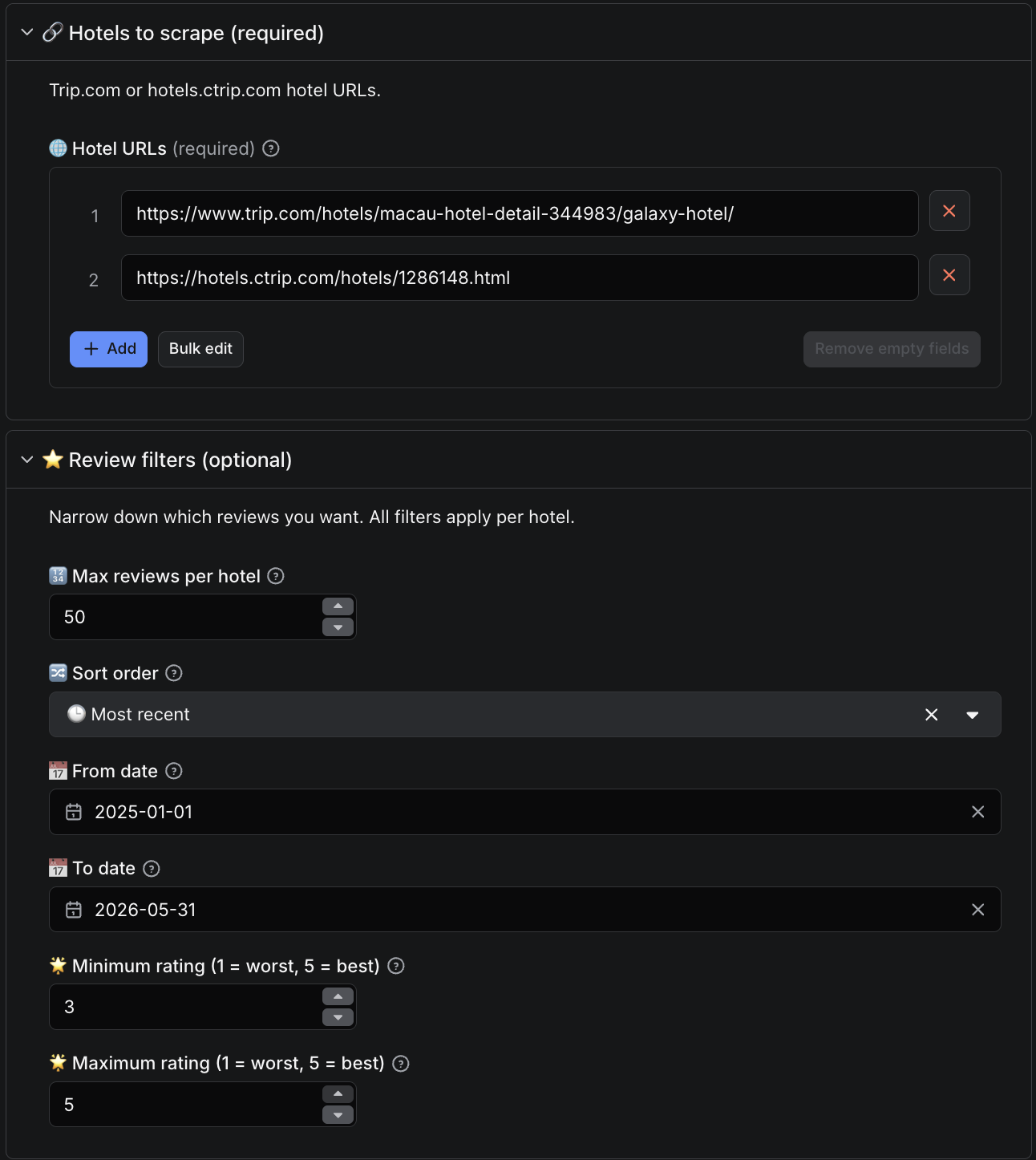
2. Paste one or more `Trip.com` or `hotels.ctrip.com` hotel URLs into **Hotel URLs** (mix freely; up to 500 per run).
3. Set `maxReviewsPerHotel`, `fromDate` / `toDate`, `minRating` / `maxRating`, and `sortBy` as needed.
4. Click **Start**. Results stream into the Output tab in real time.
5. Switch the Output tab dropdown between **Reviews** and **Hotels** to inspect either dataset. Download as JSON, CSV, or Excel.
`Trip.com` caps accessible reviews around 1,000 per high-volume hotel; `completenessPct` on the Hotels dataset tracks how much you got of what's exposed. See [Pricing](#pricing) below for per-event rates and tiered discount ladder.
***
### Input
| Field | Type | Default | Description |
|---|---|---|---|
| `startUrls` | array of URL | (prefilled) | `Trip.com` or `hotels.ctrip.com` hotel URLs. Mix freely. Max 500. |
| `maxReviewsPerHotel` | integer | 200 | 1–5,000 |
| `sortBy` | enum | `mostRecent` | `mostRelevant` / `mostRecent` / `ratingHighToLow` / `ratingLowToHigh` |
| `fromDate` | date | - | YYYY-MM-DD; reviews submitted on or after |
| `toDate` | date | - | YYYY-MM-DD; reviews submitted on or before |
| `minRating` | integer | 1 | 1–5 |
| `maxRating` | integer | 5 | 1–5 |
| `proxyConfiguration` | proxy | Apify Proxy (datacenter) | Override to Residential for heavy runs |
URL examples:
- `https://www.trip.com/hotels/macau-hotel-detail-344983/galaxy-hotel/`
- `https://hotels.ctrip.com/hotels/1286148.html`
- `https://hotels.ctrip.com/hotels/123456.html`
***
### Output
Two named alias datasets, accessible via the **Output tab dropdown** in the Apify Console:
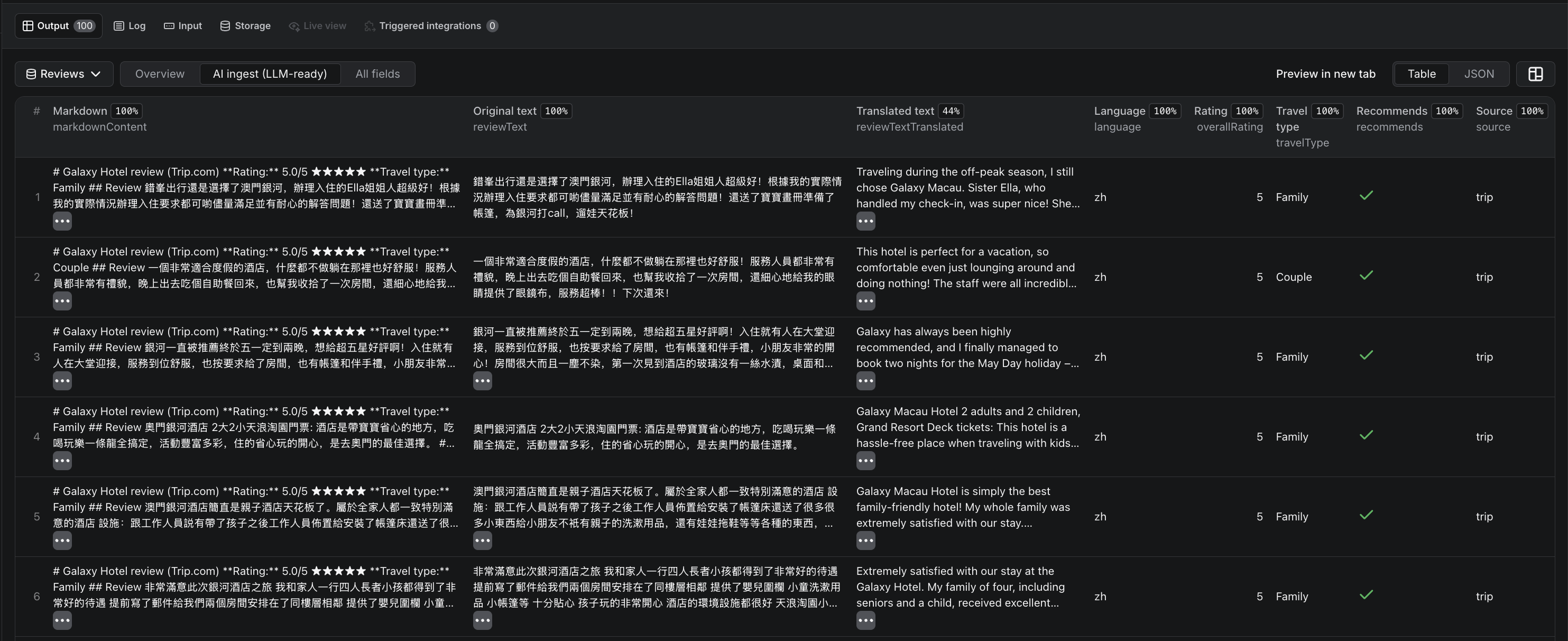
- **Reviews** - one row per review (32 fields). Two table views: **Overview** (14 columns most users want, including per-review sub-ratings) and **AI ingest** (8 LLM-ready columns including `markdownContent`).
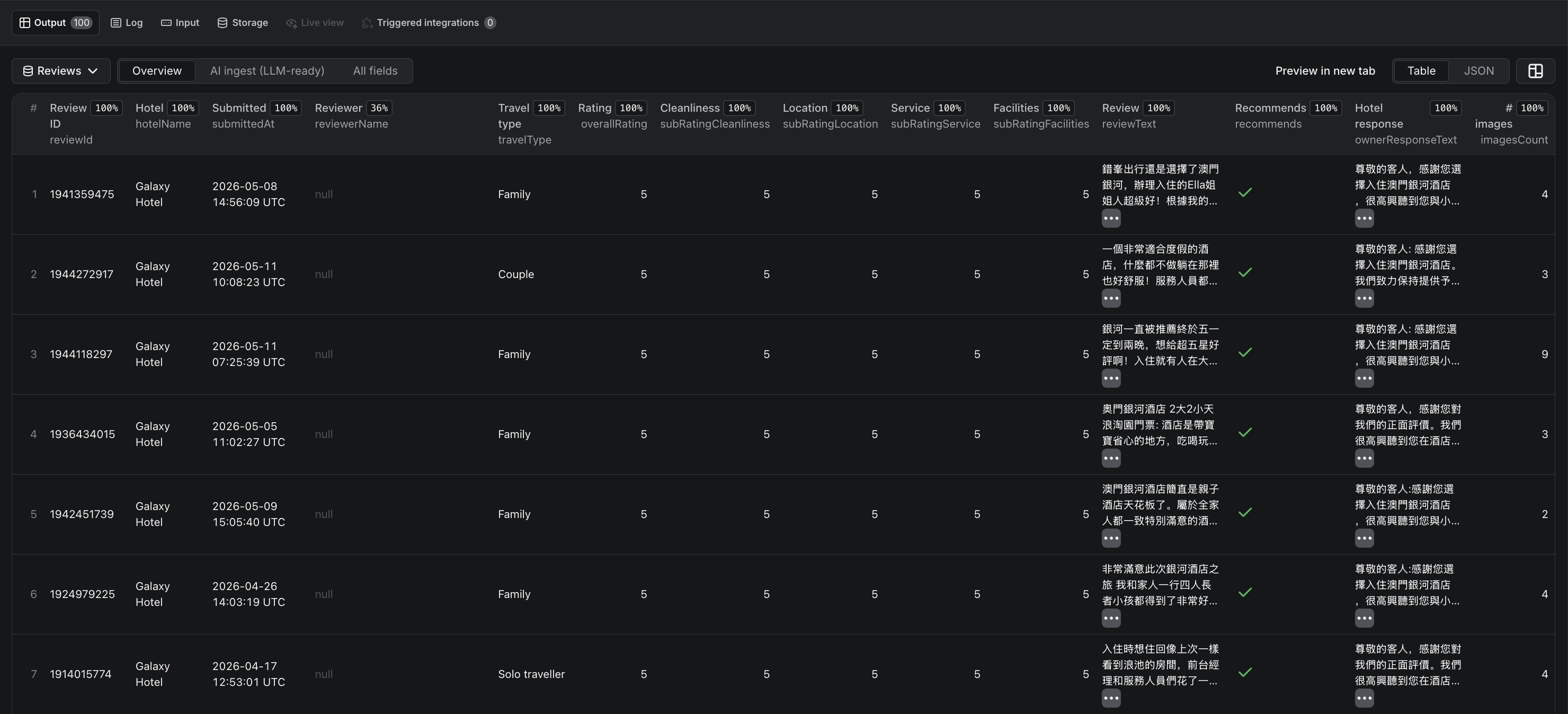
- **Hotels** - one summary row per hotel scraped (21 fields): aggregate ratings, sub-ratings, recommendation rate, days-since-last-negative, completeness percentage.


#### Sample review row
```json
{
"reviewId": "1972372932",
"hotelId": 344983,
"hotelName": "Galaxy Hotel",
"hotelUrl": "https://www.trip.com/hotels/macau-hotel-detail-344983/galaxy-hotel/",
"source": "trip",
"submittedAt": "2026-05-12T14:32:00",
"checkInMonth": "2026-04",
"reviewerName": "Sarah K.",
"reviewerLifetimeReviews": 42,
"reviewerTier": "Review Specialist",
"reviewerIsAnonymous": false,
"reviewerIpLocation": null,
"travelType": "Couple",
"roomName": "Club Room Twin Bed",
"language": "en",
"overallRating": 4.7,
"ratingLabel": "Amazing",
"subRatingCleanliness": 5,
"subRatingLocation": 5,
"subRatingService": 4.5,
"subRatingFacilities": 4.5,
"reviewText": "Outstanding service throughout our stay...",
"reviewTextTranslated": null,
"isMachineTranslated": false,
"recommends": true,
"usefulCount": 14,
"imagesCount": 3,
"hasVideo": false,
"ownerResponseText": "Dear valued guest, thank you for your kind words...",
"ownerResponseDate": "2026-05-14T09:12:00",
"markdownContent": "## Galaxy Hotel review (Trip.com)\n\n**Rating:** 4.7/5 ★★★★☆\n**Travel type:** Couple\n\n### Review\nOutstanding service throughout our stay...\n\n### Hotel response\nDear valued guest, thank you for your kind words...",
"extractedAt": "2026-06-06T10:15:00+00:00"
}
```
#### Sample hotel summary row
```json
{
"hotelId": 344983,
"hotelName": "Galaxy Hotel",
"source": "trip",
"url": "https://www.trip.com/hotels/macau-hotel-detail-344983/galaxy-hotel/",
"hotelStars": 5,
"hotelAddress": "Galaxy Macau, Cotai, Macau, China",
"overallRating": 4.0,
"ratingLabel": "Very good",
"reviewsCount": 356,
"displayedReviewsCount": 305,
"subRatingCleanliness": 4.1,
"subRatingLocation": 4.4,
"subRatingService": 3.9,
"subRatingFacilities": 3.7,
"recommendRate": 0.7,
"mostRecentNegativeDate": "2026-05-24",
"daysSinceLastNegative": 4,
"negativeReviewsCount": 40,
"reviewsExtracted": 200,
"completenessPct": 56.2,
"extractedAt": "2026-06-06T10:15:30+00:00"
}
```
**Timestamps:** `submittedAt`, `checkInMonth`, and `ownerResponseDate` come from `Trip.com` in the hotel's local time zone with no offset - we preserve them as naive ISO strings rather than mislabeling them as UTC. `extractedAt` is our scrape time in UTC.
***
### Pricing
Pay-per-event. No subscription, no minimum.
| Event | Rate |
|---|---|
| `apify-actor-start` | $0.01 per run |
| `apify-default-dataset-item` | $0.004 per review row |
**Effective rate: $4 per 1,000 reviews.** Apify's $5 new-account credit covers approximately 1,250 reviews on day one - enough to validate the actor end-to-end before any spend. Tiered subscription discounts apply automatically when your Apify plan qualifies, down to **$2.50 per 1,000 on the Business plan** (37.5% off).
***
### How to run this Trip.com reviews API on a schedule
For continuous monitoring, daily delta refreshes, or ORM dashboards:
1. Open the [Apify Schedules tab](https://docs.apify.com/platform/schedules) in your Console.
2. Add a new schedule and select this actor.
3. Set the cron expression (e.g., `0 6 * * *` for daily at 06:00 UTC).
4. In the schedule's input override, set `fromDate` to a sliding window - for example, yesterday's date via Apify's `{{NOW - 1.day | date('YYYY-MM-DD')}}` template.
5. (Optional) Wire an [Apify webhook](https://docs.apify.com/platform/integrations/webhooks) on `ACTOR.RUN.SUCCEEDED` to push the dataset into Snowflake, BigQuery, S3, or your CRM.
Combined with `sortBy: "mostRecent"`, the actor short-circuits once it crosses the `fromDate` floor - incremental runs are fast and cheap.
***
### AI agents & RAG - using the data with LLMs
The `markdownContent` field on every review is a self-contained markdown block - title, rating, travel type, body, translation, and hotel response inlined. Designed for direct vector-DB ingestion and LLM context windows. Capped at 100 KB per row.
Use the standard [Apify API or client libraries](https://docs.apify.com/api) to run the actor and iterate the Reviews dataset - `markdownContent` is your ready-to-embed chunk.
#### Field glossary for AI agents
| Field | What it carries | Why an agent cares |
|---|---|---|
| `markdownContent` | Per-review self-contained markdown chunk | RAG / vector DB ingestion |
| `subRatingCleanliness` / `Location` / `Service` / `Facilities` | Per-review dimension scores 0–5 | Fine-grained sentiment retrieval |
| `travelType` | Business / Family / Solo / Couple / Friends / Other | ICP filtering before embedding |
| `reviewerIpLocation` | Chinese province (`Ctrip` locale only) | Geographic segmentation for Chinese market |
| `ownerResponseText` | Hotel management reply | Reputation-management agents |
| `recommendRate` (Hotels dataset) | 0–1 recommendation fraction | NPS-style hotel-level signal |
| `daysSinceLastNegative` (Hotels dataset) | Days since the most recent ≤3-star review | Risk-scoring + alerting agents |
***
### Data sources & GDPR
This actor extracts publicly visible review data from `Trip.com` and `hotels.ctrip.com`. The `reviewerName` field may contain real first names where the reviewer chose to display them publicly on `Trip.com`; the `reviewerIpLocation` field (`Ctrip` locale only) contains the Chinese province-level location the reviewer published with the review. Anonymous reviewers are surfaced as `reviewerName: null` + `reviewerIsAnonymous: true`. You are responsible for ensuring your downstream use of this data complies with GDPR, China's PIPL, and any other applicable data-protection regulations in your jurisdiction.
***
### FAQ
**How much does it cost to scrape 10,000 `Trip.com` reviews?**
$0.01 (run start) + 10,000 × $0.004 = **$40.01**. New Apify accounts have a $5 credit that covers ~1,250 reviews.
**Can I scrape multiple hotels in one run?**
Yes - paste up to 500 URLs in `startUrls`. Mix `Trip.com` and `hotels.ctrip.com` URLs freely. Duplicate URLs are dropped silently.
**Does this work for Chinese-language (携程) reviews?**
Yes. Paste any `hotels.ctrip.com/hotels/{id}.html` or `hotels.ctrip.com/international/{id}.html` URL and the actor returns the Chinese guest-review feed - including `reviewerIpLocation` (province-level origin) which only appears on the `Ctrip` locale.
**How does this compare to other `Trip.com` scrapers on Apify?**
Three things unique to this actor: (1) **bilingual** - both `Trip.com` and `Ctrip` (携程) in one run, no other scraper does both; (2) **per-review sub-ratings** - cleanliness / location / service / facilities scores on every row, not just the hotel-level aggregate; (3) **`markdownContent` chunks** - self-contained per-review markdown ready for direct vector DB / RAG ingestion. Plus parsed hotel star classification + address pulled from the detail page.
**How fresh is the review data?**
Real-time. Every run pulls fresh data from `Trip.com` and `Ctrip` directly. There is no caching layer between the upstream and your dataset.
**Can I export hotel reviews to CSV or Excel?**
Yes. The Output tab in the Apify Console offers JSON, JSONL, CSV, Excel, and HTML export formats on both the Reviews and Hotels datasets.
**Can I scrape incrementally instead of refetching everything?**
Yes. Set `sortBy: "mostRecent"` and `fromDate` to your last successful scrape date. The actor stops paginating once it crosses the date floor - much faster and cheaper than a full re-scrape. See [Schedule](#how-to-run-this-tripcom-reviews-api-on-a-schedule) for cron + webhook wiring.
**How many reviews can I get per hotel?**
`Trip.com` caps publicly accessible reviews around 1,000 per high-volume property. The Hotels dataset's `completenessPct` field tells you what fraction of what's exposed you actually retrieved. For incremental syncs that's irrelevant - you'll get every new review since `fromDate`.
**Is scraping `Trip.com` legal?**
This actor extracts publicly visible data - no login is required, no rate-limit bypass is performed. Whether your downstream use is permissible depends on your jurisdiction's regulations (GDPR, PIPL, CCPA, etc.) and on `Trip.com`'s Terms of Service for the data category you're collecting. Reviewing both is your responsibility before deploying at scale.
***
### Changelog
#### v1.0 - Public launch (2026-06-08)
Initial public release. Bilingual `Trip.com` + `Ctrip` review extraction, 32-field reviews + 21-field hotels schema, LLM-ready `markdownContent`, pay-per-event pricing with tiered discounts.
***
### Support & maintenance
**Actively maintained.** Bug reports and feature requests are typically triaged within 1–2 business days.
- **Apify Issues tab** - primary support channel; we get notified instantly and other users can upvote your report. Please include the run ID, one example URL, and what you expected vs what you saw.
- **Email** - for private / billing / partnership questions.
Looking for a software-product review scraper? See our sibling actor **[G2 Reviews Scraper](https://apify.com/factden/g2-reviews-scraper)** for B2B SaaS competitive intelligence.
# Actor input Schema
## `startUrls` (type: `array`):
Trip.com or hotels.ctrip.com hotel URLs. Mix freely - each URL is processed in its native locale (Trip.com returns English reviews, Ctrip returns Chinese). Up to 500 URLs per run.
## `maxReviewsPerHotel` (type: `integer`):
Max reviews per hotel (Trip.com caps ~1,000).
## `sortBy` (type: `string`):
Sort order, applied before the per-hotel cap.
## `fromDate` (type: `string`):
Only include reviews submitted on/after this date.
## `toDate` (type: `string`):
Only include reviews submitted on/before this date.
## `minRating` (type: `integer`):
Minimum overall rating to include.
## `maxRating` (type: `integer`):
Maximum overall rating to include.
## `proxyConfiguration` (type: `object`):
Apify Proxy (datacenter) by default.
## Actor input object example
```json
{
"startUrls": [
"https://www.trip.com/hotels/macau-hotel-detail-344983/galaxy-hotel/",
"https://hotels.ctrip.com/hotels/1286148.html"
],
"maxReviewsPerHotel": 200,
"sortBy": "mostRecent",
"minRating": 1,
"maxRating": 5,
"proxyConfiguration": {
"useApifyProxy": true
}
}
```
# Actor output Schema
## `reviews` (type: `string`):
Per-review rows. 32 fields including original + translated text, per-review sub-ratings (cleanliness/location/service/facilities), owner responses, Chinese provincial IP location (Ctrip locale only), travel type, and an LLM-ready markdown view.
## `hotels` (type: `string`):
Per-hotel summary rows. One row per hotel scraped, with aggregate ratings, sub-ratings, sentiment signals (recommend rate, days since last negative), and parsed hotel detail (stars + address).
# API
You can run this Actor programmatically using our API. Below are code examples in JavaScript, Python, and CLI, as well as the OpenAPI specification and MCP server setup.
## JavaScript example
```javascript
import { ApifyClient } from 'apify-client';
// Initialize the ApifyClient with your Apify API token
// Replace the '' with your token
const client = new ApifyClient({
token: '',
});
// Prepare Actor input
const input = {
"startUrls": [
"https://www.trip.com/hotels/macau-hotel-detail-344983/galaxy-hotel/",
"https://hotels.ctrip.com/hotels/1286148.html"
]
};
// Run the Actor and wait for it to finish
const run = await client.actor("factden/ctrip-trip-reviews-scraper").call(input);
// Fetch and print Actor results from the run's dataset (if any)
console.log('Results from dataset');
console.log(`💾 Check your data here: https://console.apify.com/storage/datasets/${run.defaultDatasetId}`);
const { items } = await client.dataset(run.defaultDatasetId).listItems();
items.forEach((item) => {
console.dir(item);
});
// 📚 Want to learn more 📖? Go to → https://docs.apify.com/api/client/js/docs
```
## Python example
```python
from apify_client import ApifyClient
# Initialize the ApifyClient with your Apify API token
# Replace '' with your token.
client = ApifyClient("")
# Prepare the Actor input
run_input = { "startUrls": [
"https://www.trip.com/hotels/macau-hotel-detail-344983/galaxy-hotel/",
"https://hotels.ctrip.com/hotels/1286148.html",
] }
# Run the Actor and wait for it to finish
run = client.actor("factden/ctrip-trip-reviews-scraper").call(run_input=run_input)
# Fetch and print Actor results from the run's dataset (if there are any)
print("💾 Check your data here: https://console.apify.com/storage/datasets/" + run["defaultDatasetId"])
for item in client.dataset(run["defaultDatasetId"]).iterate_items():
print(item)
# 📚 Want to learn more 📖? Go to → https://docs.apify.com/api/client/python/docs/quick-start
```
## CLI example
```bash
echo '{
"startUrls": [
"https://www.trip.com/hotels/macau-hotel-detail-344983/galaxy-hotel/",
"https://hotels.ctrip.com/hotels/1286148.html"
]
}' |
apify call factden/ctrip-trip-reviews-scraper --silent --output-dataset
```
## MCP server setup
```json
{
"mcpServers": {
"apify": {
"command": "npx",
"args": [
"mcp-remote",
"https://mcp.apify.com/?tools=factden/ctrip-trip-reviews-scraper",
"--header",
"Authorization: Bearer "
]
}
}
}
```
## OpenAPI specification
```json
{
"openapi": "3.0.1",
"info": {
"title": "Trip.com & Ctrip (携程) Hotel Reviews Scraper (June 2026)",
"description": "Scrape hotel reviews from Trip.com and Ctrip (携程). 32 fields per review: sub-ratings (cleanliness, location, service, facilities), owner responses, reviewer IP location(ctrip), travel type, and LLM-ready markdownContent. Zero setup, no login. $4 per 1,000 reviews (from $2.50 on Business).",
"version": "1.0",
"x-build-id": "lZ7b4xdaCKSgom571"
},
"servers": [
{
"url": "https://api.apify.com/v2"
}
],
"paths": {
"/acts/factden~ctrip-trip-reviews-scraper/run-sync-get-dataset-items": {
"post": {
"operationId": "run-sync-get-dataset-items-factden-ctrip-trip-reviews-scraper",
"x-openai-isConsequential": false,
"summary": "Executes an Actor, waits for its completion, and returns Actor's dataset items in response.",
"tags": [
"Run Actor"
],
"requestBody": {
"required": true,
"content": {
"application/json": {
"schema": {
"$ref": "#/components/schemas/inputSchema"
}
}
}
},
"parameters": [
{
"name": "token",
"in": "query",
"required": true,
"schema": {
"type": "string"
},
"description": "Enter your Apify token here"
}
],
"responses": {
"200": {
"description": "OK"
}
}
}
},
"/acts/factden~ctrip-trip-reviews-scraper/runs": {
"post": {
"operationId": "runs-sync-factden-ctrip-trip-reviews-scraper",
"x-openai-isConsequential": false,
"summary": "Executes an Actor and returns information about the initiated run in response.",
"tags": [
"Run Actor"
],
"requestBody": {
"required": true,
"content": {
"application/json": {
"schema": {
"$ref": "#/components/schemas/inputSchema"
}
}
}
},
"parameters": [
{
"name": "token",
"in": "query",
"required": true,
"schema": {
"type": "string"
},
"description": "Enter your Apify token here"
}
],
"responses": {
"200": {
"description": "OK",
"content": {
"application/json": {
"schema": {
"$ref": "#/components/schemas/runsResponseSchema"
}
}
}
}
}
}
},
"/acts/factden~ctrip-trip-reviews-scraper/run-sync": {
"post": {
"operationId": "run-sync-factden-ctrip-trip-reviews-scraper",
"x-openai-isConsequential": false,
"summary": "Executes an Actor, waits for completion, and returns the OUTPUT from Key-value store in response.",
"tags": [
"Run Actor"
],
"requestBody": {
"required": true,
"content": {
"application/json": {
"schema": {
"$ref": "#/components/schemas/inputSchema"
}
}
}
},
"parameters": [
{
"name": "token",
"in": "query",
"required": true,
"schema": {
"type": "string"
},
"description": "Enter your Apify token here"
}
],
"responses": {
"200": {
"description": "OK"
}
}
}
}
},
"components": {
"schemas": {
"inputSchema": {
"type": "object",
"required": [
"startUrls"
],
"properties": {
"startUrls": {
"title": "🌐 Hotel URLs",
"maxItems": 500,
"type": "array",
"description": "Trip.com or hotels.ctrip.com hotel URLs. Mix freely - each URL is processed in its native locale (Trip.com returns English reviews, Ctrip returns Chinese). Up to 500 URLs per run.",
"items": {
"type": "string"
}
},
"maxReviewsPerHotel": {
"title": "🔢 Max reviews per hotel",
"minimum": 1,
"maximum": 5000,
"type": "integer",
"description": "Max reviews per hotel (Trip.com caps ~1,000).",
"default": 200
},
"sortBy": {
"title": "🔀 Sort order",
"enum": [
"mostRelevant",
"mostRecent",
"ratingHighToLow",
"ratingLowToHigh"
],
"type": "string",
"description": "Sort order, applied before the per-hotel cap.",
"default": "mostRecent"
},
"fromDate": {
"title": "📅 From date",
"type": "string",
"description": "Only include reviews submitted on/after this date."
},
"toDate": {
"title": "📅 To date",
"type": "string",
"description": "Only include reviews submitted on/before this date."
},
"minRating": {
"title": "🌟 Minimum rating (1 = worst, 5 = best)",
"minimum": 1,
"maximum": 5,
"type": "integer",
"description": "Minimum overall rating to include.",
"default": 1
},
"maxRating": {
"title": "🌟 Maximum rating (1 = worst, 5 = best)",
"minimum": 1,
"maximum": 5,
"type": "integer",
"description": "Maximum overall rating to include.",
"default": 5
},
"proxyConfiguration": {
"title": "🛡️ Proxy configuration",
"type": "object",
"description": "Apify Proxy (datacenter) by default.",
"default": {
"useApifyProxy": true
}
}
}
},
"runsResponseSchema": {
"type": "object",
"properties": {
"data": {
"type": "object",
"properties": {
"id": {
"type": "string"
},
"actId": {
"type": "string"
},
"userId": {
"type": "string"
},
"startedAt": {
"type": "string",
"format": "date-time",
"example": "2025-01-08T00:00:00.000Z"
},
"finishedAt": {
"type": "string",
"format": "date-time",
"example": "2025-01-08T00:00:00.000Z"
},
"status": {
"type": "string",
"example": "READY"
},
"meta": {
"type": "object",
"properties": {
"origin": {
"type": "string",
"example": "API"
},
"userAgent": {
"type": "string"
}
}
},
"stats": {
"type": "object",
"properties": {
"inputBodyLen": {
"type": "integer",
"example": 2000
},
"rebootCount": {
"type": "integer",
"example": 0
},
"restartCount": {
"type": "integer",
"example": 0
},
"resurrectCount": {
"type": "integer",
"example": 0
},
"computeUnits": {
"type": "integer",
"example": 0
}
}
},
"options": {
"type": "object",
"properties": {
"build": {
"type": "string",
"example": "latest"
},
"timeoutSecs": {
"type": "integer",
"example": 300
},
"memoryMbytes": {
"type": "integer",
"example": 1024
},
"diskMbytes": {
"type": "integer",
"example": 2048
}
}
},
"buildId": {
"type": "string"
},
"defaultKeyValueStoreId": {
"type": "string"
},
"defaultDatasetId": {
"type": "string"
},
"defaultRequestQueueId": {
"type": "string"
},
"buildNumber": {
"type": "string",
"example": "1.0.0"
},
"containerUrl": {
"type": "string"
},
"usage": {
"type": "object",
"properties": {
"ACTOR_COMPUTE_UNITS": {
"type": "integer",
"example": 0
},
"DATASET_READS": {
"type": "integer",
"example": 0
},
"DATASET_WRITES": {
"type": "integer",
"example": 0
},
"KEY_VALUE_STORE_READS": {
"type": "integer",
"example": 0
},
"KEY_VALUE_STORE_WRITES": {
"type": "integer",
"example": 1
},
"KEY_VALUE_STORE_LISTS": {
"type": "integer",
"example": 0
},
"REQUEST_QUEUE_READS": {
"type": "integer",
"example": 0
},
"REQUEST_QUEUE_WRITES": {
"type": "integer",
"example": 0
},
"DATA_TRANSFER_INTERNAL_GBYTES": {
"type": "integer",
"example": 0
},
"DATA_TRANSFER_EXTERNAL_GBYTES": {
"type": "integer",
"example": 0
},
"PROXY_RESIDENTIAL_TRANSFER_GBYTES": {
"type": "integer",
"example": 0
},
"PROXY_SERPS": {
"type": "integer",
"example": 0
}
}
},
"usageTotalUsd": {
"type": "number",
"example": 0.00005
},
"usageUsd": {
"type": "object",
"properties": {
"ACTOR_COMPUTE_UNITS": {
"type": "integer",
"example": 0
},
"DATASET_READS": {
"type": "integer",
"example": 0
},
"DATASET_WRITES": {
"type": "integer",
"example": 0
},
"KEY_VALUE_STORE_READS": {
"type": "integer",
"example": 0
},
"KEY_VALUE_STORE_WRITES": {
"type": "number",
"example": 0.00005
},
"KEY_VALUE_STORE_LISTS": {
"type": "integer",
"example": 0
},
"REQUEST_QUEUE_READS": {
"type": "integer",
"example": 0
},
"REQUEST_QUEUE_WRITES": {
"type": "integer",
"example": 0
},
"DATA_TRANSFER_INTERNAL_GBYTES": {
"type": "integer",
"example": 0
},
"DATA_TRANSFER_EXTERNAL_GBYTES": {
"type": "integer",
"example": 0
},
"PROXY_RESIDENTIAL_TRANSFER_GBYTES": {
"type": "integer",
"example": 0
},
"PROXY_SERPS": {
"type": "integer",
"example": 0
}
}
}
}
}
}
}
}
}
}
```