# Justdial Business Leads - Owners, Real Phone, Email (`factden/justdial-business-leads`) Actor
Scrape complete Justdial business leads by city and category - every business, not just the first 100. Real phone(not virtual numbers) (including paid advertisers), address, area, pincode, GPS, rating.
- **URL**: https://apify.com/factden/justdial-business-leads.md
- **Developed by:** [Factden](https://apify.com/factden) (community)
- **Categories:** Lead generation, Automation, AI
- **Stats:** 2 total users, 1 monthly users, 100.0% runs succeeded, 0 bookmarks
- **User rating**: No ratings yet
## Pricing
from $10.00 / 1,000 enriched lead (real phone, email, owner, whatsapp)s
This Actor is paid per event. You are not charged for the Apify platform usage, but only a fixed price for specific events.
Since this Actor supports Apify Store discounts, the price gets lower the higher subscription plan you have.
Learn more: https://docs.apify.com/actors/running/actors-in-store.md#pay-per-event
## What's an Apify Actor?
An Actor is a serverless cloud program that runs on the Apify platform. It has two run modes.
In Batch mode, an Actor accepts a well-defined JSON input, performs an action which can take anything from a few seconds to a few hours,
and optionally produces a well-defined JSON output, datasets with results, or files in key-value store.
In Standby mode, an Actor provides a web server which can be used as a website, API, or an MCP server.
Apify vocabulary and the platform model are defined once, in the agent quickstart at https://apify.com/agents.md.
## How to integrate an Actor?
If asked about integration, you help developers integrate Actors into their projects.
You adapt to their stack and deliver integrations that are safe, well-documented, and production-ready.
Do not guess an integration path. Every one of them is in the agent quickstart at https://apify.com/agents.md: the Apify MCP server, Agent Skills with the Apify CLI, the JavaScript and Python clients, the REST API, and the account-free path for an agent with no human to sign in. It also carries the rule on stating cost before the first paid run.
For examples already wired to this Actor's own input schema, see the [API](#api) section below.
Each client library has reference documentation the quickstart does not restate: [JavaScript/TypeScript](https://docs.apify.com/api/client/js/docs.md) (`npm install apify-client`) and [Python](https://docs.apify.com/api/client/python/docs.md) (`pip install apify-client`).
# README
## Justdial Business Leads Scraper
**Justdial Business Leads Scraper** extracts **business leads with real phone numbers, emails and owner names** from [Justdial](https://www.justdial.com), India's largest business directory. Pick any Indian **cities or states plus business categories** (Restaurants, Gyms, Dentists, Plumbers, Interior Designers and more), or paste Justdial URLs, and get a clean, deduplicated lead list ready to export to Excel, CSV, Google Sheets or JSON.
**What makes it different:** you get the **real phone number**, not the useless virtual / call-tracking number most listings show, plus the **email address** and the **business owner's name**. Those are the three fields buyers actually need for outreach, and no other Justdial scraper delivers all three. We handle the blocking and going past Justdial's ~100-results-per-search limit for you. You just pick a city and a category.
[](https://console.apify.com/sign-up)
> ⭐ **Found this useful?** Please rate and bookmark the actor, it helps other people find it.
### What can this Justdial scraper do?
- **Real phone numbers** on **every lead**, including the **real mobile behind a paid advertiser's virtual number**, not just the masked line every other scraper returns.
- **Email addresses** when a business has one on file, present on **over 85% of paid / advertiser listings** and about half of free listings.
- **Owner / contact-person name and role** (Proprietor, Owner, Director), a field **no other Justdial scraper returns**.
- **GST number (unmasked)** plus firmographics (legal name, year established, employee count, turnover). Justdial's web page **masks** the GSTIN; we return the full number.
- **All contacts, not just one**: `allPhones`, `allEmails` and `allContactPersons` return **every** phone, email and owner a business lists.
- **Two modes**: a cheap, fast **Discovery** mode (listings only) and the full **Enriched leads** mode (all the contact data). One toggle, one price per run.
- **Break past the ~100-result wall**: one run collects far more than the ~100 businesses a single Justdial search shows. We handle it automatically.
- **Search by city or whole state, times category**, or paste Justdial category / area / business URLs directly.
- **No login, no API key, no CAPTCHAs, no blocking to manage.** We handle the anti-bot side; it runs on Apify with scheduling, API access, integrations and monitoring.
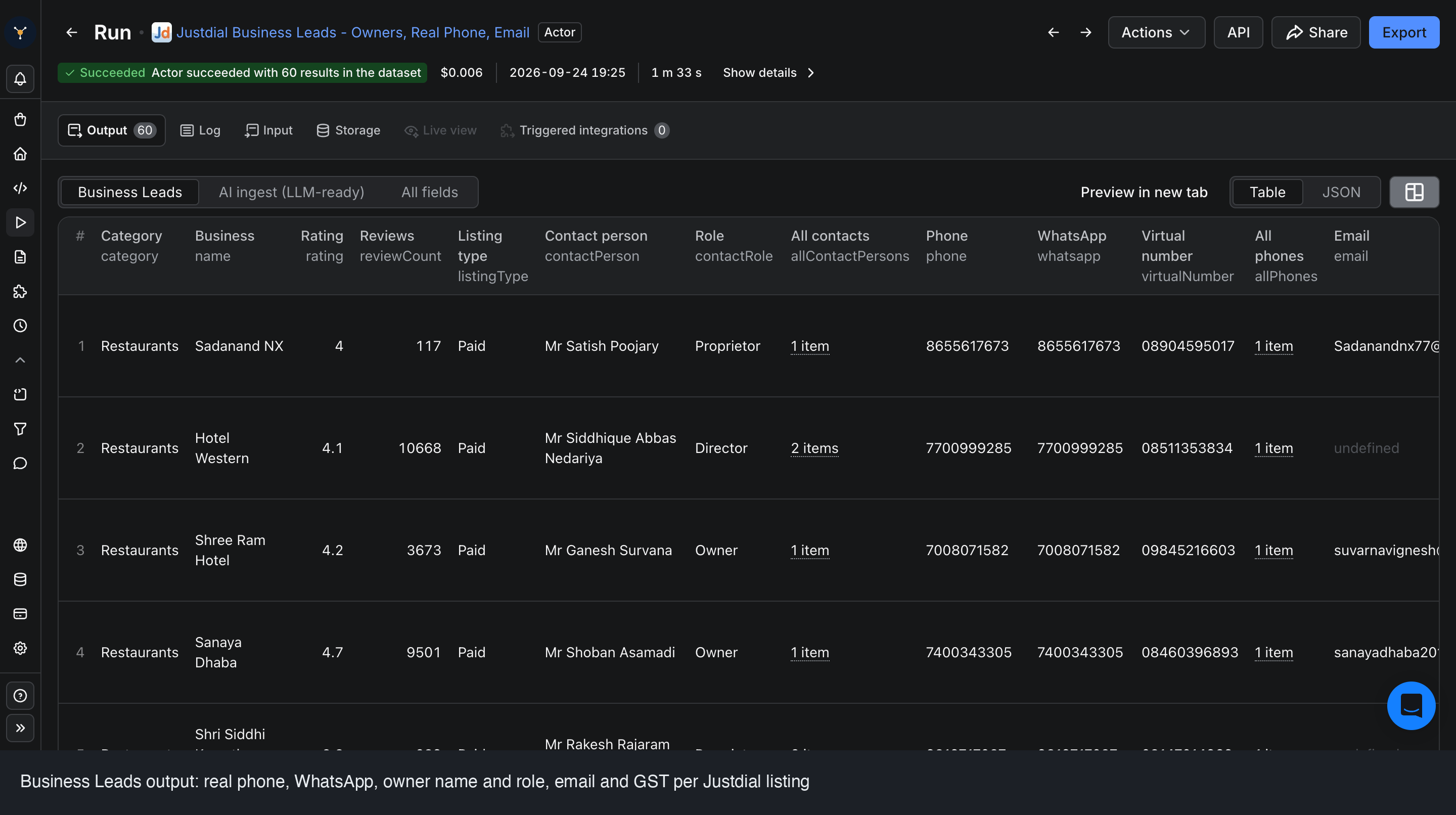 #### What data can I extract?
| Field | Description |
|---|---|
| `name` | Business name |
| `category` | Business category |
| `listingType` | Free or Paid (advertiser) listing |
| `phone` | Primary phone, the real number (advertiser real mobile when available) |
| `phoneType` | `real` or `virtual` |
| `whatsapp` | WhatsApp number when exposed |
| `virtualNumber` | The displayed call-tracking / virtual number |
| `allPhones` | Every phone number on the listing |
| `email` | Primary email (when available, most paid listings) |
| `allEmails` | Every email on the listing |
| `contactPerson`, `contactRole` | Owner / contact person and their role |
| `allContactPersons` | Every named contact with role |
| `website` | Business website |
| `gstNumber` | Full **unmasked** GSTIN (the web page masks it) |
| `legalName`, `yearEstablished`, `employeeCount`, `turnover` | Firmographics, when on file |
| `address`, `area`, `city`, `pincode` | Full address, broken out |
| `latitude`, `longitude` | GPS coordinates |
| `rating`, `reviewCount` | Star rating and number of reviews |
| `businessUrl` | Link back to the Justdial profile |
| `paidStatus`, `verified` | Whether the listing is a paid advertiser, and whether Justdial marks it verified |
| `scrapedAt` | Timestamp (ISO 8601) when the lead was collected |
Contact and firmographic fields (`phone`, `email`, owner, `whatsapp`, `website`, `gstNumber`, firmographics) are returned in **Enriched leads** mode. **Discovery** mode returns the listing fields without any contact data. The dataset export also carries extra attributes beyond the columns above (business `hours`, `paymentModes`, `cuisine`, `priceRange`, `tagline`).
### How to scrape Justdial leads by city and category
1. Under **States** or **Cities**, pick one or more locations. Every Justdial city is listed and labelled with its state.
2. Under **Categories / Keywords**, type the business types you want (for example `Restaurants`, `Gyms`, `Dentists`). It is free text, matched like Justdial's own search box.
3. Turn **Contact Enrichment** ON for full leads (real phone, email, owner, WhatsApp). It is OFF by default, which gives a cheaper Discovery-only listing map.
4. Set **Max businesses** (default 100) and click **Start**. Export to **Excel, CSV, Google Sheets or JSON** from the Output tab.
#### What data can I extract?
| Field | Description |
|---|---|
| `name` | Business name |
| `category` | Business category |
| `listingType` | Free or Paid (advertiser) listing |
| `phone` | Primary phone, the real number (advertiser real mobile when available) |
| `phoneType` | `real` or `virtual` |
| `whatsapp` | WhatsApp number when exposed |
| `virtualNumber` | The displayed call-tracking / virtual number |
| `allPhones` | Every phone number on the listing |
| `email` | Primary email (when available, most paid listings) |
| `allEmails` | Every email on the listing |
| `contactPerson`, `contactRole` | Owner / contact person and their role |
| `allContactPersons` | Every named contact with role |
| `website` | Business website |
| `gstNumber` | Full **unmasked** GSTIN (the web page masks it) |
| `legalName`, `yearEstablished`, `employeeCount`, `turnover` | Firmographics, when on file |
| `address`, `area`, `city`, `pincode` | Full address, broken out |
| `latitude`, `longitude` | GPS coordinates |
| `rating`, `reviewCount` | Star rating and number of reviews |
| `businessUrl` | Link back to the Justdial profile |
| `paidStatus`, `verified` | Whether the listing is a paid advertiser, and whether Justdial marks it verified |
| `scrapedAt` | Timestamp (ISO 8601) when the lead was collected |
Contact and firmographic fields (`phone`, `email`, owner, `whatsapp`, `website`, `gstNumber`, firmographics) are returned in **Enriched leads** mode. **Discovery** mode returns the listing fields without any contact data. The dataset export also carries extra attributes beyond the columns above (business `hours`, `paymentModes`, `cuisine`, `priceRange`, `tagline`).
### How to scrape Justdial leads by city and category
1. Under **States** or **Cities**, pick one or more locations. Every Justdial city is listed and labelled with its state.
2. Under **Categories / Keywords**, type the business types you want (for example `Restaurants`, `Gyms`, `Dentists`). It is free text, matched like Justdial's own search box.
3. Turn **Contact Enrichment** ON for full leads (real phone, email, owner, WhatsApp). It is OFF by default, which gives a cheaper Discovery-only listing map.
4. Set **Max businesses** (default 100) and click **Start**. Export to **Excel, CSV, Google Sheets or JSON** from the Output tab.
 **Handy recipes:** Restaurants in Mumbai. Dentists across Maharashtra (whole state). A multi-category agency prospecting list (`Gyms`, `Salons`, `Spas` in one run). Or paste a Justdial category URL to scrape it directly.
### How much does it cost to scrape Justdial?
Two modes, each billed **per business row** (pay-per-result, no monthly fee). You are charged for exactly one of the two, chosen by the Contact Enrichment toggle, never both:
- **🔓 Enriched leads** (toggle on): the full contact lead (real phone, email, owner, WhatsApp, website plus all listing data). From **$10 per 1,000** on paid Apify plans.
- **🗺️ Discovery** (default, toggle off): listings only (name, category, address, GPS, rating, reviews). From **$2 per 1,000** on paid Apify plans.
- **Actor start:** a flat **$0.005** per run.
Free-plan runs are priced higher to keep the service sustainable; upgrade to any paid Apify plan for the low rates above. See the **Pricing** tab for the full per-plan table.
**Worked example:** 5,000 enriched restaurant leads across Mumbai and Delhi runs about **$50 to $100** on a paid plan, a fraction of the cost of buying or hand-collecting the same list. The same 5,000 as a Discovery-only map runs about **$10 to $20**.
### Input and output example
**Input:**
```json
{
"cities": ["Mumbai"],
"categories": ["Restaurants"],
"maxItems": 1000,
"enrichContacts": true,
"proxyConfiguration": { "useApifyProxy": true }
}
```
**Output (one enriched lead):**
```json
{
"name": "Kanchan Veg",
"category": "Restaurants",
"listingType": "Paid",
"phone": "9673410606",
"phoneType": "real",
"whatsapp": "9673410606",
"virtualNumber": "09035076253",
"allPhones": ["9673410606"],
"email": "owner@example.com",
"allEmails": ["owner@example.com"],
"contactPerson": "Mr Prashad Kanchan",
"contactRole": "Proprietor",
"allContactPersons": ["Mr Prashad Kanchan (Proprietor)"],
"website": null,
"area": "Yavat",
"city": "Pune",
"pincode": "412214",
"latitude": 18.51,
"longitude": 74.20,
"rating": 4.3,
"reviewCount": 14419,
"businessUrl": "https://www.justdial.com/Pune/..."
}
```
Download the dataset in **JSON, CSV, Excel or HTML**, or pull it via the Apify API into Google Sheets, a CRM, or your outreach tool.
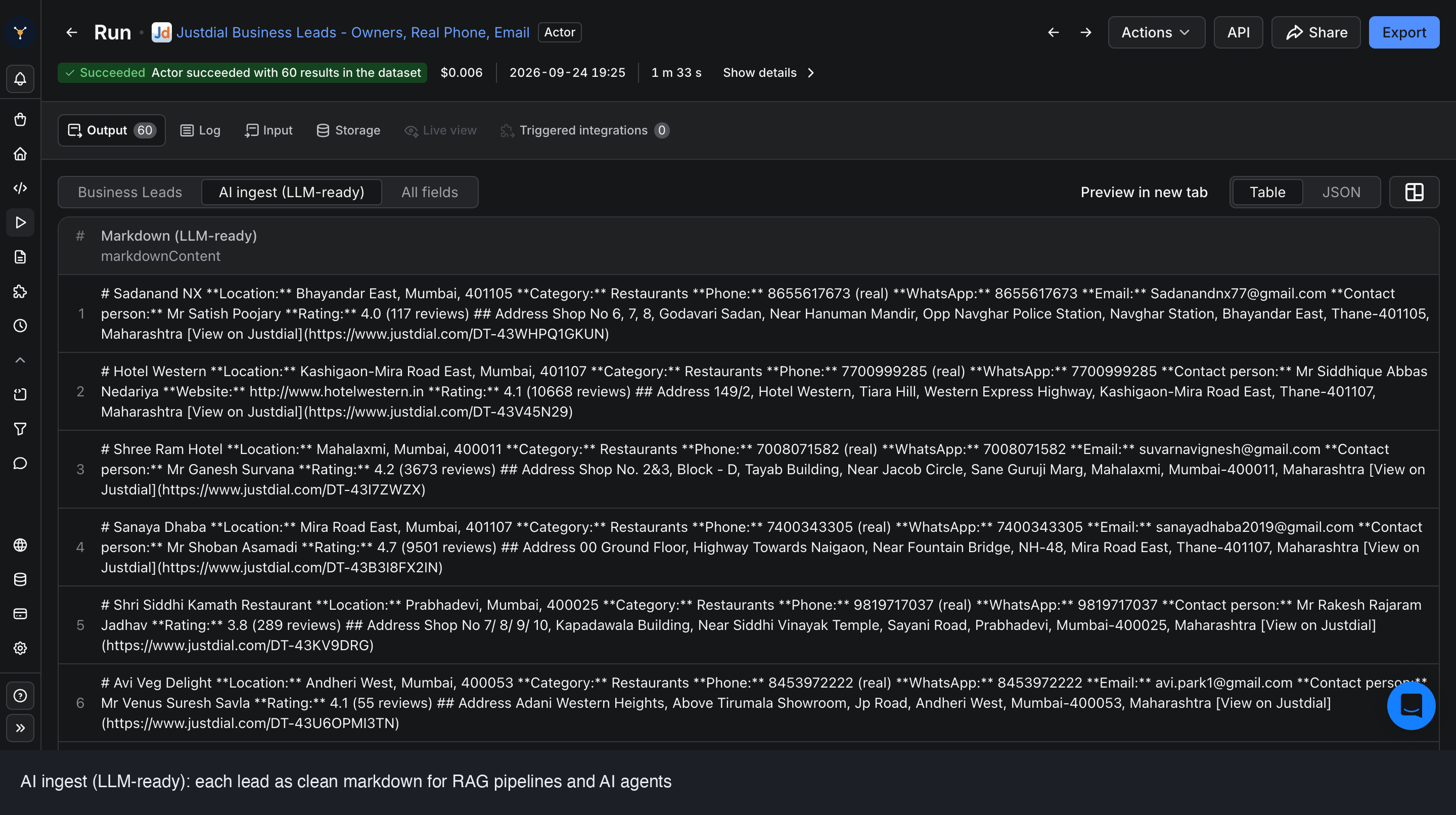
Every lead also comes as an **LLM-ready markdown field** (`markdownContent`) for RAG pipelines and AI agents:
**Handy recipes:** Restaurants in Mumbai. Dentists across Maharashtra (whole state). A multi-category agency prospecting list (`Gyms`, `Salons`, `Spas` in one run). Or paste a Justdial category URL to scrape it directly.
### How much does it cost to scrape Justdial?
Two modes, each billed **per business row** (pay-per-result, no monthly fee). You are charged for exactly one of the two, chosen by the Contact Enrichment toggle, never both:
- **🔓 Enriched leads** (toggle on): the full contact lead (real phone, email, owner, WhatsApp, website plus all listing data). From **$10 per 1,000** on paid Apify plans.
- **🗺️ Discovery** (default, toggle off): listings only (name, category, address, GPS, rating, reviews). From **$2 per 1,000** on paid Apify plans.
- **Actor start:** a flat **$0.005** per run.
Free-plan runs are priced higher to keep the service sustainable; upgrade to any paid Apify plan for the low rates above. See the **Pricing** tab for the full per-plan table.
**Worked example:** 5,000 enriched restaurant leads across Mumbai and Delhi runs about **$50 to $100** on a paid plan, a fraction of the cost of buying or hand-collecting the same list. The same 5,000 as a Discovery-only map runs about **$10 to $20**.
### Input and output example
**Input:**
```json
{
"cities": ["Mumbai"],
"categories": ["Restaurants"],
"maxItems": 1000,
"enrichContacts": true,
"proxyConfiguration": { "useApifyProxy": true }
}
```
**Output (one enriched lead):**
```json
{
"name": "Kanchan Veg",
"category": "Restaurants",
"listingType": "Paid",
"phone": "9673410606",
"phoneType": "real",
"whatsapp": "9673410606",
"virtualNumber": "09035076253",
"allPhones": ["9673410606"],
"email": "owner@example.com",
"allEmails": ["owner@example.com"],
"contactPerson": "Mr Prashad Kanchan",
"contactRole": "Proprietor",
"allContactPersons": ["Mr Prashad Kanchan (Proprietor)"],
"website": null,
"area": "Yavat",
"city": "Pune",
"pincode": "412214",
"latitude": 18.51,
"longitude": 74.20,
"rating": 4.3,
"reviewCount": 14419,
"businessUrl": "https://www.justdial.com/Pune/..."
}
```
Download the dataset in **JSON, CSV, Excel or HTML**, or pull it via the Apify API into Google Sheets, a CRM, or your outreach tool.
Every lead also comes as an **LLM-ready markdown field** (`markdownContent`) for RAG pipelines and AI agents:
 ### Other FactDen data scrapers you might like
| Actor | What it does |
|---|---|
| [MCA India Company and Director Data Scraper](https://apify.com/factden/mca-company-director-scraper) | Company and director records with email and phone leads from India's MCA registry |
| [Indeed Jobs Scraper](https://apify.com/factden/indeed-jobs-scraper) | Jobs, salaries, filters and company data from Indeed |
| [G2 Software Reviews Scraper](https://apify.com/factden/g2-reviews-scraper) | B2B software reviews, battlecards and switching data |
### FAQ
#### Is it legal to scrape Justdial?
The actor accesses only **publicly available Justdial business-listing data**, with no login-only or authenticated content. Business contact details published on a directory are generally public information, but **how you use them is your responsibility**: comply with Justdial's Terms, India's **DPDP Act**, and (where relevant) GDPR / CCPA, honour **DND and do-not-contact** requests, and have a lawful basis for outreach. See Apify's guide on [the legality of web scraping](https://blog.apify.com/is-web-scraping-legal/).
#### Are the phone numbers real, or masked?
Real. We return the number **Justdial actually displays**, and for **paid advertisers** you also get the **real underlying mobile** instead of the useless call-tracking / virtual number. Both values are returned (`phone` and `virtualNumber`) and `phoneType` tells you which is which. Numbers are never guessed; a field is empty when Justdial has none.
#### Do I get owner name, email and website, not just the phone?
Yes, in Enriched leads mode, **when the business has them on file**. Owner / contact-person name and role, and email, are present on **most paid / advertiser listings** and many free ones, plus website. We also return **`allEmails`, `allPhones` and `allContactPersons`** so you get every contact a business lists, not just the first.
#### What is the difference between Discovery and Enriched leads?
Enriched leads makes one extra lookup per business to add the real phone, email, owner, WhatsApp and website. Discovery skips that step and returns just the listing (name, address, GPS, rating, reviews) at a much lower price, which is ideal for market mapping and counting.
#### How do I scrape a specific city and category (for example Restaurants in Mumbai)?
Pick the city (or a whole state) and type the category as free text, then run it. To go more targeted, paste a Justdial **category or area URL** into Start URLs and the actor scrapes exactly that listing.
#### What formats can I export to?
JSON, CSV, Excel and HTML from the Output tab, or via the Apify API into Google Sheets, Airtable, a CRM, or your calling / WhatsApp tool.
#### Can I use this Justdial scraper with the Apify API or an MCP server?
Yes. Run it via the **Apify API / SDK** (Python or JavaScript) or a scheduled task, and it is usable by **AI agents through an MCP server**. The input schema is fully described, so an agent can run it with just a city and a category.
#### Can I run it at very large scale?
Yes. It runs on Apify's default datacenter proxy for typical jobs. For **very large-scale harvesting**, switch the proxy setting to **residential proxies** (Apify Residential or your own) for maximum resilience. Everything else stays the same.
### 🤖 For AI agents & LLM apps
This actor extracts India business leads from **Justdial** (real phone, owner, email, WhatsApp, GST) via the **Apify API** or an **MCP server**. Minimal call:
```json
{ "cities": ["Mumbai"], "categories": ["Restaurants"], "enrichContacts": true }
```
**Key output fields:** `name`, `phone`, `phoneType`, `contactPerson`, `email`, `whatsapp`, `gstNumber`, `pincode`, `latitude`/`longitude`, `rating`. Every lead also ships as an LLM-ready `markdownContent` field for RAG and agents.
**Behaviors an agent should know:**
- A run with only `cities` + `categories` works. `enrichContacts` defaults to **off** (cheap Discovery); set it `true` for the real phone, owner, email and WhatsApp.
- `maxItems` caps the result count (default 100); the actor fans out past Justdial's ~100-per-search wall automatically.
- Billing is **one event per business**, a Discovery listing or an Enriched lead, plus a flat $0.005 actor start.
### Disclaimer
This actor collects only publicly available business-listing information from Justdial. It does not access private, login-gated, or authenticated content. You are responsible for ensuring your use of the data complies with Justdial's Terms of Service and applicable data-protection and anti-spam laws (India's DPDP Act, GDPR, CCPA, TRAI DND regulations), including honouring opt-out and do-not-contact requests.
### Support and feedback
Found a bug or need an extra field, category, or region? Open an issue on the **Issues** tab. We read every one and ship fixes fast. Custom or higher-volume builds are available on request.
### Changelog
- **2026-09-24** Two modes: cheap Discovery (listings) and full Enriched leads (real phone, email, owner, WhatsApp), one price per run. Added `listingType`, `allPhones` / `allEmails` / `allContactPersons`, Apify datacenter proxy by default, faster runs.
- **2026-09-23** Single-call contact resolution: real advertiser phone, email, owner and role, website.
***
**Common searches:** justdial scraper · scrape justdial · justdial phone number extractor · justdial leads extractor · justdial email scraper · india business directory scraper · b2b lead generation india · justdial contractors scraper · local business leads india · scrape indian businesses
# Actor input Schema
## `states` (type: `array`):
Pick one or more states to scrape EVERY Justdial city in them. Combine with or use instead of Cities. Leave empty if you are choosing specific cities below.
## `cities` (type: `array`):
Pick one or more specific cities. Every Justdial city is listed (labelled with its state). Combine with States above.
## `categories` (type: `array`):
One or more business types to search (e.g. Restaurants, Gyms, Dentists, Plumbers). Free text - Justdial matches each term server-side, so any category or keyword works. Add several to scrape multiple business types.
## `startUrls` (type: `array`):
Paste Justdial category, area, or business (\_BZDET) URLs to scrape them directly instead of picking city + category.
## `maxItems` (type: `integer`):
Maximum number of business leads to return. The actor searches beyond Justdial's ~100-per-search ceiling (across subcategories and localities) only as far as needed to reach this number.
## `enrichContacts` (type: `boolean`):
📞 Real mobile (not the virtual number) · 👤 Owner name · ✉️ Email · 💬 WhatsApp. Off = Discovery listings only, cheaper.
## `proxyConfiguration` (type: `object`):
Proxy settings. Justdial's mobile API is not IP-gated, so Apify datacenter proxy (or none) works fine.
## Actor input object example
```json
{
"states": [],
"cities": [],
"categories": [
"Restaurants"
],
"startUrls": [],
"maxItems": 100,
"enrichContacts": false,
"proxyConfiguration": {
"useApifyProxy": true
}
}
```
# Actor output Schema
## `leads` (type: `string`):
No description
# API
You can run this Actor programmatically using our API. Below are code examples in JavaScript, Python, and CLI, as well as the OpenAPI specification and MCP server setup.
## JavaScript example
```javascript
import { ApifyClient } from 'apify-client';
// Initialize the ApifyClient with your Apify API token
// Replace the '' with your token
const client = new ApifyClient({
token: '',
});
// Prepare Actor input
const input = {
"categories": [
"Restaurants"
],
"startUrls": [],
"maxItems": 100
};
// Run the Actor and wait for it to finish
const run = await client.actor("factden/justdial-business-leads").call(input);
// Fetch and print Actor results from the run's dataset (if any)
console.log('Results from dataset');
console.log(`💾 Check your data here: https://console.apify.com/storage/datasets/${run.defaultDatasetId}`);
const { items } = await client.dataset(run.defaultDatasetId).listItems();
items.forEach((item) => {
console.dir(item);
});
// 📚 Want to learn more 📖? Go to → https://docs.apify.com/api/client/js/docs
```
## Python example
```python
from apify_client import ApifyClient
# Initialize the ApifyClient with your Apify API token
# Replace '' with your token.
client = ApifyClient("")
# Prepare the Actor input
run_input = {
"categories": ["Restaurants"],
"startUrls": [],
"maxItems": 100,
}
# Run the Actor and wait for it to finish
run = client.actor("factden/justdial-business-leads").call(run_input=run_input)
# Fetch and print Actor results from the run's dataset (if there are any)
print(f"💾 Check your data here: https://console.apify.com/storage/datasets/{run.default_dataset_id}")
for item in client.dataset(run.default_dataset_id).iterate_items():
print(item)
# 📚 Want to learn more 📖? Go to → https://docs.apify.com/api/client/python/docs/quick-start
```
## CLI example
```bash
echo '{
"categories": [
"Restaurants"
],
"startUrls": [],
"maxItems": 100
}' |
apify call factden/justdial-business-leads --silent --output-dataset
```
## MCP server setup
```json
{
"mcpServers": {
"apify": {
"type": "http",
"url": "https://mcp.apify.com/?tools=fetch-actor-details,factden/justdial-business-leads"
}
}
}
```
The hosted server signs you in with OAuth on first connect, so no API token belongs in this config. Clients without OAuth support can send an `Authorization: Bearer ` header instead, using a token from API & Integrations in Apify Console (https://console.apify.com/settings/integrations).
## OpenAPI specification
Download the OpenAPI definition: https://api.apify.com/v2/actors/o8HcM4WGR05zJTMWI/builds/TfCYPGFO7wdjMWqYs/openapi.json
### Other FactDen data scrapers you might like
| Actor | What it does |
|---|---|
| [MCA India Company and Director Data Scraper](https://apify.com/factden/mca-company-director-scraper) | Company and director records with email and phone leads from India's MCA registry |
| [Indeed Jobs Scraper](https://apify.com/factden/indeed-jobs-scraper) | Jobs, salaries, filters and company data from Indeed |
| [G2 Software Reviews Scraper](https://apify.com/factden/g2-reviews-scraper) | B2B software reviews, battlecards and switching data |
### FAQ
#### Is it legal to scrape Justdial?
The actor accesses only **publicly available Justdial business-listing data**, with no login-only or authenticated content. Business contact details published on a directory are generally public information, but **how you use them is your responsibility**: comply with Justdial's Terms, India's **DPDP Act**, and (where relevant) GDPR / CCPA, honour **DND and do-not-contact** requests, and have a lawful basis for outreach. See Apify's guide on [the legality of web scraping](https://blog.apify.com/is-web-scraping-legal/).
#### Are the phone numbers real, or masked?
Real. We return the number **Justdial actually displays**, and for **paid advertisers** you also get the **real underlying mobile** instead of the useless call-tracking / virtual number. Both values are returned (`phone` and `virtualNumber`) and `phoneType` tells you which is which. Numbers are never guessed; a field is empty when Justdial has none.
#### Do I get owner name, email and website, not just the phone?
Yes, in Enriched leads mode, **when the business has them on file**. Owner / contact-person name and role, and email, are present on **most paid / advertiser listings** and many free ones, plus website. We also return **`allEmails`, `allPhones` and `allContactPersons`** so you get every contact a business lists, not just the first.
#### What is the difference between Discovery and Enriched leads?
Enriched leads makes one extra lookup per business to add the real phone, email, owner, WhatsApp and website. Discovery skips that step and returns just the listing (name, address, GPS, rating, reviews) at a much lower price, which is ideal for market mapping and counting.
#### How do I scrape a specific city and category (for example Restaurants in Mumbai)?
Pick the city (or a whole state) and type the category as free text, then run it. To go more targeted, paste a Justdial **category or area URL** into Start URLs and the actor scrapes exactly that listing.
#### What formats can I export to?
JSON, CSV, Excel and HTML from the Output tab, or via the Apify API into Google Sheets, Airtable, a CRM, or your calling / WhatsApp tool.
#### Can I use this Justdial scraper with the Apify API or an MCP server?
Yes. Run it via the **Apify API / SDK** (Python or JavaScript) or a scheduled task, and it is usable by **AI agents through an MCP server**. The input schema is fully described, so an agent can run it with just a city and a category.
#### Can I run it at very large scale?
Yes. It runs on Apify's default datacenter proxy for typical jobs. For **very large-scale harvesting**, switch the proxy setting to **residential proxies** (Apify Residential or your own) for maximum resilience. Everything else stays the same.
### 🤖 For AI agents & LLM apps
This actor extracts India business leads from **Justdial** (real phone, owner, email, WhatsApp, GST) via the **Apify API** or an **MCP server**. Minimal call:
```json
{ "cities": ["Mumbai"], "categories": ["Restaurants"], "enrichContacts": true }
```
**Key output fields:** `name`, `phone`, `phoneType`, `contactPerson`, `email`, `whatsapp`, `gstNumber`, `pincode`, `latitude`/`longitude`, `rating`. Every lead also ships as an LLM-ready `markdownContent` field for RAG and agents.
**Behaviors an agent should know:**
- A run with only `cities` + `categories` works. `enrichContacts` defaults to **off** (cheap Discovery); set it `true` for the real phone, owner, email and WhatsApp.
- `maxItems` caps the result count (default 100); the actor fans out past Justdial's ~100-per-search wall automatically.
- Billing is **one event per business**, a Discovery listing or an Enriched lead, plus a flat $0.005 actor start.
### Disclaimer
This actor collects only publicly available business-listing information from Justdial. It does not access private, login-gated, or authenticated content. You are responsible for ensuring your use of the data complies with Justdial's Terms of Service and applicable data-protection and anti-spam laws (India's DPDP Act, GDPR, CCPA, TRAI DND regulations), including honouring opt-out and do-not-contact requests.
### Support and feedback
Found a bug or need an extra field, category, or region? Open an issue on the **Issues** tab. We read every one and ship fixes fast. Custom or higher-volume builds are available on request.
### Changelog
- **2026-09-24** Two modes: cheap Discovery (listings) and full Enriched leads (real phone, email, owner, WhatsApp), one price per run. Added `listingType`, `allPhones` / `allEmails` / `allContactPersons`, Apify datacenter proxy by default, faster runs.
- **2026-09-23** Single-call contact resolution: real advertiser phone, email, owner and role, website.
***
**Common searches:** justdial scraper · scrape justdial · justdial phone number extractor · justdial leads extractor · justdial email scraper · india business directory scraper · b2b lead generation india · justdial contractors scraper · local business leads india · scrape indian businesses
# Actor input Schema
## `states` (type: `array`):
Pick one or more states to scrape EVERY Justdial city in them. Combine with or use instead of Cities. Leave empty if you are choosing specific cities below.
## `cities` (type: `array`):
Pick one or more specific cities. Every Justdial city is listed (labelled with its state). Combine with States above.
## `categories` (type: `array`):
One or more business types to search (e.g. Restaurants, Gyms, Dentists, Plumbers). Free text - Justdial matches each term server-side, so any category or keyword works. Add several to scrape multiple business types.
## `startUrls` (type: `array`):
Paste Justdial category, area, or business (\_BZDET) URLs to scrape them directly instead of picking city + category.
## `maxItems` (type: `integer`):
Maximum number of business leads to return. The actor searches beyond Justdial's ~100-per-search ceiling (across subcategories and localities) only as far as needed to reach this number.
## `enrichContacts` (type: `boolean`):
📞 Real mobile (not the virtual number) · 👤 Owner name · ✉️ Email · 💬 WhatsApp. Off = Discovery listings only, cheaper.
## `proxyConfiguration` (type: `object`):
Proxy settings. Justdial's mobile API is not IP-gated, so Apify datacenter proxy (or none) works fine.
## Actor input object example
```json
{
"states": [],
"cities": [],
"categories": [
"Restaurants"
],
"startUrls": [],
"maxItems": 100,
"enrichContacts": false,
"proxyConfiguration": {
"useApifyProxy": true
}
}
```
# Actor output Schema
## `leads` (type: `string`):
No description
# API
You can run this Actor programmatically using our API. Below are code examples in JavaScript, Python, and CLI, as well as the OpenAPI specification and MCP server setup.
## JavaScript example
```javascript
import { ApifyClient } from 'apify-client';
// Initialize the ApifyClient with your Apify API token
// Replace the '' with your token
const client = new ApifyClient({
token: '',
});
// Prepare Actor input
const input = {
"categories": [
"Restaurants"
],
"startUrls": [],
"maxItems": 100
};
// Run the Actor and wait for it to finish
const run = await client.actor("factden/justdial-business-leads").call(input);
// Fetch and print Actor results from the run's dataset (if any)
console.log('Results from dataset');
console.log(`💾 Check your data here: https://console.apify.com/storage/datasets/${run.defaultDatasetId}`);
const { items } = await client.dataset(run.defaultDatasetId).listItems();
items.forEach((item) => {
console.dir(item);
});
// 📚 Want to learn more 📖? Go to → https://docs.apify.com/api/client/js/docs
```
## Python example
```python
from apify_client import ApifyClient
# Initialize the ApifyClient with your Apify API token
# Replace '' with your token.
client = ApifyClient("")
# Prepare the Actor input
run_input = {
"categories": ["Restaurants"],
"startUrls": [],
"maxItems": 100,
}
# Run the Actor and wait for it to finish
run = client.actor("factden/justdial-business-leads").call(run_input=run_input)
# Fetch and print Actor results from the run's dataset (if there are any)
print(f"💾 Check your data here: https://console.apify.com/storage/datasets/{run.default_dataset_id}")
for item in client.dataset(run.default_dataset_id).iterate_items():
print(item)
# 📚 Want to learn more 📖? Go to → https://docs.apify.com/api/client/python/docs/quick-start
```
## CLI example
```bash
echo '{
"categories": [
"Restaurants"
],
"startUrls": [],
"maxItems": 100
}' |
apify call factden/justdial-business-leads --silent --output-dataset
```
## MCP server setup
```json
{
"mcpServers": {
"apify": {
"type": "http",
"url": "https://mcp.apify.com/?tools=fetch-actor-details,factden/justdial-business-leads"
}
}
}
```
The hosted server signs you in with OAuth on first connect, so no API token belongs in this config. Clients without OAuth support can send an `Authorization: Bearer ` header instead, using a token from API & Integrations in Apify Console (https://console.apify.com/settings/integrations).
## OpenAPI specification
Download the OpenAPI definition: https://api.apify.com/v2/actors/o8HcM4WGR05zJTMWI/builds/TfCYPGFO7wdjMWqYs/openapi.json