# MakeMyTrip & Goibibo Reviews Scraper 🏨 Ratings, Text & Data (`factden/makemytrip-scraper`) Actor
Scrape MakeMyTrip and Goibibo hotel reviews plus full hotel details - ratings, sub-ratings, review text, travel type, owner responses, photos, and LLM-ready markdown. Hotel profiles included free. Structured JSON/CSV for analytics, AI and market research. No API, no login.
- **URL**: https://apify.com/factden/makemytrip-scraper.md
- **Developed by:** [Factden](https://apify.com/factden) (community)
- **Categories:** Travel, Business, AI
- **Stats:** 9 total users, 8 monthly users, 100.0% runs succeeded, 0 bookmarks
- **User rating**: No ratings yet
## Pricing
from $2.00 / 1,000 reviews
This Actor is paid per event. You are not charged for the Apify platform usage, but only a fixed price for specific events.
Since this Actor supports Apify Store discounts, the price gets lower the higher subscription plan you have.
Learn more: https://docs.apify.com/platform/actors/running/actors-in-store#pay-per-event
## What's an Apify Actor?
Actors are a software tools running on the Apify platform, for all kinds of web data extraction and automation use cases.
In Batch mode, an Actor accepts a well-defined JSON input, performs an action which can take anything from a few seconds to a few hours,
and optionally produces a well-defined JSON output, datasets with results, or files in key-value store.
In Standby mode, an Actor provides a web server which can be used as a website, API, or an MCP server.
Actors are written with capital "A".
## How to integrate an Actor?
If asked about integration, you help developers integrate Actors into their projects.
You adapt to their stack and deliver integrations that are safe, well-documented, and production-ready.
The best way to integrate Actors is as follows.
In JavaScript/TypeScript projects, use official [JavaScript/TypeScript client](https://docs.apify.com/api/client/js/docs.md):
```bash
npm install apify-client
```
In Python projects, use official [Python client library](https://docs.apify.com/api/client/python/docs.md):
```bash
pip install apify-client
```
In shell scripts, use [Apify CLI](https://docs.apify.com/cli/docs.md):
````bash
# MacOS / Linux
curl -fsSL https://apify.com/install-cli.sh | bash
# Windows
irm https://apify.com/install-cli.ps1 | iex
```bash
In AI frameworks, you might use the [Apify MCP server](https://docs.apify.com/integrations/mcp.md).
If your project is in a different language, use the [REST API](https://docs.apify.com/api/v2.md).
For usage examples, see the [API](#api) section below.
For more details, see Apify documentation as [Markdown index](https://docs.apify.com/llms.txt) and [Markdown full-text](https://docs.apify.com/llms-full.txt).
# README
## MakeMyTrip & Goibibo Hotels & Reviews Scraper (July 2026)
**MakeMyTrip Scraper** extracts hotel reviews **and** full hotel details from **`MakeMyTrip`** and **`Goibibo`** — India's largest travel platforms — in a single run. No login, no proxy setup, no code. Paste hotel URLs (or raw hotel IDs) and get structured reviews plus a complete hotel profile for each property.
> **$2.50 per 1,000 reviews** · **hotel details included free** · no per-run start fee · New Apify users get **~2,000 reviews free** with the $5 platform credit.
> ⭐ **Found this useful?** Please rate & bookmark the actor — it helps other travel-data teams find it.
**▶ Watch the 80-second walkthrough** — setup, a live run, and the structured review + hotel output:
https://www.youtube.com/watch?v=FENk4XlX2rE
**Contents**: [What's different](#whats-different) · [What it does](#what-does-this-scraper-do) · [vs the official API](#why-this-scraper-vs-the-official-api-and-other-apify-scrapers) · [Who it's for](#who-this-scraper-is-for) · [Use cases](#common-use-cases) · [Step by step](#how-to-scrape-makemytrip-reviews---step-by-step) · [Input](#input) · [Output](#output) · [Pricing](#pricing) · [Schedule](#how-to-run-this-makemytrip-reviews-api-on-a-schedule) · [AI agents & RAG](#ai-agents--rag---using-the-data-with-llms) · [GDPR](#data-sources--gdpr) · [FAQ](#faq) · [Changelog](#changelog) · [Support](#support--maintenance)
---
### What's different
Three things no other Apify actor for `MakeMyTrip` or `Goibibo` does today:
- **Both brands in one run.** MakeMyTrip and Goibibo run on one shared hotel identity, so this actor can return **both brands' guest-review feeds for the same property** — the same hotel's MakeMyTrip audience *and* its Goibibo audience, side by side. Add MakeMyTrip URLs and Goibibo URLs together, or set the review source to **Both**.
- **Full hotel profile included free.** Every run returns a **Hotels** dataset — star class, property type, address, PIN code, geo-coordinates, aggregate rating, tier label, and the clubbed sub-ratings (Location, Cleanliness, Facilities, Food, Room, Value for Money, Child-friendliness) — at **no extra charge**. You only pay per review.
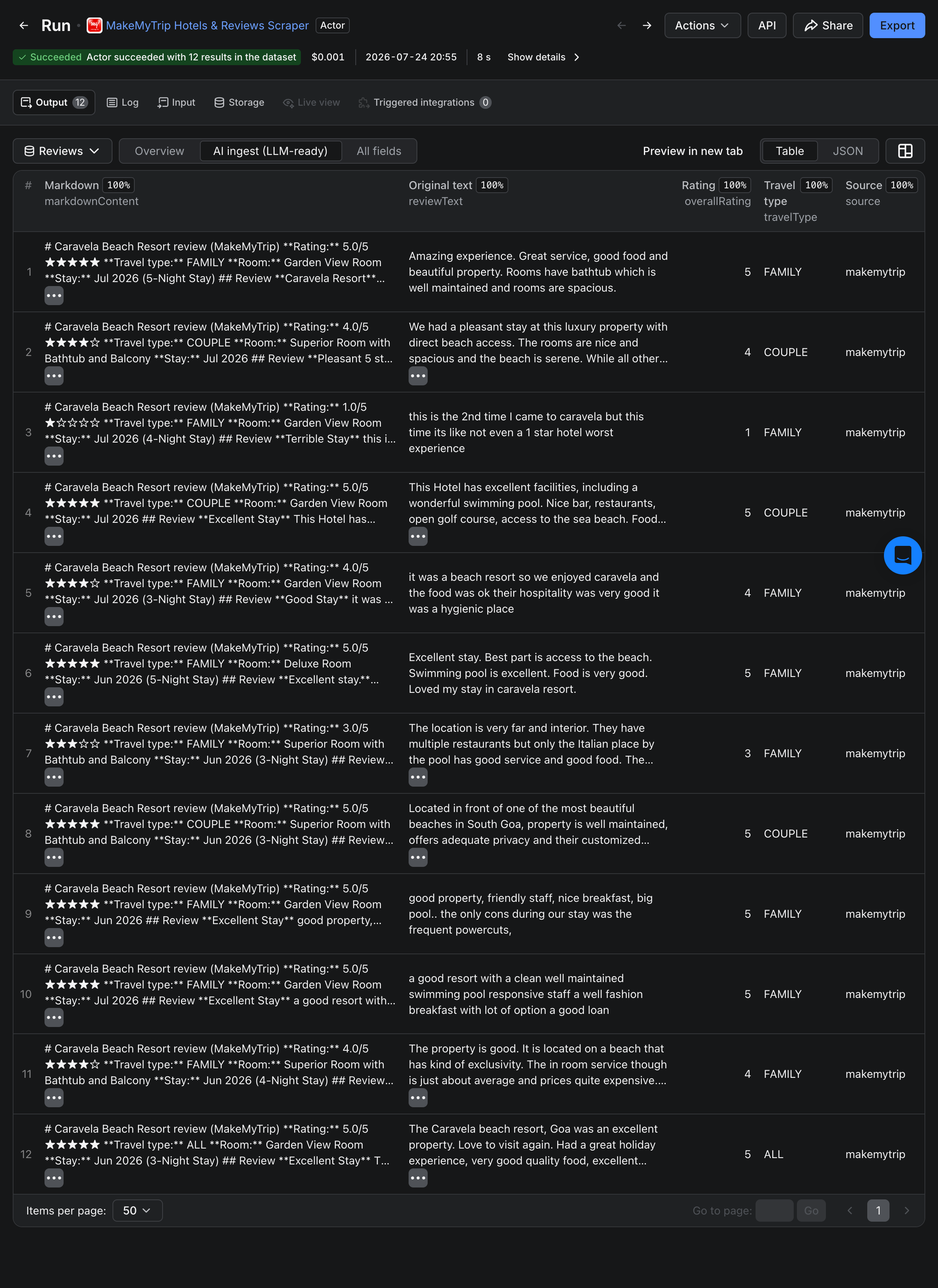
- **LLM-ready `markdownContent` per review.** Each review row carries a self-contained markdown block — rating, travel type, room, stay month, body, and the hotel's response — ready to embed straight into a vector DB.
**Plus:**
- Review **photos with AI scene-tags** (`images` → `[{ url, aiTags }]`) — the source's own image labels, on every photo.
- Owner/management responses with response date.
- Reviewer context: name, anonymity flag, and lifetime review count (Goibibo).
- Accepts **MakeMyTrip .com / .global URLs, Goibibo URLs, or raw hotel IDs** (18-digit = MakeMyTrip, 19-digit = Goibibo).
**No-setup checklist:**
- No login or account required
- Apify Proxy bundled (datacenter) - works for both brands out of the box; if Goibibo returns no data from your region, switch the proxy country in the Advanced section
- No code required (form-based input in the Apify Console)
- Pay-per-event pricing — no subscription, no commitment
---
### What does this scraper do?
You paste hotel URLs — MakeMyTrip or Goibibo, mix freely, up to 500 per run — or raw hotel IDs. The actor returns two structured datasets:
**Reviews dataset** — one row per guest review:
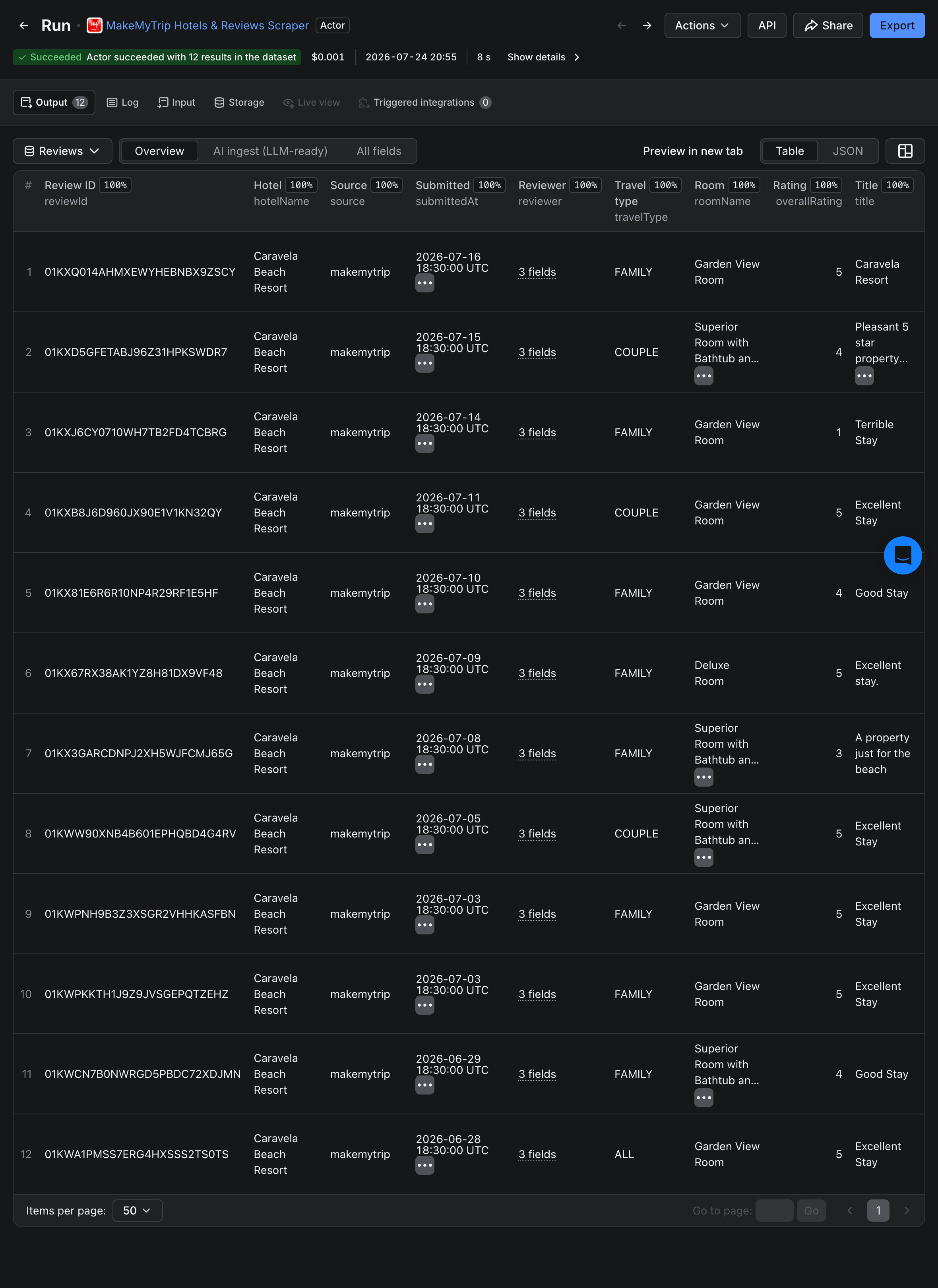
- Core: `overallRating`, `title`, `reviewText`, `travelType`, `roomName`, `checkInMonth`, `submittedAt`, `source`
- Reviewer: `reviewer.name`, `reviewer.isAnonymous`, `reviewer.reviewsWritten` (Goibibo)
- Photos: `images` — array of `{ url, aiTags }` with the source's AI scene-tags; `imagesCount`
- Management response: `ownerResponse.text`, `ownerResponse.date`
- AI-ready: `markdownContent` — self-contained per-review markdown block, direct vector-DB input
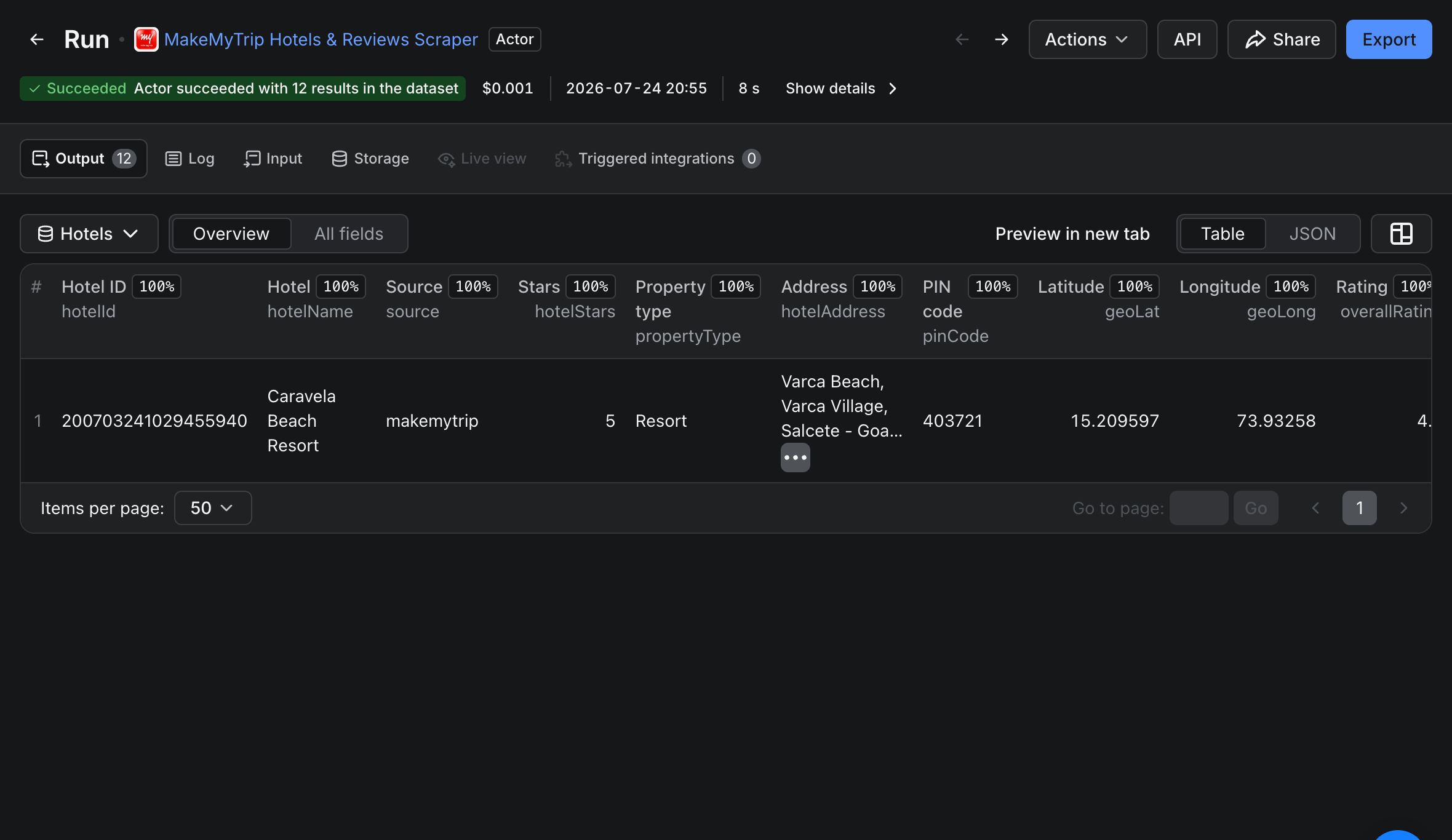
**Hotels dataset (free)** — one summary row per hotel:
- `hotelStars`, `propertyType`, `hotelAddress`, `pinCode`, `geoLat`, `geoLong`
- `overallRating`, `ratingLabel`, `reviewsCount`, and the clubbed `subRatings` array
Both datasets are accessible via the Output-tab dropdown — see [Output](#output).
---
### Why this scraper (vs the official API and other Apify scrapers)
MakeMyTrip Group publishes **no public reviews API** for either `MakeMyTrip` or `Goibibo` — scraping the public review pages is the only way to get this data at scale. This is the only Apify actor that reads **both brands in one run** and includes the **full hotel profile for free**:
| Capability | **This actor** | Other MakeMyTrip Apify scrapers | Official API |
|---|---|---|---|
| MakeMyTrip reviews | ✅ | ✅ (some) | ❌ none |
| **Goibibo reviews** | ✅ same run | ❌ MakeMyTrip-only | ❌ |
| Both brands for the same hotel | ✅ | ❌ | ❌ |
| Full hotel details (stars, geo, sub-ratings) | ✅ **free** | ⚠️ separate paid actor | ❌ |
| Review photos with AI scene-tags | ✅ | ❌ | ❌ |
| Owner / management responses | ✅ | varies | ❌ |
| LLM-ready `markdownContent` per review | ✅ | ❌ | ❌ |
| Raw hotel-ID input (no URL needed) | ✅ | varies | n/a |
| Pricing | $2.50 / 1,000 reviews (from $2.00 on Business); hotels free | reviews *and* hotels billed separately | n/a |
The headline difference is **Goibibo coverage plus free hotel data**: other tools see only the MakeMyTrip guest pool and charge separately for hotel details. This actor reads both brands' review corpora for the same property and bundles the complete hotel profile at no extra cost.
---
### Who this scraper is for
- **Hotel revenue managers** tracking their own and competitor properties' rating trends and sub-rating breakdowns across MakeMyTrip and Goibibo.
- **Reputation / guest-experience teams** monitoring new reviews, owner-response coverage, and sentiment across a portfolio.
- **OTA & market analysts** comparing MakeMyTrip vs Goibibo guest sentiment for the same hotel in one dataset.
- **AI / RAG engineers** ingesting hotel reviews into vector databases — `markdownContent` is chunk-ready.
- **Travel researchers** filtering by `travelType`, `roomName`, rating, and stay date for ICP-scoped datasets.
---
### Common use cases
#### 1. Daily sentiment monitoring across both brands
```json
{
"startUrls": [
"https://www.makemytrip.com/hotels/hotel-details/?hotelId=200703241029455940&city=CTGOI&country=IN",
"https://www.goibibo.com/hotels/hard-rock-goa-hotel-in-goa-6204281054243107966/"
],
"reviewSource": "auto",
"maxReviewsPerHotel": 50,
"sortBy": "mostRecent",
"fromDate": "2026-06-01"
}
````
Pair with the [Schedule](#how-to-run-this-makemytrip-reviews-api-on-a-schedule) section to run nightly with `fromDate` set to yesterday.
#### 2. Both brands' reviews for one hotel
```json
{
"startUrls": ["https://www.makemytrip.com/hotels/hotel-details/?hotelId=200703241029455940&city=CTGOI&country=IN"],
"reviewSource": "both",
"maxReviewsPerHotel": 200
}
```
`reviewSource: "both"` collects the MakeMyTrip **and** Goibibo review feeds for the same property, tagged by `source`.
#### 3. Negative-review mining for competitor analysis
```json
{
"startUrls": ["https://www.goibibo.com/hotels/hard-rock-goa-hotel-in-goa-6204281054243107966/"],
"maxReviewsPerHotel": 500,
"sortBy": "negative",
"minRating": 1,
"maxRating": 2
}
```
#### 4. Hotel details only (no review charge)
```json
{
"hotelIds": ["200703241029455940", "6204281054243107966"],
"maxReviewsPerHotel": 0
}
```
Set `maxReviewsPerHotel: 0` to return just the free Hotels dataset — star class, geo, sub-ratings — for a list of IDs.
***
### How to scrape MakeMyTrip reviews - step by step
1. Click **Try for free** on this actor's Apify Store page.
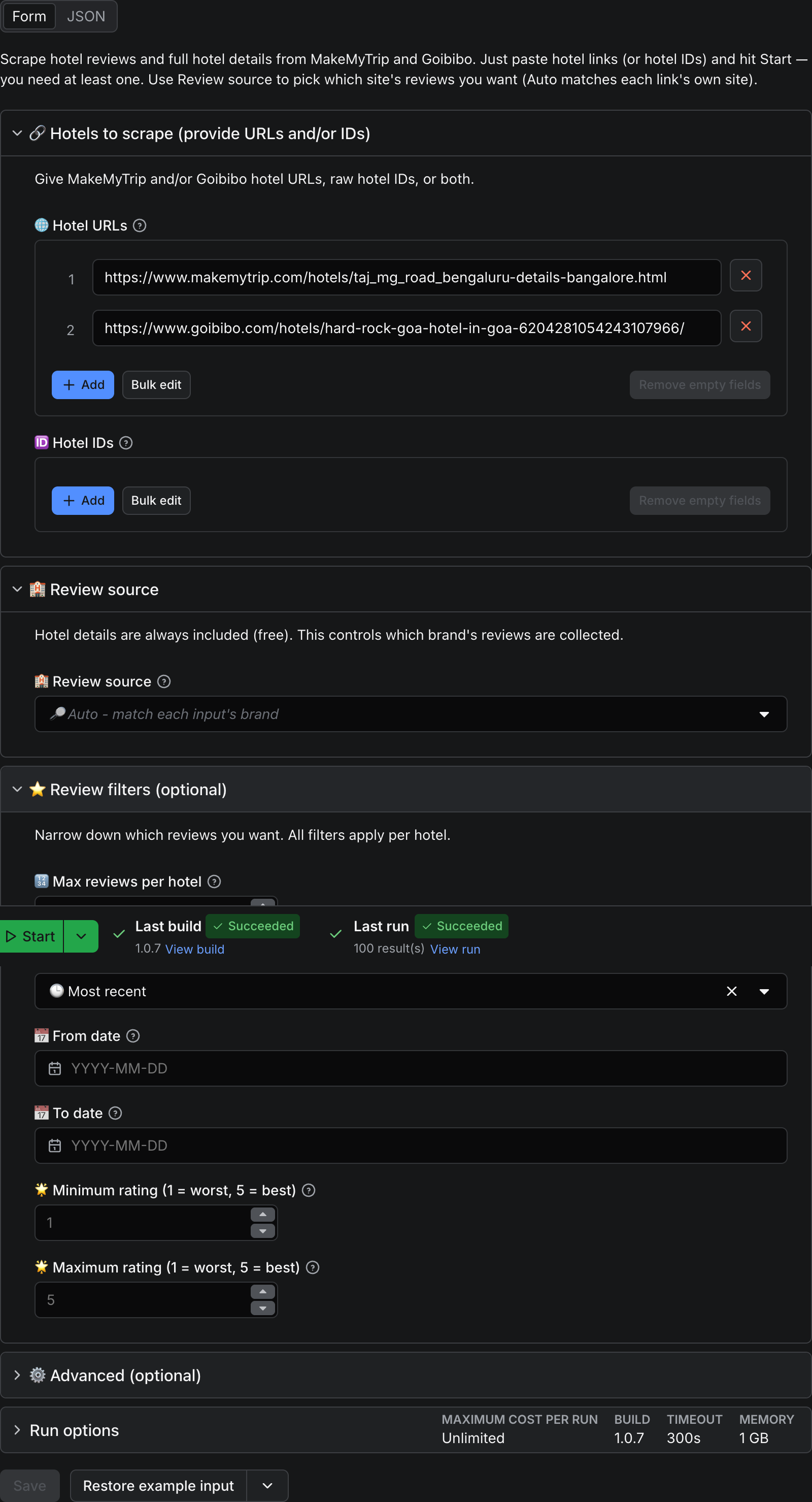
2. Paste one or more MakeMyTrip or Goibibo hotel URLs into **Hotel URLs** (mix freely; up to 500), and/or raw hotel IDs into **Hotel IDs**.
3. Choose **Review source** — *Auto* (match each link's brand), *MakeMyTrip only*, *Goibibo only*, or *Both*.
4. Set `maxReviewsPerHotel`, `fromDate` / `toDate`, `minRating` / `maxRating`, and `sortBy` as needed.
5. Click **Start**. Results stream into the Output tab in real time — switch the dropdown between **Reviews** and **Hotels**. Download as JSON, CSV, or Excel.
***
### Input
| Field | Type | Default | Description |
|---|---|---|---|
| `startUrls` | array of URL | (prefilled) | MakeMyTrip (.com/.global) or Goibibo hotel URLs. Mix freely. Max 500. |
| `hotelIds` | array of string | - | Raw hotel IDs (18-digit = MakeMyTrip, 19-digit = Goibibo) |
| `reviewSource` | enum | `auto` | `auto` / `makemytrip` / `goibibo` / `both` |
| `maxReviewsPerHotel` | integer | 200 | 0–5,000 (0 = hotel details only) |
| `sortBy` | enum | `mostRecent` | `mostRelevant` / `mostRecent` / `helpful` / `positive` / `negative` |
| `fromDate` | date | - | YYYY-MM-DD; reviews on or after |
| `toDate` | date | - | YYYY-MM-DD; reviews on or before |
| `minRating` | integer | 1 | 1–5 |
| `maxRating` | integer | 5 | 1–5 |
| `proxyConfiguration` | proxy | Apify Proxy (datacenter) | Works for both brands out of the box; switch country if Goibibo returns empty |
URL / ID examples (all supported — just copy the link from your browser):
- `https://www.makemytrip.com/hotels/hotel-details/?hotelId=200703241029455940&city=CTGOI&country=IN` (MakeMyTrip hotel page)
- `https://www.makemytrip.com/hotels/taj_mg_road_bengaluru-details-bangalore.html` (MakeMyTrip SEO link)
- `https://www.goibibo.com/hotels/hard-rock-goa-hotel-in-goa-6204281054243107966/` (Goibibo)
- `200703241029455940` (raw MakeMyTrip hotel ID)
***
### Output
Two named alias datasets, accessible via the **Output tab dropdown** in the Apify Console:
- **Reviews** — one row per guest review. Two table views: **Overview** (the columns most users want, including `source`, review `title`, and `imagesCount`) and **AI ingest** (LLM-ready columns including `markdownContent`).
- **Hotels (free)** — one summary row per hotel: star class, property type, address, PIN code, geo-coordinates, aggregate rating, tier label, total reviews, and the clubbed `subRatings` array.
#### Sample review row
```json
{
"reviewId": "01KXQ014AHMXEWYHEBNBX9ZSCY",
"hotelId": "200703241029455940",
"hotelName": "Caravela Beach Resort",
"hotelUrl": "https://www.makemytrip.com/hotels/hotel-details/?hotelId=200703241029455940",
"source": "makemytrip",
"submittedAt": "2026-07-17",
"checkInMonth": "2026-07",
"reviewer": { "name": "Sumit Khare", "isAnonymous": false, "reviewsWritten": null },
"travelType": "COUPLE",
"roomName": "Deluxe Room Sea View",
"overallRating": 5,
"title": "Wonderful beachside stay",
"reviewText": "Amazing experience. Great service, good food and a beautiful property...",
"usefulCount": 0,
"imagesCount": 3,
"images": [
{ "url": "https://.../01KXQ0BJ0RC3Y4AHK99XWCQVMH.jpg", "aiTags": ["palm_tree", "grass", "house", "car"] }
],
"ownerResponse": null,
"markdownContent": "# Caravela Beach Resort review (MakeMyTrip)\n\n**Rating:** 5/5 ★★★★★\n**Travel type:** COUPLE\n**Room:** Deluxe Room Sea View\n\n## Review\nAmazing experience...",
"extractedAt": "2026-07-24T10:40:00+00:00"
}
```
#### Sample hotel summary row
```json
{
"hotelId": "200703241029455940",
"hotelName": "Caravela Beach Resort",
"source": "makemytrip",
"url": "https://www.makemytrip.com/hotels/hotel-details/?hotelId=200703241029455940",
"hotelStars": 5,
"propertyType": "Resort",
"hotelAddress": "Varca Beach, Varca Village, Salcete - Goa, Goa",
"pinCode": "403721",
"geoLat": 15.209597,
"geoLong": 73.93258,
"overallRating": 4.4,
"ratingLabel": "Excellent",
"reviewsCount": 3357,
"subRatings": ["Location: 4.5", "Cleanliness: 4.5", "Facilities: 4.3", "Food: 4.2", "Room: 4.2", "Value For Money: 4.1", "Child Friendliness: 4.3"],
"extractedAt": "2026-07-24T10:40:30+00:00"
}
```
**Timestamps:** `submittedAt`, `checkInMonth`, and `ownerResponse.date` come from the source in local date precision (no time zone) — preserved as naive dates rather than mislabeled as UTC. `extractedAt` is our scrape time in UTC.
***
### Pricing
Pay-per-event. No subscription, no minimum spend. **Hotel details are free** — you are charged per review only.
| Event | Rate |
|---|---|
| `apify-default-dataset-item` | $0.0025 per review row |
There is **no per-run start fee**, and the Hotels dataset is not billed. Note: with **Review source = Both**, each brand is scraped up to `maxReviewsPerHotel`, so a hotel can return (and bill for) up to twice that many reviews.
**Effective rate: $2.50 per 1,000 reviews.** Tiered subscription discounts reduce this automatically — down to **$2.00 per 1,000 on the Business plan**.
**Cost examples:**
| Scope | Reviews | Cost |
|---|---|---|
| Quick validation (1 hotel, 50 reviews) | 50 | $0.13 |
| Single hotel full history | 200 | $0.50 |
| Competitor set (10 hotels × 100 reviews) | 1,000 | $2.50 |
| Both brands (10 hotels × 200 × 2) | 4,000 | $10.00 |
Apify's **$5 new-account credit** covers ~2,000 reviews on day one — enough to validate end-to-end before any spend. Incremental daily runs typically cost a few cents each.
***
### How to run this MakeMyTrip reviews API on a schedule
For continuous monitoring, daily delta refreshes, or reputation dashboards:
1. Open the [Apify Schedules tab](https://docs.apify.com/platform/schedules) in your Console.
2. Add a new schedule and select this actor.
3. Set the cron expression (e.g., `0 6 * * *` for daily at 06:00 UTC).
4. In the schedule's input override, set `fromDate` to a sliding window — e.g. yesterday via `{{NOW - 1.day | date('YYYY-MM-DD')}}`.
5. (Optional) Wire an [Apify webhook](https://docs.apify.com/platform/integrations/webhooks) on `ACTOR.RUN.SUCCEEDED` to push the dataset into BigQuery, S3, or your CRM.
Combined with `sortBy: "mostRecent"`, incremental runs stop once they cross the `fromDate` floor — fast and cheap.
***
### AI agents & RAG - using the data with LLMs
The `markdownContent` field on every review is a self-contained markdown block — title, rating, travel type, room, stay month, body, and hotel response inlined. Designed for direct vector-DB ingestion and LLM context windows. Capped at 100 KB per row.
Use the standard [Apify API or client libraries](https://docs.apify.com/api) to run the actor and iterate the Reviews dataset — `markdownContent` is your ready-to-embed chunk.
***
### Data sources & GDPR
This actor extracts publicly visible review data from `MakeMyTrip` and `Goibibo`. The `reviewer.name` field may contain first names where the reviewer chose to display them publicly; anonymous reviewers are surfaced as `reviewer.name: null` + `reviewer.isAnonymous: true`. You are responsible for ensuring your downstream use complies with GDPR, India's DPDP Act, and any other applicable data-protection regulations in your jurisdiction.
***
### FAQ
#### How much does it cost to scrape 10,000 MakeMyTrip reviews?
10,000 × $0.0025 = **$25.00** (no start fee, hotel details free). New Apify accounts get a $5 credit that covers ~2,000 reviews at base tier. Tiered discounts lower the per-row price automatically as your Apify plan scales, down to $2.00 per 1,000 on Business.
#### Can I scrape MakeMyTrip and Goibibo in one run?
Yes — that is the actor's headline feature. Mix MakeMyTrip and Goibibo URLs in `startUrls`, or set `reviewSource: "both"` to collect **both brands' reviews for the same hotel** (the two platforms share one hotel identity). Each row is tagged with its `source`.
#### Does MakeMyTrip have a public API?
No. MakeMyTrip Group offers no public reviews or hotel-data API for MakeMyTrip or Goibibo. This actor is an unofficial API alternative: it reads the public review and hotel-detail feeds and returns them as structured JSON/CSV, with no login or API key required.
#### Can I use this actor through an MCP Server?
Yes. The actor is exposed through Apify's MCP server, so AI agents (Claude, LangChain, and other MCP clients) can discover and run it autonomously. Pass `startUrls` or `hotelIds`; the lean input schema and typed output are designed for blind agent execution.
#### Can I export hotel reviews to CSV or Excel?
Yes. The Output tab offers JSON, JSONL, CSV, Excel, and HTML downloads on both the Reviews and Hotels datasets. The Overview view is column-ordered for clean import into Google Sheets or Excel. For large exports use the [Apify API](https://docs.apify.com/api/v2).
#### Can I scrape incrementally instead of refetching everything?
Yes. Set `sortBy: "mostRecent"` and `fromDate` to your last scrape date. The actor stops paginating once it crosses the date floor — much faster and cheaper than a full re-scrape. Each incremental run typically costs a few cents per hotel.
#### Do I need a MakeMyTrip account, API key, or proxy?
No. Only an Apify account (free) is required — no MakeMyTrip or Goibibo login, no API key, no proxy setup. Apify's built-in datacenter proxy is bundled and works for both brands out of the box; if Goibibo returns no data from your region, switch the proxy country in the Advanced section.
#### Is scraping MakeMyTrip legal?
This actor extracts publicly visible data — no login is required and no rate-limit bypass is performed. Whether your downstream use is permissible depends on your jurisdiction's regulations (GDPR, India's DPDP Act, CCPA, etc.) and on the platforms' Terms of Service for the data category you collect. Reviewing both is your responsibility before deploying at scale. See [Apify's guide on whether web scraping is legal](https://blog.apify.com/is-web-scraping-legal/).
***
### Related Actors
Pair MakeMyTrip & Goibibo Reviews Scraper with our other FactDen actors on the Apify Store:
- [Trip.com & Ctrip Reviews Scraper](https://apify.com/factden/ctrip-trip-reviews-scraper) — bilingual hotel reviews across Trip.com and Ctrip (携程)
- [Expedia Reviews Scraper](https://apify.com/factden/expedia-hotel-reviews-scraper) — hotel reviews and sentiment across Expedia Group brands
- [Hotels.com Reviews Scraper](https://apify.com/factden/hotels-com-reviews-scraper) — hotel ratings, review text, and sentiment from Hotels.com
- [Google Hotels Scraper](https://apify.com/factden/google-hotels-scraper) — live hotel prices, OTA rate ladder, and guest reviews from Google Hotels
- [G2 Reviews Scraper](https://apify.com/factden/g2-reviews-scraper) — B2B SaaS competitive intelligence and review data
- [Indeed Jobs Scraper](https://apify.com/factden/indeed-jobs-scraper) — job listings, salaries, and company profiles across 60+ countries
***
### Changelog
#### v1.0 - Public launch (2026-07-XX)
Initial public release. Dual-brand MakeMyTrip + Goibibo review extraction in one run, free Hotels dataset (star class, property type, geo, PIN, sub-ratings), review photos with AI scene-tags, LLM-ready `markdownContent`, pay-per-event pricing with tiered discounts, and raw hotel-ID input.
***
### Support & maintenance
> ⭐ **Found this useful?** Leaving a quick review on this page helps other travel-data teams discover the actor — and tells us what to build next. Thank you!
**Actively maintained.** Bug reports and feature requests are typically triaged within 1–2 business days.
- **Apify Issues tab** — primary support channel; include the run ID, one example URL, and what you expected vs what you saw.
- **Email** — for private / billing / partnership questions.
***
*Built by [factden](https://apify.com/factden) on the Apify platform. **Try the MakeMyTrip & Goibibo Reviews Scraper free** with Apify's $5 monthly credit — covers ~2,000 reviews on first run.*
# Actor input Schema
## `startUrls` (type: `array`):
Paste hotel page links from MakeMyTrip and/or Goibibo — copy them straight from your browser. Any MakeMyTrip link works (the hotel page, an SEO/search link, or a .global link) and any Goibibo hotel link. Mix both sites freely, up to 500 per run. No IDs needed — but if you already have hotel IDs, you can paste them in the field below instead.
## `hotelIds` (type: `array`):
Raw hotel IDs instead of full URLs. 18-digit IDs are treated as MakeMyTrip, 19-digit IDs as Goibibo. Handy when you already have IDs from a previous run.
## `reviewSource` (type: `string`):
Which brand's reviews to collect for each hotel. Auto = match each input's own brand (a MakeMyTrip link returns MakeMyTrip reviews, a Goibibo link returns Goibibo reviews). Both = collect MakeMyTrip and Goibibo reviews for every hotel (uses the shared hotel identity; bills more rows).
## `maxReviewsPerHotel` (type: `integer`):
Maximum reviews to collect per hotel, per selected brand. Note: with Review source = Both, each brand is scraped up to this limit, so a hotel can return (and bill) up to 2x this many reviews. Set to 0 to skip reviews and return hotel details only.
## `sortBy` (type: `string`):
Order reviews are collected in, applied before the per-hotel cap.
## `fromDate` (type: `string`):
Only include reviews submitted on/after this date (YYYY-MM-DD).
## `toDate` (type: `string`):
Only include reviews submitted on/before this date (YYYY-MM-DD).
## `minRating` (type: `integer`):
Minimum overall rating to include.
## `maxRating` (type: `integer`):
Maximum overall rating to include.
## `proxyConfiguration` (type: `object`):
Apify Proxy (datacenter) by default - works for both MakeMyTrip and Goibibo. If Goibibo returns no data from your region, switch the proxy country.
## Actor input object example
```json
{
"startUrls": [
"https://www.makemytrip.com/hotels/hotel-details/?hotelId=200703241029455940&city=CTGOI&country=IN",
"https://www.makemytrip.com/hotels/taj_mg_road_bengaluru-details-bangalore.html",
"https://www.goibibo.com/hotels/hard-rock-goa-hotel-in-goa-6204281054243107966/"
],
"reviewSource": "auto",
"maxReviewsPerHotel": 200,
"sortBy": "mostRecent",
"minRating": 1,
"maxRating": 5,
"proxyConfiguration": {
"useApifyProxy": true
}
}
```
# Actor output Schema
## `reviews` (type: `string`):
Per-review rows from MakeMyTrip and/or Goibibo. Review text, title, rating, travel type, room, stay month, a clubbed reviewer object, an ownerResponse object, review photos with AI scene-tags, and an LLM-ready markdown view.
## `hotels` (type: `string`):
Per-hotel summary rows (included free). One row per hotel, with star rating, property type, address, PIN code, geo-coordinates, aggregate rating, tier label, total reviews, and a clubbed sub-ratings array.
# API
You can run this Actor programmatically using our API. Below are code examples in JavaScript, Python, and CLI, as well as the OpenAPI specification and MCP server setup.
## JavaScript example
```javascript
import { ApifyClient } from 'apify-client';
// Initialize the ApifyClient with your Apify API token
// Replace the '' with your token
const client = new ApifyClient({
token: '',
});
// Prepare Actor input
const input = {
"startUrls": [
"https://www.makemytrip.com/hotels/hotel-details/?hotelId=200703241029455940&city=CTGOI&country=IN",
"https://www.makemytrip.com/hotels/taj_mg_road_bengaluru-details-bangalore.html",
"https://www.goibibo.com/hotels/hard-rock-goa-hotel-in-goa-6204281054243107966/"
]
};
// Run the Actor and wait for it to finish
const run = await client.actor("factden/makemytrip-scraper").call(input);
// Fetch and print Actor results from the run's dataset (if any)
console.log('Results from dataset');
console.log(`💾 Check your data here: https://console.apify.com/storage/datasets/${run.defaultDatasetId}`);
const { items } = await client.dataset(run.defaultDatasetId).listItems();
items.forEach((item) => {
console.dir(item);
});
// 📚 Want to learn more 📖? Go to → https://docs.apify.com/api/client/js/docs
```
## Python example
```python
from apify_client import ApifyClient
# Initialize the ApifyClient with your Apify API token
# Replace '' with your token.
client = ApifyClient("")
# Prepare the Actor input
run_input = { "startUrls": [
"https://www.makemytrip.com/hotels/hotel-details/?hotelId=200703241029455940&city=CTGOI&country=IN",
"https://www.makemytrip.com/hotels/taj_mg_road_bengaluru-details-bangalore.html",
"https://www.goibibo.com/hotels/hard-rock-goa-hotel-in-goa-6204281054243107966/",
] }
# Run the Actor and wait for it to finish
run = client.actor("factden/makemytrip-scraper").call(run_input=run_input)
# Fetch and print Actor results from the run's dataset (if there are any)
print("💾 Check your data here: https://console.apify.com/storage/datasets/" + run["defaultDatasetId"])
for item in client.dataset(run["defaultDatasetId"]).iterate_items():
print(item)
# 📚 Want to learn more 📖? Go to → https://docs.apify.com/api/client/python/docs/quick-start
```
## CLI example
```bash
echo '{
"startUrls": [
"https://www.makemytrip.com/hotels/hotel-details/?hotelId=200703241029455940&city=CTGOI&country=IN",
"https://www.makemytrip.com/hotels/taj_mg_road_bengaluru-details-bangalore.html",
"https://www.goibibo.com/hotels/hard-rock-goa-hotel-in-goa-6204281054243107966/"
]
}' |
apify call factden/makemytrip-scraper --silent --output-dataset
```
## MCP server setup
```json
{
"mcpServers": {
"apify": {
"command": "npx",
"args": [
"mcp-remote",
"https://mcp.apify.com/?tools=factden/makemytrip-scraper",
"--header",
"Authorization: Bearer "
]
}
}
}
```
## OpenAPI specification
```json
{
"openapi": "3.0.1",
"info": {
"title": "MakeMyTrip & Goibibo Reviews Scraper 🏨 Ratings, Text & Data",
"description": "Scrape MakeMyTrip and Goibibo hotel reviews plus full hotel details - ratings, sub-ratings, review text, travel type, owner responses, photos, and LLM-ready markdown. Hotel profiles included free. Structured JSON/CSV for analytics, AI and market research. No API, no login.",
"version": "1.0",
"x-build-id": "tSaf3wKecYHBdhKli"
},
"servers": [
{
"url": "https://api.apify.com/v2"
}
],
"paths": {
"/acts/factden~makemytrip-scraper/run-sync-get-dataset-items": {
"post": {
"operationId": "run-sync-get-dataset-items-factden-makemytrip-scraper",
"x-openai-isConsequential": false,
"summary": "Executes an Actor, waits for its completion, and returns Actor's dataset items in response.",
"tags": [
"Run Actor"
],
"requestBody": {
"required": true,
"content": {
"application/json": {
"schema": {
"$ref": "#/components/schemas/inputSchema"
}
}
}
},
"parameters": [
{
"name": "token",
"in": "query",
"required": true,
"schema": {
"type": "string"
},
"description": "Enter your Apify token here"
}
],
"responses": {
"200": {
"description": "OK"
}
}
}
},
"/acts/factden~makemytrip-scraper/runs": {
"post": {
"operationId": "runs-sync-factden-makemytrip-scraper",
"x-openai-isConsequential": false,
"summary": "Executes an Actor and returns information about the initiated run in response.",
"tags": [
"Run Actor"
],
"requestBody": {
"required": true,
"content": {
"application/json": {
"schema": {
"$ref": "#/components/schemas/inputSchema"
}
}
}
},
"parameters": [
{
"name": "token",
"in": "query",
"required": true,
"schema": {
"type": "string"
},
"description": "Enter your Apify token here"
}
],
"responses": {
"200": {
"description": "OK",
"content": {
"application/json": {
"schema": {
"$ref": "#/components/schemas/runsResponseSchema"
}
}
}
}
}
}
},
"/acts/factden~makemytrip-scraper/run-sync": {
"post": {
"operationId": "run-sync-factden-makemytrip-scraper",
"x-openai-isConsequential": false,
"summary": "Executes an Actor, waits for completion, and returns the OUTPUT from Key-value store in response.",
"tags": [
"Run Actor"
],
"requestBody": {
"required": true,
"content": {
"application/json": {
"schema": {
"$ref": "#/components/schemas/inputSchema"
}
}
}
},
"parameters": [
{
"name": "token",
"in": "query",
"required": true,
"schema": {
"type": "string"
},
"description": "Enter your Apify token here"
}
],
"responses": {
"200": {
"description": "OK"
}
}
}
}
},
"components": {
"schemas": {
"inputSchema": {
"type": "object",
"properties": {
"startUrls": {
"title": "🌐 Hotel URLs",
"maxItems": 500,
"type": "array",
"description": "Paste hotel page links from MakeMyTrip and/or Goibibo — copy them straight from your browser. Any MakeMyTrip link works (the hotel page, an SEO/search link, or a .global link) and any Goibibo hotel link. Mix both sites freely, up to 500 per run. No IDs needed — but if you already have hotel IDs, you can paste them in the field below instead.",
"items": {
"type": "string"
}
},
"hotelIds": {
"title": "🆔 Hotel IDs",
"maxItems": 500,
"type": "array",
"description": "Raw hotel IDs instead of full URLs. 18-digit IDs are treated as MakeMyTrip, 19-digit IDs as Goibibo. Handy when you already have IDs from a previous run.",
"items": {
"type": "string"
}
},
"reviewSource": {
"title": "🏨 Review source",
"enum": [
"auto",
"makemytrip",
"goibibo",
"both"
],
"type": "string",
"description": "Which brand's reviews to collect for each hotel. Auto = match each input's own brand (a MakeMyTrip link returns MakeMyTrip reviews, a Goibibo link returns Goibibo reviews). Both = collect MakeMyTrip and Goibibo reviews for every hotel (uses the shared hotel identity; bills more rows).",
"default": "auto"
},
"maxReviewsPerHotel": {
"title": "🔢 Max reviews per hotel",
"minimum": 0,
"maximum": 5000,
"type": "integer",
"description": "Maximum reviews to collect per hotel, per selected brand. Note: with Review source = Both, each brand is scraped up to this limit, so a hotel can return (and bill) up to 2x this many reviews. Set to 0 to skip reviews and return hotel details only.",
"default": 200
},
"sortBy": {
"title": "🔀 Sort order",
"enum": [
"mostRelevant",
"mostRecent",
"helpful",
"positive",
"negative"
],
"type": "string",
"description": "Order reviews are collected in, applied before the per-hotel cap.",
"default": "mostRecent"
},
"fromDate": {
"title": "📅 From date",
"type": "string",
"description": "Only include reviews submitted on/after this date (YYYY-MM-DD)."
},
"toDate": {
"title": "📅 To date",
"type": "string",
"description": "Only include reviews submitted on/before this date (YYYY-MM-DD)."
},
"minRating": {
"title": "🌟 Minimum rating (1 = worst, 5 = best)",
"minimum": 1,
"maximum": 5,
"type": "integer",
"description": "Minimum overall rating to include.",
"default": 1
},
"maxRating": {
"title": "🌟 Maximum rating (1 = worst, 5 = best)",
"minimum": 1,
"maximum": 5,
"type": "integer",
"description": "Maximum overall rating to include.",
"default": 5
},
"proxyConfiguration": {
"title": "🛡️ Proxy configuration",
"type": "object",
"description": "Apify Proxy (datacenter) by default - works for both MakeMyTrip and Goibibo. If Goibibo returns no data from your region, switch the proxy country.",
"default": {
"useApifyProxy": true
}
}
}
},
"runsResponseSchema": {
"type": "object",
"properties": {
"data": {
"type": "object",
"properties": {
"id": {
"type": "string"
},
"actId": {
"type": "string"
},
"userId": {
"type": "string"
},
"startedAt": {
"type": "string",
"format": "date-time",
"example": "2025-01-08T00:00:00.000Z"
},
"finishedAt": {
"type": "string",
"format": "date-time",
"example": "2025-01-08T00:00:00.000Z"
},
"status": {
"type": "string",
"example": "READY"
},
"meta": {
"type": "object",
"properties": {
"origin": {
"type": "string",
"example": "API"
},
"userAgent": {
"type": "string"
}
}
},
"stats": {
"type": "object",
"properties": {
"inputBodyLen": {
"type": "integer",
"example": 2000
},
"rebootCount": {
"type": "integer",
"example": 0
},
"restartCount": {
"type": "integer",
"example": 0
},
"resurrectCount": {
"type": "integer",
"example": 0
},
"computeUnits": {
"type": "integer",
"example": 0
}
}
},
"options": {
"type": "object",
"properties": {
"build": {
"type": "string",
"example": "latest"
},
"timeoutSecs": {
"type": "integer",
"example": 300
},
"memoryMbytes": {
"type": "integer",
"example": 1024
},
"diskMbytes": {
"type": "integer",
"example": 2048
}
}
},
"buildId": {
"type": "string"
},
"defaultKeyValueStoreId": {
"type": "string"
},
"defaultDatasetId": {
"type": "string"
},
"defaultRequestQueueId": {
"type": "string"
},
"buildNumber": {
"type": "string",
"example": "1.0.0"
},
"containerUrl": {
"type": "string"
},
"usage": {
"type": "object",
"properties": {
"ACTOR_COMPUTE_UNITS": {
"type": "integer",
"example": 0
},
"DATASET_READS": {
"type": "integer",
"example": 0
},
"DATASET_WRITES": {
"type": "integer",
"example": 0
},
"KEY_VALUE_STORE_READS": {
"type": "integer",
"example": 0
},
"KEY_VALUE_STORE_WRITES": {
"type": "integer",
"example": 1
},
"KEY_VALUE_STORE_LISTS": {
"type": "integer",
"example": 0
},
"REQUEST_QUEUE_READS": {
"type": "integer",
"example": 0
},
"REQUEST_QUEUE_WRITES": {
"type": "integer",
"example": 0
},
"DATA_TRANSFER_INTERNAL_GBYTES": {
"type": "integer",
"example": 0
},
"DATA_TRANSFER_EXTERNAL_GBYTES": {
"type": "integer",
"example": 0
},
"PROXY_RESIDENTIAL_TRANSFER_GBYTES": {
"type": "integer",
"example": 0
},
"PROXY_SERPS": {
"type": "integer",
"example": 0
}
}
},
"usageTotalUsd": {
"type": "number",
"example": 0.00005
},
"usageUsd": {
"type": "object",
"properties": {
"ACTOR_COMPUTE_UNITS": {
"type": "integer",
"example": 0
},
"DATASET_READS": {
"type": "integer",
"example": 0
},
"DATASET_WRITES": {
"type": "integer",
"example": 0
},
"KEY_VALUE_STORE_READS": {
"type": "integer",
"example": 0
},
"KEY_VALUE_STORE_WRITES": {
"type": "number",
"example": 0.00005
},
"KEY_VALUE_STORE_LISTS": {
"type": "integer",
"example": 0
},
"REQUEST_QUEUE_READS": {
"type": "integer",
"example": 0
},
"REQUEST_QUEUE_WRITES": {
"type": "integer",
"example": 0
},
"DATA_TRANSFER_INTERNAL_GBYTES": {
"type": "integer",
"example": 0
},
"DATA_TRANSFER_EXTERNAL_GBYTES": {
"type": "integer",
"example": 0
},
"PROXY_RESIDENTIAL_TRANSFER_GBYTES": {
"type": "integer",
"example": 0
},
"PROXY_SERPS": {
"type": "integer",
"example": 0
}
}
}
}
}
}
}
}
}
}
```