# MCA India Company & Director Data Scraper: Email & Phone Leads (`factden/mca-company-director-scraper`) Actor
Scrape India MCA company and director data(including phone and email) by CIN, DIN, company name, or industry + state. Company master, board of directors, directorships, capital, filings, status, and the company public email. Structured JSON/CSV. B2B company data and lead lists.
- **URL**: https://apify.com/factden/mca-company-director-scraper.md
- **Developed by:** [Factden](https://apify.com/factden) (community)
- **Categories:** Lead generation, Developer tools
- **Stats:** 1 total users, 0 monthly users, 100.0% runs succeeded, 0 bookmarks
- **User rating**: No ratings yet
## Pricing
from $2.50 / 1,000 company records
This Actor is paid per event. You are not charged for the Apify platform usage, but only a fixed price for specific events.
Since this Actor supports Apify Store discounts, the price gets lower the higher subscription plan you have.
Learn more: https://docs.apify.com/platform/actors/running/actors-in-store#pay-per-event
## What's an Apify Actor?
Actors are web data automations that power AI and operations. They run on the Apify platform to scrape websites, process data, connect APIs, and automate workflows.
In Batch mode, an Actor accepts a well-defined JSON input, performs an action which can take anything from a few seconds to a few hours,
and optionally produces a well-defined JSON output, datasets with results, or files in key-value store.
In Standby mode, an Actor provides a web server which can be used as a website, API, or an MCP server.
Actors are written with capital "A".
## How to integrate an Actor?
If asked about integration, you help developers integrate Actors into their projects.
You adapt to their stack and deliver integrations that are safe, well-documented, and production-ready.
The best way to integrate Actors is as follows.
- **AI agents and MCP clients** — the [Apify MCP server](https://docs.apify.com/integrations/mcp.md) at `https://mcp.apify.com` (remote, streamable HTTP, OAuth on first use).
- **Agentic workflows and local Actor development** — [Agent Skills](https://apify.com/.well-known/agent-skills/index.json) with the [Apify CLI](https://docs.apify.com/cli/docs.md): `npm install -g apify-cli`, then `apify login`.
- **JavaScript/TypeScript projects** — the official [JS/TS client](https://docs.apify.com/api/client/js/docs.md): `npm install apify-client`.
- **Python projects** — the official [Python client](https://docs.apify.com/api/client/python/docs.md): `pip install apify-client`.
- **Any other language** — the [REST API](https://docs.apify.com/api/v2.md).
For usage examples, see the [API](#api) section below.
For more details, see Apify documentation as [Markdown index](https://docs.apify.com/llms.txt) and [Markdown full-text](https://docs.apify.com/llms-full.txt).
# README
## MCA India Company & Director Data Scraper
**Pull India MCA (Ministry of Corporate Affairs) company and director data** by CIN, DIN, company name, or
industry, and get **each director's personal email and phone** as an optional paid enrichment. You also get
company master records, the full board of directors, directorships, capital, filings, incorporation date,
status, and the company's on-record public email. Clean JSON/CSV, **no login, no API key**. Ideal for **B2B
lead lists, director contact enrichment, KYB, and due diligence**.
**▶ Watch the walkthrough:** https://www.youtube.com/watch?v=PhZmoVHMjTE
### What does this actor do?
The MCA registry (mca.gov.in) is the system of record for every company and LLP incorporated in India, but it
has **no open bulk data API** and its portal is one record at a time. This actor turns it into structured,
downloadable data at scale. There are two modes, each billed as its own event:
- **Companies:** search by exact **CIN**, **company name**, or an **industry** sector (combine name and
industry to intersect the two). You get the company master record, and you can toggle **Include board** to
also pull each company's directors.
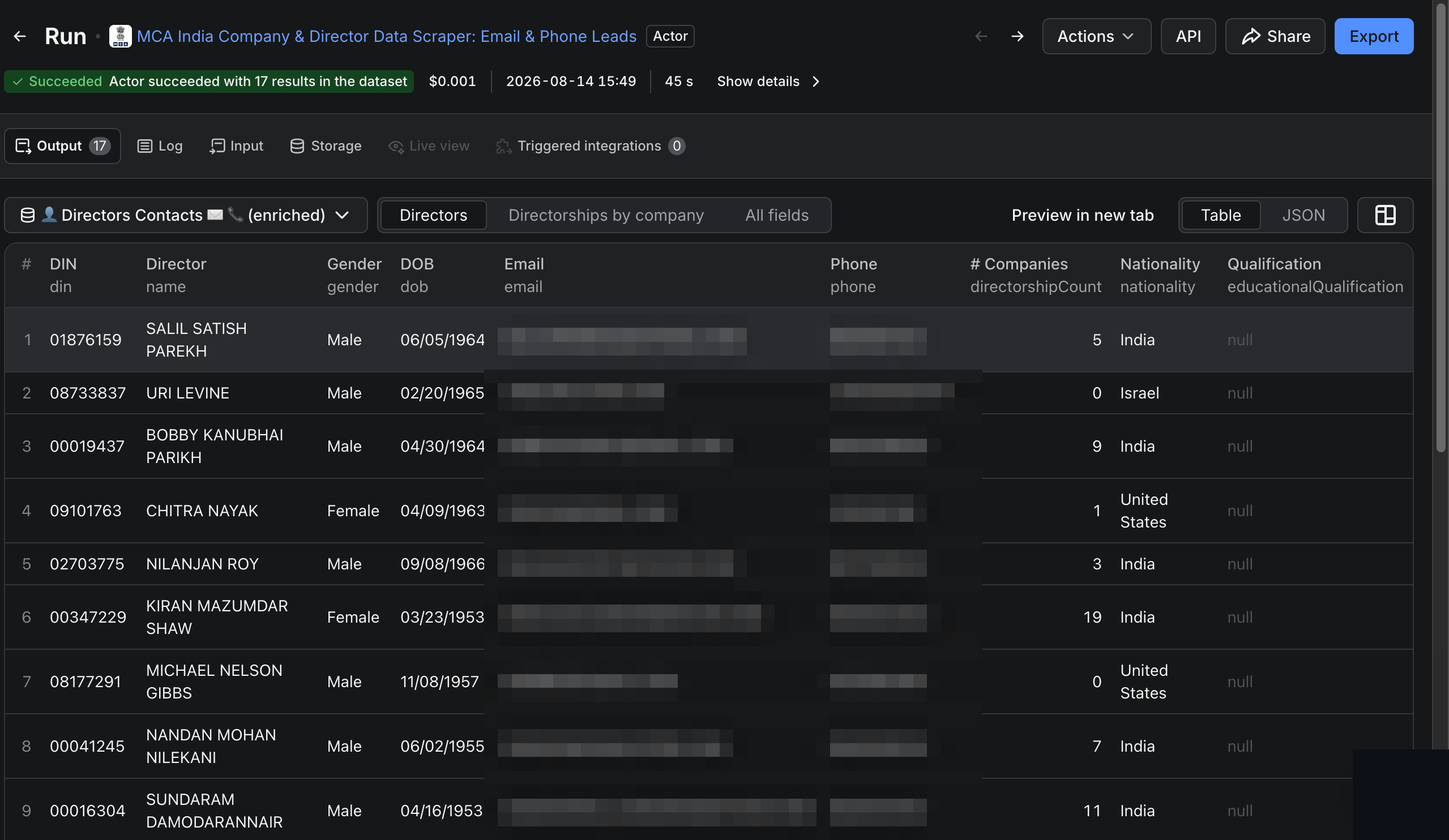
- **Directors:** search by exact **DIN** or **director name** (you can narrow a common name to the person on
a specific company). You get the director's full lead: their profile, their complete directorship network,
and their personal email and phone when on file.
Run it on the Apify platform for scheduling, API access, integrations, proxy rotation, and monitoring.
### Who is it for?
- **Sales and lead-gen teams** building targeted B2B lists by industry and state.
- **KYB, compliance, and due-diligence teams** verifying a company's status, directors, capital, and filings.
- **Investors and researchers** mapping directorship networks and corporate structures.
- **Data teams** enriching a CRM with authoritative registry firmographics.
### How to scrape MCA company data (to CSV)
1. Pick a mode (**Companies** or **Directors**).
2. Companies: enter CINs, company names, or choose one or more **industries** (you can also narrow by state,
status, type, and listed). Directors: enter DINs or director names.
3. Set the active-only filter (on by default) and a max-records cap.
4. Run, then **download the dataset as JSON, CSV, Excel, or HTML**, or pull it via the Apify API.
### Input
| Field | Mode | What it does |
|---|---|---|
| CINs | Companies | Exact company IDs, the fastest path |
| Company names | Companies | Prefix match on the registered legal name |
| Industries | Companies | Sector dropdown (mapped to NIC codes); returns the whole sector, or intersects with a name |
| States / status / type / listed | Companies | Narrow a name or industry search by geography or class |
| Include board / Director contacts | Companies | Also fetch each company's directors, or their full enriched leads |
| DINs | Directors | Exact director IDs |
| Director names (+ at company) | Directors | Name search, optionally narrowed to a company |
| Max companies / Max directors | both | Cap the run size |
### Output
Each run writes to a **default** dataset plus typed **Companies**, **Directors**, and **Director Leads** views.
Company record (simplified):
```json
{
"rowType": "company",
"cin": "U63999MH2024PTC431654",
"name": "CRESTFORT TECHNOLOGIES PRIVATE LIMITED",
"status": "Active",
"companyType": "Company",
"companyEmail": "contact@example.com",
"dateOfIncorporation": "08/31/2024",
"industryDescription": "INFORMATION SERVICE ACTIVITIES",
"state": "MH",
"authorisedCapital": "1000000",
"paidUpCapital": "536260",
"boardSize": 2
}
```
Director record (simplified):
```json
{
"rowType": "director",
"din": "09397486",
"name": "KARAN NEERAJKUMAR MEHRA",
"status": "Approved",
"disqualified": false,
"directorshipCount": 4,
"directorships": [
{ "cin": "U72900KA2021PTC...", "company": "...", "designation": "Director", "effectiveDate": "..." }
]
}
```
You can download the dataset as JSON, CSV, Excel, or HTML, or fetch it from the Apify API.
### Data fields
**Companies:** CIN, name, status, type, category, public email, incorporation date, industry (NIC), state,
authorised and paid-up capital, last AGM, ROC, registered addresses, 3-year balance-sheet and annual-return
filing dates, and the board. **Directors:** DIN, name, status, disqualified flag, DOB, gender, nationality,
the full directorship network (each company's CIN, name, designation, and dates), and, as an optional paid
enrichment, the director's on-file personal email and phone.
### Director contacts and compliance
The **Director contacts** option (the whole point of Directors mode, and an opt-in add-on in Companies mode)
fetches each director's personal email and phone alongside their profile and directorship network. These are
the email and phone the director registered with MCA (from their DIN / DIR-3 KYC record), so a director who
has never filed a mobile or email simply returns none for that field.
> **You are charged once per unique director (DIN), and only when a real email or phone is actually found.**
> No contact found means no charge, even though the director's full profile and directorship network still
> ship. You never pay per row: a director who sits on 20 companies is still a single charge.
This is personal data protected under India's **Digital Personal Data Protection Act, 2023 (DPDP Act)**. By
enabling it you confirm that you have a lawful basis or consent to obtain and process that data, and that you
are responsible for using it in a compliant way. If you only need the public-record firmographics, leave the
contacts option off and use the free board and directorship data.
### Pricing
Pay per result: you are billed only for the records actually returned. Exact CINs and DINs return one record
each, while name and industry searches return as many as match, up to your max-records cap. Two record types
are priced separately: **company records** (the bulk of most runs) and **director contacts** (email and
phone), which are a premium per-director enrichment and cost more each. **Director contacts are charged once
per unique director (DIN), and only when a contact is actually found**, never per row, and never for a
director whose contact is not on file. Director profiles and their directorship network without contacts are
not charged. See the **Pricing** tab for the current rates.
### Run on a schedule
Use Apify **Schedules** to re-run a search daily or weekly and diff the results (new incorporations in a
sector, status changes, or fresh directorships), then push straight into your CRM, a webhook, or a Google
Sheet via Apify integrations.
### FAQ
**Does MCA have a public data API?** Not an open bulk one. This actor gives you structured, paginated access
to the same public-record data without a portal login or API key.
**Is name search exact?** It is a **prefix match on the registered legal name**, so enter the name as filed.
Brand and trade names may not resolve; use the legal name or the CIN/DIN.
**Can I target by industry and state?** Yes. Pick an industry sector (NIC-mapped) and optionally a state, and
the actor discovers matching companies while you filter by status, type, and listed.
**What formats can I export?** JSON, CSV, Excel, or HTML, plus the Apify API and integrations.
**Is this legal?** It reads public corporate-registry data for legitimate business use (KYB, due diligence,
lead enrichment). You are responsible for using the results in compliance with applicable data-protection law
(including India's DPDP Act, 2023) and for having a lawful basis for any personal data you process.
### Other FactDen actors
Browse the full portfolio at **apify.com/factden**.
### Notes and limitations
- Company-name and director-name search are **prefix matches on the registered name**, so enter the name as
filed, or use the CIN/DIN for an exact lookup.
- Some registry fields (for example the NIC industry code) are inconsistently populated at source.
- The MCA registry applies a fair-use limit on master-data reads. Very large runs are paced, and if the
upstream limit is reached the run ends with a status asking you to re-run (partial results are delivered).
### Changelog
- **2026-08-13:** Initial release. Company and director master data, industry and state discovery, board and
directorship network, filing history.
Found an issue or want a field added? Open an issue on the **Issues** tab.
# Actor input Schema
## `mode` (type: `string`):
Choose whether to pull company records or director records. Only the section for your choice is used.
## `cins` (type: `array`):
Exact CINs, e.g. U63999MH2024PTC431654. Each one returns that exact company as it stands. The filters below (state, status, type, listed) are ignored for pasted CINs.
## `companyNames` (type: `array`):
Search by the registered legal name as filed with MCA. This is a prefix match on the registered name, not a substring, so enter the name the way it is registered. Brand or trade names may not resolve.
## `industries` (type: `array`):
Find companies by sector, mapped to the NIC code inside the CIN. Returns companies in the sectors you pick. Add a company name to intersect the two, or use the filters below to narrow by geography or status.
## `states` (type: `array`):
Keep only companies registered in these states or union territories. This narrows a name or industry search, it is not a search on its own.
## `companyStatuses` (type: `array`):
Keep only companies with these statuses. The default is Active only. Clear it to also include struck-off, amalgamated, dormant and the rest.
## `companyTypes` (type: `array`):
Keep only these registration types, read straight from the CIN with no extra request. Covers the class (Private, Public, OPC) plus foreign, Section-8, government and unlimited companies.
## `listed` (type: `string`):
Filter by stock-exchange listing, read from the first letter of the CIN (L is listed, U is unlisted).
## `includeDirectors` (type: `boolean`):
Return each company's board as basic director rows (name, DIN, designation, appointment date). Free, included with the company.
## `directorLeads` (type: `boolean`):
Get each director's personal contact (email and phone), plus their full profile and every company they direct (the directorship network). Every director on each company's board is enriched (there is no per-director cap; bound the run with Max companies). You are billed once per unique director (DIN), not per row, and only when a contact is actually found. Leave it off to ship the board basics for free. This is personal data protected under India's DPDP Act, 2023, so by enabling it you confirm you have a lawful basis or consent to obtain and process it and are responsible for using it compliantly.
## `maxCompanies` (type: `integer`):
Hard cap on companies returned per run. Each exact CIN returns one. This mainly bounds a name or industry search.
## `dins` (type: `array`):
Exact 8-digit DINs, e.g. 09397486. Each one returns that exact director as it stands. The filters below are ignored for pasted DINs.
## `directorNames` (type: `array`):
Search by director name as a prefix match, in first, middle, last order. Common names return many namesakes, so narrow them with the company field below.
## `directorCompany` (type: `string`):
Narrow a director-name search to the person who sits on a company matching this text. Applied after the search: each namesake's directorships are checked for a company name that contains this keyword. Slower for very common names, since it is one lookup per namesake.
## `includeCompanies` (type: `boolean`):
For every company this director sits on, also pull its full company record into the Companies output. Free, bundled with the director lead. A director on many boards means more lookups, so larger runs take a little longer.
## `maxDirectors` (type: `integer`):
Hard cap on directors returned per run in Directors mode. Each exact DIN returns one, so this mainly bounds a name search. It does not apply to Companies mode, which enriches every board member; bound those runs with Max companies.
## `proxyConfiguration` (type: `object`):
Proxy used for requests. Apify Proxy is recommended.
## Actor input object example
```json
{
"mode": "company",
"industries": [],
"states": [],
"companyStatuses": [
"Active"
],
"companyTypes": [],
"listed": "any",
"includeDirectors": true,
"directorLeads": false,
"maxCompanies": 200,
"includeCompanies": false,
"maxDirectors": 25,
"proxyConfiguration": {
"useApifyProxy": true
}
}
```
# Actor output Schema
## `companies` (type: `string`):
No description
## `directors` (type: `string`):
No description
## `directorLeads` (type: `string`):
No description
# API
You can run this Actor programmatically using our API. Below are code examples in JavaScript, Python, and CLI, as well as the OpenAPI specification and MCP server setup.
## JavaScript example
```javascript
import { ApifyClient } from 'apify-client';
// Initialize the ApifyClient with your Apify API token
// Replace the '' with your token
const client = new ApifyClient({
token: '',
});
// Prepare Actor input
const input = {};
// Run the Actor and wait for it to finish
const run = await client.actor("factden/mca-company-director-scraper").call(input);
// Fetch and print Actor results from the run's dataset (if any)
console.log('Results from dataset');
console.log(`💾 Check your data here: https://console.apify.com/storage/datasets/${run.defaultDatasetId}`);
const { items } = await client.dataset(run.defaultDatasetId).listItems();
items.forEach((item) => {
console.dir(item);
});
// 📚 Want to learn more 📖? Go to → https://docs.apify.com/api/client/js/docs
```
## Python example
```python
from apify_client import ApifyClient
# Initialize the ApifyClient with your Apify API token
# Replace '' with your token.
client = ApifyClient("")
# Prepare the Actor input
run_input = {}
# Run the Actor and wait for it to finish
run = client.actor("factden/mca-company-director-scraper").call(run_input=run_input)
# Fetch and print Actor results from the run's dataset (if there are any)
print(f"💾 Check your data here: https://console.apify.com/storage/datasets/{run.default_dataset_id}")
for item in client.dataset(run.default_dataset_id).iterate_items():
print(item)
# 📚 Want to learn more 📖? Go to → https://docs.apify.com/api/client/python/docs/quick-start
```
## CLI example
```bash
echo '{}' |
apify call factden/mca-company-director-scraper --silent --output-dataset
```
## MCP server setup
```json
{
"mcpServers": {
"apify": {
"type": "http",
"url": "https://mcp.apify.com/?tools=fetch-actor-details,factden/mca-company-director-scraper"
}
}
}
```
The hosted server signs you in with OAuth on first connect, so no API token belongs in this config. Clients without OAuth support can send an `Authorization: Bearer ` header instead, using a token from API & Integrations in Apify Console (https://console.apify.com/settings/integrations).
## OpenAPI specification
Download the OpenAPI definition: https://api.apify.com/v2/actors/eYtefMYxpeV9MS6hv/builds/XRWWLgpA7ioUeiXwW/openapi.json