# AI Image Upscaler & Background Remover API (4K Bulk Photo) (`futurewood/ai-image-upscaler-bg-remover`) Actor
Upscale blurry images to 4K (Recraft Crisp & SeedVR2) and remove backgrounds (BiRefNet v2) to transparent PNG or pure-white #FFFFFF Amazon/Shopify photos in bulk. Auto WebP/AVIF/CMYK fix, no API key or GPU, zero charge on failed URLs. From $0.011/image — Topaz & remove.bg alternative.
- **URL**: https://apify.com/futurewood/ai-image-upscaler-bg-remover.md
- **Developed by:** [FutureWood AI Studio](https://apify.com/futurewood) (community)
- **Categories:** AI, E-commerce, Developer tools
- **Features:** Limited permissions
- **Stats:** 1 total users, 0 monthly users, 0.0% runs succeeded, 0 bookmarks
- **User rating**: No ratings yet
## Pricing
from $11.00 / 1,000 image upscaled (4k crisp)s
This Actor is paid per event. You are not charged for the Apify platform usage, but only a fixed price for specific events.
Since this Actor supports Apify Store discounts, the price gets lower the higher subscription plan you have.
Learn more: https://docs.apify.com/actors/store.md#pay-per-event
## What's an Apify Actor?
An Actor is a serverless cloud program that runs on the Apify platform. It has two run modes.
In Batch mode, an Actor accepts a well-defined JSON input, performs an action which can take anything from a few seconds to a few hours,
and optionally produces a well-defined JSON output, datasets with results, or files in key-value store.
In Standby mode, an Actor provides a web server which can be used as a website, API, or an MCP server.
Apify vocabulary and the platform model are defined once, in the agent quickstart at https://apify.com/agents.md.
## How to integrate an Actor?
If asked about integration, you help developers integrate Actors into their projects.
You adapt to their stack and deliver integrations that are safe, well-documented, and production-ready.
Do not guess an integration path. Every one of them is in the agent quickstart at https://apify.com/agents.md: the Apify MCP server, Agent Skills with the Apify CLI, the JavaScript and Python clients, the REST API, and the account-free path for an agent with no human to sign in. It also carries the rule on stating cost before the first paid run.
For examples already wired to this Actor's own input schema, see the [API](#api) section below.
Each client library has reference documentation the quickstart does not restate: [JavaScript/TypeScript](https://docs.apify.com/api/client/js/docs.md) (`npm install apify-client`) and [Python](https://docs.apify.com/api/client/python/docs.md) (`pip install apify-client`).
# README
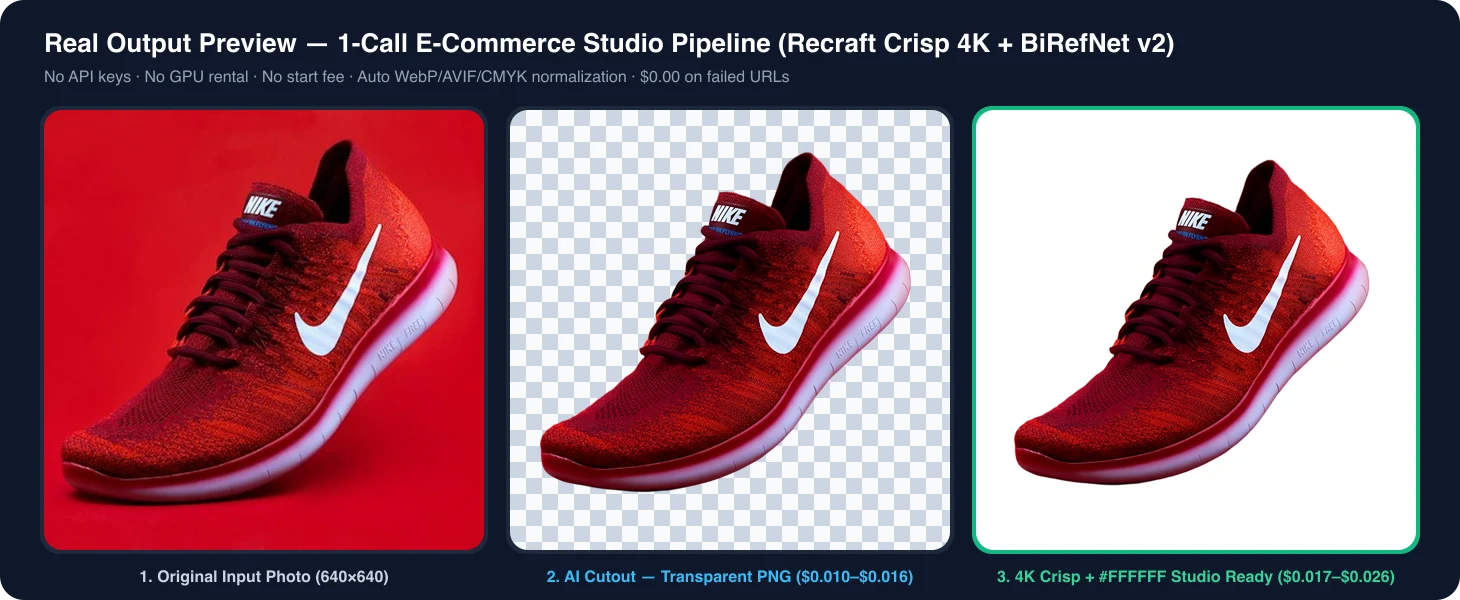
Batch **4K AI image upscaler** and **AI background remover API** built for e-commerce catalogs, spreadsheets, creative workflows, and autonomous AI agents. Restore blurry product or AI-generated images to crisp 4K (`Recraft Crisp` + `SeedVR2`), cut out clean transparent PNGs (`BiRefNet v2`), or output ready-to-list **pure-white (`#FFFFFF`) Amazon & Shopify studio photos** — **up to 100 images per run from URLs, Google Sheets, CSV, or another scraper, with no external API keys, no GPU rental, and `$0.00` per-image charge on failed or already-high-res skipped URLs** (from **`$0.011 / image`**, all Apify compute included).

### Ready-Made 1-Click Templates (All 10 Workflows — Try Free)
Pick any pre-configured template below to open it directly in Apify Console with real sample inputs ready to run:
- **[Amazon Pure-White (`#FFFFFF`) Product Photo Studio](https://apify.com/futurewood/ai-image-upscaler-bg-remover/examples/amazon-white-background-product-photos)** — 4K upscale + precision cutout + compliant `#FFFFFF` backdrop with `5%` margin padding.
- **[Shopify & Google Merchant Center Catalog Enhancer](https://apify.com/futurewood/ai-image-upscaler-bg-remover/examples/shopify-product-image-upscaler-and-cutout)** — Upgrade supplier images above Google Merchant Center's high-resolution threshold in WebP or PNG.
- **[Bulk Transparent PNG Background Remover](https://apify.com/futurewood/ai-image-upscaler-bg-remover/examples/bulk-remove-background-transparent-png)** — High-precision `BiRefNet v2` alpha cutouts for logos, apparel, electronics, and design assets.
- **[Upscale Midjourney, Flux & AI Art to 4K](https://apify.com/futurewood/ai-image-upscaler-bg-remover/examples/upscale-midjourney-and-flux-images-to-4k)** — Turn `512px–1024px` AI generations into print-ready `4K` assets without plastic over-smoothing.
- **[Process Product Photos from Google Sheets or CSV](https://apify.com/futurewood/ai-image-upscaler-bg-remover/examples/product-photos-from-google-sheets-or-csv)** — Paste a Google Sheets link or CSV catalog URL and get studio photos matched back to every `SKU` / `Title`.
- **[Enhance Low-Res 1688, AliExpress & Supplier Photos](https://apify.com/futurewood/ai-image-upscaler-bg-remover/examples/enhance-low-res-alibaba-1688-supplier-photos)** — Chain directly after supplier scrapers (`datasetId`) to clean compressed thumbnails.
- **[Portrait, Fashion & Fine-Hair Matting Cutout](https://apify.com/futurewood/ai-image-upscaler-bg-remover/examples/portrait-hair-matting-background-remover)** — Uses `BiRefNet v2 (Matting)` for clean hair strands, fur, and translucent edges.
- **[Batch WebP / AVIF to Lossless 4K PNG Converter](https://apify.com/futurewood/ai-image-upscaler-bg-remover/examples/batch-webp-avif-to-high-res-png-converter)** — Auto-fixes WebP, AVIF, CMYK color profiles, and EXIF rotation glitches before upscaling.
- **[Print-on-Demand (POD) 4K Artwork Upscaler](https://apify.com/futurewood/ai-image-upscaler-bg-remover/examples/print-on-demand-4k-artwork-upscaler)** — Prepare 300-DPI-ready graphics for Merch by Amazon, Printful, Printify, and Etsy.
- **[Real Estate, Airbnb & Auto Dealership 4K Photo Enhancer](https://apify.com/futurewood/ai-image-upscaler-bg-remover/examples/real-estate-and-car-listing-photo-4k-enhancer)** — Sharpen scraped property, hotel, and vehicle listing photos with smart skip on already-4K images.
### Contact, Custom Volume & Partnerships
Questions about a run, custom enterprise catalog volume (`10,000+` images), or workflow integration help? Email **** or open a ticket in the **[Issues tab](https://apify.com/futurewood/ai-image-upscaler-bg-remover/issues)** (include your run ID if applicable — we respond within **12 hours**). Open-source skills & n8n/Make templates: **[github.com/woodfuturebj-boop/ai-image-upscaler-skills](https://github.com/woodfuturebj-boop/ai-image-upscaler-skills)**.
### Why Teams Switch to This Actor
Most standalone upscaler or background-removal tools fail on **30%–45% of real-world e-commerce URLs** due to modern `WebP` / `AVIF` encodings, sideways `EXIF` phone orientation, `CMYK` print profiles, or single-image-only inputs — while still billing you for 4 GB–8 GB RAM compute.
This Actor solves every one of those bottlenecks in a single production pipeline:
- **3 Workflows in 1 API Call**: Run **4K Crisp Upscale** (`upscale_crisp`), **AI Background Removal** (`remove_background`), or the **E-Commerce Studio Combo** (`ecommerce_studio`: upscales first on full RGB, then cuts out ultra-sharp edges onto transparent or `#FFFFFF` studio canvas).
- **Automatic Input Sanitization**: Automatically normalizes `JPEG`, `PNG`, `WebP`, `AVIF`, `GIF`, `TIFF`, `CMYK`, and `EXIF`-rotated mobile photos into clean `sRGB` buffers before inference.
- **Dual-Engine Automatic Failover**: Uses **Recraft Crisp Upscale** for sharp product labels, packaging text, and fabric weave, with automatic failover to **SeedVR2** so transient upstream spikes never break a batch.
- **Every Input Source Built In**: Pass `imageUrls` (up to 100/run), upload a local file (`imageFiles`), paste a **Google Sheets or CSV link (`spreadsheetUrl`)**, send Google Drive or Dropbox share links, pass inline `data:image/...;base64` strings, or chain directly from another Apify scraper via `datasetId` + `keepFields` (`SKU`, `ASIN`, `title`).
- **Smart Resolution Skip (`$0.00`)**: Set `skipIfLongEdgeAtLeast: 2048` on scheduled catalog runs — images already high-res come back `status: "skipped"` with their usable URL at **`$0.00` charge**.
- **All Compute Included & `$0.00` on Failed URLs**: Platform RAM/CPU compute is **100% included** in the per-image event price. Dead links, HTTP 404s, or corrupted files are logged cleanly in the dataset at **`$0.00` image charge**.
### How It Compares
#### Vs. SaaS Subscriptions (Topaz, remove.bg, Photoroom)
| Feature | This Actor (`futurewood`) | remove.bg API | Photoroom API | Topaz Cloud / Gigapixel |
| :--- | :--- | :--- | :--- | :--- |
| **Effective Price (1,000 images)** | **`$11 – $15`** *(single)* / **`$18 – $25`** *(combo)* | `$90 – $200` | `$20 – $100` *(plan min)* | Subscription / seat license |
| **4K Upscale + Cutout + `#FFFFFF` in 1 Call** | **Yes (`ecommerce_studio`)** | Cutout only | Separate API tiers | Upscale only |
| **Monthly Subscription Required** | **No** *(uses Apify credit)* | Yes (credits expire) | Yes | Yes |
| **Google Sheets / CSV & Scraper Chaining** | **Yes (`spreadsheetUrl` & `datasetId`)** | No | No | No |
| **Native MCP Server & Agent Skill** | **Yes (`mcp.apify.com` + `npx skills`)** | No | Separate setup | No |
#### Vs. Other Image Actors on Apify Store
| Capability | This Actor (`futurewood`) | Typical Single-Model Upscalers | Typical BG-Remover Actors |
| :--- | :--- | :--- | :--- |
| **Batch Processing** | **Up to 100 images / run** | Often 1 URL per run | Often 1 URL per run |
| **WebP / AVIF / CMYK / EXIF Auto-Fix** | **Built-in (`sharp` sRGB pipeline)** | Fails on non-PNG/JPEG (~30–45% error) | Variable |
| **Pure-White `#FFFFFF` + Margin Padding** | **Built-in (`0%–30%` padding)** | None | Transparent PNG only |
| **Google Sheets / CSV + SKU Preservation** | **Built-in (`spreadsheetUrl` + `keepFields`)** | None | None |
| **Platform RAM / Compute Billing** | **`$0.00` (100% included in event)** | Extra 4 GB – 8 GB RAM compute billed | Extra RAM compute billed |
| **Failed or Already-4K Skipped URL Charge** | **`$0.00` (Never charged)** | Often fails entire run | Often fails entire run |
| **Side-by-Side Console Image Previews** | **Yes (Result + Source thumbnails)** | Raw text links | Raw text links |
### Modes & Use Cases
| Mode (`mode`) | AI Pipeline | Typical Latency | Best For |
| :--- | :--- | :---: | :--- |
| **`upscale_crisp`** | `Recraft Crisp` *(auto-failover `SeedVR2`)* | `~4.5 – 6.5 s` | Low-res product thumbnails, Midjourney/Flux `1024px` -> `4K`, real estate/auto listings, POD artwork |
| **`remove_background`** | `BiRefNet v2` *(`Heavy`, `Light`, `Portrait`, `Matting`)* | `~2.5 – 4.5 s` | Transparent PNG logos/apparel, `#FFFFFF` marketplace main images, headshots & hair matting |
| **`ecommerce_studio`** | `Recraft Crisp 4K` -> `BiRefNet v2` -> Studio Canvas | `~6.5 – 9.5 s` | Turning phone/supplier snapshots into compliant `2500px+` Amazon, Shopify, Walmart & eBay hero listings |
### Transparent Pay-Per-Event Pricing
**Zero extra Apify compute charges and `$0.00` per-image charge on failed or smart-skipped URLs** (only a nominal `$0.00005` container start event per run). Every Apify account receives free platform credits (`$5/month` on Starter/Creator plans), which automatically cover hundreds of images per month:
| Workflow Mode | Billed Event | Free / Bronze | Silver | Gold / Platinum / Diamond | Cost per 1,000 Images (Gold+) |
| :--- | :--- | :---: | :---: | :---: | :---: |
| **4K Crisp Upscale** | `image-upscaled` | `$0.015` | `$0.013` | **`$0.011`** | **`$11.00`** |
| **AI Background Removal** | `background-removed` | `$0.015` | `$0.013` | **`$0.011`** | **`$11.00`** |
| **E-Commerce Studio Combo** | `ecommerce-studio-combo` | `$0.025` | `$0.022` | **`$0.018`** | **`$18.00`** |
- **Spend Cap Protection**: Set Apify's built-in **Max total charge (`maxTotalChargeUsd`)** on any run or API call — the Actor checks remaining budget *before* each image and exits cleanly the moment your cap is reached.
- **Free Apify Plan Preview**: Free-plan users can test 1 single-step image per run to inspect full-resolution quality before upgrading to unlock 100-image batches and Studio Combo mode.
### Input Sources: URLs, Google Sheets / CSV & Scraper Chaining
#### 1. Standard E-Commerce Studio Batch (`JSON`)
```json
{
"imageUrls": [
"https://api.apify.com/v2/key-value-stores/aiPvyqtNsUyarLtrB/records/demo-product-sneaker.jpg",
"https://api.apify.com/v2/key-value-stores/aiPvyqtNsUyarLtrB/records/demo-product-watch.jpg"
],
"mode": "ecommerce_studio",
"backgroundStyle": "white",
"paddingPercent": 5,
"outputFormat": "png"
}
```
#### 2. Import Directly from Google Sheets or CSV (`spreadsheetUrl` + `keepFields`)
Paste any Google Sheet link shared as *"Anyone with the link"* or a `.csv` / `.tsv` catalog URL — each output item keeps your `sku` and `title` inside `sourceMetadata`:
```json
{
"spreadsheetUrl": "https://api.apify.com/v2/key-value-stores/aiPvyqtNsUyarLtrB/records/demo-catalog.csv",
"urlField": "image_url",
"keepFields": ["sku", "title"],
"mode": "ecommerce_studio",
"backgroundStyle": "white",
"outputFormat": "webp"
}
```
#### 3. Chain Automatically After Any Amazon / Shopify / 1688 / AliExpress Scraper
In Apify Console (**Integrations -> Actor-to-Actor**) or n8n/Make, pass the upstream scraper's `defaultDatasetId`:
```json
{
"datasetId": "{{resource.defaultDatasetId}}",
"urlField": "thumbnailUrl",
"keepFields": ["asin", "sku", "title"],
"mode": "ecommerce_studio",
"backgroundStyle": "white",
"paddingPercent": 5,
"outputFormat": "webp"
}
```
#### 4. Run on an Automated Schedule (`skipIfLongEdgeAtLeast`)
Create an [Apify Schedule](https://docs.apify.com/platform/schedules) pointing at your Google Sheet or scraper dataset and set `"skipIfLongEdgeAtLeast": 2048` — images already upscaled to `>=2048px` are returned as `status: "skipped"` at **`$0.00` charge**.
### API, Python, JavaScript, n8n & Make Ready-Made Templates
Ready-to-import **n8n** and **Make.com** workflow JSON blueprints are available free in our open-source repository:
- **[Download n8n & Make.com Workflow JSON Templates](https://github.com/woodfuturebj-boop/ai-image-upscaler-skills/tree/main/workflows)**
#### Synchronous 1-Line `cURL`
```bash
curl -s -X POST "https://api.apify.com/v2/acts/futurewood~ai-image-upscaler-bg-remover/run-sync-get-dataset-items?token=YOUR_APIFY_TOKEN" \
-H "Content-Type: application/json" \
-d '{
"imageUrls": ["https://api.apify.com/v2/key-value-stores/aiPvyqtNsUyarLtrB/records/demo-product-sneaker.jpg"],
"mode": "ecommerce_studio",
"backgroundStyle": "white"
}'
```
#### Python (`apify-client`)
```python
from apify_client import ApifyClient
client = ApifyClient("YOUR_APIFY_TOKEN")
run = client.actor("futurewood/ai-image-upscaler-bg-remover").call(
run_input={
"imageUrls": [
"https://api.apify.com/v2/key-value-stores/aiPvyqtNsUyarLtrB/records/demo-product-sneaker.jpg"
],
"mode": "ecommerce_studio",
"backgroundStyle": "white",
"paddingPercent": 5,
"outputFormat": "png",
},
max_total_charge_usd=1.00,
)
for item in client.dataset(run["defaultDatasetId"]).iterate_items():
print(item["status"], item["outputDimensions"], item["outputUrl"])
```
#### JavaScript / TypeScript (`apify-client`)
```javascript
import { ApifyClient } from 'apify-client';
const client = new ApifyClient({ token: process.env.APIFY_TOKEN });
const run = await client.actor('futurewood/ai-image-upscaler-bg-remover').call(
{
imageUrls: ['https://api.apify.com/v2/key-value-stores/aiPvyqtNsUyarLtrB/records/demo-product-sneaker.jpg'],
mode: 'ecommerce_studio',
backgroundStyle: 'white',
},
{ maxTotalChargeUsd: 1.0 },
);
const { items } = await client.dataset(run.defaultDatasetId).listItems();
console.log(items[0].outputUrl);
```
### Use from AI Coding Agents (`npx skills`) & MCP Server
#### Install Agent Skill (Claude Code, Cursor, Codex, Gemini CLI, Antigravity)
Install our open-source Agent Skill in 1 command so your AI coding or marketing agent knows how to estimate cost, cap spend, batch-process folders/CSVs, and chain scrapers automatically:
```bash
npx skills add woodfuturebj-boop/ai-image-upscaler-skills --skill image-upscaler-bg-remover
```
Or install the full scraper-to-studio e-commerce pipeline skill:
```bash
npx skills add woodfuturebj-boop/ai-image-upscaler-skills --skill ecommerce-product-photo-pipeline
```
Source & documentation: **[github.com/woodfuturebj-boop/ai-image-upscaler-skills](https://github.com/woodfuturebj-boop/ai-image-upscaler-skills)**
#### Connect via Hosted Apify MCP Server (`mcp.apify.com`)
```bash
claude mcp add --transport http apify-image-studio \
"https://mcp.apify.com?tools=futurewood/ai-image-upscaler-bg-remover" \
--header "Authorization: Bearer YOUR_APIFY_TOKEN"
```
```json
{
"mcpServers": {
"apify-image-studio": {
"url": "https://mcp.apify.com?tools=futurewood/ai-image-upscaler-bg-remover",
"headers": {
"Authorization": "Bearer YOUR_APIFY_TOKEN"
}
}
}
}
```
This Actor runs under strict **`LIMITED_PERMISSIONS`** with full JSON Input & Dataset Output Schemas and is compatible with autonomous agentic payment flows (`x402`, `Skyfire`, `MPP`).
### Frequently Asked Questions (FAQ)
#### Does this meet Amazon Main Image pure-white (`#FFFFFF`) requirements?
Yes. Setting `backgroundStyle: "white"` flattens the high-precision `BiRefNet v2` alpha mask onto exact RGB `(255, 255, 255)` (`#FFFFFF`), and `paddingPercent: 5` ensures your product fills ~85–90% of the frame in compliance with Amazon, Walmart, eBay, and Google Merchant Center rules.
#### Am I charged if an image URL is broken, 404, or skipped by `skipIfLongEdgeAtLeast`?
Never (`$0.00`). Pay-Per-Event billing triggers **only after** a newly processed image is verified and saved to your Key-Value Store. Failed or smart-skipped URLs cost `$0.00` and never crash your batch run.
#### Can I pass a Google Sheet or CSV catalog without writing code?
Yes. Share your Google Sheet as *"Anyone with the link"*, paste its URL into `spreadsheetUrl`, optionally list columns like `["sku", "title"]` in `keepFields`, and click **Start**.
#### Do I need my own fal.ai, Recraft, or GPU API key?
No. All AI model inference and Apify container compute are included out of the box.
#### Need higher concurrency, custom workflows, or dedicated B2B support?
Email **** or open an issue on **[Apify Issues](https://apify.com/futurewood/ai-image-upscaler-bg-remover/issues)** — we respond within **12 hours**.
# Actor input Schema
## `imageUrls` (type: `array`):
One or more public image URLs (JPEG, PNG, WebP, AVIF, GIF, TIFF, Google Drive, Dropbox, or base64 data URIs). Free Apify plan previews 1 image; paid plans process up to 100 images per run.
## `imageFiles` (type: `string`):
Drag and drop a local image file directly from your computer.
## `mode` (type: `string`):
Select 4K Crisp Upscale ($0.011–$0.015/img), AI Background Removal ($0.011–$0.015/img), or E-Commerce Studio Combo ($0.018–$0.025/img).
## `backgroundStyle` (type: `string`):
Keep a clean transparent PNG alpha channel, or place the cutout onto a pure-white (#FFFFFF) Amazon/Shopify backdrop or custom brand hex color.
## `spreadsheetUrl` (type: `string`):
Paste a public Google Sheets link (shared as 'Anyone with the link') or direct .csv / .tsv URL containing an image URL column.
## `datasetId` (type: `string`):
Optional Apify Dataset ID (e.g. from an Amazon, Shopify, 1688, or AliExpress scraper, or {{resource.defaultDatasetId}} in Actor-to-Actor integrations).
## `urlField` (type: `string`):
Column header in your CSV/Sheet or field path in your Dataset (e.g. imageUrl, image_src, thumbnailUrl, images.0). Auto-detected if left default.
## `keepFields` (type: `array`):
Optional list of field/column names from your Dataset or CSV (e.g. \['sku', 'asin', 'title']) to copy into each output row under sourceMetadata.
## `customBackgroundColor` (type: `string`):
Hex color applied when Background Style is set to Custom Solid Color (e.g. #F8FAFC).
## `paddingPercent` (type: `integer`):
Uniform studio margin (0–30%) added around solid-backdrop product photos so items fill ~85–90% of the frame (Amazon main-image best practice).
## `skipIfLongEdgeAtLeast` (type: `integer`):
In upscale_crisp mode, if an input image is already at least this many pixels on its longest side (e.g. 2048 or 3840), skip AI upscaling at $0.00 charge and return its URL cleanly. Set 0 to disable.
## `outputFormat` (type: `string`):
Output file format saved to Key-Value Store. Transparent cutouts automatically stay lossless PNG or WebP.
## `upscaleEngine` (type: `string`):
Auto runs Recraft Crisp Upscale first (best for sharp product edges, labels, and textures) with automatic SeedVR2 failover.
## `bgModelVariant` (type: `string`):
Select the BiRefNet v2 segmentation model tuned for products, portraits, or fine hair/fur.
## `maxConcurrency` (type: `integer`):
Number of images processed concurrently (1–5). Keep at 2–3 for optimal speed and memory stability.
## `imageUrl` (type: `string`):
Optional singular alias accepted for AI/MCP agents and REST API callers.
## Actor input object example
```json
{
"imageUrls": [
"https://api.apify.com/v2/key-value-stores/aiPvyqtNsUyarLtrB/records/demo-product-sneaker.jpg"
],
"mode": "ecommerce_studio",
"backgroundStyle": "white",
"urlField": "imageUrl",
"customBackgroundColor": "#F8FAFC",
"paddingPercent": 5,
"skipIfLongEdgeAtLeast": 0,
"outputFormat": "png",
"upscaleEngine": "auto",
"bgModelVariant": "General Use (Heavy)",
"maxConcurrency": 2
}
```
# Actor output Schema
## `results` (type: `string`):
No description
## `summary` (type: `string`):
No description
# API
You can run this Actor programmatically using our API. Below are code examples in JavaScript, Python, and CLI, as well as the OpenAPI specification and MCP server setup.
## JavaScript example
```javascript
import { ApifyClient } from 'apify-client';
// Initialize the ApifyClient with your Apify API token
// Replace the '' with your token
const client = new ApifyClient({
token: '',
});
// Prepare Actor input
const input = {
"imageUrls": [
"https://api.apify.com/v2/key-value-stores/aiPvyqtNsUyarLtrB/records/demo-product-sneaker.jpg"
],
"mode": "ecommerce_studio",
"backgroundStyle": "white"
};
// Run the Actor and wait for it to finish
const run = await client.actor("futurewood/ai-image-upscaler-bg-remover").call(input);
// Fetch and print Actor results from the run's dataset (if any)
console.log('Results from dataset');
console.log(`💾 Check your data here: https://console.apify.com/storage/datasets/${run.defaultDatasetId}`);
const { items } = await client.dataset(run.defaultDatasetId).listItems();
items.forEach((item) => {
console.dir(item);
});
// 📚 Want to learn more 📖? Go to → https://docs.apify.com/api/client/js/docs
```
## Python example
```python
from apify_client import ApifyClient
# Initialize the ApifyClient with your Apify API token
# Replace '' with your token.
client = ApifyClient("")
# Prepare the Actor input
run_input = {
"imageUrls": ["https://api.apify.com/v2/key-value-stores/aiPvyqtNsUyarLtrB/records/demo-product-sneaker.jpg"],
"mode": "ecommerce_studio",
"backgroundStyle": "white",
}
# Run the Actor and wait for it to finish
run = client.actor("futurewood/ai-image-upscaler-bg-remover").call(run_input=run_input)
# Fetch and print Actor results from the run's dataset (if there are any)
print(f"💾 Check your data here: https://console.apify.com/storage/datasets/{run.default_dataset_id}")
for item in client.dataset(run.default_dataset_id).iterate_items():
print(item)
# 📚 Want to learn more 📖? Go to → https://docs.apify.com/api/client/python/docs/quick-start
```
## CLI example
```bash
echo '{
"imageUrls": [
"https://api.apify.com/v2/key-value-stores/aiPvyqtNsUyarLtrB/records/demo-product-sneaker.jpg"
],
"mode": "ecommerce_studio",
"backgroundStyle": "white"
}' |
apify call futurewood/ai-image-upscaler-bg-remover --silent --output-dataset
```
## MCP server setup
```json
{
"mcpServers": {
"apify": {
"type": "http",
"url": "https://mcp.apify.com/?tools=fetch-actor-details,futurewood/ai-image-upscaler-bg-remover"
}
}
}
```
The hosted server signs you in with OAuth on first connect, so no API token belongs in this config. Clients without OAuth support can send an `Authorization: Bearer ` header instead, using a token from API & Integrations in Apify Console (https://console.apify.com/settings/integrations).
## OpenAPI specification
Download the OpenAPI definition: https://api.apify.com/v2/actors/4skWkAyDdVegZdGDz/builds/BGjGo1Wd1VdAsEbOK/openapi.json