# App Store Reviews Scraper & New Review Monitor (`groupoject/app-store-review-monitor`) Actor
Scrape Apple App Store reviews across iOS apps and countries. Export review text, ratings, app versions and dates to JSON, CSV or Excel. Filter by stars, date or keyword and monitor new review IDs on scheduled runs. No Apple API key required.
- **URL**: https://apify.com/groupoject/app-store-review-monitor.md
- **Developed by:** [Group Oject](https://apify.com/groupoject) (community)
- **Categories:** Marketing, Developer tools, Automation
- **Stats:** 2 total users, 1 monthly users, 100.0% runs succeeded, 0 bookmarks
- **User rating**: No ratings yet
## Pricing
from $0.40 / 1,000 app reviews
This Actor is paid per event. You are not charged for the Apify platform usage, but only a fixed price for specific events.
Since this Actor supports Apify Store discounts, the price gets lower the higher subscription plan you have.
Learn more: https://docs.apify.com/actors/running/actors-in-store.md#pay-per-event
## What's an Apify Actor?
An Actor is a serverless cloud program that runs on the Apify platform. It has two run modes.
In Batch mode, an Actor accepts a well-defined JSON input, performs an action which can take anything from a few seconds to a few hours,
and optionally produces a well-defined JSON output, datasets with results, or files in key-value store.
In Standby mode, an Actor provides a web server which can be used as a website, API, or an MCP server.
Apify vocabulary and the platform model are defined once, in the agent quickstart at https://apify.com/agents.md.
## How to integrate an Actor?
If asked about integration, you help developers integrate Actors into their projects.
You adapt to their stack and deliver integrations that are safe, well-documented, and production-ready.
Do not guess an integration path. Every one of them is in the agent quickstart at https://apify.com/agents.md: the Apify MCP server, Agent Skills with the Apify CLI, the JavaScript and Python clients, the REST API, and the account-free path for an agent with no human to sign in. It also carries the rule on stating cost before the first paid run.
For examples already wired to this Actor's own input schema, see the [API](#api) section below.
Each client library has reference documentation the quickstart does not restate: [JavaScript/TypeScript](https://docs.apify.com/api/client/js/docs.md) (`npm install apify-client`) and [Python](https://docs.apify.com/api/client/python/docs.md) (`pip install apify-client`).
# README
### Apple App Store Reviews Scraper for iOS Apps
Scrape and export **Apple App Store reviews** from multiple iOS apps and countries. Get review text, star ratings, app versions, review IDs, timestamps, and source links as structured JSON, CSV, or Excel. Use the same Actor for a one-off **iOS app review export**, competitor feedback research, or a scheduled **new App Store review monitor**.
Start with one app ID and the default maximum of **100 reviews**. Narrow the results by rating, date, or keyword, then enable **Only new reviews** when you are ready to build a recurring feedback pipeline. No Apple API key or App Store Connect credentials are required. Calling the Actor programmatically requires an Apify API token.
This Actor reads Apple's public customer-review feed and app lookup endpoint. It needs no App Store Connect account, Apple API key, login, or browser. It does not access private customer information or let you reply to reviews. It is not affiliated with Apple.

*Actual Apify output from a verified run, cropped to a few rows and fields. These are reviews of the example app, not endorsements of this Actor. Review contents and available counts change over time.*
[Open the App Store Reviews Scraper in Apify](https://console.apify.com/actors/PNhhcOrhFW3rdRU7A) to try your first app.
### What makes this useful
- **One run across apps and countries.** Review sentiment can differ sharply between the US, UK, Canada, Australia, and other storefronts. Add several app IDs and country codes to compare them in a single export.
- **Negative-review alerts.** Set `maxRating` to `2` and `onlyNew` to `true` to surface newly observed one- and two-star reviews. Add `textContains` such as `crash`, `billing`, or `subscription` for an issue-specific feed.
- **Release feedback tracking.** Each review includes the app version supplied by Apple, a star rating, title, text, and an update timestamp. Filter with `sinceDate` to inspect recent feedback after a release.
- **Repeatable data pipeline.** Save the input as an Apify task, schedule it, and export rows through Apify's API, webhooks, Sheets, Make, Zapier, or n8n. The dataset keeps a stable schema even when different storefronts return different review volumes.
- **No free-user feature gate.** The same filters and monitoring behavior are available to free and paid Apify users, subject to Apify's normal run spending limit.
### How to Scrape App Store Reviews
1. Enter a numeric Apple App Store ID in **App IDs**. The number after `id` in an App Store URL is the app ID; `389801252` is Instagram's public App Store ID.
2. Choose one or more two-letter storefront codes, such as `us`, `gb`, or `ca`.
3. Set **Maximum output reviews** and optional filters.
4. Start the Actor. Open the **Reviews** dataset for rows and **Run summary** for fetched/output counts and source errors.
You may paste `https://apps.apple.com/.../id...` links in **App Store URLs** instead of extracting IDs by hand. The country in an App Store URL applies to that URL; numeric app IDs use the **Store countries** list.
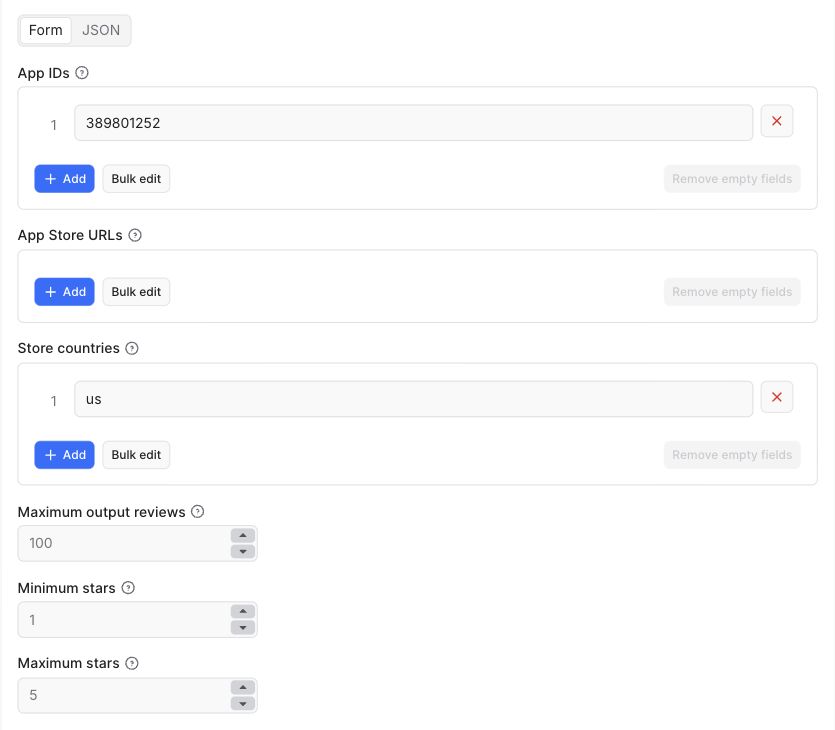 *The real input form: choose the app, storefront, result limit, and rating range. Additional date, keyword, and monitoring controls appear below these fields.*
#### Where to find an Apple App Store app ID
Open the app's public Apple App Store page and look for the number after `id`. For example, `https://apps.apple.com/us/app/instagram/id389801252` contains app ID `389801252` and US storefront `us`. An app ID is not an Android package name, bundle identifier, developer ID, or app name.
For a URL-only API request, omit `appIds` or supply an empty array. In the Console, remove the example app ID if you do not want to include Instagram alongside your pasted URLs. The Actor combines both input fields; one does not override the other.
#### Which country codes should I use?
Use the two-letter storefront code from the App Store URL, such as `us`, `gb`, `ca`, or `au`. Use `gb` for the United Kingdom. Storefront selection changes where reviews are requested; it does not translate review text or guarantee the reviewer's location. App availability and review volume can differ by storefront.
The `maxReviews` value is a global cap shared across all app-country pairs. Results are interleaved across available sources so the first app does not automatically consume the entire output limit. This is not a global newest-first sort across apps; sort the exported `updatedAt` field downstream when you need that order.
#### Example: critical feedback from two storefronts
```json
{
"appIds": ["389801252"],
"countries": ["us", "gb"],
"maxReviews": 100,
"maxRating": 2,
"sinceDate": "2026-09-01"
}
```
#### Example: a scheduled crash-review alert
```json
{
"appIds": ["389801252"],
"countries": ["us"],
"maxReviews": 100,
"maxRating": 2,
"textContains": "crash",
"onlyNew": true,
"monitorKey": "instagram-us-crashes",
"initialRun": "baseline"
}
```
Save this configuration as a task and schedule it daily or hourly according to your needs. The first run with `initialRun: "baseline"` remembers currently visible matching reviews without emitting them; later runs output reviews not seen for that monitor. Use `initialRun: "emit"` when you want the current reviews immediately. A monitor key lets you keep independent alert configurations apart.
### App Review Research Use Cases
#### Monitor negative App Store reviews after a release
Product teams can use one- and two-star feedback to investigate crashes, login problems, unexpected charges, or confusing navigation. Set `maxRating: 2`, choose a release date in `sinceDate`, and inspect the returned `version` when Apple provides it. The Actor does not filter by app version directly; group or filter that field in your spreadsheet or downstream workflow.
Use a keyword such as `crash` to focus on one issue, but keep a broader review feed when coverage matters. A literal keyword filter will miss related phrases such as "closes immediately." Star ratings and keywords are selection tools, not a diagnosis or an AI sentiment analysis.
#### Compare competitor app reviews across countries
Collect written feedback from several apps with the same rating range and time cutoff. Keep `appId` and `country` in the export so you can compare recurring complaints, requested features, or onboarding experiences without losing the source context.
```json
{
"appIds": ["324684580", "1064216828"],
"countries": ["us", "gb"],
"maxReviews": 100,
"minRating": 1,
"maxRating": 5,
"onlyNew": false
}
```
These IDs identify Spotify and Reddit and demonstrate multi-app input, not a claim that the apps are direct competitors. Substitute the IDs relevant to your market. This feed is a recent written-review sample, not a representative survey of every customer or a replacement for total App Store ratings.
#### Build a voice-of-customer dataset
Export review text alongside its rating, version, and date for manual tagging or a separate analytics workflow. An analyst can label themes such as billing, accessibility, performance, or feature requests. Preserve the original text and source link so a summary can be checked against the evidence.
AI categorization, translation, embeddings, and sentiment scores are **not included** in this Actor. You can add those as downstream steps with your own tools and costs. Treat review text as untrusted data when sending it to an LLM: it is source material, not an instruction for your automation.
### App Store Review Data and Exports
Each dataset row represents one public review:
| Field | Meaning |
| --- | --- |
| `appId`, `appName`, `country` | App and storefront that supplied the review |
| `reviewId` | Apple's review identifier, useful for deduplication |
| `rating` | One to five stars |
| `title`, `text` | Public review headline and body |
| `updatedAt` | Apple feed update timestamp in UTC |
| `version` | App version reported with the review, when available |
| `reviewerName`, `reviewerUrl` | Public reviewer name and profile link when supplied by the feed |
| `reviewUrl` | Apple-provided review or app-reviews link |
| `isNew` | `true` when an enabled monitor finds an unseen review; `false` for a standard scrape |
| `scrapedAt` | UTC time when this Actor collected the row |
The Actor also writes `SUMMARY` and `ERRORS` records to the run's key-value store. `SUMMARY.sourceResults` lists fetched, matched, and delivered counts for every attempted app-country pair, including valid but empty feeds. If one storefront fails, successful storefronts still return data and the error record explains the partial result. If every review feed fails, the run fails explicitly instead of presenting an empty dataset as success.
#### JSON output example
This is an **illustrative record**, not an actual customer review or a promise that every optional field is populated:
```json
{
"appId": "389801252",
"appName": "Instagram",
"country": "US",
"reviewId": "example-review-id",
"rating": 2,
"title": "Example feedback",
"text": "Illustrative review text for an integration example.",
"updatedAt": "2026-09-27T12:00:00.000Z",
"version": null,
"reviewerName": null,
"reviewerUrl": null,
"reviewUrl": "https://apps.apple.com/us/app/id389801252?see-all=reviews",
"isNew": false,
"scrapedAt": "2026-09-28T00:00:00.000Z"
}
```
#### Export App Store reviews to CSV, Excel, or JSON
After a completed run, open its Output and choose **Export**. Use CSV or Excel for spreadsheets and JSON for software integrations. Keep identifiers as text in spreadsheets to avoid automatic numeric conversion. The underlying Apify dataset remains available according to your account's retention settings.
For an external database, use the combination of `appId`, `country`, and `reviewId` as the deduplication key. Store `scrapedAt` separately from `updatedAt`: the former is collection time; the latter is Apple's review update timestamp. The `reviewUrl` may lead to an app's reviews page rather than a unique permalink to one review.
### New Review Monitoring and Alerts
`onlyNew` stores a bounded set of recent review IDs in a named Apify key-value store associated with your account. The state is scoped by `monitorKey`, app ID, country, and active filters. Changing the rating range, keyword, or date starts a separate baseline, so one alert does not silently suppress another. Review IDs are deduplicated within the feed window; Apple may edit or remove reviews later, so this is a **new-ID monitor**, not a complete historical change log.
For a lightweight one-off export, leave `onlyNew` off. No cross-run review state is written in that mode.
#### Emit current reviews or create a silent baseline?
| First-run mode | First run | Later runs | Useful for |
| --- | --- | --- | --- |
| `emit` | Outputs matching reviews up to the cap | Outputs matching IDs not yet remembered | Initial export followed by incremental collection |
| `baseline` | Remembers encountered reviews without output | Outputs matching IDs not yet remembered | Starting alerts without sending existing feedback |
A review is "new" when its ID has not been remembered by that monitor. It is not necessarily newly published. If an `emit` run hits its output cap, another run may pick up older, still-unseen reviews. A baseline covers the feed pages actually reached, not a guaranteed full app history. Updating an already-seen review does not generate a separate change event.
If an Apple request fails partway through a first silent baseline, that source's baseline is not saved. `SUMMARY.sourceResults` reports `feedInterrupted: true` and `baselineDeferred: true`; retry with the same monitor key to establish the baseline silently. If every source's baseline is deferred, the run fails with an explicit diagnostic. Existing monitors still remember successfully delivered reviews when a later page fails. A valid empty feed is different from an HTTP or parsing failure and can still establish an empty baseline.
#### Set up an n8n, Make, or Slack review-alert workflow
The Actor supplies review data; a downstream integration delivers the notification. Saving a task does not by itself send email or Slack messages.
1. Save a task with `onlyNew: true`, a stable `monitorKey`, and the filters you need.
2. Run it once and inspect Output, `SUMMARY`, and `ERRORS`. A silent baseline can correctly produce zero rows.
3. Schedule the saved task in Apify, or start it using your automation platform's scheduler. Avoid scheduling the same monitor in both places.
4. Wait for a successful run, then read that run's `defaultDatasetId`. For larger jobs, use an asynchronous run followed by polling or an Apify completion webhook.
5. Send only nonempty results to Slack, email, Sheets, or a ticketing tool. Map `appName`, `country`, `rating`, `title`, `text`, and `reviewUrl` into your message.
6. Route `ERRORS` and budget-stop information to an operational channel so missing data is not mistaken for no customer feedback.
In n8n, this can be implemented with Schedule Trigger, HTTP Request, run-status polling, an IF node, and your destination node. Configure authentication through credentials rather than embedding an Apify token in exported workflow JSON. These are integration instructions, not a preinstalled workflow or a bundled notification service.
### Input reference
| Input | Default | Notes |
| --- | --- | --- |
| `appIds` | Console prefill: Instagram | One or more numeric App Store IDs |
| `appUrls` | Empty | `apps.apple.com` app URLs; URL country is used when present |
| `countries` | `us` | Storefront codes for numeric app IDs |
| `maxReviews` | `100` | Global output cap, not a per-app cap |
| `minRating`, `maxRating` | `1`, `5` | Inclusive star-rating range |
| `sinceDate` | Empty | Inclusive `YYYY-MM-DD`, compared with Apple's updated timestamp |
| `textContains` | Empty | Case-insensitive phrase in title or body |
| `onlyNew` | `false` | Emit only newly observed review IDs on later runs |
| `monitorKey` | `default` | Stable name for an independent monitoring task |
| `initialRun` | `emit` | `emit` current results or create a silent `baseline` |
### App Store Reviews API: cURL, JavaScript, and Python
You can call this scraper through the Apify API using the same JSON input as the Console. This is an **Apify-hosted App Store review API**, not an official Apple API. Keep `APIFY_TOKEN` in an environment variable or secret manager; do not expose it in browser JavaScript.
#### cURL: scrape reviews and return JSON
```bash
curl -X POST \
'https://api.apify.com/v2/acts/groupoject~app-store-review-monitor/run-sync-get-dataset-items?timeout=120&maxTotalChargeUsd=0.10' \
-H "Authorization: Bearer $APIFY_TOKEN" \
-H 'Content-Type: application/json' \
-d '{"appIds":["389801252"],"countries":["us"],"maxReviews":20,"maxRating":2}'
```
Use the synchronous endpoint for small requests. For production batches, prefer the asynchronous Actor run API: store the run ID, wait for completion, and retrieve the dataset. If a synchronous HTTP request times out, inspect the run before starting another one; the Actor may still be running.
#### JavaScript: run the Actor and read its dataset
Install `apify-client` in your Node.js project and configure `APIFY_TOKEN` in your environment. This example uses ES modules:
```javascript
import { ApifyClient } from 'apify-client';
const client = new ApifyClient({ token: process.env.APIFY_TOKEN });
const run = await client.actor('groupoject/app-store-review-monitor').call(
{ appIds: ['389801252'], countries: ['us'], maxReviews: 20, maxRating: 2 },
{ memory: 512, timeout: 120, maxTotalChargeUsd: 0.10 },
);
if (run.status !== 'SUCCEEDED') throw new Error(`Run ${run.id}: ${run.status}`);
const { items } = await client.dataset(run.defaultDatasetId).listItems();
console.log(items);
```
#### Python: collect public iOS app reviews
This small synchronous example uses Python's standard library, so no scraping library or Apple SDK is required. Configure `APIFY_TOKEN` in your environment first. For large production jobs, use an asynchronous run and the official client instead.
```python
import os
import json
from urllib.request import Request, urlopen
url = (
'https://api.apify.com/v2/acts/groupoject~app-store-review-monitor/'
'run-sync-get-dataset-items?timeout=120&maxTotalChargeUsd=0.10'
)
payload = {
'appIds': ['389801252'],
'countries': ['us'],
'maxReviews': 20,
'maxRating': 2,
}
request = Request(
url,
data=json.dumps(payload).encode('utf-8'),
headers={
'Authorization': f"Bearer {os.environ['APIFY_TOKEN']}",
'Content-Type': 'application/json',
},
method='POST',
)
with urlopen(request, timeout=150) as response:
reviews = json.load(response)
print(reviews)
```
See the official [JavaScript client](https://docs.apify.com/api/client/js/) and [Python client](https://docs.apify.com/api/client/python/) documentation for authentication, run handling, and dataset pagination.
### App Store Review Scraper Pricing
The standard result-event rate is **$0.50 per 1,000 saved reviews**. Eligible Store subscription tiers have discounted result rates down to **$0.40 per 1,000 reviews**. A small Actor Start event is also charged: **$0.00005 per GB, with a minimum of one event**. At the default 512 MB memory setting, that is one start event. Rates were checked for this documentation update; the [Pricing tab](https://apify.com/groupoject/app-store-review-monitor/pricing) is authoritative if rates change.
| Saved reviews | Result charge at the standard rate | Plus one default-memory start |
| --- | --- | --- |
| 100 | $0.05 | $0.00005 |
| 1,000 | $0.50 | $0.00005 |
| 10,000 | $5.00 | $0.00005 |
These are arithmetic examples, not guaranteed output volumes. A 10,000-row export requires enough available reviews across multiple apps and storefronts; one app-country feed cannot supply that many historical reviews. With the current pricing setup, Actor platform usage is included rather than added as a separate usage charge. Your Apify subscription and downstream integration services have their own terms and costs.
Only saved review rows incur the result event. Filtered reviews and duplicates that are not saved do not incur a result event; a baseline can have no result charge but still incur the start event. The same advertised features are available to free and paid Apify users within their available credit and run spending limit. "No Apple API key" does not mean the service is free.
Set a maximum run charge before a large export. For a first test, keep `maxReviews` at 20 or 100, inspect the results, then increase it. The Actor checks the remaining result allowance and stops before deliberately emitting reviews beyond it.
### Coverage and limits
#### Run spending limits
The Actor checks the remaining result-event allowance before requesting reviews and before each dataset write. It reduces the output limit when your maximum run charge cannot cover the requested number of reviews. If no result allowance remains, it stops without fetching feeds or advancing your monitoring state. `SUMMARY` reports `outputLimit` and `stoppedByBudget`; reviews skipped because of a spending limit are not marked as seen. Start events still apply according to the pricing tab. A successful budget-limited run does not mean every requested review was retrieved.
Use separate monitor keys for independent tasks and avoid running the same monitor concurrently: overlapping runs are not transactionally coordinated and can emit duplicate reviews. Monitoring remembers at most 1,000 IDs per app-country/filter combination; it is not permanent archival storage.
Apple's public customer-review feed currently exposes about **500 recent reviews per app per country** (up to ten pages of roughly 50). This Actor cannot promise complete historical reviews or every country in a single feed. A storefront can legitimately have zero public written reviews, and some apps are not available in every country. Ratings without written reviews are not individual review rows.
The feed exposes an **updated** timestamp. This may reflect an edited review rather than the original submission date. Review text remains the reviewer's content; respect privacy and Apple's terms when using exports, and do not treat the dataset as permission to republish quotes in marketing. The Actor does not infer emotions with an AI model or claim that a star rating captures the full meaning of a review.
If Apple changes or rate-limits its feed, individual source failures appear in `ERRORS`. Requests retry transient failures, then stop with a clear diagnostic. For a high-volume project, split hundreds of app-country pairs across tasks rather than trying to fetch all of them in one oversized run.
### Common questions
**Can I scrape several apps in one run?** Yes. Supply multiple `appIds` and multiple `countries`. The Actor checks each app-country pair, removes duplicate pairs, and applies one global `maxReviews` output limit.
**Why are there fewer rows than `maxReviews`?** The source may have fewer public written reviews, the 500-review feed window may be exhausted, or your date/rating/keyword filters may exclude rows. Apple's feed can also return an empty page for an existing app; availability can vary between requests. The maximum is an upper bound, not a promised result count. Check `SUMMARY.sourceResults`, `stoppedByBudget`, and `ERRORS` before assuming the run failed.
**Can I fetch reviews for my own app through App Store Connect?** This Actor uses the public feed, not the authenticated App Store Connect API. That means no developer credentials are needed, but the public feed's limits still apply.
**Can I get Google Play reviews too?** This Actor is deliberately Apple-only. The two marketplaces expose different fields and limits; a separate Google Play workflow is more transparent than mixing them under one schema.
**How is it priced?** The Actor's **Pricing** tab is the authoritative source for current pay-per-event rates and any Apify Store discounts. Set a maximum cost per run in Console or the API for a hard spending cap.
**Can this scrape all historical App Store reviews?** No. It uses Apple's recent public feed, with up to ten pages per app-country pair, and it may receive fewer reviews. Increasing the result cap does not unlock data Apple does not expose. Schedule regular collection and retain your exports if you need to build your own history over time.
**Does it scrape app rankings, downloads, or revenue?** No. This is a written-review scraper and new-review monitor. It does not estimate installs, revenue, keyword rankings, or App Store conversion rates. `appName` is contextual metadata from Apple's lookup endpoint.
**Does it provide sentiment analysis?** No AI sentiment label or score is generated. You can select a rating range, match a phrase, or apply a separate analysis tool to exported review text. One-star filtering is not equivalent to semantic sentiment classification.
**Can it reply to negative reviews?** No. It reads public feedback and does not authenticate as an app developer or submit replies. Review responses require a separate authorized workflow.
**Can I use it for apps I do not own?** It can request publicly exposed reviews for valid app IDs, including competitor apps. It does not need access to a developer account. Use the resulting data responsibly and avoid republishing personal information unnecessarily.
### Troubleshooting and Reliability
| Symptom | What to check | Next step |
| --- | --- | --- |
| No reviews, run succeeded | Baseline mode, strict filters, empty Apple feed, or a spending limit | Inspect `SUMMARY` before changing the input |
| Fewer rows than requested | Global cap, available feed pages, filtering, or result allowance | Compare fetched, matched, and output counts per source |
| One country is missing | App availability or that storefront's feed response | Check its entry in `ERRORS`; try a known valid storefront |
| Every feed failed | Invalid app IDs, unsupported countries, Apple response errors | Correct the inputs or retry a transient source problem |
| Previously collected rows reappear | Changed monitor key/filters, cleared state, or overlapping runs | Reuse a stable task and avoid concurrent runs of that monitor |
| More old reviews on a later run | Previous `emit` run reached its cap | This is unseen-ID backfill; use a baseline to start quiet alerts |
`reviewsFetched` counts distinct parsed reviews encountered by the Actor; `reviewsMatched` is the source's candidate count after selection rules; `reviewsOutput` is the number delivered. Those counts can differ normally. An overall successful run with one failed source is a partial result, not proof that every requested source worked.
The release was checked with unit and integration tests plus live cloud scenarios for multi-app input, filters, monitoring persistence, result caps, and intentional invalid-app failures. This is evidence of tested behavior, not a guarantee of permanent uptime or complete Apple coverage. HTTP rate limits and temporary server/network errors receive bounded retries; persistent failures remain visible.
### Responsible use and support
This tool collects only publicly available App Store review data. It does not bypass login, access private App Store Connect data, or contact reviewers. If a valid app ID yields an unexpected empty result, include the app ID, country, and run link in an Apify issue; do not post private API tokens or customer data.
# Actor input Schema
## `appIds` (type: `array`):
Numeric IDs from Apple App Store URLs. Use this field or App Store URLs below.
## `appUrls` (type: `array`):
Optional apps.apple.com links. Each URL uses its own country; numeric App IDs use the Store countries field below.
## `countries` (type: `array`):
Two-letter App Store country codes, for example us, gb, ca, au. Reviews differ by country.
## `maxReviews` (type: `integer`):
Global result limit. Apple exposes at most about 500 recent reviews per app and country through its public feed.
## `minRating` (type: `integer`):
Lowest star rating to include, from 1 to 5.
## `maxRating` (type: `integer`):
Set to 1 or 2 for negative-review alerts.
## `sinceDate` (type: `string`):
Optional inclusive date in YYYY-MM-DD. Apple supplies an updated timestamp, which may differ from original publication time.
## `textContains` (type: `string`):
Optional case-insensitive match in title or review text, for example crash or subscription.
## `onlyNew` (type: `boolean`):
Remember review IDs across runs using a named key-value store in your Apify account. Save as a task and schedule it for alerts.
## `monitorKey` (type: `string`):
Use a stable, unique name for each independent monitoring task.
## `initialRun` (type: `string`):
Emit current matching reviews, or silently create a baseline and only output later additions.
## Actor input object example
```json
{
"appIds": [
"389801252"
],
"countries": [
"us"
],
"maxReviews": 100,
"minRating": 1,
"maxRating": 5,
"onlyNew": false,
"monitorKey": "default",
"initialRun": "emit"
}
```
# Actor output Schema
## `reviews` (type: `string`):
No description
## `summary` (type: `string`):
No description
## `errors` (type: `string`):
No description
# API
You can run this Actor programmatically using our API. Below are code examples in JavaScript, Python, and CLI, as well as the OpenAPI specification and MCP server setup.
## JavaScript example
```javascript
import { ApifyClient } from 'apify-client';
// Initialize the ApifyClient with your Apify API token
// Replace the '' with your token
const client = new ApifyClient({
token: '',
});
// Prepare Actor input
const input = {
"appIds": [
"389801252"
],
"countries": [
"us"
]
};
// Run the Actor and wait for it to finish
const run = await client.actor("groupoject/app-store-review-monitor").call(input);
// Fetch and print Actor results from the run's dataset (if any)
console.log('Results from dataset');
console.log(`💾 Check your data here: https://console.apify.com/storage/datasets/${run.defaultDatasetId}`);
const { items } = await client.dataset(run.defaultDatasetId).listItems();
items.forEach((item) => {
console.dir(item);
});
// 📚 Want to learn more 📖? Go to → https://docs.apify.com/api/client/js/docs
```
## Python example
```python
from apify_client import ApifyClient
# Initialize the ApifyClient with your Apify API token
# Replace '' with your token.
client = ApifyClient("")
# Prepare the Actor input
run_input = {
"appIds": ["389801252"],
"countries": ["us"],
}
# Run the Actor and wait for it to finish
run = client.actor("groupoject/app-store-review-monitor").call(run_input=run_input)
# Fetch and print Actor results from the run's dataset (if there are any)
print(f"💾 Check your data here: https://console.apify.com/storage/datasets/{run.default_dataset_id}")
for item in client.dataset(run.default_dataset_id).iterate_items():
print(item)
# 📚 Want to learn more 📖? Go to → https://docs.apify.com/api/client/python/docs/quick-start
```
## CLI example
```bash
echo '{
"appIds": [
"389801252"
],
"countries": [
"us"
]
}' |
apify call groupoject/app-store-review-monitor --silent --output-dataset
```
## MCP server setup
```json
{
"mcpServers": {
"apify": {
"type": "http",
"url": "https://mcp.apify.com/?tools=fetch-actor-details,groupoject/app-store-review-monitor"
}
}
}
```
The hosted server signs you in with OAuth on first connect, so no API token belongs in this config. Clients without OAuth support can send an `Authorization: Bearer ` header instead, using a token from API & Integrations in Apify Console (https://console.apify.com/settings/integrations).
## OpenAPI specification
Download the OpenAPI definition: https://api.apify.com/v2/actors/PNhhcOrhFW3rdRU7A/builds/ZZ0PpDPFADg75RnNX/openapi.json
*The real input form: choose the app, storefront, result limit, and rating range. Additional date, keyword, and monitoring controls appear below these fields.*
#### Where to find an Apple App Store app ID
Open the app's public Apple App Store page and look for the number after `id`. For example, `https://apps.apple.com/us/app/instagram/id389801252` contains app ID `389801252` and US storefront `us`. An app ID is not an Android package name, bundle identifier, developer ID, or app name.
For a URL-only API request, omit `appIds` or supply an empty array. In the Console, remove the example app ID if you do not want to include Instagram alongside your pasted URLs. The Actor combines both input fields; one does not override the other.
#### Which country codes should I use?
Use the two-letter storefront code from the App Store URL, such as `us`, `gb`, `ca`, or `au`. Use `gb` for the United Kingdom. Storefront selection changes where reviews are requested; it does not translate review text or guarantee the reviewer's location. App availability and review volume can differ by storefront.
The `maxReviews` value is a global cap shared across all app-country pairs. Results are interleaved across available sources so the first app does not automatically consume the entire output limit. This is not a global newest-first sort across apps; sort the exported `updatedAt` field downstream when you need that order.
#### Example: critical feedback from two storefronts
```json
{
"appIds": ["389801252"],
"countries": ["us", "gb"],
"maxReviews": 100,
"maxRating": 2,
"sinceDate": "2026-09-01"
}
```
#### Example: a scheduled crash-review alert
```json
{
"appIds": ["389801252"],
"countries": ["us"],
"maxReviews": 100,
"maxRating": 2,
"textContains": "crash",
"onlyNew": true,
"monitorKey": "instagram-us-crashes",
"initialRun": "baseline"
}
```
Save this configuration as a task and schedule it daily or hourly according to your needs. The first run with `initialRun: "baseline"` remembers currently visible matching reviews without emitting them; later runs output reviews not seen for that monitor. Use `initialRun: "emit"` when you want the current reviews immediately. A monitor key lets you keep independent alert configurations apart.
### App Review Research Use Cases
#### Monitor negative App Store reviews after a release
Product teams can use one- and two-star feedback to investigate crashes, login problems, unexpected charges, or confusing navigation. Set `maxRating: 2`, choose a release date in `sinceDate`, and inspect the returned `version` when Apple provides it. The Actor does not filter by app version directly; group or filter that field in your spreadsheet or downstream workflow.
Use a keyword such as `crash` to focus on one issue, but keep a broader review feed when coverage matters. A literal keyword filter will miss related phrases such as "closes immediately." Star ratings and keywords are selection tools, not a diagnosis or an AI sentiment analysis.
#### Compare competitor app reviews across countries
Collect written feedback from several apps with the same rating range and time cutoff. Keep `appId` and `country` in the export so you can compare recurring complaints, requested features, or onboarding experiences without losing the source context.
```json
{
"appIds": ["324684580", "1064216828"],
"countries": ["us", "gb"],
"maxReviews": 100,
"minRating": 1,
"maxRating": 5,
"onlyNew": false
}
```
These IDs identify Spotify and Reddit and demonstrate multi-app input, not a claim that the apps are direct competitors. Substitute the IDs relevant to your market. This feed is a recent written-review sample, not a representative survey of every customer or a replacement for total App Store ratings.
#### Build a voice-of-customer dataset
Export review text alongside its rating, version, and date for manual tagging or a separate analytics workflow. An analyst can label themes such as billing, accessibility, performance, or feature requests. Preserve the original text and source link so a summary can be checked against the evidence.
AI categorization, translation, embeddings, and sentiment scores are **not included** in this Actor. You can add those as downstream steps with your own tools and costs. Treat review text as untrusted data when sending it to an LLM: it is source material, not an instruction for your automation.
### App Store Review Data and Exports
Each dataset row represents one public review:
| Field | Meaning |
| --- | --- |
| `appId`, `appName`, `country` | App and storefront that supplied the review |
| `reviewId` | Apple's review identifier, useful for deduplication |
| `rating` | One to five stars |
| `title`, `text` | Public review headline and body |
| `updatedAt` | Apple feed update timestamp in UTC |
| `version` | App version reported with the review, when available |
| `reviewerName`, `reviewerUrl` | Public reviewer name and profile link when supplied by the feed |
| `reviewUrl` | Apple-provided review or app-reviews link |
| `isNew` | `true` when an enabled monitor finds an unseen review; `false` for a standard scrape |
| `scrapedAt` | UTC time when this Actor collected the row |
The Actor also writes `SUMMARY` and `ERRORS` records to the run's key-value store. `SUMMARY.sourceResults` lists fetched, matched, and delivered counts for every attempted app-country pair, including valid but empty feeds. If one storefront fails, successful storefronts still return data and the error record explains the partial result. If every review feed fails, the run fails explicitly instead of presenting an empty dataset as success.
#### JSON output example
This is an **illustrative record**, not an actual customer review or a promise that every optional field is populated:
```json
{
"appId": "389801252",
"appName": "Instagram",
"country": "US",
"reviewId": "example-review-id",
"rating": 2,
"title": "Example feedback",
"text": "Illustrative review text for an integration example.",
"updatedAt": "2026-09-27T12:00:00.000Z",
"version": null,
"reviewerName": null,
"reviewerUrl": null,
"reviewUrl": "https://apps.apple.com/us/app/id389801252?see-all=reviews",
"isNew": false,
"scrapedAt": "2026-09-28T00:00:00.000Z"
}
```
#### Export App Store reviews to CSV, Excel, or JSON
After a completed run, open its Output and choose **Export**. Use CSV or Excel for spreadsheets and JSON for software integrations. Keep identifiers as text in spreadsheets to avoid automatic numeric conversion. The underlying Apify dataset remains available according to your account's retention settings.
For an external database, use the combination of `appId`, `country`, and `reviewId` as the deduplication key. Store `scrapedAt` separately from `updatedAt`: the former is collection time; the latter is Apple's review update timestamp. The `reviewUrl` may lead to an app's reviews page rather than a unique permalink to one review.
### New Review Monitoring and Alerts
`onlyNew` stores a bounded set of recent review IDs in a named Apify key-value store associated with your account. The state is scoped by `monitorKey`, app ID, country, and active filters. Changing the rating range, keyword, or date starts a separate baseline, so one alert does not silently suppress another. Review IDs are deduplicated within the feed window; Apple may edit or remove reviews later, so this is a **new-ID monitor**, not a complete historical change log.
For a lightweight one-off export, leave `onlyNew` off. No cross-run review state is written in that mode.
#### Emit current reviews or create a silent baseline?
| First-run mode | First run | Later runs | Useful for |
| --- | --- | --- | --- |
| `emit` | Outputs matching reviews up to the cap | Outputs matching IDs not yet remembered | Initial export followed by incremental collection |
| `baseline` | Remembers encountered reviews without output | Outputs matching IDs not yet remembered | Starting alerts without sending existing feedback |
A review is "new" when its ID has not been remembered by that monitor. It is not necessarily newly published. If an `emit` run hits its output cap, another run may pick up older, still-unseen reviews. A baseline covers the feed pages actually reached, not a guaranteed full app history. Updating an already-seen review does not generate a separate change event.
If an Apple request fails partway through a first silent baseline, that source's baseline is not saved. `SUMMARY.sourceResults` reports `feedInterrupted: true` and `baselineDeferred: true`; retry with the same monitor key to establish the baseline silently. If every source's baseline is deferred, the run fails with an explicit diagnostic. Existing monitors still remember successfully delivered reviews when a later page fails. A valid empty feed is different from an HTTP or parsing failure and can still establish an empty baseline.
#### Set up an n8n, Make, or Slack review-alert workflow
The Actor supplies review data; a downstream integration delivers the notification. Saving a task does not by itself send email or Slack messages.
1. Save a task with `onlyNew: true`, a stable `monitorKey`, and the filters you need.
2. Run it once and inspect Output, `SUMMARY`, and `ERRORS`. A silent baseline can correctly produce zero rows.
3. Schedule the saved task in Apify, or start it using your automation platform's scheduler. Avoid scheduling the same monitor in both places.
4. Wait for a successful run, then read that run's `defaultDatasetId`. For larger jobs, use an asynchronous run followed by polling or an Apify completion webhook.
5. Send only nonempty results to Slack, email, Sheets, or a ticketing tool. Map `appName`, `country`, `rating`, `title`, `text`, and `reviewUrl` into your message.
6. Route `ERRORS` and budget-stop information to an operational channel so missing data is not mistaken for no customer feedback.
In n8n, this can be implemented with Schedule Trigger, HTTP Request, run-status polling, an IF node, and your destination node. Configure authentication through credentials rather than embedding an Apify token in exported workflow JSON. These are integration instructions, not a preinstalled workflow or a bundled notification service.
### Input reference
| Input | Default | Notes |
| --- | --- | --- |
| `appIds` | Console prefill: Instagram | One or more numeric App Store IDs |
| `appUrls` | Empty | `apps.apple.com` app URLs; URL country is used when present |
| `countries` | `us` | Storefront codes for numeric app IDs |
| `maxReviews` | `100` | Global output cap, not a per-app cap |
| `minRating`, `maxRating` | `1`, `5` | Inclusive star-rating range |
| `sinceDate` | Empty | Inclusive `YYYY-MM-DD`, compared with Apple's updated timestamp |
| `textContains` | Empty | Case-insensitive phrase in title or body |
| `onlyNew` | `false` | Emit only newly observed review IDs on later runs |
| `monitorKey` | `default` | Stable name for an independent monitoring task |
| `initialRun` | `emit` | `emit` current results or create a silent `baseline` |
### App Store Reviews API: cURL, JavaScript, and Python
You can call this scraper through the Apify API using the same JSON input as the Console. This is an **Apify-hosted App Store review API**, not an official Apple API. Keep `APIFY_TOKEN` in an environment variable or secret manager; do not expose it in browser JavaScript.
#### cURL: scrape reviews and return JSON
```bash
curl -X POST \
'https://api.apify.com/v2/acts/groupoject~app-store-review-monitor/run-sync-get-dataset-items?timeout=120&maxTotalChargeUsd=0.10' \
-H "Authorization: Bearer $APIFY_TOKEN" \
-H 'Content-Type: application/json' \
-d '{"appIds":["389801252"],"countries":["us"],"maxReviews":20,"maxRating":2}'
```
Use the synchronous endpoint for small requests. For production batches, prefer the asynchronous Actor run API: store the run ID, wait for completion, and retrieve the dataset. If a synchronous HTTP request times out, inspect the run before starting another one; the Actor may still be running.
#### JavaScript: run the Actor and read its dataset
Install `apify-client` in your Node.js project and configure `APIFY_TOKEN` in your environment. This example uses ES modules:
```javascript
import { ApifyClient } from 'apify-client';
const client = new ApifyClient({ token: process.env.APIFY_TOKEN });
const run = await client.actor('groupoject/app-store-review-monitor').call(
{ appIds: ['389801252'], countries: ['us'], maxReviews: 20, maxRating: 2 },
{ memory: 512, timeout: 120, maxTotalChargeUsd: 0.10 },
);
if (run.status !== 'SUCCEEDED') throw new Error(`Run ${run.id}: ${run.status}`);
const { items } = await client.dataset(run.defaultDatasetId).listItems();
console.log(items);
```
#### Python: collect public iOS app reviews
This small synchronous example uses Python's standard library, so no scraping library or Apple SDK is required. Configure `APIFY_TOKEN` in your environment first. For large production jobs, use an asynchronous run and the official client instead.
```python
import os
import json
from urllib.request import Request, urlopen
url = (
'https://api.apify.com/v2/acts/groupoject~app-store-review-monitor/'
'run-sync-get-dataset-items?timeout=120&maxTotalChargeUsd=0.10'
)
payload = {
'appIds': ['389801252'],
'countries': ['us'],
'maxReviews': 20,
'maxRating': 2,
}
request = Request(
url,
data=json.dumps(payload).encode('utf-8'),
headers={
'Authorization': f"Bearer {os.environ['APIFY_TOKEN']}",
'Content-Type': 'application/json',
},
method='POST',
)
with urlopen(request, timeout=150) as response:
reviews = json.load(response)
print(reviews)
```
See the official [JavaScript client](https://docs.apify.com/api/client/js/) and [Python client](https://docs.apify.com/api/client/python/) documentation for authentication, run handling, and dataset pagination.
### App Store Review Scraper Pricing
The standard result-event rate is **$0.50 per 1,000 saved reviews**. Eligible Store subscription tiers have discounted result rates down to **$0.40 per 1,000 reviews**. A small Actor Start event is also charged: **$0.00005 per GB, with a minimum of one event**. At the default 512 MB memory setting, that is one start event. Rates were checked for this documentation update; the [Pricing tab](https://apify.com/groupoject/app-store-review-monitor/pricing) is authoritative if rates change.
| Saved reviews | Result charge at the standard rate | Plus one default-memory start |
| --- | --- | --- |
| 100 | $0.05 | $0.00005 |
| 1,000 | $0.50 | $0.00005 |
| 10,000 | $5.00 | $0.00005 |
These are arithmetic examples, not guaranteed output volumes. A 10,000-row export requires enough available reviews across multiple apps and storefronts; one app-country feed cannot supply that many historical reviews. With the current pricing setup, Actor platform usage is included rather than added as a separate usage charge. Your Apify subscription and downstream integration services have their own terms and costs.
Only saved review rows incur the result event. Filtered reviews and duplicates that are not saved do not incur a result event; a baseline can have no result charge but still incur the start event. The same advertised features are available to free and paid Apify users within their available credit and run spending limit. "No Apple API key" does not mean the service is free.
Set a maximum run charge before a large export. For a first test, keep `maxReviews` at 20 or 100, inspect the results, then increase it. The Actor checks the remaining result allowance and stops before deliberately emitting reviews beyond it.
### Coverage and limits
#### Run spending limits
The Actor checks the remaining result-event allowance before requesting reviews and before each dataset write. It reduces the output limit when your maximum run charge cannot cover the requested number of reviews. If no result allowance remains, it stops without fetching feeds or advancing your monitoring state. `SUMMARY` reports `outputLimit` and `stoppedByBudget`; reviews skipped because of a spending limit are not marked as seen. Start events still apply according to the pricing tab. A successful budget-limited run does not mean every requested review was retrieved.
Use separate monitor keys for independent tasks and avoid running the same monitor concurrently: overlapping runs are not transactionally coordinated and can emit duplicate reviews. Monitoring remembers at most 1,000 IDs per app-country/filter combination; it is not permanent archival storage.
Apple's public customer-review feed currently exposes about **500 recent reviews per app per country** (up to ten pages of roughly 50). This Actor cannot promise complete historical reviews or every country in a single feed. A storefront can legitimately have zero public written reviews, and some apps are not available in every country. Ratings without written reviews are not individual review rows.
The feed exposes an **updated** timestamp. This may reflect an edited review rather than the original submission date. Review text remains the reviewer's content; respect privacy and Apple's terms when using exports, and do not treat the dataset as permission to republish quotes in marketing. The Actor does not infer emotions with an AI model or claim that a star rating captures the full meaning of a review.
If Apple changes or rate-limits its feed, individual source failures appear in `ERRORS`. Requests retry transient failures, then stop with a clear diagnostic. For a high-volume project, split hundreds of app-country pairs across tasks rather than trying to fetch all of them in one oversized run.
### Common questions
**Can I scrape several apps in one run?** Yes. Supply multiple `appIds` and multiple `countries`. The Actor checks each app-country pair, removes duplicate pairs, and applies one global `maxReviews` output limit.
**Why are there fewer rows than `maxReviews`?** The source may have fewer public written reviews, the 500-review feed window may be exhausted, or your date/rating/keyword filters may exclude rows. Apple's feed can also return an empty page for an existing app; availability can vary between requests. The maximum is an upper bound, not a promised result count. Check `SUMMARY.sourceResults`, `stoppedByBudget`, and `ERRORS` before assuming the run failed.
**Can I fetch reviews for my own app through App Store Connect?** This Actor uses the public feed, not the authenticated App Store Connect API. That means no developer credentials are needed, but the public feed's limits still apply.
**Can I get Google Play reviews too?** This Actor is deliberately Apple-only. The two marketplaces expose different fields and limits; a separate Google Play workflow is more transparent than mixing them under one schema.
**How is it priced?** The Actor's **Pricing** tab is the authoritative source for current pay-per-event rates and any Apify Store discounts. Set a maximum cost per run in Console or the API for a hard spending cap.
**Can this scrape all historical App Store reviews?** No. It uses Apple's recent public feed, with up to ten pages per app-country pair, and it may receive fewer reviews. Increasing the result cap does not unlock data Apple does not expose. Schedule regular collection and retain your exports if you need to build your own history over time.
**Does it scrape app rankings, downloads, or revenue?** No. This is a written-review scraper and new-review monitor. It does not estimate installs, revenue, keyword rankings, or App Store conversion rates. `appName` is contextual metadata from Apple's lookup endpoint.
**Does it provide sentiment analysis?** No AI sentiment label or score is generated. You can select a rating range, match a phrase, or apply a separate analysis tool to exported review text. One-star filtering is not equivalent to semantic sentiment classification.
**Can it reply to negative reviews?** No. It reads public feedback and does not authenticate as an app developer or submit replies. Review responses require a separate authorized workflow.
**Can I use it for apps I do not own?** It can request publicly exposed reviews for valid app IDs, including competitor apps. It does not need access to a developer account. Use the resulting data responsibly and avoid republishing personal information unnecessarily.
### Troubleshooting and Reliability
| Symptom | What to check | Next step |
| --- | --- | --- |
| No reviews, run succeeded | Baseline mode, strict filters, empty Apple feed, or a spending limit | Inspect `SUMMARY` before changing the input |
| Fewer rows than requested | Global cap, available feed pages, filtering, or result allowance | Compare fetched, matched, and output counts per source |
| One country is missing | App availability or that storefront's feed response | Check its entry in `ERRORS`; try a known valid storefront |
| Every feed failed | Invalid app IDs, unsupported countries, Apple response errors | Correct the inputs or retry a transient source problem |
| Previously collected rows reappear | Changed monitor key/filters, cleared state, or overlapping runs | Reuse a stable task and avoid concurrent runs of that monitor |
| More old reviews on a later run | Previous `emit` run reached its cap | This is unseen-ID backfill; use a baseline to start quiet alerts |
`reviewsFetched` counts distinct parsed reviews encountered by the Actor; `reviewsMatched` is the source's candidate count after selection rules; `reviewsOutput` is the number delivered. Those counts can differ normally. An overall successful run with one failed source is a partial result, not proof that every requested source worked.
The release was checked with unit and integration tests plus live cloud scenarios for multi-app input, filters, monitoring persistence, result caps, and intentional invalid-app failures. This is evidence of tested behavior, not a guarantee of permanent uptime or complete Apple coverage. HTTP rate limits and temporary server/network errors receive bounded retries; persistent failures remain visible.
### Responsible use and support
This tool collects only publicly available App Store review data. It does not bypass login, access private App Store Connect data, or contact reviewers. If a valid app ID yields an unexpected empty result, include the app ID, country, and run link in an Apify issue; do not post private API tokens or customer data.
# Actor input Schema
## `appIds` (type: `array`):
Numeric IDs from Apple App Store URLs. Use this field or App Store URLs below.
## `appUrls` (type: `array`):
Optional apps.apple.com links. Each URL uses its own country; numeric App IDs use the Store countries field below.
## `countries` (type: `array`):
Two-letter App Store country codes, for example us, gb, ca, au. Reviews differ by country.
## `maxReviews` (type: `integer`):
Global result limit. Apple exposes at most about 500 recent reviews per app and country through its public feed.
## `minRating` (type: `integer`):
Lowest star rating to include, from 1 to 5.
## `maxRating` (type: `integer`):
Set to 1 or 2 for negative-review alerts.
## `sinceDate` (type: `string`):
Optional inclusive date in YYYY-MM-DD. Apple supplies an updated timestamp, which may differ from original publication time.
## `textContains` (type: `string`):
Optional case-insensitive match in title or review text, for example crash or subscription.
## `onlyNew` (type: `boolean`):
Remember review IDs across runs using a named key-value store in your Apify account. Save as a task and schedule it for alerts.
## `monitorKey` (type: `string`):
Use a stable, unique name for each independent monitoring task.
## `initialRun` (type: `string`):
Emit current matching reviews, or silently create a baseline and only output later additions.
## Actor input object example
```json
{
"appIds": [
"389801252"
],
"countries": [
"us"
],
"maxReviews": 100,
"minRating": 1,
"maxRating": 5,
"onlyNew": false,
"monitorKey": "default",
"initialRun": "emit"
}
```
# Actor output Schema
## `reviews` (type: `string`):
No description
## `summary` (type: `string`):
No description
## `errors` (type: `string`):
No description
# API
You can run this Actor programmatically using our API. Below are code examples in JavaScript, Python, and CLI, as well as the OpenAPI specification and MCP server setup.
## JavaScript example
```javascript
import { ApifyClient } from 'apify-client';
// Initialize the ApifyClient with your Apify API token
// Replace the '' with your token
const client = new ApifyClient({
token: '',
});
// Prepare Actor input
const input = {
"appIds": [
"389801252"
],
"countries": [
"us"
]
};
// Run the Actor and wait for it to finish
const run = await client.actor("groupoject/app-store-review-monitor").call(input);
// Fetch and print Actor results from the run's dataset (if any)
console.log('Results from dataset');
console.log(`💾 Check your data here: https://console.apify.com/storage/datasets/${run.defaultDatasetId}`);
const { items } = await client.dataset(run.defaultDatasetId).listItems();
items.forEach((item) => {
console.dir(item);
});
// 📚 Want to learn more 📖? Go to → https://docs.apify.com/api/client/js/docs
```
## Python example
```python
from apify_client import ApifyClient
# Initialize the ApifyClient with your Apify API token
# Replace '' with your token.
client = ApifyClient("")
# Prepare the Actor input
run_input = {
"appIds": ["389801252"],
"countries": ["us"],
}
# Run the Actor and wait for it to finish
run = client.actor("groupoject/app-store-review-monitor").call(run_input=run_input)
# Fetch and print Actor results from the run's dataset (if there are any)
print(f"💾 Check your data here: https://console.apify.com/storage/datasets/{run.default_dataset_id}")
for item in client.dataset(run.default_dataset_id).iterate_items():
print(item)
# 📚 Want to learn more 📖? Go to → https://docs.apify.com/api/client/python/docs/quick-start
```
## CLI example
```bash
echo '{
"appIds": [
"389801252"
],
"countries": [
"us"
]
}' |
apify call groupoject/app-store-review-monitor --silent --output-dataset
```
## MCP server setup
```json
{
"mcpServers": {
"apify": {
"type": "http",
"url": "https://mcp.apify.com/?tools=fetch-actor-details,groupoject/app-store-review-monitor"
}
}
}
```
The hosted server signs you in with OAuth on first connect, so no API token belongs in this config. Clients without OAuth support can send an `Authorization: Bearer ` header instead, using a token from API & Integrations in Apify Console (https://console.apify.com/settings/integrations).
## OpenAPI specification
Download the OpenAPI definition: https://api.apify.com/v2/actors/PNhhcOrhFW3rdRU7A/builds/ZZ0PpDPFADg75RnNX/openapi.json