# Ashby Job Board Scraper — All Company Jobs (`hipersoft/ashby-scraper`) Actor
Scrape all open jobs from any company's Ashby board: title, department, team, location, employment type, remote flag, compensation, description and apply link. Bulk companies. Public API, no key.
- **URL**: https://apify.com/hipersoft/ashby-scraper.md
- **Developed by:** [hiper soft](https://apify.com/hipersoft) (community)
- **Categories:** Jobs
- **Stats:** 3 total users, 2 monthly users, 100.0% runs succeeded, 0 bookmarks
- **User rating**: No ratings yet
## Pricing
from $0.0005 / job scraped
This Actor is paid per event. You are not charged for the Apify platform usage, but only a fixed price for specific events.
Since this Actor supports Apify Store discounts, the price gets lower the higher subscription plan you have.
Learn more: https://docs.apify.com/platform/actors/running/actors-in-store#pay-per-event
## What's an Apify Actor?
Actors are web data automations that power AI and operations. They run on the Apify platform to scrape websites, process data, connect APIs, and automate workflows.
In Batch mode, an Actor accepts a well-defined JSON input, performs an action which can take anything from a few seconds to a few hours,
and optionally produces a well-defined JSON output, datasets with results, or files in key-value store.
In Standby mode, an Actor provides a web server which can be used as a website, API, or an MCP server.
Actors are written with capital "A".
## How to integrate an Actor?
If asked about integration, you help developers integrate Actors into their projects.
You adapt to their stack and deliver integrations that are safe, well-documented, and production-ready.
The best way to integrate Actors is as follows.
- **AI agents and MCP clients** — the [Apify MCP server](https://docs.apify.com/integrations/mcp.md) at `https://mcp.apify.com` (remote, streamable HTTP, OAuth on first use).
- **Agentic workflows and local Actor development** — [Agent Skills](https://apify.com/.well-known/agent-skills/index.json) with the [Apify CLI](https://docs.apify.com/cli/docs.md): `npm install -g apify-cli`, then `apify login`.
- **JavaScript/TypeScript projects** — the official [JS/TS client](https://docs.apify.com/api/client/js/docs.md): `npm install apify-client`.
- **Python projects** — the official [Python client](https://docs.apify.com/api/client/python/docs.md): `pip install apify-client`.
- **Any other language** — the [REST API](https://docs.apify.com/api/v2.md).
For usage examples, see the [API](#api) section below.
For more details, see Apify documentation as [Markdown index](https://docs.apify.com/llms.txt) and [Markdown full-text](https://docs.apify.com/llms-full.txt).
# README
## Ashby Job Board Scraper — Jobs, Departments, Locations & Salaries
Scrape **every open job** from any company that hosts its careers page on **Ashby**. Extract **job title, department, team, location, employment type, remote flag, compensation, published date, full description and apply link** into clean JSON, CSV, Excel or XML. Pass one company or many in a single run. Fast and reliable.
### What does Ashby Job Board Scraper do?
Ashby Job Board Scraper collects the full list of open roles from any Ashby-hosted careers page and returns them as structured data. Point it at one or many companies and export the jobs, departments, locations, salaries and descriptions you need for aggregation, sourcing or hiring-trend analysis.
### What data can you scrape from Ashby?
- 🏢 **Company & board** — the Ashby board each job belongs to
- 📋 **Job details** — title, department, team, employment type, workplace type
- 📍 **Locations** — primary location plus secondary/additional locations
- 🏠 **Remote flag** — whether the role is remote
- 💰 **Compensation** — pay range summary when the company publishes one
- 📝 **Full descriptions** — plain text and HTML (optional)
- 🔗 **Links** — direct job URL and apply URL
- 🗓️ **Published date** — when the role went live
### Use cases
- **Job aggregators & boards** — feed fresh, structured Ashby listings into your own site
- **Recruiting & sourcing** — monitor which companies are hiring for specific roles
- **Hiring-trend analysis** — track departments, locations and compensation over time
- **ATS & CRM enrichment** — keep an internal dataset of open roles up to date
- **Lead generation** — find companies actively hiring for particular skills
### How to scrape Ashby job data
1. Add Ashby Job Board Scraper to your Apify account.
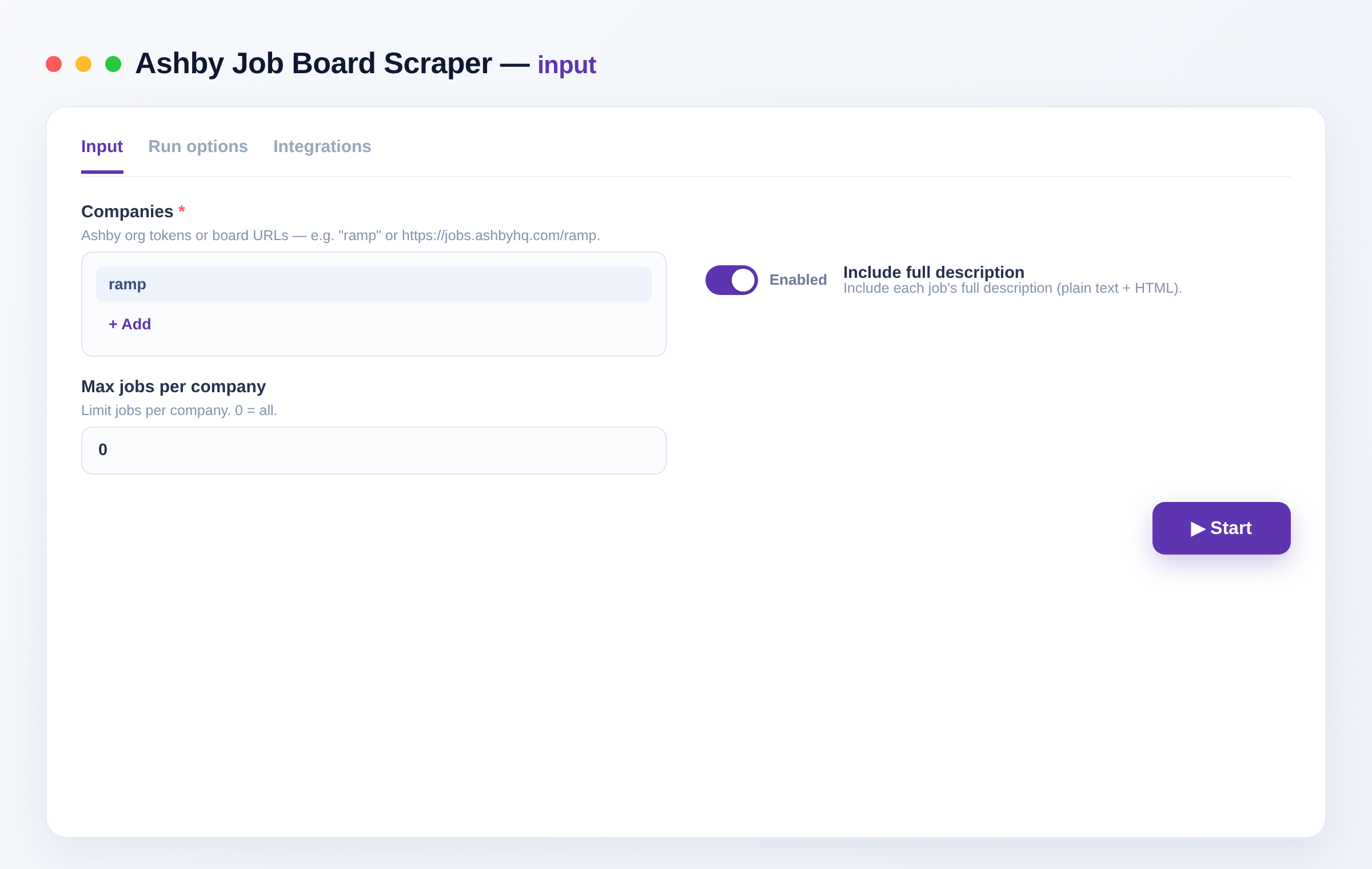
2. Enter one or more companies in `companies` — an Ashby token (e.g. `ramp`) or a full board URL.
3. Toggle `includeContent` to add each job's full description.
4. Set `maxJobsPerCompany` to cap results per company (0 = all).
5. Run the Actor and export the results as JSON, CSV, Excel or XML — or pull them via the API.
### Input
```json
{
"companies": ["ramp", "https://jobs.ashbyhq.com/notion"],
"includeContent": true,
"maxJobsPerCompany": 0
}
```
| Field | Description |
|-------|-------------|
| `companies` | Ashby company tokens or board URLs to scrape (e.g. `ramp` or `https://jobs.ashbyhq.com/notion`) — **required**. |
| `includeContent` | Include each job's full description (text + HTML). Default `true`. |
| `maxJobsPerCompany` | Maximum jobs to return per company. `0` = all. |
### Output
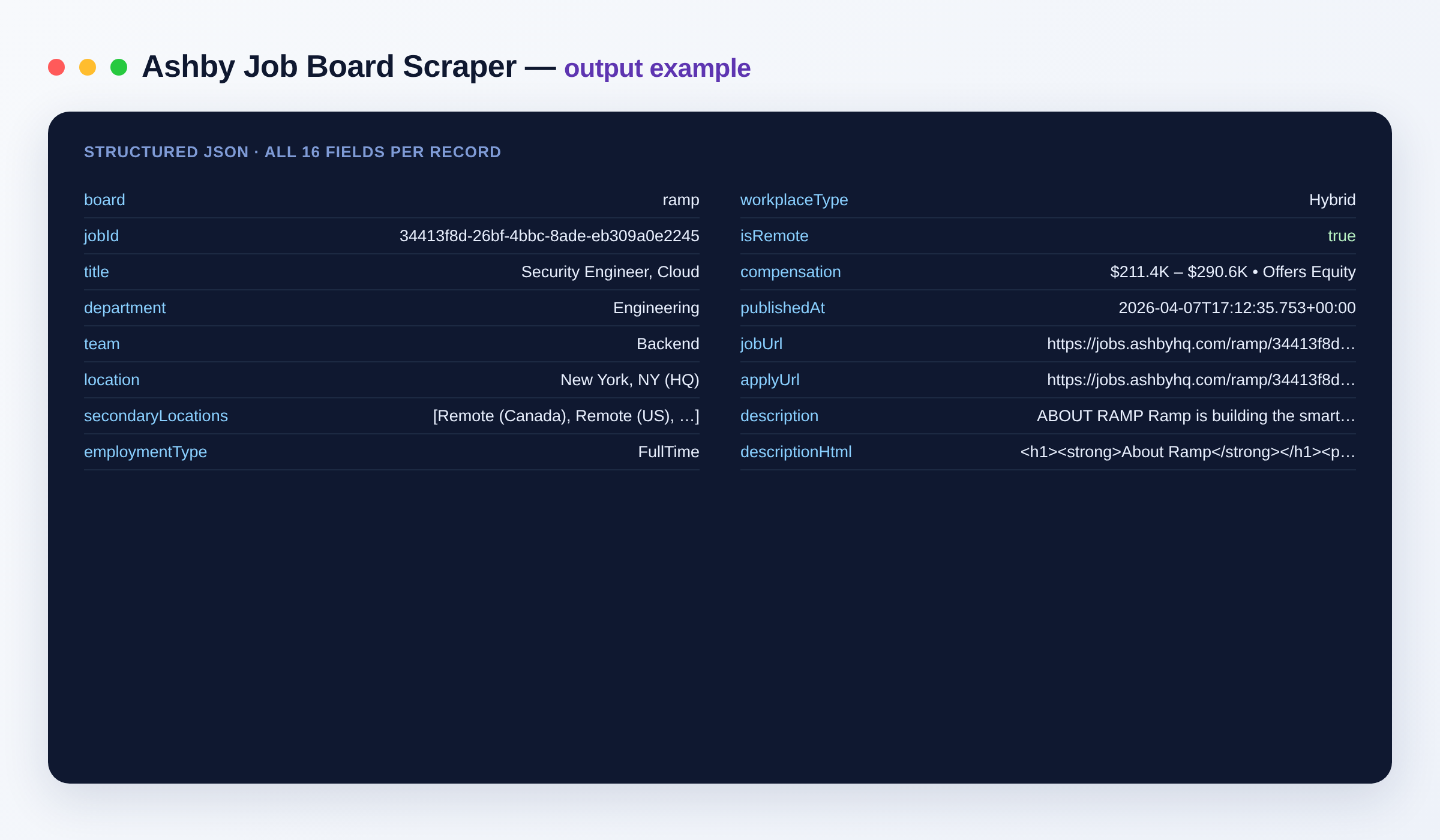
```json
{
"board": "ramp",
"jobId": "34413f8d-…",
"title": "Security Engineer, Cloud",
"department": "Engineering",
"team": "Security",
"location": "New York, NY (HQ)",
"secondaryLocations": ["San Francisco, CA", "Remote (US)"],
"employmentType": "FullTime",
"workplaceType": "Hybrid",
"isRemote": true,
"compensation": "$180K – $220K",
"publishedAt": "2026-07-15T09:14:00Z",
"jobUrl": "https://jobs.ashbyhq.com/ramp/34413f8d-…",
"applyUrl": "https://jobs.ashbyhq.com/ramp/34413f8d-…/application",
"description": "Full job description text… (when includeContent is on)",
"descriptionHtml": "Full job description as HTML…
"
}
```
#### Output schema
| Field | Type | Description |
|-------|------|-------------|
| `board` | string | Ashby company token the job belongs to. |
| `jobId` | string | Unique Ashby job listing ID. |
| `title` | string | Job title. |
| `department` | string | Department the role sits in. |
| `team` | string | Team within the department. |
| `location` | string | Primary job location. |
| `secondaryLocations` | array | Additional locations the role is open in. |
| `employmentType` | string | Employment type, e.g. FullTime, PartTime, Contract. |
| `workplaceType` | string | Workplace type, e.g. Remote, Hybrid, On-site. |
| `isRemote` | boolean | Whether the role is remote. |
| `compensation` | string | Published compensation range summary, when available. |
| `publishedAt` | string (ISO date) | When the role was published. |
| `jobUrl` | string (URL) | Direct URL to the job listing. |
| `applyUrl` | string (URL) | URL to apply for the role. |
| `description` | string | Full job description text (when `includeContent` is on). |
| `descriptionHtml` | string | Full job description as HTML (when `includeContent` is on). |
### Need more job data?
Combine Ashby with other job sources for wider coverage:
- [Greenhouse Job Board Scraper](https://apify.com/hipersoft/greenhouse-scraper) — jobs from Greenhouse careers boards.
- [Lever Job Board Scraper](https://apify.com/hipersoft/lever-scraper) — jobs from Lever careers boards.
- [Company Careers Job Scraper](https://apify.com/hipersoft/company-jobs-scraper) — roles from Greenhouse, Lever and Ashby boards in one run.
- [RemoteOK Job Scraper](https://apify.com/hipersoft/remoteok-scraper) — remote roles with tags and salary ranges.
### FAQ
**Where do I find a company's Ashby token?**
It's the slug in the careers URL — `jobs.ashbyhq.com/ramp` → `ramp`. A full board URL works too.
**Do I need an account or login?**
No. There's no setup and no login — just add one or more companies and run.
**How many jobs can I scrape per run?**
Use `maxJobsPerCompany` to cap results per company, or set `0` for all. Add more companies to `companies` for wider coverage.
**How does billing work?**
You pay per job you get, plus a small per-request charge — pay only for what you scrape.
**What's the output format?**
Structured JSON — one record per job with title, department, location, employment type, compensation, dates, links and (optionally) the full description. Export as JSON, CSV, Excel or XML.
**Is scraping Ashby job boards legal?**
Only public job data shown to any visitor on an Ashby careers page is collected. This is an independent tool, not affiliated with Ashby; check Ashby's and each company's terms and applicable regulations for your use case.
**Can I integrate this with other tools?**
The Ashby Job Board Scraper can be connected with almost any cloud service or web app thanks to [integrations on the Apify platform](https://apify.com/integrations). It works with [Make](https://apify.com/integrations/make), [Zapier](https://apify.com/integrations/zapier), [Slack](https://docs.apify.com/platform/integrations/slack), [Airbyte](https://docs.apify.com/platform/integrations/airbyte), [GitHub](https://docs.apify.com/platform/integrations/github), [Google Drive](https://docs.apify.com/platform/integrations/drive) and [many more](https://apify.com/integrations), plus the [Apify API](https://docs.apify.com/api/v2), JavaScript/Python clients and MCP. Or use [webhooks](https://docs.apify.com/platform/integrations/webhooks) to trigger an action whenever a run finishes.
### Related Actors
- [SmartRecruiters Job Scraper](https://apify.com/hipersoft/smartrecruiters-scraper) — jobs from SmartRecruiters career sites.
- [Personio Job Scraper](https://apify.com/hipersoft/personio-scraper) — jobs from Personio career pages.
- [Himalayas Remote Jobs Scraper](https://apify.com/hipersoft/himalayas-scraper) — remote roles with salaries worldwide.
- [Dice Jobs Scraper](https://apify.com/hipersoft/dice-scraper) — US tech jobs with salaries.
### Notes
Original clean-room implementation. Returns only public data; you are responsible for compliance with Ashby's and each company's terms. Not affiliated with Ashby.
# Actor input Schema
## `companies` (type: `array`):
Ashby org tokens or board URLs — e.g. "ramp" or https://jobs.ashbyhq.com/ramp.
## `includeContent` (type: `boolean`):
Include each job's full description (plain text + HTML).
## `maxJobsPerCompany` (type: `integer`):
Limit jobs per company. 0 = all.
## Actor input object example
```json
{
"companies": [
"ramp",
"notion"
],
"includeContent": true,
"maxJobsPerCompany": 0
}
```
# Actor output Schema
## `results` (type: `string`):
The scraped results as dataset items.
# API
You can run this Actor programmatically using our API. Below are code examples in JavaScript, Python, and CLI, as well as the OpenAPI specification and MCP server setup.
## JavaScript example
```javascript
import { ApifyClient } from 'apify-client';
// Initialize the ApifyClient with your Apify API token
// Replace the '' with your token
const client = new ApifyClient({
token: '',
});
// Prepare Actor input
const input = {
"companies": [
"ramp"
]
};
// Run the Actor and wait for it to finish
const run = await client.actor("hipersoft/ashby-scraper").call(input);
// Fetch and print Actor results from the run's dataset (if any)
console.log('Results from dataset');
console.log(`💾 Check your data here: https://console.apify.com/storage/datasets/${run.defaultDatasetId}`);
const { items } = await client.dataset(run.defaultDatasetId).listItems();
items.forEach((item) => {
console.dir(item);
});
// 📚 Want to learn more 📖? Go to → https://docs.apify.com/api/client/js/docs
```
## Python example
```python
from apify_client import ApifyClient
# Initialize the ApifyClient with your Apify API token
# Replace '' with your token.
client = ApifyClient("")
# Prepare the Actor input
run_input = { "companies": ["ramp"] }
# Run the Actor and wait for it to finish
run = client.actor("hipersoft/ashby-scraper").call(run_input=run_input)
# Fetch and print Actor results from the run's dataset (if there are any)
print(f"💾 Check your data here: https://console.apify.com/storage/datasets/{run.default_dataset_id}")
for item in client.dataset(run.default_dataset_id).iterate_items():
print(item)
# 📚 Want to learn more 📖? Go to → https://docs.apify.com/api/client/python/docs/quick-start
```
## CLI example
```bash
echo '{
"companies": [
"ramp"
]
}' |
apify call hipersoft/ashby-scraper --silent --output-dataset
```
## MCP server setup
```json
{
"mcpServers": {
"apify": {
"type": "http",
"url": "https://mcp.apify.com/?tools=fetch-actor-details,hipersoft/ashby-scraper"
}
}
}
```
The hosted server signs you in with OAuth on first connect, so no API token belongs in this config. Clients without OAuth support can send an `Authorization: Bearer ` header instead, using a token from API & Integrations in Apify Console (https://console.apify.com/settings/integrations).
## OpenAPI specification
Download the OpenAPI definition: https://api.apify.com/v2/actors/oX3NWPMzu6mbaJv5Z/builds/HTzlejiADvev51Nve/openapi.json