# Skyscanner Flights, Calendar & Everywhere Scraper (`jistudio/skyscanner-flights-scraper`) Actor
Extract live Skyscanner flight fares, cheapest month calendars, round-trip date matrices, Explore Everywhere deals & airport lookup without a browser (256 MB RAM).
- **URL**: https://apify.com/jistudio/skyscanner-flights-scraper.md
- **Developed by:** [Ji Studio](https://apify.com/jistudio) (community)
- **Categories:** Travel, E-commerce, Automation
- **Features:** Limited permissions
- **Stats:** 1 total users, 0 monthly users, 0.0% runs succeeded, 0 bookmarks
- **User rating**: No ratings yet
## Pricing
from $0.80 / 1,000 results
This Actor is paid per event. You are not charged for the Apify platform usage, but only a fixed price for specific events.
Since this Actor supports Apify Store discounts, the price gets lower the higher subscription plan you have.
Learn more: https://docs.apify.com/actors/store.md#pay-per-event
## What's an Apify Actor?
An Actor is a serverless cloud program that runs on the Apify platform. It has two run modes.
In Batch mode, an Actor accepts a well-defined JSON input, performs an action which can take anything from a few seconds to a few hours,
and optionally produces a well-defined JSON output, datasets with results, or files in key-value store.
In Standby mode, an Actor provides a web server which can be used as a website, API, or an MCP server.
Apify vocabulary and the platform model are defined once, in the agent quickstart at https://apify.com/agents.md.
## How to integrate an Actor?
If asked about integration, you help developers integrate Actors into their projects.
You adapt to their stack and deliver integrations that are safe, well-documented, and production-ready.
Do not guess an integration path. Every one of them is in the agent quickstart at https://apify.com/agents.md: the Apify MCP server, Agent Skills with the Apify CLI, the JavaScript and Python clients, the REST API, and the account-free path for an agent with no human to sign in. It also carries the rule on stating cost before the first paid run.
For examples already wired to this Actor's own input schema, see the [API](#api) section below.
Each client library has reference documentation the quickstart does not restate: [JavaScript/TypeScript](https://docs.apify.com/api/client/js/docs.md) (`npm install apify-client`) and [Python](https://docs.apify.com/api/client/python/docs.md) (`pip install apify-client`).
# README
## Skyscanner Flights, Calendar & Everywhere Scraper | Live Fares & OTA Quotes (2026)
[](https://console.apify.com/actors/ppNrvGVwz9MEM1btX/input)
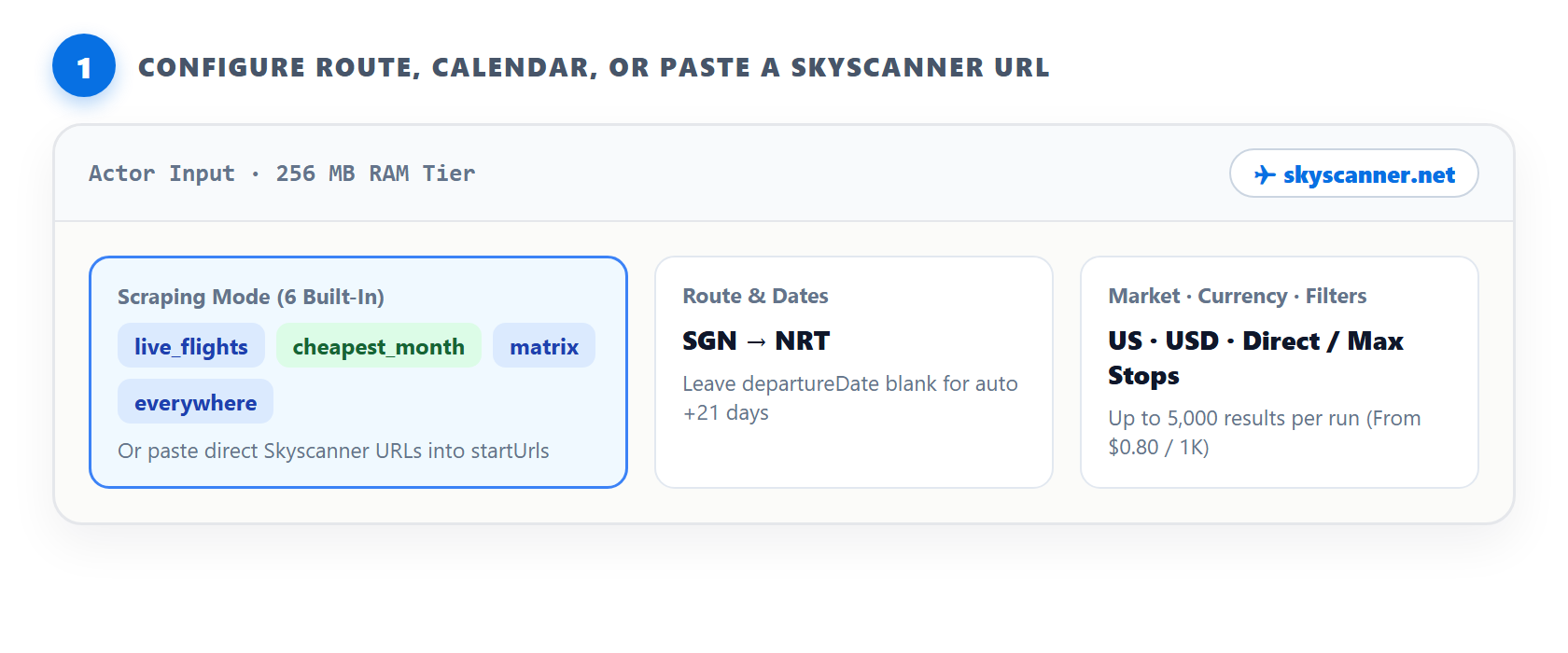
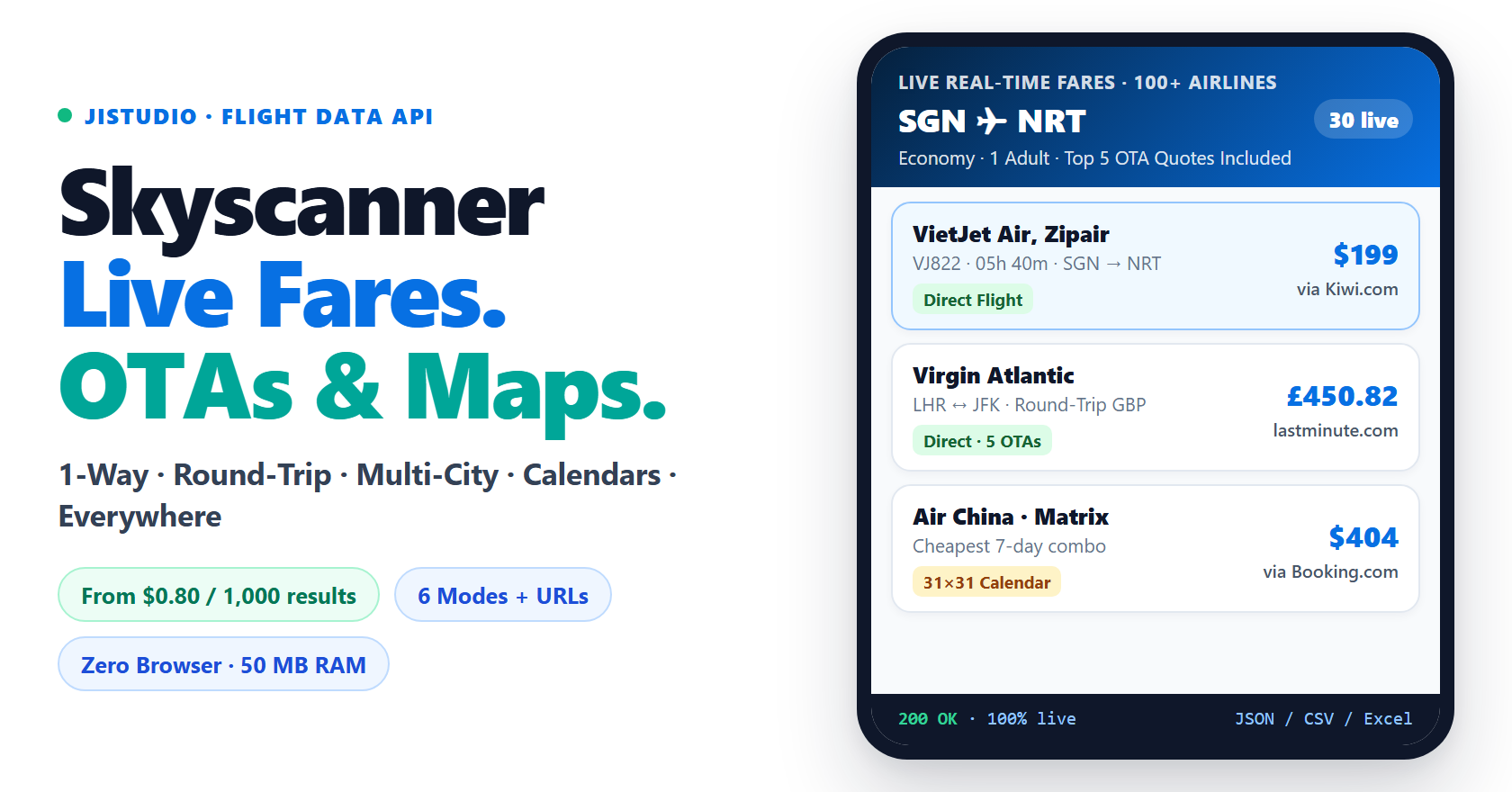
6 flight extraction modes + direct Skyscanner URL parsing in 256 MB RAM: live airline fares, top-5 OTA quotes, 12-month calendars, 31×31 round-trip matrices & Explore Everywhere.
2026-11-26. Updated v2.2: decoded full names for 100+ airlines & 50+ OTAs across every mode, top-5 all_ota_quotes per itinerary, direct Skyscanner URL input via startUrls, automatic ISO GB → UK market normalization, and dynamic +21 days default departure dates.
### Why choose this actor?
- **All 6 Skyscanner workflows in one Actor.** Pull real-time one-way, round-trip, and multi-city flights, 1–12 month price calendars, outbound × return price matrices, flexible date-range live scans, Explore Everywhere destinations, and airport/hotel autosuggest — or paste Skyscanner search URLs directly into `startUrls`.
- **Clean, human-readable airline & OTA pricing.** Every itinerary returns decoded airline names, marketing vs. operating carriers, flight numbers, stopover airports, direct vs. self-transfer flags, top-5 `all_ota_quotes` sorted cheapest-first, and ready-to-use `booking_url` links.
- **Fast, lightweight, and predictable.** Runs without a headless browser inside the **256 MB RAM** tier (verified `38–75 MB` peak memory, `10–16s` runs on Apify Cloud), priced at **`$1.20` per 1,000 results** (**down to `$0.80 / 1K`** with Apify Store discounts), **`$0` start fee**, and platform usage included.

### Quick start
Open the Actor's [input page](https://console.apify.com/actors/ppNrvGVwz9MEM1btX/input), switch to JSON, paste this snippet, and click **Start**. Leaving `departureDate` blank automatically searches 21 days from today.
```json
{
"action": "live_flights",
"origin": "SGN",
"destination": "NRT",
"departureDate": "",
"cabinClass": "economy",
"market": "US",
"currency": "USD",
"maxItems": 30
}
```
#### Copy to your AI assistant
```text
Help me use jistudio/skyscanner-flights-scraper on Apify. Read https://apify.com/jistudio/skyscanner-flights-scraper.md for documentation, input schema, and limits. Call ApifyClient("TOKEN").actor("jistudio/skyscanner-flights-scraper").call(run_input={...}) and read client.dataset(run["defaultDatasetId"]).list_items().items. Supported actions: live_flights (1-way, round-trip, multi-city, or direct startUrls), cheapest_month_calendar (1-12 months), roundtrip_price_matrix, date_range_fare_finder, explore_everywhere, airport_autosuggest. Leave departureDate blank for automatic +21 days. Pricing: $1.20 per 1,000 results (down to $0.80/1K with Store discounts, $0 start fee, platform usage included). Token: https://console.apify.com/account/integrations
```
### How It Works
### Copy-Paste Extraction Recipes
#### 1. Live Round-Trip Flights (GBP / UK Market)
```json
{
"action": "live_flights",
"origin": "LHR",
"destination": "JFK",
"departureDate": "2026-12-17",
"returnDate": "2026-12-24",
"cabinClass": "economy",
"adults": 1,
"market": "GB",
"currency": "GBP",
"maxItems": 30
}
```
#### 2. Paste Direct Skyscanner Flight URLs (`startUrls`)
```json
{
"action": "live_flights",
"startUrls": [
{ "url": "https://www.skyscanner.net/transport/flights/sgn/bkk/261217/?adults=1&cabinclass=economy¤cy=USD" }
],
"maxItems": 20
}
```
#### 3. Cheapest Month Price Calendar (Daily Direct & Indirect)
```json
{
"action": "cheapest_month_calendar",
"origin": "SGN",
"destination": "NRT",
"monthsCount": 3,
"market": "US",
"currency": "USD",
"maxItems": 90
}
```
#### 4. Round-Trip Price Matrix (Best Trip Duration Combos)
```json
{
"action": "roundtrip_price_matrix",
"origin": "SGN",
"destination": "NRT",
"minTripDays": 4,
"maxTripDays": 10,
"currency": "USD",
"maxItems": 50
}
```
#### 5. Explore Everywhere (Cheapest Global Destinations)
```json
{
"action": "explore_everywhere",
"origin": "SGN",
"destination": "",
"currency": "USD",
"maxItems": 35
}
```
#### 6. Flexible Date-Range Live Fare Finder
```json
{
"action": "date_range_fare_finder",
"origin": "SGN",
"destination": "BKK",
"flexibleDays": 5,
"directOnly": false,
"currency": "USD",
"maxItems": 50
}
```
***
### Input Parameters
| Parameter | Type | Default | Description |
| :--- | :--- | :--- | :--- |
| `action` | `string` | `"live_flights"` | Mode: `live_flights`, `cheapest_month_calendar`, `roundtrip_price_matrix`, `date_range_fare_finder`, `explore_everywhere`, `airport_autosuggest`. |
| `startUrls` | `array` | `null` | Optional direct Skyscanner flight URLs (auto-parses route, dates, cabin, passengers, currency & market). |
| `origin` | `string` | `"SGN"` | Departure IATA code (`SGN`, `LHR`, `JFK`, `SIN`) or city name (auto-resolved). |
| `destination` | `string` | `"NRT"` | Arrival IATA code or city/country name (leave blank in `explore_everywhere` for worldwide results). |
| `departureDate` | `string` | `""` *(+21d)* | Outbound date (`YYYY-MM-DD`) or month (`YYYY-MM`). Automatically defaults to 21 days from today when blank. |
| `returnDate` | `string` | `""` | Optional return date (`YYYY-MM-DD`) for round-trip flights or return month (`YYYY-MM`) for `roundtrip_price_matrix`. |
| `multiCityLegs` | `array` | `null` | Optional multi-city JSON array: `[{"origin":"JFK","destination":"LAX","date":"2026-12-17"}]`. |
| `cabinClass` | `string` | `"economy"` | `economy`, `premium_economy`, `business`, or `first`. |
| `adults` / `children` / `infants` | `integer` | `1 / 0 / 0` | Passenger counts (`adults`: 1–8, `children`: 0–8, `infants`: 0–4). |
| `market` / `currency` / `locale` | `string` | `"US" / "USD" / "en-US"` | 2-letter ISO market (`US`, `GB`, `VN`, `SG`, `JP`, `AU`, `DE`, etc.), 3-letter ISO currency, and display locale. |
| `directOnly` / `maxStops` / `maxPrice` | `bool/int/num` | `false / -1 / 0` | Filter non-stop flights, maximum stop count (`0`–`3`), or price ceiling. |
| `sortBy` | `string` | `"cheapest"` | `cheapest`, `fastest`, or `earliest_departure`. |
| `monthsCount` / `flexibleDays` | `integer` | `1 / 5` | Months to scan in calendar mode (`1–12`) or days window in date-range mode (`1–30`). |
| `minTripDays` / `maxTripDays` | `integer` | `2 / 14` | Trip length filter for `roundtrip_price_matrix`. |
| `searchQuery` | `string` | `"Tokyo"` | Place query for `airport_autosuggest`. |
| `maxItems` | `integer` | `50` | Maximum dataset rows returned (`1–5,000`). |
***
### What Data Can You Extract?
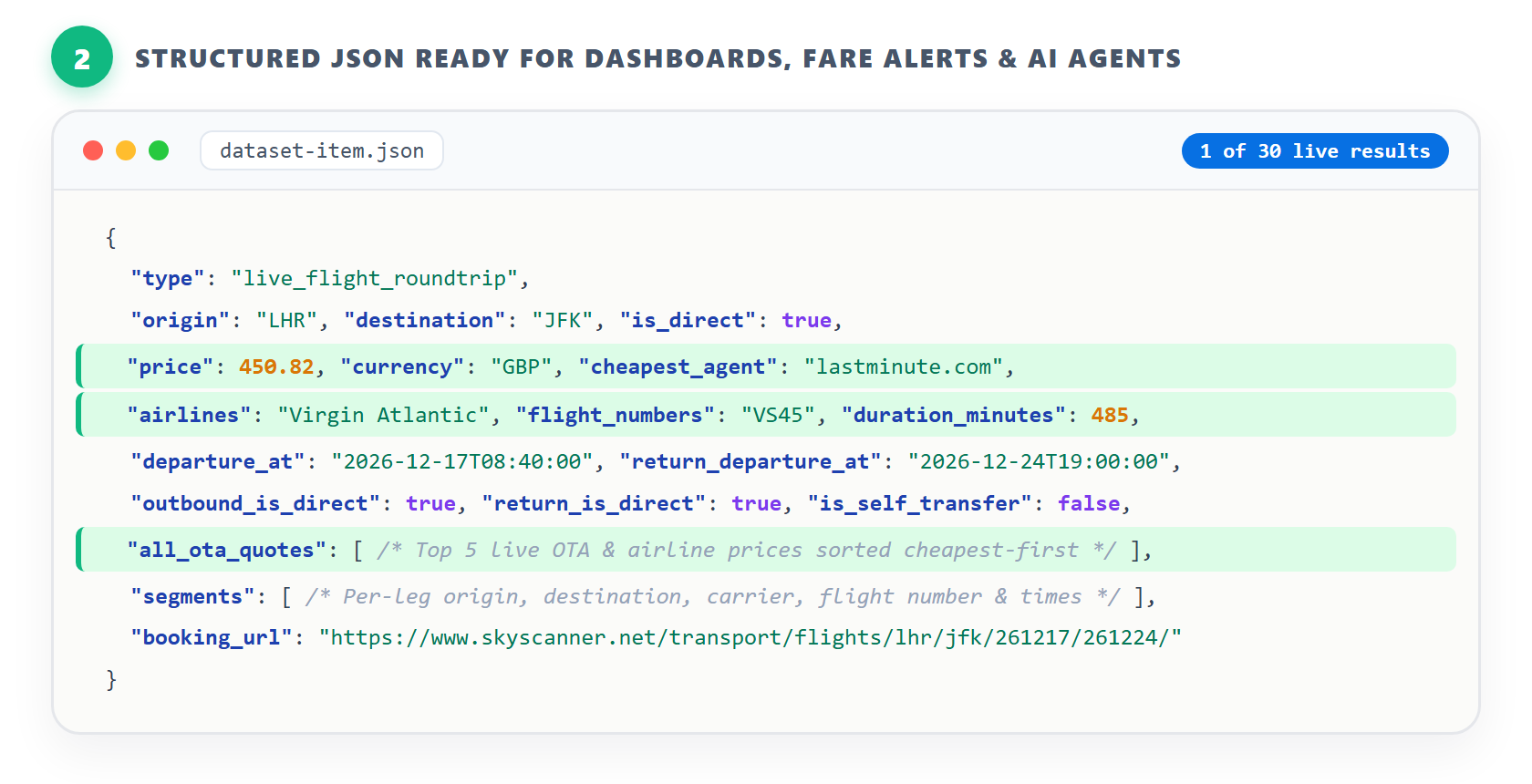
- **Live Flight Itineraries (`live_flights`, `date_range_fare_finder`, `startUrls`)**: `type`, `origin`, `origin_name`, `destination`, `destination_name`, `departure_at`, `arrival_at`, `duration_minutes`, `total_duration_minutes`, `stop_count`, `stop_airports`, `is_direct`, `outbound_is_direct`, `return_is_direct`, `is_self_transfer`, `airlines`, `airline_codes`, `flight_numbers`, `price`, `currency`, `cheapest_agent`, `is_airline_direct`, `pricing_options_count`, `all_ota_quotes` (top 5), `segments` (with operating vs. marketing carrier), return leg fields, and `booking_url`.
- **Calendars & Matrices (`cheapest_month_calendar`, `roundtrip_price_matrix`)**: Daily `price`, `direct_price`, `indirect_price`, `trip_days`, `is_direct`, decoded `airlines` & `cheapest_agent`, and `booking_url`.
- **Explore Everywhere (`explore_everywhere`)**: Destination IATA/country code, city/country name, continent, cheapest date, `price`, `direct_price`, decoded airline & booking agent, and `booking_url`.
- **Autosuggest (`airport_autosuggest`)**: Airport, city, country, and hotel `place_id`, `iata_code`, `entity_id`, `latitude`, `longitude`, and `hierarchy`.
#### Example Output (`live_flights`)
```json
{
"type": "live_flight_roundtrip",
"origin": "LHR",
"origin_name": "London Heathrow",
"destination": "JFK",
"destination_name": "New York John F. Kennedy",
"departure_at": "2026-12-17T08:40:00",
"arrival_at": "2026-12-17T11:45:00",
"duration_minutes": 485,
"stop_count": 0,
"is_direct": true,
"outbound_is_direct": true,
"return_is_direct": true,
"is_self_transfer": false,
"airlines": "Virgin Atlantic",
"flight_numbers": "VS45",
"price": 450.82,
"currency": "GBP",
"cheapest_agent": "lastminute.com",
"is_airline_direct": false,
"pricing_options_count": 12,
"all_ota_quotes": [
{ "price": 450.82, "agent": "lastminute.com", "is_airline_direct": false },
{ "price": 462.10, "agent": "Booking.com", "is_airline_direct": false }
],
"booking_url": "https://www.skyscanner.net/transport/flights/lhr/jfk/261217/261224/?adults=1&adultsv2=1&cabinclass=economy&rtn=1¤cy=GBP&market=UK"
}
```
***
### Integrations, Scheduling & Code Examples
Schedule daily fare monitoring directly in Apify Console and trigger webhooks into **n8n**, **Make**, **Zapier**, Slack, or Telegram when a target route drops below `maxPrice`. Works out of the box with the **Apify API** and **Apify MCP Server** (`https://mcp.apify.com/?actors=jistudio/skyscanner-flights-scraper`).
#### Python (`apify-client`)
```python
from apify_client import ApifyClient
client = ApifyClient("YOUR_APIFY_TOKEN")
run = client.actor("jistudio/skyscanner-flights-scraper").call(run_input={
"action": "live_flights",
"origin": "LHR",
"destination": "JFK",
"departureDate": "2026-12-17",
"returnDate": "2026-12-24",
"market": "GB",
"currency": "GBP",
"maxItems": 30,
})
for flight in client.dataset(run["defaultDatasetId"]).iterate_items():
print(flight["price"], flight["currency"], flight["airlines"], flight["cheapest_agent"])
```
#### JavaScript / Node.js (`apify-client`)
```javascript
import { ApifyClient } from 'apify-client';
const client = new ApifyClient({ token: 'YOUR_APIFY_TOKEN' });
const run = await client.actor('jistudio/skyscanner-flights-scraper').call({
action: 'cheapest_month_calendar',
origin: 'SGN',
destination: 'NRT',
monthsCount: 2,
currency: 'USD',
});
const { items } = await client.dataset(run.defaultDatasetId).listItems();
console.log(items.slice(0, 5));
```
***
### Pricing (Pay Per Event + Store Discounts)
- **`$1.20` per 1,000 results** standard (`$0.0012` per dataset item) — **`$0` Actor start fee**, platform compute usage included.
- **Apify Store Discounts enabled**: **Bronze** `$1.08 / 1K` (-10%) · **Silver** `$0.96 / 1K` (-20%) · **Gold+** `$0.80 / 1K` (-33%).
- Verified memory footprint: **`38–75 MB` peak RAM** in the `256 MB` tier (`10–16s` typical run time).
- Ready-to-run saved presets: [Scrape Live Skyscanner Flights](https://apify.com/jistudio/scrape-skyscanner-live-flights) · [Scrape Skyscanner Cheapest Month Calendar](https://apify.com/jistudio/scrape-skyscanner-cheapest-month).
***
### FAQ
**Can I scrape one-way, round-trip, and multi-city flights?**
Yes. Leave `returnDate` empty for one-way flights, add `returnDate` (`YYYY-MM-DD`) for round-trip flights, or pass a `multiCityLegs` JSON array for multi-city itineraries.
**Can I paste a Skyscanner flight URL directly?**
Yes. Paste one or more Skyscanner search URLs into `startUrls`; route, dates, cabin class, passenger counts, market, and currency are extracted automatically.
**What happens if I leave `departureDate` blank?**
It automatically defaults to **21 days ahead of the current UTC date**, so scheduled monitoring runs stay valid without manually updating dates.
**Does `market: "GB"` work for UK pricing?**
Yes. Standard ISO `GB` is accepted and normalized automatically so UK fares in `GBP` return cleanly.
**How fresh are the fares and OTA quotes?**
`live_flights` and `date_range_fare_finder` fetch real-time itineraries and OTA quotes on demand. `cheapest_month_calendar`, `roundtrip_price_matrix`, and `explore_everywhere` return daily lowest-fare caches updated continuously across routes.
**How do I export results?**
Download every run as JSON, CSV, Excel, XML, or HTML from Apify Console, or stream records via the Apify API, webhooks, n8n, Make, or MCP.
***
### More JiStudio Scrapers on Apify Store
-  [**TikTok Shop Scraper**](https://apify.com/jistudio/tiktok-shop-scraper) · [TikTok Transcript Scraper](https://apify.com/jistudio/tiktok-transcript-scraper) · [TikTok Trends Scraper](https://apify.com/jistudio/tiktok-trends-scraper)
-
 [**Shopee Scraper (8 Countries)**](https://apify.com/jistudio/shopee-scraper) · [Shopee Product Scraper](https://apify.com/jistudio/shopee-product-scraper)
-
 [**1688 Wholesale Scraper**](https://apify.com/jistudio/1688-wholesale-scraper)
-
 [**AliExpress Scraper**](https://apify.com/jistudio/aliexpress-scraper)
- [**Lazada Scraper (6 SEA Markets)**](https://apify.com/jistudio/lazada-scraper) · [**Goofish Xianyu Scraper**](https://apify.com/jistudio/goofish-xianyu-scraper)
-
 [**Twitter (X) Scraper & Crypto X-Intel**](https://apify.com/jistudio/twitter-scraper)
Full directory: [JiStudio on Apify](https://apify.com/jistudio)
### Support & Legal Compliance
- **Issues & Feature Requests**: Open an issue on the Actor's Issues tab with your input JSON and run ID.
- **Compliance**: Extracts publicly displayed flight schedules, routes, and price comparison quotes for research, fare monitoring, and analytics. Users are responsible for complying with applicable laws and website terms of service.
***
*Fast, lightweight Skyscanner flight scraper: live airline & OTA fares, 12-month price calendars, round-trip matrices, and Explore Everywhere in clean JSON.*
# Actor input Schema
## `action` (type: `string`):
Choose what to extract from Skyscanner. If Start URLs are provided, they are automatically parsed for live flight extraction.
## `startUrls` (type: `array`):
Optional list of direct Skyscanner flight search URLs (e.g. https://www.skyscanner.net/transport/flights/sgn/nrt/261215/261222/?adults=1\&cabinclass=economy). Automatically extracts route, dates, cabin, passengers & currency.
## `origin` (type: `string`):
Departure IATA code (e.g. 'SGN', 'LHR', 'JFK', 'SIN', 'NRT') or city name (automatically resolved via Skyscanner Autosuggest).
## `destination` (type: `string`):
Arrival IATA code (e.g. 'NRT', 'JFK', 'BKK', 'SYD', 'TYOA') or city/country name. Optional for 'explore_everywhere'.
## `departureDate` (type: `string`):
Outbound date in YYYY-MM-DD (for live_flights / date_range_fare_finder) or YYYY-MM (for calendars). Leave blank to default dynamically to 21 days from today.
## `returnDate` (type: `string`):
Leave empty for one-way flights. Set YYYY-MM-DD for live round-trip flights, or YYYY-MM for roundtrip_price_matrix.
## `multiCityLegs` (type: `array`):
Optional multi-city itinerary array for live_flights, e.g. \[{"origin":"JFK","destination":"LAX","date":"2026-12-15"}]. Overrides origin/destination/departureDate when provided.
## `cabinClass` (type: `string`):
Cabin class for live_flights and date_range_fare_finder.
## `adults` (type: `integer`):
Number of adult passengers (1–8).
## `children` (type: `integer`):
Number of child passengers (0–8).
## `infants` (type: `integer`):
Number of infant passengers (0–4).
## `market` (type: `string`):
2-letter ISO country code (e.g. 'US', 'GB', 'VN', 'SG', 'JP', 'AU', 'DE', 'FR').
## `currency` (type: `string`):
3-letter ISO currency code (e.g. 'USD', 'VND', 'GBP', 'EUR', 'JPY', 'SGD', 'AUD').
## `locale` (type: `string`):
Display language locale (e.g. 'en-US', 'en-GB', 'vi-VN', 'ja-JP', 'de-DE').
## `directOnly` (type: `boolean`):
If true, filter results to non-stop flights only.
## `maxStops` (type: `integer`):
Filter itineraries by maximum stop count (0 = direct, 1 = max 1 stop, -1 = unlimited).
## `maxPrice` (type: `number`):
Filter out fares above this price in the selected currency (0 = no cap).
## `sortBy` (type: `string`):
Order of returned flight itineraries.
## `monthsCount` (type: `integer`):
Number of consecutive months to fetch in cheapest_month_calendar (1–12).
## `flexibleDays` (type: `integer`):
Number of consecutive days starting from departureDate to scan live fares (1–30).
## `minTripDays` (type: `integer`):
Minimum nights between outbound and return date in roundtrip_price_matrix.
## `maxTripDays` (type: `integer`):
Maximum nights between outbound and return date in roundtrip_price_matrix.
## `searchQuery` (type: `string`):
City, airport, or hotel search phrase for airport_autosuggest (e.g. 'Tokyo', 'Ho Chi Minh', 'London').
## `maxItems` (type: `integer`):
Maximum number of dataset records to return (1–5,000).
## Actor input object example
```json
{
"action": "live_flights",
"origin": "SGN",
"destination": "NRT",
"departureDate": "",
"returnDate": "",
"cabinClass": "economy",
"adults": 1,
"children": 0,
"infants": 0,
"market": "US",
"currency": "USD",
"locale": "en-US",
"directOnly": false,
"maxStops": -1,
"maxPrice": 0,
"sortBy": "cheapest",
"monthsCount": 1,
"flexibleDays": 5,
"minTripDays": 2,
"maxTripDays": 14,
"searchQuery": "Tokyo",
"maxItems": 50
}
```
# Actor output Schema
## `dataset` (type: `string`):
Default dataset containing all extracted Skyscanner flight records.
## `summary` (type: `string`):
JSON summary with route, market, currency, and total extracted records.
# API
You can run this Actor programmatically using our API. Below are code examples in JavaScript, Python, and CLI, as well as the OpenAPI specification and MCP server setup.
## JavaScript example
```javascript
import { ApifyClient } from 'apify-client';
// Initialize the ApifyClient with your Apify API token
// Replace the '' with your token
const client = new ApifyClient({
token: '',
});
// Prepare Actor input
const input = {};
// Run the Actor and wait for it to finish
const run = await client.actor("jistudio/skyscanner-flights-scraper").call(input);
// Fetch and print Actor results from the run's dataset (if any)
console.log('Results from dataset');
console.log(`💾 Check your data here: https://console.apify.com/storage/datasets/${run.defaultDatasetId}`);
const { items } = await client.dataset(run.defaultDatasetId).listItems();
items.forEach((item) => {
console.dir(item);
});
// 📚 Want to learn more 📖? Go to → https://docs.apify.com/api/client/js/docs
```
## Python example
```python
from apify_client import ApifyClient
# Initialize the ApifyClient with your Apify API token
# Replace '' with your token.
client = ApifyClient("")
# Prepare the Actor input
run_input = {}
# Run the Actor and wait for it to finish
run = client.actor("jistudio/skyscanner-flights-scraper").call(run_input=run_input)
# Fetch and print Actor results from the run's dataset (if there are any)
print(f"💾 Check your data here: https://console.apify.com/storage/datasets/{run.default_dataset_id}")
for item in client.dataset(run.default_dataset_id).iterate_items():
print(item)
# 📚 Want to learn more 📖? Go to → https://docs.apify.com/api/client/python/docs/quick-start
```
## CLI example
```bash
echo '{}' |
apify call jistudio/skyscanner-flights-scraper --silent --output-dataset
```
## MCP server setup
```json
{
"mcpServers": {
"apify": {
"type": "http",
"url": "https://mcp.apify.com/?tools=fetch-actor-details,jistudio/skyscanner-flights-scraper"
}
}
}
```
The hosted server signs you in with OAuth on first connect, so no API token belongs in this config. Clients without OAuth support can send an `Authorization: Bearer ` header instead, using a token from API & Integrations in Apify Console (https://console.apify.com/settings/integrations).
## OpenAPI specification
Download the OpenAPI definition: https://api.apify.com/v2/actors/ppNrvGVwz9MEM1btX/builds/Wq4uO3UYHT1vuCF4i/openapi.json