# Pinterest Explorer 📌
💫 All-in-One Pinterest.com Scraper
## Actor Statistics
- Total users: 287
- Monthly users: 29
- Runs succeeded: 92.54%
- Categories: Social media, Videos
## Pricing
$30.00/month + usage
## Input Schema
- **query** (type: array): Possible Values :
KEYWORDS@USERNAME\[/BOARD]#IDEASPIN\_IDPIN\_ID/commentsPIN\_ID/relatedPIN\_ID/visualURL
- **limit** (type: integer): 💡 Number of results (per-query)
- **domains** (type: array): 💡 examples: "ebay.com", "amazon.com", "etsy.com"
- **price\_min** (type: integer): No description
- **price\_max** (type: integer): No description
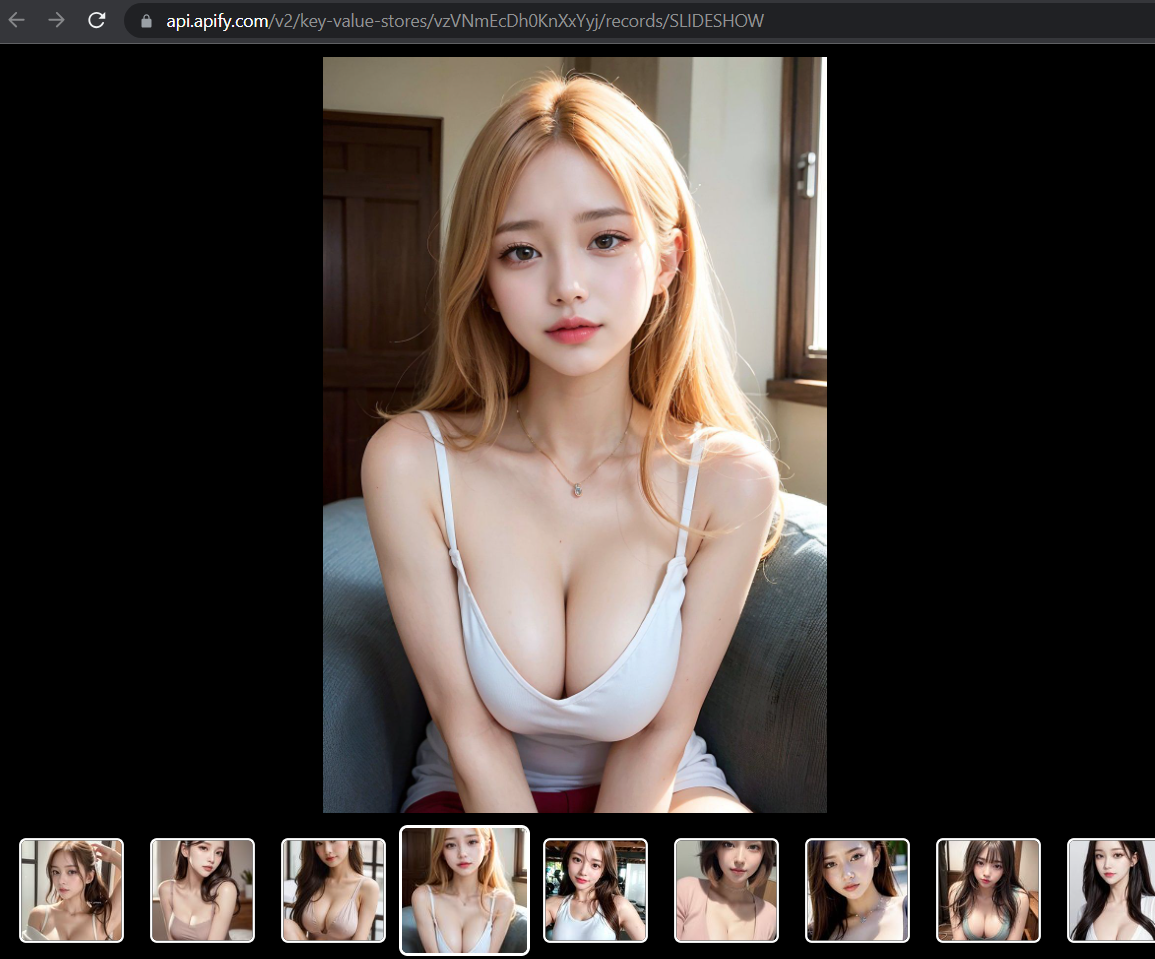
- **gallery** (type: boolean): 💡 Generate simple HTML gallery (HTML5 + CSS3). The gallery will be saved to default Key-Value storage
- **dev\_proxy\_config** (type: object): 💡 Supported protocol:
HTTP(S), SOCKS5
{http|socks5}://{user:pass}@{hostname|ip-address}:port
Example: socks5://example.com:9000
- **dev\_custom\_headers** (type: array): 💡 Additional HTTP Headers
- **dev\_custom\_cookies** (type: array): 💡 Additional HTTP Cookies
- **dev\_transform\_fields** (type: array): 💡 Transform the resulting output. Select only needed fields.
For nested object use DOT. For example: address.streetAddress
For nested array use NUMBER (index of array element starting from index=0). For example: images.0.url
- **dev\_dataset\_name** (type: string): 💡 Save results into custom named Dataset, use mask to customize dataset name
{ACTOR} = actor name
{DATE} = date (YYYYMMDD)
{TIME} = time (HHMMSS)
This masks can be used to autogenerate Dataset Name.
example: data-{DATE}
Depending on today date the dataset name will be: data-20230603
default: data-{ACTOR}-{DATE}-{TIME}
- **dev\_dataset\_clear** (type: boolean): Clear Dataset before insert/update.
- **dev\_no\_strip** (type: boolean): 💡 Keep/Save empty values (NULL, FALSE, empty ARRAY, empty OBJECT, empty STRING)
## API example
## Pinterest Explorer 📌
- **OpenAPI Version:** `3.1.1`
- **API Version:** `0.3`
💫 All-in-One Pinterest.com Scraper
### Servers
- **URL:** `https://api.apify.com/v2`
### Operations
#### Executes an Actor, waits for its completion, and returns Actor's dataset items in response.
- **Method:** `POST`
- **Path:** `/acts/jupri~pinterest-explorer/run-sync-get-dataset-items`
- **Tags:** Run Actor
##### Request Body
###### Content-Type: application/json
- **`query` (required)**
`array` — \Possible Values :\\
\
\\\KEYWORDS\\@USERNAME\[/BOARD]\\#IDEAS\\PIN\_ID\\PIN\_ID/comments\\PIN\_ID/related\\PIN\_ID/visual\\URL\\\\
**Items:**
`string`
- **`dev_custom_cookies`**
`array` — 💡 Additional HTTP Cookies
**Items:**
- **`key` (required)**
`string`
- **`value` (required)**
`string`
- **`dev_custom_headers`**
`array` — 💡 Additional HTTP Headers
**Items:**
- **`key` (required)**
`string`
- **`value` (required)**
`string`
- **`dev_dataset_clear`**
`boolean` — Clear Dataset before insert/update.
- **`dev_dataset_name`**
`string` — 💡 \Save results into custom named Dataset, use mask to customize dataset name\\
\
\{ACTOR} = actor name\
{DATE} = date (YYYYMMDD)\
{TIME} = time (HHMMSS)\\
\
This masks can be used to autogenerate Dataset Name.\
\
example: \\data-{DATE}\\\
Depending on today date the dataset name will be: \data-20230603\\\
\
default: \data-{ACTOR}-{DATE}-{TIME}\\
- **`dev_no_strip`**
`boolean` — 💡 Keep/Save empty values \\(NULL, FALSE, empty ARRAY, empty OBJECT, empty STRING)\\
- **`dev_proxy_config`**
`object` — 💡 \Supported protocol:\\
\
\HTTP(S), SOCKS5\\
\{http|socks5}://{user:pass}@{hostname|ip-address}:port\\
\
\Example\: \socks5://example.com:9000\
- **`dev_transform_fields`**
`array` — 💡 \Transform the resulting output. Select only needed fields.\\
\
For nested object use \DOT\. For example: \address.streetAddress\
\
For nested array use \NUMBER\ \(index of array element starting from index=0)\. For example: \images.0.url\
**Items:**
- **`key` (required)**
`string`
- **`value` (required)**
`string`
- **`domains`**
`array` — 💡 \\examples:\\ \"ebay.com"\, \"amazon.com"\, \"etsy.com"\
**Items:**
`string`
- **`gallery`**
`boolean` — 💡 Generate simple HTML gallery (HTML5 + CSS3). The gallery will be saved to default \Key-Value\ storage
- **`limit`**
`integer` — 💡 Number of results (per-query)
- **`price_max`**
`integer`
- **`price_min`**
`integer`
**Example:**
```
{
"query": [
""
],
"limit": 1,
"domains": [
""
],
"price_min": 1,
"price_max": 1,
"gallery": true,
"dev_proxy_config": {},
"dev_custom_headers": [
{
"key": "",
"value": ""
}
],
"dev_custom_cookies": [
{
"key": "",
"value": ""
}
],
"dev_transform_fields": [
{
"key": "",
"value": ""
}
],
"dev_dataset_name": "",
"dev_dataset_clear": true,
"dev_no_strip": true
}
```
##### Responses
###### Status: 200 OK
#### Executes an Actor and returns information about the initiated run in response.
- **Method:** `POST`
- **Path:** `/acts/jupri~pinterest-explorer/runs`
- **Tags:** Run Actor
##### Request Body
###### Content-Type: application/json
- **`query` (required)**
`array` — \Possible Values :\\
\
\\\KEYWORDS\\@USERNAME\[/BOARD]\\#IDEAS\\PIN\_ID\\PIN\_ID/comments\\PIN\_ID/related\\PIN\_ID/visual\\URL\\\\
**Items:**
`string`
- **`dev_custom_cookies`**
`array` — 💡 Additional HTTP Cookies
**Items:**
- **`key` (required)**
`string`
- **`value` (required)**
`string`
- **`dev_custom_headers`**
`array` — 💡 Additional HTTP Headers
**Items:**
- **`key` (required)**
`string`
- **`value` (required)**
`string`
- **`dev_dataset_clear`**
`boolean` — Clear Dataset before insert/update.
- **`dev_dataset_name`**
`string` — 💡 \Save results into custom named Dataset, use mask to customize dataset name\\
\
\{ACTOR} = actor name\
{DATE} = date (YYYYMMDD)\
{TIME} = time (HHMMSS)\\
\
This masks can be used to autogenerate Dataset Name.\
\
example: \\data-{DATE}\\\
Depending on today date the dataset name will be: \data-20230603\\\
\
default: \data-{ACTOR}-{DATE}-{TIME}\\
- **`dev_no_strip`**
`boolean` — 💡 Keep/Save empty values \\(NULL, FALSE, empty ARRAY, empty OBJECT, empty STRING)\\
- **`dev_proxy_config`**
`object` — 💡 \Supported protocol:\\
\
\HTTP(S), SOCKS5\\
\{http|socks5}://{user:pass}@{hostname|ip-address}:port\\
\
\Example\: \socks5://example.com:9000\
- **`dev_transform_fields`**
`array` — 💡 \Transform the resulting output. Select only needed fields.\\
\
For nested object use \DOT\. For example: \address.streetAddress\
\
For nested array use \NUMBER\ \(index of array element starting from index=0)\. For example: \images.0.url\
**Items:**
- **`key` (required)**
`string`
- **`value` (required)**
`string`
- **`domains`**
`array` — 💡 \\examples:\\ \"ebay.com"\, \"amazon.com"\, \"etsy.com"\
**Items:**
`string`
- **`gallery`**
`boolean` — 💡 Generate simple HTML gallery (HTML5 + CSS3). The gallery will be saved to default \Key-Value\ storage
- **`limit`**
`integer` — 💡 Number of results (per-query)
- **`price_max`**
`integer`
- **`price_min`**
`integer`
**Example:**
```
{
"query": [
""
],
"limit": 1,
"domains": [
""
],
"price_min": 1,
"price_max": 1,
"gallery": true,
"dev_proxy_config": {},
"dev_custom_headers": [
{
"key": "",
"value": ""
}
],
"dev_custom_cookies": [
{
"key": "",
"value": ""
}
],
"dev_transform_fields": [
{
"key": "",
"value": ""
}
],
"dev_dataset_name": "",
"dev_dataset_clear": true,
"dev_no_strip": true
}
```
##### Responses
###### Status: 200 OK
\####### Content-Type: application/json
- **`data`**
`object`
- **`actId`**
`string`
- **`buildId`**
`string`
- **`buildNumber`**
`string`
- **`containerUrl`**
`string`
- **`defaultDatasetId`**
`string`
- **`defaultKeyValueStoreId`**
`string`
- **`defaultRequestQueueId`**
`string`
- **`finishedAt`**
`string`, format: `date-time`
- **`id`**
`string`
- **`meta`**
`object`
- **`origin`**
`string`
- **`userAgent`**
`string`
- **`options`**
`object`
- **`build`**
`string`
- **`diskMbytes`**
`integer`
- **`memoryMbytes`**
`integer`
- **`timeoutSecs`**
`integer`
- **`startedAt`**
`string`, format: `date-time`
- **`stats`**
`object`
- **`computeUnits`**
`integer`
- **`inputBodyLen`**
`integer`
- **`rebootCount`**
`integer`
- **`restartCount`**
`integer`
- **`resurrectCount`**
`integer`
- **`status`**
`string`
- **`usage`**
`object`
- **`ACTOR_COMPUTE_UNITS`**
`integer`
- **`DATA_TRANSFER_EXTERNAL_GBYTES`**
`integer`
- **`DATA_TRANSFER_INTERNAL_GBYTES`**
`integer`
- **`DATASET_READS`**
`integer`
- **`DATASET_WRITES`**
`integer`
- **`KEY_VALUE_STORE_LISTS`**
`integer`
- **`KEY_VALUE_STORE_READS`**
`integer`
- **`KEY_VALUE_STORE_WRITES`**
`integer`
- **`PROXY_RESIDENTIAL_TRANSFER_GBYTES`**
`integer`
- **`PROXY_SERPS`**
`integer`
- **`REQUEST_QUEUE_READS`**
`integer`
- **`REQUEST_QUEUE_WRITES`**
`integer`
- **`usageTotalUsd`**
`number`
- **`usageUsd`**
`object`
- **`ACTOR_COMPUTE_UNITS`**
`integer`
- **`DATA_TRANSFER_EXTERNAL_GBYTES`**
`integer`
- **`DATA_TRANSFER_INTERNAL_GBYTES`**
`integer`
- **`DATASET_READS`**
`integer`
- **`DATASET_WRITES`**
`integer`
- **`KEY_VALUE_STORE_LISTS`**
`integer`
- **`KEY_VALUE_STORE_READS`**
`integer`
- **`KEY_VALUE_STORE_WRITES`**
`number`
- **`PROXY_RESIDENTIAL_TRANSFER_GBYTES`**
`integer`
- **`PROXY_SERPS`**
`integer`
- **`REQUEST_QUEUE_READS`**
`integer`
- **`REQUEST_QUEUE_WRITES`**
`integer`
- **`userId`**
`string`
**Example:**
```
{
"data": {
"id": "",
"actId": "",
"userId": "",
"startedAt": "2025-01-08T00:00:00.000Z",
"finishedAt": "2025-01-08T00:00:00.000Z",
"status": "READY",
"meta": {
"origin": "API",
"userAgent": ""
},
"stats": {
"inputBodyLen": 2000,
"rebootCount": 0,
"restartCount": 0,
"resurrectCount": 0,
"computeUnits": 0
},
"options": {
"build": "latest",
"timeoutSecs": 300,
"memoryMbytes": 1024,
"diskMbytes": 2048
},
"buildId": "",
"defaultKeyValueStoreId": "",
"defaultDatasetId": "",
"defaultRequestQueueId": "",
"buildNumber": "1.0.0",
"containerUrl": "",
"usage": {
"ACTOR_COMPUTE_UNITS": 0,
"DATASET_READS": 0,
"DATASET_WRITES": 0,
"KEY_VALUE_STORE_READS": 0,
"KEY_VALUE_STORE_WRITES": 1,
"KEY_VALUE_STORE_LISTS": 0,
"REQUEST_QUEUE_READS": 0,
"REQUEST_QUEUE_WRITES": 0,
"DATA_TRANSFER_INTERNAL_GBYTES": 0,
"DATA_TRANSFER_EXTERNAL_GBYTES": 0,
"PROXY_RESIDENTIAL_TRANSFER_GBYTES": 0,
"PROXY_SERPS": 0
},
"usageTotalUsd": 0.00005,
"usageUsd": {
"ACTOR_COMPUTE_UNITS": 0,
"DATASET_READS": 0,
"DATASET_WRITES": 0,
"KEY_VALUE_STORE_READS": 0,
"KEY_VALUE_STORE_WRITES": 0.00005,
"KEY_VALUE_STORE_LISTS": 0,
"REQUEST_QUEUE_READS": 0,
"REQUEST_QUEUE_WRITES": 0,
"DATA_TRANSFER_INTERNAL_GBYTES": 0,
"DATA_TRANSFER_EXTERNAL_GBYTES": 0,
"PROXY_RESIDENTIAL_TRANSFER_GBYTES": 0,
"PROXY_SERPS": 0
}
}
}
```
#### Executes an Actor, waits for completion, and returns the OUTPUT from Key-value store in response.
- **Method:** `POST`
- **Path:** `/acts/jupri~pinterest-explorer/run-sync`
- **Tags:** Run Actor
##### Request Body
###### Content-Type: application/json
- **`query` (required)**
`array` — \Possible Values :\\
\
\\\KEYWORDS\\@USERNAME\[/BOARD]\\#IDEAS\\PIN\_ID\\PIN\_ID/comments\\PIN\_ID/related\\PIN\_ID/visual\\URL\\\\
**Items:**
`string`
- **`dev_custom_cookies`**
`array` — 💡 Additional HTTP Cookies
**Items:**
- **`key` (required)**
`string`
- **`value` (required)**
`string`
- **`dev_custom_headers`**
`array` — 💡 Additional HTTP Headers
**Items:**
- **`key` (required)**
`string`
- **`value` (required)**
`string`
- **`dev_dataset_clear`**
`boolean` — Clear Dataset before insert/update.
- **`dev_dataset_name`**
`string` — 💡 \Save results into custom named Dataset, use mask to customize dataset name\\
\
\{ACTOR} = actor name\
{DATE} = date (YYYYMMDD)\
{TIME} = time (HHMMSS)\\
\
This masks can be used to autogenerate Dataset Name.\
\
example: \\data-{DATE}\\\
Depending on today date the dataset name will be: \data-20230603\\\
\
default: \data-{ACTOR}-{DATE}-{TIME}\\
- **`dev_no_strip`**
`boolean` — 💡 Keep/Save empty values \\(NULL, FALSE, empty ARRAY, empty OBJECT, empty STRING)\\
- **`dev_proxy_config`**
`object` — 💡 \Supported protocol:\\
\
\HTTP(S), SOCKS5\\
\{http|socks5}://{user:pass}@{hostname|ip-address}:port\\
\
\Example\: \socks5://example.com:9000\
- **`dev_transform_fields`**
`array` — 💡 \Transform the resulting output. Select only needed fields.\\
\
For nested object use \DOT\. For example: \address.streetAddress\
\
For nested array use \NUMBER\ \(index of array element starting from index=0)\. For example: \images.0.url\
**Items:**
- **`key` (required)**
`string`
- **`value` (required)**
`string`
- **`domains`**
`array` — 💡 \\examples:\\ \"ebay.com"\, \"amazon.com"\, \"etsy.com"\
**Items:**
`string`
- **`gallery`**
`boolean` — 💡 Generate simple HTML gallery (HTML5 + CSS3). The gallery will be saved to default \Key-Value\ storage
- **`limit`**
`integer` — 💡 Number of results (per-query)
- **`price_max`**
`integer`
- **`price_min`**
`integer`
**Example:**
```
{
"query": [
""
],
"limit": 1,
"domains": [
""
],
"price_min": 1,
"price_max": 1,
"gallery": true,
"dev_proxy_config": {},
"dev_custom_headers": [
{
"key": "",
"value": ""
}
],
"dev_custom_cookies": [
{
"key": "",
"value": ""
}
],
"dev_transform_fields": [
{
"key": "",
"value": ""
}
],
"dev_dataset_name": "",
"dev_dataset_clear": true,
"dev_no_strip": true
}
```
##### Responses
###### Status: 200 OK
### Schemas
#### inputSchema
- **Type:**`object`
* **`query` (required)**
`array` — \Possible Values :\\
\
\\\KEYWORDS\\@USERNAME\[/BOARD]\\#IDEAS\\PIN\_ID\\PIN\_ID/comments\\PIN\_ID/related\\PIN\_ID/visual\\URL\\\\
**Items:**
`string`
* **`dev_custom_cookies`**
`array` — 💡 Additional HTTP Cookies
**Items:**
- **`key` (required)**
`string`
- **`value` (required)**
`string`
* **`dev_custom_headers`**
`array` — 💡 Additional HTTP Headers
**Items:**
- **`key` (required)**
`string`
- **`value` (required)**
`string`
* **`dev_dataset_clear`**
`boolean` — Clear Dataset before insert/update.
* **`dev_dataset_name`**
`string` — 💡 \Save results into custom named Dataset, use mask to customize dataset name\\
\
\{ACTOR} = actor name\
{DATE} = date (YYYYMMDD)\
{TIME} = time (HHMMSS)\\
\
This masks can be used to autogenerate Dataset Name.\
\
example: \\data-{DATE}\\\
Depending on today date the dataset name will be: \data-20230603\\\
\
default: \data-{ACTOR}-{DATE}-{TIME}\\
* **`dev_no_strip`**
`boolean` — 💡 Keep/Save empty values \\(NULL, FALSE, empty ARRAY, empty OBJECT, empty STRING)\\
* **`dev_proxy_config`**
`object` — 💡 \Supported protocol:\\
\
\HTTP(S), SOCKS5\\
\{http|socks5}://{user:pass}@{hostname|ip-address}:port\\
\
\Example\: \socks5://example.com:9000\
* **`dev_transform_fields`**
`array` — 💡 \Transform the resulting output. Select only needed fields.\\
\
For nested object use \DOT\. For example: \address.streetAddress\
\
For nested array use \NUMBER\ \(index of array element starting from index=0)\. For example: \images.0.url\
**Items:**
- **`key` (required)**
`string`
- **`value` (required)**
`string`
* **`domains`**
`array` — 💡 \\examples:\\ \"ebay.com"\, \"amazon.com"\, \"etsy.com"\
**Items:**
`string`
* **`gallery`**
`boolean` — 💡 Generate simple HTML gallery (HTML5 + CSS3). The gallery will be saved to default \Key-Value\ storage
* **`limit`**
`integer` — 💡 Number of results (per-query)
* **`price_max`**
`integer`
* **`price_min`**
`integer`
**Example:**
```
{
"query": [
""
],
"limit": 1,
"domains": [
""
],
"price_min": 1,
"price_max": 1,
"gallery": true,
"dev_proxy_config": {},
"dev_custom_headers": [
{
"key": "",
"value": ""
}
],
"dev_custom_cookies": [
{
"key": "",
"value": ""
}
],
"dev_transform_fields": [
{
"key": "",
"value": ""
}
],
"dev_dataset_name": "",
"dev_dataset_clear": true,
"dev_no_strip": true
}
```
#### runsResponseSchema
- **Type:**`object`
* **`data`**
`object`
- **`actId`**
`string`
- **`buildId`**
`string`
- **`buildNumber`**
`string`
- **`containerUrl`**
`string`
- **`defaultDatasetId`**
`string`
- **`defaultKeyValueStoreId`**
`string`
- **`defaultRequestQueueId`**
`string`
- **`finishedAt`**
`string`, format: `date-time`
- **`id`**
`string`
- **`meta`**
`object`
- **`origin`**
`string`
- **`userAgent`**
`string`
- **`options`**
`object`
- **`build`**
`string`
- **`diskMbytes`**
`integer`
- **`memoryMbytes`**
`integer`
- **`timeoutSecs`**
`integer`
- **`startedAt`**
`string`, format: `date-time`
- **`stats`**
`object`
- **`computeUnits`**
`integer`
- **`inputBodyLen`**
`integer`
- **`rebootCount`**
`integer`
- **`restartCount`**
`integer`
- **`resurrectCount`**
`integer`
- **`status`**
`string`
- **`usage`**
`object`
- **`ACTOR_COMPUTE_UNITS`**
`integer`
- **`DATA_TRANSFER_EXTERNAL_GBYTES`**
`integer`
- **`DATA_TRANSFER_INTERNAL_GBYTES`**
`integer`
- **`DATASET_READS`**
`integer`
- **`DATASET_WRITES`**
`integer`
- **`KEY_VALUE_STORE_LISTS`**
`integer`
- **`KEY_VALUE_STORE_READS`**
`integer`
- **`KEY_VALUE_STORE_WRITES`**
`integer`
- **`PROXY_RESIDENTIAL_TRANSFER_GBYTES`**
`integer`
- **`PROXY_SERPS`**
`integer`
- **`REQUEST_QUEUE_READS`**
`integer`
- **`REQUEST_QUEUE_WRITES`**
`integer`
- **`usageTotalUsd`**
`number`
- **`usageUsd`**
`object`
- **`ACTOR_COMPUTE_UNITS`**
`integer`
- **`DATA_TRANSFER_EXTERNAL_GBYTES`**
`integer`
- **`DATA_TRANSFER_INTERNAL_GBYTES`**
`integer`
- **`DATASET_READS`**
`integer`
- **`DATASET_WRITES`**
`integer`
- **`KEY_VALUE_STORE_LISTS`**
`integer`
- **`KEY_VALUE_STORE_READS`**
`integer`
- **`KEY_VALUE_STORE_WRITES`**
`number`
- **`PROXY_RESIDENTIAL_TRANSFER_GBYTES`**
`integer`
- **`PROXY_SERPS`**
`integer`
- **`REQUEST_QUEUE_READS`**
`integer`
- **`REQUEST_QUEUE_WRITES`**
`integer`
- **`userId`**
`string`
**Example:**
```
{
"data": {
"id": "",
"actId": "",
"userId": "",
"startedAt": "2025-01-08T00:00:00.000Z",
"finishedAt": "2025-01-08T00:00:00.000Z",
"status": "READY",
"meta": {
"origin": "API",
"userAgent": ""
},
"stats": {
"inputBodyLen": 2000,
"rebootCount": 0,
"restartCount": 0,
"resurrectCount": 0,
"computeUnits": 0
},
"options": {
"build": "latest",
"timeoutSecs": 300,
"memoryMbytes": 1024,
"diskMbytes": 2048
},
"buildId": "",
"defaultKeyValueStoreId": "",
"defaultDatasetId": "",
"defaultRequestQueueId": "",
"buildNumber": "1.0.0",
"containerUrl": "",
"usage": {
"ACTOR_COMPUTE_UNITS": 0,
"DATASET_READS": 0,
"DATASET_WRITES": 0,
"KEY_VALUE_STORE_READS": 0,
"KEY_VALUE_STORE_WRITES": 1,
"KEY_VALUE_STORE_LISTS": 0,
"REQUEST_QUEUE_READS": 0,
"REQUEST_QUEUE_WRITES": 0,
"DATA_TRANSFER_INTERNAL_GBYTES": 0,
"DATA_TRANSFER_EXTERNAL_GBYTES": 0,
"PROXY_RESIDENTIAL_TRANSFER_GBYTES": 0,
"PROXY_SERPS": 0
},
"usageTotalUsd": 0.00005,
"usageUsd": {
"ACTOR_COMPUTE_UNITS": 0,
"DATASET_READS": 0,
"DATASET_WRITES": 0,
"KEY_VALUE_STORE_READS": 0,
"KEY_VALUE_STORE_WRITES": 0.00005,
"KEY_VALUE_STORE_LISTS": 0,
"REQUEST_QUEUE_READS": 0,
"REQUEST_QUEUE_WRITES": 0,
"DATA_TRANSFER_INTERNAL_GBYTES": 0,
"DATA_TRANSFER_EXTERNAL_GBYTES": 0,
"PROXY_RESIDENTIAL_TRANSFER_GBYTES": 0,
"PROXY_SERPS": 0
}
}
}
```
## Welcome To Pinterest Explorer
 
### About Pinterest.com

**Pinterest** is an American [image sharing](https://en.wikipedia.org/wiki/Image_sharing "Image sharing") and [social media service](https://en.wikipedia.org/wiki/Social_media_service "Social media service") designed to enable saving and discovery of information (specifically "ideas")[\[6\]](https://en.wikipedia.org/wiki/Pinterest#cite_note-6) on the internet using images, and on a smaller scale, animated GIFs and videos,[\[7\]](https://en.wikipedia.org/wiki/Pinterest#cite_note-7) in the form of [pinboards](https://en.wikipedia.org/wiki/Bulletin_board "Bulletin board").[\[8\]](https://en.wikipedia.org/wiki/Pinterest#cite_note-8) The site was created by [Ben Silbermann](https://en.wikipedia.org/wiki/Ben_Silbermann "Ben Silbermann"), [Paul Sciarra](https://en.wikipedia.org/wiki/Paul_Sciarra "Paul Sciarra"), and [Evan Sharp](https://en.wikipedia.org/wiki/Evan_Sharp "Evan Sharp"), and had 450 million [global monthly active users](https://en.wikipedia.org/wiki/Monthly_active_users "Monthly active users") as of December 2022.[\[5\]](https://en.wikipedia.org/wiki/Pinterest#cite_note-q4-2022-5) It is operated by **Pinterest, Inc.**, based in [San Francisco](https://en.wikipedia.org/wiki/San_Francisco "San Francisco").
### 📌 About This Actor
Use this Actor to scrape data from Pinterest.com, including profile, pins, boards, sections, search for pins visual similarity, etc.
#### 🍿 Features :
- ⭐ Scrape Profile, Pins, Boards, Section
- ⭐ Scrape using URL
- ⭐ Search for visual similarity (using URL)
- ⭐ Sort images by similarity *(coming soon)*
- ⭐ Generate Slide-Show
- ⭐ Minimal input
- ⭐ Fast like The Flash
### 📌 Input Parameters
| Parameter | Type | Description |
|-|-|-|
| `query`| **string array** | See below for possible query values |
| `limit` | **integer** | Number of results (per query) |
| `gallery` | **boolean** | Generate HTML gallery/viewer |
### 📌 HTTP Cookies
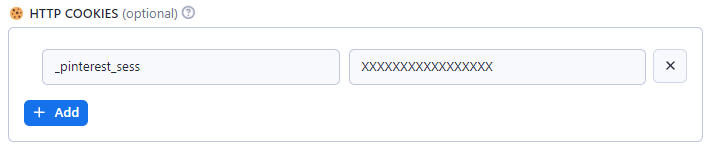
Some function may require a cookie value from your HTTP session. For example: products search, etc (*see below*). You may want to include additional HTTP cookie, for example your **Login Cookie** named **\_pinterest\_sess** (*this is just example, use at your own risk!*).
- Login to Pinterest.com, and get cookie value named: `_pinterest_sess` from domain: `https://www.pinterest.com`
- Open **☢️ Advanced Options** then copy paste:
### 📌 Advanced Usage
#### 🍿 Pinterest Query Language (PQL)
```html
[ | ## | @ ] [ | | | ] [ / ]
```
#### 🍿 Possible QUERY values
| Format | Example | Description |
|-|-|-|
|**<*KEYWORDS*>** | `wood furniture` |***Search Anything***|
|`KEYWORDS` |`square pants`|Search pins|
|`videos:` |`videos:wooden chairs`|Search videos|
|`boards:` |`boards:yellow cats` |Search boards|
|`users:` |`users:apify`|Search users|
|`stories:` |`stories:garden`|Search stories |
|`products:` |`products:computer`|Search products

### About Pinterest.com

**Pinterest** is an American [image sharing](https://en.wikipedia.org/wiki/Image_sharing "Image sharing") and [social media service](https://en.wikipedia.org/wiki/Social_media_service "Social media service") designed to enable saving and discovery of information (specifically "ideas")[\[6\]](https://en.wikipedia.org/wiki/Pinterest#cite_note-6) on the internet using images, and on a smaller scale, animated GIFs and videos,[\[7\]](https://en.wikipedia.org/wiki/Pinterest#cite_note-7) in the form of [pinboards](https://en.wikipedia.org/wiki/Bulletin_board "Bulletin board").[\[8\]](https://en.wikipedia.org/wiki/Pinterest#cite_note-8) The site was created by [Ben Silbermann](https://en.wikipedia.org/wiki/Ben_Silbermann "Ben Silbermann"), [Paul Sciarra](https://en.wikipedia.org/wiki/Paul_Sciarra "Paul Sciarra"), and [Evan Sharp](https://en.wikipedia.org/wiki/Evan_Sharp "Evan Sharp"), and had 450 million [global monthly active users](https://en.wikipedia.org/wiki/Monthly_active_users "Monthly active users") as of December 2022.[\[5\]](https://en.wikipedia.org/wiki/Pinterest#cite_note-q4-2022-5) It is operated by **Pinterest, Inc.**, based in [San Francisco](https://en.wikipedia.org/wiki/San_Francisco "San Francisco").
### 📌 About This Actor
Use this Actor to scrape data from Pinterest.com, including profile, pins, boards, sections, search for pins visual similarity, etc.
#### 🍿 Features :
- ⭐ Scrape Profile, Pins, Boards, Section
- ⭐ Scrape using URL
- ⭐ Search for visual similarity (using URL)
- ⭐ Sort images by similarity *(coming soon)*
- ⭐ Generate Slide-Show
- ⭐ Minimal input
- ⭐ Fast like The Flash
### 📌 Input Parameters
| Parameter | Type | Description |
|-|-|-|
| `query`| **string array** | See below for possible query values |
| `limit` | **integer** | Number of results (per query) |
| `gallery` | **boolean** | Generate HTML gallery/viewer |
### 📌 HTTP Cookies
Some function may require a cookie value from your HTTP session. For example: products search, etc (*see below*). You may want to include additional HTTP cookie, for example your **Login Cookie** named **\_pinterest\_sess** (*this is just example, use at your own risk!*).
- Login to Pinterest.com, and get cookie value named: `_pinterest_sess` from domain: `https://www.pinterest.com`
- Open **☢️ Advanced Options** then copy paste:

### 📌 Advanced Usage
#### 🍿 Pinterest Query Language (PQL)
```html
[ | ## | @ ] [ | | | ] [ / ]
```
#### 🍿 Possible QUERY values
| Format | Example | Description |
|-|-|-|
|**<*KEYWORDS*>** | `wood furniture` |***Search Anything***|
|`KEYWORDS` |`square pants`|Search pins|
|`videos:` |`videos:wooden chairs`|Search videos|
|`boards:` |`boards:yellow cats` |Search boards|
|`users:` |`users:apify`|Search users|
|`stories:` |`stories:garden`|Search stories |
|`products:` |`products:computer`|Search products
*(cookie required)*|
|**#<*TOPIC*>**| `#art` or `#961238559656` |***Idea (topic/interest)***|
|**topic:<*TOPIC*>**| `topic:961238559656` | |
|`/info`| `#art/info`|Topic info and stats|
|`/pins`| `#art/pins`|Topic related pins|
|`/videos`| `#art/videos`|Topic related videos|
|**<*PIN*>** | `1234567890` | ***Pin (post) Data***|
|`/info`|`1234567890/info`|Pin info and stats|
|`/related`|`1234567890/related`|Related pins|
|`/comments`|`1234567890/comments`|Pin comments|
|`/visual`|`1234567890/visual`|Pin visual search|
|`/products`|`1234567890/products`|Pin related products
*(cookie required)*|
|**@<*USER*>** | `@microsoft` | ***User Data***|
|`/info` | `@microsoft/info`|User info|
|`/followers`|`@microsoft/followers`|User followers|
|`/following`|`@microsoft/following`|User following|
|`/pins`|`@microsoft/pins`|User pins|
|`/boards`|`@walmart/boards`|User boards|
|`/created`|`@walmart/created`|User created pins|
|`/products`|`@amazon/products`|User (seller) products|
|**@<*USER*>:<*BOARD*>**|`@microsoft:travel`|***Board Data***
|**board:<*BOARD\_ID*>**|`board:120013001`|***Board Data (by board ID)***
|`/info`|`board:120013001/info`|Board info|
|`/sections`|`board:120013001/sections`|Board section (sub-folders)|
|`/pins`|`board:120013001/pins`|Board pins|
|`/members`|`board:120013001/members`|Board members (collaborators)|
|`/followers`|`board:120013001/followers`|Board followers|
|`/ideas`| `board:120013001/ideas` | More pins (ideas)
|**@<*USER*>:*BOARD:SECTION***|`@microsoft:travel:india`| ***Sub-board Data***
|**section:<*SECTION\_ID*>**|`section:310002100`| ***Sub-board (by section ID)***
|`/info`|`section:310002100/info`|Sub-board info|
|`/pins`|`section:310002100/pins`|Sub-board pins|
|**https:<*URL*>** | `https://*.pinterest.com/...` |***Start URL***|
| `/search//?q=KEYWORD`| | Search for pins specific type |
| `/ideas//` | |Search specific topic/interest
| `/pin/`| `https://id.pinterest.com/pin/1234567890` | User pin related |
| `/pin//visual-search`| |User pin visual search |
| `/`| `https://id.pinterest.com/microsoft` | User info |
| `//pins`| | User pins |
| `//_created` | |User created pins |
| `//_saved` | |User boards |
| `//` | |Board pins |
| `///` | | Board sub-folder pins |
### 📌 Tutorial
#### 🍿 Example #1: Searching
Searching for pins
```yaml
{ "query": ["Window and Furniture"] }
```
Searching for videos only
```yaml
{ "query": ["vidoes:Cat House"] }
```
Searching for products
```yaml
{ "query": ["products:Square Pants"] }
```
#### 🍿 Example #2: User Profile
User/profile info and stats
```yaml
{ "query": ["@microsoft/info"] }
```
User boards list
```yaml
{ "query": ["@microsoft/boards"] }
```
User products list
```yaml
{ "query": ["@amazon/products"] }
```
#### 🍿 Example #3: Number of Results
Use LIMIT to increase or limit number of results (per-query)
```yaml
{ "query": ["@microsoft/pins"], "limit": 100 }
```
#### 🍿 Example #4: Board and Section Pins
User Board pins
```yaml
{ "query": ["@microsoft:travel/pins"], "limit": 100 }
```
User Board may have sub-boards (sections)
```yaml
{ "query": ["@microsoft:travel:india/pins"], "limit": 100 }
```
For Board more detail info, use query `board:`
Use query `@USER/boards` to get list of user boards and its `ID`
```yaml
{ "query": ["board:12300100002/info"] } ## board info
{ "query": ["board:12300100002/pins"], "limit": 100 } ## board pins
```
Board sub-folders list
```yaml
{ "query": ["board:12300100002/sections"], "limit": 100 }
```
#### 🍿 Example #5: Pin Info
Pin info and statistics
```yaml
{ "query": ["1234567890/info"] }
```
Pin related pins
```yaml
{ "query": ["1234567890/related"], "limit": 50 }
```
Pin comments
```yaml
{ "query": ["1234567890/comments"], "limit": 50 }
```
#### 🍿 Example #6: URL
As last resort, you can copy and paste an URL
```yaml
{ "query": ["https://id.pinterest.com/microsoft/"] }
```
#### 🍿 Example #7: Multiple Queries
Multiple user info
```yaml
{
"query": [
"@google/info",
"@walmart/info",
"@apify/info"
]
}
```
Multiple user pins
```yaml
{
"query": [
"@amazon/products",
"@walmart/products",
"@nike/products",
"@apify/pins",
"videos:yellow cat"
],
"limit": 10 ## 10 results per-query
}
```
Different `QUERY` may have different attributes set.
You can combine different type of `QUERY` in a single request but not recommended.
```yaml
{
"query": [
"@google/info",
"120000199922/info",
"#art/info"
]
}
```
### 📌 Output Samples
#### 🍿 Sample #1: JSON Output
```yaml
{
"board": {
"name": "Lưu nhanh",
"url": "/bch7946/_quick_saves/"
},
"created_at": "Tue, 14 Mar 2023 15:23:53 +0000",
"domain": "tracking.feedpress.it",
"grid_title": "Microsoft Ads Introduces Cookie-Based Experiment Feature",
"id": "1066438386741918409",
"image_crop": {
"max_y": 1
},
"image_signature": "1cc0030a7989dbcfe3b6b58d0f06f58c",
"images": {
"170x": {
"height": 123,
"url": "https://i.pinimg.com/236x/1c/c0/03/1cc0030a7989dbcfe3b6b58d0f06f58c.jpg",
"width": 236
},
"236x": {
"height": 123,
"url": "https://i.pinimg.com/236x/1c/c0/03/1cc0030a7989dbcfe3b6b58d0f06f58c.jpg",
"width": 236
},
"474x": {
"height": 248,
"url": "https://i.pinimg.com/474x/1c/c0/03/1cc0030a7989dbcfe3b6b58d0f06f58c.jpg",
"width": 474
},
"736x": {
"height": 386,
"url": "https://i.pinimg.com/736x/1c/c0/03/1cc0030a7989dbcfe3b6b58d0f06f58c.jpg",
"width": 736
},
"orig": {
"height": 840,
"url": "https://i.pinimg.com/originals/1c/c0/03/1cc0030a7989dbcfe3b6b58d0f06f58c.png",
"width": 1600
}
},
"is_uploaded": true,
"link": "http://tracking.feedpress.it/link/13962/13489926",
"pinner": {
"full_name": "Trâm Bích",
"id": "1066438524171071800",
"image_large_url": "https://s.pinimg.com/images/user/default_140.png",
"image_medium_url": "https://s.pinimg.com/images/user/default_75.png",
"image_small_url": "https://s.pinimg.com/images/user/default_30.png",
"username": "bch7946"
},
"reaction_counts": {
"1": 1
},
"rich_summary": {
"display_description": "Microsoft Ads added an additional feature to the Experiment functionality launched last July: cookie-based audience specifications.",
"display_name": "Microsoft Ads Introduces Cookie-Based Experiment Feature",
"favicon_images": {
"orig": "https://i.pinimg.com/favicons/e4793202be714776e9ec57cd8452dea6839302dcaf946ff7c8a69e07.png?9292791bfd447d72ea6e3c05a904eb89"
},
"favicon_link": "https://i.pinimg.com/favicons/e4793202be714776e9ec57cd8452dea6839302dcaf946ff7c8a69e07.png?9292791bfd447d72ea6e3c05a904eb89",
"id": "0c15d83843dccc4039dbbb3091133efd",
"site_name": "Search Engine Journal",
"type": "richpingriddata",
"type_name": "article",
"url": "http://tracking.feedpress.it/link/13962/13489926"
},
"type": "pin"
}
```
#### Sample #2: Simple HTML Gallery
### 📌 Support
 - ⚡️ Congratulation! you have mastered ***"How to scrape Pinterest using APIFY Pinterest Explorer"***
- ⚡️ Feel free to [reach out](https://console.apify.com/actors/LJ5EVniB0ulV4RfGP/issues) to the developer for any issues or suggestions for improvement.
- ⚡️ Congratulation! you have mastered ***"How to scrape Pinterest using APIFY Pinterest Explorer"***
- ⚡️ Feel free to [reach out](https://console.apify.com/actors/LJ5EVniB0ulV4RfGP/issues) to the developer for any issues or suggestions for improvement.