# Comment & Review Sentiment Analysis (`kazkn/social-media-sentiment-monitor`) Actor
Add sentiment, language, complaint signals and NEW/CHANGED/UNCHANGED monitoring to comments from any Apify Dataset or pasted text. Local models in 6 languages, no AI API, hash-only monitoring memory.
- **URL**: https://apify.com/kazkn/social-media-sentiment-monitor.md
- **Developed by:** [KazKN](https://apify.com/kazkn) (community)
- **Categories:** AI, Social media, Automation
- **Security:** Limited permissions
- **Stats:** 2 total users, 1 monthly users, 100.0% runs succeeded, 0 bookmarks
- **User rating**: No ratings yet
## Pricing
from $1.50 / 1,000 comment analyzeds
This Actor is paid per event. You are not charged for the Apify platform usage, but only a fixed price for specific events.
Learn more: https://docs.apify.com/actors/running/actors-in-store.md#pay-per-event
## What's an Apify Actor?
An Actor is a serverless cloud program that runs on the Apify platform. It has two run modes.
In Batch mode, an Actor accepts a well-defined JSON input, performs an action which can take anything from a few seconds to a few hours,
and optionally produces a well-defined JSON output, datasets with results, or files in key-value store.
In Standby mode, an Actor provides a web server which can be used as a website, API, or an MCP server.
Apify vocabulary and the platform model are defined once, in the agent quickstart at https://apify.com/agents.md.
## How to integrate an Actor?
If asked about integration, you help developers integrate Actors into their projects.
You adapt to their stack and deliver integrations that are safe, well-documented, and production-ready.
Do not guess an integration path. Every one of them is in the agent quickstart at https://apify.com/agents.md: the Apify MCP server, Agent Skills with the Apify CLI, the JavaScript and Python clients, the REST API, and the account-free path for an agent with no human to sign in. It also carries the rule on stating cost before the first paid run.
For examples already wired to this Actor's own input schema, see the [API](#api) section below.
Each client library has reference documentation the quickstart does not restate: [JavaScript/TypeScript](https://docs.apify.com/api/client/js/docs.md) (`npm install apify-client`) and [Python](https://docs.apify.com/api/client/python/docs.md) (`pip install apify-client`).
# README
## Comment & Review Sentiment Analysis (6 Languages, No AI API)
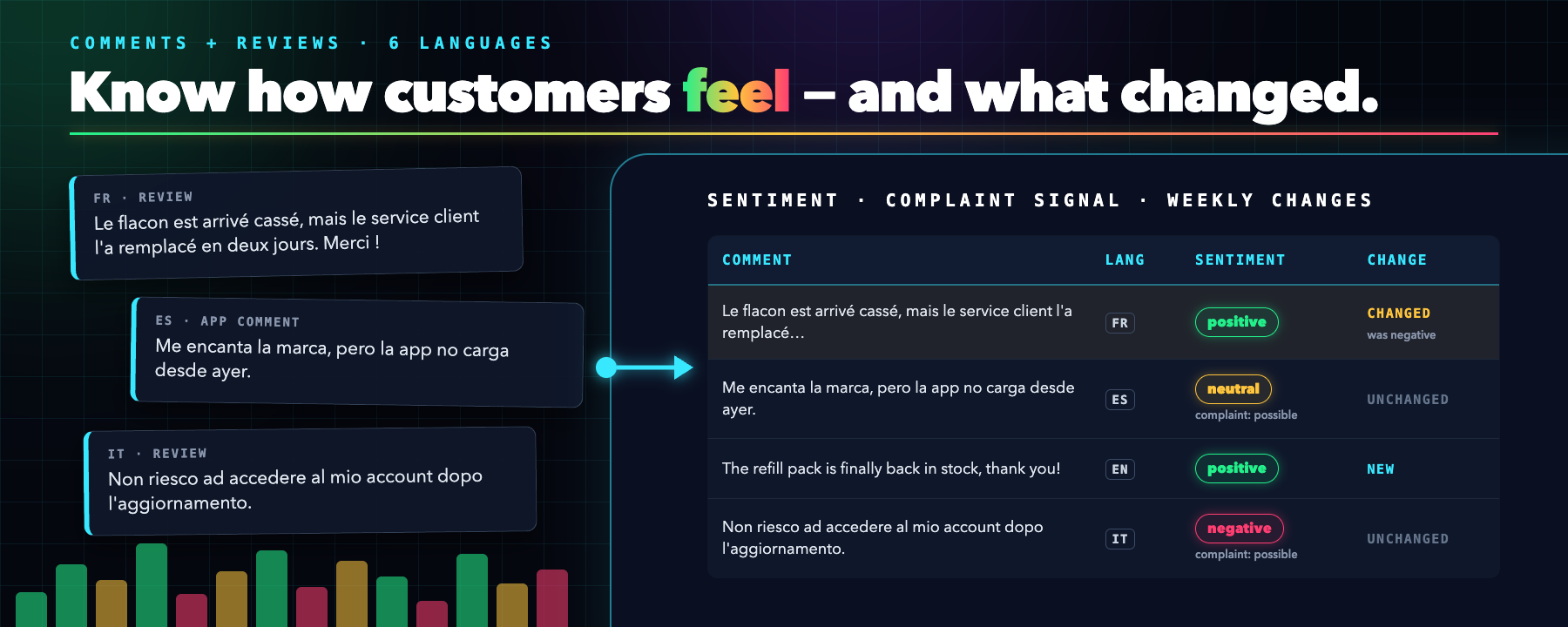 **Comment & Review Sentiment Analysis** (also known as Social Media Sentiment Monitor) is an Apify Actor for **comment sentiment analysis**, **customer review sentiment analysis**, and **social media sentiment analysis**, with a **sentiment analysis API** for brand managers, community managers, e-commerce teams, agencies, and analysts who already collect comments and reviews and need to know what people feel and what changed since last week.
Use it as the analysis step after any comments or reviews scraper. Give it the Dataset ID of a YouTube comments, TikTok comments, app store reviews, Google Maps reviews, or Trustpilot reviews scraper run, or paste your own texts. One run adds **sentiment**, **language**, **duplicate and spam flags**, and **NEW / CHANGED / UNCHANGED monitoring** to every comment, plus a **complaint signal** for Spanish, Italian, and Portuguese comments. Everything runs on local models: your comments are never sent to a third-party AI API, and the monitoring memory keeps only hashes.
**Best for:** social listening, brand monitoring, customer review analysis, support triage, weekly sentiment reports, and comment exports to Google Sheets, BI tools, or a CRM.
**Explore on Apify:** [Run Actor](https://apify.com/kazkn/social-media-sentiment-monitor?fpr=8fp2od) · [Input](https://apify.com/kazkn/social-media-sentiment-monitor/input-schema?fpr=8fp2od) · [Output](https://apify.com/kazkn/social-media-sentiment-monitor/output-schema?fpr=8fp2od) · [Pricing](https://apify.com/kazkn/social-media-sentiment-monitor/pricing?fpr=8fp2od) · [API](https://apify.com/kazkn/social-media-sentiment-monitor/api/python?fpr=8fp2od) · [Support](https://apify.com/kazkn/social-media-sentiment-monitor/issues/open?fpr=8fp2od)
### Video tutorial — see it in action
[](https://www.youtube.com/watch?v=b5i8aiKIYtM)
Watch the 2-minute demo: from a pile of multilingual comments to one sentiment label per comment, then a weekly view of what is new or changed.
***
### API examples, GitHub repo, and workflows
Need to run this Actor from Python or Node.js, or see real sample outputs first? Use the public GitHub resource hub:
[](https://github.com/Boo-n/comment-review-sentiment-analysis)
The repo includes:
- Python and Node.js examples with the Apify client
- a sample input with 15 comments in 6 languages
- real sample output rows and the matching `SUMMARY`
- a weekly monitoring input for a scraper Dataset
Start here: [Comment & Review Sentiment Analysis examples](https://github.com/Boo-n/comment-review-sentiment-analysis)
***
### What does Comment & Review Sentiment Analysis do?
| Need | What you get |
| ----------------------- | --------------------------------------------------------------------------------------------------- |
| Comment sentiment | `positive`, `neutral`, or `negative` for each comment, with a model score |
| Multilingual analysis | English, French, German, Spanish, Italian, and Portuguese, with language detection per comment |
| Complaint triage (beta) | A `complaintSignal` for Spanish, Italian, and Portuguese comments, even when the tone looks polite |
| Cleaner data | Exact duplicate and simple spam flags |
| Weekly monitoring | `NEW`, `CHANGED`, or `UNCHANGED` for each comment compared with the previous run |
| Reporting | A `SUMMARY` record with sentiment distribution, net sentiment, complaint signals, and daily volume |
| Privacy controls | Hide comment text or hash comment IDs with one checkbox, no author data copied, hash-only baselines |
| No scraping, no login | Works on data you already have: no social account, cookie, or proxy needed |
It does **not** collect comments itself. Pair it with any comments or reviews scraper on Apify, or paste your own list.
***
### Why use it for comment and review sentiment analysis?
- **Read thousands of comments in one run.** Instead of reading every review, sort them by sentiment and start with the negative ones.
- **One tool for 6 languages.** Comments in English, French, German, Spanish, Italian, and Portuguese get the same labels, so you can compare markets.
- **See what changed.** Monitor mode tells you which comments are new or changed since last week, so a weekly report takes minutes.
- **No AI API, no data sharing.** The models run inside the Actor, so your comments are not sent to an AI provider.
- **Apify platform included.** Schedule weekly runs, call the Actor through the API, export to JSON, CSV, Excel, or Google Sheets, and connect it to Make, Zapier, or webhooks.
***
### How to analyze comment sentiment in 3 steps
1. **Collect comments** with any Apify comments or reviews scraper, or prepare your own list.
2. **Run this Actor** with the scraper run's Dataset ID, or paste the comments in `texts`.
3. **Get one row per comment** in the output Dataset, plus a `SUMMARY` record for reporting. Schedule it in `monitor` mode to see only what changed since the previous run.
***
### How much does sentiment analysis cost?
Pay per event, with no subscription:
- **$1.50 per 1,000 analyzed comments** ($0.0015 per comment);
- plus an Actor start fee of $0.0005 per GB of memory ($0.001 per run at the default 2 GB).
For example, analyzing 10,000 comments costs about $15.00, plus $0.001 for the start.
Comments that fail validation (for example, an empty or non-text value) are returned as `ERROR` rows and are **not charged**. If you set a maximum cost per run, the Actor stops before analyzing comments it cannot charge, says so in the log and in `RUN_MANIFEST` (`stoppedAtChargeLimit`), and does not update the monitoring baseline.
***
### Input
See the Input tab for every option. The two common cases are below.
Read the comments produced by another Actor run:
```json
{
"datasetId": "YOUR_DATASET_ID",
"textField": "text",
"idField": "id",
"metadataFields": {
"observedAt": "createdAt",
"platform": "source"
},
"maxItems": 1000
}
```
Or paste comments directly:
```json
{
"texts": [
{ "id": "review-1", "text": "The product is excellent." },
{ "id": "review-2", "text": "La livraison est trop lente." }
],
"languages": ["en", "fr"]
}
```
Provide `texts` or `datasetId`; when both are filled in, the Dataset is used and the inline comments are ignored. `textField` and `idField` accept nested paths such as `review.body`. Your comment IDs and texts are shown in the output by default, so you can see which comment got which sentiment. Set `includeSourceIdentifiers` to `false` to replace the IDs with SHA-256 hashes, and `includeText` to `false` to leave the text out. Only `source`, `observedAt`, `platform`, and `sourceRef` can be mapped as metadata, and their values must be primitive. Do not point `sourceRef` to a private or signed URL. Author profiles and nested objects are never copied.
Set `languageField` (for example `review.locale`) only if the source reliably gives the language of each comment, not a page locale or the author's country. Codes such as `es-MX`, `it`, and `pt_BR` are normalized to `es`, `it`, and `pt`; missing or malformed codes fall back to detection. `languageSource` tells you whether the language was `provided`, `detected`, or `undetermined`.
***
### Output
You can download the dataset in various formats such as JSON, HTML, CSV, or Excel. Here are two rows from a real run, simplified:
```json
[
{
"recordId": "fr-2",
"text": "Le flacon est arrivé cassé, très déçue.",
"sentiment": "negative",
"confidence": 0.9972,
"language": "fr",
"languageSource": "detected",
"complaintSignal": "not_evaluated",
"isDuplicate": false,
"isSpam": false,
"processingStatus": "OK"
},
{
"recordId": "es-1",
"text": "Me encanta la marca, pero la app no carga desde ayer.",
"sentiment": "neutral",
"confidence": 0.8314,
"language": "es",
"languageSource": "detected",
"complaintSignal": "possible",
"isDuplicate": false,
"isSpam": false,
"processingStatus": "OK"
}
]
```
The Spanish comment sounds polite, so its sentiment is neutral, but the complaint signal flags the app problem.
| Field | Type | Description |
| ------------------ | ------- | ----------------------------------------------------------------------------------- |
| `recordId` | string | Your comment ID, or its SHA-256 hash when `includeSourceIdentifiers` is `false` |
| `text` | string | The comment, omitted when `includeText` is `false` |
| `sentiment` | string | `positive`, `neutral`, or `negative` |
| `confidence` | number | Model score from 0 to 1 |
| `language` | string | `en`, `fr`, `de`, `es`, `it`, `pt`, or `und` when too short to tell |
| `complaintSignal` | string | `possible`, `not_detected`, or `not_evaluated` (beta, Spanish, Italian, Portuguese) |
| `isDuplicate` | boolean | `true` for an exact duplicate of an earlier comment |
| `isSpam` | boolean | `true` when simple spam rules match |
| `status` | string | In monitor mode: `NEW`, `CHANGED`, or `UNCHANGED` |
| `processingStatus` | string | `OK`, or `ERROR` for an invalid comment (not charged) |
The default key-value store contains:
- `SUMMARY` — sentiment distribution, net sentiment, complaint signals, and daily volume;
- `RUN_MANIFEST` — counts, source completeness, baseline status, and whether the run stopped at your maximum cost;
- `MODEL_MANIFEST` — model repositories, revisions, licenses, sizes, and SHA-256 hashes.
***
### Weekly sentiment monitoring
Set `mode` to `monitor` and give a stable `stateKey`, such as `brand-weekly`. The first complete run marks valid comments as `NEW`. Later runs return `NEW`, `CHANGED`, or `UNCHANGED` for each comment.
Baselines are kept in the named key-value store `sentiment-monitor-state` of your account, because each run starts with a new default store. They contain hashes and prediction summaries, never raw text or author identity. A truncated source or an invalid comment does not replace the previous baseline. Changing the model, the language set, or the analysis settings makes an old baseline incompatible instead of silently comparing different analyses.
Only one monitoring run per `stateKey` works at a time: a second run started meanwhile stops at once with an explicit message, before analyzing anything. The lock of a run that crashed expires at that run's timeout. If another run publishes a newer baseline while a run is still working, the slower run keeps it and reports `baselineUpdated: false`. After an aborted run, check `RUN_MANIFEST` before relying on the baseline. Use a new `stateKey` when you change `languageField`.
***
### Complaint signal (beta)
`complaintSignal` can flag a possible problem (a crash, a login issue, a missing refund…) even when `sentiment` is neutral or positive. It uses local rules for Spanish, Italian, and Portuguese. `possible` means a rule matched. `not_detected` means no rule matched, which does **not** prove the comment contains no problem. `not_evaluated` means the comment is in a language without rules, such as English, French, or German. A comment too short for its language to be determined is still checked against the Spanish, Italian, and Portuguese rules.
Use it to sort comments for review, not as a final classification. On 74 original Portuguese reviews, it flagged 29 of 39 complaints with 1 false alarm among the other 35. On 127 short Brazilian shopping reviews, it flagged 51 of 70 complaints, with 13 false alarms among the other 57. Short or implicit complaints are the ones it misses most.
***
### Accuracy and languages
- On 612 annotated test sentences (102 per language), sentiment reaches a macro-F1 of 0.870 (0.838 to 0.893 depending on the language).
- On real customer reviews translated into the six languages, macro-F1 is 0.796 on full reviews and 0.672 on short extracts of 10 to 40 characters.
- Very short Spanish, Italian, and Portuguese comments can be confused with one another. When the evidence is weak, the Actor returns `und` instead of guessing; set `languageField` when your source provides the language.
- Indirect complaints with no clearly negative word, such as a question ("free shipping, then fees at checkout?") or a comparison ("slower than another shop"), can come out `neutral` instead of `negative`, especially in German.
Sarcasm, very short text, domain jargon, and mixed opinions reduce quality. Review a sample of your own data before automating decisions.
***
### Privacy and responsible use
Analysis runs inside the Actor with pinned models; model downloads and remote AI fallbacks are disabled at run time. Do not use sentiment as a decision about an individual, as proof of intent, or as an explanation of why a trend changed.
Comments can contain personal data. Personal data is protected by the GDPR in the European Union and by other regulations around the world. Only analyze comments you have a legitimate reason to process, and use `includeText` and `includeSourceIdentifiers` to keep the output minimal. If you're unsure whether your reason is legitimate, consult your lawyers.
***
### Limits and tips
`maxItems` is capped at 10,000 comments per run and `maxTextChars` at 5,000 characters per comment; longer or malformed comments become `ERROR` rows while the others continue. Each raw Dataset page is limited to 8 MiB and the retained source to 32 MiB. The Actor needs at least 2 GB of memory; more memory gives more CPU and faster runs on large inputs.
- Start with a small `maxItems` to check that `textField` points to the comment text.
- Set a maximum cost per run in Apify to cap spending on large Datasets.
- Set `languageField` when your scraper gives a reliable language per comment: short comments are then labeled more accurately.
***
### FAQ
#### What is comment sentiment analysis?
It labels each comment or review as positive, neutral, or negative, so you can measure how people feel about a brand, product, or video without reading every comment.
#### Does this Actor scrape social networks?
No. It analyzes comments you already have, from another Actor's Dataset or pasted text. Use any comments scraper first, then pass its Dataset ID.
#### Can I analyze YouTube comments or app store reviews?
Yes. Run a YouTube comments scraper or an app store reviews scraper on Apify, then give its Dataset ID to this Actor and set `textField` to the field that holds the comment text.
#### Is there a sentiment analysis API?
Yes. Every Apify Actor has an API. Start a run and read the results from Python, Node.js, or any HTTP client: see the [API tab](https://apify.com/kazkn/social-media-sentiment-monitor/api/python?fpr=8fp2od) and the [GitHub examples](https://github.com/Boo-n/comment-review-sentiment-analysis).
#### How do I export the results to CSV or Excel?
Open the run's Dataset and choose JSON, CSV, Excel, or HTML, or connect Google Sheets through Apify integrations.
#### Is my text sent to an AI service?
No. Both the analysis and the models run inside the Actor.
#### Which languages are supported?
English, French, German, Spanish, Italian, and Portuguese. The complaint signal covers Spanish, Italian, and Portuguese.
#### Can I run it every week?
Yes. Use `monitor` mode with a stable `stateKey` and an Apify schedule to see only new or changed comments.
***
### Other Actors by KazKN
| Actor | When to choose it |
| -------------------------------------------------------------------------------------------------------------------------- | ------------------------------------------------------------------------------------ |
| [Vinted Smart Scraper: Listings, Sellers & Prices](https://apify.com/kazkn/vinted-smart-scraper?fpr=8fp2od) | Scrape Vinted listings by keyword in 26 countries and compare prices between markets |
| [Vinted Turbo Scraper: Search, Seller & Item URLs](https://apify.com/kazkn/vinted-turbo-scraper?fpr=8fp2od) | Paste any Vinted URL (search, brand, category, or seller profile) and export it |
| [LoopNet + Crexi Scraper · CRE Listings](https://apify.com/kazkn/commercial-real-estate-brokerage-intel?fpr=8fp2od) | Commercial real estate listings from LoopNet and Crexi in one broker-ready file |
| [YouTube Channel Finder — Qualified Creator Leads](https://apify.com/kazkn/youtube-creator-lead-finder?fpr=8fp2od) | Find YouTube creators for sponsorships, outreach, and influencer campaigns |
| [App Store Scraper for Localization Gaps](https://apify.com/kazkn/apple-app-store-localization-scraper?fpr=8fp2od) | Find strong US apps missing French, German, Spanish, or other localizations |
| [Shopify Apps Spy + Product Scraper](https://apify.com/kazkn/shopify-scraper-apps-spy?fpr=8fp2od) | See which apps a Shopify store has installed, and scrape its products |
| [Vestiaire Collective Scraper: Sold Items & Export](https://apify.com/kazkn/vestiaire-collective-smart-scraper?fpr=8fp2od) | Export Vestiaire Collective listings and sold items with prices |
***
### Technical notes
- Stack: Apify SDK, TypeScript, Node.js, and [Transformers.js](https://huggingface.co/docs/transformers.js) with quantized ONNX models.
- Sentiment model: [Horizon-Labs/multilingual-sentiment-small](https://huggingface.co/Horizon-Labs/multilingual-sentiment-small) (Apache-2.0), pinned to one revision and run inside the Actor.
- Output: Apify Dataset with JSON, CSV, Excel, HTML, API, and integrations, plus `SUMMARY`, `RUN_MANIFEST`, and `MODEL_MANIFEST` records.
***
### Support
Open an [issue on Apify](https://apify.com/kazkn/social-media-sentiment-monitor/issues/open?fpr=8fp2od) for bugs, missing languages, new fields, or questions about your data.
If this Actor helped your workflow, an honest Apify review helps other teams evaluate it and helps prioritize maintenance.
# Actor input Schema
## `texts` (type: `array`):
Paste your comments as a JSON list, one object per comment with an id and a text. Ignored when an Apify Dataset ID is filled in.
## `datasetId` (type: `string`):
To analyze the results of a comments or reviews scraper, paste the ID of its run's dataset (Storage tab of the run). When filled in, the inline comments are ignored.
## `textField` (type: `string`):
Name of the field that holds each comment, such as text, comment, or review.body for a nested field.
## `mode` (type: `string`):
Analyze: score these comments once. Monitor changes: also mark each comment NEW, CHANGED, or UNCHANGED since the previous run with the same state key.
## `stateKey` (type: `string`):
Only for Monitor changes. Use the same name every run, such as brand-weekly, so the Actor compares with the right previous run.
## `includeText` (type: `boolean`):
Show each comment's text next to its sentiment. Uncheck to keep raw text out of the output. The monitoring memory never stores raw text.
## `idField` (type: `string`):
Field path containing a stable comment identifier. A text hash is used when absent.
## `includeSourceIdentifiers` (type: `boolean`):
Show your own comment IDs, such as en-1, in the output. Uncheck to replace them with SHA-256 hashes. The monitoring memory always stores only hashes.
## `languageField` (type: `string`):
Optional field path for a reliable per-comment language code, such as es, it-IT or pt-BR. Leave unset if the source only gives a page or account locale.
## `languages` (type: `array`):
Languages allowed for detection in this locally validated MVP scope.
## `metadataFields` (type: `object`):
Optional allowlisted mapping for source, observedAt, platform, and sourceRef. Author data is never copied automatically.
## `maxItems` (type: `integer`):
Hard cap read from inline input or the source Dataset.
## `maxTextChars` (type: `integer`):
Comments above this safety limit become explicit error rows.
## `batchSize` (type: `integer`):
Comments processed per local ONNX inference batch. Reduce if memory is constrained.
## Actor input object example
```json
{
"texts": [
{
"id": "comment-1",
"text": "I love this product and the delivery was fast."
},
{
"id": "comment-2",
"text": "Le colis est arrive en retard."
}
],
"textField": "text",
"mode": "analyze",
"stateKey": "brand-weekly",
"includeText": true,
"idField": "id",
"includeSourceIdentifiers": true,
"languageField": "",
"languages": [
"en",
"fr",
"de",
"es",
"it",
"pt"
],
"metadataFields": {},
"maxItems": 1000,
"maxTextChars": 4000,
"batchSize": 8
}
```
# Actor output Schema
## `results` (type: `string`):
No description
## `summary` (type: `string`):
No description
## `runManifest` (type: `string`):
No description
## `modelManifest` (type: `string`):
No description
# API
You can run this Actor programmatically using our API. Below are code examples in JavaScript, Python, and CLI, as well as the OpenAPI specification and MCP server setup.
## JavaScript example
```javascript
import { ApifyClient } from 'apify-client';
// Initialize the ApifyClient with your Apify API token
// Replace the '' with your token
const client = new ApifyClient({
token: '',
});
// Prepare Actor input
const input = {
"texts": [
{
"id": "comment-1",
"text": "I love this product and the delivery was fast."
},
{
"id": "comment-2",
"text": "Le colis est arrive en retard."
}
],
"stateKey": "brand-weekly",
"languageField": ""
};
// Run the Actor and wait for it to finish
const run = await client.actor("kazkn/social-media-sentiment-monitor").call(input);
// Fetch and print Actor results from the run's dataset (if any)
console.log('Results from dataset');
console.log(`💾 Check your data here: https://console.apify.com/storage/datasets/${run.defaultDatasetId}`);
const { items } = await client.dataset(run.defaultDatasetId).listItems();
items.forEach((item) => {
console.dir(item);
});
// 📚 Want to learn more 📖? Go to → https://docs.apify.com/api/client/js/docs
```
## Python example
```python
from apify_client import ApifyClient
# Initialize the ApifyClient with your Apify API token
# Replace '' with your token.
client = ApifyClient("")
# Prepare the Actor input
run_input = {
"texts": [
{
"id": "comment-1",
"text": "I love this product and the delivery was fast.",
},
{
"id": "comment-2",
"text": "Le colis est arrive en retard.",
},
],
"stateKey": "brand-weekly",
"languageField": "",
}
# Run the Actor and wait for it to finish
run = client.actor("kazkn/social-media-sentiment-monitor").call(run_input=run_input)
# Fetch and print Actor results from the run's dataset (if there are any)
print(f"💾 Check your data here: https://console.apify.com/storage/datasets/{run.default_dataset_id}")
for item in client.dataset(run.default_dataset_id).iterate_items():
print(item)
# 📚 Want to learn more 📖? Go to → https://docs.apify.com/api/client/python/docs/quick-start
```
## CLI example
```bash
echo '{
"texts": [
{
"id": "comment-1",
"text": "I love this product and the delivery was fast."
},
{
"id": "comment-2",
"text": "Le colis est arrive en retard."
}
],
"stateKey": "brand-weekly",
"languageField": ""
}' |
apify call kazkn/social-media-sentiment-monitor --silent --output-dataset
```
## MCP server setup
```json
{
"mcpServers": {
"apify": {
"type": "http",
"url": "https://mcp.apify.com/?tools=fetch-actor-details,kazkn/social-media-sentiment-monitor"
}
}
}
```
The hosted server signs you in with OAuth on first connect, so no API token belongs in this config. Clients without OAuth support can send an `Authorization: Bearer ` header instead, using a token from API & Integrations in Apify Console (https://console.apify.com/settings/integrations).
## OpenAPI specification
Download the OpenAPI definition: https://api.apify.com/v2/actors/ndbxiOYvnPD5VzbI5/builds/z9iYoNeQjhlp80TDx/openapi.json