# Bluesky Users Scraper (`kinaesthetic_millionaire/bluesky-users-scraper`) Actor
Extracts Bluesky user profiles by handle, search term, or follower list, including display name, bio, follower and post counts, and avatar.
- **URL**: https://apify.com/kinaesthetic\_millionaire/bluesky-users-scraper.md
- **Developed by:** [Parsedom Inc](https://apify.com/kinaesthetic_millionaire) (community)
- **Stats:** 2 total users, 1 monthly users, 100.0% runs succeeded, 0 bookmarks
- **User rating**: No ratings yet
## Pricing
from $0.30 / 1,000 results
This Actor is paid per event. You are not charged for the Apify platform usage, but only a fixed price for specific events.
Since this Actor supports Apify Store discounts, the price gets lower the higher subscription plan you have.
Learn more: https://docs.apify.com/actors/running/actors-in-store.md#pay-per-event
## What's an Apify Actor?
An Actor is a serverless cloud program that runs on the Apify platform. It has two run modes.
In Batch mode, an Actor accepts a well-defined JSON input, performs an action which can take anything from a few seconds to a few hours,
and optionally produces a well-defined JSON output, datasets with results, or files in key-value store.
In Standby mode, an Actor provides a web server which can be used as a website, API, or an MCP server.
Apify vocabulary and the platform model are defined once, in the agent quickstart at https://apify.com/agents.md.
## How to integrate an Actor?
If asked about integration, you help developers integrate Actors into their projects.
You adapt to their stack and deliver integrations that are safe, well-documented, and production-ready.
Do not guess an integration path. Every one of them is in the agent quickstart at https://apify.com/agents.md: the Apify MCP server, Agent Skills with the Apify CLI, the JavaScript and Python clients, the REST API, and the account-free path for an agent with no human to sign in. It also carries the rule on stating cost before the first paid run.
For examples already wired to this Actor's own input schema, see the [API](#api) section below.
Each client library has reference documentation the quickstart does not restate: [JavaScript/TypeScript](https://docs.apify.com/api/client/js/docs.md) (`npm install apify-client`) and [Python](https://docs.apify.com/api/client/python/docs.md) (`pip install apify-client`).
# README
## Bluesky Users Scraper - Scrape Bluesky Profiles, Followers & Following
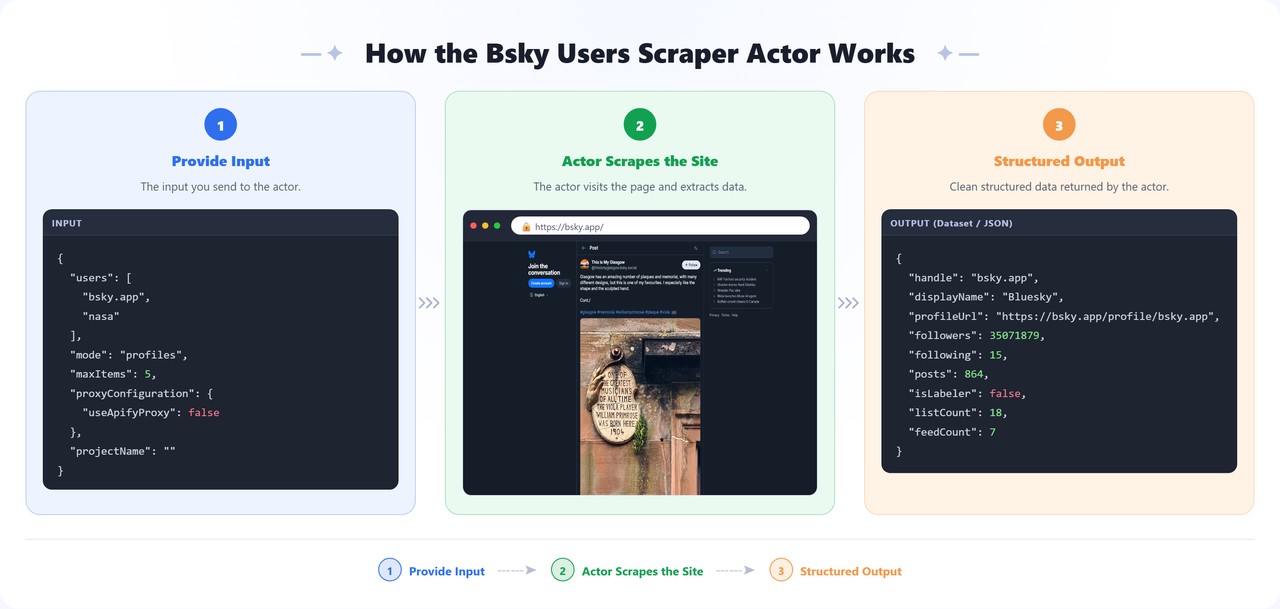
Scrape user profiles from [Bluesky](https://bsky.app) at scale. Look accounts up by handle, find them with a search term, or pull the full follower or following list of any account. For each account this Bluesky scraper returns the handle, display name, bio, follower/following/post counts, avatar, banner, and account age. Results are returned as structured JSON, ready to export to CSV or Excel - no login, no API key, and no Bluesky developer account required.
 ### Features
- **Three ways to find accounts** - by handle or profile URL, by search term, or by listing who follows (or is followed by) an account
- **Full profile detail** - display name, bio, follower/following/post counts, avatar, banner, and creation date
- **Search by keyword** - type `nasa` and get the matching accounts, no handle needed
- **Follower and following lists** - page through an account's whole social graph
- **Per-project caching** - set a project name and the Actor remembers what it already returned for that project, skipping it next time. Each project keeps its own history, so different projects never interfere.
- **No proxy, no login** - Bluesky publishes a read-only public API, so runs are fast and cheap
### Input Configuration
| Field | Type | Required | Default | Description |
| -------------------------------------- | ------- | -------- | ------------------ | ------------------------------------------------------------------------------------------------------------------------------------------------------------------------------------------------------------------------------------------------------------------------------------------------------------------------- |
| Handles, profile URLs, or search terms | array | Yes | `bsky.app`, `nasa` | Handles (`bsky.app`), DIDs, profile URLs, or plain search terms. Anything that is not a handle or URL is searched for. |
| What to scrape | select | - | Profiles | `Profiles` scrapes the accounts you listed; `Followers` / `Following` scrape the accounts around each handle. |
| Max accounts per input | integer | - | 50 | Maximum accounts to return for each handle or search term. |
| Project name (enables caching) | string | - | — | Set a project name to enable cross-run caching, for example "social". The Actor remembers the accounts it returned under that project and skips them in later runs of the same project. Each project keeps its own separate history, so using a different name starts fresh. Leave empty to scrape everything every time. |
| Proxy configuration | object | - | No proxy | Proxy settings. Not needed for Bluesky's public API. |
**How input is interpreted:**
- `bsky.app`, `alice.bsky.social` - a handle (Bluesky handles are always domain-shaped)
- `@nasa` - an explicit handle, even without a dot
- `nasa` - a **search term**, because a bare word is not a valid handle
- `https://bsky.app/profile/bsky.app` - a profile URL
- `did:plc:z72i7...` - a DID, which keeps working after a handle change
### Output
The dataset has one view, **Overview**, showing handle, display name, follower/following/post counts, bio, and profile URL. Every row carries a `source` field naming the handle or search term it came from, and follower/following rows also carry a `relationship` field.
**Sample output:**
```json
[
{
"did": "did:plc:z72i7hdynmk6r22z27h6tvur",
"handle": "bsky.app",
"displayName": "Bluesky",
"description": "Official Bluesky account",
"profileUrl": "https://bsky.app/profile/bsky.app",
"avatarUrl": "https://cdn.bsky.app/img/avatar/plain/did:plc:z72i7hdynmk6r22z27h6tvur/....jpeg",
"bannerUrl": "https://cdn.bsky.app/img/banner/plain/....jpeg",
"followers": 34847362,
"following": 42,
"posts": 1187,
"isLabeler": false,
"listCount": 18,
"feedCount": 7,
"createdAt": "2023-04-12T04:53:57.057Z",
"indexedAt": "2026-08-02T18:32:11.001Z",
"source": "bsky.app",
"scrapedAt": "2026-09-10T15:19:44.201Z"
}
]
```
### Uses of This Data
- Build creator and community lists for a topic by searching keywords
- Analyse an account's audience by pulling its follower list
- Track follower growth for a set of accounts over time
- Find and qualify accounts to follow, partner with, or monitor
- Feed social graph research and network analysis
### How to Use
1. [Sign up](https://apify.com/sign-up) for a free Apify account - includes **$5 monthly credit**.
2. Open the actor page and click **Try for free**.
3. Enter handles or search terms, and pick what to scrape (profiles, followers, or following).
4. Click **Start** and wait for the run to complete.
5. Download results from the **Output** tab in JSON, CSV, or Excel format.
You can also run this actor via the [Apify API](https://docs.apify.com/api/v2) or integrate it directly into your workflows using [Zapier](https://zapier.com/apps/apify), [Make](https://www.make.com/), or [n8n](https://n8n.io/).
### Limitations & Known Issues
- **Search results carry fewer fields** - Bluesky's search endpoint returns the handle, name, bio and avatar but not the follower counts. Those come back `null` for search results; run the matching handles through `Profiles` mode to fill them in.
- **Public data only** - the Actor reads Bluesky's public API, so it cannot see private lists, blocks, or anything requiring a login.
- **Large follower lists take time** - the API pages 100 accounts at a time, so pulling a very large follower list means many sequential requests.
- **Counts are a snapshot** - follower numbers change constantly and are accurate as of each record's `scrapedAt`.
### Notes
- **No proxy or login required** - Bluesky's read-only API is open, which makes this one of the cheapest Actors to run at scale.
- **API integration** - This actor can be called as an API from any automation platform (Zapier, Make, n8n, custom scripts).
- **DIDs are the stable identifier** - handles can change, DIDs cannot, which is why the cache keys on the DID.
### 🔗 Other Actors
| Category | Actor | What it does |
| ----------------------- | --------------------------------------------------------------------------------------------------------------- | -------------------------------------------------------------------------------------------------------------------------------------------------------------------- |
| 🎵 Social Media | [Instagram Reels Audio Scraper](https://apify.com/kinaesthetic_millionaire/instagram-reels-audio-scraper) | Extracts detailed data from Instagram Reels that use a given audio track. |
| 🏢 Company Data & Leads | [Kununu Company and Leads Scraper](https://apify.com/kinaesthetic_millionaire/kununu-company-and-leads-scraper) | Scrapes company profile data from kununu.com, including ratings, industry, headquarters location, and recommendation rate. |
| 🟢 Monitoring | [Website Uptime Checker](https://apify.com/kinaesthetic_millionaire/website-uptime-checker) | Monitors websites and APIs for availability, response time, SSL certificate expiry, and expected content, sending email or webhook alerts when something goes wrong. |
| 📈 SEO | [Ahrefs Website Authority Checker](https://apify.com/kinaesthetic_millionaire/ahref-website-authority-checker) | Extracts website authority metrics from Ahrefs including Domain Rating (DR), backlinks, and referring domains - useful for competitor analysis and link building. |
| 💼 Lead Generation | [Booksy Leads Scraper](https://apify.com/kinaesthetic_millionaire/booksy-leads-scraper) | Extracts business profiles from Booksy including names, addresses, phone numbers, emails, social media, and ratings. Built for beauty and wellness lead generation. |
### FAQ
**Does this scraper need a Bluesky account, login, or API key?**
No. Bluesky exposes a public read-only API for profile and social graph data, so this Actor runs without any credentials.
**Can I scrape a Bluesky account's followers or following list?**
Yes. Switch "What to scrape" to `Followers` or `Following`, enter the handle(s), and the Actor pages through the full list up to your `Max accounts per input` limit.
**Can I search for Bluesky accounts by keyword instead of a handle?**
Yes. Enter a plain word or phrase (not a handle or URL) and the Actor treats it as a search term, returning matching accounts.
**Why are follower/following counts `null` on some rows?**
Bluesky's search endpoint doesn't return count data. Rows from search results carry `null` for those fields - run the returned handles through `Profiles` mode to fill them in.
**Does the scraper return the same accounts on every run?**
Only if you don't set a project name. Set one to enable caching - the Actor remembers what it already returned for that project and skips duplicates on later runs.
**What data can I extract from a Bluesky profile?**
Handle, DID, display name, bio, avatar and banner URLs, follower/following/post counts, account creation date, and more - see the [Output](#output) section for a full sample.
**Is a proxy required to run this Actor?**
No. Bluesky's API is public and unauthenticated, so proxies aren't needed and are disabled by default to keep runs cheap.
**Can I use handles, profile URLs, and DIDs interchangeably as input?**
Yes. The Actor auto-detects handles (`alice.bsky.social`), profile URLs (`https://bsky.app/profile/...`), and DIDs (`did:plc:...`) and resolves them the same way.
### 💬 Disclaimer & Support
This actor only collects data that LinkedIn shows a logged-out visitor - it does not log in, bypass the auth wall, or access private profiles or member data. Beyond LinkedIn it visits only a public search engine to resolve company names, and the lead-enrichment provider when that option is enabled.
**By running this actor you accept sole responsibility and liability for how you use it and for the data you collect.** That includes ensuring your use complies with LinkedIn's Terms of Service, with applicable law in your jurisdiction (including data protection law such as the GDPR where it applies to personal data in enrichment results), and with any other terms that bind you. If you do not accept this, please do not run the actor.
If extraction quality drops or you want a custom apify actor then you can:
- Email us at
- Visit [parsedom.com](https://parsedom.com)
- Visit our profile on Fiverr: [fiverr.com/s/rEmNqEb](https://www.fiverr.com/s/rEmNqEb)
- Apify public page: [apify.com/kinaesthetic\_millionaire](https://apify.com/kinaesthetic_millionaire)
- You can also contact us if you want to build a custom actor.
Ready to scrape more listings? Add your URLs and start scraping! 🚀
# Actor input Schema
## `users` (type: `array`):
Bluesky handles (bsky.app, @alice.bsky.social), DIDs, profile URLs, or plain search terms. Anything that is not a handle or URL is treated as a search for accounts matching it.
## `mode` (type: `string`):
Profiles: scrape the accounts you listed. Followers / Following: scrape the accounts that follow, or are followed by, each handle you listed.
## `maxItems` (type: `integer`):
Maximum number of accounts to return for each handle or search term.
## `projectName` (type: `string`):
Set a project name to enable cross-run caching, for example "social". The Actor remembers the accounts it returned under that project and skips them in later runs of the same project. Each project keeps its own separate history, so using a different name starts fresh. Leave empty to scrape everything every time.
## `proxyConfiguration` (type: `object`):
Proxy settings used for all requests. Bluesky's public API does not require a proxy.
## Actor input object example
```json
{
"users": [
"bsky.app",
"nasa"
],
"mode": "profiles",
"maxItems": 50,
"proxyConfiguration": {
"useApifyProxy": true
}
}
```
# Actor output Schema
## `overview` (type: `string`):
No description
# API
You can run this Actor programmatically using our API. Below are code examples in JavaScript, Python, and CLI, as well as the OpenAPI specification and MCP server setup.
## JavaScript example
```javascript
import { ApifyClient } from 'apify-client';
// Initialize the ApifyClient with your Apify API token
// Replace the '' with your token
const client = new ApifyClient({
token: '',
});
// Prepare Actor input
const input = {
"users": [
"bsky.app",
"nasa"
]
};
// Run the Actor and wait for it to finish
const run = await client.actor("kinaesthetic_millionaire/bluesky-users-scraper").call(input);
// Fetch and print Actor results from the run's dataset (if any)
console.log('Results from dataset');
console.log(`💾 Check your data here: https://console.apify.com/storage/datasets/${run.defaultDatasetId}`);
const { items } = await client.dataset(run.defaultDatasetId).listItems();
items.forEach((item) => {
console.dir(item);
});
// 📚 Want to learn more 📖? Go to → https://docs.apify.com/api/client/js/docs
```
## Python example
```python
from apify_client import ApifyClient
# Initialize the ApifyClient with your Apify API token
# Replace '' with your token.
client = ApifyClient("")
# Prepare the Actor input
run_input = { "users": [
"bsky.app",
"nasa",
] }
# Run the Actor and wait for it to finish
run = client.actor("kinaesthetic_millionaire/bluesky-users-scraper").call(run_input=run_input)
# Fetch and print Actor results from the run's dataset (if there are any)
print(f"💾 Check your data here: https://console.apify.com/storage/datasets/{run.default_dataset_id}")
for item in client.dataset(run.default_dataset_id).iterate_items():
print(item)
# 📚 Want to learn more 📖? Go to → https://docs.apify.com/api/client/python/docs/quick-start
```
## CLI example
```bash
echo '{
"users": [
"bsky.app",
"nasa"
]
}' |
apify call kinaesthetic_millionaire/bluesky-users-scraper --silent --output-dataset
```
## MCP server setup
```json
{
"mcpServers": {
"apify": {
"type": "http",
"url": "https://mcp.apify.com/?tools=fetch-actor-details,kinaesthetic_millionaire/bluesky-users-scraper"
}
}
}
```
The hosted server signs you in with OAuth on first connect, so no API token belongs in this config. Clients without OAuth support can send an `Authorization: Bearer ` header instead, using a token from API & Integrations in Apify Console (https://console.apify.com/settings/integrations).
## OpenAPI specification
Download the OpenAPI definition: https://api.apify.com/v2/actors/bnF2xxoJA91qmH86e/builds/uFSFbXcv8NVgwRfrC/openapi.json
### Features
- **Three ways to find accounts** - by handle or profile URL, by search term, or by listing who follows (or is followed by) an account
- **Full profile detail** - display name, bio, follower/following/post counts, avatar, banner, and creation date
- **Search by keyword** - type `nasa` and get the matching accounts, no handle needed
- **Follower and following lists** - page through an account's whole social graph
- **Per-project caching** - set a project name and the Actor remembers what it already returned for that project, skipping it next time. Each project keeps its own history, so different projects never interfere.
- **No proxy, no login** - Bluesky publishes a read-only public API, so runs are fast and cheap
### Input Configuration
| Field | Type | Required | Default | Description |
| -------------------------------------- | ------- | -------- | ------------------ | ------------------------------------------------------------------------------------------------------------------------------------------------------------------------------------------------------------------------------------------------------------------------------------------------------------------------- |
| Handles, profile URLs, or search terms | array | Yes | `bsky.app`, `nasa` | Handles (`bsky.app`), DIDs, profile URLs, or plain search terms. Anything that is not a handle or URL is searched for. |
| What to scrape | select | - | Profiles | `Profiles` scrapes the accounts you listed; `Followers` / `Following` scrape the accounts around each handle. |
| Max accounts per input | integer | - | 50 | Maximum accounts to return for each handle or search term. |
| Project name (enables caching) | string | - | — | Set a project name to enable cross-run caching, for example "social". The Actor remembers the accounts it returned under that project and skips them in later runs of the same project. Each project keeps its own separate history, so using a different name starts fresh. Leave empty to scrape everything every time. |
| Proxy configuration | object | - | No proxy | Proxy settings. Not needed for Bluesky's public API. |
**How input is interpreted:**
- `bsky.app`, `alice.bsky.social` - a handle (Bluesky handles are always domain-shaped)
- `@nasa` - an explicit handle, even without a dot
- `nasa` - a **search term**, because a bare word is not a valid handle
- `https://bsky.app/profile/bsky.app` - a profile URL
- `did:plc:z72i7...` - a DID, which keeps working after a handle change
### Output
The dataset has one view, **Overview**, showing handle, display name, follower/following/post counts, bio, and profile URL. Every row carries a `source` field naming the handle or search term it came from, and follower/following rows also carry a `relationship` field.
**Sample output:**
```json
[
{
"did": "did:plc:z72i7hdynmk6r22z27h6tvur",
"handle": "bsky.app",
"displayName": "Bluesky",
"description": "Official Bluesky account",
"profileUrl": "https://bsky.app/profile/bsky.app",
"avatarUrl": "https://cdn.bsky.app/img/avatar/plain/did:plc:z72i7hdynmk6r22z27h6tvur/....jpeg",
"bannerUrl": "https://cdn.bsky.app/img/banner/plain/....jpeg",
"followers": 34847362,
"following": 42,
"posts": 1187,
"isLabeler": false,
"listCount": 18,
"feedCount": 7,
"createdAt": "2023-04-12T04:53:57.057Z",
"indexedAt": "2026-08-02T18:32:11.001Z",
"source": "bsky.app",
"scrapedAt": "2026-09-10T15:19:44.201Z"
}
]
```
### Uses of This Data
- Build creator and community lists for a topic by searching keywords
- Analyse an account's audience by pulling its follower list
- Track follower growth for a set of accounts over time
- Find and qualify accounts to follow, partner with, or monitor
- Feed social graph research and network analysis
### How to Use
1. [Sign up](https://apify.com/sign-up) for a free Apify account - includes **$5 monthly credit**.
2. Open the actor page and click **Try for free**.
3. Enter handles or search terms, and pick what to scrape (profiles, followers, or following).
4. Click **Start** and wait for the run to complete.
5. Download results from the **Output** tab in JSON, CSV, or Excel format.
You can also run this actor via the [Apify API](https://docs.apify.com/api/v2) or integrate it directly into your workflows using [Zapier](https://zapier.com/apps/apify), [Make](https://www.make.com/), or [n8n](https://n8n.io/).
### Limitations & Known Issues
- **Search results carry fewer fields** - Bluesky's search endpoint returns the handle, name, bio and avatar but not the follower counts. Those come back `null` for search results; run the matching handles through `Profiles` mode to fill them in.
- **Public data only** - the Actor reads Bluesky's public API, so it cannot see private lists, blocks, or anything requiring a login.
- **Large follower lists take time** - the API pages 100 accounts at a time, so pulling a very large follower list means many sequential requests.
- **Counts are a snapshot** - follower numbers change constantly and are accurate as of each record's `scrapedAt`.
### Notes
- **No proxy or login required** - Bluesky's read-only API is open, which makes this one of the cheapest Actors to run at scale.
- **API integration** - This actor can be called as an API from any automation platform (Zapier, Make, n8n, custom scripts).
- **DIDs are the stable identifier** - handles can change, DIDs cannot, which is why the cache keys on the DID.
### 🔗 Other Actors
| Category | Actor | What it does |
| ----------------------- | --------------------------------------------------------------------------------------------------------------- | -------------------------------------------------------------------------------------------------------------------------------------------------------------------- |
| 🎵 Social Media | [Instagram Reels Audio Scraper](https://apify.com/kinaesthetic_millionaire/instagram-reels-audio-scraper) | Extracts detailed data from Instagram Reels that use a given audio track. |
| 🏢 Company Data & Leads | [Kununu Company and Leads Scraper](https://apify.com/kinaesthetic_millionaire/kununu-company-and-leads-scraper) | Scrapes company profile data from kununu.com, including ratings, industry, headquarters location, and recommendation rate. |
| 🟢 Monitoring | [Website Uptime Checker](https://apify.com/kinaesthetic_millionaire/website-uptime-checker) | Monitors websites and APIs for availability, response time, SSL certificate expiry, and expected content, sending email or webhook alerts when something goes wrong. |
| 📈 SEO | [Ahrefs Website Authority Checker](https://apify.com/kinaesthetic_millionaire/ahref-website-authority-checker) | Extracts website authority metrics from Ahrefs including Domain Rating (DR), backlinks, and referring domains - useful for competitor analysis and link building. |
| 💼 Lead Generation | [Booksy Leads Scraper](https://apify.com/kinaesthetic_millionaire/booksy-leads-scraper) | Extracts business profiles from Booksy including names, addresses, phone numbers, emails, social media, and ratings. Built for beauty and wellness lead generation. |
### FAQ
**Does this scraper need a Bluesky account, login, or API key?**
No. Bluesky exposes a public read-only API for profile and social graph data, so this Actor runs without any credentials.
**Can I scrape a Bluesky account's followers or following list?**
Yes. Switch "What to scrape" to `Followers` or `Following`, enter the handle(s), and the Actor pages through the full list up to your `Max accounts per input` limit.
**Can I search for Bluesky accounts by keyword instead of a handle?**
Yes. Enter a plain word or phrase (not a handle or URL) and the Actor treats it as a search term, returning matching accounts.
**Why are follower/following counts `null` on some rows?**
Bluesky's search endpoint doesn't return count data. Rows from search results carry `null` for those fields - run the returned handles through `Profiles` mode to fill them in.
**Does the scraper return the same accounts on every run?**
Only if you don't set a project name. Set one to enable caching - the Actor remembers what it already returned for that project and skips duplicates on later runs.
**What data can I extract from a Bluesky profile?**
Handle, DID, display name, bio, avatar and banner URLs, follower/following/post counts, account creation date, and more - see the [Output](#output) section for a full sample.
**Is a proxy required to run this Actor?**
No. Bluesky's API is public and unauthenticated, so proxies aren't needed and are disabled by default to keep runs cheap.
**Can I use handles, profile URLs, and DIDs interchangeably as input?**
Yes. The Actor auto-detects handles (`alice.bsky.social`), profile URLs (`https://bsky.app/profile/...`), and DIDs (`did:plc:...`) and resolves them the same way.
### 💬 Disclaimer & Support
This actor only collects data that LinkedIn shows a logged-out visitor - it does not log in, bypass the auth wall, or access private profiles or member data. Beyond LinkedIn it visits only a public search engine to resolve company names, and the lead-enrichment provider when that option is enabled.
**By running this actor you accept sole responsibility and liability for how you use it and for the data you collect.** That includes ensuring your use complies with LinkedIn's Terms of Service, with applicable law in your jurisdiction (including data protection law such as the GDPR where it applies to personal data in enrichment results), and with any other terms that bind you. If you do not accept this, please do not run the actor.
If extraction quality drops or you want a custom apify actor then you can:
- Email us at
- Visit [parsedom.com](https://parsedom.com)
- Visit our profile on Fiverr: [fiverr.com/s/rEmNqEb](https://www.fiverr.com/s/rEmNqEb)
- Apify public page: [apify.com/kinaesthetic\_millionaire](https://apify.com/kinaesthetic_millionaire)
- You can also contact us if you want to build a custom actor.
Ready to scrape more listings? Add your URLs and start scraping! 🚀
# Actor input Schema
## `users` (type: `array`):
Bluesky handles (bsky.app, @alice.bsky.social), DIDs, profile URLs, or plain search terms. Anything that is not a handle or URL is treated as a search for accounts matching it.
## `mode` (type: `string`):
Profiles: scrape the accounts you listed. Followers / Following: scrape the accounts that follow, or are followed by, each handle you listed.
## `maxItems` (type: `integer`):
Maximum number of accounts to return for each handle or search term.
## `projectName` (type: `string`):
Set a project name to enable cross-run caching, for example "social". The Actor remembers the accounts it returned under that project and skips them in later runs of the same project. Each project keeps its own separate history, so using a different name starts fresh. Leave empty to scrape everything every time.
## `proxyConfiguration` (type: `object`):
Proxy settings used for all requests. Bluesky's public API does not require a proxy.
## Actor input object example
```json
{
"users": [
"bsky.app",
"nasa"
],
"mode": "profiles",
"maxItems": 50,
"proxyConfiguration": {
"useApifyProxy": true
}
}
```
# Actor output Schema
## `overview` (type: `string`):
No description
# API
You can run this Actor programmatically using our API. Below are code examples in JavaScript, Python, and CLI, as well as the OpenAPI specification and MCP server setup.
## JavaScript example
```javascript
import { ApifyClient } from 'apify-client';
// Initialize the ApifyClient with your Apify API token
// Replace the '' with your token
const client = new ApifyClient({
token: '',
});
// Prepare Actor input
const input = {
"users": [
"bsky.app",
"nasa"
]
};
// Run the Actor and wait for it to finish
const run = await client.actor("kinaesthetic_millionaire/bluesky-users-scraper").call(input);
// Fetch and print Actor results from the run's dataset (if any)
console.log('Results from dataset');
console.log(`💾 Check your data here: https://console.apify.com/storage/datasets/${run.defaultDatasetId}`);
const { items } = await client.dataset(run.defaultDatasetId).listItems();
items.forEach((item) => {
console.dir(item);
});
// 📚 Want to learn more 📖? Go to → https://docs.apify.com/api/client/js/docs
```
## Python example
```python
from apify_client import ApifyClient
# Initialize the ApifyClient with your Apify API token
# Replace '' with your token.
client = ApifyClient("")
# Prepare the Actor input
run_input = { "users": [
"bsky.app",
"nasa",
] }
# Run the Actor and wait for it to finish
run = client.actor("kinaesthetic_millionaire/bluesky-users-scraper").call(run_input=run_input)
# Fetch and print Actor results from the run's dataset (if there are any)
print(f"💾 Check your data here: https://console.apify.com/storage/datasets/{run.default_dataset_id}")
for item in client.dataset(run.default_dataset_id).iterate_items():
print(item)
# 📚 Want to learn more 📖? Go to → https://docs.apify.com/api/client/python/docs/quick-start
```
## CLI example
```bash
echo '{
"users": [
"bsky.app",
"nasa"
]
}' |
apify call kinaesthetic_millionaire/bluesky-users-scraper --silent --output-dataset
```
## MCP server setup
```json
{
"mcpServers": {
"apify": {
"type": "http",
"url": "https://mcp.apify.com/?tools=fetch-actor-details,kinaesthetic_millionaire/bluesky-users-scraper"
}
}
}
```
The hosted server signs you in with OAuth on first connect, so no API token belongs in this config. Clients without OAuth support can send an `Authorization: Bearer ` header instead, using a token from API & Integrations in Apify Console (https://console.apify.com/settings/integrations).
## OpenAPI specification
Download the OpenAPI definition: https://api.apify.com/v2/actors/bnF2xxoJA91qmH86e/builds/uFSFbXcv8NVgwRfrC/openapi.json