# Kununu Compay and Leads Scraper (`kinaesthetic_millionaire/kununu-company-and-leads-scraper`) Actor
Scrapes company profile data from kununu.com, including ratings, industry, headquarters location, and recommendation rate.
- **URL**: https://apify.com/kinaesthetic\_millionaire/kununu-company-and-leads-scraper.md
- **Developed by:** [Parsedom Inc](https://apify.com/kinaesthetic_millionaire) (community)
- **Categories:**
- **Stats:** 2 total users, 1 monthly users, 100.0% runs succeeded, 0 bookmarks
- **User rating**: No ratings yet
## Pricing
from $2.50 / 1,000 results
This Actor is paid per event. You are not charged for the Apify platform usage, but only a fixed price for specific events.
Since this Actor supports Apify Store discounts, the price gets lower the higher subscription plan you have.
Learn more: https://docs.apify.com/actors/running/actors-in-store.md#pay-per-event
## What's an Apify Actor?
Actors are web data automations that power AI and operations. They run on the Apify platform to scrape websites, process data, connect APIs, and automate workflows.
In Batch mode, an Actor accepts a well-defined JSON input, performs an action which can take anything from a few seconds to a few hours,
and optionally produces a well-defined JSON output, datasets with results, or files in key-value store.
In Standby mode, an Actor provides a web server which can be used as a website, API, or an MCP server.
Actors are written with capital "A".
## How to integrate an Actor?
If asked about integration, you help developers integrate Actors into their projects.
You adapt to their stack and deliver integrations that are safe, well-documented, and production-ready.
The best way to integrate Actors is as follows.
- **AI agents and MCP clients** — the [Apify MCP server](https://docs.apify.com/integrations/mcp.md) at `https://mcp.apify.com` (remote, streamable HTTP, OAuth on first use).
- **Agentic workflows and local Actor development** — [Agent Skills](https://apify.com/.well-known/agent-skills/index.json) with the [Apify CLI](https://docs.apify.com/cli/docs.md): `npm install -g apify-cli`, then `apify login`.
- **JavaScript/TypeScript projects** — the official [JS/TS client](https://docs.apify.com/api/client/js/docs.md): `npm install apify-client`.
- **Python projects** — the official [Python client](https://docs.apify.com/api/client/python/docs.md): `pip install apify-client`.
- **Any other language** — the [REST API](https://docs.apify.com/api/v2.md).
For usage examples, see the [API](#api) section below.
For more details, see Apify documentation as [Markdown index](https://docs.apify.com/llms.txt) and [Markdown full-text](https://docs.apify.com/llms-full.txt).
# README
Extract **company profiles and employee contacts from [kununu.com](https://www.kununu.com)**, the leading employer-review platform in the German-speaking market, without writing a single line of code. Give it a company search page or a direct company profile URL, and it returns each company's overview (rating, industry, headquarters, salary data) ready to download or connect straight into your own systems - scheduling, monitoring, and integrations like Zapier and Make all included.
 ### What does Kununu Scraper do?
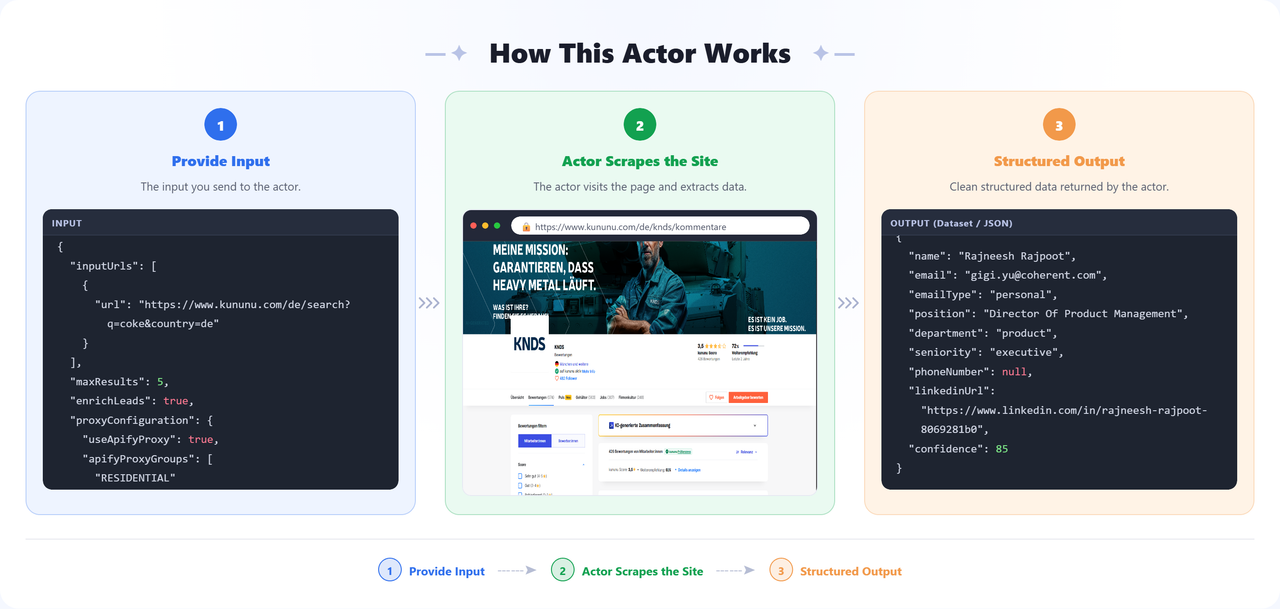
This actor automatically detects whether a start URL is a kununu search page or a direct company profile page. For search pages, it finds every matching company and visits each one; for a single company profile, it goes straight there. For each company, it pulls a full overview - name, rating, headquarters, industry standing, recommendation rate, salary coverage, and more - reading only what's publicly visible on kununu.com. Optionally, turn on **lead enrichment** and it will also look up each company's website for employee contacts (names, roles, emails - CEO, CTO, HR, and beyond), attached right onto that company's own result. It runs on the Apify platform, so you get scheduling, monitoring, and dataset export (JSON, CSV, Excel) out of the box - no server setup required on your end.
### Why use Kununu Scraper?
- **Employer branding research** - see exactly how a company or its competitors present themselves, alongside their overall reputation.
- **HR and recruiting benchmarking** - compare ratings, salary transparency, and reputation across employers at scale.
- **Sales and business development** - turn a list of target companies into a list of named decision-makers you can actually reach.
- **Bulk company discovery** - pass a search query and let the actor find and process every matching company automatically.
### How to use Kununu Scraper
1. [Sign up](https://apify.com/sign-up) for a free Apify account - includes **$5 monthly credit**.
2. Open the actor page and click **Try for free**.
3. Paste one or more kununu.com search or company profile URLs into **Start URLs**.
4. Turn on **Find employee contacts (leads)** if you also want names and emails for each company.
5. Click **Start** and wait for the run to complete.
6. Download results from the **Output** tab in JSON, CSV, or Excel format.
### Input
Configure the run from the **Input** tab:
| Field | Type | Required | Default | Description |
| -------------------- | ------- | -------- | -------- | ---------------------------------------------------------------------------------------------------------------------------------------------------------------------------------- |
| `inputUrls` | array | ✅ | — | kununu.com company search pages or direct company profile pages. |
| `maxResults` | integer | — | 5 | Maximum number of companies to process, shared across all Input URLs. |
| `proxyConfiguration` | object | ✅ | Apify residential | Proxy settings (required). kununu.com sits behind AWS WAF Bot Control, so Apify's **residential** proxy is the default and strongly recommended to avoid blocked-request warnings and captchas. Datacenter proxies may work at lower cost - switch if runs stay clean. |
| `enrichLeads` | boolean | — | `true` | If enabled, also finds employee contacts (e.g. CEO, CTO, HR) with email addresses for each company, added as a `leads` list. Incurs an extra charge per company - see **Pricing**. |
| `projectName` | string | — | — | When set, caches already-scraped companies for this project so later runs with the same project name skip re-scraping them (persistent across runs). Leave empty to always scrape fresh. |
**Supported URL types:**
- Company search: `https://www.kununu.com/de/search?q=coke&country=de`
- Company profile: `https://www.kununu.com/de/vestiga-consulting1`
### Output
Each dataset item is one company's overview. Use the **Companies** view in the Apify Console for a clean table, or download the raw results directly.
**Sample output** (real data from a live run):
```json
{
"type": "company",
"parentUrl": "https://www.kununu.com/de/consulting1",
"companyName": "consulting1",
"displayName": "Consulting GmbH",
"website": "https://www.consulting.de",
"hqLocation": "München, Bayern",
"overallRating": 4.4,
"isVerified": true,
"followerCount": 7,
"profileUrl": "https://www.kununu.com/de/consulting1"
}
```
When **Find employee contacts (leads)** is enabled, each company that was successfully looked up also gets a `leads` list with one entry per contact found - everything stays on that one company's result:
```json
{
"type": "company",
"displayName": "Consulting GmbH",
"website": "https://www.consulting.de",
"profileUrl": "https://www.kununu.com/de/consulting1",
"leads": [
{
"name": "John Wick",
"email": "wick@continental.de",
"emailType": "personal",
"position": "Assasin",
"department": "executive",
"seniority": null,
"phoneNumber": null,
"linkedinUrl": "https://www.linkedin.com/in/john-wick",
"confidence": 99
},
{
"name": "John Cena",
"email": "cena@wwe.com",
"emailType": "generic",
"position": null,
"department": "support",
"seniority": null,
"phoneNumber": null,
"linkedinUrl": null,
"confidence": 83
}
]
}
```
Every lead always has a `name` you can read at a glance - a real person's name where one was found, otherwise a department-based label (e.g. "Support Contact") or "General Contact" as a last resort, so a generic inbox like `info@` is never just a bare, unexplained email address.
### Data table
**Company fields:**
| Field | Description |
| ---------------------------- | ---------------------------------------------------------------------------------------------------------------- |
| `companyName` | Company slug as it appears in the kununu URL. |
| `displayName` | Company's display name. |
| `website` | Company website, if listed. |
| `hqLocation` | Headquarters city/state. |
| `overallRating` | Aggregate rating shown on the profile. |
| `recommendationRate` | Share of reviewers who'd recommend the company, with review counts. |
| `isVerified` / `isClaimed` | Whether the profile is verified and/or claimed by the company. |
| `followerCount` | Number of followers on the profile. |
| `industryAverageScore` | Average rating for the company's industry, for comparison. |
| `profileType` | kununu's internal profile tier. |
| `countryCode` | Two-letter country code. |
| `firstReviewYear` | Year of the company's earliest review. |
| `topCompanyYears` | Years the company was recognized as a "Top Company." |
| `profileSalariesRangesCount` | Number of distinct salary ranges reported. |
| `profileSalariesTotalCount` | Total number of salary entries reported. |
| `image` | Company logo URL. |
| `profileUrl` | The company's kununu profile URL. |
| `leads` | List of employee contacts, only present when lead enrichment is on and it succeeded - see **Lead fields** below. |
**Lead fields** (each entry in a company's `leads` list, only present when lead enrichment is enabled):
| Field | Description |
| ------------- | -------------------------------------------------------------------------------------------------------------------------------------------------- |
| `name` | The contact's full name where known, otherwise a department-based label (e.g. "Support Contact") or "General Contact" as a fallback - never blank. |
| `email` | Contact's email address. |
| `emailType` | `personal` (named individual) or `generic` (e.g. info@). |
| `position` | Contact's job title, where known. |
| `department` | Department, where known (e.g. executive, HR, sales). |
| `seniority` | Seniority level, where known. |
| `phoneNumber` | Contact's phone number, where known. |
| `linkedinUrl` | Contact's LinkedIn profile, where known. |
| `confidence` | Confidence score (0-100) that the email is valid. |
### Pricing / Cost estimation
This actor uses **pay-per-event** pricing on top of your Apify plan's compute units:
| Event | Price | Charged when... |
| --------------- | --------- | --------------------------------------------------------------------------------------------------------------------------- |
| Lead enrichment | **$0.022** | ...lead enrichment is on and a company's employee contacts were successfully looked up (regardless of how many were found). |
Company processing is billed per company via the "Request data" event. This actor reads only publicly visible data with lightweight HTTP requests (no browser, no third-party site visits), so compute cost per run is low. Use the free **$5 monthly Apify credit** to test before scaling up.
### Tips
- Prefer a company profile URL when you only need one specific company - it skips the search step entirely.
- Use a search URL to discover and process multiple companies matching a keyword in one run.
- Leave lead enrichment off if you only need company overviews - it's an optional extra, not required for the core scrape.
### ⚠️ Limitations & Known Issues
- **Data availability varies by company** - Some fields (e.g. salary data, recommendation rate) depend on how much a company's profile has been filled in on kununu, and may come back empty for smaller or newer profiles.
### 🚀 Our other similar actors
- 🛠️ **[Hipages Lead Scraper](https://apify.com/kinaesthetic_millionaire/hipages-lead-scraper)** - A lead scraper for extracting business details from Hipages, including names, contact information, ratings, and more. It supports pagination and proxy configuration, making it suitable for lead generation and market research.
- 📞 **[Das Telefonbuch Lead Scraper](https://apify.com/kinaesthetic_millionaire/dastelefonbuch-leads-scraper)** - Scrapes business leads from Das Telefonbuch (dastelefonbuch.de) - extracts name, address, phone, email, website, description, coordinates, and ratings.
- 🟡 **[Gelbe Seiten Leads Scraper](https://apify.com/kinaesthetic_millionaire/gelbeseiten-leads-scraper)** - Extract structured business information from gelbeseiten.de (the German Yellow Pages) such as contact details, categories, ratings and geo coordinates.
- 🏙️ **[Branchenbuch Leads Scraper](https://apify.com/kinaesthetic_millionaire/branchenbuch)** - Scrape Branchenbuch website which is a business directory where we can find leads for Berlin and the surrounding area; service providers, shops, government offices, real estate and much more. Scrape directly for companies or by categories.
- 💅 **[Booksy Leads Scraper](https://apify.com/kinaesthetic_millionaire/booksy-leads-scraper)** - Booksy Leads Scraper extracts business profiles from Booksy including names, addresses, phone numbers, emails, social media, and ratings. Perfect for lead generation in beauty/wellness industries.
### FAQ, disclaimers, and support
This actor only collects publicly visible data from kununu.com - it never renders pages or visits any other site beyond what's needed to enrich leads when that option is enabled. You are responsible for ensuring your use complies with kununu's Terms of Service and applicable law in your jurisdiction.
If extraction quality drops or you want a custom apify actor then you can:
- Email us at
- Visit [parsedom.com](https://parsedom.com)
- Visit our profile on Fiverr: [fiverr.com/s/rEmNqEb](https://www.fiverr.com/s/rEmNqEb)
- Apify public page: [apify.com/kinaesthetic\_millionaire](https://apify.com/kinaesthetic_millionaire)
- You can also contact us if you want to build a custom actor.
Ready to scrape more listings? Add your URLs and start scraping! 🚀
# Actor input Schema
## `inputUrls` (type: `array`):
kununu.com company search pages or direct company profile pages to scrape company overviews from.
## `maxResults` (type: `integer`):
Maximum number of companies to scrape across the whole run. This budget is shared across all Input URLs, not per URL.
## `proxyConfiguration` (type: `object`):
Proxy settings. kununu.com sits behind AWS WAF Bot Control, so a residential proxy is recommended and is the default. Residential proxies dramatically reduce bot-detection / blocked-request warnings. Datacenter proxies may also work at lower cost - pick whichever gives clean runs.
## `enrichLeads` (type: `boolean`):
If enabled, looks up each scraped company's website to find employee contacts (e.g. CEO, CTO, HR) with email addresses, added to that company's dataset item as a 'leads' array. Adds a separate $0.05 charge per company successfully looked up, in addition to the regular per-company charge.
## `projectName` (type: `string`):
Optional name of the project this run belongs to. When set, the actor caches already-scraped companies for that project in a persistent Key-Value Store and skips re-scraping them in later runs (across multiple runs of the same project). Leave empty to disable caching and always scrape fresh.
## Actor input object example
```json
{
"inputUrls": [
{
"url": "https://www.kununu.com/de/search?q=construction&country=de"
}
],
"maxResults": 1,
"proxyConfiguration": {
"useApifyProxy": true,
"apifyProxyGroups": [
"RESIDENTIAL"
]
},
"enrichLeads": false
}
```
# Actor output Schema
## `results` (type: `string`):
No description
# API
You can run this Actor programmatically using our API. Below are code examples in JavaScript, Python, and CLI, as well as the OpenAPI specification and MCP server setup.
## JavaScript example
```javascript
import { ApifyClient } from 'apify-client';
// Initialize the ApifyClient with your Apify API token
// Replace the '' with your token
const client = new ApifyClient({
token: '',
});
// Prepare Actor input
const input = {
"inputUrls": [
{
"url": "https://www.kununu.com/de/search?q=construction&country=de"
}
],
"maxResults": 1,
"enrichLeads": false
};
// Run the Actor and wait for it to finish
const run = await client.actor("kinaesthetic_millionaire/kununu-company-and-leads-scraper").call(input);
// Fetch and print Actor results from the run's dataset (if any)
console.log('Results from dataset');
console.log(`💾 Check your data here: https://console.apify.com/storage/datasets/${run.defaultDatasetId}`);
const { items } = await client.dataset(run.defaultDatasetId).listItems();
items.forEach((item) => {
console.dir(item);
});
// 📚 Want to learn more 📖? Go to → https://docs.apify.com/api/client/js/docs
```
## Python example
```python
from apify_client import ApifyClient
# Initialize the ApifyClient with your Apify API token
# Replace '' with your token.
client = ApifyClient("")
# Prepare the Actor input
run_input = {
"inputUrls": [{ "url": "https://www.kununu.com/de/search?q=construction&country=de" }],
"maxResults": 1,
"enrichLeads": False,
}
# Run the Actor and wait for it to finish
run = client.actor("kinaesthetic_millionaire/kununu-company-and-leads-scraper").call(run_input=run_input)
# Fetch and print Actor results from the run's dataset (if there are any)
print(f"💾 Check your data here: https://console.apify.com/storage/datasets/{run.default_dataset_id}")
for item in client.dataset(run.default_dataset_id).iterate_items():
print(item)
# 📚 Want to learn more 📖? Go to → https://docs.apify.com/api/client/python/docs/quick-start
```
## CLI example
```bash
echo '{
"inputUrls": [
{
"url": "https://www.kununu.com/de/search?q=construction&country=de"
}
],
"maxResults": 1,
"enrichLeads": false
}' |
apify call kinaesthetic_millionaire/kununu-company-and-leads-scraper --silent --output-dataset
```
## MCP server setup
```json
{
"mcpServers": {
"apify": {
"type": "http",
"url": "https://mcp.apify.com/?tools=fetch-actor-details,kinaesthetic_millionaire/kununu-company-and-leads-scraper"
}
}
}
```
The hosted server signs you in with OAuth on first connect, so no API token belongs in this config. Clients without OAuth support can send an `Authorization: Bearer ` header instead, using a token from API & Integrations in Apify Console (https://console.apify.com/settings/integrations).
## OpenAPI specification
Download the OpenAPI definition: https://api.apify.com/v2/actors/2n0RjXsQq0gzS7xje/builds/JbWwXDlAUDvemOy4A/openapi.json
### What does Kununu Scraper do?
This actor automatically detects whether a start URL is a kununu search page or a direct company profile page. For search pages, it finds every matching company and visits each one; for a single company profile, it goes straight there. For each company, it pulls a full overview - name, rating, headquarters, industry standing, recommendation rate, salary coverage, and more - reading only what's publicly visible on kununu.com. Optionally, turn on **lead enrichment** and it will also look up each company's website for employee contacts (names, roles, emails - CEO, CTO, HR, and beyond), attached right onto that company's own result. It runs on the Apify platform, so you get scheduling, monitoring, and dataset export (JSON, CSV, Excel) out of the box - no server setup required on your end.
### Why use Kununu Scraper?
- **Employer branding research** - see exactly how a company or its competitors present themselves, alongside their overall reputation.
- **HR and recruiting benchmarking** - compare ratings, salary transparency, and reputation across employers at scale.
- **Sales and business development** - turn a list of target companies into a list of named decision-makers you can actually reach.
- **Bulk company discovery** - pass a search query and let the actor find and process every matching company automatically.
### How to use Kununu Scraper
1. [Sign up](https://apify.com/sign-up) for a free Apify account - includes **$5 monthly credit**.
2. Open the actor page and click **Try for free**.
3. Paste one or more kununu.com search or company profile URLs into **Start URLs**.
4. Turn on **Find employee contacts (leads)** if you also want names and emails for each company.
5. Click **Start** and wait for the run to complete.
6. Download results from the **Output** tab in JSON, CSV, or Excel format.
### Input
Configure the run from the **Input** tab:
| Field | Type | Required | Default | Description |
| -------------------- | ------- | -------- | -------- | ---------------------------------------------------------------------------------------------------------------------------------------------------------------------------------- |
| `inputUrls` | array | ✅ | — | kununu.com company search pages or direct company profile pages. |
| `maxResults` | integer | — | 5 | Maximum number of companies to process, shared across all Input URLs. |
| `proxyConfiguration` | object | ✅ | Apify residential | Proxy settings (required). kununu.com sits behind AWS WAF Bot Control, so Apify's **residential** proxy is the default and strongly recommended to avoid blocked-request warnings and captchas. Datacenter proxies may work at lower cost - switch if runs stay clean. |
| `enrichLeads` | boolean | — | `true` | If enabled, also finds employee contacts (e.g. CEO, CTO, HR) with email addresses for each company, added as a `leads` list. Incurs an extra charge per company - see **Pricing**. |
| `projectName` | string | — | — | When set, caches already-scraped companies for this project so later runs with the same project name skip re-scraping them (persistent across runs). Leave empty to always scrape fresh. |
**Supported URL types:**
- Company search: `https://www.kununu.com/de/search?q=coke&country=de`
- Company profile: `https://www.kununu.com/de/vestiga-consulting1`
### Output
Each dataset item is one company's overview. Use the **Companies** view in the Apify Console for a clean table, or download the raw results directly.
**Sample output** (real data from a live run):
```json
{
"type": "company",
"parentUrl": "https://www.kununu.com/de/consulting1",
"companyName": "consulting1",
"displayName": "Consulting GmbH",
"website": "https://www.consulting.de",
"hqLocation": "München, Bayern",
"overallRating": 4.4,
"isVerified": true,
"followerCount": 7,
"profileUrl": "https://www.kununu.com/de/consulting1"
}
```
When **Find employee contacts (leads)** is enabled, each company that was successfully looked up also gets a `leads` list with one entry per contact found - everything stays on that one company's result:
```json
{
"type": "company",
"displayName": "Consulting GmbH",
"website": "https://www.consulting.de",
"profileUrl": "https://www.kununu.com/de/consulting1",
"leads": [
{
"name": "John Wick",
"email": "wick@continental.de",
"emailType": "personal",
"position": "Assasin",
"department": "executive",
"seniority": null,
"phoneNumber": null,
"linkedinUrl": "https://www.linkedin.com/in/john-wick",
"confidence": 99
},
{
"name": "John Cena",
"email": "cena@wwe.com",
"emailType": "generic",
"position": null,
"department": "support",
"seniority": null,
"phoneNumber": null,
"linkedinUrl": null,
"confidence": 83
}
]
}
```
Every lead always has a `name` you can read at a glance - a real person's name where one was found, otherwise a department-based label (e.g. "Support Contact") or "General Contact" as a last resort, so a generic inbox like `info@` is never just a bare, unexplained email address.
### Data table
**Company fields:**
| Field | Description |
| ---------------------------- | ---------------------------------------------------------------------------------------------------------------- |
| `companyName` | Company slug as it appears in the kununu URL. |
| `displayName` | Company's display name. |
| `website` | Company website, if listed. |
| `hqLocation` | Headquarters city/state. |
| `overallRating` | Aggregate rating shown on the profile. |
| `recommendationRate` | Share of reviewers who'd recommend the company, with review counts. |
| `isVerified` / `isClaimed` | Whether the profile is verified and/or claimed by the company. |
| `followerCount` | Number of followers on the profile. |
| `industryAverageScore` | Average rating for the company's industry, for comparison. |
| `profileType` | kununu's internal profile tier. |
| `countryCode` | Two-letter country code. |
| `firstReviewYear` | Year of the company's earliest review. |
| `topCompanyYears` | Years the company was recognized as a "Top Company." |
| `profileSalariesRangesCount` | Number of distinct salary ranges reported. |
| `profileSalariesTotalCount` | Total number of salary entries reported. |
| `image` | Company logo URL. |
| `profileUrl` | The company's kununu profile URL. |
| `leads` | List of employee contacts, only present when lead enrichment is on and it succeeded - see **Lead fields** below. |
**Lead fields** (each entry in a company's `leads` list, only present when lead enrichment is enabled):
| Field | Description |
| ------------- | -------------------------------------------------------------------------------------------------------------------------------------------------- |
| `name` | The contact's full name where known, otherwise a department-based label (e.g. "Support Contact") or "General Contact" as a fallback - never blank. |
| `email` | Contact's email address. |
| `emailType` | `personal` (named individual) or `generic` (e.g. info@). |
| `position` | Contact's job title, where known. |
| `department` | Department, where known (e.g. executive, HR, sales). |
| `seniority` | Seniority level, where known. |
| `phoneNumber` | Contact's phone number, where known. |
| `linkedinUrl` | Contact's LinkedIn profile, where known. |
| `confidence` | Confidence score (0-100) that the email is valid. |
### Pricing / Cost estimation
This actor uses **pay-per-event** pricing on top of your Apify plan's compute units:
| Event | Price | Charged when... |
| --------------- | --------- | --------------------------------------------------------------------------------------------------------------------------- |
| Lead enrichment | **$0.022** | ...lead enrichment is on and a company's employee contacts were successfully looked up (regardless of how many were found). |
Company processing is billed per company via the "Request data" event. This actor reads only publicly visible data with lightweight HTTP requests (no browser, no third-party site visits), so compute cost per run is low. Use the free **$5 monthly Apify credit** to test before scaling up.
### Tips
- Prefer a company profile URL when you only need one specific company - it skips the search step entirely.
- Use a search URL to discover and process multiple companies matching a keyword in one run.
- Leave lead enrichment off if you only need company overviews - it's an optional extra, not required for the core scrape.
### ⚠️ Limitations & Known Issues
- **Data availability varies by company** - Some fields (e.g. salary data, recommendation rate) depend on how much a company's profile has been filled in on kununu, and may come back empty for smaller or newer profiles.
### 🚀 Our other similar actors
- 🛠️ **[Hipages Lead Scraper](https://apify.com/kinaesthetic_millionaire/hipages-lead-scraper)** - A lead scraper for extracting business details from Hipages, including names, contact information, ratings, and more. It supports pagination and proxy configuration, making it suitable for lead generation and market research.
- 📞 **[Das Telefonbuch Lead Scraper](https://apify.com/kinaesthetic_millionaire/dastelefonbuch-leads-scraper)** - Scrapes business leads from Das Telefonbuch (dastelefonbuch.de) - extracts name, address, phone, email, website, description, coordinates, and ratings.
- 🟡 **[Gelbe Seiten Leads Scraper](https://apify.com/kinaesthetic_millionaire/gelbeseiten-leads-scraper)** - Extract structured business information from gelbeseiten.de (the German Yellow Pages) such as contact details, categories, ratings and geo coordinates.
- 🏙️ **[Branchenbuch Leads Scraper](https://apify.com/kinaesthetic_millionaire/branchenbuch)** - Scrape Branchenbuch website which is a business directory where we can find leads for Berlin and the surrounding area; service providers, shops, government offices, real estate and much more. Scrape directly for companies or by categories.
- 💅 **[Booksy Leads Scraper](https://apify.com/kinaesthetic_millionaire/booksy-leads-scraper)** - Booksy Leads Scraper extracts business profiles from Booksy including names, addresses, phone numbers, emails, social media, and ratings. Perfect for lead generation in beauty/wellness industries.
### FAQ, disclaimers, and support
This actor only collects publicly visible data from kununu.com - it never renders pages or visits any other site beyond what's needed to enrich leads when that option is enabled. You are responsible for ensuring your use complies with kununu's Terms of Service and applicable law in your jurisdiction.
If extraction quality drops or you want a custom apify actor then you can:
- Email us at
- Visit [parsedom.com](https://parsedom.com)
- Visit our profile on Fiverr: [fiverr.com/s/rEmNqEb](https://www.fiverr.com/s/rEmNqEb)
- Apify public page: [apify.com/kinaesthetic\_millionaire](https://apify.com/kinaesthetic_millionaire)
- You can also contact us if you want to build a custom actor.
Ready to scrape more listings? Add your URLs and start scraping! 🚀
# Actor input Schema
## `inputUrls` (type: `array`):
kununu.com company search pages or direct company profile pages to scrape company overviews from.
## `maxResults` (type: `integer`):
Maximum number of companies to scrape across the whole run. This budget is shared across all Input URLs, not per URL.
## `proxyConfiguration` (type: `object`):
Proxy settings. kununu.com sits behind AWS WAF Bot Control, so a residential proxy is recommended and is the default. Residential proxies dramatically reduce bot-detection / blocked-request warnings. Datacenter proxies may also work at lower cost - pick whichever gives clean runs.
## `enrichLeads` (type: `boolean`):
If enabled, looks up each scraped company's website to find employee contacts (e.g. CEO, CTO, HR) with email addresses, added to that company's dataset item as a 'leads' array. Adds a separate $0.05 charge per company successfully looked up, in addition to the regular per-company charge.
## `projectName` (type: `string`):
Optional name of the project this run belongs to. When set, the actor caches already-scraped companies for that project in a persistent Key-Value Store and skips re-scraping them in later runs (across multiple runs of the same project). Leave empty to disable caching and always scrape fresh.
## Actor input object example
```json
{
"inputUrls": [
{
"url": "https://www.kununu.com/de/search?q=construction&country=de"
}
],
"maxResults": 1,
"proxyConfiguration": {
"useApifyProxy": true,
"apifyProxyGroups": [
"RESIDENTIAL"
]
},
"enrichLeads": false
}
```
# Actor output Schema
## `results` (type: `string`):
No description
# API
You can run this Actor programmatically using our API. Below are code examples in JavaScript, Python, and CLI, as well as the OpenAPI specification and MCP server setup.
## JavaScript example
```javascript
import { ApifyClient } from 'apify-client';
// Initialize the ApifyClient with your Apify API token
// Replace the '' with your token
const client = new ApifyClient({
token: '',
});
// Prepare Actor input
const input = {
"inputUrls": [
{
"url": "https://www.kununu.com/de/search?q=construction&country=de"
}
],
"maxResults": 1,
"enrichLeads": false
};
// Run the Actor and wait for it to finish
const run = await client.actor("kinaesthetic_millionaire/kununu-company-and-leads-scraper").call(input);
// Fetch and print Actor results from the run's dataset (if any)
console.log('Results from dataset');
console.log(`💾 Check your data here: https://console.apify.com/storage/datasets/${run.defaultDatasetId}`);
const { items } = await client.dataset(run.defaultDatasetId).listItems();
items.forEach((item) => {
console.dir(item);
});
// 📚 Want to learn more 📖? Go to → https://docs.apify.com/api/client/js/docs
```
## Python example
```python
from apify_client import ApifyClient
# Initialize the ApifyClient with your Apify API token
# Replace '' with your token.
client = ApifyClient("")
# Prepare the Actor input
run_input = {
"inputUrls": [{ "url": "https://www.kununu.com/de/search?q=construction&country=de" }],
"maxResults": 1,
"enrichLeads": False,
}
# Run the Actor and wait for it to finish
run = client.actor("kinaesthetic_millionaire/kununu-company-and-leads-scraper").call(run_input=run_input)
# Fetch and print Actor results from the run's dataset (if there are any)
print(f"💾 Check your data here: https://console.apify.com/storage/datasets/{run.default_dataset_id}")
for item in client.dataset(run.default_dataset_id).iterate_items():
print(item)
# 📚 Want to learn more 📖? Go to → https://docs.apify.com/api/client/python/docs/quick-start
```
## CLI example
```bash
echo '{
"inputUrls": [
{
"url": "https://www.kununu.com/de/search?q=construction&country=de"
}
],
"maxResults": 1,
"enrichLeads": false
}' |
apify call kinaesthetic_millionaire/kununu-company-and-leads-scraper --silent --output-dataset
```
## MCP server setup
```json
{
"mcpServers": {
"apify": {
"type": "http",
"url": "https://mcp.apify.com/?tools=fetch-actor-details,kinaesthetic_millionaire/kununu-company-and-leads-scraper"
}
}
}
```
The hosted server signs you in with OAuth on first connect, so no API token belongs in this config. Clients without OAuth support can send an `Authorization: Bearer ` header instead, using a token from API & Integrations in Apify Console (https://console.apify.com/settings/integrations).
## OpenAPI specification
Download the OpenAPI definition: https://api.apify.com/v2/actors/2n0RjXsQq0gzS7xje/builds/JbWwXDlAUDvemOy4A/openapi.json