# Naukri Job Scraper (`kinaesthetic_millionaire/naukri-job-scraper`) Actor
Scrape job listings reliably from Naukri.com search result pages, including title, company, location, salary, posted date, and description.
- **URL**: https://apify.com/kinaesthetic_millionaire/naukri-job-scraper.md
- **Developed by:** [Parsedom Inc](https://apify.com/kinaesthetic_millionaire) (community)
- **Categories:** Jobs, Automation, Developer tools
- **Security:** Limited permissions
- **Stats:** 1 total users, 0 monthly users, 100.0% runs succeeded, 0 bookmarks
- **User rating**: No ratings yet
## Pricing
Pay per usage
This Actor is paid per platform usage. The Actor is free to use, and you only pay for the Apify platform usage, which gets cheaper the higher subscription plan you have.
Learn more: https://docs.apify.com/actors/running/actors-in-store.md#pay-per-usage
## What's an Apify Actor?
An Actor is a serverless cloud program that runs on the Apify platform. It has two run modes.
In Batch mode, an Actor accepts a well-defined JSON input, performs an action which can take anything from a few seconds to a few hours,
and optionally produces a well-defined JSON output, datasets with results, or files in key-value store.
In Standby mode, an Actor provides a web server which can be used as a website, API, or an MCP server.
Apify vocabulary and the platform model are defined once, in the agent quickstart at https://apify.com/agents.md.
## How to integrate an Actor?
If asked about integration, you help developers integrate Actors into their projects.
You adapt to their stack and deliver integrations that are safe, well-documented, and production-ready.
Do not guess an integration path. Every one of them is in the agent quickstart at https://apify.com/agents.md: the Apify MCP server, Agent Skills with the Apify CLI, the JavaScript and Python clients, the REST API, and the account-free path for an agent with no human to sign in. It also carries the rule on stating cost before the first paid run.
For examples already wired to this Actor's own input schema, see the [API](#api) section below.
Each client library has reference documentation the quickstart does not restate: [JavaScript/TypeScript](https://docs.apify.com/api/client/js/docs.md) (`npm install apify-client`) and [Python](https://docs.apify.com/api/client/python/docs.md) (`pip install apify-client`).
# README
## Naukri Job Scraper
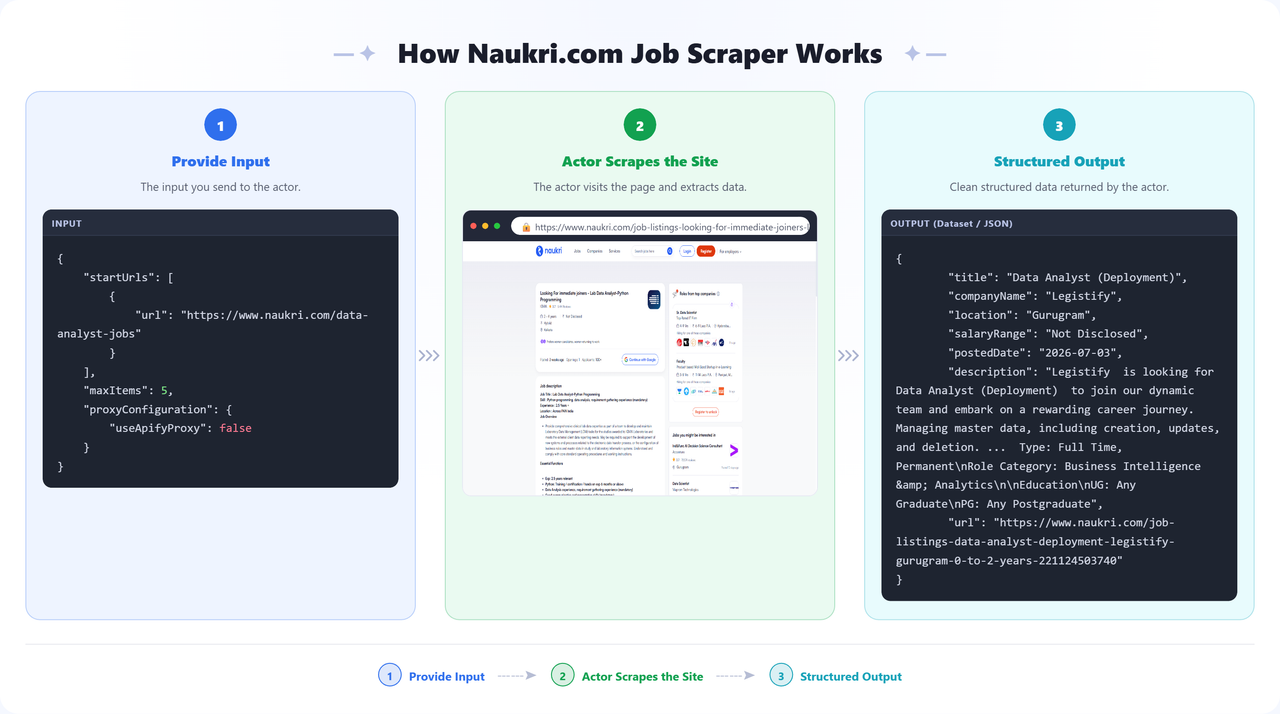
**Extract job listings from [Naukri.com](https://www.naukri.com)** — India's largest job portal — including job title, company name, location, salary, posted date, and full description. Just paste any Naukri search result URL and get clean, structured job data ready for analysis, lead generation, or feeding into your own job board.
 ### ✨ Features
- **Job listing extraction** — title, company, location, salary, posted date, and full description for every job on a search page
- **Pagination support** — automatically follows "Next" page links until the requested number of jobs is collected
- **Proxy support** — optional Apify Proxy configuration for higher-volume runs
### 🔧 Input Configuration
| Field | Type | Required | Default | Description |
|-------|------|----------|---------|-------------|
| `startUrls` | array | ✅ | `https://www.naukri.com/data-analyst-jobs` | One or more Naukri.com job search result page URLs |
| `maxItems` | integer | — | `5` | Maximum number of jobs to scrape per start URL |
| `proxyConfiguration` | object | — | `{ "useApifyProxy": false }` | Apify Proxy settings |
**Supported URL types:**
Any Naukri.com job search results page, e.g. `https://www.naukri.com/data-analyst-jobs`, `https://www.naukri.com/jobs-in-bangalore`, or a filtered search results URL copied directly from your browser.
**What to put in Start URLs:**
1. Go to [naukri.com](https://www.naukri.com) and search for the role, skill, or location you're interested in (e.g. "Data Analyst" or "Jobs in Bangalore").
2. Apply any filters you want — experience level, location, salary, etc. — directly on the Naukri search page.
3. Copy the resulting URL from your browser's address bar.
4. Paste it into **Start URLs**. Add multiple URLs to scrape several searches in one run.
Only `naukri.com` URLs are accepted — other URLs are skipped with a warning in the run log.
### 📦 Output
One dataset item per job listing, viewable in the **Overview** table (title, company, location, salary, posted date, URL).
**Sample output:**
```json
[
{
"title": "Climate Data Analyst",
"companyName": "MSCI Services",
"location": "Pune",
"salaryRange": "Not Disclosed",
"postedDate": "2026-07-16",
"description": "The Climate Data and Content team is responsible for research and assessment of carbon footprint...",
"url": "https://www.naukri.com/job-listings-climate-data-analyst-msci-services-pvt-ltd-pune-0-to-4-years-090726505446"
},
{
"title": "Data Analyst",
"companyName": "Cognizant",
"location": "Hyderabad",
"salaryRange": "Not Disclosed",
"postedDate": "2026-07-21",
"description": "Role: Data Analyst\n\nExperience: 5+ years...",
"url": "https://www.naukri.com/job-listings-data-analyst-cognizant-hyderabad-5-to-10-years-261125013003"
}
]
```
You can download the dataset in various formats such as JSON, HTML, CSV, or Excel.
### 💡 Uses of This Data
- Job market and salary trend analysis for a role or industry
- Sourcing candidate leads for recruitment agencies
- Feeding a job aggregator or job board with fresh listings
- Competitive hiring intelligence — tracking which companies are actively hiring
- Building alerts for newly posted roles matching your criteria
### 🚀 How to Use
1. [Sign up](https://apify.com/sign-up) for a free Apify account — includes **$5 monthly credit**.
2. Open the actor page and click **Try for free**.
3. Paste one or more Naukri.com search result URLs into **Start URLs**.
4. Click **Start** and wait for the run to complete.
5. Download results from the **Output** tab in JSON, CSV, or Excel format.
You can also integrate this actor directly into your workflows using [Zapier](https://zapier.com/apps/apify), [Make](https://www.make.com/), or [n8n](https://n8n.io/).
### ⚠️ Limitations & Known Issues
- **Occasional rate limiting** — Naukri.com may briefly block a request under heavy load; the actor retries automatically. For large-volume runs, enabling a proxy is recommended.
- **Salary visibility** — Many listings on Naukri.com mark salary as "Not Disclosed" by the employer; this is reflected as-is in the output.
### 📝 Notes
- **Proxy recommended for large-scale scraping** — For high-volume runs, enable the Apify proxy to reduce the chance of temporary blocks.
### 🤝 Support
Need help or have questions?
- Email us at info@parsedom.com
- Or visit https://parsedom.com
- Visit our profilel in fiverr: https://www.fiverr.com/s/rEmNqEb
- Apify public page: https://apify.com/kinaesthetic_millionaire
- You can also contact us if you want to build a custom actor.
Ready to scrape more listings? Add your URLs and start scraping! 🚀
# Actor input Schema
## `startUrls` (type: `array`):
Naukri.com job search result page URLs to start scraping from.
## `maxItems` (type: `integer`):
Maximum number of job listings to scrape for each start URL.
## `proxyConfiguration` (type: `object`):
Proxy settings. Naukri.com works reliably without a proxy for normal-volume runs; enable it if you hit blocks on large runs.
## Actor input object example
```json
{
"startUrls": [
{
"url": "https://www.naukri.com/data-analyst-jobs"
}
],
"maxItems": 5,
"proxyConfiguration": {
"useApifyProxy": false
}
}
```
# Actor output Schema
## `overview` (type: `string`):
No description
# API
You can run this Actor programmatically using our API. Below are code examples in JavaScript, Python, and CLI, as well as the OpenAPI specification and MCP server setup.
## JavaScript example
```javascript
import { ApifyClient } from 'apify-client';
// Initialize the ApifyClient with your Apify API token
// Replace the '' with your token
const client = new ApifyClient({
token: '',
});
// Prepare Actor input
const input = {
"startUrls": [
{
"url": "https://www.naukri.com/data-analyst-jobs"
}
]
};
// Run the Actor and wait for it to finish
const run = await client.actor("kinaesthetic_millionaire/naukri-job-scraper").call(input);
// Fetch and print Actor results from the run's dataset (if any)
console.log('Results from dataset');
console.log(`💾 Check your data here: https://console.apify.com/storage/datasets/${run.defaultDatasetId}`);
const { items } = await client.dataset(run.defaultDatasetId).listItems();
items.forEach((item) => {
console.dir(item);
});
// 📚 Want to learn more 📖? Go to → https://docs.apify.com/api/client/js/docs
```
## Python example
```python
from apify_client import ApifyClient
# Initialize the ApifyClient with your Apify API token
# Replace '' with your token.
client = ApifyClient("")
# Prepare the Actor input
run_input = { "startUrls": [{ "url": "https://www.naukri.com/data-analyst-jobs" }] }
# Run the Actor and wait for it to finish
run = client.actor("kinaesthetic_millionaire/naukri-job-scraper").call(run_input=run_input)
# Fetch and print Actor results from the run's dataset (if there are any)
print(f"💾 Check your data here: https://console.apify.com/storage/datasets/{run.default_dataset_id}")
for item in client.dataset(run.default_dataset_id).iterate_items():
print(item)
# 📚 Want to learn more 📖? Go to → https://docs.apify.com/api/client/python/docs/quick-start
```
## CLI example
```bash
echo '{
"startUrls": [
{
"url": "https://www.naukri.com/data-analyst-jobs"
}
]
}' |
apify call kinaesthetic_millionaire/naukri-job-scraper --silent --output-dataset
```
## MCP server setup
```json
{
"mcpServers": {
"apify": {
"type": "http",
"url": "https://mcp.apify.com/?tools=fetch-actor-details,kinaesthetic_millionaire/naukri-job-scraper"
}
}
}
```
The hosted server signs you in with OAuth on first connect, so no API token belongs in this config. Clients without OAuth support can send an `Authorization: Bearer ` header instead, using a token from API & Integrations in Apify Console (https://console.apify.com/settings/integrations).
## OpenAPI specification
Download the OpenAPI definition: https://api.apify.com/v2/actors/JgWyXaSX7bEeY7egS/builds/8dBuwaFoghPAGz9gn/openapi.json