# NHS UK \[$0💰] Jobs Scraper (`kinaesthetic_millionaire/nhs-uk-jobs-scraper`) Actor
Extracts job listings from NHS Jobs, including title, employer, location, salary, contract type and full job description.
- **URL**: https://apify.com/kinaesthetic\_millionaire/nhs-uk-jobs-scraper.md
- **Developed by:** [Parsedom Inc](https://apify.com/kinaesthetic_millionaire) (community)
- **Categories:** Jobs, Automation, Developer tools
- **Stats:** 2 total users, 1 monthly users, 100.0% runs succeeded, 0 bookmarks
- **User rating**: No ratings yet
## Pricing
Pay per usage
This Actor is paid per platform usage. The Actor is free to use, and you only pay for the Apify platform usage, which gets cheaper the higher subscription plan you have.
Learn more: https://docs.apify.com/platform/actors/running/actors-in-store#pay-per-usage
## What's an Apify Actor?
Actors are web data automations that power AI and operations. They run on the Apify platform to scrape websites, process data, connect APIs, and automate workflows.
In Batch mode, an Actor accepts a well-defined JSON input, performs an action which can take anything from a few seconds to a few hours,
and optionally produces a well-defined JSON output, datasets with results, or files in key-value store.
In Standby mode, an Actor provides a web server which can be used as a website, API, or an MCP server.
Actors are written with capital "A".
## How to integrate an Actor?
If asked about integration, you help developers integrate Actors into their projects.
You adapt to their stack and deliver integrations that are safe, well-documented, and production-ready.
The best way to integrate Actors is as follows.
In JavaScript/TypeScript projects, use official [JavaScript/TypeScript client](https://docs.apify.com/api/client/js/docs.md):
```bash
npm install apify-client
```
In Python projects, use official [Python client library](https://docs.apify.com/api/client/python/docs.md):
```bash
pip install apify-client
```
In shell scripts, use [Apify CLI](https://docs.apify.com/cli/docs.md):
````bash
# MacOS / Linux
curl -fsSL https://apify.com/install-cli.sh | bash
# Windows
irm https://apify.com/install-cli.ps1 | iex
```bash
In AI frameworks, you might use the [Apify MCP server](https://docs.apify.com/integrations/mcp.md).
If your project is in a different language, use the [REST API](https://docs.apify.com/api/v2.md).
For usage examples, see the [API](#api) section below.
For more details, see Apify documentation as [Markdown index](https://docs.apify.com/llms.txt) and [Markdown full-text](https://docs.apify.com/llms-full.txt).
# README
## NHS Jobs Scraper
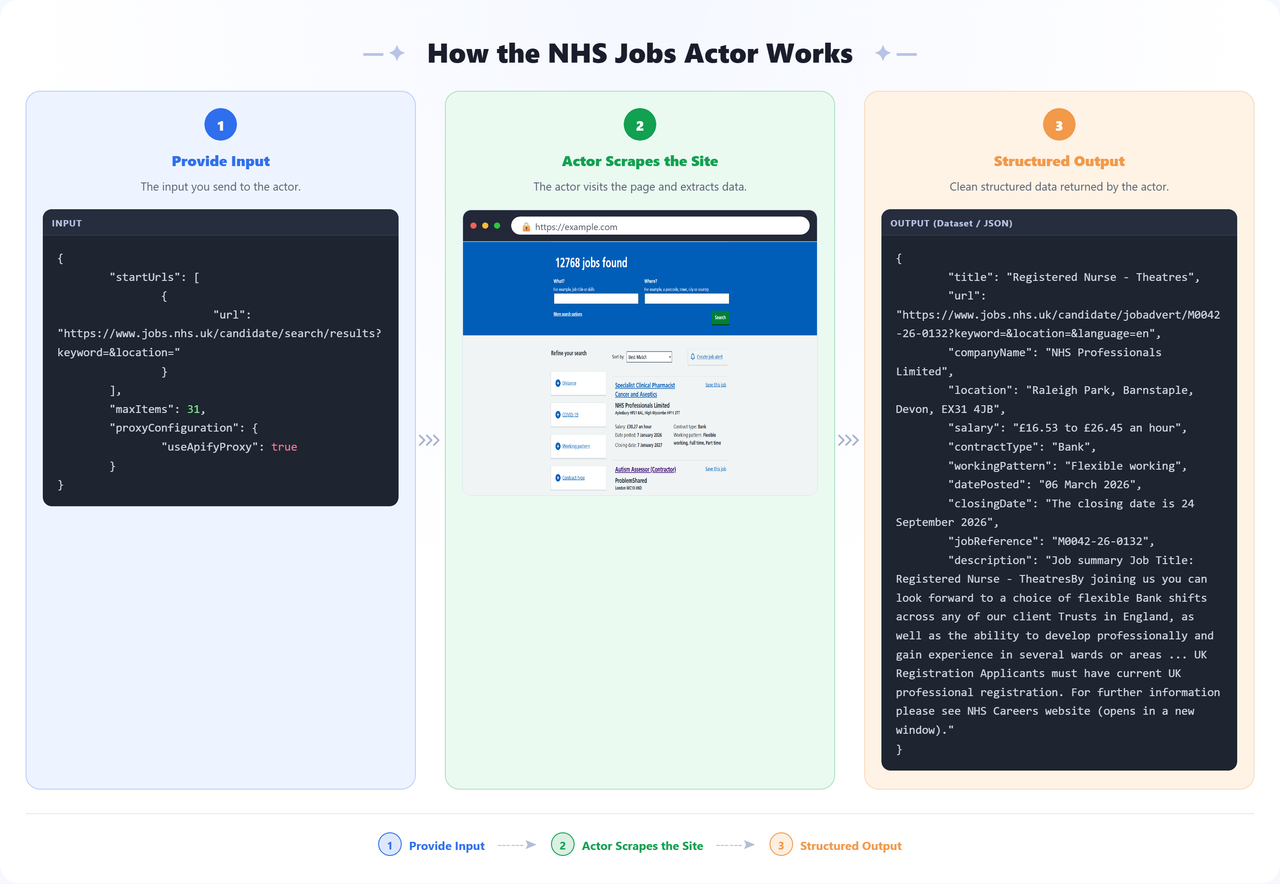
Extracts job listings from [NHS Jobs](https://www.jobs.nhs.uk), the official job site for the UK's National Health Service. Give it a search results page and it returns structured data for every listing — job title, employer, location, salary, contract type, working pattern, and the full job description — as ready-to-use JSON.
 ### ✨ Features
- **Job listing extraction** — title, employer, location, salary, contract type, working pattern, dates, reference number, and full description for every job
- **Pagination support** — automatically follows search result pages until enough listings are collected
- **Proxy support** — uses Apify Proxy by default to keep runs reliable at scale
### 🔧 Input Configuration
| Field | Type | Required | Default | Description |
| --- | --- | --- | --- | --- |
| `startUrls` | array | ✅ | `https://www.jobs.nhs.uk/candidate/search/results?keyword=&location=` | NHS Jobs search result pages or direct job listing URLs to start scraping from |
| `maxItems` | integer | — | `5` | Maximum number of job listings to scrape per start URL |
| `proxyConfiguration` | object | — | `{ "useApifyProxy": true }` | Proxy settings for the run |
**Supported URL types:**
- NHS Jobs search result pages, e.g. `https://www.jobs.nhs.uk/candidate/search/results?keyword=nurse&location=london`
- Direct job listing pages, e.g. `https://www.jobs.nhs.uk/candidate/jobadvert/`
### 📦 Output
The dataset includes one **Overview** view showing the main fields for each scraped job in a compact table.
**Sample output:**
```json
{
"title": "Staff Nurse - A&E",
"url": "https://www.jobs.nhs.uk/candidate/jobadvert/M0042-26-0125?keyword=&location=&language=en",
"companyName": "Torbay & South Devon Nhs Foundation Trust",
"location": "Newton Road, Torquay, TQ2 7AA",
"salary": "£18.66 to £29.85 an hour",
"contractType": "Bank",
"workingPattern": "Full-time, Part-time, Flexible working",
"datePosted": "05 September 2025",
"closingDate": "The closing date is 05 September 2026",
"jobReference": "M0042-26-0125",
"description": "Job summary The Emergency Department at Torbay Hospital is looking for enthusiastic and committed Staff Nurses to join our team on a bank basis. You will work alongside a supportive multidisciplinary team delivering high-quality, patient-centred emergency care... [truncated for brevity — full text included in the actual dataset]"
}
````
You can download the dataset in various formats such as JSON, HTML, CSV, or Excel.
### 💡 Uses of This Data
- Aggregating NHS vacancies onto a jobs board or careers site
- Tracking new openings at specific NHS trusts or in specific regions
- Monitoring salary bands and contract types across healthcare roles
- Feeding job alerts or notifications for specific job titles or locations
- Workforce and recruitment market research within the UK healthcare sector
### 🚀 How to Use
1. [Sign up](https://apify.com/sign-up) for a free Apify account — includes **$5 monthly credit**.
2. Open the actor page and click **Try for free**.
3. Fill in the **Input** fields (start URL or search query is required).
4. Click **Start** and wait for the run to complete.
5. Download results from the **Output** tab in JSON, CSV, or Excel format.
You can also run this actor via the [Apify API](https://docs.apify.com/api/v2) or integrate it directly into your workflows using [Zapier](https://zapier.com/apps/apify), [Make](https://www.make.com/), or [n8n](https://n8n.io/).
### 📝 Notes
- **Proxy enabled by default** — Apify Proxy is used out of the box to keep runs reliable; adjust the group or country in the Input tab if needed.
- **API integration** — This actor can be called as an API from any automation platform (Zapier, Make, n8n, custom scripts).
### 🤝 Support
Need help or have questions?
- Email us at
- Or visit
- Visit our profile on Fiverr:
- Apify public page:
- You can also contact us if you want to build a custom actor.
# Actor input Schema
## `startUrls` (type: `array`):
NHS Jobs search result pages or direct job listing URLs to start scraping from.
## `maxItems` (type: `integer`):
Maximum number of job listings to scrape per start URL.
## `proxyConfiguration` (type: `object`):
Proxy settings for the run.
## Actor input object example
```json
{
"startUrls": [
{
"url": "https://www.jobs.nhs.uk/candidate/search/results?keyword=&location="
}
],
"maxItems": 5,
"proxyConfiguration": {
"useApifyProxy": true
}
}
```
# Actor output Schema
## `overview` (type: `string`):
No description
# API
You can run this Actor programmatically using our API. Below are code examples in JavaScript, Python, and CLI, as well as the OpenAPI specification and MCP server setup.
## JavaScript example
```javascript
import { ApifyClient } from 'apify-client';
// Initialize the ApifyClient with your Apify API token
// Replace the '' with your token
const client = new ApifyClient({
token: '',
});
// Prepare Actor input
const input = {
"startUrls": [
{
"url": "https://www.jobs.nhs.uk/candidate/search/results?keyword=&location="
}
],
"maxItems": 5,
"proxyConfiguration": {
"useApifyProxy": true
}
};
// Run the Actor and wait for it to finish
const run = await client.actor("kinaesthetic_millionaire/nhs-uk-jobs-scraper").call(input);
// Fetch and print Actor results from the run's dataset (if any)
console.log('Results from dataset');
console.log(`💾 Check your data here: https://console.apify.com/storage/datasets/${run.defaultDatasetId}`);
const { items } = await client.dataset(run.defaultDatasetId).listItems();
items.forEach((item) => {
console.dir(item);
});
// 📚 Want to learn more 📖? Go to → https://docs.apify.com/api/client/js/docs
```
## Python example
```python
from apify_client import ApifyClient
# Initialize the ApifyClient with your Apify API token
# Replace '' with your token.
client = ApifyClient("")
# Prepare the Actor input
run_input = {
"startUrls": [{ "url": "https://www.jobs.nhs.uk/candidate/search/results?keyword=&location=" }],
"maxItems": 5,
"proxyConfiguration": { "useApifyProxy": True },
}
# Run the Actor and wait for it to finish
run = client.actor("kinaesthetic_millionaire/nhs-uk-jobs-scraper").call(run_input=run_input)
# Fetch and print Actor results from the run's dataset (if there are any)
print("💾 Check your data here: https://console.apify.com/storage/datasets/" + run["defaultDatasetId"])
for item in client.dataset(run["defaultDatasetId"]).iterate_items():
print(item)
# 📚 Want to learn more 📖? Go to → https://docs.apify.com/api/client/python/docs/quick-start
```
## CLI example
```bash
echo '{
"startUrls": [
{
"url": "https://www.jobs.nhs.uk/candidate/search/results?keyword=&location="
}
],
"maxItems": 5,
"proxyConfiguration": {
"useApifyProxy": true
}
}' |
apify call kinaesthetic_millionaire/nhs-uk-jobs-scraper --silent --output-dataset
```
## MCP server setup
```json
{
"mcpServers": {
"apify": {
"command": "npx",
"args": [
"mcp-remote",
"https://mcp.apify.com/?tools=kinaesthetic_millionaire/nhs-uk-jobs-scraper",
"--header",
"Authorization: Bearer "
]
}
}
}
```
## OpenAPI specification
```json
{
"openapi": "3.0.1",
"info": {
"title": "NHS UK [$0💰] Jobs Scraper",
"description": "Extracts job listings from NHS Jobs, including title, employer, location, salary, contract type and full job description.",
"version": "1.0",
"x-build-id": "wBLp8kFyurNIFbXTy"
},
"servers": [
{
"url": "https://api.apify.com/v2"
}
],
"paths": {
"/acts/kinaesthetic_millionaire~nhs-uk-jobs-scraper/run-sync-get-dataset-items": {
"post": {
"operationId": "run-sync-get-dataset-items-kinaesthetic_millionaire-nhs-uk-jobs-scraper",
"x-openai-isConsequential": false,
"summary": "Executes an Actor, waits for its completion, and returns Actor's dataset items in response.",
"tags": [
"Run Actor"
],
"requestBody": {
"required": true,
"content": {
"application/json": {
"schema": {
"$ref": "#/components/schemas/inputSchema"
}
}
}
},
"parameters": [
{
"name": "token",
"in": "query",
"required": true,
"schema": {
"type": "string"
},
"description": "Enter your Apify token here"
}
],
"responses": {
"200": {
"description": "OK"
}
}
}
},
"/acts/kinaesthetic_millionaire~nhs-uk-jobs-scraper/runs": {
"post": {
"operationId": "runs-sync-kinaesthetic_millionaire-nhs-uk-jobs-scraper",
"x-openai-isConsequential": false,
"summary": "Executes an Actor and returns information about the initiated run in response.",
"tags": [
"Run Actor"
],
"requestBody": {
"required": true,
"content": {
"application/json": {
"schema": {
"$ref": "#/components/schemas/inputSchema"
}
}
}
},
"parameters": [
{
"name": "token",
"in": "query",
"required": true,
"schema": {
"type": "string"
},
"description": "Enter your Apify token here"
}
],
"responses": {
"200": {
"description": "OK",
"content": {
"application/json": {
"schema": {
"$ref": "#/components/schemas/runsResponseSchema"
}
}
}
}
}
}
},
"/acts/kinaesthetic_millionaire~nhs-uk-jobs-scraper/run-sync": {
"post": {
"operationId": "run-sync-kinaesthetic_millionaire-nhs-uk-jobs-scraper",
"x-openai-isConsequential": false,
"summary": "Executes an Actor, waits for completion, and returns the OUTPUT from Key-value store in response.",
"tags": [
"Run Actor"
],
"requestBody": {
"required": true,
"content": {
"application/json": {
"schema": {
"$ref": "#/components/schemas/inputSchema"
}
}
}
},
"parameters": [
{
"name": "token",
"in": "query",
"required": true,
"schema": {
"type": "string"
},
"description": "Enter your Apify token here"
}
],
"responses": {
"200": {
"description": "OK"
}
}
}
}
},
"components": {
"schemas": {
"inputSchema": {
"type": "object",
"required": [
"startUrls"
],
"properties": {
"startUrls": {
"title": "Start URLs",
"type": "array",
"description": "NHS Jobs search result pages or direct job listing URLs to start scraping from.",
"default": [
{
"url": "https://www.jobs.nhs.uk/candidate/search/results?keyword=&location="
}
],
"items": {
"type": "object",
"required": [
"url"
],
"properties": {
"url": {
"type": "string",
"title": "URL of a web page",
"format": "uri"
}
}
}
},
"maxItems": {
"title": "Max items per start URL",
"minimum": 1,
"type": "integer",
"description": "Maximum number of job listings to scrape per start URL.",
"default": 5
},
"proxyConfiguration": {
"title": "Proxy configuration",
"type": "object",
"description": "Proxy settings for the run.",
"default": {
"useApifyProxy": true
}
}
}
},
"runsResponseSchema": {
"type": "object",
"properties": {
"data": {
"type": "object",
"properties": {
"id": {
"type": "string"
},
"actId": {
"type": "string"
},
"userId": {
"type": "string"
},
"startedAt": {
"type": "string",
"format": "date-time",
"example": "2025-01-08T00:00:00.000Z"
},
"finishedAt": {
"type": "string",
"format": "date-time",
"example": "2025-01-08T00:00:00.000Z"
},
"status": {
"type": "string",
"example": "READY"
},
"meta": {
"type": "object",
"properties": {
"origin": {
"type": "string",
"example": "API"
},
"userAgent": {
"type": "string"
}
}
},
"stats": {
"type": "object",
"properties": {
"inputBodyLen": {
"type": "integer",
"example": 2000
},
"rebootCount": {
"type": "integer",
"example": 0
},
"restartCount": {
"type": "integer",
"example": 0
},
"resurrectCount": {
"type": "integer",
"example": 0
},
"computeUnits": {
"type": "integer",
"example": 0
}
}
},
"options": {
"type": "object",
"properties": {
"build": {
"type": "string",
"example": "latest"
},
"timeoutSecs": {
"type": "integer",
"example": 300
},
"memoryMbytes": {
"type": "integer",
"example": 1024
},
"diskMbytes": {
"type": "integer",
"example": 2048
}
}
},
"buildId": {
"type": "string"
},
"defaultKeyValueStoreId": {
"type": "string"
},
"defaultDatasetId": {
"type": "string"
},
"defaultRequestQueueId": {
"type": "string"
},
"buildNumber": {
"type": "string",
"example": "1.0.0"
},
"containerUrl": {
"type": "string"
},
"usage": {
"type": "object",
"properties": {
"ACTOR_COMPUTE_UNITS": {
"type": "integer",
"example": 0
},
"DATASET_READS": {
"type": "integer",
"example": 0
},
"DATASET_WRITES": {
"type": "integer",
"example": 0
},
"KEY_VALUE_STORE_READS": {
"type": "integer",
"example": 0
},
"KEY_VALUE_STORE_WRITES": {
"type": "integer",
"example": 1
},
"KEY_VALUE_STORE_LISTS": {
"type": "integer",
"example": 0
},
"REQUEST_QUEUE_READS": {
"type": "integer",
"example": 0
},
"REQUEST_QUEUE_WRITES": {
"type": "integer",
"example": 0
},
"DATA_TRANSFER_INTERNAL_GBYTES": {
"type": "integer",
"example": 0
},
"DATA_TRANSFER_EXTERNAL_GBYTES": {
"type": "integer",
"example": 0
},
"PROXY_RESIDENTIAL_TRANSFER_GBYTES": {
"type": "integer",
"example": 0
},
"PROXY_SERPS": {
"type": "integer",
"example": 0
}
}
},
"usageTotalUsd": {
"type": "number",
"example": 0.00005
},
"usageUsd": {
"type": "object",
"properties": {
"ACTOR_COMPUTE_UNITS": {
"type": "integer",
"example": 0
},
"DATASET_READS": {
"type": "integer",
"example": 0
},
"DATASET_WRITES": {
"type": "integer",
"example": 0
},
"KEY_VALUE_STORE_READS": {
"type": "integer",
"example": 0
},
"KEY_VALUE_STORE_WRITES": {
"type": "number",
"example": 0.00005
},
"KEY_VALUE_STORE_LISTS": {
"type": "integer",
"example": 0
},
"REQUEST_QUEUE_READS": {
"type": "integer",
"example": 0
},
"REQUEST_QUEUE_WRITES": {
"type": "integer",
"example": 0
},
"DATA_TRANSFER_INTERNAL_GBYTES": {
"type": "integer",
"example": 0
},
"DATA_TRANSFER_EXTERNAL_GBYTES": {
"type": "integer",
"example": 0
},
"PROXY_RESIDENTIAL_TRANSFER_GBYTES": {
"type": "integer",
"example": 0
},
"PROXY_SERPS": {
"type": "integer",
"example": 0
}
}
}
}
}
}
}
}
}
}
```
### ✨ Features
- **Job listing extraction** — title, employer, location, salary, contract type, working pattern, dates, reference number, and full description for every job
- **Pagination support** — automatically follows search result pages until enough listings are collected
- **Proxy support** — uses Apify Proxy by default to keep runs reliable at scale
### 🔧 Input Configuration
| Field | Type | Required | Default | Description |
| --- | --- | --- | --- | --- |
| `startUrls` | array | ✅ | `https://www.jobs.nhs.uk/candidate/search/results?keyword=&location=` | NHS Jobs search result pages or direct job listing URLs to start scraping from |
| `maxItems` | integer | — | `5` | Maximum number of job listings to scrape per start URL |
| `proxyConfiguration` | object | — | `{ "useApifyProxy": true }` | Proxy settings for the run |
**Supported URL types:**
- NHS Jobs search result pages, e.g. `https://www.jobs.nhs.uk/candidate/search/results?keyword=nurse&location=london`
- Direct job listing pages, e.g. `https://www.jobs.nhs.uk/candidate/jobadvert/`
### 📦 Output
The dataset includes one **Overview** view showing the main fields for each scraped job in a compact table.
**Sample output:**
```json
{
"title": "Staff Nurse - A&E",
"url": "https://www.jobs.nhs.uk/candidate/jobadvert/M0042-26-0125?keyword=&location=&language=en",
"companyName": "Torbay & South Devon Nhs Foundation Trust",
"location": "Newton Road, Torquay, TQ2 7AA",
"salary": "£18.66 to £29.85 an hour",
"contractType": "Bank",
"workingPattern": "Full-time, Part-time, Flexible working",
"datePosted": "05 September 2025",
"closingDate": "The closing date is 05 September 2026",
"jobReference": "M0042-26-0125",
"description": "Job summary The Emergency Department at Torbay Hospital is looking for enthusiastic and committed Staff Nurses to join our team on a bank basis. You will work alongside a supportive multidisciplinary team delivering high-quality, patient-centred emergency care... [truncated for brevity — full text included in the actual dataset]"
}
````
You can download the dataset in various formats such as JSON, HTML, CSV, or Excel.
### 💡 Uses of This Data
- Aggregating NHS vacancies onto a jobs board or careers site
- Tracking new openings at specific NHS trusts or in specific regions
- Monitoring salary bands and contract types across healthcare roles
- Feeding job alerts or notifications for specific job titles or locations
- Workforce and recruitment market research within the UK healthcare sector
### 🚀 How to Use
1. [Sign up](https://apify.com/sign-up) for a free Apify account — includes **$5 monthly credit**.
2. Open the actor page and click **Try for free**.
3. Fill in the **Input** fields (start URL or search query is required).
4. Click **Start** and wait for the run to complete.
5. Download results from the **Output** tab in JSON, CSV, or Excel format.
You can also run this actor via the [Apify API](https://docs.apify.com/api/v2) or integrate it directly into your workflows using [Zapier](https://zapier.com/apps/apify), [Make](https://www.make.com/), or [n8n](https://n8n.io/).
### 📝 Notes
- **Proxy enabled by default** — Apify Proxy is used out of the box to keep runs reliable; adjust the group or country in the Input tab if needed.
- **API integration** — This actor can be called as an API from any automation platform (Zapier, Make, n8n, custom scripts).
### 🤝 Support
Need help or have questions?
- Email us at
- Or visit
- Visit our profile on Fiverr:
- Apify public page:
- You can also contact us if you want to build a custom actor.
# Actor input Schema
## `startUrls` (type: `array`):
NHS Jobs search result pages or direct job listing URLs to start scraping from.
## `maxItems` (type: `integer`):
Maximum number of job listings to scrape per start URL.
## `proxyConfiguration` (type: `object`):
Proxy settings for the run.
## Actor input object example
```json
{
"startUrls": [
{
"url": "https://www.jobs.nhs.uk/candidate/search/results?keyword=&location="
}
],
"maxItems": 5,
"proxyConfiguration": {
"useApifyProxy": true
}
}
```
# Actor output Schema
## `overview` (type: `string`):
No description
# API
You can run this Actor programmatically using our API. Below are code examples in JavaScript, Python, and CLI, as well as the OpenAPI specification and MCP server setup.
## JavaScript example
```javascript
import { ApifyClient } from 'apify-client';
// Initialize the ApifyClient with your Apify API token
// Replace the '' with your token
const client = new ApifyClient({
token: '',
});
// Prepare Actor input
const input = {
"startUrls": [
{
"url": "https://www.jobs.nhs.uk/candidate/search/results?keyword=&location="
}
],
"maxItems": 5,
"proxyConfiguration": {
"useApifyProxy": true
}
};
// Run the Actor and wait for it to finish
const run = await client.actor("kinaesthetic_millionaire/nhs-uk-jobs-scraper").call(input);
// Fetch and print Actor results from the run's dataset (if any)
console.log('Results from dataset');
console.log(`💾 Check your data here: https://console.apify.com/storage/datasets/${run.defaultDatasetId}`);
const { items } = await client.dataset(run.defaultDatasetId).listItems();
items.forEach((item) => {
console.dir(item);
});
// 📚 Want to learn more 📖? Go to → https://docs.apify.com/api/client/js/docs
```
## Python example
```python
from apify_client import ApifyClient
# Initialize the ApifyClient with your Apify API token
# Replace '' with your token.
client = ApifyClient("")
# Prepare the Actor input
run_input = {
"startUrls": [{ "url": "https://www.jobs.nhs.uk/candidate/search/results?keyword=&location=" }],
"maxItems": 5,
"proxyConfiguration": { "useApifyProxy": True },
}
# Run the Actor and wait for it to finish
run = client.actor("kinaesthetic_millionaire/nhs-uk-jobs-scraper").call(run_input=run_input)
# Fetch and print Actor results from the run's dataset (if there are any)
print("💾 Check your data here: https://console.apify.com/storage/datasets/" + run["defaultDatasetId"])
for item in client.dataset(run["defaultDatasetId"]).iterate_items():
print(item)
# 📚 Want to learn more 📖? Go to → https://docs.apify.com/api/client/python/docs/quick-start
```
## CLI example
```bash
echo '{
"startUrls": [
{
"url": "https://www.jobs.nhs.uk/candidate/search/results?keyword=&location="
}
],
"maxItems": 5,
"proxyConfiguration": {
"useApifyProxy": true
}
}' |
apify call kinaesthetic_millionaire/nhs-uk-jobs-scraper --silent --output-dataset
```
## MCP server setup
```json
{
"mcpServers": {
"apify": {
"command": "npx",
"args": [
"mcp-remote",
"https://mcp.apify.com/?tools=kinaesthetic_millionaire/nhs-uk-jobs-scraper",
"--header",
"Authorization: Bearer "
]
}
}
}
```
## OpenAPI specification
```json
{
"openapi": "3.0.1",
"info": {
"title": "NHS UK [$0💰] Jobs Scraper",
"description": "Extracts job listings from NHS Jobs, including title, employer, location, salary, contract type and full job description.",
"version": "1.0",
"x-build-id": "wBLp8kFyurNIFbXTy"
},
"servers": [
{
"url": "https://api.apify.com/v2"
}
],
"paths": {
"/acts/kinaesthetic_millionaire~nhs-uk-jobs-scraper/run-sync-get-dataset-items": {
"post": {
"operationId": "run-sync-get-dataset-items-kinaesthetic_millionaire-nhs-uk-jobs-scraper",
"x-openai-isConsequential": false,
"summary": "Executes an Actor, waits for its completion, and returns Actor's dataset items in response.",
"tags": [
"Run Actor"
],
"requestBody": {
"required": true,
"content": {
"application/json": {
"schema": {
"$ref": "#/components/schemas/inputSchema"
}
}
}
},
"parameters": [
{
"name": "token",
"in": "query",
"required": true,
"schema": {
"type": "string"
},
"description": "Enter your Apify token here"
}
],
"responses": {
"200": {
"description": "OK"
}
}
}
},
"/acts/kinaesthetic_millionaire~nhs-uk-jobs-scraper/runs": {
"post": {
"operationId": "runs-sync-kinaesthetic_millionaire-nhs-uk-jobs-scraper",
"x-openai-isConsequential": false,
"summary": "Executes an Actor and returns information about the initiated run in response.",
"tags": [
"Run Actor"
],
"requestBody": {
"required": true,
"content": {
"application/json": {
"schema": {
"$ref": "#/components/schemas/inputSchema"
}
}
}
},
"parameters": [
{
"name": "token",
"in": "query",
"required": true,
"schema": {
"type": "string"
},
"description": "Enter your Apify token here"
}
],
"responses": {
"200": {
"description": "OK",
"content": {
"application/json": {
"schema": {
"$ref": "#/components/schemas/runsResponseSchema"
}
}
}
}
}
}
},
"/acts/kinaesthetic_millionaire~nhs-uk-jobs-scraper/run-sync": {
"post": {
"operationId": "run-sync-kinaesthetic_millionaire-nhs-uk-jobs-scraper",
"x-openai-isConsequential": false,
"summary": "Executes an Actor, waits for completion, and returns the OUTPUT from Key-value store in response.",
"tags": [
"Run Actor"
],
"requestBody": {
"required": true,
"content": {
"application/json": {
"schema": {
"$ref": "#/components/schemas/inputSchema"
}
}
}
},
"parameters": [
{
"name": "token",
"in": "query",
"required": true,
"schema": {
"type": "string"
},
"description": "Enter your Apify token here"
}
],
"responses": {
"200": {
"description": "OK"
}
}
}
}
},
"components": {
"schemas": {
"inputSchema": {
"type": "object",
"required": [
"startUrls"
],
"properties": {
"startUrls": {
"title": "Start URLs",
"type": "array",
"description": "NHS Jobs search result pages or direct job listing URLs to start scraping from.",
"default": [
{
"url": "https://www.jobs.nhs.uk/candidate/search/results?keyword=&location="
}
],
"items": {
"type": "object",
"required": [
"url"
],
"properties": {
"url": {
"type": "string",
"title": "URL of a web page",
"format": "uri"
}
}
}
},
"maxItems": {
"title": "Max items per start URL",
"minimum": 1,
"type": "integer",
"description": "Maximum number of job listings to scrape per start URL.",
"default": 5
},
"proxyConfiguration": {
"title": "Proxy configuration",
"type": "object",
"description": "Proxy settings for the run.",
"default": {
"useApifyProxy": true
}
}
}
},
"runsResponseSchema": {
"type": "object",
"properties": {
"data": {
"type": "object",
"properties": {
"id": {
"type": "string"
},
"actId": {
"type": "string"
},
"userId": {
"type": "string"
},
"startedAt": {
"type": "string",
"format": "date-time",
"example": "2025-01-08T00:00:00.000Z"
},
"finishedAt": {
"type": "string",
"format": "date-time",
"example": "2025-01-08T00:00:00.000Z"
},
"status": {
"type": "string",
"example": "READY"
},
"meta": {
"type": "object",
"properties": {
"origin": {
"type": "string",
"example": "API"
},
"userAgent": {
"type": "string"
}
}
},
"stats": {
"type": "object",
"properties": {
"inputBodyLen": {
"type": "integer",
"example": 2000
},
"rebootCount": {
"type": "integer",
"example": 0
},
"restartCount": {
"type": "integer",
"example": 0
},
"resurrectCount": {
"type": "integer",
"example": 0
},
"computeUnits": {
"type": "integer",
"example": 0
}
}
},
"options": {
"type": "object",
"properties": {
"build": {
"type": "string",
"example": "latest"
},
"timeoutSecs": {
"type": "integer",
"example": 300
},
"memoryMbytes": {
"type": "integer",
"example": 1024
},
"diskMbytes": {
"type": "integer",
"example": 2048
}
}
},
"buildId": {
"type": "string"
},
"defaultKeyValueStoreId": {
"type": "string"
},
"defaultDatasetId": {
"type": "string"
},
"defaultRequestQueueId": {
"type": "string"
},
"buildNumber": {
"type": "string",
"example": "1.0.0"
},
"containerUrl": {
"type": "string"
},
"usage": {
"type": "object",
"properties": {
"ACTOR_COMPUTE_UNITS": {
"type": "integer",
"example": 0
},
"DATASET_READS": {
"type": "integer",
"example": 0
},
"DATASET_WRITES": {
"type": "integer",
"example": 0
},
"KEY_VALUE_STORE_READS": {
"type": "integer",
"example": 0
},
"KEY_VALUE_STORE_WRITES": {
"type": "integer",
"example": 1
},
"KEY_VALUE_STORE_LISTS": {
"type": "integer",
"example": 0
},
"REQUEST_QUEUE_READS": {
"type": "integer",
"example": 0
},
"REQUEST_QUEUE_WRITES": {
"type": "integer",
"example": 0
},
"DATA_TRANSFER_INTERNAL_GBYTES": {
"type": "integer",
"example": 0
},
"DATA_TRANSFER_EXTERNAL_GBYTES": {
"type": "integer",
"example": 0
},
"PROXY_RESIDENTIAL_TRANSFER_GBYTES": {
"type": "integer",
"example": 0
},
"PROXY_SERPS": {
"type": "integer",
"example": 0
}
}
},
"usageTotalUsd": {
"type": "number",
"example": 0.00005
},
"usageUsd": {
"type": "object",
"properties": {
"ACTOR_COMPUTE_UNITS": {
"type": "integer",
"example": 0
},
"DATASET_READS": {
"type": "integer",
"example": 0
},
"DATASET_WRITES": {
"type": "integer",
"example": 0
},
"KEY_VALUE_STORE_READS": {
"type": "integer",
"example": 0
},
"KEY_VALUE_STORE_WRITES": {
"type": "number",
"example": 0.00005
},
"KEY_VALUE_STORE_LISTS": {
"type": "integer",
"example": 0
},
"REQUEST_QUEUE_READS": {
"type": "integer",
"example": 0
},
"REQUEST_QUEUE_WRITES": {
"type": "integer",
"example": 0
},
"DATA_TRANSFER_INTERNAL_GBYTES": {
"type": "integer",
"example": 0
},
"DATA_TRANSFER_EXTERNAL_GBYTES": {
"type": "integer",
"example": 0
},
"PROXY_RESIDENTIAL_TRANSFER_GBYTES": {
"type": "integer",
"example": 0
},
"PROXY_SERPS": {
"type": "integer",
"example": 0
}
}
}
}
}
}
}
}
}
}
```