# TikTok Users Scraper (`kinaesthetic_millionaire/tiktok-users-scraper`) Actor
Extracts public TikTok user accounts in bulk - follower, following, like and video counts, bio, bio link, verification status, and avatar.
- **URL**: https://apify.com/kinaesthetic\_millionaire/tiktok-users-scraper.md
- **Developed by:** [Parsedom Inc](https://apify.com/kinaesthetic_millionaire) (community)
- **Stats:** 2 total users, 1 monthly users, 100.0% runs succeeded, 0 bookmarks
- **User rating**: No ratings yet
## Pricing
from $2.90 / 1,000 results
This Actor is paid per event. You are not charged for the Apify platform usage, but only a fixed price for specific events.
Since this Actor supports Apify Store discounts, the price gets lower the higher subscription plan you have.
Learn more: https://docs.apify.com/actors/running/actors-in-store.md#pay-per-event
## What's an Apify Actor?
An Actor is a serverless cloud program that runs on the Apify platform. It has two run modes.
In Batch mode, an Actor accepts a well-defined JSON input, performs an action which can take anything from a few seconds to a few hours,
and optionally produces a well-defined JSON output, datasets with results, or files in key-value store.
In Standby mode, an Actor provides a web server which can be used as a website, API, or an MCP server.
Apify vocabulary and the platform model are defined once, in the agent quickstart at https://apify.com/agents.md.
## How to integrate an Actor?
If asked about integration, you help developers integrate Actors into their projects.
You adapt to their stack and deliver integrations that are safe, well-documented, and production-ready.
Do not guess an integration path. Every one of them is in the agent quickstart at https://apify.com/agents.md: the Apify MCP server, Agent Skills with the Apify CLI, the JavaScript and Python clients, the REST API, and the account-free path for an agent with no human to sign in. It also carries the rule on stating cost before the first paid run.
For examples already wired to this Actor's own input schema, see the [API](#api) section below.
Each client library has reference documentation the quickstart does not restate: [JavaScript/TypeScript](https://docs.apify.com/api/client/js/docs.md) (`npm install apify-client`) and [Python](https://docs.apify.com/api/client/python/docs.md) (`pip install apify-client`).
# README
## TikTok Users Scraper - Bulk Profile & Follower Data Extractor
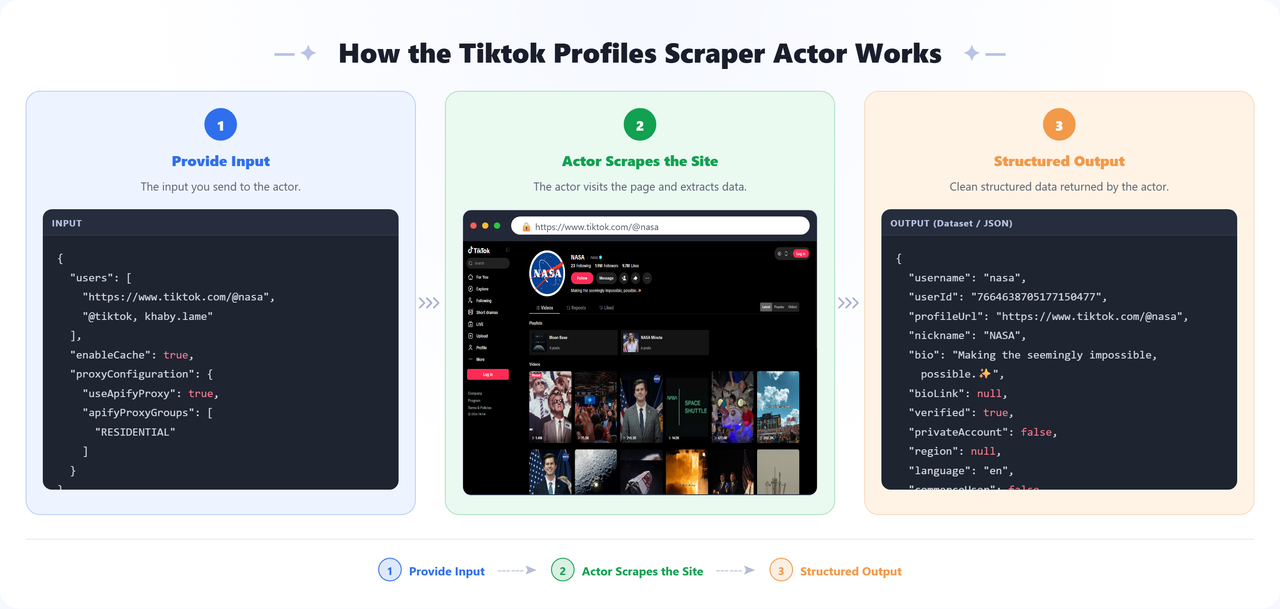
Scrape public [TikTok](https://www.tiktok.com) user profiles **in bulk** and extract exact follower count, following count, likes, and video count, plus bio, bio link, verification status, account category, and avatar. Paste a whole list of handles or profile URLs at once - no coding or TikTok API access required. Results are returned as structured JSON, ready to export to CSV or Excel for influencer research, competitor tracking, or lead generation.
 ### Features
- **Bulk TikTok profile scraping** - paste many accounts at once, several per line if you like; the Actor splits on commas, spaces, and newlines
- **Exact follower and like counts, not rounded** - TikTok's page shows `95.7M`, this Actor returns `95676148`, so numbers can be compared and tracked precisely
- **Full account detail** - nickname, bio, bio link, verified flag, private-account flag, language, business category, and avatar
- **Flexible identifiers** - profile URLs, `@handles`, bare handles, or a video URL (which resolves to the account that posted it)
- **Automatic de-duplication** - the same account listed twice, or as both a handle and a URL, is scraped only once
- **Per-project caching** - set a project name and the Actor remembers what it already returned for that project, skipping it next time. Each project keeps its own history, so different projects never interfere.
- **Proxy support** - full Apify Proxy integration, with residential proxies enabled by default
### Input Configuration
| Field | Type | Required | Default | Description |
| ------------------------------ | ------ | -------- | ------------------------------------------------------- | ------------------------------------------------------------------------------------------------------------------------------------------------------------------------------------------------------------------------------------------------------------------------------------------------------------------------- |
| TikTok users | array | Yes | `https://www.tiktok.com/@nasa`, `@tiktok`, `khaby.lame` | Accounts to scrape - profile URLs, `@handles`, or bare handles. Several per line is fine. |
| Project name (enables caching) | string | - | — | Set a project name to enable cross-run caching, for example "social". The Actor remembers the accounts it returned under that project and skips them in later runs of the same project. Each project keeps its own separate history, so using a different name starts fresh. Leave empty to scrape everything every time. |
| Proxy configuration | object | - | Apify Residential | Proxy settings used for all requests. |
### Output
The dataset has one view, **Overview**, showing username, nickname, followers, following, likes, video count, verified status, and profile URL.
**Sample output:**
```json
[
{
"username": "khaby.lame",
"userId": "127905465618821121",
"profileUrl": "https://www.tiktok.com/@khaby.lame",
"nickname": "Khabane lame",
"bio": "Se vuoi ridere sei nel posto giusto😎 If u wanna laugh u r in the right place😎",
"bioLink": null,
"verified": true,
"privateAccount": false,
"region": null,
"language": "en",
"commerceUser": false,
"category": null,
"followers": 162768799,
"following": 81,
"likes": 2669653034,
"videoCount": 1351,
"friendCount": 77,
"avatarUrl": "https://p16-common-sign.tiktokcdn-us.com/....jpeg",
"scrapedAt": "2026-09-10T15:23:29.236Z"
}
]
```
### Frequently Asked Questions
**Does this scrape TikTok without login?**
Yes. It reads public profile pages exactly as a logged-out visitor sees them - no TikTok account, cookies, or API key needed.
**Can I get a user's follower count in bulk from a list of usernames?**
Yes. Paste any number of `@handles`, bare usernames, or profile URLs and the Actor returns exact follower, following, like, and video counts for each in one run.
**Does it return the exact number instead of TikTok's rounded "95.7M" display?**
Yes. TikTok's UI rounds large numbers; this Actor returns the precise integer (e.g. `95676148`) so counts can be tracked and compared over time.
**Can I track follower growth over time?**
Yes. Schedule the Actor to run on the same list daily or weekly (with caching off) to build a time series of follower, like, and video counts per account.
**Does it scrape a user's videos too?**
No. TikTok does not expose a profile's video feed to logged-out visitors, so this Actor returns account-level stats (including total `videoCount`) but not individual video data.
### Uses of This Data
- Screen a long list of creators against follower count and engagement before outreach
- Track follower growth across a roster of accounts over time
- Verify accounts are genuine and verified before a partnership
- Enrich an influencer CRM with current bios, links, and counts
- Feed creator databases, media kits, and campaign reporting
### How to Use
1. [Sign up](https://apify.com/sign-up) for a free Apify account - includes **$5 monthly credit**.
2. Open the actor page and click **Try for free**.
3. Paste your accounts into the **TikTok users** field.
4. Click **Start** and wait for the run to complete.
5. Download results from the **Output** tab in JSON, CSV, or Excel format.
You can also run this actor via the [Apify API](https://docs.apify.com/api/v2) or integrate it directly into your workflows using [Zapier](https://zapier.com/apps/apify), [Make](https://www.make.com/), or [n8n](https://n8n.io/).
### Limitations & Known Issues
- **You supply the accounts** - TikTok does not return search results to logged-out visitors, so this Actor works from handles and URLs rather than keyword search.
- **Account data, not the video feed** - TikTok does not include a profile's videos in the page served to logged-out visitors. Each record carries the total `videoCount`, but not the individual videos.
- **Public accounts only** - private accounts return the profile shell with `privateAccount` set; TikTok may withhold their detailed stats.
- **Proxies are recommended** - TikTok serves a stripped page with no data to a share of IPs. The Actor detects this and retries from a fresh IP automatically, so keeping residential proxies enabled makes runs faster.
- **Counts are a snapshot** - follower and like counts change constantly and are accurate as of each record's `scrapedAt`.
### Notes
- **Proxy recommended for large-scale scraping** - keep the Apify Residential proxy enabled to reduce retries.
- **API integration** - This actor can be called as an API from any automation platform (Zapier, Make, n8n, custom scripts).
- **Schedule it for growth tracking** - running the same list daily with caching off builds a clean time series of follower counts.
### 🔗 Other Actors
| Category | Actor | What it does |
| ----------------------- | --------------------------------------------------------------------------------------------------------------- | -------------------------------------------------------------------------------------------------------------------------------------------------------------------- |
| 🎵 Social Media | [Instagram Reels Audio Scraper](https://apify.com/kinaesthetic_millionaire/instagram-reels-audio-scraper) | Extracts detailed data from Instagram Reels that use a given audio track. |
| 🏢 Company Data & Leads | [Kununu Company and Leads Scraper](https://apify.com/kinaesthetic_millionaire/kununu-company-and-leads-scraper) | Scrapes company profile data from kununu.com, including ratings, industry, headquarters location, and recommendation rate. |
| 🟢 Monitoring | [Website Uptime Checker](https://apify.com/kinaesthetic_millionaire/website-uptime-checker) | Monitors websites and APIs for availability, response time, SSL certificate expiry, and expected content, sending email or webhook alerts when something goes wrong. |
| 📈 SEO | [Ahrefs Website Authority Checker](https://apify.com/kinaesthetic_millionaire/ahref-website-authority-checker) | Extracts website authority metrics from Ahrefs including Domain Rating (DR), backlinks, and referring domains - useful for competitor analysis and link building. |
| 💼 Lead Generation | [Booksy Leads Scraper](https://apify.com/kinaesthetic_millionaire/booksy-leads-scraper) | Extracts business profiles from Booksy including names, addresses, phone numbers, emails, social media, and ratings. Built for beauty and wellness lead generation. |
**By running this actor you accept sole responsibility and liability for how you use it and for the data you collect.** That includes ensuring your use complies with Tiktok's's Terms of Service, with applicable law in your jurisdiction (including data protection law such as the GDPR where it applies to personal data in enrichment results), and with any other terms that bind you. If you do not accept this, please do not run the actor.
If extraction quality drops or you want a custom apify actor then you can:
- Email us at
- Visit [parsedom.com](https://parsedom.com)
- Visit our profile on Fiverr: [fiverr.com/s/rEmNqEb](https://www.fiverr.com/s/rEmNqEb)
- Apify public page: [apify.com/kinaesthetic\_millionaire](https://apify.com/kinaesthetic_millionaire)
- You can also contact us if you want to build a custom actor.
Ready to scrape more listings? Add your URLs and start scraping! 🚀
# Actor input Schema
## `users` (type: `array`):
The accounts to scrape - profile URLs, @handles, or bare handles. You can paste several per line separated by spaces or commas; a video URL also works and resolves to the account that posted it.
## `projectName` (type: `string`):
Set a project name to enable cross-run caching, for example "social". The Actor remembers the accounts it returned under that project and skips them in later runs of the same project. Each project keeps its own separate history, so using a different name starts fresh. Leave empty to scrape everything every time.
## `proxyConfiguration` (type: `object`):
Proxy settings used for all requests. TikTok serves a stripped page to some IPs, so residential proxies are enabled by default.
## Actor input object example
```json
{
"users": [
"https://www.tiktok.com/@nasa",
"@tiktok",
"khaby.lame"
],
"proxyConfiguration": {
"useApifyProxy": true,
"apifyProxyGroups": [
"RESIDENTIAL"
]
}
}
```
# Actor output Schema
## `results` (type: `string`):
No description
# API
You can run this Actor programmatically using our API. Below are code examples in JavaScript, Python, and CLI, as well as the OpenAPI specification and MCP server setup.
## JavaScript example
```javascript
import { ApifyClient } from 'apify-client';
// Initialize the ApifyClient with your Apify API token
// Replace the '' with your token
const client = new ApifyClient({
token: '',
});
// Prepare Actor input
const input = {
"users": [
"https://www.tiktok.com/@nasa",
"@tiktok",
"khaby.lame"
]
};
// Run the Actor and wait for it to finish
const run = await client.actor("kinaesthetic_millionaire/tiktok-users-scraper").call(input);
// Fetch and print Actor results from the run's dataset (if any)
console.log('Results from dataset');
console.log(`💾 Check your data here: https://console.apify.com/storage/datasets/${run.defaultDatasetId}`);
const { items } = await client.dataset(run.defaultDatasetId).listItems();
items.forEach((item) => {
console.dir(item);
});
// 📚 Want to learn more 📖? Go to → https://docs.apify.com/api/client/js/docs
```
## Python example
```python
from apify_client import ApifyClient
# Initialize the ApifyClient with your Apify API token
# Replace '' with your token.
client = ApifyClient("")
# Prepare the Actor input
run_input = { "users": [
"https://www.tiktok.com/@nasa",
"@tiktok",
"khaby.lame",
] }
# Run the Actor and wait for it to finish
run = client.actor("kinaesthetic_millionaire/tiktok-users-scraper").call(run_input=run_input)
# Fetch and print Actor results from the run's dataset (if there are any)
print(f"💾 Check your data here: https://console.apify.com/storage/datasets/{run.default_dataset_id}")
for item in client.dataset(run.default_dataset_id).iterate_items():
print(item)
# 📚 Want to learn more 📖? Go to → https://docs.apify.com/api/client/python/docs/quick-start
```
## CLI example
```bash
echo '{
"users": [
"https://www.tiktok.com/@nasa",
"@tiktok",
"khaby.lame"
]
}' |
apify call kinaesthetic_millionaire/tiktok-users-scraper --silent --output-dataset
```
## MCP server setup
```json
{
"mcpServers": {
"apify": {
"type": "http",
"url": "https://mcp.apify.com/?tools=fetch-actor-details,kinaesthetic_millionaire/tiktok-users-scraper"
}
}
}
```
The hosted server signs you in with OAuth on first connect, so no API token belongs in this config. Clients without OAuth support can send an `Authorization: Bearer ` header instead, using a token from API & Integrations in Apify Console (https://console.apify.com/settings/integrations).
## OpenAPI specification
Download the OpenAPI definition: https://api.apify.com/v2/actors/mC6GX3ZeQZeJU03kH/builds/wuE4a2KbdldSeNiCO/openapi.json
### Features
- **Bulk TikTok profile scraping** - paste many accounts at once, several per line if you like; the Actor splits on commas, spaces, and newlines
- **Exact follower and like counts, not rounded** - TikTok's page shows `95.7M`, this Actor returns `95676148`, so numbers can be compared and tracked precisely
- **Full account detail** - nickname, bio, bio link, verified flag, private-account flag, language, business category, and avatar
- **Flexible identifiers** - profile URLs, `@handles`, bare handles, or a video URL (which resolves to the account that posted it)
- **Automatic de-duplication** - the same account listed twice, or as both a handle and a URL, is scraped only once
- **Per-project caching** - set a project name and the Actor remembers what it already returned for that project, skipping it next time. Each project keeps its own history, so different projects never interfere.
- **Proxy support** - full Apify Proxy integration, with residential proxies enabled by default
### Input Configuration
| Field | Type | Required | Default | Description |
| ------------------------------ | ------ | -------- | ------------------------------------------------------- | ------------------------------------------------------------------------------------------------------------------------------------------------------------------------------------------------------------------------------------------------------------------------------------------------------------------------- |
| TikTok users | array | Yes | `https://www.tiktok.com/@nasa`, `@tiktok`, `khaby.lame` | Accounts to scrape - profile URLs, `@handles`, or bare handles. Several per line is fine. |
| Project name (enables caching) | string | - | — | Set a project name to enable cross-run caching, for example "social". The Actor remembers the accounts it returned under that project and skips them in later runs of the same project. Each project keeps its own separate history, so using a different name starts fresh. Leave empty to scrape everything every time. |
| Proxy configuration | object | - | Apify Residential | Proxy settings used for all requests. |
### Output
The dataset has one view, **Overview**, showing username, nickname, followers, following, likes, video count, verified status, and profile URL.
**Sample output:**
```json
[
{
"username": "khaby.lame",
"userId": "127905465618821121",
"profileUrl": "https://www.tiktok.com/@khaby.lame",
"nickname": "Khabane lame",
"bio": "Se vuoi ridere sei nel posto giusto😎 If u wanna laugh u r in the right place😎",
"bioLink": null,
"verified": true,
"privateAccount": false,
"region": null,
"language": "en",
"commerceUser": false,
"category": null,
"followers": 162768799,
"following": 81,
"likes": 2669653034,
"videoCount": 1351,
"friendCount": 77,
"avatarUrl": "https://p16-common-sign.tiktokcdn-us.com/....jpeg",
"scrapedAt": "2026-09-10T15:23:29.236Z"
}
]
```
### Frequently Asked Questions
**Does this scrape TikTok without login?**
Yes. It reads public profile pages exactly as a logged-out visitor sees them - no TikTok account, cookies, or API key needed.
**Can I get a user's follower count in bulk from a list of usernames?**
Yes. Paste any number of `@handles`, bare usernames, or profile URLs and the Actor returns exact follower, following, like, and video counts for each in one run.
**Does it return the exact number instead of TikTok's rounded "95.7M" display?**
Yes. TikTok's UI rounds large numbers; this Actor returns the precise integer (e.g. `95676148`) so counts can be tracked and compared over time.
**Can I track follower growth over time?**
Yes. Schedule the Actor to run on the same list daily or weekly (with caching off) to build a time series of follower, like, and video counts per account.
**Does it scrape a user's videos too?**
No. TikTok does not expose a profile's video feed to logged-out visitors, so this Actor returns account-level stats (including total `videoCount`) but not individual video data.
### Uses of This Data
- Screen a long list of creators against follower count and engagement before outreach
- Track follower growth across a roster of accounts over time
- Verify accounts are genuine and verified before a partnership
- Enrich an influencer CRM with current bios, links, and counts
- Feed creator databases, media kits, and campaign reporting
### How to Use
1. [Sign up](https://apify.com/sign-up) for a free Apify account - includes **$5 monthly credit**.
2. Open the actor page and click **Try for free**.
3. Paste your accounts into the **TikTok users** field.
4. Click **Start** and wait for the run to complete.
5. Download results from the **Output** tab in JSON, CSV, or Excel format.
You can also run this actor via the [Apify API](https://docs.apify.com/api/v2) or integrate it directly into your workflows using [Zapier](https://zapier.com/apps/apify), [Make](https://www.make.com/), or [n8n](https://n8n.io/).
### Limitations & Known Issues
- **You supply the accounts** - TikTok does not return search results to logged-out visitors, so this Actor works from handles and URLs rather than keyword search.
- **Account data, not the video feed** - TikTok does not include a profile's videos in the page served to logged-out visitors. Each record carries the total `videoCount`, but not the individual videos.
- **Public accounts only** - private accounts return the profile shell with `privateAccount` set; TikTok may withhold their detailed stats.
- **Proxies are recommended** - TikTok serves a stripped page with no data to a share of IPs. The Actor detects this and retries from a fresh IP automatically, so keeping residential proxies enabled makes runs faster.
- **Counts are a snapshot** - follower and like counts change constantly and are accurate as of each record's `scrapedAt`.
### Notes
- **Proxy recommended for large-scale scraping** - keep the Apify Residential proxy enabled to reduce retries.
- **API integration** - This actor can be called as an API from any automation platform (Zapier, Make, n8n, custom scripts).
- **Schedule it for growth tracking** - running the same list daily with caching off builds a clean time series of follower counts.
### 🔗 Other Actors
| Category | Actor | What it does |
| ----------------------- | --------------------------------------------------------------------------------------------------------------- | -------------------------------------------------------------------------------------------------------------------------------------------------------------------- |
| 🎵 Social Media | [Instagram Reels Audio Scraper](https://apify.com/kinaesthetic_millionaire/instagram-reels-audio-scraper) | Extracts detailed data from Instagram Reels that use a given audio track. |
| 🏢 Company Data & Leads | [Kununu Company and Leads Scraper](https://apify.com/kinaesthetic_millionaire/kununu-company-and-leads-scraper) | Scrapes company profile data from kununu.com, including ratings, industry, headquarters location, and recommendation rate. |
| 🟢 Monitoring | [Website Uptime Checker](https://apify.com/kinaesthetic_millionaire/website-uptime-checker) | Monitors websites and APIs for availability, response time, SSL certificate expiry, and expected content, sending email or webhook alerts when something goes wrong. |
| 📈 SEO | [Ahrefs Website Authority Checker](https://apify.com/kinaesthetic_millionaire/ahref-website-authority-checker) | Extracts website authority metrics from Ahrefs including Domain Rating (DR), backlinks, and referring domains - useful for competitor analysis and link building. |
| 💼 Lead Generation | [Booksy Leads Scraper](https://apify.com/kinaesthetic_millionaire/booksy-leads-scraper) | Extracts business profiles from Booksy including names, addresses, phone numbers, emails, social media, and ratings. Built for beauty and wellness lead generation. |
**By running this actor you accept sole responsibility and liability for how you use it and for the data you collect.** That includes ensuring your use complies with Tiktok's's Terms of Service, with applicable law in your jurisdiction (including data protection law such as the GDPR where it applies to personal data in enrichment results), and with any other terms that bind you. If you do not accept this, please do not run the actor.
If extraction quality drops or you want a custom apify actor then you can:
- Email us at
- Visit [parsedom.com](https://parsedom.com)
- Visit our profile on Fiverr: [fiverr.com/s/rEmNqEb](https://www.fiverr.com/s/rEmNqEb)
- Apify public page: [apify.com/kinaesthetic\_millionaire](https://apify.com/kinaesthetic_millionaire)
- You can also contact us if you want to build a custom actor.
Ready to scrape more listings? Add your URLs and start scraping! 🚀
# Actor input Schema
## `users` (type: `array`):
The accounts to scrape - profile URLs, @handles, or bare handles. You can paste several per line separated by spaces or commas; a video URL also works and resolves to the account that posted it.
## `projectName` (type: `string`):
Set a project name to enable cross-run caching, for example "social". The Actor remembers the accounts it returned under that project and skips them in later runs of the same project. Each project keeps its own separate history, so using a different name starts fresh. Leave empty to scrape everything every time.
## `proxyConfiguration` (type: `object`):
Proxy settings used for all requests. TikTok serves a stripped page to some IPs, so residential proxies are enabled by default.
## Actor input object example
```json
{
"users": [
"https://www.tiktok.com/@nasa",
"@tiktok",
"khaby.lame"
],
"proxyConfiguration": {
"useApifyProxy": true,
"apifyProxyGroups": [
"RESIDENTIAL"
]
}
}
```
# Actor output Schema
## `results` (type: `string`):
No description
# API
You can run this Actor programmatically using our API. Below are code examples in JavaScript, Python, and CLI, as well as the OpenAPI specification and MCP server setup.
## JavaScript example
```javascript
import { ApifyClient } from 'apify-client';
// Initialize the ApifyClient with your Apify API token
// Replace the '' with your token
const client = new ApifyClient({
token: '',
});
// Prepare Actor input
const input = {
"users": [
"https://www.tiktok.com/@nasa",
"@tiktok",
"khaby.lame"
]
};
// Run the Actor and wait for it to finish
const run = await client.actor("kinaesthetic_millionaire/tiktok-users-scraper").call(input);
// Fetch and print Actor results from the run's dataset (if any)
console.log('Results from dataset');
console.log(`💾 Check your data here: https://console.apify.com/storage/datasets/${run.defaultDatasetId}`);
const { items } = await client.dataset(run.defaultDatasetId).listItems();
items.forEach((item) => {
console.dir(item);
});
// 📚 Want to learn more 📖? Go to → https://docs.apify.com/api/client/js/docs
```
## Python example
```python
from apify_client import ApifyClient
# Initialize the ApifyClient with your Apify API token
# Replace '' with your token.
client = ApifyClient("")
# Prepare the Actor input
run_input = { "users": [
"https://www.tiktok.com/@nasa",
"@tiktok",
"khaby.lame",
] }
# Run the Actor and wait for it to finish
run = client.actor("kinaesthetic_millionaire/tiktok-users-scraper").call(run_input=run_input)
# Fetch and print Actor results from the run's dataset (if there are any)
print(f"💾 Check your data here: https://console.apify.com/storage/datasets/{run.default_dataset_id}")
for item in client.dataset(run.default_dataset_id).iterate_items():
print(item)
# 📚 Want to learn more 📖? Go to → https://docs.apify.com/api/client/python/docs/quick-start
```
## CLI example
```bash
echo '{
"users": [
"https://www.tiktok.com/@nasa",
"@tiktok",
"khaby.lame"
]
}' |
apify call kinaesthetic_millionaire/tiktok-users-scraper --silent --output-dataset
```
## MCP server setup
```json
{
"mcpServers": {
"apify": {
"type": "http",
"url": "https://mcp.apify.com/?tools=fetch-actor-details,kinaesthetic_millionaire/tiktok-users-scraper"
}
}
}
```
The hosted server signs you in with OAuth on first connect, so no API token belongs in this config. Clients without OAuth support can send an `Authorization: Bearer ` header instead, using a token from API & Integrations in Apify Console (https://console.apify.com/settings/integrations).
## OpenAPI specification
Download the OpenAPI definition: https://api.apify.com/v2/actors/mC6GX3ZeQZeJU03kH/builds/wuE4a2KbdldSeNiCO/openapi.json