# Zillow Scraper — Sale, Rent & Sold (`lergassy/zillow-scraper`) Actor
Scrape Zillow homes for sale, for rent and recently sold with every filter, past the 820-result cap. One flat row per home: price, sold date, beds, baths, sqft, Zestimate, agent phone, price history, photos. Export data, run via API, schedule runs or plug into AI workflows.
- **URL**: https://apify.com/lergassy/zillow-scraper.md
- **Developed by:** [Matvey](https://apify.com/lergassy) (community)
- **Categories:** Real estate, Lead generation, MCP servers
- **Stats:** 2 total users, 1 monthly users, 100.0% runs succeeded, 0 bookmarks
- **User rating**: 5.00 out of 5 stars
## Pricing
from $0.91 / 1,000 search results
This Actor is paid per event. You are not charged for the Apify platform usage, but only a fixed price for specific events.
Since this Actor supports Apify Store discounts, the price gets lower the higher subscription plan you have.
Learn more: https://docs.apify.com/actors/running/actors-in-store.md#pay-per-event
## What's an Apify Actor?
Actors are web data automations that power AI and operations. They run on the Apify platform to scrape websites, process data, connect APIs, and automate workflows.
In Batch mode, an Actor accepts a well-defined JSON input, performs an action which can take anything from a few seconds to a few hours,
and optionally produces a well-defined JSON output, datasets with results, or files in key-value store.
In Standby mode, an Actor provides a web server which can be used as a website, API, or an MCP server.
Actors are written with capital "A".
## How to integrate an Actor?
If asked about integration, you help developers integrate Actors into their projects.
You adapt to their stack and deliver integrations that are safe, well-documented, and production-ready.
The best way to integrate Actors is as follows.
- **AI agents and MCP clients** — the [Apify MCP server](https://docs.apify.com/integrations/mcp.md) at `https://mcp.apify.com` (remote, streamable HTTP, OAuth on first use).
- **Agentic workflows and local Actor development** — [Agent Skills](https://apify.com/.well-known/agent-skills/index.json) with the [Apify CLI](https://docs.apify.com/cli/docs.md): `npm install -g apify-cli`, then `apify login`.
- **JavaScript/TypeScript projects** — the official [JS/TS client](https://docs.apify.com/api/client/js/docs.md): `npm install apify-client`.
- **Python projects** — the official [Python client](https://docs.apify.com/api/client/python/docs.md): `pip install apify-client`.
- **Any other language** — the [REST API](https://docs.apify.com/api/v2.md).
For usage examples, see the [API](#api) section below.
For more details, see Apify documentation as [Markdown index](https://docs.apify.com/llms.txt) and [Markdown full-text](https://docs.apify.com/llms-full.txt).
# README
**Zillow Scraper** turns any Zillow search into a clean spreadsheet: **homes for sale, homes for rent and recently sold homes**, with every filter Zillow offers, in **one flat row per home** — price, beds, baths, square feet, lot size, Zestimate, rent Zestimate, sold date and sold price, days on Zillow, listing agent and broker phone, MLS number, price history, photos and facts. Type a city, a ZIP code, a neighborhood or paste a Zillow URL, press Start, and download JSON, CSV or Excel — or pull the rows through the Apify API into Google Sheets, n8n, Make, Zapier, a database or an AI agent.
It goes **past Zillow's 820-result cap**: a search that Zillow cuts off at 20 pages is split into smaller map areas automatically, so a whole city comes back complete (Austin, TX: 5,692 homes for sale in 4 minutes, all of them). It needs **no login, no API key, no cookies and no proxy** — Zillow answers Apify's servers directly, so a run costs exactly what the price per result says and nothing more.
### What is Zillow Scraper?
Zillow is the largest real-estate marketplace in the United States, but its official API is closed to almost everyone and its website shows at most 820 homes per search. **Zillow Scraper** is a **Zillow API alternative**: it reads the same listing data the website shows and returns it as structured rows, at any volume, for any location, on a schedule if you want.
Three kinds of search, one row shape:
| Listing type | What you get | Typical use |
|---|---|---|
| **For sale** | Active listings with price, Zestimate, days on Zillow, FSBO / foreclosure / auction / new-construction flags, listing brokerage | Investor deal flow, buyer alerts, market reports, agent lead lists |
| **For rent** | Houses, condos and whole **apartment buildings** with every unit, rent range, availability and pet policy | Rent comps, relocation tools, property-management prospecting |
| **Recently sold** | Sold price and **sold date**, Zestimate at sale, beds, baths, sqft | Comps, appraisal support, market-trend analysis, flip tracking |
Every row also carries the address split into street, city, state and ZIP, coordinates, home type, lot size and a one-sentence `summary` an AI agent or a Slack alert can read as is.
### What data does Zillow Scraper extract?
**On every row (search results):**
| Field | Example | Notes |
|---|---|---|
| `zpid`, `url` | `331627751`, `https://www.zillow.com/homedetails/…/331627751_zpid/` | Zillow's id and the listing page |
| `listingType`, `status`, `statusText` | `forSale`, `FOR_SALE`, `Active` | Also `PENDING`, `FOR_RENT`, `SOLD` |
| `price`, `pricePerSqft` | `279000`, `162` | Monthly rent for rentals, sale price for sold homes |
| `soldPrice`, `soldDate` | `550000`, `2026-09-11` | Sold homes; see the note on non-disclosure states below |
| `address`, `street`, `city`, `state`, `zip` | `15000 Upland Willow Rd, Austin, TX 78724` | Split for filtering and mail merge |
| `latitude`, `longitude` | `30.262829`, `-97.57543` | For maps and radius filters |
| `beds`, `baths`, `sqft`, `lotSizeSqft` | `3`, `2`, `1725`, `5663` | Lot always in square feet |
| `homeType` | `house` | `house`, `condo`, `townhouse`, `multiFamily`, `apartment`, `lot`, `manufactured` |
| `zestimate`, `rentZestimate`, `taxAssessedValue` | `281400`, `1795`, `247000` | Zillow's estimates and the assessor's value |
| `daysOnZillow` | `16` | Days since listed (days since sold for sold homes) |
| `isFsbo`, `isAgentListed`, `isNewConstruction`, `isForeclosure`, `isAuction`, `isComingSoon`, `isPending`, `isOpenHouse` | `false` | Listing flags investors filter on |
| `brokerName` | `Compass RE Texas, LLC` | Listing brokerage |
| `imageUrl` | `https://photos.zillowstatic.com/fp/…` | Cover photo |
| `searchLocation` | `Austin, TX` | Which input the row came from |
| `summary` | `15000 Upland Willow Rd, Austin, TX 78724: 3 bd 2 ba 1,725 sqft house $279,000; 16 day(s) on Zillow.` | One readable sentence |
**Added with "Add full details" (or for pasted URLs, ZPIDs and addresses):**
| Field | Example |
|---|---|
| `description` | The full listing text |
| `yearBuilt`, `propertySubType`, `parcelNumber`, `county` | `2020`, `Single Family Residence`, … |
| `hoaFee` | `35` (monthly) |
| `agentName`, `agentPhone`, `agentEmail`, `agentLicense`, `brokerName`, `brokerPhone` | `Andrew Allen`, `(512) 346-3550`, … — as published on the listing |
| `mlsId`, `mlsName`, `listingUpdated` | `8668201`, `Unlock MLS`, `2026-09-11 08:12:02` |
| `priceHistory` | `[{"date": "2026-08-27", "price": 279000}, {"date": "2025-08-08", "price": 299000}, …]` |
| `priceChange`, `priceChangeDate`, `lastSoldPrice`, `lastSoldDate` | `-20000`, `2026-08-27`, … |
| `photos`, `photoCount` | 19 full-size photo URLs |
| `highlights` | `["Quartz countertops", "Walk-in closet", "Walk-in shower"]` — Zillow's own highlight phrases |
| `heating`, `cooling`, `parking`, `garageSpaces`, `appliances`, `flooring`, `stories`, `basement`, `hasPool`, `lotFeatures` | Facts and features |
| `facts` | Everything else Zillow lists under *Facts & features*, as a key–value object |
| `zestimateLow`, `zestimateHigh`, `propertyTaxRate`, `openHouses`, `virtualTourUrl` | When Zillow shows them |
**Apartment buildings (rentals):** `buildingName`, `minRent`, `maxRent`, `availableUnits`, `units` (unit number, floor plan, beds, baths, sqft, rent, base rent, required fees, available-from date), `phone`, `managementCompany`, `petPolicy`, `amenities`, `officeHours`, `schools`, `photos`. Switch on **One row per rental unit** to get each unit as its own row instead.
Rows that fail come back as `rowType: "error"` with `errorCode` and `errorMessage` (for example `location-not-found` when Zillow does not recognise a place) — they cost nothing and nothing disappears silently.
### How much does it cost to scrape Zillow?
Pay per result, no subscription, no charge for errors:
| Event | Price | What it is |
|---|---|---|
| **Home from search** | **$1.30 per 1,000** | One home or apartment building returned by a search |
| **Full property details** | **$2.50 per 1,000** | The full page for one home — description, price history, photos, facts, agent contact. Added on top of the search event when *Add full details* is on; charged alone for pasted URLs, ZPIDs and addresses |
So **$1 buys about 770 search rows**, or about **260 homes with full details**. Zillow answers without a proxy, so the platform usage on top is a fraction of a cent: the 5,692-home Austin run above cost $0.04 of compute. On the **Apify free plan ($5 of credit every month)** that is roughly 3,800 homes from search or 1,300 fully detailed homes, every month, for free. Paid Apify plans get the same rows 10–30% cheaper.
Set **Maximum results** and the run can never cost more than that number × the price — the run stops the moment it is reached. Unreachable pages, unknown locations and blocked requests are never billed.
For comparison, the popular Zillow scrapers on Apify charge $2–3.60 per 1,000 search rows and $3–80 per 1,000 detailed homes, and several of them bill a per-run start fee on top. This one has no start fee.
### How to scrape Zillow with Zillow Scraper
1. **Pick the listing type** — for sale, for rent or recently sold.
2. **Tell it where** — one location per line: `Austin, TX`, `78704`, `Zilker, Austin, TX`, `Travis County, TX`. Or paste Zillow search URLs straight from your browser, filters and all.
3. **Add filters if you want** — price, beds, baths, home types, square feet, lot, year built, listed within, seller type (FSBO, foreclosure, auction, new construction…), keywords, must-have features, HOA cap, parking.
4. **Decide on details** — leave *Add full details* off for a fast, cheap list; switch it on for description, price history, photos, facts and the agent's phone on every row.
5. **Set Maximum results** — this is your cost cap.
6. **Start.** Rows appear in the dataset as they are found; download them as JSON, CSV, Excel or HTML, or read them through the API.
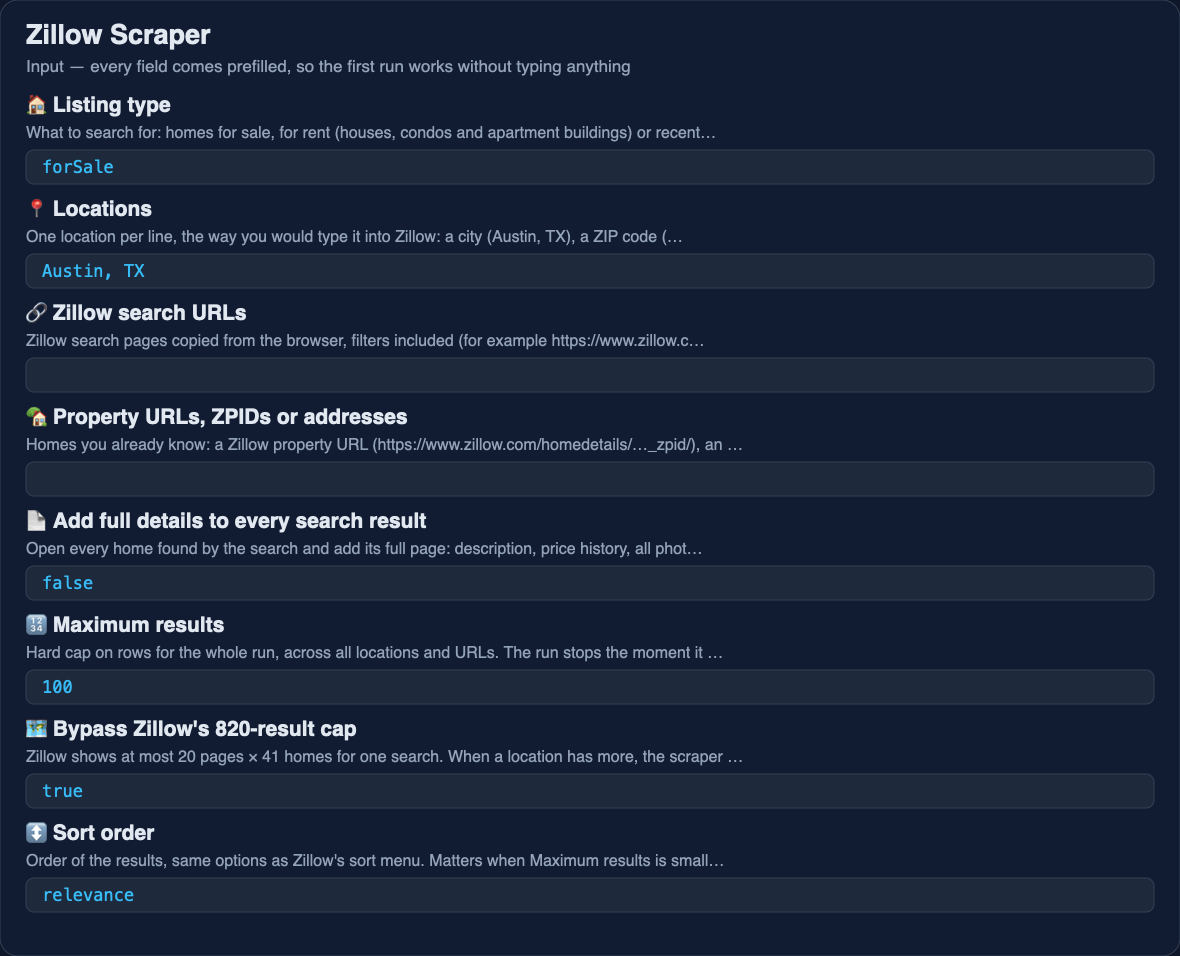 ### ⬇️ Input
The simplest useful input — 100 homes for sale in one ZIP code:
```json
{
"listingType": "forSale",
"locations": ["78704"],
"maxItems": 100
}
```
Investor search — owner-posted and foreclosure houses under $400k with a pool, listed in the last 30 days, with full details and the agent's phone:
```json
{
"listingType": "forSale",
"locations": ["Phoenix, AZ", "Mesa, AZ"],
"sellerTypes": ["ownerPosted", "foreclosure", "auction"],
"homeTypes": ["house"],
"priceMax": 400000,
"features": ["pool"],
"daysOnZillow": "30",
"includeDetails": true,
"maxItems": 500
}
```
Sold comps for an appraisal — houses sold in the last 90 days within a neighborhood:
```json
{
"listingType": "sold",
"locations": ["Zilker, Austin, TX"],
"homeTypes": ["house"],
"daysOnZillow": "90",
"sort": "newest",
"maxItems": 0
}
```
Rentals, one row per unit, pets allowed:
```json
{
"listingType": "forRent",
"locations": ["Denver, CO"],
"bedsMin": 2,
"priceMax": 2500,
"features": ["petsAllowed", "inUnitLaundry"],
"oneRowPerUnit": true,
"maxItems": 300
}
```
Homes you already know — a ZPID, a street address, a listing URL and an apartment building:
```json
{
"propertyUrls": [
"331627751",
"15000 Upland Willow Rd, Austin, TX 78724",
"https://www.zillow.com/homedetails/1208-Kinney-Ave-Austin-TX-78704/29324051_zpid/",
"https://www.zillow.com/apartments/austin-tx/bellrock-la-frontera/CtqCKn/"
]
}
```
#### Every input field
| Field | Type | What it does |
|---|---|---|
| `listingType` | `forSale` · `forRent` · `sold` | What to search for |
| `locations` | list | Cities, ZIP codes, neighborhoods, counties, states — one per line |
| `searchUrls` | list | Zillow search pages copied from the browser; their filters are kept and yours are added on top |
| `propertyUrls` | list | Property URLs, apartment-building URLs, bare ZPIDs or street addresses; each returns a fully detailed row |
| `includeDetails` | boolean | Open every search result and add the full page (one *Full property details* event each) |
| `maxItems` | number | Hard cap on rows for the run; `0` = no cap |
| `bypassResultCap` | boolean | Split the map when Zillow caps a search at 820 (on by default) |
| `sort` | choice | Relevance, newest, price low→high / high→low, beds, baths, sqft, lot, year built, days on Zillow |
| `priceMin`, `priceMax` | number | USD; monthly rent for rentals |
| `bedsMin`, `bedsMax`, `bathsMin` | number | `bathsMin` accepts halves |
| `homeTypes` | multi-select | Houses, condos, townhomes, multi-family, apartments, lots, manufactured |
| `sqftMin`, `sqftMax`, `lotSizeMin`, `lotSizeMax`, `yearBuiltMin`, `yearBuiltMax` | number | Lot in square feet |
| `daysOnZillow` | choice | Listed (or sold) within 1 day … 36 months |
| `sellerTypes` | multi-select | Agent listed, owner posted (FSBO), new construction, foreclosures, auctions, pre-foreclosures, foreclosed, coming soon |
| `includePending` | boolean | Also return pending / under-contract homes |
| `keywords` | text | Words the listing must contain (`pool`, `ADU`, `fixer`) |
| `features` | multi-select | Pool, A/C, garage, waterfront, single story, basement, view, open house; pets allowed, furnished, in-unit laundry for rentals |
| `hoaMax`, `parkingSpotsMin` | number | HOA cap (`0` = no HOA), minimum parking |
| `oneRowPerUnit` | boolean | Rentals: one row per apartment unit |
| `monitoringStoreName` | text | Name a watch; later runs return only new or changed homes |
| `includeRawData` | boolean | Add Zillow's raw JSON under `raw` |
| `maxConcurrency`, `requestTimeoutSecs`, `proxyConfiguration` | advanced | Defaults work; a proxy is not needed |
### ⬆️ Output
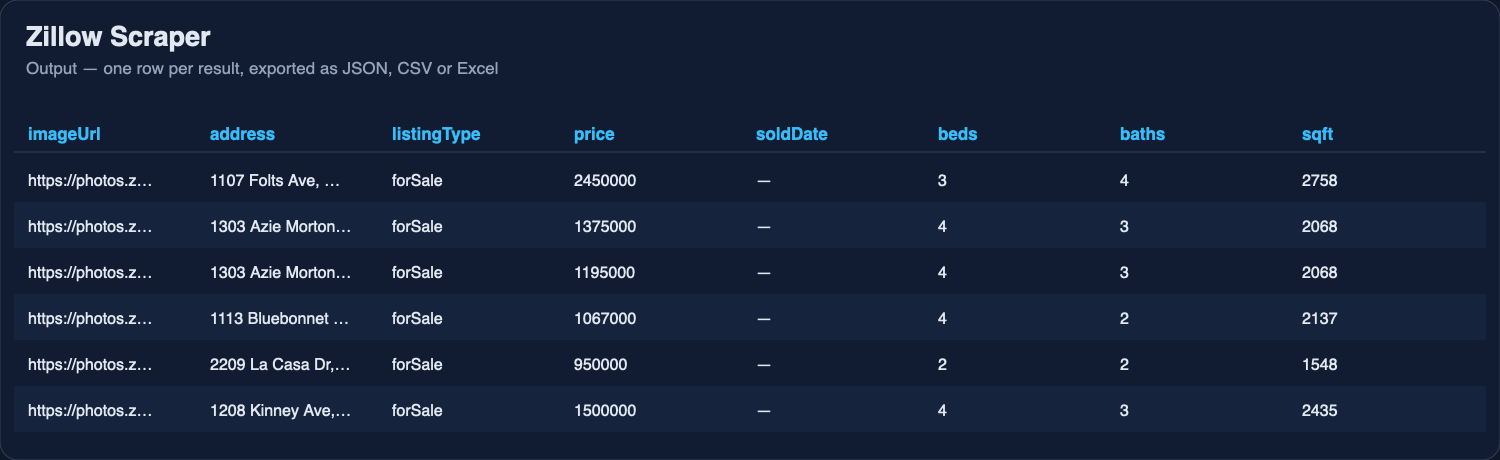
One row per home. A search row with full details:
```json
{
"zpid": "29325047",
"url": "https://www.zillow.com/homedetails/1113-Bluebonnet-Ln-Austin-TX-78704/29325047_zpid/",
"listingType": "forSale",
"status": "FOR_SALE",
"statusText": "Active",
"price": 1067000,
"pricePerSqft": 499,
"address": "1113 Bluebonnet Ln, Austin, TX 78704",
"street": "1113 Bluebonnet Ln",
"city": "Austin",
"state": "TX",
"zip": "78704",
"latitude": 30.2466,
"longitude": -97.7676,
"beds": 4,
"baths": 2,
"sqft": 2137,
"lotSizeSqft": 8189,
"homeType": "house",
"yearBuilt": 1959,
"zestimate": 1052300,
"rentZestimate": 4870,
"daysOnZillow": 65,
"isFsbo": false,
"isNewConstruction": false,
"isForeclosure": false,
"isPending": false,
"brokerName": "Keller Williams Realty",
"agentName": "Andrew Allen",
"agentPhone": "(512) 346-3550",
"mlsId": "2075799",
"hoaFee": null,
"heating": "Central",
"cooling": "Central Air",
"parking": ["Attached"],
"description": "Charming mid-century home on a corner lot in Zilker…",
"highlights": ["Storage shed", "Paver patio", "Two fireplaces", "Huge screened-in porch"],
"priceHistory": [
{ "date": "2026-07-10", "price": 1067000 },
{ "date": "2026-05-02", "price": 1099000 }
],
"photoCount": 30,
"photos": ["https://photos.zillowstatic.com/fp/…-cc_ft_1536.jpg", "…"],
"facts": { "propertySubType": ["Single Family Residence"], "parkingCapacity": 2, "lotSize": "8,189 sqft" },
"searchLocation": "Zilker, Austin, TX",
"summary": "1113 Bluebonnet Ln, Austin, TX 78704: 4 bd 2 ba 2,137 sqft house $1,067,000; 65 day(s) on Zillow; listed by Andrew Allen ((512) 346-3550).",
"scrapedAt": "2026-09-13T15:00:12Z"
}
```
A sold home:
```json
{
"zpid": "7946659",
"listingType": "sold",
"status": "SOLD",
"price": 550000,
"soldPrice": 550000,
"soldDate": "2026-09-11",
"address": "4037 W Kelton Ave, Phoenix, AZ 85053",
"beds": 4,
"baths": 2,
"sqft": 2700,
"homeType": "house",
"zestimate": 543100,
"rentZestimate": 2650,
"brokerName": "Arizona Premier Realty Homes & Land, LLC",
"summary": "4037 W Kelton Ave, Phoenix, AZ 85053: 4 bd 2 ba 2,700 sqft house sold for $550,000 on 2026-09-11; Zestimate $543,100."
}
```
An apartment unit (with *One row per rental unit*):
```json
{
"listingType": "forRent",
"isBuilding": true,
"buildingName": "Chimney Park Apartments",
"unitNumber": "Unit 310",
"floorPlan": "A1",
"beds": 1,
"baths": 1,
"sqft": 450,
"price": 1049,
"baseRent": 949,
"requiredMonthlyFees": 100,
"availableFrom": "2026-11-10",
"address": "2406 Bluebonnet Ln, Austin, TX 78704",
"phone": "(512) 555-0134",
"petPolicy": ["Cats", "Small dogs"],
"minRent": 1049,
"maxRent": 1890,
"availableUnits": 14,
"summary": "Chimney Park Apartments, Unit 310: 1 bd 1 ba 450 sqft $1,049/mo, available 2026-11-10 at 2406 Bluebonnet Ln, Austin, TX 78704."
}
```
### ⬇️ Input
The simplest useful input — 100 homes for sale in one ZIP code:
```json
{
"listingType": "forSale",
"locations": ["78704"],
"maxItems": 100
}
```
Investor search — owner-posted and foreclosure houses under $400k with a pool, listed in the last 30 days, with full details and the agent's phone:
```json
{
"listingType": "forSale",
"locations": ["Phoenix, AZ", "Mesa, AZ"],
"sellerTypes": ["ownerPosted", "foreclosure", "auction"],
"homeTypes": ["house"],
"priceMax": 400000,
"features": ["pool"],
"daysOnZillow": "30",
"includeDetails": true,
"maxItems": 500
}
```
Sold comps for an appraisal — houses sold in the last 90 days within a neighborhood:
```json
{
"listingType": "sold",
"locations": ["Zilker, Austin, TX"],
"homeTypes": ["house"],
"daysOnZillow": "90",
"sort": "newest",
"maxItems": 0
}
```
Rentals, one row per unit, pets allowed:
```json
{
"listingType": "forRent",
"locations": ["Denver, CO"],
"bedsMin": 2,
"priceMax": 2500,
"features": ["petsAllowed", "inUnitLaundry"],
"oneRowPerUnit": true,
"maxItems": 300
}
```
Homes you already know — a ZPID, a street address, a listing URL and an apartment building:
```json
{
"propertyUrls": [
"331627751",
"15000 Upland Willow Rd, Austin, TX 78724",
"https://www.zillow.com/homedetails/1208-Kinney-Ave-Austin-TX-78704/29324051_zpid/",
"https://www.zillow.com/apartments/austin-tx/bellrock-la-frontera/CtqCKn/"
]
}
```
#### Every input field
| Field | Type | What it does |
|---|---|---|
| `listingType` | `forSale` · `forRent` · `sold` | What to search for |
| `locations` | list | Cities, ZIP codes, neighborhoods, counties, states — one per line |
| `searchUrls` | list | Zillow search pages copied from the browser; their filters are kept and yours are added on top |
| `propertyUrls` | list | Property URLs, apartment-building URLs, bare ZPIDs or street addresses; each returns a fully detailed row |
| `includeDetails` | boolean | Open every search result and add the full page (one *Full property details* event each) |
| `maxItems` | number | Hard cap on rows for the run; `0` = no cap |
| `bypassResultCap` | boolean | Split the map when Zillow caps a search at 820 (on by default) |
| `sort` | choice | Relevance, newest, price low→high / high→low, beds, baths, sqft, lot, year built, days on Zillow |
| `priceMin`, `priceMax` | number | USD; monthly rent for rentals |
| `bedsMin`, `bedsMax`, `bathsMin` | number | `bathsMin` accepts halves |
| `homeTypes` | multi-select | Houses, condos, townhomes, multi-family, apartments, lots, manufactured |
| `sqftMin`, `sqftMax`, `lotSizeMin`, `lotSizeMax`, `yearBuiltMin`, `yearBuiltMax` | number | Lot in square feet |
| `daysOnZillow` | choice | Listed (or sold) within 1 day … 36 months |
| `sellerTypes` | multi-select | Agent listed, owner posted (FSBO), new construction, foreclosures, auctions, pre-foreclosures, foreclosed, coming soon |
| `includePending` | boolean | Also return pending / under-contract homes |
| `keywords` | text | Words the listing must contain (`pool`, `ADU`, `fixer`) |
| `features` | multi-select | Pool, A/C, garage, waterfront, single story, basement, view, open house; pets allowed, furnished, in-unit laundry for rentals |
| `hoaMax`, `parkingSpotsMin` | number | HOA cap (`0` = no HOA), minimum parking |
| `oneRowPerUnit` | boolean | Rentals: one row per apartment unit |
| `monitoringStoreName` | text | Name a watch; later runs return only new or changed homes |
| `includeRawData` | boolean | Add Zillow's raw JSON under `raw` |
| `maxConcurrency`, `requestTimeoutSecs`, `proxyConfiguration` | advanced | Defaults work; a proxy is not needed |
### ⬆️ Output
One row per home. A search row with full details:
```json
{
"zpid": "29325047",
"url": "https://www.zillow.com/homedetails/1113-Bluebonnet-Ln-Austin-TX-78704/29325047_zpid/",
"listingType": "forSale",
"status": "FOR_SALE",
"statusText": "Active",
"price": 1067000,
"pricePerSqft": 499,
"address": "1113 Bluebonnet Ln, Austin, TX 78704",
"street": "1113 Bluebonnet Ln",
"city": "Austin",
"state": "TX",
"zip": "78704",
"latitude": 30.2466,
"longitude": -97.7676,
"beds": 4,
"baths": 2,
"sqft": 2137,
"lotSizeSqft": 8189,
"homeType": "house",
"yearBuilt": 1959,
"zestimate": 1052300,
"rentZestimate": 4870,
"daysOnZillow": 65,
"isFsbo": false,
"isNewConstruction": false,
"isForeclosure": false,
"isPending": false,
"brokerName": "Keller Williams Realty",
"agentName": "Andrew Allen",
"agentPhone": "(512) 346-3550",
"mlsId": "2075799",
"hoaFee": null,
"heating": "Central",
"cooling": "Central Air",
"parking": ["Attached"],
"description": "Charming mid-century home on a corner lot in Zilker…",
"highlights": ["Storage shed", "Paver patio", "Two fireplaces", "Huge screened-in porch"],
"priceHistory": [
{ "date": "2026-07-10", "price": 1067000 },
{ "date": "2026-05-02", "price": 1099000 }
],
"photoCount": 30,
"photos": ["https://photos.zillowstatic.com/fp/…-cc_ft_1536.jpg", "…"],
"facts": { "propertySubType": ["Single Family Residence"], "parkingCapacity": 2, "lotSize": "8,189 sqft" },
"searchLocation": "Zilker, Austin, TX",
"summary": "1113 Bluebonnet Ln, Austin, TX 78704: 4 bd 2 ba 2,137 sqft house $1,067,000; 65 day(s) on Zillow; listed by Andrew Allen ((512) 346-3550).",
"scrapedAt": "2026-09-13T15:00:12Z"
}
```
A sold home:
```json
{
"zpid": "7946659",
"listingType": "sold",
"status": "SOLD",
"price": 550000,
"soldPrice": 550000,
"soldDate": "2026-09-11",
"address": "4037 W Kelton Ave, Phoenix, AZ 85053",
"beds": 4,
"baths": 2,
"sqft": 2700,
"homeType": "house",
"zestimate": 543100,
"rentZestimate": 2650,
"brokerName": "Arizona Premier Realty Homes & Land, LLC",
"summary": "4037 W Kelton Ave, Phoenix, AZ 85053: 4 bd 2 ba 2,700 sqft house sold for $550,000 on 2026-09-11; Zestimate $543,100."
}
```
An apartment unit (with *One row per rental unit*):
```json
{
"listingType": "forRent",
"isBuilding": true,
"buildingName": "Chimney Park Apartments",
"unitNumber": "Unit 310",
"floorPlan": "A1",
"beds": 1,
"baths": 1,
"sqft": 450,
"price": 1049,
"baseRent": 949,
"requiredMonthlyFees": 100,
"availableFrom": "2026-11-10",
"address": "2406 Bluebonnet Ln, Austin, TX 78704",
"phone": "(512) 555-0134",
"petPolicy": ["Cats", "Small dogs"],
"minRent": 1049,
"maxRent": 1890,
"availableUnits": 14,
"summary": "Chimney Park Apartments, Unit 310: 1 bd 1 ba 450 sqft $1,049/mo, available 2026-11-10 at 2406 Bluebonnet Ln, Austin, TX 78704."
}
```
 ### Use cases for Zillow data
#### Real-estate investors and wholesalers
Run the FSBO + foreclosure + auction filter over your target metros every morning with **Monitoring mode** on: each run returns only homes that are new or whose price or status changed since yesterday. Pipe the rows into a sheet or a CRM and call the `agentPhone` on the ones that match your buy box. Sold comps for the same ZIP come from the same Actor with `listingType: "sold"`.
#### Agents and brokerages
Build a list of every active listing in your farm area with the listing agent's name, phone and brokerage — recruiting, co-broking and expired-listing outreach start from that table. Track days on Zillow and price cuts to time your calls.
#### Appraisers, analysts and PropTech teams
Pull all recently sold homes in a county with sold date, sold price, beds, baths, sqft and lot size, and compute price per square foot by neighborhood. Schedule the run weekly and append to a warehouse; the flat schema and stable field names make the append trivial.
#### Property managers and rental platforms
Rent comps by ZIP, building by building, unit by unit: floor plan, sqft, base rent, required fees and availability date, plus the leasing-office phone and pet policy. Filter apartments by *pets allowed* or *in-unit laundry* the way a tenant would.
#### AI agents, RAG and research
Every row has a `summary` sentence and a stable id, so an agent can search a city, reason over prices and call the Actor again for details on the homes it picked. The Actor is listed for the Apify MCP server and for agentic payments.
### Integrations
- **API** — `POST https://api.apify.com/v2/acts/lergassy~zillow-scraper/run-sync-get-dataset-items?token=…` with the input JSON returns the rows directly; for longer runs start the run, wait for `SUCCEEDED`, then read `datasets/{id}/items?format=csv`.
- **Python / JavaScript** — `apify-client`: `client.actor("lergassy/zillow-scraper").call(run_input={...})`, then `client.dataset(run["defaultDatasetId"]).list_items()`.
- **Google Sheets** — Apify's Google Sheets integration, or the CSV export link, or the Apify node in n8n/Make that appends dataset rows to a sheet. The rows are flat, so every column maps without transformation; the few nested fields (`priceHistory`, `photos`, `units`, `facts`) arrive as JSON text.
- **n8n, Make, Zapier** — use the Apify app / node, pick this Actor, paste the input JSON, and map the dataset items downstream. Set *Maximum results* so a big city does not overflow a scenario's limits; for runs over 5 minutes use the "wait for finish" option or a webhook rather than a plain HTTP request.
- **Webhooks** — an Actor-run webhook on `ACTOR.RUN.SUCCEEDED` posts the dataset link to your endpoint or Slack.
- **Scheduling** — Apify Schedules run the same input daily or hourly; combined with Monitoring mode this is a change feed of a market.
- **MCP** — connect the Apify MCP server to Claude, Cursor or any MCP client and ask for Zillow data in plain language; the Actor's input schema is the tool description.
### Zillow's result cap and how it is handled
Zillow shows at most 20 pages of 41 homes for any single search, so a search for a big city normally stops at 820 homes no matter what. With **Bypass Zillow's 820-result cap** on (the default) the Actor reads the total first and, when it is above the cap, splits the map into four quadrants, then again, until every quadrant is under the cap, and merges the results with duplicates removed. The city boundary is kept — a quadrant search still respects the region, so homes outside the city limits do not creep in. The whole of Austin (5,692 homes for sale) took 153 requests and 4 minutes.
### Sold prices and non-disclosure states
Twelve US states (Texas, Utah, Idaho, Montana, Wyoming, North Dakota, Kansas, Missouri, Mississippi, Louisiana, Alaska, New Mexico) do not make sale prices public. Zillow shows a **sold date but no sold price** there, and so does this Actor — `soldPrice` is `null` rather than a guess. In every other state both fields are filled.
### ❓ FAQ
#### Is it legal to scrape Zillow?
The Actor reads only what Zillow shows to any visitor without logging in — public listing pages — and stores no personal data beyond what the listing itself publishes (the listing agent's business contact). Scraping publicly available data is generally lawful, but how you use it is your responsibility: respect Zillow's terms where they apply to you, fair-housing rules and privacy law in your jurisdiction, and consult a lawyer for commercial use. Do not use the data to contact homeowners against their wishes.
#### Do I need a Zillow account, API key, cookies or a proxy?
No. Nothing to log into, nothing to paste, nothing to configure. If a very large run ever starts seeing `blocked` error rows, switch on Apify residential proxy in the advanced section — but this has not been necessary in testing.
#### Why does my search return more homes than Zillow shows me?
Because of the cap bypass. Zillow shows at most 820 per search; the Actor splits the map and collects them all. Turn `bypassResultCap` off if you want exactly what one Zillow page set shows.
#### Why is `soldPrice` empty for Texas?
Texas is a non-disclosure state; Zillow does not publish sale prices there. The sold date is still returned. See the section above.
#### Can I search by address, ZPID or a list of URLs?
Yes — put them in **Property URLs, ZPIDs or addresses**, one per line. Each returns a fully detailed row. Mixed lists are fine.
#### Can I use the filters from a Zillow URL I already have?
Yes. Paste the URL into **Zillow search URLs**; its filters are read from the address bar and any filter you set in the form is added on top.
#### How do I get only new listings every day?
Set **Monitoring mode — store name** to any name, schedule the run daily. The first run returns everything; later runs return only homes that are new or whose price or status changed, each marked `changeType: "new"` or `"changed"` (with `previousPrice`).
#### How fast is it?
About 41 homes per request for search, one request per home for details. 100 search rows take a few seconds; 100 fully detailed homes about 15–30 seconds at the default concurrency.
#### Does it get tax history and school ratings?
Not yet. Zillow loads those two blocks through a separate, signed request that anonymous visitors cannot reproduce reliably, and I would rather leave a field out than fill it with guesses. Everything else on the listing page is included. If you need them, open an issue — it is on the list.
#### Can I get one row per apartment unit?
Yes — `oneRowPerUnit: true`. Otherwise a building is one row with its units nested under `units`.
#### Can I use Zillow Scraper with the Apify API, Python, n8n or Make?
Yes, see Integrations above. The Actor follows the standard Apify run → dataset flow, so every Apify integration works unchanged.
#### Can I run it through an MCP server or let an AI agent call it?
Yes. It is available through the Apify MCP server, the input fields are described for agents, and it is enabled for agentic payments.
#### What happens when Zillow changes its page layout?
The Actor is tested automatically every day against the default input. If a layout change breaks a field, the run reports a `parse` error row instead of empty data, and the fix is usually out within a day. Please report anything odd in the Issues tab.
### Your feedback
Something missing, a field you need, a city that misbehaves? Open an issue on the **Issues** tab — every report gets an answer, and most fixes ship within a day. If the Actor saves you time, a review helps other buyers find it.
### You might also like
| Actor | What it does |
|---|---|
| [Website Contact Scraper](https://apify.com/lergassy/website-contacts-api) | E-mails, phones and social profiles from any list of websites — enrich the brokerages you found here |
| [Email & Phone Verifier](https://apify.com/lergassy/email-phone-verifier) | Check that the contacts you collected are real before the mail merge |
| [US Business Filings](https://apify.com/lergassy/us-business-filings) | New business registrations by state — landlords, LLCs and property companies as they appear |
| [Airbnb Scraper](https://apify.com/lergassy/airbnb-scraper) | Short-term-rental listings, prices and reviews for the same neighborhoods |
| [Google Maps Reviews Scraper](https://apify.com/lergassy/google-maps-reviews-scraper) | Reviews of property managers, brokerages and contractors |
# Actor input Schema
## `listingType` (type: `string`):
What to search for: homes for sale, for rent (houses, condos and apartment buildings) or recently sold homes with their sold date and price.
## `locations` (type: `array`):
One location per line, the way you would type it into Zillow: a city (
### Use cases for Zillow data
#### Real-estate investors and wholesalers
Run the FSBO + foreclosure + auction filter over your target metros every morning with **Monitoring mode** on: each run returns only homes that are new or whose price or status changed since yesterday. Pipe the rows into a sheet or a CRM and call the `agentPhone` on the ones that match your buy box. Sold comps for the same ZIP come from the same Actor with `listingType: "sold"`.
#### Agents and brokerages
Build a list of every active listing in your farm area with the listing agent's name, phone and brokerage — recruiting, co-broking and expired-listing outreach start from that table. Track days on Zillow and price cuts to time your calls.
#### Appraisers, analysts and PropTech teams
Pull all recently sold homes in a county with sold date, sold price, beds, baths, sqft and lot size, and compute price per square foot by neighborhood. Schedule the run weekly and append to a warehouse; the flat schema and stable field names make the append trivial.
#### Property managers and rental platforms
Rent comps by ZIP, building by building, unit by unit: floor plan, sqft, base rent, required fees and availability date, plus the leasing-office phone and pet policy. Filter apartments by *pets allowed* or *in-unit laundry* the way a tenant would.
#### AI agents, RAG and research
Every row has a `summary` sentence and a stable id, so an agent can search a city, reason over prices and call the Actor again for details on the homes it picked. The Actor is listed for the Apify MCP server and for agentic payments.
### Integrations
- **API** — `POST https://api.apify.com/v2/acts/lergassy~zillow-scraper/run-sync-get-dataset-items?token=…` with the input JSON returns the rows directly; for longer runs start the run, wait for `SUCCEEDED`, then read `datasets/{id}/items?format=csv`.
- **Python / JavaScript** — `apify-client`: `client.actor("lergassy/zillow-scraper").call(run_input={...})`, then `client.dataset(run["defaultDatasetId"]).list_items()`.
- **Google Sheets** — Apify's Google Sheets integration, or the CSV export link, or the Apify node in n8n/Make that appends dataset rows to a sheet. The rows are flat, so every column maps without transformation; the few nested fields (`priceHistory`, `photos`, `units`, `facts`) arrive as JSON text.
- **n8n, Make, Zapier** — use the Apify app / node, pick this Actor, paste the input JSON, and map the dataset items downstream. Set *Maximum results* so a big city does not overflow a scenario's limits; for runs over 5 minutes use the "wait for finish" option or a webhook rather than a plain HTTP request.
- **Webhooks** — an Actor-run webhook on `ACTOR.RUN.SUCCEEDED` posts the dataset link to your endpoint or Slack.
- **Scheduling** — Apify Schedules run the same input daily or hourly; combined with Monitoring mode this is a change feed of a market.
- **MCP** — connect the Apify MCP server to Claude, Cursor or any MCP client and ask for Zillow data in plain language; the Actor's input schema is the tool description.
### Zillow's result cap and how it is handled
Zillow shows at most 20 pages of 41 homes for any single search, so a search for a big city normally stops at 820 homes no matter what. With **Bypass Zillow's 820-result cap** on (the default) the Actor reads the total first and, when it is above the cap, splits the map into four quadrants, then again, until every quadrant is under the cap, and merges the results with duplicates removed. The city boundary is kept — a quadrant search still respects the region, so homes outside the city limits do not creep in. The whole of Austin (5,692 homes for sale) took 153 requests and 4 minutes.
### Sold prices and non-disclosure states
Twelve US states (Texas, Utah, Idaho, Montana, Wyoming, North Dakota, Kansas, Missouri, Mississippi, Louisiana, Alaska, New Mexico) do not make sale prices public. Zillow shows a **sold date but no sold price** there, and so does this Actor — `soldPrice` is `null` rather than a guess. In every other state both fields are filled.
### ❓ FAQ
#### Is it legal to scrape Zillow?
The Actor reads only what Zillow shows to any visitor without logging in — public listing pages — and stores no personal data beyond what the listing itself publishes (the listing agent's business contact). Scraping publicly available data is generally lawful, but how you use it is your responsibility: respect Zillow's terms where they apply to you, fair-housing rules and privacy law in your jurisdiction, and consult a lawyer for commercial use. Do not use the data to contact homeowners against their wishes.
#### Do I need a Zillow account, API key, cookies or a proxy?
No. Nothing to log into, nothing to paste, nothing to configure. If a very large run ever starts seeing `blocked` error rows, switch on Apify residential proxy in the advanced section — but this has not been necessary in testing.
#### Why does my search return more homes than Zillow shows me?
Because of the cap bypass. Zillow shows at most 820 per search; the Actor splits the map and collects them all. Turn `bypassResultCap` off if you want exactly what one Zillow page set shows.
#### Why is `soldPrice` empty for Texas?
Texas is a non-disclosure state; Zillow does not publish sale prices there. The sold date is still returned. See the section above.
#### Can I search by address, ZPID or a list of URLs?
Yes — put them in **Property URLs, ZPIDs or addresses**, one per line. Each returns a fully detailed row. Mixed lists are fine.
#### Can I use the filters from a Zillow URL I already have?
Yes. Paste the URL into **Zillow search URLs**; its filters are read from the address bar and any filter you set in the form is added on top.
#### How do I get only new listings every day?
Set **Monitoring mode — store name** to any name, schedule the run daily. The first run returns everything; later runs return only homes that are new or whose price or status changed, each marked `changeType: "new"` or `"changed"` (with `previousPrice`).
#### How fast is it?
About 41 homes per request for search, one request per home for details. 100 search rows take a few seconds; 100 fully detailed homes about 15–30 seconds at the default concurrency.
#### Does it get tax history and school ratings?
Not yet. Zillow loads those two blocks through a separate, signed request that anonymous visitors cannot reproduce reliably, and I would rather leave a field out than fill it with guesses. Everything else on the listing page is included. If you need them, open an issue — it is on the list.
#### Can I get one row per apartment unit?
Yes — `oneRowPerUnit: true`. Otherwise a building is one row with its units nested under `units`.
#### Can I use Zillow Scraper with the Apify API, Python, n8n or Make?
Yes, see Integrations above. The Actor follows the standard Apify run → dataset flow, so every Apify integration works unchanged.
#### Can I run it through an MCP server or let an AI agent call it?
Yes. It is available through the Apify MCP server, the input fields are described for agents, and it is enabled for agentic payments.
#### What happens when Zillow changes its page layout?
The Actor is tested automatically every day against the default input. If a layout change breaks a field, the run reports a `parse` error row instead of empty data, and the fix is usually out within a day. Please report anything odd in the Issues tab.
### Your feedback
Something missing, a field you need, a city that misbehaves? Open an issue on the **Issues** tab — every report gets an answer, and most fixes ship within a day. If the Actor saves you time, a review helps other buyers find it.
### You might also like
| Actor | What it does |
|---|---|
| [Website Contact Scraper](https://apify.com/lergassy/website-contacts-api) | E-mails, phones and social profiles from any list of websites — enrich the brokerages you found here |
| [Email & Phone Verifier](https://apify.com/lergassy/email-phone-verifier) | Check that the contacts you collected are real before the mail merge |
| [US Business Filings](https://apify.com/lergassy/us-business-filings) | New business registrations by state — landlords, LLCs and property companies as they appear |
| [Airbnb Scraper](https://apify.com/lergassy/airbnb-scraper) | Short-term-rental listings, prices and reviews for the same neighborhoods |
| [Google Maps Reviews Scraper](https://apify.com/lergassy/google-maps-reviews-scraper) | Reviews of property managers, brokerages and contractors |
# Actor input Schema
## `listingType` (type: `string`):
What to search for: homes for sale, for rent (houses, condos and apartment buildings) or recently sold homes with their sold date and price.
## `locations` (type: `array`):
One location per line, the way you would type it into Zillow: a city (Austin, TX), a ZIP code (78704), a neighborhood (Zilker, Austin, TX), a county (Travis County, TX) or a whole state (Nevada). Each location is searched separately and the rows say which one they came from.
## `searchUrls` (type: `array`):
Zillow search pages copied from the browser, filters included (for example https://www.zillow.com/austin-tx/houses/?searchQueryState=…). Use this when the Zillow website already shows exactly the homes you want. Filters set below are added on top of what the URL carries.
## `propertyUrls` (type: `array`):
Homes you already know: a Zillow property URL (https://www.zillow.com/homedetails/…\_zpid/), an apartment-building URL, a bare ZPID (331627751) or a street address (15000 Upland Willow Rd, Austin, TX 78724). Each one returns a full property row with description, price history, photos, facts and listing contact — no search needed.
## `includeDetails` (type: `boolean`):
Open every home found by the search and add its full page: description, price history, all photos, facts and features (parking, heating, HOA, lot), listing agent and broker contact, MLS number, Zillow's own highlight phrases. Costs one extra request and one Property detail event per home. Leave off for a fast, cheap list.
## `maxItems` (type: `integer`):
Hard cap on rows for the whole run, across all locations and URLs. The run stops the moment it is reached, so this is also your cost cap: results × price per result. Set 0 for no limit.
## `bypassResultCap` (type: `boolean`):
Zillow shows at most 20 pages × 41 homes for one search. When a location has more, the scraper splits the map into smaller areas and searches each of them, so a whole city comes back complete. Turn off to stop at Zillow's first 820.
## `sort` (type: `string`):
Order of the results, same options as Zillow's sort menu. Matters when Maximum results is smaller than the number of matching homes.
## `priceMin` (type: `integer`):
Minimum price in US dollars. For rentals this is the monthly rent.
## `priceMax` (type: `integer`):
Maximum price in US dollars (monthly rent for rentals).
## `bedsMin` (type: `integer`):
Minimum number of bedrooms. 0 includes studios.
## `bedsMax` (type: `integer`):
Maximum number of bedrooms.
## `bathsMin` (type: `number`):
Minimum number of bathrooms, halves allowed (1.5).
## `homeTypes` (type: `array`):
Which kinds of home to include. Empty means all types.
## `sqftMin` (type: `integer`):
Minimum living area in square feet.
## `sqftMax` (type: `integer`):
Maximum living area in square feet.
## `lotSizeMin` (type: `integer`):
Minimum lot size in square feet (an acre is 43,560).
## `lotSizeMax` (type: `integer`):
Maximum lot size in square feet.
## `yearBuiltMin` (type: `integer`):
Earliest construction year to include.
## `yearBuiltMax` (type: `integer`):
Latest construction year to include.
## `daysOnZillow` (type: `string`):
Only homes listed (or, for the sold type, sold) within this period.
## `sellerTypes` (type: `array`):
Narrow for-sale results to who is selling. Empty means all of them. Owner posted is the FSBO filter investors look for; Foreclosures, Auctions and Pre-foreclosures are the distressed-property filters.
## `includePending` (type: `boolean`):
For-sale searches: also return homes that are pending or under contract (accepting backup offers). Off returns active listings only.
## `keywords` (type: `string`):
Words that must appear in the listing text, for example pool, ADU, fixer, mother-in-law. Same as the keyword box on Zillow.
## `features` (type: `array`):
Home features the listing must have.
## `hoaMax` (type: `integer`):
Maximum monthly HOA fee in dollars. 0 means no HOA at all.
## `parkingSpotsMin` (type: `integer`):
Minimum number of parking spots.
## `oneRowPerUnit` (type: `boolean`):
Rentals: apartment buildings list several units and floor plans. On, every unit becomes its own row (beds, baths, sqft, rent, availability). Off, a building is one row with its units nested in units.
## `monitoringStoreName` (type: `string`):
Give this run a name (letters, digits and dashes, e.g. austin-fsbo-watch) and every later run with the same name returns only homes that are new or whose price or status changed since the previous run. Schedule it daily to get a change feed instead of the whole list each time. Leave empty for a normal full run.
## `includeRawData` (type: `boolean`):
Add a raw field with everything Zillow returned for the home, untouched. Useful for developers; makes rows large.
## `maxConcurrency` (type: `integer`):
How many Zillow pages are fetched at the same time. Higher is faster; lower is gentler if you see blocked rows.
## `requestTimeoutSecs` (type: `integer`):
How long to wait for one Zillow page.
## `proxyConfiguration` (type: `object`):
Not needed: Zillow answers Apify's own servers directly, so the default costs nothing. Switch on Apify residential proxy only if rows come back with status: blocked on a very large run.
## Actor input object example
```json
{
"listingType": "forSale",
"locations": [
"Austin, TX"
],
"searchUrls": [],
"propertyUrls": [],
"includeDetails": false,
"maxItems": 100,
"bypassResultCap": true,
"sort": "relevance",
"homeTypes": [],
"daysOnZillow": "any",
"sellerTypes": [],
"includePending": false,
"features": [],
"oneRowPerUnit": false,
"includeRawData": false,
"maxConcurrency": 5,
"requestTimeoutSecs": 30,
"proxyConfiguration": {
"useApifyProxy": false
}
}
```
# Actor output Schema
## `homes` (type: `string`):
One flat row per home or rental building: Zillow URL, status, price, sold date and price, address split into street, city, state and ZIP, coordinates, beds, baths, square feet, lot size, home type, Zestimate and rent Zestimate, days on Zillow, listing flags, listing agent and broker contact, price history, photos, facts and a one-sentence summary. Error rows carry the reason and cost nothing.
# API
You can run this Actor programmatically using our API. Below are code examples in JavaScript, Python, and CLI, as well as the OpenAPI specification and MCP server setup.
## JavaScript example
```javascript
import { ApifyClient } from 'apify-client';
// Initialize the ApifyClient with your Apify API token
// Replace the '' with your token
const client = new ApifyClient({
token: '',
});
// Prepare Actor input
const input = {
"listingType": "forSale",
"locations": [
"Austin, TX"
],
"searchUrls": [],
"propertyUrls": [],
"maxItems": 100,
"proxyConfiguration": {
"useApifyProxy": false
}
};
// Run the Actor and wait for it to finish
const run = await client.actor("lergassy/zillow-scraper").call(input);
// Fetch and print Actor results from the run's dataset (if any)
console.log('Results from dataset');
console.log(`💾 Check your data here: https://console.apify.com/storage/datasets/${run.defaultDatasetId}`);
const { items } = await client.dataset(run.defaultDatasetId).listItems();
items.forEach((item) => {
console.dir(item);
});
// 📚 Want to learn more 📖? Go to → https://docs.apify.com/api/client/js/docs
```
## Python example
```python
from apify_client import ApifyClient
# Initialize the ApifyClient with your Apify API token
# Replace '' with your token.
client = ApifyClient("")
# Prepare the Actor input
run_input = {
"listingType": "forSale",
"locations": ["Austin, TX"],
"searchUrls": [],
"propertyUrls": [],
"maxItems": 100,
"proxyConfiguration": { "useApifyProxy": False },
}
# Run the Actor and wait for it to finish
run = client.actor("lergassy/zillow-scraper").call(run_input=run_input)
# Fetch and print Actor results from the run's dataset (if there are any)
print(f"💾 Check your data here: https://console.apify.com/storage/datasets/{run.default_dataset_id}")
for item in client.dataset(run.default_dataset_id).iterate_items():
print(item)
# 📚 Want to learn more 📖? Go to → https://docs.apify.com/api/client/python/docs/quick-start
```
## CLI example
```bash
echo '{
"listingType": "forSale",
"locations": [
"Austin, TX"
],
"searchUrls": [],
"propertyUrls": [],
"maxItems": 100,
"proxyConfiguration": {
"useApifyProxy": false
}
}' |
apify call lergassy/zillow-scraper --silent --output-dataset
```
## MCP server setup
```json
{
"mcpServers": {
"apify": {
"type": "http",
"url": "https://mcp.apify.com/?tools=fetch-actor-details,lergassy/zillow-scraper"
}
}
}
```
The hosted server signs you in with OAuth on first connect, so no API token belongs in this config. Clients without OAuth support can send an `Authorization: Bearer ` header instead, using a token from API & Integrations in Apify Console (https://console.apify.com/settings/integrations).
## OpenAPI specification
Download the OpenAPI definition: https://api.apify.com/v2/actors/ajWLunJKItj0Zd03v/builds/3gJfMcmJVPuqffqye/openapi.json