# Dice.com Job Scraper (`lovely_radiologist/dice-job-scraper`) Actor
Scrapes Dice.com tech job listings — title, company, salary, location, employment type, workplace type, skills, and full description — without login.
- **URL**: https://apify.com/lovely\_radiologist/dice-job-scraper.md
- **Developed by:** [Vivek Gaur](https://apify.com/lovely_radiologist) (community)
- **Categories:** Jobs, Automation, Lead generation
- **Stats:** 2 total users, 1 monthly users, 100.0% runs succeeded, 1 bookmarks
- **User rating**: No ratings yet
## Pricing
from $0.10 / 1,000 result items
This Actor is paid per event. You are not charged for the Apify platform usage, but only a fixed price for specific events.
Learn more: https://docs.apify.com/platform/actors/running/actors-in-store#pay-per-event
## What's an Apify Actor?
Actors are web data automations that power AI and operations. They run on the Apify platform to scrape websites, process data, connect APIs, and automate workflows.
In Batch mode, an Actor accepts a well-defined JSON input, performs an action which can take anything from a few seconds to a few hours,
and optionally produces a well-defined JSON output, datasets with results, or files in key-value store.
In Standby mode, an Actor provides a web server which can be used as a website, API, or an MCP server.
Actors are written with capital "A".
## How to integrate an Actor?
If asked about integration, you help developers integrate Actors into their projects.
You adapt to their stack and deliver integrations that are safe, well-documented, and production-ready.
The best way to integrate Actors is as follows.
- **AI agents and MCP clients** — the [Apify MCP server](https://docs.apify.com/integrations/mcp.md) at `https://mcp.apify.com` (remote, streamable HTTP, OAuth on first use).
- **Agentic workflows and local Actor development** — [Agent Skills](https://apify.com/.well-known/agent-skills/index.json) with the [Apify CLI](https://docs.apify.com/cli/docs.md): `npm install -g apify-cli`, then `apify login`.
- **JavaScript/TypeScript projects** — the official [JS/TS client](https://docs.apify.com/api/client/js/docs.md): `npm install apify-client`.
- **Python projects** — the official [Python client](https://docs.apify.com/api/client/python/docs.md): `pip install apify-client`.
- **Any other language** — the [REST API](https://docs.apify.com/api/v2.md).
For usage examples, see the [API](#api) section below.
For more details, see Apify documentation as [Markdown index](https://docs.apify.com/llms.txt) and [Markdown full-text](https://docs.apify.com/llms-full.txt).
# README

## 🎲 Dice.com Job Scraper
Extract **US tech job listings** from [Dice.com](https://www.dice.com) — job titles, companies, salaries, locations, skills, workplace type, employment type, and full job descriptions — as clean, structured JSON, ready for market research, recruitment, or job-search apps.
***
***
Dice is where America's tech roles get posted — and this actor turns that firehose into a tidy dataset you can actually use.
Tell it what you're hunting for (a role, a skill, a city, a type of work) and it returns every matching opening with the details filled in: who's hiring, what they pay, where the job sits, whether it's remote, and the full job description — all without a login, a browser, or a Dice account.
***
### What You Get
**Complete job records, not just titles and links.** Every result carries:
- 🏢 **Company** — name, employer type (direct hire vs. recruiter), profile link, and logo
- 💰 **Salary** — raw text *plus* parsed min/max, currency, and pay period
- 📍 **Location** — city, state, region, and postal code, broken out into separate fields
- 🏠 **Workplace** — remote, hybrid, or on-site, plus an `isRemote` flag
- 📝 **Description** — full text in three formats: plain, HTML, and Markdown
- 🧩 **Skills** — the required-skills list pulled from each posting
- 📅 **Dates** — posted, last-modified, and the posting's expiry date
- 🔗 **Links** — direct job URL and company profile URL
**No login. No browser. No API key.** The actor reads the same public pages Google crawls, so there's nothing to authenticate and nothing to get blocked on.
***
### Search Any Way You Need
Filter your results down to exactly the roles that matter:
| Filter | Options |
|---|---|
| **Keyword** | Any role, skill, or title — "Python Developer", "Kubernetes", "DevOps" |
| **Location** | City + state, or "Remote" |
| **Radius** | Miles from the location |
| **Posted** | Last 1, 3, or 7 days |
| **Employment type** | Full-time, Part-time, Contract, Third Party |
| **Employer type** | Direct Hire, Recruiter, Other |
| **Workplace** | Remote, Hybrid, On-site |
| **Easy Apply** | Only Easy-Apply listings |
| **Sponsorship** | Only roles willing to sponsor visas |
Run **multiple searches at once**, or use **location fan-out** to sweep the same role across every major city in a single run.
***
### Who It's Built For
- **Recruiters & staffing firms** — watch who's hiring in real time and build candidate-ready pipelines
- **Job boards & aggregators** — keep a niche board stocked with fresh Dice listings
- **Market researchers** — track salary trends, skill demand, and hiring velocity by city or technology
- **Sales teams** — spot companies actively scaling their engineering orgs
- **Job seekers** — filter remote and contract roles in one pass, export to CSV, done
***
### Input
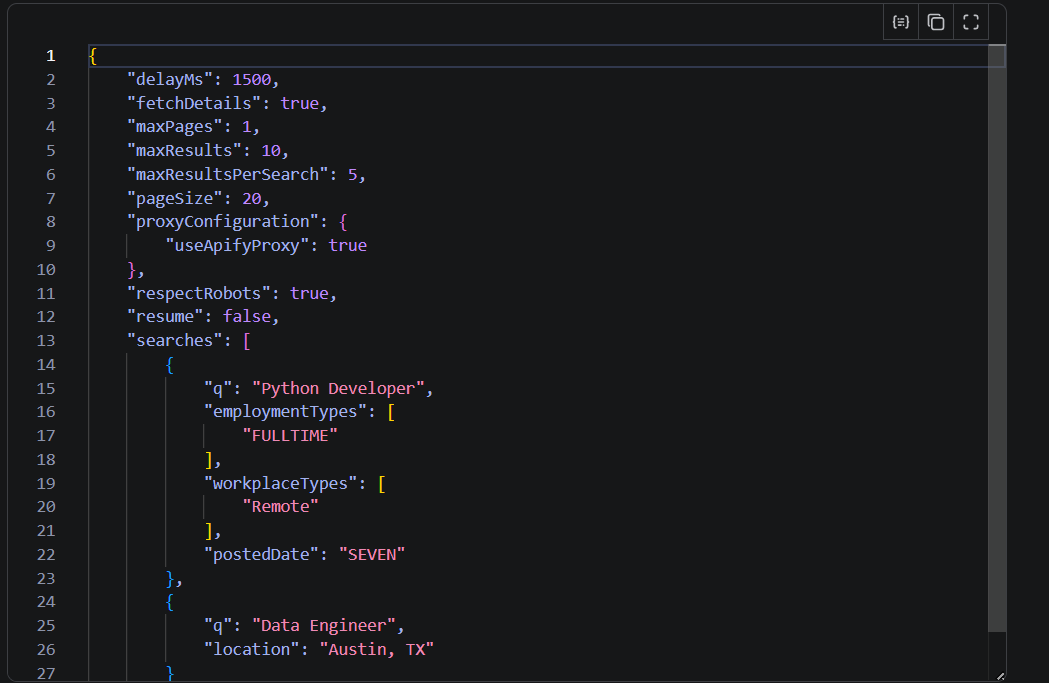 ```json
{
"searches": [
{
"q": "Software Developer",
"location": "New York, NY",
"employmentTypes": ["FULLTIME"],
"workplaceTypes": ["Remote"],
"postedDate": "SEVEN",
"easyApply": true,
"willingToSponsor": true
}
],
"locations": ["New York, NY", "Austin, TX", "Remote"],
"fetchDetails": true,
"maxResults": 1000,
"proxyConfiguration": { "useApifyProxy": true }
}
```
| Parameter | What it does |
|---|---|
| `searches` | One or more keyword/location searches, each with its own filters |
| `locations` | Fan-out — repeat every search once per city for wider coverage |
| `postedDateWindows` | Fan-out — split results by recency to bypass the per-query result cap |
| `startUrls` | Paste raw Dice listing or job-detail URLs to scrape directly |
| `fetchDetails` | Pull the full description, skills, and expiry from each job page |
| `maxResults` | Cap total output (0 = up to 5000) |
| `maxResultsPerSearch` | Cap each individual search |
| `pageSize` / `maxPages` | Pagination controls (Dice limits a query to ~25 pages) |
| `delayMs` / `maxRetries` | Politeness and resilience tuning |
| `resume` | Continue a previous run from where it stopped |
| `respectRobots` | Stay within Dice's allowed crawl paths (on by default) |
| `proxyConfiguration` | Datacenter or residential Apify proxy |
> **Tip:** a single Dice query returns roughly 500 results before its internal page cap. Use `locations` and `postedDateWindows` fan-out to slice one broad search into many smaller ones and pull thousands of unique jobs.
***
### Output
```json
{
"searches": [
{
"q": "Software Developer",
"location": "New York, NY",
"employmentTypes": ["FULLTIME"],
"workplaceTypes": ["Remote"],
"postedDate": "SEVEN",
"easyApply": true,
"willingToSponsor": true
}
],
"locations": ["New York, NY", "Austin, TX", "Remote"],
"fetchDetails": true,
"maxResults": 1000,
"proxyConfiguration": { "useApifyProxy": true }
}
```
| Parameter | What it does |
|---|---|
| `searches` | One or more keyword/location searches, each with its own filters |
| `locations` | Fan-out — repeat every search once per city for wider coverage |
| `postedDateWindows` | Fan-out — split results by recency to bypass the per-query result cap |
| `startUrls` | Paste raw Dice listing or job-detail URLs to scrape directly |
| `fetchDetails` | Pull the full description, skills, and expiry from each job page |
| `maxResults` | Cap total output (0 = up to 5000) |
| `maxResultsPerSearch` | Cap each individual search |
| `pageSize` / `maxPages` | Pagination controls (Dice limits a query to ~25 pages) |
| `delayMs` / `maxRetries` | Politeness and resilience tuning |
| `resume` | Continue a previous run from where it stopped |
| `respectRobots` | Stay within Dice's allowed crawl paths (on by default) |
| `proxyConfiguration` | Datacenter or residential Apify proxy |
> **Tip:** a single Dice query returns roughly 500 results before its internal page cap. Use `locations` and `postedDateWindows` fan-out to slice one broad search into many smaller ones and pull thousands of unique jobs.
***
### Output
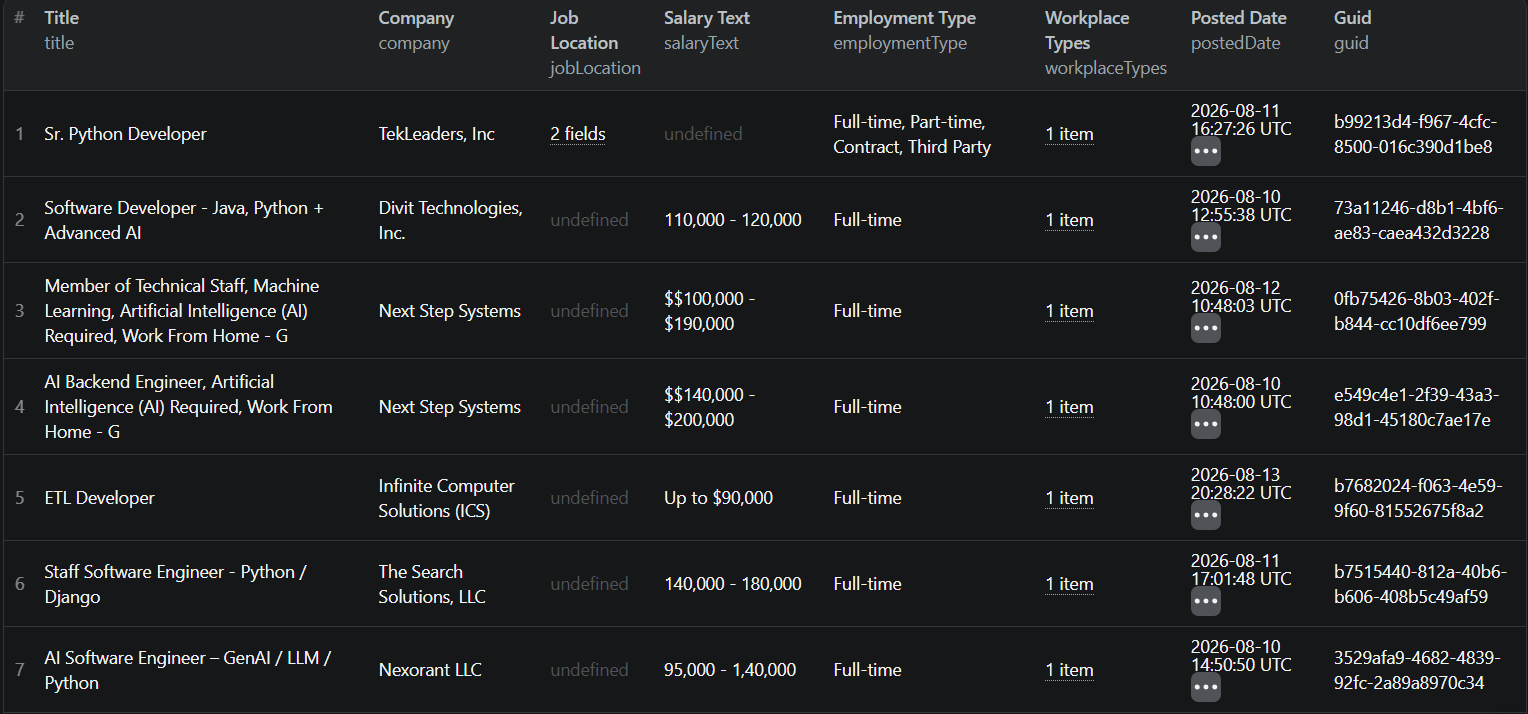 #### Output schema
| Group | Field | Type | Description |
|---|---|---|---|
| Identity | `scrapedAt` | string | When the record was collected (ISO 8601) |
| Identity | `id` | string | Dice's job identifier |
| Identity | `guid` | string | Position identifier (UUID) — the dedup key |
| Identity | `title` | string | Job title |
| Identity | `score` | number | Dice's relevance score |
| Company | `company` | string | Hiring company name |
| Company | `employerType` | string | `Recruiter` | `Direct Hire` | `Other` |
| Company | `clientBrandId` | string | Employer identifier |
| Company | `companyProfileId` | string | Dice company ID |
| Company | `companyProfileUrl` | string | Company profile URL |
| Company | `companyLogoUrl` | string | Company logo image URL |
| Employment | `employmentType` | string | `Full-time` | `Contract` | `Part-time` |
| Employment | `employmentTypeRaw` | string | `FULL_TIME` | `CONTRACTOR` | … |
| Employment | `workplaceTypes` | array | `Remote` | `On-Site` | `Hybrid` |
| Employment | `isRemote` | boolean | Fully-remote indicator |
| Employment | `workFromHomeAvailability` | string | `TRUE` / `FALSE` |
| Employment | `easyApply` | boolean | Easy-Apply availability |
| Location | `jobLocation` | object | `{ city, state, region, country, displayName, postalCode }` |
| Location | `city` | string | City (flattened) |
| Location | `state` | string | State (flattened) |
| Location | `country` | string | Country (flattened) |
| Location | `postalCode` | string | Zip/postal code |
| Salary | `salaryText` | string | Raw salary string |
| Salary | `salaryMin` | number | Parsed minimum |
| Salary | `salaryMax` | number | Parsed maximum |
| Salary | `salaryCurrency` | string | `USD`, `EUR`, … |
| Salary | `salaryPeriod` | string | `year` | `hour` | `month` | `week` | `day` |
| Dates | `postedDate` | string | Original posting date (ISO) |
| Dates | `modifiedDate` | string | Last updated (ISO) |
| Dates | `validThrough` | string | Posting expiry (ISO) |
| Content | `summary` | string | Listing snippet |
| Content | `description` | string | Full description (plain text) |
| Content | `descriptionHtml` | string | Full description (HTML) |
| Content | `descriptionMarkdown` | string | Full description (Markdown) |
| Content | `skills` | array | Required skills list |
| Provenance | `detailsPageUrl` | string | Direct job URL |
| Provenance | `searchQuery` | string | Search that produced this record |
| Provenance | `searchUrl` | string | The exact search URL |
| Provenance | `source` | string | Always `dice.com` |
#### Example record
```json
{
"title": "Senior Data Engineer",
"company": "ABC Technologies",
"employerType": "Direct Hire",
"employmentType": "Full-time",
"employmentTypeRaw": "FULL_TIME",
"jobLocation": {
"city": "New York",
"state": "New York",
"region": "NY",
"country": "USA",
"displayName": "New York, New York, USA"
},
"workplaceTypes": ["Hybrid"],
"isRemote": false,
"salaryText": "$140,000 - $180,000",
"salaryMin": 140000,
"salaryMax": 180000,
"salaryCurrency": "USD",
"salaryPeriod": "year",
"postedDate": "2026-08-14T12:00:00Z",
"validThrough": "2026-09-14T12:00:00Z",
"skills": ["Python", "SQL", "Airflow", "Spark"],
"easyApply": true,
"detailsPageUrl": "https://www.dice.com/job-detail/8a904d2c-a81b-4ebe-b800-9337a939b1b3",
"guid": "8a904d2c-a81b-4ebe-b800-9337a939b1b3",
"source": "dice.com"
}
```
Every record exports to JSON, CSV, Excel, XML, or RSS — or flows straight into your pipeline through the Apify API.
***
### Answers to Common Questions
**Do I need a Dice account?**
No. Everything is collected from Dice's public pages — nothing to sign in to.
**Can it find remote-only roles?**
Yes — filter by `workplaceTypes: ["Remote"]`, or check the `isRemote` flag on results.
**Can it find visa-sponsoring employers?**
Yes. `willingToSponsor: true` returns only roles where the employer sponsors.
**Does it grab contract work?**
Yes — full-time, part-time, contract, and third-party listings are all supported.
**How much of the description do I get?**
The whole thing — plain text, HTML, and Markdown — plus a parsed skills list.
**Does it break when Dice updates their site?**
It recovers Dice's embedded job data directly and falls back to HTML parsing, so markup changes degrade gracefully rather than erroring out.
**How do I export the results?**
From the Apify dataset tab, export as JSON, CSV, Excel, XML, RSS, or HTML — or pull it via the API.
**Is it respectful of the site?**
Yes — it crawls Dice's robots-allowed paths, respects a global rate limit, rotates proxies on blocks, and pauses cleanly when asked.
***
### Reliability
- **Proxy rotation** — on a block or challenge, it grabs a fresh IP and retries
- **Adaptive backoff** — retries grow exponentially with longer waits on rate limits
- **Challenge detection** — bot-check pages are caught and never written as data
- **Deduplication** — the same job is never written twice, even across overlapping searches
- **Checkpoint & resume** — a killed run picks up where it left off with `resume: true`
***
### Notes & Limits
- A single Dice query caps at roughly 500 results (~25 pages) — fan-out is the way to go wider.
- Sponsorship is available as a *search filter*, not as a per-job field on Dice's public pages.
- Dice doesn't expose geo coordinates or company-size data on its server-rendered pages.
***
This actor is intended for research, recruitment, and market intelligence. You're responsible for using the data in line with Dice's terms and applicable law.
⭐ If this saves you time, a quick review goes a long way.
# Actor input Schema
## `searches` (type: `array`):
One or more searches to run. Each search has a keyword plus optional filters.
## `locations` (type: `array`):
Run every search once per location (e.g. \['New York, NY', 'Austin, TX', 'Remote']). Dice caps any single query at ~25 pages, so fan-out greatly increases coverage.
## `postedDateWindows` (type: `array`):
Run every search once per recency window. Narrow windows slice a large result set into fully-fetchable chunks.
## `startUrls` (type: `array`):
Optional raw Dice URLs to scrape instead of searches. Use path-form listing URLs (https://www.dice.com/jobs/q-...) or job-detail URLs.
## `fetchDetails` (type: `boolean`):
Visit each job's detail page for the full description, skills, and posting expiry date.
## `maxResults` (type: `integer`):
Maximum job records to push. 0 = system hard cap (5000).
## `maxResultsPerSearch` (type: `integer`):
Stop a single search after this many records. 0 = no per-search limit.
## `pageSize` (type: `integer`):
Results per page (Dice default is 20).
## `maxPages` (type: `integer`):
Max pages to paginate per search. Dice caps a query at ~25 pages.
## `delayMs` (type: `integer`):
Base delay between requests (random jitter is applied on top).
## `maxRetries` (type: `integer`):
Retry attempts per request.
## `resume` (type: `boolean`):
Resume from the stored checkpoint and skip already-seen jobs.
## `respectRobots` (type: `boolean`):
When true, refuse query-form /jobs?q=... URLs and only use the allowed path-form /jobs/q-... and /job-detail/... pages.
## `proxyConfiguration` (type: `object`):
Proxy to use for scraping. Residential or datacenter Apify Proxy recommended to avoid blocks. The actor rotates the proxy automatically when blocked.
## Actor input object example
```json
{
"searches": [
{
"q": "Python Developer"
}
],
"locations": [],
"postedDateWindows": [],
"startUrls": [],
"fetchDetails": false,
"maxResults": 100,
"maxResultsPerSearch": 0,
"pageSize": 20,
"maxPages": 25,
"delayMs": 1500,
"maxRetries": 4,
"resume": false,
"respectRobots": true,
"proxyConfiguration": {
"useApifyProxy": true
}
}
```
# Actor output Schema
## `results` (type: `string`):
All scraped job listings, stored as items in the default dataset. One record per job posting.
# API
You can run this Actor programmatically using our API. Below are code examples in JavaScript, Python, and CLI, as well as the OpenAPI specification and MCP server setup.
## JavaScript example
```javascript
import { ApifyClient } from 'apify-client';
// Initialize the ApifyClient with your Apify API token
// Replace the '' with your token
const client = new ApifyClient({
token: '',
});
// Prepare Actor input
const input = {
"searches": [
{
"q": "Python Developer"
}
],
"locations": [],
"postedDateWindows": [],
"startUrls": []
};
// Run the Actor and wait for it to finish
const run = await client.actor("lovely_radiologist/dice-job-scraper").call(input);
// Fetch and print Actor results from the run's dataset (if any)
console.log('Results from dataset');
console.log(`💾 Check your data here: https://console.apify.com/storage/datasets/${run.defaultDatasetId}`);
const { items } = await client.dataset(run.defaultDatasetId).listItems();
items.forEach((item) => {
console.dir(item);
});
// 📚 Want to learn more 📖? Go to → https://docs.apify.com/api/client/js/docs
```
## Python example
```python
from apify_client import ApifyClient
# Initialize the ApifyClient with your Apify API token
# Replace '' with your token.
client = ApifyClient("")
# Prepare the Actor input
run_input = {
"searches": [{ "q": "Python Developer" }],
"locations": [],
"postedDateWindows": [],
"startUrls": [],
}
# Run the Actor and wait for it to finish
run = client.actor("lovely_radiologist/dice-job-scraper").call(run_input=run_input)
# Fetch and print Actor results from the run's dataset (if there are any)
print(f"💾 Check your data here: https://console.apify.com/storage/datasets/{run.default_dataset_id}")
for item in client.dataset(run.default_dataset_id).iterate_items():
print(item)
# 📚 Want to learn more 📖? Go to → https://docs.apify.com/api/client/python/docs/quick-start
```
## CLI example
```bash
echo '{
"searches": [
{
"q": "Python Developer"
}
],
"locations": [],
"postedDateWindows": [],
"startUrls": []
}' |
apify call lovely_radiologist/dice-job-scraper --silent --output-dataset
```
## MCP server setup
```json
{
"mcpServers": {
"apify": {
"type": "http",
"url": "https://mcp.apify.com/?tools=fetch-actor-details,lovely_radiologist/dice-job-scraper"
}
}
}
```
The hosted server signs you in with OAuth on first connect, so no API token belongs in this config. Clients without OAuth support can send an `Authorization: Bearer ` header instead, using a token from API & Integrations in Apify Console (https://console.apify.com/settings/integrations).
## OpenAPI specification
Download the OpenAPI definition: https://api.apify.com/v2/actors/Ar1kqX22LCjLFhfIf/builds/oUt5eu4gI6JtRPyIO/openapi.json
#### Output schema
| Group | Field | Type | Description |
|---|---|---|---|
| Identity | `scrapedAt` | string | When the record was collected (ISO 8601) |
| Identity | `id` | string | Dice's job identifier |
| Identity | `guid` | string | Position identifier (UUID) — the dedup key |
| Identity | `title` | string | Job title |
| Identity | `score` | number | Dice's relevance score |
| Company | `company` | string | Hiring company name |
| Company | `employerType` | string | `Recruiter` | `Direct Hire` | `Other` |
| Company | `clientBrandId` | string | Employer identifier |
| Company | `companyProfileId` | string | Dice company ID |
| Company | `companyProfileUrl` | string | Company profile URL |
| Company | `companyLogoUrl` | string | Company logo image URL |
| Employment | `employmentType` | string | `Full-time` | `Contract` | `Part-time` |
| Employment | `employmentTypeRaw` | string | `FULL_TIME` | `CONTRACTOR` | … |
| Employment | `workplaceTypes` | array | `Remote` | `On-Site` | `Hybrid` |
| Employment | `isRemote` | boolean | Fully-remote indicator |
| Employment | `workFromHomeAvailability` | string | `TRUE` / `FALSE` |
| Employment | `easyApply` | boolean | Easy-Apply availability |
| Location | `jobLocation` | object | `{ city, state, region, country, displayName, postalCode }` |
| Location | `city` | string | City (flattened) |
| Location | `state` | string | State (flattened) |
| Location | `country` | string | Country (flattened) |
| Location | `postalCode` | string | Zip/postal code |
| Salary | `salaryText` | string | Raw salary string |
| Salary | `salaryMin` | number | Parsed minimum |
| Salary | `salaryMax` | number | Parsed maximum |
| Salary | `salaryCurrency` | string | `USD`, `EUR`, … |
| Salary | `salaryPeriod` | string | `year` | `hour` | `month` | `week` | `day` |
| Dates | `postedDate` | string | Original posting date (ISO) |
| Dates | `modifiedDate` | string | Last updated (ISO) |
| Dates | `validThrough` | string | Posting expiry (ISO) |
| Content | `summary` | string | Listing snippet |
| Content | `description` | string | Full description (plain text) |
| Content | `descriptionHtml` | string | Full description (HTML) |
| Content | `descriptionMarkdown` | string | Full description (Markdown) |
| Content | `skills` | array | Required skills list |
| Provenance | `detailsPageUrl` | string | Direct job URL |
| Provenance | `searchQuery` | string | Search that produced this record |
| Provenance | `searchUrl` | string | The exact search URL |
| Provenance | `source` | string | Always `dice.com` |
#### Example record
```json
{
"title": "Senior Data Engineer",
"company": "ABC Technologies",
"employerType": "Direct Hire",
"employmentType": "Full-time",
"employmentTypeRaw": "FULL_TIME",
"jobLocation": {
"city": "New York",
"state": "New York",
"region": "NY",
"country": "USA",
"displayName": "New York, New York, USA"
},
"workplaceTypes": ["Hybrid"],
"isRemote": false,
"salaryText": "$140,000 - $180,000",
"salaryMin": 140000,
"salaryMax": 180000,
"salaryCurrency": "USD",
"salaryPeriod": "year",
"postedDate": "2026-08-14T12:00:00Z",
"validThrough": "2026-09-14T12:00:00Z",
"skills": ["Python", "SQL", "Airflow", "Spark"],
"easyApply": true,
"detailsPageUrl": "https://www.dice.com/job-detail/8a904d2c-a81b-4ebe-b800-9337a939b1b3",
"guid": "8a904d2c-a81b-4ebe-b800-9337a939b1b3",
"source": "dice.com"
}
```
Every record exports to JSON, CSV, Excel, XML, or RSS — or flows straight into your pipeline through the Apify API.
***
### Answers to Common Questions
**Do I need a Dice account?**
No. Everything is collected from Dice's public pages — nothing to sign in to.
**Can it find remote-only roles?**
Yes — filter by `workplaceTypes: ["Remote"]`, or check the `isRemote` flag on results.
**Can it find visa-sponsoring employers?**
Yes. `willingToSponsor: true` returns only roles where the employer sponsors.
**Does it grab contract work?**
Yes — full-time, part-time, contract, and third-party listings are all supported.
**How much of the description do I get?**
The whole thing — plain text, HTML, and Markdown — plus a parsed skills list.
**Does it break when Dice updates their site?**
It recovers Dice's embedded job data directly and falls back to HTML parsing, so markup changes degrade gracefully rather than erroring out.
**How do I export the results?**
From the Apify dataset tab, export as JSON, CSV, Excel, XML, RSS, or HTML — or pull it via the API.
**Is it respectful of the site?**
Yes — it crawls Dice's robots-allowed paths, respects a global rate limit, rotates proxies on blocks, and pauses cleanly when asked.
***
### Reliability
- **Proxy rotation** — on a block or challenge, it grabs a fresh IP and retries
- **Adaptive backoff** — retries grow exponentially with longer waits on rate limits
- **Challenge detection** — bot-check pages are caught and never written as data
- **Deduplication** — the same job is never written twice, even across overlapping searches
- **Checkpoint & resume** — a killed run picks up where it left off with `resume: true`
***
### Notes & Limits
- A single Dice query caps at roughly 500 results (~25 pages) — fan-out is the way to go wider.
- Sponsorship is available as a *search filter*, not as a per-job field on Dice's public pages.
- Dice doesn't expose geo coordinates or company-size data on its server-rendered pages.
***
This actor is intended for research, recruitment, and market intelligence. You're responsible for using the data in line with Dice's terms and applicable law.
⭐ If this saves you time, a quick review goes a long way.
# Actor input Schema
## `searches` (type: `array`):
One or more searches to run. Each search has a keyword plus optional filters.
## `locations` (type: `array`):
Run every search once per location (e.g. \['New York, NY', 'Austin, TX', 'Remote']). Dice caps any single query at ~25 pages, so fan-out greatly increases coverage.
## `postedDateWindows` (type: `array`):
Run every search once per recency window. Narrow windows slice a large result set into fully-fetchable chunks.
## `startUrls` (type: `array`):
Optional raw Dice URLs to scrape instead of searches. Use path-form listing URLs (https://www.dice.com/jobs/q-...) or job-detail URLs.
## `fetchDetails` (type: `boolean`):
Visit each job's detail page for the full description, skills, and posting expiry date.
## `maxResults` (type: `integer`):
Maximum job records to push. 0 = system hard cap (5000).
## `maxResultsPerSearch` (type: `integer`):
Stop a single search after this many records. 0 = no per-search limit.
## `pageSize` (type: `integer`):
Results per page (Dice default is 20).
## `maxPages` (type: `integer`):
Max pages to paginate per search. Dice caps a query at ~25 pages.
## `delayMs` (type: `integer`):
Base delay between requests (random jitter is applied on top).
## `maxRetries` (type: `integer`):
Retry attempts per request.
## `resume` (type: `boolean`):
Resume from the stored checkpoint and skip already-seen jobs.
## `respectRobots` (type: `boolean`):
When true, refuse query-form /jobs?q=... URLs and only use the allowed path-form /jobs/q-... and /job-detail/... pages.
## `proxyConfiguration` (type: `object`):
Proxy to use for scraping. Residential or datacenter Apify Proxy recommended to avoid blocks. The actor rotates the proxy automatically when blocked.
## Actor input object example
```json
{
"searches": [
{
"q": "Python Developer"
}
],
"locations": [],
"postedDateWindows": [],
"startUrls": [],
"fetchDetails": false,
"maxResults": 100,
"maxResultsPerSearch": 0,
"pageSize": 20,
"maxPages": 25,
"delayMs": 1500,
"maxRetries": 4,
"resume": false,
"respectRobots": true,
"proxyConfiguration": {
"useApifyProxy": true
}
}
```
# Actor output Schema
## `results` (type: `string`):
All scraped job listings, stored as items in the default dataset. One record per job posting.
# API
You can run this Actor programmatically using our API. Below are code examples in JavaScript, Python, and CLI, as well as the OpenAPI specification and MCP server setup.
## JavaScript example
```javascript
import { ApifyClient } from 'apify-client';
// Initialize the ApifyClient with your Apify API token
// Replace the '' with your token
const client = new ApifyClient({
token: '',
});
// Prepare Actor input
const input = {
"searches": [
{
"q": "Python Developer"
}
],
"locations": [],
"postedDateWindows": [],
"startUrls": []
};
// Run the Actor and wait for it to finish
const run = await client.actor("lovely_radiologist/dice-job-scraper").call(input);
// Fetch and print Actor results from the run's dataset (if any)
console.log('Results from dataset');
console.log(`💾 Check your data here: https://console.apify.com/storage/datasets/${run.defaultDatasetId}`);
const { items } = await client.dataset(run.defaultDatasetId).listItems();
items.forEach((item) => {
console.dir(item);
});
// 📚 Want to learn more 📖? Go to → https://docs.apify.com/api/client/js/docs
```
## Python example
```python
from apify_client import ApifyClient
# Initialize the ApifyClient with your Apify API token
# Replace '' with your token.
client = ApifyClient("")
# Prepare the Actor input
run_input = {
"searches": [{ "q": "Python Developer" }],
"locations": [],
"postedDateWindows": [],
"startUrls": [],
}
# Run the Actor and wait for it to finish
run = client.actor("lovely_radiologist/dice-job-scraper").call(run_input=run_input)
# Fetch and print Actor results from the run's dataset (if there are any)
print(f"💾 Check your data here: https://console.apify.com/storage/datasets/{run.default_dataset_id}")
for item in client.dataset(run.default_dataset_id).iterate_items():
print(item)
# 📚 Want to learn more 📖? Go to → https://docs.apify.com/api/client/python/docs/quick-start
```
## CLI example
```bash
echo '{
"searches": [
{
"q": "Python Developer"
}
],
"locations": [],
"postedDateWindows": [],
"startUrls": []
}' |
apify call lovely_radiologist/dice-job-scraper --silent --output-dataset
```
## MCP server setup
```json
{
"mcpServers": {
"apify": {
"type": "http",
"url": "https://mcp.apify.com/?tools=fetch-actor-details,lovely_radiologist/dice-job-scraper"
}
}
}
```
The hosted server signs you in with OAuth on first connect, so no API token belongs in this config. Clients without OAuth support can send an `Authorization: Bearer ` header instead, using a token from API & Integrations in Apify Console (https://console.apify.com/settings/integrations).
## OpenAPI specification
Download the OpenAPI definition: https://api.apify.com/v2/actors/Ar1kqX22LCjLFhfIf/builds/oUt5eu4gI6JtRPyIO/openapi.json