# 1688 Image Search — Find Suppliers by Photo · $0.35/1k (`memo23/1688-image-search-scraper`) Actor
Search 1688.com by photo: paste an Amazon, AliExpress or Shopify product picture and get the factories and wholesalers selling it, with price, units sold, supplier, location, factory badges and English titles, plus tier pricing and MOQ on request. $0.35 per 1,000 matches. No login.
- **URL**: https://apify.com/memo23/1688-image-search-scraper.md
- **Developed by:** [Muhamed Didovic](https://apify.com/memo23) (community)
- **Categories:** E-commerce, Lead generation, Automation
- **Features:** Limited permissions
- **Stats:** 16 total users, 14 monthly users, 100.0% runs succeeded, 0 bookmarks
- **User rating**: No ratings yet
## Pricing
from $0.35 / 1,000 matching offers
This Actor is paid per event. You are not charged for the Apify platform usage, but only a fixed price for specific events.
Learn more: https://docs.apify.com/actors/running/actors-in-store.md#pay-per-event
## What's an Apify Actor?
An Actor is a serverless cloud program that runs on the Apify platform. It has two run modes.
In Batch mode, an Actor accepts a well-defined JSON input, performs an action which can take anything from a few seconds to a few hours,
and optionally produces a well-defined JSON output, datasets with results, or files in key-value store.
In Standby mode, an Actor provides a web server which can be used as a website, API, or an MCP server.
Apify vocabulary and the platform model are defined once, in the agent quickstart at https://apify.com/agents.md.
## How to integrate an Actor?
If asked about integration, you help developers integrate Actors into their projects.
You adapt to their stack and deliver integrations that are safe, well-documented, and production-ready.
Do not guess an integration path. Every one of them is in the agent quickstart at https://apify.com/agents.md: the Apify MCP server, Agent Skills with the Apify CLI, the JavaScript and Python clients, the REST API, and the account-free path for an agent with no human to sign in. It also carries the rule on stating cost before the first paid run.
For examples already wired to this Actor's own input schema, see the [API](#api) section below.
Each client library has reference documentation the quickstart does not restate: [JavaScript/TypeScript](https://docs.apify.com/api/client/js/docs.md) (`npm install apify-client`) and [Python](https://docs.apify.com/api/client/python/docs.md) (`pip install apify-client`).
# README
## 1688 Image Search — Find Wholesale Suppliers by Photo, by Run or by API
Search **1688.com** (Alibaba's China wholesale marketplace) **by product photo**. Paste a picture from Amazon, AliExpress, Shopify, TikTok Shop, Temu or your own camera roll and get the 1688 factories and wholesalers selling that product: price in yuan and US dollars, units sold, supplier company, location, factory badges and service score, with tier pricing, MOQ and every SKU variant on request. No login, no cookies. Clean JSON or CSV out.
### 中文说明
**1688 以图搜货数据采集,无需登录、无需 Cookie。** 粘贴商品图片链接(亚马逊、速卖通、Shopify、TikTok Shop、Temu 或自己的图片),返回 1688 上销售同款或相似商品的工厂和批发商:
- 每张图片的匹配商品:标题、价格(人民币和美元参考价)、已售数量、商品图片、是否广告
- 供应商:公司名称、店铺链接、所在省市、生产加工或经销批发、超级工厂、实力工厂验厂、诚信通年限、服务评分
- 详情页(开启 `scrapeDetails`):阶梯批发价、起订量(MOQ)、库存、商品属性、全部图片、混批规则、一件代发、商品视频
- SKU 规格(开启 `includeSkuDetails`)、商品详情描述(开启 `includeDescription`)、供应商列表(`includeSupplierList`)
- 筛选:价格区间、省份/城市、只看生产厂家、排除广告、标题排除词。被筛掉的商品不收费
输入示例:
```json
{
"imageUrls": ["https://m.media-amazon.com/images/I/71gHzHhVhOL.jpg"],
"maxResultsPerImage": 20,
"manufacturersOnly": true
}
```
### Why use this 1688 Image Search?
- **Start from the photo you already have.** A competitor's Amazon listing, an AliExpress product, a Shopify store or a picture you took: each one returns the 1688 offers that look like it, usually the same product from several factories first, then close variants.
- **Find the factory, not just the listing.** Every match carries the supplier company, storefront, location, whether it is a manufacturer (生产加工) or a trader, super-factory and inspected-factory badges, years on 1688 and its service score.
- **See the wholesale price next to the retail one.** Each match has its price in CNY and a USD reference price, so you can put the 1688 cost beside the price on the listing you started from.
- **Many photos in one run.** Every photo is searched on its own, capped by `maxResultsPerImage`, and every row says which photo found it in `sourceImageUrl`.
- **Go deeper when a match is worth it.** Turn on offer page details for tier pricing, MOQ, stock, attributes, the full gallery, dropship and mixed-batch terms, and SKU variants with their own price and stock.
- **A supplier shortlist for free-form outreach.** `includeSupplierList` ends the run with one row per supplier behind the matches, most matches first.
- **Filter before you pay.** Price range, supplier province or city, manufacturers only, no ads and words the title must not contain. Offers your filters remove never reach the dataset and are never billed.
### Overview
1688.com is the wholesale source behind a large share of what is resold on Amazon, AliExpress, TikTok Shop and independent stores, but it is in Chinese and hard to search for a product you only have a picture of. This actor takes product photos and returns the 1688 offers that match them as structured rows, for **product sourcing, supplier discovery, dropshipping research, private-label validation and margin checks**.
Titles, supplier names and attributes come back exactly as 1688 publishes them, in Chinese, with `titleEn` and `supplierNameEn` next to them. Turn **English translation** off if you only want the Chinese fields.
### Supported inputs
| Input | Example | Notes |
|---|---|---|
| Amazon product photo | `https://m.media-amazon.com/images/I/71gHzHhVhOL.jpg` | Use the full-size link (no `._AC_..._` size suffix) for the best matches |
| AliExpress / Alibaba photo | `https://ae01.alicdn.com/kf/....jpg` | |
| Shopify, TikTok Shop, Temu or any public photo | Any `.jpg`, `.png` or `.webp` link up to 5 MB | A sharp photo of one product on a plain background matches best |
### Use cases
- **Sourcing a winning product** — start from a best-seller's photo and get the factories that make it, with their prices and units sold.
- **Dropshipping research** — check which 1688 offers sit behind an AliExpress or TikTok Shop listing and at what wholesale cost.
- **Private label and OEM** — shortlist manufacturers (not traders) for a product you want to brand, filtered by province.
- **Margin checks** — put the 1688 price and USD reference price beside the retail price you started from.
- **Supplier monitoring** — re-run the same photos on a schedule and watch new suppliers and prices appear.
### How it works
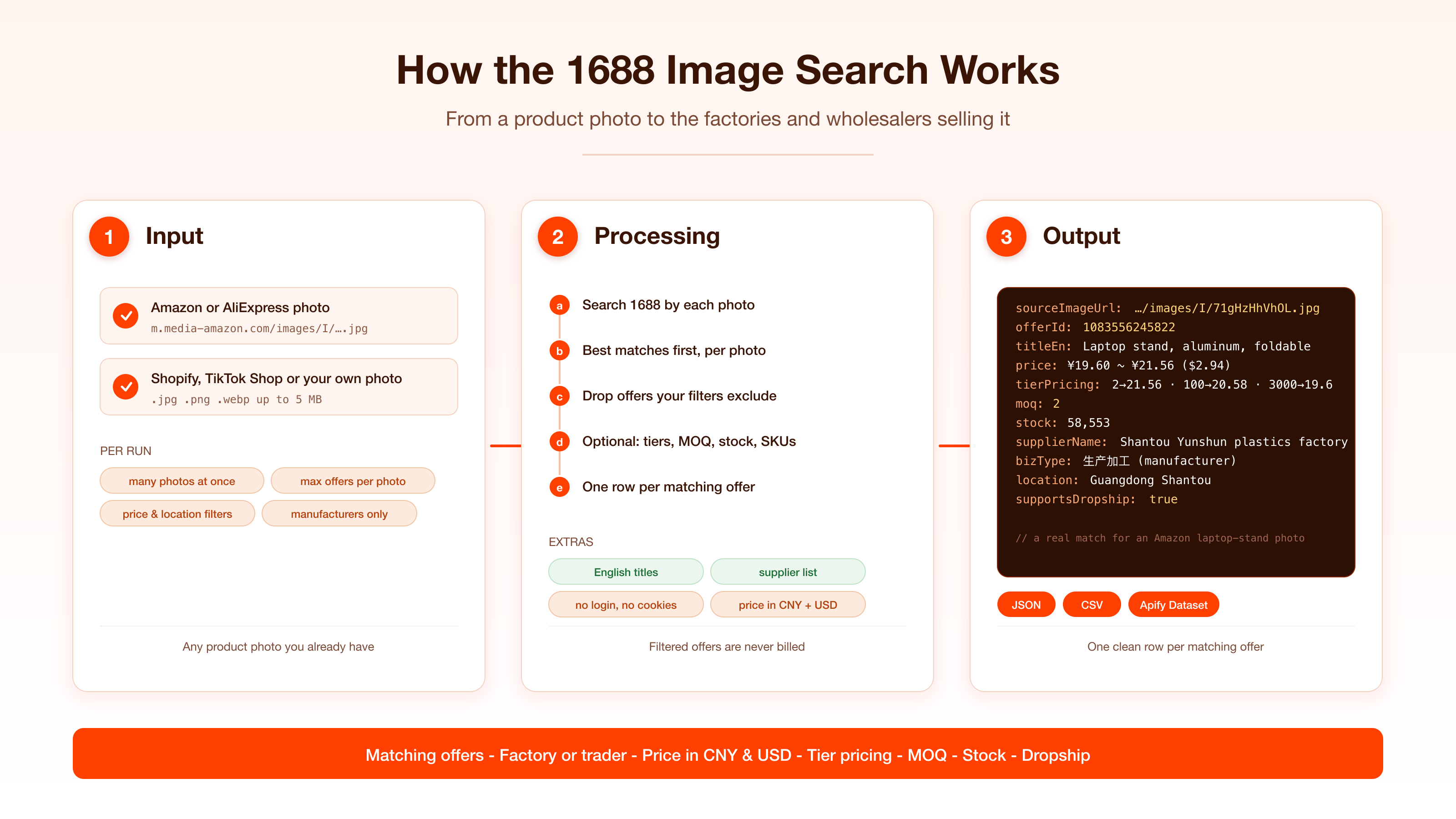
1. You give one or more photo links.
2. Each photo is searched on 1688, and the matching offers come back best match first.
3. Your filters drop the offers you excluded, before anything reaches the dataset.
4. With offer page details on, each remaining match is completed from its offer page.
5. Each photo stops at **Max offers per photo**, and the run stops at **Max offers in total**.
### Input configuration
| Field | Type | Description |
|---|---|---|
| `imageUrls` | array | **Required.** Links to product photos (.jpg, .png, .webp, up to 5 MB). |
| `maxResultsPerImage` | integer | Matching offers per photo, best match first. Default `50`. |
| `scrapeDetails` | boolean | Add tier pricing, MOQ, unit, stock, attributes, gallery, delivery terms, video, dropship and mixed-batch terms from each offer's page. Billed as Product details. Default `false`. |
| `includeSkuDetails` | boolean | Add the variant matrix: every SKU with its options, own price or promo price and stock. Default `false`. |
| `includeDescription` | boolean | Add the seller's long description as text plus its images. Turns on `scrapeDetails`. Default `false`. |
| `translateToEnglish` | boolean | Add `titleEn` and `supplierNameEn`. Default `true`. |
| `priceMin` / `priceMax` | integer | Unit price range in CNY. |
| `maxMoq` | integer | Highest MOQ to keep. Works with `scrapeDetails` on, since photo matches carry their MOQ on the offer page. |
| `locations` | array | Supplier province or city, e.g. `广东`, `浙江`, `义乌`. |
| `manufacturersOnly` | boolean | Keep only manufacturers, super factories and inspected factories. Default `false`. |
| `excludeAds` | boolean | Leave out sponsored offers. Default `false`. |
| `excludeKeywords` | array | Drop offers whose title contains any of these words. |
| `includeSupplierList` | boolean | End the run with one row per supplier behind the matches. Default `false`. |
| `maxItems` | integer | Cap on offers across all photos together. Default `500`. |
### Output overview
Each matching offer is one dataset row, and every row carries the photo it was found for in `sourceImageUrl`. A photo match carries the title, price (CNY and USD), units sold, the offer's repurchase rate, the supplier company and storefront, location, manufacturer or trader, factory badges, years on 1688, service score and service tags, and whether the placement was an ad. Tier pricing, MOQ, unit, stock, attributes and the full gallery live on the offer page and are added when **Offer page details** is on.
With **Supplier list** on, the run ends with one row per supplier (`type: "supplier"`): name, location, manufacturer or trader, badges, how many of the run's matches it has, its lowest price and up to 5 sample offers.
### Output samples
A match for a laptop-stand photo taken from an Amazon listing:
```json
{
"offerId": "1083556245822",
"title": "新款笔记本支架桌面办公显示器散热支撑架升降铝合金平板电脑支架",
"offerUrl": "https://m.1688.com/offer/1083556245822.html",
"image": "https://cbu01.alicdn.com/img/ibank/O1CN01cSXCxiL2BCF1chua_!!2222545051263-0-cib.jpg",
"price": "¥21.56",
"priceValue": 21.56,
"currency": "CNY",
"priceUsd": 3.2347,
"soldCount": "20+件",
"bookedCount": 15,
"offerRepurchaseRate": "45%",
"supplierName": "汕头市澄海区允顺塑料制品厂",
"supplierUrl": "http://shop203855h40c5h7.1688.com",
"supplierYears": "1",
"bizType": "生产加工",
"superFactory": false,
"factoryInspection": false,
"serviceScores": { "composite": 4.5 },
"serviceTags": ["先采后付", "官方物流"],
"isAd": false,
"sourceImageUrl": "https://m.media-amazon.com/images/I/71gHzHhVhOL.jpg",
"scrapedAt": "2026-11-03T13:17:36.145Z"
}
```
With **Offer page details** and **English translation** on, the same offer also carries its quantity-break ladder, MOQ, stock and attributes (`attributes` cut to 6 of 24 here):
```json
{
"titleEn": "New laptop stand desktop office monitor cooling support stand lifting aluminum alloy tablet computer stand",
"tierPricing": [
{ "minQuantity": 2, "unitPrice": 21.56 },
{ "minQuantity": 100, "unitPrice": 20.58 },
{ "minQuantity": 3000, "unitPrice": 19.6 }
],
"moq": 2,
"unit": "台",
"stock": 58553,
"supportsDropship": true,
"location": "广东汕头",
"attributes": {
"材质": "铝合金",
"款式": "折叠式",
"适用机型": "笔记本电脑",
"产品重量": "219g",
"是否支持一件代发": "支持",
"主要下游平台": "ebay,亚马逊,wish,速卖通,独立站,LAZADA,其他"
}
}
```
### Key output fields
| Field | Description |
|---|---|
| `sourceImageUrl` | The photo this offer was found for |
| `offerId` / `offerUrl` | 1688 offer ID and link |
| `title` / `titleEn` | Offer title in Chinese, and in English with `translateToEnglish` |
| `image` | The offer's main picture, to compare with your photo |
| `price` / `priceValue` / `priceUsd` | Price as shown, lowest numeric unit price in CNY, USD reference price |
| `soldCount` / `bookedCount` | Units sold and orders booked |
| `offerRepurchaseRate` | Share of the offer's buyers who ordered again |
| `supplierName` / `supplierUrl` / `supplierYears` | Supplier company, storefront and years on 1688 |
| `location` / `province` / `city` | Supplier location, when 1688 shows it |
| `bizType` | 生产加工 (manufacturer) or 经销批发 (trader) |
| `superFactory` / `factoryInspection` | Super factory badge, on-site inspected factory |
| `serviceScores` / `serviceTags` | Service score out of 5, and service pills such as 先采后付 |
| `isAd` | Paid placement rather than an organic match |
| `tierPricing` / `moq` / `unit` | Quantity-break ladder, minimum order and unit *(offer page details)* |
| `stock` / `attributes` / `images` | Units in stock, product attributes, full gallery *(offer page details)* |
| `mixedBatch` / `supportsDropship` / `videoUrl` | 混批 rule, one-piece dropshipping, product video *(offer page details)* |
| `variantAxes` / `variants` | Every SKU with options, price, promo price and stock *(includeSkuDetails)* |
| `descriptionText` / `descriptionImages` | The seller's long description *(includeDescription)* |
### Pricing
Pay per event.
| Event | Price | When |
|---|---|---|
| Matching offer | $0.00035 | One per offer delivered ($0.35 per 1,000) |
| Product details | $0.003 | One per delivered offer completed from its offer page (`scrapeDetails`) |
| Actor start | $0.005 | Once per run |
Offers your filters remove are never billed. Supplier list rows are billed like matching offers. The free Apify plan returns up to 100 offers per run.
### FAQ
**What kind of photo works best?**
A sharp photo of one product, filling most of the frame, on a plain background. Marketplace listing photos work well. Lifestyle shots with several items return a mix of whatever is in them.
**Why do the first results look identical?**
They are usually the same product sold by several factories and wholesalers, which is the point: compare their prices, badges and units sold, then open the best two or three with offer page details.
**Why are `tierPricing` and `moq` empty on some rows?**
Photo matches do not carry them; they live on the offer page. Turn on **Offer page details** and every delivered match gets its quantity-break ladder, MOQ and unit.
**Can I search many photos in one run?**
Yes. Each photo is searched on its own and stops at **Max offers per photo**. An offer that already matched an earlier photo is not delivered or billed twice.
**Are the results in Chinese?**
Titles, supplier names and attributes are returned as 1688 publishes them, with English `titleEn` and `supplierNameEn` on by default. Turn **English translation** off for Chinese-only rows.
**Which currency do I get?**
Prices are in Chinese yuan (CNY), and every row also carries `priceUsd` at the run's daily reference rate.
**Do I need a 1688 account?**
No. Nothing here logs in.
**Can I search 1688 by keyword too?**
Use the [1688 Wholesale Scraper](https://apify.com/memo23/1688-wholesale-scraper) for keywords, offer links and IDs.
### Support
Found a photo that should match and does not, or need a field added? Open an issue on the actor's **Issues** tab with the photo link, and it gets looked at.
### Additional services
Need matches enriched, on a schedule, or pushed to your warehouse or webhook? Reach out through the Issues tab: custom fields, monitoring runs and integrations are available.
### Explore more scrapers
- [1688 Product Details Scraper](https://apify.com/memo23/1688-product-details-scraper) — full product pages for the offers you found: every SKU with price and stock, specs and the supplier profile
- [1688 Wholesale Scraper](https://apify.com/memo23/1688-wholesale-scraper) — keyword search, offer links and IDs
- [1688 Supplier Scraper](https://apify.com/memo23/1688-supplier-scraper) — the factories behind a keyword or photo, with factory profiles, and every product of a supplier you name
- [AliExpress Image Search](https://apify.com/memo23/aliexpress-image-search-scraper) — find AliExpress products by photo
- [Taobao Scraper](https://apify.com/memo23/taobao-scraper) — Taobao and Tmall products
### 🤖 For AI Agents & LLM Apps
One required field and flat rows make this an easy tool call: pass `imageUrls` (and `maxResultsPerImage` for a short list), then read the rows best match first. Every row carries `sourceImageUrl`, so an agent can group matches by photo, and `priceValue`, `priceUsd` and `bizType` are ready for filtering and margin maths without post-processing. Add `"scrapeDetails": true` when the agent needs tier pricing and MOQ, and `"includeSupplierList": true` for a factory shortlist. Available over the Apify API and MCP.
### ⚠️ Disclaimer
This actor collects only publicly available data from 1688.com. It does not log in, bypass authentication or access private data. You are responsible for using the data in line with 1688's terms and applicable laws, including copyright and data-protection rules, and for any downstream use. Photos you submit must be ones you are allowed to use.
### SEO Keywords
1688 image search, 1688 search by image, find supplier by photo, 1688 reverse image search API, 1688 photo search, 1688 reverse image search, search 1688 by photo, find 1688 supplier by image, 1688 image search scraper, 1688 image search API, Alibaba 1688 image search, find factory by photo, find supplier by image, China supplier finder, wholesale supplier by photo, product sourcing by image, dropshipping supplier finder, Amazon to 1688, AliExpress to 1688, 1688 factory finder, 1688 manufacturer search, 1688 scraper, 以图搜货, 1688以图搜货, 1688图片搜索, 拍立淘, 货源采集.
# Actor input Schema
## `imageUrls` (type: `array`):
Links to product photos (.jpg, .png, .webp, up to 5 MB). Each photo returns the 1688 offers that look like it: usually the same product from several factories and wholesalers first, then close variants. Every row carries its photo in sourceImageUrl.
## `maxResultsPerImage` (type: `integer`):
How many matching offers to return for each photo, best match first. The closest matches come first, so 20 to 50 is usually enough to find the factory.
## `scrapeDetails` (type: `boolean`):
Open each matching offer's page to add the quantity-break tier pricing, the MOQ and unit, the full product attribute map, the complete image gallery, delivery terms, the category id, units in stock, exact units sold, the mixed-batch rule (混批), one-piece dropshipping (一件代发), the product video and the buyer-protection services. Billed as one Product details event per delivered offer that carries them.
## `includeSkuDetails` (type: `boolean`):
Add every offer's variant matrix: variantAxes (颜色, 尺码, 型号 and so on, with option images) and variants, one entry per SKU with skuId, its own price or promotional price where it has one, and stock. If the variants cannot be read, the row is still delivered without them.
## `includeDescription` (type: `boolean`):
Add the seller's long description (详情) as plain text (descriptionText) and the images inside it (descriptionImages). It lives on the offer page, so this turns on offer page details.
## `translateToEnglish` (type: `boolean`):
Add titleEn and supplierNameEn, machine-translated from the Chinese. The Chinese originals stay in title and supplierName. On by default; turn it off if you only want Chinese.
## `priceMin` (type: `integer`):
Keep only offers priced at or above this, in yuan. Offers that show no price are kept.
## `priceMax` (type: `integer`):
Keep only offers priced at or below this, in yuan.
## `maxMoq` (type: `integer`):
Keep only offers whose minimum order quantity is at or below this. Photo matches carry their MOQ on the offer page only, so this filter works with Offer page details on; without them every offer is kept.
## `locations` (type: `array`):
Keep only suppliers whose location contains one of these. A province matches every city in it, e.g. 广东 matches 广东深圳市 and 广东佛山市. Leave empty to keep every supplier.
## `manufacturersOnly` (type: `boolean`):
Keep only offers from manufacturers: suppliers listed as 生产加工 (production), super factories (超级工厂) and on-site inspected factories. Traders and wholesalers are dropped before billing.
## `excludeAds` (type: `boolean`):
Drop sponsored placements. Those rows never reach the dataset and are not billed.
## `excludeKeywords` (type: `array`):
Drop offers whose title contains any of these words, Chinese or English, case-insensitive. Dropped offers are not billed.
## `includeSupplierList` (type: `boolean`):
After the offers, return one row per supplier behind them (type: supplier): name, location, manufacturer or trader, factory badges, years on 1688, repurchase rate, service scores, how many of the run's offers it has, its lowest price and up to 5 sample offers. Billed per row like an offer.
## `maxItems` (type: `integer`):
Cap on the offers returned across all photos together. Each photo still stops at Max offers per photo.
## `proxy` (type: `object`):
Optional. Runs on paid Apify plans use the actor's own connection and ignore this setting. On the free plan you can set your own residential proxy here.
## Actor input object example
```json
{
"imageUrls": [
"https://m.media-amazon.com/images/I/71gHzHhVhOL.jpg"
],
"maxResultsPerImage": 50,
"scrapeDetails": false,
"includeSkuDetails": false,
"includeDescription": false,
"translateToEnglish": true,
"locations": [],
"manufacturersOnly": false,
"excludeAds": false,
"excludeKeywords": [],
"includeSupplierList": false,
"maxItems": 500
}
```
# Actor output Schema
## `results` (type: `string`):
Dataset of 1688 offers matching your photos, with tier pricing, MOQ, supplier company and location, sold count and the photo each was found for.
# API
You can run this Actor programmatically using our API. Below are code examples in JavaScript, Python, and CLI, as well as the OpenAPI specification and MCP server setup.
## JavaScript example
```javascript
import { ApifyClient } from 'apify-client';
// Initialize the ApifyClient with your Apify API token
// Replace the '' with your token
const client = new ApifyClient({
token: '',
});
// Prepare Actor input
const input = {
"imageUrls": [
"https://m.media-amazon.com/images/I/71gHzHhVhOL.jpg"
],
"locations": [],
"excludeKeywords": []
};
// Run the Actor and wait for it to finish
const run = await client.actor("memo23/1688-image-search-scraper").call(input);
// Fetch and print Actor results from the run's dataset (if any)
console.log('Results from dataset');
console.log(`💾 Check your data here: https://console.apify.com/storage/datasets/${run.defaultDatasetId}`);
const { items } = await client.dataset(run.defaultDatasetId).listItems();
items.forEach((item) => {
console.dir(item);
});
// 📚 Want to learn more 📖? Go to → https://docs.apify.com/api/client/js/docs
```
## Python example
```python
from apify_client import ApifyClient
# Initialize the ApifyClient with your Apify API token
# Replace '' with your token.
client = ApifyClient("")
# Prepare the Actor input
run_input = {
"imageUrls": ["https://m.media-amazon.com/images/I/71gHzHhVhOL.jpg"],
"locations": [],
"excludeKeywords": [],
}
# Run the Actor and wait for it to finish
run = client.actor("memo23/1688-image-search-scraper").call(run_input=run_input)
# Fetch and print Actor results from the run's dataset (if there are any)
print(f"💾 Check your data here: https://console.apify.com/storage/datasets/{run.default_dataset_id}")
for item in client.dataset(run.default_dataset_id).iterate_items():
print(item)
# 📚 Want to learn more 📖? Go to → https://docs.apify.com/api/client/python/docs/quick-start
```
## CLI example
```bash
echo '{
"imageUrls": [
"https://m.media-amazon.com/images/I/71gHzHhVhOL.jpg"
],
"locations": [],
"excludeKeywords": []
}' |
apify call memo23/1688-image-search-scraper --silent --output-dataset
```
## MCP server setup
```json
{
"mcpServers": {
"apify": {
"type": "http",
"url": "https://mcp.apify.com/?tools=fetch-actor-details,memo23/1688-image-search-scraper"
}
}
}
```
The hosted server signs you in with OAuth on first connect, so no API token belongs in this config. Clients without OAuth support can send an `Authorization: Bearer ` header instead, using a token from API & Integrations in Apify Console (https://console.apify.com/settings/integrations).
## OpenAPI specification
Download the OpenAPI definition: https://api.apify.com/v2/actors/sW6dYRc3Xq06haAk7/builds/yfjUTnyWfoSOCYIVV/openapi.json