# 1688 Wholesale Scraper — Tier Pricing, MOQ & Supplier Data (`memo23/1688-wholesale-scraper`) Actor
Scrape 1688.com wholesale offers by keyword or URL. Quantity-break tier pricing, MOQ, supplier company, location, repurchase rate, product attributes and image gallery. Filter by price, MOQ and province before you are billed — excluded offers never reach your dataset. JSON or CSV.
- **URL**: https://apify.com/memo23/1688-wholesale-scraper.md
- **Developed by:** [Muhamed Didovic](https://apify.com/memo23) (community)
- **Categories:** E-commerce, Lead generation, Automation
- **Stats:** 2 total users, 1 monthly users, 100.0% runs succeeded, 0 bookmarks
- **User rating**: No ratings yet
## Pricing
from $2.00 / 1,000 offer scrapeds
This Actor is paid per event. You are not charged for the Apify platform usage, but only a fixed price for specific events.
Learn more: https://docs.apify.com/platform/actors/running/actors-in-store#pay-per-event
## What's an Apify Actor?
Actors are web data automations that power AI and operations. They run on the Apify platform to scrape websites, process data, connect APIs, and automate workflows.
In Batch mode, an Actor accepts a well-defined JSON input, performs an action which can take anything from a few seconds to a few hours,
and optionally produces a well-defined JSON output, datasets with results, or files in key-value store.
In Standby mode, an Actor provides a web server which can be used as a website, API, or an MCP server.
Actors are written with capital "A".
## How to integrate an Actor?
If asked about integration, you help developers integrate Actors into their projects.
You adapt to their stack and deliver integrations that are safe, well-documented, and production-ready.
The best way to integrate Actors is as follows.
- **AI agents and MCP clients** — the [Apify MCP server](https://docs.apify.com/integrations/mcp.md) at `https://mcp.apify.com` (remote, streamable HTTP, OAuth on first use).
- **Agentic workflows and local Actor development** — [Agent Skills](https://apify.com/.well-known/agent-skills/index.json) with the [Apify CLI](https://docs.apify.com/cli/docs.md): `npm install -g apify-cli`, then `apify login`.
- **JavaScript/TypeScript projects** — the official [JS/TS client](https://docs.apify.com/api/client/js/docs.md): `npm install apify-client`.
- **Python projects** — the official [Python client](https://docs.apify.com/api/client/python/docs.md): `pip install apify-client`.
- **Any other language** — the [REST API](https://docs.apify.com/api/v2.md).
For usage examples, see the [API](#api) section below.
For more details, see Apify documentation as [Markdown index](https://docs.apify.com/llms.txt) and [Markdown full-text](https://docs.apify.com/llms-full.txt).
# README
## 1688 Wholesale Scraper — Tier Pricing, MOQ & Supplier Data
Extract structured wholesale offers from **1688.com** (Alibaba's China B2B marketplace) at scale — quantity-break tier pricing, minimum order quantity (MOQ), supplier company, location, SKU attributes and image galleries — by keyword or URL. No login, no cookies, no browser. Clean JSON or CSV out.

### Why use this 1688 Wholesale Scraper?
- **Search by keyword or paste any offer URL** — keyword searches, desktop `detail.1688.com` and mobile `m.1688.com` offer pages, and bare numeric offer IDs are all handled.
- **Sourcing-grade data** — the full tier-pricing ladder (buy N+ → price each), MOQ, unit, supplier company, trading years, location and product attributes, not just a single price.
- **Rich data straight from search** — title, price, sold count, repurchase rate, supplier trading years and location on every row, no detail fetch required.
- **Built for scale** — pagination (~20 offers/page), residential-proxy rotation, and automatic retry through 1688's x5sec anti-bot.
- **Filter before you pay** — narrow by unit price, MOQ and supplier province or city. Excluded offers never reach your dataset, so you are not billed for them, and price and location are read straight off the search card, which also saves a detail request per skipped offer.
- **One clean row per offer** — you pay per result, never for padding.
### Overview
1688.com is Alibaba's domestic Chinese wholesale marketplace — the source behind a huge share of what's resold on AliExpress, Amazon, eBay and independent stores. This scraper turns any 1688 search or offer URL into structured data you can use for **wholesale sourcing, dropshipping product research, price and MOQ comparison, supplier discovery, and cross-border arbitrage**.
It runs on a pure HTTP stack (no headless browser), reads the offer data 1688 embeds in its own mobile pages, and returns it as tidy JSON/CSV — fast and cheap. Chinese text (titles, attributes, supplier names) is preserved exactly as published.
### Filtering, and what it costs you
Sourcing runs are mostly about throwing away offers: wrong price band, MOQ too high,
supplier on the other side of the country. Doing that after the fact means paying for
rows you delete.
Four filter inputs run inside the scraper instead:
| Filter | Applied from | Effect |
|---|---|---|
| `priceMin` / `priceMax` | search listing | Skipped before the detail page is fetched |
| `locations` | search listing | Same — matches province or city as a substring |
| `maxMoq` | detail page | Applied after the fetch, still before the row is pushed |
Two details worth knowing. An offer whose card carries no price is **kept**, not dropped,
because silently discarding it would shrink a filtered run in a way you cannot account
for. And if five pages in a row match none of your filters, the run stops that query and
says so, rather than paging through the whole catalogue burning requests for nothing.
`maxMoq` needs **Scrape offer detail pages** switched on, since 1688 does not put MOQ on
the search card. Asking for it without that fails the run with a message saying so,
instead of returning an unfiltered dataset that looks fine.
### Supported inputs
| Input type | Example |
|---|---|
| Keyword search | `手机壳` (phone cases), `蓝牙耳机` (bluetooth earphones), or any keyword |
| Offer / detail URL | `https://detail.1688.com/offer/629791812713.html` |
| Mobile offer URL | `https://m.1688.com/offer/629791812713.html` |
| Bare offer ID | `629791812713` |
| Keyword-search URL | `https://s.1688.com/selloffer/offer_search.htm?keywords=手机壳` |
All URL formats are auto-normalized to the canonical mobile URL the scraper fetches.
### Use cases
- **Wholesale sourcing** — find suppliers by keyword, compare tier pricing and MOQ side by side.
- **Dropshipping & reselling research** — trace which 1688 offers back AliExpress/Amazon listings and at what wholesale cost.
- **Price & margin analysis** — pull the full quantity-break ladder to model landed cost at different order sizes.
- **Supplier discovery** — collect supplier company names, trading years and locations for outreach.
- **Catalog building** — pull titles, attributes, images and prices for thousands of offers by keyword.
### How it works
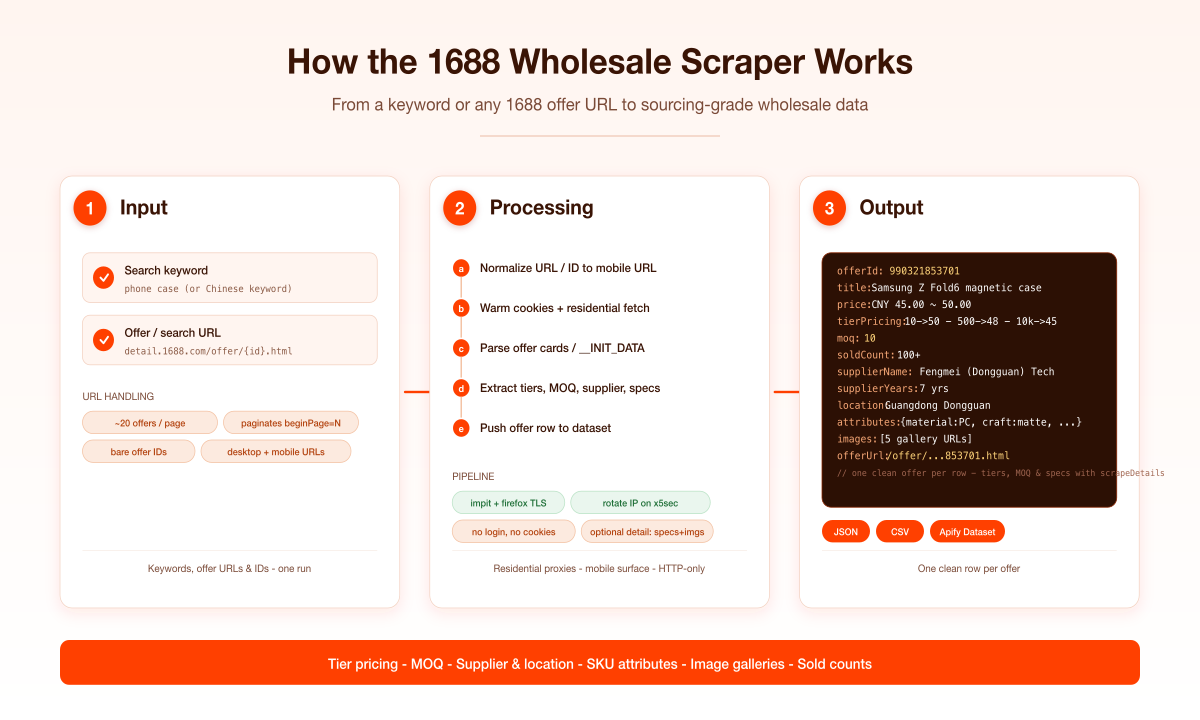
1. You provide keyword searches and/or 1688 offer URLs (or bare offer IDs).
2. The scraper builds canonical mobile search URLs and normalizes any pasted links/IDs to the mobile offer form.
3. It fetches each page through a residential proxy with a warmed session, and reads the offer cards (search) or the `window.__INIT_DATA` blob (detail) that 1688 embeds in the page.
4. Results are paginated (~20 offers per page) up to your **Max items** limit.
5. Optionally, each offer's detail page is fetched for tier pricing, MOQ, supplier, SKU attributes and the full image gallery.
6. Every offer is written to the dataset as one clean row.
### Input configuration
| Field | Type | Description |
|---|---|---|
| `searchQueries` | array | Keywords to search on 1688. Chinese keywords match best. Each is paginated up to `maxItems`. |
| `startUrls` | array | Direct offer / search URLs, or bare offer IDs. |
| `scrapeDetails` | boolean | Fetch each offer's detail page for tier pricing, MOQ, supplier, attributes and gallery (slower, one request per offer). Default `false`. |
| `priceMin` / `priceMax` | integer | Unit-price band in CNY. Read from the search card, so excluded offers cost no detail request. |
| `maxMoq` | integer | Keep offers with MOQ at or below this. Requires `scrapeDetails`. |
| `locations` | array | Supplier province/city substrings to keep, e.g. `["广东", "浙江"]`. |
| `maxItems` | integer | Hard cap on offers returned. Default `100`. |
| `maxConcurrency` | integer | Parallel detail fetches (only when `scrapeDetails` is on). Default `8`. |
| `proxy` | object | Proxy config. Residential is the default and the most reliable; Apify datacenter proxy also works, though 1688 blocks it more often. |
### Output overview
Each offer is one dataset row. Search-level runs populate the core commerce fields (title, price, sold count, repurchase rate, supplier years, location); enable `scrapeDetails` to add the tier-pricing ladder, MOQ, unit, supplier company/URL, SKU attributes and image gallery.
### Output sample
```json
{
"offerId": "990321853701",
"title": "跨境适用于三星Z FOLD6磁吸二合一肤感折叠屏手机壳Z FOLD7手机壳",
"offerUrl": "https://m.1688.com/offer/990321853701.html",
"image": "https://cbu01.alicdn.com/img/ibank/O1CN01CeSxdk1lOZmSVEQau_!!2208146624809-0-cib.jpg",
"price": "¥45.00 ~ ¥50.00",
"priceValue": 45,
"currency": "CNY",
"tierPricing": [
{ "minQuantity": 10, "unitPrice": 50 },
{ "minQuantity": 500, "unitPrice": 48 },
{ "minQuantity": 10000, "unitPrice": 45 }
],
"moq": 10,
"unit": "个",
"soldCount": "100+",
"repurchaseRate": "0%",
"supplierName": "丰美(东莞)科技有限公司",
"supplierUrl": "https://winport.m.1688.com/page/index.html?memberId=b2b-2208146624809e0973",
"supplierId": "2208146624809",
"supplierLoginId": "fmhzh2588",
"supplierYears": "7年",
"location": "广东东莞",
"categoryId": "1042207",
"attributes": { "材质": "PC", "工艺": "磨砂", "适用机型": "三星ZFold6" },
"images": ["https://cbu01.alicdn.com/img/ibank/O1CN01CeSxdk1lOZmSVEQau_!!2208146624809-0-cib.jpg"],
"delivery": "承诺48小时发货",
"sourceQuery": "手机壳",
"scrapedAt": "2026-07-22T20:14:18.574Z"
}
```
### Key output fields
| Field | Description |
|---|---|
| `offerId` | 1688 offer ID |
| `title` | Offer title (original Chinese) |
| `offerUrl` | Canonical offer URL |
| `price` / `priceValue` | Price or price range (formatted) + lowest numeric unit price |
| `currency` | Currency code (`CNY`) |
| `tierPricing` | Quantity-break ladder: `{ minQuantity, unitPrice }[]` *(with `scrapeDetails`)* |
| `moq` | Minimum order quantity *(with `scrapeDetails`)* |
| `unit` | Pricing unit, e.g. `个`, `pcs` *(with `scrapeDetails`)* |
| `soldCount` | Units sold |
| `repurchaseRate` | Buyer repurchase rate *(search results)* |
| `supplierName` / `supplierUrl` | Supplier company + storefront *(with `scrapeDetails`)* |
| `supplierYears` | Years trading on 1688 *(search results)* |
| `location` | Supplier location |
| `attributes` | SKU attribute map (material, style, model, …) *(with `scrapeDetails`)* |
| `images` | Full image gallery *(with `scrapeDetails`)* |
### FAQ
**Do I need cookies or a login?** No. The scraper is fully no-login, no-cookies.
**Are the results in Chinese?** Yes — titles, attributes and supplier names are returned exactly as 1688 publishes them (Chinese). This keeps the data faithful; translate downstream if needed.
**Why are `tierPricing`, `moq` and `attributes` empty on some rows?** Those fields live on the offer detail page. Search-level runs return them empty; enable `scrapeDetails` (or pass offer URLs directly) to populate them.
**Do I need residential proxies?** Yes. 1688's x5sec anti-bot blocks datacenter IPs; the actor ships with a working residential pool by default and rotates IPs automatically on a block.
**Which currency do I get?** Prices are in Chinese Yuan (CNY / ¥), as shown on 1688.
**How many offers per search?** About 20 per page; it paginates automatically up to your `maxItems`.
### Support
Found a bug or need a field added? Open an issue on the actor's **Issues** tab and it'll be looked at quickly.
### Additional services
Need this data enriched, on a schedule, or pushed to your warehouse/webhook? Reach out via the Issues tab — custom fields, monitoring runs and integrations are available.
### Explore more scrapers
Check the publisher profile for more e-commerce and marketplace scrapers, including AliExpress, Taobao/Tmall and other product catalogs.
### 🤖 For AI Agents & LLM Apps
This actor returns clean, flat JSON ideal for RAG pipelines and agent tool-calling: one offer per row, stable field names, numeric fields (`priceValue`, `moq`, and the `tierPricing` ladder) ready for margin modelling and filtering without post-processing. Point your agent at a keyword or an offer URL and get structured wholesale-sourcing data back.
### ⚠️ Disclaimer
This scraper collects only publicly available data from 1688.com. It does not log in, bypass authentication, or access private data. You are responsible for using the scraped data in compliance with 1688's terms, applicable laws (including copyright and data-protection regulations), and for any downstream use. Use responsibly.
### SEO Keywords
1688 scraper, 1688 API, 1688.com scraper, 1688 wholesale scraper, Alibaba 1688 scraper, scrape 1688, 1688 product scraper, 1688 price scraper, 1688 supplier scraper, 1688 MOQ scraper, tier pricing scraper, China wholesale scraper, wholesale sourcing data, dropshipping sourcing scraper, 1688 data extraction, 1688 offer scraper, B2B marketplace scraper, 1688 crawler, 1688 JSON, 1688 CSV export, Alibaba wholesale data.
# Actor input Schema
## `searchQueries` (type: `array`):
Keywords to search on 1688.com. Chinese keywords match best (e.g. "手机壳" for phone cases, "蓝牙耳机" for bluetooth earphones), but any keyword works. Each becomes a wholesale search (about 20 offers per page) and is paginated up to your Max items limit.
## `startUrls` (type: `array`):
Direct 1688 URLs. Accepts offer/detail pages (`detail.1688.com/offer/.html`, `m.1688.com/offer/.html`), keyword-search pages, or bare numeric offer IDs. All are auto-normalized to the mobile URL the scraper fetches.
## `scrapeDetails` (type: `boolean`):
When enabled, each offer's detail page is fetched to add the quantity-break tier-pricing ladder, minimum order quantity (MOQ), unit, supplier company / location, product attributes and the full image gallery. Adds one HTTP request per offer — slower and costlier — so leave off if the search-level fields are enough.
## `priceMin` (type: `integer`):
Keep only offers priced at or above this, in yuan. Offers whose card shows no price are kept.
## `priceMax` (type: `integer`):
Keep only offers priced at or below this, in yuan.
## `maxMoq` (type: `integer`):
Keep only offers whose minimum order quantity is at or below this. Needs 'Scrape offer detail pages' on, since 1688 does not show MOQ on the search listing.
## `locations` (type: `array`):
Keep only suppliers whose location contains one of these. A province matches every city in it, e.g. 广东 matches 广东深圳 and 广东佛山.
## `maxItems` (type: `integer`):
Hard cap on the number of offers returned across all queries and URLs. One search page yields about 20 offers; raise this to paginate deeper.
## `maxConcurrency` (type: `integer`):
Maximum number of detail pages fetched in parallel (only relevant when "Scrape offer detail pages" is on).
## `proxy` (type: `object`):
Residential proxies are REQUIRED — 1688's x5sec anti-bot blocks datacenter IPs. The actor ships with a working residential pool by default; override here only if you have your own residential proxy.
## Actor input object example
```json
{
"searchQueries": [
"手机壳"
],
"startUrls": [],
"scrapeDetails": false,
"locations": [
"广东"
],
"maxItems": 100,
"maxConcurrency": 8,
"proxy": {
"useApifyProxy": true,
"apifyProxyGroups": [
"RESIDENTIAL"
]
}
}
```
# Actor output Schema
## `results` (type: `string`):
Dataset of 1688 wholesale offers with tier pricing, MOQ, supplier company and location, sold count, repurchase rate, product attributes and the full image gallery.
# API
You can run this Actor programmatically using our API. Below are code examples in JavaScript, Python, and CLI, as well as the OpenAPI specification and MCP server setup.
## JavaScript example
```javascript
import { ApifyClient } from 'apify-client';
// Initialize the ApifyClient with your Apify API token
// Replace the '' with your token
const client = new ApifyClient({
token: '',
});
// Prepare Actor input
const input = {
"searchQueries": [
"手机壳"
],
"startUrls": [],
"locations": [
"广东"
],
"proxy": {
"useApifyProxy": true,
"apifyProxyGroups": [
"RESIDENTIAL"
]
}
};
// Run the Actor and wait for it to finish
const run = await client.actor("memo23/1688-wholesale-scraper").call(input);
// Fetch and print Actor results from the run's dataset (if any)
console.log('Results from dataset');
console.log(`💾 Check your data here: https://console.apify.com/storage/datasets/${run.defaultDatasetId}`);
const { items } = await client.dataset(run.defaultDatasetId).listItems();
items.forEach((item) => {
console.dir(item);
});
// 📚 Want to learn more 📖? Go to → https://docs.apify.com/api/client/js/docs
```
## Python example
```python
from apify_client import ApifyClient
# Initialize the ApifyClient with your Apify API token
# Replace '' with your token.
client = ApifyClient("")
# Prepare the Actor input
run_input = {
"searchQueries": ["手机壳"],
"startUrls": [],
"locations": ["广东"],
"proxy": {
"useApifyProxy": True,
"apifyProxyGroups": ["RESIDENTIAL"],
},
}
# Run the Actor and wait for it to finish
run = client.actor("memo23/1688-wholesale-scraper").call(run_input=run_input)
# Fetch and print Actor results from the run's dataset (if there are any)
print(f"💾 Check your data here: https://console.apify.com/storage/datasets/{run.default_dataset_id}")
for item in client.dataset(run.default_dataset_id).iterate_items():
print(item)
# 📚 Want to learn more 📖? Go to → https://docs.apify.com/api/client/python/docs/quick-start
```
## CLI example
```bash
echo '{
"searchQueries": [
"手机壳"
],
"startUrls": [],
"locations": [
"广东"
],
"proxy": {
"useApifyProxy": true,
"apifyProxyGroups": [
"RESIDENTIAL"
]
}
}' |
apify call memo23/1688-wholesale-scraper --silent --output-dataset
```
## MCP server setup
```json
{
"mcpServers": {
"apify": {
"type": "http",
"url": "https://mcp.apify.com/?tools=fetch-actor-details,memo23/1688-wholesale-scraper"
}
}
}
```
The hosted server signs you in with OAuth on first connect, so no API token belongs in this config. Clients without OAuth support can send an `Authorization: Bearer ` header instead, using a token from API & Integrations in Apify Console (https://console.apify.com/settings/integrations).
## OpenAPI specification
Download the OpenAPI definition: https://api.apify.com/v2/actors/gSZPh8CbkhlR1dB13/builds/ex1HRVIVQOvostp0c/openapi.json