# 99.co Scraper — Singapore Listings & Agent Phones (`memo23/99co-scraper`) Actor
99.co scraper for Singapore sale and rent searches. Each listing row includes the asking price, address, beds, baths, floor area, tenure, neighbourhood, and the agent name, phone, and WhatsApp shown on the card. Paste a search link, set a cap, and download JSON or CSV. No login needed.
- **URL**: https://apify.com/memo23/99co-scraper.md
- **Developed by:** [Muhamed Didovic](https://apify.com/memo23) (community)
- **Categories:** Real estate, Lead generation, MCP servers
- **Features:** Limited permissions
- **Stats:** 1 total users, 0 monthly users, 100.0% runs succeeded, 0 bookmarks
- **User rating**: No ratings yet
## Pricing
from $1.50 / 1,000 listings
This Actor is paid per event. You are not charged for the Apify platform usage, but only a fixed price for specific events.
Learn more: https://docs.apify.com/actors/running/actors-in-store.md#pay-per-event
## What's an Apify Actor?
An Actor is a serverless cloud program that runs on the Apify platform. It has two run modes.
In Batch mode, an Actor accepts a well-defined JSON input, performs an action which can take anything from a few seconds to a few hours,
and optionally produces a well-defined JSON output, datasets with results, or files in key-value store.
In Standby mode, an Actor provides a web server which can be used as a website, API, or an MCP server.
Apify vocabulary and the platform model are defined once, in the agent quickstart at https://apify.com/agents.md.
## How to integrate an Actor?
If asked about integration, you help developers integrate Actors into their projects.
You adapt to their stack and deliver integrations that are safe, well-documented, and production-ready.
Do not guess an integration path. Every one of them is in the agent quickstart at https://apify.com/agents.md: the Apify MCP server, Agent Skills with the Apify CLI, the JavaScript and Python clients, the REST API, and the account-free path for an agent with no human to sign in. It also carries the rule on stating cost before the first paid run.
For examples already wired to this Actor's own input schema, see the [API](#api) section below.
Each client library has reference documentation the quickstart does not restate: [JavaScript/TypeScript](https://docs.apify.com/api/client/js/docs.md) (`npm install apify-client`) and [Python](https://docs.apify.com/api/client/python/docs.md) (`pip install apify-client`).
# README
## 99.co Scraper — Singapore Listings & Agent Phones

Singapore sale and rent listings from 99.co, including the agent phone and WhatsApp shown on the card.
| Input | Rows |
|---|---|
| Sale search | One row per listing, with price, size, address, and agent phone |
| Rent search | Same row, for listings offered to rent |
> No login or API key needed. JSON or CSV out.
### Why use this scraper?
- The agent phone and WhatsApp are on the listing card, so each row is ready for outreach.
- Price, beds, baths, floor area, tenure, address, and neighbourhood sit on the same row.
- A sale search and a rent search can go in the same run.
- You set the cap. The default run stops at 100 listings.
### Overview
This actor reads 99.co search results for Singapore and saves one dataset row per listing. It is built for agencies and operators who want a current list of homes for sale or rent, with a direct number for the agent on that card.
A full sale search is long, on the order of a thousand pages. Set `maxItems` or `maxPages` to the slice you actually need.
### Supported inputs
| Link | Example | What comes back |
|---|---|---|
| Sale search | `https://www.99.co/singapore/sale` | Listings currently for sale |
| Rent search | `https://www.99.co/singapore/rent` | Listings currently for rent |
Paste the search link you already use on 99.co, including a neighbourhood or property-type filter if the address bar shows one.
These are not read as listing pages: a single property URL, an agent profile, or a project page. Start from the search.
### Use cases
| Who | What they take |
|---|---|
| Estate agencies | Current instructions, with a phone for the listing agent |
| Relocation and corporate housing | Rent stock by area, with size and price |
| Portal and market research | Asking prices, PSF, and property type across a search |
| Lead operations | Agent name, phone, and WhatsApp beside the listing |
### How it works
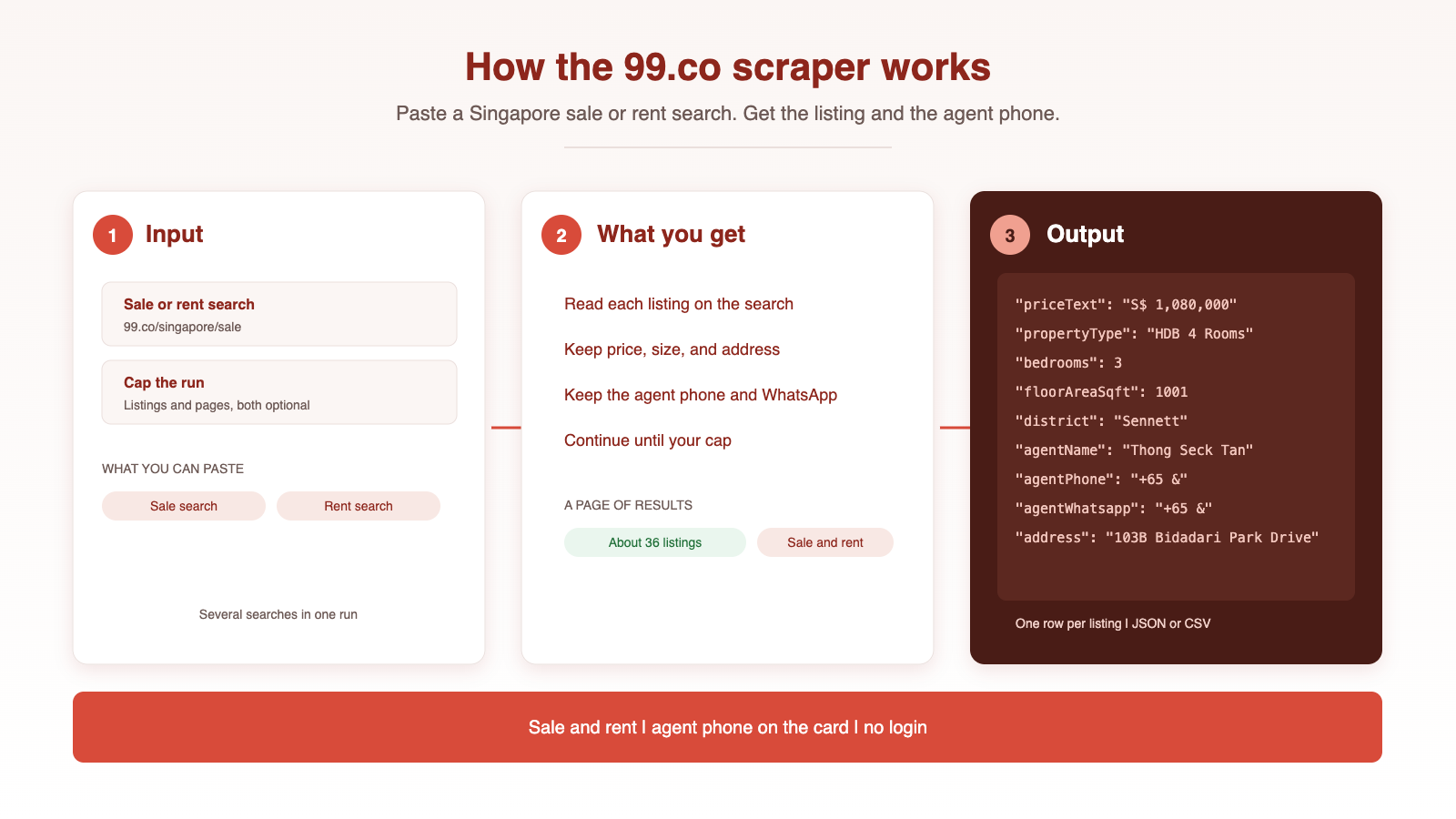
1. Paste one or more 99.co sale or rent search links.
2. Set how many listings and pages you want.
3. The run reads each listing on those searches and keeps price, size, address, and the agent contact on the card.
4. Download the dataset as JSON or CSV.
### Input configuration
| Field | Type | Required | Notes |
|---|---|---|---|
| `startUrls` | array of links | No | Sale and rent searches. Default is the Singapore sale search. |
| `maxItems` | integer | No | Stop after this many listings. Default 100. |
| `maxPages` | integer | No | Pages to read per search. About 36 listings per page. Default 5. |
| `proxyConfiguration` | object | No | Residential proxies recommended. The default works out of the box. |
#### A short sale sample
```json
{
"startUrls": [{ "url": "https://www.99.co/singapore/sale" }],
"maxItems": 20,
"maxPages": 1,
"proxyConfiguration": {
"useApifyProxy": true,
"apifyProxyGroups": ["RESIDENTIAL"],
"apifyProxyCountry": "SG"
}
}
```
#### Sale and rent together
```json
{
"startUrls": [
{ "url": "https://www.99.co/singapore/sale" },
{ "url": "https://www.99.co/singapore/rent" }
],
"maxItems": 100,
"maxPages": 2
}
```
### Output overview
Each row is one listing from the search card. Price is both a number and the text shown on the site. The agent block is the name, phone, WhatsApp, and agent id printed on that card. There is no separate email for the agent.
### Output sample
Sale search, Bidadari, from a live run. The phone and WhatsApp are the numbers on that card.
```json
{
"listingId": "MJejUZkfuVSzFEx5u9qcF6",
"url": "https://www.99.co/singapore/sale/property/103b-bidadari-park-drive-hdb-MJejUZkfuVSzFEx5u9qcF6",
"title": "4 Room (4A) HDB for Sale in 103B Bidadari Park Drive",
"listingType": "sale",
"price": 1080000,
"priceText": "S$ 1,080,000",
"psfText": "S$ 1,079 psf",
"bedrooms": 3,
"bathrooms": 2,
"floorAreaSqft": 1001,
"propertyType": "HDB 4 Rooms",
"tenure": "99 yrs",
"address": "103B Bidadari Park Drive 342103",
"district": "Sennett",
"region": "Central Region",
"latitude": 1.33509,
"longitude": 103.871338,
"agentName": "Thong Seck Tan",
"agentPhone": "+6593364851",
"agentWhatsapp": "+6593364851",
"agentId": "AH6ZpG3MHrq9hdjgTgu4TT"
}
```
### Key output fields
**Listing** — `listingId`, `url`, `title`, `listingType`, `propertyType`, `tenure`
**Price and size** — `price`, `priceText`, `psfText`, `bedrooms`, `bathrooms`, `floorAreaSqft`
**Place** — `address`, `district`, `region`, `latitude`, `longitude`
**Agent** — `agentName`, `agentPhone`, `agentWhatsapp`, `agentId`
### FAQ
**Does every row have a phone?**
On the sale search used for the live check, every card had a phone and a WhatsApp number. A card with neither would leave those fields empty.
**Can I scrape one listing URL?**
Start from a search. A lone property link is not a search, so it is not expanded into a row.
**How big is the sale search?**
The sale index runs past a thousand pages, about 36 listings each. `maxItems` and `maxPages` are there so a run stays on the slice you asked for.
**Is the agent email included?**
No. The card carries the phone and WhatsApp, not a personal email.
### Pricing
| Event | When it applies | Store rate |
|---|---|---|
| Listing row | One listing saved to the dataset | $1.50 per 1,000 rows |
| Run start | Once per run, per GB of memory | $0.005 |
Platform usage is billed by Apify as usual. A run on the default 512 MB uses one start event.
### What you get compared with a bare listing export
| | Typical listing export | This actor |
|---|---|---|
| Asking price, beds, size | Yes | Yes |
| Address, neighbourhood, map point | Sometimes | Yes |
| Agent phone and WhatsApp on the same row | Rarely | Yes |
| Sale and rent searches in one run | Varies | Yes |
### Notes and limitations
- Rows come from the search card. A field that is blank on the card is null in the row.
- Agent email is not on the card.
- Set `maxItems` on a broad sale search. The full index is tens of thousands of listings.
### Support
Questions and gaps go on the actor's Issues tab in Apify Console.
### Additional services
A filtered export, a scheduled run, or a column set matched to a CRM can be arranged from that same Issues tab.
### Explore more scrapers
- [PropertyGuru Scraper](https://apify.com/memo23/propertyguru-scraper) for Singapore listings with the agent name, agency, and CEA number.
- [Singapore Yellow Pages Scraper](https://apify.com/memo23/singapore-yellowpages-scraper) for local business listings.
### 🤖 For AI Agents & LLM Apps
Compact reference for AI agents calling this actor via the [Apify MCP server](https://mcp.apify.com) or the Apify API (actor: `memo23/99co-scraper`).
**Purpose:** Singapore sale and rent listings from 99.co, one row per card, including the agent phone and WhatsApp.
**Minimal input:**
```json
{
"startUrls": [{ "url": "https://www.99.co/singapore/sale" }],
"maxItems": 5,
"maxPages": 1
}
```
**Output:** one dataset row per listing. Fields: `listingId`, `url`, `title`, `listingType`, `price`, `priceText`, `psfText`, `bedrooms`, `bathrooms`, `floorAreaSqft`, `propertyType`, `tenure`, `address`, `district`, `region`, `latitude`, `longitude`, `agentName`, `agentPhone`, `agentWhatsapp`, `agentId`.
**Behaviors an agent should know:**
- Always set `maxItems`. An uncapped sale search is tens of thousands of rows.
- `startUrls` accepts sale and rent search links. A single property URL is not expanded.
- The Store price is $1.50 per 1,000 listing rows, plus $0.005 per run at the default memory. Platform usage is separate.
- Agent email is not present. Phone and WhatsApp are the contact fields.
### ⚠️ Disclaimer
This Actor is an independent tool and is not affiliated with, endorsed by, or sponsored by 99.co Pte. Ltd. or any of its subsidiaries. All trademarks mentioned are the property of their respective owners.
The scraper accesses only publicly available listing pages. No login, paid features, or content behind a 99.co account. Users are responsible for ensuring their use complies with 99.co's Terms of Service, applicable data-protection law (GDPR, CCPA, etc.), and any contractual obligations of their own organization.
### SEO Keywords
99.co scraper, scrape 99.co, Apify 99.co, Singapore property listings, HDB condo data, agent phone export, WhatsApp agent leads, sale and rent stock, asking price data, neighbourhood search, floor area listings, tenure export, Singapore housing research, real estate CRM import, agent contact list
# Actor input Schema
## `startUrls` (type: `array`):
99.co search links to read. A sale search is https://www.99.co/singapore/sale and a rent search is https://www.99.co/singapore/rent. One row is saved per listing on those searches.
## `maxItems` (type: `integer`):
Stop after this many listings. Example: 100. Default is 100.
## `maxPages` (type: `integer`):
How many search pages to read for each link. A page holds about 36 listings. Example: 5. Default is 5.
## `proxyConfiguration` (type: `object`):
Residential proxies recommended. The default works out of the box.
## Actor input object example
```json
{
"startUrls": [
{
"url": "https://www.99.co/singapore/sale"
}
],
"maxItems": 100,
"maxPages": 5,
"proxyConfiguration": {
"useApifyProxy": true,
"apifyProxyGroups": [
"RESIDENTIAL"
],
"apifyProxyCountry": "SG"
}
}
```
# Actor output Schema
## `overview` (type: `string`):
No description
# API
You can run this Actor programmatically using our API. Below are code examples in JavaScript, Python, and CLI, as well as the OpenAPI specification and MCP server setup.
## JavaScript example
```javascript
import { ApifyClient } from 'apify-client';
// Initialize the ApifyClient with your Apify API token
// Replace the '' with your token
const client = new ApifyClient({
token: '',
});
// Prepare Actor input
const input = {
"startUrls": [
{
"url": "https://www.99.co/singapore/sale"
}
]
};
// Run the Actor and wait for it to finish
const run = await client.actor("memo23/99co-scraper").call(input);
// Fetch and print Actor results from the run's dataset (if any)
console.log('Results from dataset');
console.log(`💾 Check your data here: https://console.apify.com/storage/datasets/${run.defaultDatasetId}`);
const { items } = await client.dataset(run.defaultDatasetId).listItems();
items.forEach((item) => {
console.dir(item);
});
// 📚 Want to learn more 📖? Go to → https://docs.apify.com/api/client/js/docs
```
## Python example
```python
from apify_client import ApifyClient
# Initialize the ApifyClient with your Apify API token
# Replace '' with your token.
client = ApifyClient("")
# Prepare the Actor input
run_input = { "startUrls": [{ "url": "https://www.99.co/singapore/sale" }] }
# Run the Actor and wait for it to finish
run = client.actor("memo23/99co-scraper").call(run_input=run_input)
# Fetch and print Actor results from the run's dataset (if there are any)
print(f"💾 Check your data here: https://console.apify.com/storage/datasets/{run.default_dataset_id}")
for item in client.dataset(run.default_dataset_id).iterate_items():
print(item)
# 📚 Want to learn more 📖? Go to → https://docs.apify.com/api/client/python/docs/quick-start
```
## CLI example
```bash
echo '{
"startUrls": [
{
"url": "https://www.99.co/singapore/sale"
}
]
}' |
apify call memo23/99co-scraper --silent --output-dataset
```
## MCP server setup
```json
{
"mcpServers": {
"apify": {
"type": "http",
"url": "https://mcp.apify.com/?tools=fetch-actor-details,memo23/99co-scraper"
}
}
}
```
The hosted server signs you in with OAuth on first connect, so no API token belongs in this config. Clients without OAuth support can send an `Authorization: Bearer ` header instead, using a token from API & Integrations in Apify Console (https://console.apify.com/settings/integrations).
## OpenAPI specification
Download the OpenAPI definition: https://api.apify.com/v2/actors/WGlDUjDK7qtye91pQ/builds/3NIbCcBlVdn7arANP/openapi.json