# Argenprop Scraper 🇦🇷 Argentina & Uruguay Property + WhatsApp (`memo23/argenprop-scraper`) Actor
Argenprop scraper for Argentina and Uruguay. Paste any sale, rent, or temporary-rent search URL from argenprop.com and get price, expenses, m2, rooms, geo, photos, phone, and WhatsApp on every listing. Listing URLs work too. JSON, CSV, or Excel. $1 per 1,000. No browser and no login.
- **URL**: https://apify.com/memo23/argenprop-scraper.md
- **Developed by:** [Muhamed Didovic](https://apify.com/memo23) (community)
- **Categories:** Real estate, AI, Agents
- **Stats:** 1 total users, 1 monthly users, 100.0% runs succeeded, 0 bookmarks
- **User rating**: No ratings yet
## Pricing
from $1.00 / 1,000 results
This Actor is paid per event. You are not charged for the Apify platform usage, but only a fixed price for specific events.
Learn more: https://docs.apify.com/actors/running/actors-in-store.md#pay-per-event
## What's an Apify Actor?
An Actor is a serverless cloud program that runs on the Apify platform. It has two run modes.
In Batch mode, an Actor accepts a well-defined JSON input, performs an action which can take anything from a few seconds to a few hours,
and optionally produces a well-defined JSON output, datasets with results, or files in key-value store.
In Standby mode, an Actor provides a web server which can be used as a website, API, or an MCP server.
Apify vocabulary and the platform model are defined once, in the agent quickstart at https://apify.com/agents.md.
## How to integrate an Actor?
If asked about integration, you help developers integrate Actors into their projects.
You adapt to their stack and deliver integrations that are safe, well-documented, and production-ready.
Do not guess an integration path. Every one of them is in the agent quickstart at https://apify.com/agents.md: the Apify MCP server, Agent Skills with the Apify CLI, the JavaScript and Python clients, the REST API, and the account-free path for an agent with no human to sign in. It also carries the rule on stating cost before the first paid run.
For examples already wired to this Actor's own input schema, see the [API](#api) section below.
Each client library has reference documentation the quickstart does not restate: [JavaScript/TypeScript](https://docs.apify.com/api/client/js/docs.md) (`npm install apify-client`) and [Python](https://docs.apify.com/api/client/python/docs.md) (`pip install apify-client`).
# README
## Argenprop Scraper 🇦🇷 Argentina & Uruguay Property + WhatsApp

Versión en español
Extrae avisos de argenprop.com a partir de cualquier URL de búsqueda de venta, alquiler o alquiler temporal. Sin navegador y sin inicio de sesión.
**Cómo se usa**
Filtrá en Argenprop (ubicación, precio, tipo de propiedad), copiá la URL de la barra de direcciones y pegala en `startUrls`. Una URL de aviso suelto (`--id` al final) también sirve.
**Qué obtienes**
33 campos por aviso: precio y moneda, expensas, ambientes, dormitorios, baños, superficie, antigüedad, dirección, barrio, coordenadas, fotos, teléfono y WhatsApp. JSON, CSV o Excel. USD 1 cada 1.000 avisos.
**Plan gratuito**
Una cuenta gratuita de Apify devuelve hasta 100 avisos por ejecución. Los planes de pago levantan ese tope: [precios de Apify](https://apify.com/pricing).
**Turn any argenprop.com search into structured property rows, with phone and WhatsApp on each listing.** Paste a sale, rent, or temporary-rent URL from Argentina or Uruguay. You get price, expenses, rooms, surface, address, coordinates, photos, and the contact numbers the listing publishes. JSON, CSV, or Excel. USD 1 per 1,000 listings.
### Why Use This Scraper?
- Paste a search URL. Filters stay on the URL, and every results page is walked for you.
- Phone and WhatsApp come back on the row, together with price and expenses.
- 33 English fields per listing: rooms, surface, address, coordinates, photos, dates.
- A single listing URL works on its own. It ends with `--` and the numeric id.
- Flat rows for JSON, CSV, and Excel.
- No browser and no login. Free Apify accounts are capped at 100 listings per run.
### Overview
One dataset row per Argenprop listing. Sale, rent, and temporary-rent searches all produce the same shape. A search URL and a single listing URL both end as listing rows. There is no keyword box and no city picker: you filter on argenprop.com, then paste the address bar.
`publisherCode` is the publisher id on the listing. It is not a display name, and this actor does not return an email address.
### Supported Inputs
| URL type | What to paste | Example |
|---|---|---|
| Rent search | Results page | `https://www.argenprop.com/departamentos/alquiler/capital-federal` |
| Sale search | Results page | `https://www.argenprop.com/casas/venta/capital-federal` |
| One listing | Path ending in `--{id}` | `https://www.argenprop.com/departamento-en-alquiler-en-palermo-1-ambiente--20407738` |
| `startUrl` | One URL, merged with `startUrls` | same hosts as above |
```json
{
"startUrls": [
"https://www.argenprop.com/departamentos/alquiler/capital-federal"
],
"maxItems": 25
}
```
**Unsupported**
- Hosts other than argenprop.com
- Keyword-only runs with no URL
- Agency profile pages
- Email addresses (the listing record used here does not include one)
### Use Cases
| Audience | Use case |
|---|---|
| **Agencies and lead-gen** | Build a call list with phone and WhatsApp for a neighborhood and operation |
| **PropTech** | Pull price, photos, and coordinates into an inventory feed |
| **Analysts** | Compare asking rents, expenses, and surface across a search |
| **Investors** | Watch a sale or rent search and export the new rows |
| **Data teams** | Refresh a dataset keyed by `listingId` |
### How It Works
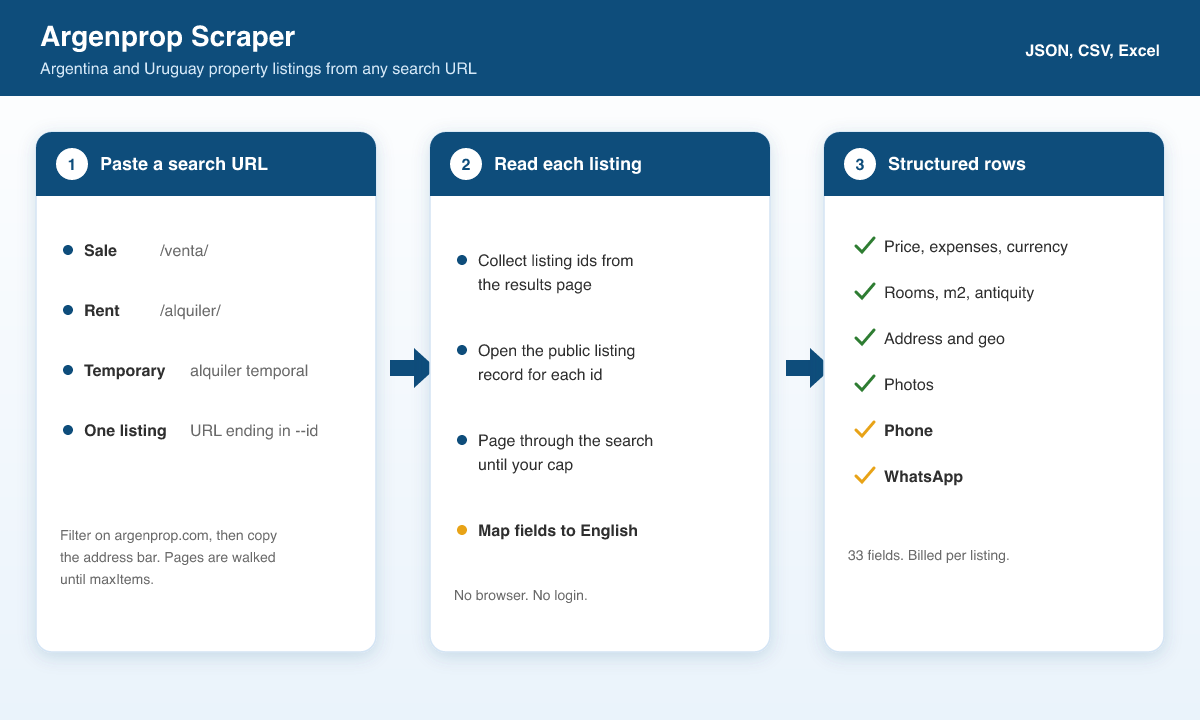
1. Paste one or more argenprop.com search URLs, or a listing URL.
2. Each results page yields the listing ids on that page. The actor requests the next page until `maxItems` or the search runs out.
3. Each id is loaded from Argenprop's public listing record and mapped to English fields.
4. The row is saved to the dataset. The same id is not saved twice in one run.
### Input Configuration
| Field | Type | Default | Description |
|---|---|---|---|
| `startUrls` | array of strings | one rent URL in the form | Search or listing URLs on argenprop.com |
| `startUrl` | string | empty | One URL. Merged with `startUrls` and de-duplicated |
| `maxItems` | integer | `1000` | Cap across all URLs. Free Apify accounts are capped at 100 |
| `maxConcurrency` | integer | `8` | Parallel listing fetches. Minimum 1, maximum 32 |
#### A few listings
```json
{
"startUrls": ["https://www.argenprop.com/departamentos/alquiler/capital-federal"],
"maxItems": 25
}
```
#### One listing
```json
{
"startUrl": "https://www.argenprop.com/departamento-en-alquiler-en-palermo-1-ambiente--20407738"
}
```
#### Two searches, higher concurrency
```json
{
"startUrls": [
"https://www.argenprop.com/departamentos/alquiler/capital-federal",
"https://www.argenprop.com/casas/venta/capital-federal"
],
"maxItems": 200,
"maxConcurrency": 8
}
```
### Output Overview
Each item is one listing. `listingId` and `url` identify it. Price, expenses, rooms, surface, address, coordinates, photos, phone, and WhatsApp come from the public listing record. A field is `null` when that listing does not publish it. `images` is the photo list, and `mainImage` is the first photo.
Currency is the symbol on the listing (`$` or `USD` in the sample run). Expenses use `expensesCurrency` when it differs.
### Output Samples
Rent search `https://www.argenprop.com/departamentos/alquiler/capital-federal`, scraped 26 Sep 2026. The photo list below is shortened to two URLs.
```json
{
"type": "property",
"listingId": "20407738",
"url": "https://www.argenprop.com/departamento-en-alquiler-en-palermo-1-ambiente--20407738",
"title": "Departamento monoambiente en alquiler en Palermo",
"description": "Departamento monoambiente en excelente estado recién pintado, se encuentra a 5 cuadras de la estación de tren Carranza, El edificio tiene pileta, y seguridad 24 hs, Digno de ver.",
"propertyType": "Departamento",
"operation": "Alquiler",
"price": 800000,
"currency": "$",
"expenses": 230000,
"expensesCurrency": "$",
"rooms": 1,
"bedrooms": 1,
"bathrooms": 1,
"parking": false,
"totalArea": 40,
"coveredArea": 36,
"antiquity": "15 años",
"address": "Guatemala 6000",
"neighborhood": "Palermo",
"city": "CABA",
"province": "Capital Federal",
"country": "Argentina",
"latitude": -34.57726,
"longitude": -58.43607,
"whatsApp": "5491165666169",
"phone": "1165666169",
"publisherCode": "5OM6_13",
"images": [
"https://www.argenprop.com/static-content/83770402/7a2317d6-95df-44bc-9d26-317b10cb5060.jpg",
"https://www.argenprop.com/static-content/83770402/f6bf9c0e-b07b-475f-ad61-9367632ca517.jpg"
],
"mainImage": "https://www.argenprop.com/static-content/83770402/7a2317d6-95df-44bc-9d26-317b10cb5060.jpg",
"publishedAt": "2026-09-07T10:38:22.283Z",
"modifiedAt": "2026-09-17T16:11:35.17Z",
"scrapedAt": "2026-09-26T05:39:35.435Z"
}
```
### Key Output Fields
| Group | Fields |
|---|---|
| Identity | `type`, `listingId`, `url`, `title`, `description`, `propertyType`, `operation` |
| Money | `price`, `currency`, `expenses`, `expensesCurrency` |
| Size | `rooms`, `bedrooms`, `bathrooms`, `parking`, `totalArea`, `coveredArea`, `antiquity` |
| Place | `address`, `neighborhood`, `city`, `province`, `country`, `latitude`, `longitude` |
| Contact | `whatsApp`, `phone`, `publisherCode` |
| Media and dates | `images`, `mainImage`, `publishedAt`, `modifiedAt`, `scrapedAt` |
### FAQ
**Which URLs work?**
Any argenprop.com results URL (sale, rent, temporary rent, whatever filters you set in the browser) and any listing URL whose path ends in `--` plus the numeric id.
**Do I get the agent's email?**
No. The row includes `phone` and `whatsApp` when the listing publishes them. It does not include an email address.
**Is there a city or price input?**
No. Set those filters on argenprop.com and paste the URL.
**How many listings can I take?**
Up to `maxItems` (default 1,000). A free Apify account stops at 100 even if `maxItems` is higher.
**What is a run billed for?**
USD 1 per 1,000 listings written to the dataset. A listing that cannot be loaded is skipped and is not written.
### Support
- Issues and feature requests: the **Issues** tab of this actor on the Apify Console.
- Website:
- Email:
### Additional Services
- Custom fields or a full export:
- API access (no Apify platform fee, usage fee only):
### Explore More Scrapers
Same author, same kind of export:
- [Inmuebles24 Scraper](https://apify.com/memo23/inmuebles24-scraper) for Mexico
- ZonaProp and other property actors on [memo23's Apify profile](https://apify.com/memo23)
### 🤖 For AI Agents & LLM Apps
Reference for agents calling this actor via the [Apify MCP server](https://mcp.apify.com) or the Apify API. Actor: `memo23/argenprop-scraper`.
**Purpose:** Scrape property listings from any argenprop.com sale, rent, or temporary-rent search URL. Phone and WhatsApp are on the row when the listing publishes them.
**Minimal input:**
```json
{
"startUrls": ["https://www.argenprop.com/departamentos/alquiler/capital-federal"],
"maxItems": 25
}
```
`startUrl` (string) is an alternative to `startUrls`.
**Output fields:** `type`, `listingId`, `url`, `title`, `description`, `propertyType`, `operation`, `price`, `currency`, `expenses`, `expensesCurrency`, `rooms`, `bedrooms`, `bathrooms`, `parking`, `totalArea`, `coveredArea`, `antiquity`, `address`, `neighborhood`, `city`, `province`, `country`, `latitude`, `longitude`, `whatsApp`, `phone`, `publisherCode`, `images`, `mainImage`, `publishedAt`, `modifiedAt`, `scrapedAt`.
**Behaviors:**
- Set `maxItems`. The default is 1000. Free Apify accounts are capped at 100.
- URL mode only. No keyword, city, or price fields.
- Search pages and listing URLs (`--{id}`) both emit listing rows. Duplicate ids in one run are skipped.
- No email field. `publisherCode` is an id, not a display name.
- A missing listing is not written and is not billed. Price is USD 0.001 per dataset item (USD 1 per 1,000).
### ⚠️ Disclaimer
This Actor is an independent tool and is not affiliated with, endorsed by, or sponsored by Argenprop, Sosiva, or any of their subsidiaries or affiliates. All trademarks mentioned are the property of their respective owners.
The scraper accesses only publicly available property-listing information on argenprop.com. It does not collect buyer data, private messages, or content behind a login. Phone and WhatsApp values are the contact details published on the listing. Users are responsible for complying with argenprop.com's Terms of Service, applicable data-protection law (including GDPR and Argentina's Ley 25.326), and their own contractual obligations.
### SEO Keywords
argenprop scraper, scrape argenprop, argenprop api, argentina real estate scraper, uruguay property scraper, argenprop whatsapp, argenprop phone number, departamentos alquiler scraper, casas en venta argentina, capital federal alquiler data, argenprop listings export, real estate leads argentina, property listings buenos aires, argenprop data extraction, inmuebles argentina scraper, alquiler temporal scraper, real estate market data argentina, zonaprop alternative scraper, proptech argentina, argenprop json export
# Actor input Schema
## `startUrls` (type: `array`):
One or more argenprop.com search-results URLs, or individual listing URLs. Sale, rent and temporary-rent searches all work. Example: https://www.argenprop.com/departamentos/alquiler/capital-federal. Default: empty (use startUrl or this list).
## `startUrl` (type: `string`):
Convenience alternative to startUrls when you have one argenprop.com search or listing URL. Merged with startUrls and de-duplicated. Example: https://www.argenprop.com/casas/venta/buenos-aires. Default: empty.
## `maxItems` (type: `integer`):
Hard cap on the number of listings collected across all URLs. Controls billing. Free Apify accounts are capped at 100 regardless of this value. Example: 25 for a smoke test. Default: 1000.
## `maxConcurrency` (type: `integer`):
How many Sosiva detail fetches to run in parallel. Example: 8. Default: 8.
## Actor input object example
```json
{
"startUrls": [
"https://www.argenprop.com/departamentos/alquiler/capital-federal"
],
"maxItems": 1000,
"maxConcurrency": 8
}
```
# Actor output Schema
## `results` (type: `string`):
No description
# API
You can run this Actor programmatically using our API. Below are code examples in JavaScript, Python, and CLI, as well as the OpenAPI specification and MCP server setup.
## JavaScript example
```javascript
import { ApifyClient } from 'apify-client';
// Initialize the ApifyClient with your Apify API token
// Replace the '' with your token
const client = new ApifyClient({
token: '',
});
// Prepare Actor input
const input = {
"startUrls": [
"https://www.argenprop.com/departamentos/alquiler/capital-federal"
]
};
// Run the Actor and wait for it to finish
const run = await client.actor("memo23/argenprop-scraper").call(input);
// Fetch and print Actor results from the run's dataset (if any)
console.log('Results from dataset');
console.log(`💾 Check your data here: https://console.apify.com/storage/datasets/${run.defaultDatasetId}`);
const { items } = await client.dataset(run.defaultDatasetId).listItems();
items.forEach((item) => {
console.dir(item);
});
// 📚 Want to learn more 📖? Go to → https://docs.apify.com/api/client/js/docs
```
## Python example
```python
from apify_client import ApifyClient
# Initialize the ApifyClient with your Apify API token
# Replace '' with your token.
client = ApifyClient("")
# Prepare the Actor input
run_input = { "startUrls": ["https://www.argenprop.com/departamentos/alquiler/capital-federal"] }
# Run the Actor and wait for it to finish
run = client.actor("memo23/argenprop-scraper").call(run_input=run_input)
# Fetch and print Actor results from the run's dataset (if there are any)
print(f"💾 Check your data here: https://console.apify.com/storage/datasets/{run.default_dataset_id}")
for item in client.dataset(run.default_dataset_id).iterate_items():
print(item)
# 📚 Want to learn more 📖? Go to → https://docs.apify.com/api/client/python/docs/quick-start
```
## CLI example
```bash
echo '{
"startUrls": [
"https://www.argenprop.com/departamentos/alquiler/capital-federal"
]
}' |
apify call memo23/argenprop-scraper --silent --output-dataset
```
## MCP server setup
```json
{
"mcpServers": {
"apify": {
"type": "http",
"url": "https://mcp.apify.com/?tools=fetch-actor-details,memo23/argenprop-scraper"
}
}
}
```
The hosted server signs you in with OAuth on first connect, so no API token belongs in this config. Clients without OAuth support can send an `Authorization: Bearer ` header instead, using a token from API & Integrations in Apify Console (https://console.apify.com/settings/integrations).
## OpenAPI specification
Download the OpenAPI definition: https://api.apify.com/v2/actors/Lh1FbBXccuXSPDvxL/builds/8W1v2Fd0QOPmCez1E/openapi.json