# Blinkit Product & Price Scraper Multi-City Stock & Delivery ETA (`memo23/blinkit-scraper`) Actor
Scrape Blinkit product data by keyword or by pasting product/category/search URLs — across any delivery location in India. Each row: name, brand, variant, MRP + selling price, discount, live stock, merchant/store, image, and real-time delivery ETA. Multi-city price comparison. JSON, CSV, Excel
- **URL**: https://apify.com/memo23/blinkit-scraper.md
- **Developed by:** [Muhamed Didovic](https://apify.com/memo23) (community)
- **Categories:** E-commerce, AI, Agents
- **Stats:** 1 total users, 0 monthly users, 100.0% runs succeeded, 0 bookmarks
- **User rating**: No ratings yet
## Pricing
from $3.00 / 1,000 product scrapeds
This Actor is paid per event. You are not charged for the Apify platform usage, but only a fixed price for specific events.
Learn more: https://docs.apify.com/platform/actors/running/actors-in-store#pay-per-event
## What's an Apify Actor?
Actors are a software tools running on the Apify platform, for all kinds of web data extraction and automation use cases.
In Batch mode, an Actor accepts a well-defined JSON input, performs an action which can take anything from a few seconds to a few hours,
and optionally produces a well-defined JSON output, datasets with results, or files in key-value store.
In Standby mode, an Actor provides a web server which can be used as a website, API, or an MCP server.
Actors are written with capital "A".
## How to integrate an Actor?
If asked about integration, you help developers integrate Actors into their projects.
You adapt to their stack and deliver integrations that are safe, well-documented, and production-ready.
The best way to integrate Actors is as follows.
In JavaScript/TypeScript projects, use official [JavaScript/TypeScript client](https://docs.apify.com/api/client/js.md):
```bash
npm install apify-client
```
In Python projects, use official [Python client library](https://docs.apify.com/api/client/python.md):
```bash
pip install apify-client
```
In shell scripts, use [Apify CLI](https://docs.apify.com/cli/docs.md):
````bash
# MacOS / Linux
curl -fsSL https://apify.com/install-cli.sh | bash
# Windows
irm https://apify.com/install-cli.ps1 | iex
```bash
In AI frameworks, you might use the [Apify MCP server](https://docs.apify.com/platform/integrations/mcp.md).
If your project is in a different language, use the [REST API](https://docs.apify.com/api/v2.md).
For usage examples, see the [API](#api) section below.
For more details, see Apify documentation as [Markdown index](https://docs.apify.com/llms.txt) and [Markdown full-text](https://docs.apify.com/llms-full.txt).
# README
## Blinkit Scraper — Products, Prices, Stock & Delivery ETA
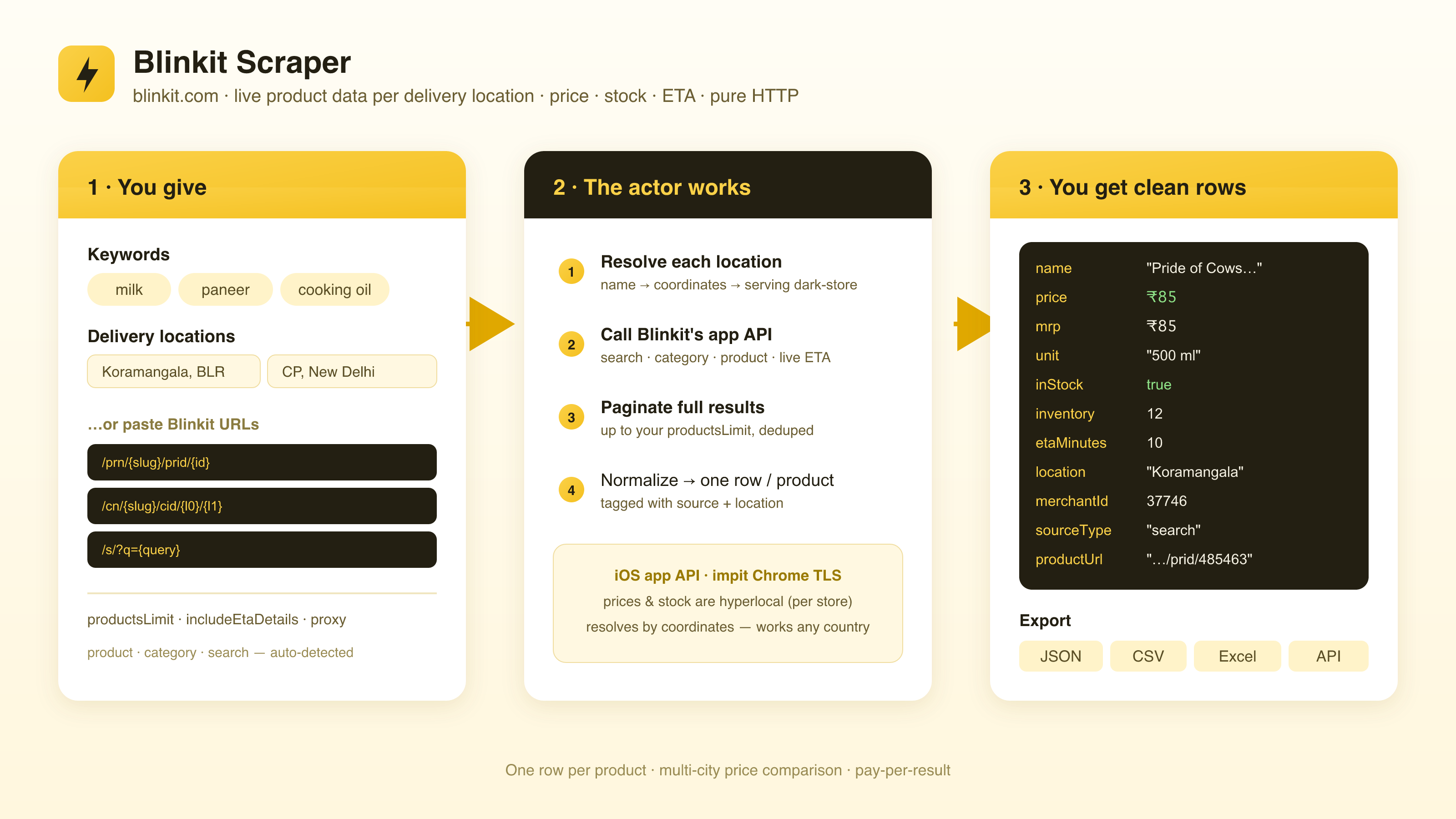
Turn any Blinkit search into a clean, structured dataset. Scrape live product data by **keyword**, by pasting Blinkit **website URLs** (product, category, or search deeplinks), or both — across one or more **delivery locations**.
Get name, brand, variant, MRP + selling price, discount, stock, inventory, merchant/store, images, and optional **real-time delivery ETA** — one row per product, per location. Prices and stock are hyperlocal on Blinkit (set per dark-store), so every input runs at every location you give. Pure HTTP, no browser.
### Why Use This Scraper?
- ✅ Search by keyword and/or paste Blinkit URLs — products, categories, and search deeplinks are auto-classified from one input
- ✅ Multi-location by design — each query and URL runs at every delivery location, so you get true hyperlocal prices and stock
- ✅ Built for price comparison — compare the same product across cities and neighborhoods in a single run
- ✅ Full pricing on every row — selling price, MRP, and a computed discount percent
- ✅ Live availability — in-stock flag plus raw inventory count, straight from the serving dark-store
- ✅ Optional real-time delivery ETA in minutes, attached to every product
- ✅ Works from anywhere — stores are resolved from coordinates, not your IP, so location is decoupled from where the run executes
- ✅ JSON, CSV, or Excel output, ready for spreadsheets, BI tools, and pipelines
### Overview
The Blinkit Scraper is built for pricing analysts, category managers, brands, and researchers who need quick-commerce data in a spreadsheet instead of tapping through a phone app, one pincode at a time.
The output is **product-shaped rows** — one row per product, per delivery location. Whether a row comes from a keyword search, a category deeplink, or a single product URL, it carries the same flat schema (price, MRP, stock, merchant, location), so everything lands in one clean table.
Blinkit is **hyperlocal**: each delivery area is served by a nearby dark-store with its own catalog, prices, and stock. That's why you supply **locations** — the actor geocodes each one, resolves the serving store, and reports exactly what a shopper at that address would see. It talks to Blinkit's own mobile-app API over HTTP, so it stays fast and lightweight (no browser, no rendering).
### Supported Inputs
You can drive the scraper three ways — keywords, URLs, or both — and every input is run at every location.
#### Search queries
Plain product keywords. Each is searched on Blinkit at every delivery location.
```json
{
"searchQueries": ["milk", "paneer", "atta", "cold drink"]
}
````
#### Start URLs (Blinkit deeplinks)
Paste Blinkit website URLs and the actor auto-classifies each one by its shape — no tagging required.
| URL type | Pattern | Example |
|---|---|---|
| Product | `blinkit.com/prn/{slug}/prid/{id}` | `https://blinkit.com/prn/amul-gold-milk/prid/14639` |
| Category | `blinkit.com/cn/{slug}/cid/{l0}/{l1}` | `https://blinkit.com/cn/dairy-bread-eggs/cid/14/922` |
| Search | `blinkit.com/s/?q={query}` | `https://blinkit.com/s/?q=paneer` |
```json
{
"startUrls": [
"https://blinkit.com/prn/amul-gold-milk/prid/14639",
"https://blinkit.com/cn/dairy-bread-eggs/cid/14/922",
"https://blinkit.com/s/?q=paneer"
]
}
```
`startUrls` accepts both plain strings (`"https://…"`) and request objects (`{ "url": "https://…" }`) — mix freely. Provide `searchQueries` and/or `startUrls`.
#### Delivery locations
Area or locality names. Each is geocoded to coordinates, and the serving dark-store is resolved so prices and stock reflect that exact location.
```json
{
"locations": [
"Koramangala, Bangalore",
"Connaught Place, New Delhi",
"Bandra West, Mumbai"
]
}
```
### Use Cases
| Audience | Use case |
|---|---|
| **Pricing & category teams** | Compare selling price, MRP, and discount for the same SKU across cities and neighborhoods |
| **Brands & FMCG** | Track product visibility, stock, and price by location; spot where you're out of stock or undercut |
| **Quick-commerce & retail analysts** | Monitor the live catalog of a dark-store network without an app or manual checks |
| **Operations & logistics** | Pair price with real-time delivery ETA to study serviceability and delivery performance by area |
| **BI & data teams** | Feed a clean, flat product feed into dashboards, warehouses, and reports |
| **Researchers & ML pipelines** | Bulk-export hyperlocal pricing and availability as training or automation input |
### How It Works

1. **Input** — give keywords, Blinkit URLs (or both), and one or more delivery locations
2. **Geocode & resolve store** — each location is geocoded to coordinates and the serving dark-store is resolved, so prices and stock are hyperlocal
3. **Fetch** — Blinkit's mobile-app API is queried over HTTP with a real Chrome TLS fingerprint (passes Cloudflare without a browser); search results paginate until `productsLimit`
4. **Normalize** — each product is flattened to a clean row with price, MRP, computed discount, stock, inventory, merchant, and images; optional delivery ETA is attached
5. **Output** — one product row per (query/URL × location), exportable as JSON, CSV, or Excel
### Input Configuration
| Field | Type | Required | Notes |
|---|---|---|---|
| `searchQueries` | `array` | yes\* | Product keywords. Each is searched at every location. \*Provide this and/or `startUrls`. |
| `startUrls` | `array` | yes\* | Blinkit deeplinks — product, category, or search. Auto-classified. \*Provide this and/or `searchQueries`. |
| `locations` | `array` | yes | Delivery area/locality names. Each is geocoded and its dark-store resolved, so prices/stock are per-location. |
| `productsLimit` | `integer` | no | Max products per (query/URL × location). Default `45`. Results are paginated until this many are collected or they run out. |
| `includeEtaDetails` | `boolean` | no | Default `false`. Fetch each location's real-time delivery ETA (minutes) and attach it to every product. Adds one request per location. |
| `maxItems` | `integer` | no | Hard cap on **total dataset rows** across all queries and locations. Default `1000`. |
| `maxConcurrency` | `integer` | no | Max Blinkit API requests in flight at once. Default `6`. |
| `minConcurrency` | `integer` | no | Minimum parallelism. Default `1`. |
| `maxRequestRetries` | `integer` | no | Per-request retry budget (fresh proxy session each retry). Default `5`. |
| `proxy` | `object` | no | Defaults to Apify Proxy. Indian residential proxies give the best reliability and correct geo. |
#### Common scenarios
**1. Compare one keyword across cities**
```json
{
"searchQueries": ["milk"],
"locations": ["Koramangala, Bangalore", "Connaught Place, New Delhi", "Bandra West, Mumbai"]
}
```
**2. Several products and categories in one location, with delivery ETA**
```json
{
"searchQueries": ["paneer", "atta"],
"startUrls": ["https://blinkit.com/cn/dairy-bread-eggs/cid/14/922"],
"locations": ["Koramangala, Bangalore"],
"includeEtaDetails": true
}
```
**3. Track specific products by URL across neighborhoods**
```json
{
"startUrls": [
"https://blinkit.com/prn/amul-gold-milk/prid/14639",
"https://blinkit.com/prn/pride-of-cows-farm-cow-milk/prid/485463"
],
"locations": ["Koramangala, Bangalore", "Connaught Place, New Delhi"],
"productsLimit": 10
}
```
### Output Overview
Each dataset item is one **product row** — a single product as seen at a single delivery location. The same flat schema is used no matter how the row was discovered (keyword search, category deeplink, or product URL); `sourceType` tells you which.
Because every input runs at every location, a single keyword across three cities yields three sets of rows — the natural shape for price comparison and availability tracking.
Notes on when fields are populated:
- **`location`, `city`, `locality`, `lat`, `lon`, `serviceable`** describe the resolved delivery location. If `serviceable` is `false`, Blinkit doesn't deliver there and product rows for that location may be empty.
- **`etaMinutes`** is populated only when `includeEtaDetails` is on; otherwise it's `null`.
- **`brand`** is often `null` — Blinkit frequently doesn't populate it in its API (see FAQ).
- **`discountPercent`** is computed from `mrp` and `price`; it's `0` when there's no discount.
Output is a flat table by default; the Apify Console "Export" tab gives JSON, CSV, or Excel.
### Output Samples
#### Product row — keyword search, single location
```json
{
"query": "milk",
"sourceType": "search",
"sourceUrl": null,
"location": "Koramangala, Bangalore",
"city": "Bengaluru",
"locality": "Koramangala",
"lat": 12.9352,
"lon": 77.624532,
"serviceable": true,
"productId": 485463,
"merchantId": 37746,
"name": "Pride of Cows Farm Cow Milk",
"brand": null,
"unit": "500 ml",
"price": 85,
"mrp": 85,
"discountPercent": 0,
"inStock": true,
"inventory": 12,
"imageUrl": "https://cdn.grofers.com/da/cms-assets/cms/product/42badb39-3720-4e49-8e19-980a10367928.png",
"productUrl": "https://blinkit.com/prn/pride-of-cows-farm-cow-milk/prid/485463",
"merchantType": "super_longtail",
"etaMinutes": 10,
"scrapedAt": "2026-06-24T09:20:22.378Z"
}
```
### Key Output Fields
#### Source & location
- `query` — the keyword (or URL-derived query) this row came from
- `sourceType` — `search`, `category`, or `product`
- `sourceUrl` — the Blinkit deeplink, when the row came from a `startUrls` entry (else `null`)
- `location` — the delivery location you supplied
- `city`, `locality` — resolved from geocoding
- `lat`, `lon` — coordinates of the resolved location
- `serviceable` — whether Blinkit delivers to this location
#### Product identity
- `productId` — Blinkit's numeric product id
- `merchantId` — the serving dark-store / merchant id
- `name` — product display name
- `brand` — brand (often `null`; Blinkit limitation)
- `unit` — pack size / variant (e.g. `"500 ml"`)
- `imageUrl` — product image
- `productUrl` — canonical Blinkit product link
#### Price, stock & delivery
- `price` — current selling price
- `mrp` — maximum retail price
- `discountPercent` — computed discount (`0` when none)
- `inStock` — availability flag at this dark-store
- `inventory` — raw available quantity (when exposed)
- `merchantType` — store/merchant type (e.g. `super_longtail`)
- `etaMinutes` — real-time delivery ETA (with `includeEtaDetails`)
- `scrapedAt` — ISO timestamp of capture
### FAQ
#### Do I need to log in?
No. The scraper reads publicly available Blinkit catalog data — no account, no login, no cookies required.
#### Is there an official Blinkit API?
No. There's no public Blinkit API. The actor talks to Blinkit's own mobile-app endpoints over HTTP — the same data the app uses to show you products, prices, and stock.
#### Why are prices and stock different per location?
Blinkit is hyperlocal. Each delivery area is served by a nearby dark-store with its own catalog, prices, and inventory, so the same product can have a different price — or be out of stock — a few kilometers away. That's exactly why you supply `locations`: each one is geocoded, the serving store is resolved, and the row reflects what a shopper at that address would see.
#### Can I paste Blinkit URLs instead of keywords?
Yes. Put them in `startUrls`. Product (`/prn/{slug}/prid/{id}`), category (`/cn/{slug}/cid/{l0}/{l1}`), and search (`/s/?q={query}`) deeplinks are all auto-classified. You can mix URLs and `searchQueries` freely — both run at every location.
#### Why is `brand` sometimes empty?
Blinkit often doesn't populate the brand field in its API response, even when the brand is obvious from the product name. When that happens, `brand` comes back `null`. The brand is usually recoverable from `name` if you need it downstream.
#### Is the delivery ETA real-time?
Yes — when `includeEtaDetails` is enabled, the actor fetches each location's live ETA (in minutes) at scrape time and attaches it to every product row. Leave it off and `etaMinutes` is `null`.
#### Does this work outside India?
Yes. Blinkit serves India, but the actor resolves dark-stores from **coordinates**, not from your IP or where the run executes — so you can scrape any Indian delivery location from anywhere. For best reliability and correct geo, use Indian residential proxies in the `proxy` setting.
#### How many products do I get per search?
Up to `productsLimit` per (query/URL × location) — default `45` — paginated until that many are collected or Blinkit runs out of results. `maxItems` caps the total across the whole run.
#### Can I export to CSV or Excel?
Yes. Output is a flat table — export it as JSON, CSV, or Excel from the Apify Console, or pull it via the API for your own pipeline.
### Support
Found a bug, hit a location that won't resolve, or want another Blinkit URL kind supported? Open an issue on the actor's **Issues** tab, or reach out via the [memo23 profile](https://apify.com/memo23) on Apify.
### Additional Services
Need a custom export shape, scheduled price monitoring, or another quick-commerce source added? I build tailored scrapers and data pipelines — get in touch via the [memo23 profile](https://apify.com/memo23).
### Explore More Scrapers
If you track quick-commerce, retail prices, and product availability, these pair well:
- [**Zepto Scraper**](https://apify.com/memo23) — compare prices and stock against Blinkit on India's other 10-minute delivery app
- [**Amazon Product Scraper**](https://apify.com/memo23) — benchmark quick-commerce pricing against marketplace listings
- [**Google Maps Scraper**](https://apify.com/memo23) — map dark-store and retail locations by area
- [**Trustpilot Scraper**](https://apify.com/memo23/trustpilot-scraper-ppe) — customer sentiment for the brands you track
Full portfolio: [apify.com/memo23](https://apify.com/memo23).
***
### ⚠️ Disclaimer
This Actor is an independent tool and is not affiliated with, endorsed by, or sponsored by Blinkit, Blink Commerce Private Limited, Zomato Limited (Eternal Limited), or any of their parent companies or subsidiaries. All trademarks mentioned are the property of their respective owners.
The scraper accesses only publicly available Blinkit product and catalog data — no authenticated endpoints, private accounts, or content behind a login. Users are responsible for ensuring their use complies with Blinkit's Terms of Service, applicable data-protection law (GDPR, CCPA, India's DPDP Act, etc.), and any contractual obligations of their own organization. Prices, stock, and availability are point-in-time snapshots that change continuously and per location — verify against the live app before relying on them for commercial decisions.
***
### SEO Keywords
blinkit scraper, scrape blinkit, blinkit.com scraper, blinkit api, blinkit price scraper, blinkit product scraper, Apify blinkit, blinkit grocery scraper, quick commerce scraper, q-commerce data, 10 minute delivery scraper, blinkit price comparison, hyperlocal pricing data, dark store catalog scraper, blinkit stock tracker, grocery price monitoring india, blinkit delivery eta, zepto blinkit comparison, india grocery data, retail price intelligence
# Actor input Schema
## `searchQueries` (type: `array`):
Product keywords to search on Blinkit. Each query is run against every location below. Provide this and/or Start URLs.
## `startUrls` (type: `array`):
Optional Blinkit website URLs to scrape, alongside or instead of search queries. Each is auto-classified and scraped at every location:
• Product — https://blinkit.com/prn/{slug}/prid/{id}
• Category — https://blinkit.com/cn/{slug}/cid/{l0}/{l1}
• Search — https://blinkit.com/s/?q={query}
## `locations` (type: `array`):
Blinkit delivery locations to scrape from — area/locality names. Each is geocoded to coordinates and the serving dark-store is resolved, so prices and stock reflect that location.
## `productsLimit` (type: `integer`):
Maximum products to collect for each (query × location) pair. The actor paginates Blinkit's search results until this many products are collected or results run out.
## `includeEtaDetails` (type: `boolean`):
When enabled, fetch each location's real-time delivery ETA (in minutes) and attach it to every product row. Adds one request per location.
## `maxItems` (type: `integer`):
Hard cap on the total number of product rows collected across all queries and locations.
## `maxConcurrency` (type: `integer`):
Maximum number of Blinkit API requests in flight at once.
## `minConcurrency` (type: `integer`):
Minimum number of requests processed in parallel.
## `maxRequestRetries` (type: `integer`):
Number of retries (with a fresh proxy session) before a failed request is given up.
## `proxy` (type: `object`):
Blinkit is served behind Cloudflare and is geo-restricted to India; impit's Chrome TLS fingerprint passes the challenge. Use Indian residential proxies here for best reliability and correct geo.
## Actor input object example
```json
{
"searchQueries": [
"milk",
"paneer"
],
"startUrls": [],
"locations": [
"Connaught Place, New Delhi",
"Koramangala, Bangalore"
],
"productsLimit": 45,
"includeEtaDetails": false,
"maxItems": 1000,
"maxConcurrency": 6,
"minConcurrency": 1,
"maxRequestRetries": 5,
"proxy": {
"useApifyProxy": true
}
}
```
# API
You can run this Actor programmatically using our API. Below are code examples in JavaScript, Python, and CLI, as well as the OpenAPI specification and MCP server setup.
## JavaScript example
```javascript
import { ApifyClient } from 'apify-client';
// Initialize the ApifyClient with your Apify API token
// Replace the '' with your token
const client = new ApifyClient({
token: '',
});
// Prepare Actor input
const input = {
"searchQueries": [
"milk",
"paneer"
],
"startUrls": [],
"locations": [
"Connaught Place, New Delhi",
"Koramangala, Bangalore"
],
"proxy": {
"useApifyProxy": true
}
};
// Run the Actor and wait for it to finish
const run = await client.actor("memo23/blinkit-scraper").call(input);
// Fetch and print Actor results from the run's dataset (if any)
console.log('Results from dataset');
console.log(`💾 Check your data here: https://console.apify.com/storage/datasets/${run.defaultDatasetId}`);
const { items } = await client.dataset(run.defaultDatasetId).listItems();
items.forEach((item) => {
console.dir(item);
});
// 📚 Want to learn more 📖? Go to → https://docs.apify.com/api/client/js/docs
```
## Python example
```python
from apify_client import ApifyClient
# Initialize the ApifyClient with your Apify API token
# Replace '' with your token.
client = ApifyClient("")
# Prepare the Actor input
run_input = {
"searchQueries": [
"milk",
"paneer",
],
"startUrls": [],
"locations": [
"Connaught Place, New Delhi",
"Koramangala, Bangalore",
],
"proxy": { "useApifyProxy": True },
}
# Run the Actor and wait for it to finish
run = client.actor("memo23/blinkit-scraper").call(run_input=run_input)
# Fetch and print Actor results from the run's dataset (if there are any)
print("💾 Check your data here: https://console.apify.com/storage/datasets/" + run["defaultDatasetId"])
for item in client.dataset(run["defaultDatasetId"]).iterate_items():
print(item)
# 📚 Want to learn more 📖? Go to → https://docs.apify.com/api/client/python/docs/quick-start
```
## CLI example
```bash
echo '{
"searchQueries": [
"milk",
"paneer"
],
"startUrls": [],
"locations": [
"Connaught Place, New Delhi",
"Koramangala, Bangalore"
],
"proxy": {
"useApifyProxy": true
}
}' |
apify call memo23/blinkit-scraper --silent --output-dataset
```
## MCP server setup
```json
{
"mcpServers": {
"apify": {
"command": "npx",
"args": [
"mcp-remote",
"https://mcp.apify.com/?tools=memo23/blinkit-scraper",
"--header",
"Authorization: Bearer "
]
}
}
}
```
## OpenAPI specification
```json
{
"openapi": "3.0.1",
"info": {
"title": "Blinkit Product & Price Scraper Multi-City Stock & Delivery ETA",
"description": "Scrape Blinkit product data by keyword or by pasting product/category/search URLs — across any delivery location in India. Each row: name, brand, variant, MRP + selling price, discount, live stock, merchant/store, image, and real-time delivery ETA. Multi-city price comparison. JSON, CSV, Excel",
"version": "0.0",
"x-build-id": "jIueQPOs4YX8vXy71"
},
"servers": [
{
"url": "https://api.apify.com/v2"
}
],
"paths": {
"/acts/memo23~blinkit-scraper/run-sync-get-dataset-items": {
"post": {
"operationId": "run-sync-get-dataset-items-memo23-blinkit-scraper",
"x-openai-isConsequential": false,
"summary": "Executes an Actor, waits for its completion, and returns Actor's dataset items in response.",
"tags": [
"Run Actor"
],
"requestBody": {
"required": true,
"content": {
"application/json": {
"schema": {
"$ref": "#/components/schemas/inputSchema"
}
}
}
},
"parameters": [
{
"name": "token",
"in": "query",
"required": true,
"schema": {
"type": "string"
},
"description": "Enter your Apify token here"
}
],
"responses": {
"200": {
"description": "OK"
}
}
}
},
"/acts/memo23~blinkit-scraper/runs": {
"post": {
"operationId": "runs-sync-memo23-blinkit-scraper",
"x-openai-isConsequential": false,
"summary": "Executes an Actor and returns information about the initiated run in response.",
"tags": [
"Run Actor"
],
"requestBody": {
"required": true,
"content": {
"application/json": {
"schema": {
"$ref": "#/components/schemas/inputSchema"
}
}
}
},
"parameters": [
{
"name": "token",
"in": "query",
"required": true,
"schema": {
"type": "string"
},
"description": "Enter your Apify token here"
}
],
"responses": {
"200": {
"description": "OK",
"content": {
"application/json": {
"schema": {
"$ref": "#/components/schemas/runsResponseSchema"
}
}
}
}
}
}
},
"/acts/memo23~blinkit-scraper/run-sync": {
"post": {
"operationId": "run-sync-memo23-blinkit-scraper",
"x-openai-isConsequential": false,
"summary": "Executes an Actor, waits for completion, and returns the OUTPUT from Key-value store in response.",
"tags": [
"Run Actor"
],
"requestBody": {
"required": true,
"content": {
"application/json": {
"schema": {
"$ref": "#/components/schemas/inputSchema"
}
}
}
},
"parameters": [
{
"name": "token",
"in": "query",
"required": true,
"schema": {
"type": "string"
},
"description": "Enter your Apify token here"
}
],
"responses": {
"200": {
"description": "OK"
}
}
}
}
},
"components": {
"schemas": {
"inputSchema": {
"type": "object",
"properties": {
"searchQueries": {
"title": "Search queries",
"type": "array",
"description": "Product keywords to search on Blinkit. Each query is run against every location below. Provide this and/or Start URLs.",
"items": {
"type": "string"
}
},
"startUrls": {
"title": "Start URLs (optional deeplinks)",
"type": "array",
"description": "Optional Blinkit website URLs to scrape, alongside or instead of search queries. Each is auto-classified and scraped at every location:\n\n• Product — https://blinkit.com/prn/{slug}/prid/{id}\n• Category — https://blinkit.com/cn/{slug}/cid/{l0}/{l1}\n• Search — https://blinkit.com/s/?q={query}",
"items": {
"type": "string"
}
},
"locations": {
"title": "Delivery locations",
"type": "array",
"description": "Blinkit delivery locations to scrape from — area/locality names. Each is geocoded to coordinates and the serving dark-store is resolved, so prices and stock reflect that location.",
"items": {
"type": "string"
}
},
"productsLimit": {
"title": "Products per query × location",
"minimum": 1,
"type": "integer",
"description": "Maximum products to collect for each (query × location) pair. The actor paginates Blinkit's search results until this many products are collected or results run out.",
"default": 45
},
"includeEtaDetails": {
"title": "Include delivery ETA",
"type": "boolean",
"description": "When enabled, fetch each location's real-time delivery ETA (in minutes) and attach it to every product row. Adds one request per location.",
"default": false
},
"maxItems": {
"title": "Maximum items to scrape",
"minimum": 1,
"type": "integer",
"description": "Hard cap on the total number of product rows collected across all queries and locations.",
"default": 1000
},
"maxConcurrency": {
"title": "Max concurrency",
"minimum": 1,
"type": "integer",
"description": "Maximum number of Blinkit API requests in flight at once.",
"default": 6
},
"minConcurrency": {
"title": "Min concurrency",
"minimum": 1,
"type": "integer",
"description": "Minimum number of requests processed in parallel.",
"default": 1
},
"maxRequestRetries": {
"title": "Max request retries",
"minimum": 0,
"type": "integer",
"description": "Number of retries (with a fresh proxy session) before a failed request is given up.",
"default": 5
},
"proxy": {
"title": "Proxy configuration",
"type": "object",
"description": "Blinkit is served behind Cloudflare and is geo-restricted to India; impit's Chrome TLS fingerprint passes the challenge. Use Indian residential proxies here for best reliability and correct geo."
}
}
},
"runsResponseSchema": {
"type": "object",
"properties": {
"data": {
"type": "object",
"properties": {
"id": {
"type": "string"
},
"actId": {
"type": "string"
},
"userId": {
"type": "string"
},
"startedAt": {
"type": "string",
"format": "date-time",
"example": "2025-01-08T00:00:00.000Z"
},
"finishedAt": {
"type": "string",
"format": "date-time",
"example": "2025-01-08T00:00:00.000Z"
},
"status": {
"type": "string",
"example": "READY"
},
"meta": {
"type": "object",
"properties": {
"origin": {
"type": "string",
"example": "API"
},
"userAgent": {
"type": "string"
}
}
},
"stats": {
"type": "object",
"properties": {
"inputBodyLen": {
"type": "integer",
"example": 2000
},
"rebootCount": {
"type": "integer",
"example": 0
},
"restartCount": {
"type": "integer",
"example": 0
},
"resurrectCount": {
"type": "integer",
"example": 0
},
"computeUnits": {
"type": "integer",
"example": 0
}
}
},
"options": {
"type": "object",
"properties": {
"build": {
"type": "string",
"example": "latest"
},
"timeoutSecs": {
"type": "integer",
"example": 300
},
"memoryMbytes": {
"type": "integer",
"example": 1024
},
"diskMbytes": {
"type": "integer",
"example": 2048
}
}
},
"buildId": {
"type": "string"
},
"defaultKeyValueStoreId": {
"type": "string"
},
"defaultDatasetId": {
"type": "string"
},
"defaultRequestQueueId": {
"type": "string"
},
"buildNumber": {
"type": "string",
"example": "1.0.0"
},
"containerUrl": {
"type": "string"
},
"usage": {
"type": "object",
"properties": {
"ACTOR_COMPUTE_UNITS": {
"type": "integer",
"example": 0
},
"DATASET_READS": {
"type": "integer",
"example": 0
},
"DATASET_WRITES": {
"type": "integer",
"example": 0
},
"KEY_VALUE_STORE_READS": {
"type": "integer",
"example": 0
},
"KEY_VALUE_STORE_WRITES": {
"type": "integer",
"example": 1
},
"KEY_VALUE_STORE_LISTS": {
"type": "integer",
"example": 0
},
"REQUEST_QUEUE_READS": {
"type": "integer",
"example": 0
},
"REQUEST_QUEUE_WRITES": {
"type": "integer",
"example": 0
},
"DATA_TRANSFER_INTERNAL_GBYTES": {
"type": "integer",
"example": 0
},
"DATA_TRANSFER_EXTERNAL_GBYTES": {
"type": "integer",
"example": 0
},
"PROXY_RESIDENTIAL_TRANSFER_GBYTES": {
"type": "integer",
"example": 0
},
"PROXY_SERPS": {
"type": "integer",
"example": 0
}
}
},
"usageTotalUsd": {
"type": "number",
"example": 0.00005
},
"usageUsd": {
"type": "object",
"properties": {
"ACTOR_COMPUTE_UNITS": {
"type": "integer",
"example": 0
},
"DATASET_READS": {
"type": "integer",
"example": 0
},
"DATASET_WRITES": {
"type": "integer",
"example": 0
},
"KEY_VALUE_STORE_READS": {
"type": "integer",
"example": 0
},
"KEY_VALUE_STORE_WRITES": {
"type": "number",
"example": 0.00005
},
"KEY_VALUE_STORE_LISTS": {
"type": "integer",
"example": 0
},
"REQUEST_QUEUE_READS": {
"type": "integer",
"example": 0
},
"REQUEST_QUEUE_WRITES": {
"type": "integer",
"example": 0
},
"DATA_TRANSFER_INTERNAL_GBYTES": {
"type": "integer",
"example": 0
},
"DATA_TRANSFER_EXTERNAL_GBYTES": {
"type": "integer",
"example": 0
},
"PROXY_RESIDENTIAL_TRANSFER_GBYTES": {
"type": "integer",
"example": 0
},
"PROXY_SERPS": {
"type": "integer",
"example": 0
}
}
}
}
}
}
}
}
}
}
```