# Blocket.se Car Scraper: All Swedish listings (`memo23/blocket-scraper`) Actor
Scrape every car on Blocket.se — price with and without VAT, mileage in km, VIN, registration plate, battery kWh, equipment, all photos, plus seller phone, email, website and address. Splits past Blocket's 2,450-per-search limit to reach all ~144,000 listings. JSON or CSV.
- **URL**: https://apify.com/memo23/blocket-scraper.md
- **Developed by:** [Muhamed Didovic](https://apify.com/memo23) (community)
- **Categories:** E-commerce, Lead generation, Business
- **Stats:** 1 total users, 1 monthly users, 100.0% runs succeeded, 0 bookmarks
- **User rating**: No ratings yet
## Pricing
from $0.80 / 1,000 results
This Actor is paid per event. You are not charged for the Apify platform usage, but only a fixed price for specific events.
Learn more: https://docs.apify.com/actors/running/actors-in-store.md#pay-per-event
## What's an Apify Actor?
Actors are web data automations that power AI and operations. They run on the Apify platform to scrape websites, process data, connect APIs, and automate workflows.
In Batch mode, an Actor accepts a well-defined JSON input, performs an action which can take anything from a few seconds to a few hours,
and optionally produces a well-defined JSON output, datasets with results, or files in key-value store.
In Standby mode, an Actor provides a web server which can be used as a website, API, or an MCP server.
Actors are written with capital "A".
## How to integrate an Actor?
If asked about integration, you help developers integrate Actors into their projects.
You adapt to their stack and deliver integrations that are safe, well-documented, and production-ready.
The best way to integrate Actors is as follows.
- **AI agents and MCP clients** — the [Apify MCP server](https://docs.apify.com/integrations/mcp.md) at `https://mcp.apify.com` (remote, streamable HTTP, OAuth on first use).
- **Agentic workflows and local Actor development** — [Agent Skills](https://apify.com/.well-known/agent-skills/index.json) with the [Apify CLI](https://docs.apify.com/cli/docs.md): `npm install -g apify-cli`, then `apify login`.
- **JavaScript/TypeScript projects** — the official [JS/TS client](https://docs.apify.com/api/client/js/docs.md): `npm install apify-client`.
- **Python projects** — the official [Python client](https://docs.apify.com/api/client/python/docs.md): `pip install apify-client`.
- **Any other language** — the [REST API](https://docs.apify.com/api/v2.md).
For usage examples, see the [API](#api) section below.
For more details, see Apify documentation as [Markdown index](https://docs.apify.com/llms.txt) and [Markdown full-text](https://docs.apify.com/llms-full.txt).
# README
## Blocket.se Scraper

**Every car on Blocket.se — not the first 2,450.** Paste any Blocket search URL and get one clean row per car: price with and without VAT, mileage in kilometres, VIN, registration plate, battery capacity, full equipment list, every photo at full resolution, and the seller's phone, email, website and postal address. Roughly 144,000 cars are listed at any moment, and this actor is built to reach all of them.
| Input you paste | What comes back |
|---|---|
| `blocket.se/mobility/search/car?...` — any search, any filter | One row per matching car, across the whole result set |
| `blocket.se/mobility/item/26253704` — a single ad | One row for that car |
| `blocket.se/mobility/dealer/9311124` — a dealer page | One row per car in that dealer's inventory |
| Nothing at all | Every car on Blocket |
> Pure HTTP. No browser, no headless Chrome, no third-party bypass service. Blocket ships its data inside its own server-rendered pages, and this actor reads it there.
***
### Why this is not a normal listing scraper
Blocket answers **any** single search with at most 50 pages of 49 ads. That is a hard ceiling of **2,450 rows per query**, and it arrives with no error, no warning, and no marker in the response. Point a conventional crawler at "all cars" and it returns 2,450 of 144,000 and reports success.
This actor measures the size of your query first, then splits it into price ranges — halving, and halving again — until every piece fits under the ceiling. On the full Swedish car market that currently means **127 partitions planned from 255 counting queries**, none of them touching the wall.
The split points are measured at run time, never hardcoded. A fixed ladder of price bands is only correct for the market it was measured against; the day the inventory shifts, one band crosses the ceiling and starts losing its tail with nothing in the log to say so.
***
### How it works
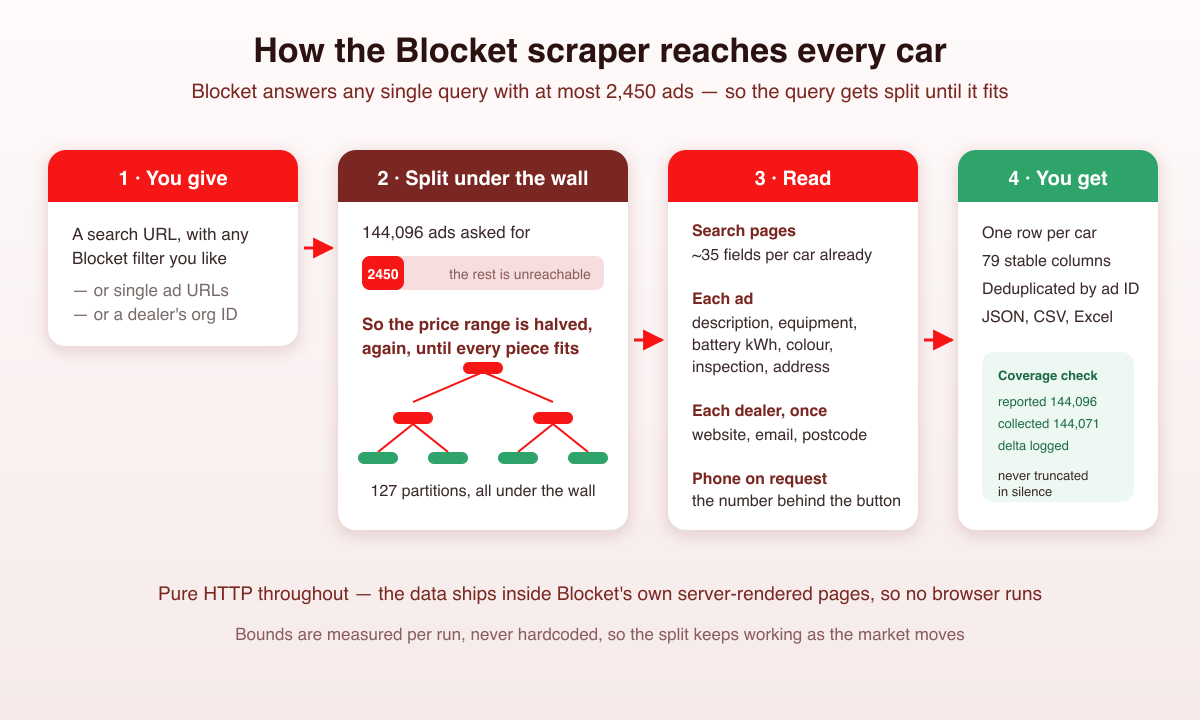
The run measures your query, plans the partitions, then walks each one. Ads seen while measuring are kept rather than re-fetched, and everything is deduplicated by ad ID, so a car that appears in two partitions is still one row.
At the end the actor compares what Blocket reported against what it actually collected and writes the difference into the log. Blocket's own count moves while a crawl runs — ads go up and come down by the minute — so a small delta is normal and the actor says so instead of pretending to a number it cannot guarantee.
***
### Input
| Field | Type | Required | Notes |
|---|---|---|---|
| `startUrls` | array | no | Search, ad or dealer URLs. Empty means every car on Blocket. |
| `dealerOrgIds` | array | no | Dealer org IDs; each expands to that dealer's whole inventory. |
| `detailLevel` | enum | no | `basic`, `full` (default) or `fullDealer`. See below. |
| `includePhone` | boolean | no | Resolve the number behind each ad's phone button. Default `false`. |
| `maxItems` | integer | no | Stop after this many cars. Default `1000`. |
| `fullCoveragePass` | boolean | no | Second sweep to catch cars listed without a price. Default `false`. |
| `safePartitionCap` | integer | no | Split anything above this. Default `2000`. |
| `partitionConcurrency` | integer | no | Counting queries in flight while planning. Default `5`. |
| `maxConcurrency` | integer | no | Parallel requests while scraping. Default `10`. |
| `proxy` | object | no | Optional. Blocket serves this actor without one. |
#### Detail levels
| Level | Extra requests per car | What it adds |
|---|---|---|
| `basic` | none | ~35 fields straight from the search results: price, mileage, VIN, plate, coordinates, images, dealer name |
| `full` | 1 | Description, equipment list, battery capacity, colour, registration date, inspection dates, previous owners, seller's street address |
| `fullDealer` | 1 + one per dealer | Dealer website, email, switchboard number and postal address, fetched once per dealer and cached |
`basic` is dramatically cheaper and already carries most of what a pricing or inventory analysis needs. Reach for `full` when you want the description, the equipment or the EV fields.
#### Example input
```json
{
"startUrls": [
"https://www.blocket.se/mobility/search/car?fuel=4&dealer_segment=2&sales_form=1"
],
"detailLevel": "fullDealer",
"includePhone": true,
"maxItems": 5000
}
```
That reads every used electric car sold by a business. Any filter Blocket's own interface offers works in the URL — `price_from`, `price_to`, `year_from`, `mileage_to`, `body_type`, `transmission`, `wheel_drive`, `exterior_colour`, `location` and the rest are passed through untouched.
***
### Output schema
One row per car, 79 columns in a fixed order. Fields a run did not ask for come back as `null` rather than disappearing, so a CSV keeps the same shape from run to run.
```jsonc
{
"adId": "26253704",
"adUrl": "https://www.blocket.se/mobility/item/26253704",
"title": "Tesla Model X",
"make": "Tesla",
"model": "Model X",
"modelSpecification": "100D Long Range 6-sits *MOMS* 423hk",
"year": 2017,
"firstRegistration": "2017-06-13",
"bodyType": "SUV",
"exteriorColor": "Grå",
"price": 308900, // SEK, including VAT
"priceExVat": 247120, // where the seller marked it VAT-deductible
"currency": "SEK",
"mileage": 14729, // Scandinavian miles, as Blocket reports it
"mileageUnit": "SCANDINAVIAN_MILE",
"mileageKm": 147290, // converted — one mil is ten kilometres
"previousOwners": 10,
"fuel": "El",
"transmission": "Automatisk",
"wheelDrive": "Fyrhjulsdrift",
"enginePowerHp": 423,
"batteryCapacityKwh": 100, // a real structured field, not parsed out of the title
"drivingRangeKm": 435,
"rangePerKwh": 4.4,
"chargingCosts": { "home_charging": { "cost_pr_km": 0.41 }, "monthly_savings": { "monthly_amount": 780 } },
"registrationNumber": "YGT452",
"chassisNumber": "5yjxcce29hf045288",
"inspectionLast": "2026-03-19",
"inspectionNext": "2027-03-31",
"description": "Tesla Model X 100D AWD, 423 hk, 6-sits (2017)…",
"equipment": ["ABS-bromsar", "Backkamera", "Digitalt mätarhus", "…47 entries"],
"imageUrls": ["https://images.blocketcdn.se/dynamic/1280w/item/26253704/…"],
"imageCount": 19,
"sellerStreet": "Finspångsgatan 37",
"sellerZip": "16353",
"sellerCity": "Spånga",
"latitude": 59.39018,
"longitude": 17.87464,
"orgId": "9311124",
"organisationName": "Cederfeldts Bil",
"dealerSegment": "Företag",
"adPhoneNumber": "073-518 06 90", // behind the ad's phone button
"adContactPhone": "+46735180690", // the ad's own contact block
"dealerPhone": "073-518 06 90", // the dealer's profile page
"adContactEmail": "sulle@cederfeldtsbil.se",
"dealerEmail": "info@cederfeldtsbil.se",
"dealerWebsite": "http://www.cederfeldtsbil.se/",
"publishedAt": "2026-09-01T12:18:41.000Z",
"updatedAt": "2026-09-02T13:33:46.860Z",
"scrapedAt": "2026-09-02T15:06:30.241Z"
}
```
#### Three phone numbers, three columns
Blocket exposes a seller's number in three places and they genuinely disagree. On one Porsche Center Göteborg listing the phone button returned `031-361 83 72`, the ad's contact block held `+46313855500`, and the dealer's own profile page said `031-385 55 00`. Each gets its own column, labelled by where it came from, so you can decide which one your use case wants rather than having the actor decide for you. The same applies to email.
***
### Pricing
Billed for work actually performed, so a cheap run stays cheap.
| Event | Charged when | Rate |
|---|---|---|
| Result | Each car row | $0.80 / 1,000 |
| Ad detail | An ad page is opened (`full` and above) | $0.50 / 1,000 |
| Dealer profile | Per **unique** dealer, not per row | $0.002 each |
| Phone number | A number is actually returned | $0.60 / 1,000 |
Which works out to roughly **$0.80 per 1,000** at `basic`, **$1.30** at `full`, and about **$1.86** with phone numbers switched on.
Nothing is charged for the counting queries that plan the partitions, for search pages, for retries, or for a phone lookup that comes back empty — around 7% of ads expose no number and those are free. A dealer with 200 cars in the run is charged once, not 200 times.
***
### What makes this richer than a generic listing scraper
| Capability | Typical scraper | This actor |
|---|---|---|
| Result-set size | First 2,450 rows, silently | Splits the query until the whole set is reachable |
| Split points | Hardcoded price bands | Measured at run time, so they survive a shifting market |
| Coverage reporting | "Finished" | Reported vs collected, delta written to the log |
| Mileage | Raw Blocket number | Raw value, unit, and kilometres — no factor-of-ten trap |
| Battery capacity | Parsed out of the title text | Blocket's own structured `battery_capacity` field |
| Seller contact | One phone | Three phone sources and two email sources, each labelled |
| Images | First photo, default size | Every photo at 1280px, the largest the CDN serves |
| Browser | Often headless Chrome | Pure HTTP |
***
### Notes & limitations
**Battery capacity is optional on Blocket.** It is a real structured field, not something parsed out of the listing title, but sellers fill it in for only part of the inventory — roughly 40–45% in sampling. Expect nulls, and do not treat a null as "no battery data exists".
**About 7% of ads expose no phone number.** The number is served against a token that ships with the ad page, and some ads carry no token. Those rows get `adPhoneNumber: null`. That is Blocket withholding the number, not a failed request.
**Cars listed without a price need the extra pass.** The partitioner splits on price, so a car with no price is invisible to it — currently about 25 cars out of 144,000, or 0.02%. The actor detects this and says so in the log. Set `fullCoveragePass: true` to sweep a second axis and pick them up; it roughly doubles search-page traffic, and per-ad requests are deduplicated so those are not repeated.
**A whole-market run costs real money and needs the cost limit raised.** All ~144,000 cars comes to roughly $115 at `basic`, $187 at `full`, and around $268 with phone numbers on. Apify stops a run the moment it reaches the maximum-cost setting on that run, and it stops mid-crawl with no warning — a validation run of this actor was cut at 50,350 rows exactly that way. Raise the limit before starting a whole-market crawl, or keep the scope down with `maxItems` or a filtered search URL. A single price band or one dealer's inventory costs cents.
**Mileage is in Scandinavian miles.** Blocket's `mileage` is `mil`, where one mil is ten kilometres. Both the raw value and `mileageKm` are in the output. Using the raw number as kilometres puts you off by a factor of ten.
**Swedish values are not translated.** `fuel`, `transmission`, `exteriorColor`, `bodyType` and the equipment list come back as Blocket writes them — `El`, `Automatisk`, `Grå`. Translating them would mean guessing at a mapping and losing the original.
**Blocket's own total moves during a run.** It shifted three times within an hour during testing. The actor logs reported-versus-collected rather than asserting they match, because asserting it turns ordinary listing churn into failed runs.
***
### 🤖 For AI Agents & LLM Apps
**Purpose:** structured car listings from Blocket.se, Sweden's largest classifieds site. One row per car.
**Minimal tested input:**
```json
{ "startUrls": ["https://www.blocket.se/mobility/search/car?fuel=4"], "detailLevel": "basic", "maxItems": 100 }
```
**Key output fields:** `adId`, `adUrl`, `title`, `make`, `model`, `modelSpecification`, `year`, `firstRegistration`, `bodyType`, `exteriorColor`, `price`, `priceExVat`, `currency`, `mileage`, `mileageKm`, `previousOwners`, `fuel`, `transmission`, `wheelDrive`, `enginePowerHp`, `batteryCapacityKwh`, `drivingRangeKm`, `rangePerKwh`, `registrationNumber`, `chassisNumber`, `inspectionLast`, `inspectionNext`, `doors`, `seats`, `bootSizeLitres`, `weightKg`, `description`, `equipment`, `imageUrls`, `location`, `sellerStreet`, `sellerZip`, `sellerCity`, `latitude`, `longitude`, `orgId`, `organisationName`, `dealerSegment`, `adPhoneNumber`, `adContactPhone`, `dealerPhone`, `adContactEmail`, `dealerEmail`, `dealerWebsite`, `publishedAt`, `updatedAt`, `scrapedAt`.
**Behaviours worth knowing:**
- Billing is per row plus per unit of extra work: opening an ad, fetching a dealer profile, resolving a phone number. Partition planning, search pages, retries and empty phone lookups are free.
- `detailLevel: "basic"` needs no per-ad request and is the cheapest way to survey the market.
- `mileage` is in Scandinavian miles; use `mileageKm` for kilometres.
- `batteryCapacityKwh` and `adPhoneNumber` are frequently `null` — that is source data, not failure.
- Every field is present on every row, `null` when unknown, so the shape is stable.
- Swedish enum values are not translated.
- A capped run (`maxItems` reached) says so in the log and skips the coverage comparison.
- A whole-market crawl is ~$115 at `basic` and ~$187 at `full`. Raise the run's maximum-cost setting first, or it aborts part-way through.
***
### ⚠️ Disclaimer
This Actor is an independent tool and is **not affiliated with, endorsed by, or sponsored by** Blocket, Schibsted, Vend, or any of their subsidiaries. All trademarks mentioned are the property of their respective owners.
The scraper extracts only **publicly visible** data from Blocket.se — car listings, dealer profiles and the contact details Blocket itself shows to any logged-out visitor. No login, no CAPTCHA solving, no API-key forgery, no private-endpoint probing.
Users are responsible for:
- Complying with Blocket.se's Terms of Service
- Following GDPR and your jurisdiction's data-protection laws when storing or processing seller contact details, registration plates and VINs
- Not contacting sellers listed in scraped data without a lawful basis for doing so
- Not republishing scraped data in a way that competes commercially with Blocket
- Honouring any opt-out signals on the source pages
Registration plates and chassis numbers are personal data in many jurisdictions when they can be linked to an individual. Treat them accordingly.
***
### SEO Keywords
blocket scraper, scrape blocket, blocket.se scraper, blocket car scraper, blocket bilar scraper, swedish car listings scraper, sweden used car data, blocket api, blocket mobility scraper, swedish car market data, blocket dealer scraper, blocket annonser scraper, used car price data sweden, swedish vehicle listings, blocket electric car scraper, sweden ev listings scraper, blocket elbil scraper, car dealer leads sweden, swedish car dealer contacts, vin scraper sweden, registration plate scraper sweden, blocket cheerio scraper, no-browser blocket scraper, apify blocket, blocket bulk export, swedish automotive market research, car pricing intelligence sweden, blocket inventory scraper, blocket bil data, nordic car listings scraper, blocket listing extraction
# Actor input Schema
## `startUrls` (type: `array`):
Search URLs, single ads, or dealer pages — the actor works out which is which. Leave empty to scrape every car on Blocket. Example search: https://www.blocket.se/mobility/search/car?fuel=4\&dealer\_segment=2\&sales\_form=1 (used electric cars sold by businesses). Any filter Blocket supports is passed through untouched.
## `dealerOrgIds` (type: `array`):
Dealer org IDs (the number in /mobility/dealer/{orgId}). Each one is expanded into that dealer's complete inventory.
## `detailLevel` (type: `string`):
How much is collected per ad. 'Basic' reads the search results only — about 35 fields per car including price, mileage, VIN, registration number, coordinates and images — and needs no extra request, so it is by far the fastest. 'Full' opens each ad for description, equipment list, battery capacity, colour, registration date, inspection dates, previous owners and the seller's street address. 'Full + dealer' also loads each dealer's profile page once for their website, email and postal address.
## `includePhone` (type: `boolean`):
Fetch the number behind each ad's 'Visa telefonnummer' button. It can differ from the phone on the dealer's profile page, so both are kept in separate fields. Needs a detail level above Basic and costs one extra request per ad. Around 7% of ads expose no number.
## `maxItems` (type: `integer`):
Stop after this many cars. Blocket currently lists roughly 144,000 cars in total, so leave room if you want full coverage.
## `safePartitionCap` (type: `integer`):
Blocket refuses to paginate past 2,450 results per query, so the actor splits any search bigger than this into price ranges. The default of 2,000 leaves headroom for ads posted mid-crawl. Raising it toward 2,450 risks silently losing the tail of a partition.
## `fullCoveragePass` (type: `boolean`):
About 0.05% of Blocket's cars are listed without a price, and the actor splits large searches by price — so those ads cannot be reached on that axis. Turn this on to run a second sweep by year and merge the results. It roughly doubles the search-page traffic; per-ad and per-dealer requests are deduplicated, so those are not repeated.
## `partitionConcurrency` (type: `integer`):
How many counting queries run at once while the actor works out how to split a large search.
## `maxConcurrency` (type: `integer`):
Maximum parallel requests while scraping ads.
## `minConcurrency` (type: `integer`):
Minimum parallel requests.
## `maxRequestRetries` (type: `integer`):
How many times a failed request is retried before the actor gives up on it.
## `proxy` (type: `object`):
Optional. Blocket serves this actor without a proxy, so leave it unset unless your runs start failing. When set, it replaces the actor's built-in residential pool.
## Actor input object example
```json
{
"startUrls": [
"https://www.blocket.se/mobility/search/car?fuel=4&dealer_segment=2&sales_form=1"
],
"detailLevel": "full",
"includePhone": false,
"maxItems": 1000,
"safePartitionCap": 2000,
"fullCoveragePass": false,
"partitionConcurrency": 5,
"maxConcurrency": 10,
"minConcurrency": 1,
"maxRequestRetries": 5
}
```
# Actor output Schema
## `results` (type: `string`):
Dataset of Blocket car listings with price and VAT-excluded price, mileage in both Scandinavian miles and kilometres, VIN and registration number, fuel and drivetrain, EV battery capacity and range, equipment list, full-resolution images, and phone, email, website and postal address for the seller.
# API
You can run this Actor programmatically using our API. Below are code examples in JavaScript, Python, and CLI, as well as the OpenAPI specification and MCP server setup.
## JavaScript example
```javascript
import { ApifyClient } from 'apify-client';
// Initialize the ApifyClient with your Apify API token
// Replace the '' with your token
const client = new ApifyClient({
token: '',
});
// Prepare Actor input
const input = {
"startUrls": [
"https://www.blocket.se/mobility/search/car?fuel=4&dealer_segment=2&sales_form=1"
],
"detailLevel": "full",
"maxItems": 1000,
"safePartitionCap": 2000,
"partitionConcurrency": 5,
"maxConcurrency": 10,
"minConcurrency": 1,
"maxRequestRetries": 5
};
// Run the Actor and wait for it to finish
const run = await client.actor("memo23/blocket-scraper").call(input);
// Fetch and print Actor results from the run's dataset (if any)
console.log('Results from dataset');
console.log(`💾 Check your data here: https://console.apify.com/storage/datasets/${run.defaultDatasetId}`);
const { items } = await client.dataset(run.defaultDatasetId).listItems();
items.forEach((item) => {
console.dir(item);
});
// 📚 Want to learn more 📖? Go to → https://docs.apify.com/api/client/js/docs
```
## Python example
```python
from apify_client import ApifyClient
# Initialize the ApifyClient with your Apify API token
# Replace '' with your token.
client = ApifyClient("")
# Prepare the Actor input
run_input = {
"startUrls": ["https://www.blocket.se/mobility/search/car?fuel=4&dealer_segment=2&sales_form=1"],
"detailLevel": "full",
"maxItems": 1000,
"safePartitionCap": 2000,
"partitionConcurrency": 5,
"maxConcurrency": 10,
"minConcurrency": 1,
"maxRequestRetries": 5,
}
# Run the Actor and wait for it to finish
run = client.actor("memo23/blocket-scraper").call(run_input=run_input)
# Fetch and print Actor results from the run's dataset (if there are any)
print(f"💾 Check your data here: https://console.apify.com/storage/datasets/{run.default_dataset_id}")
for item in client.dataset(run.default_dataset_id).iterate_items():
print(item)
# 📚 Want to learn more 📖? Go to → https://docs.apify.com/api/client/python/docs/quick-start
```
## CLI example
```bash
echo '{
"startUrls": [
"https://www.blocket.se/mobility/search/car?fuel=4&dealer_segment=2&sales_form=1"
],
"detailLevel": "full",
"maxItems": 1000,
"safePartitionCap": 2000,
"partitionConcurrency": 5,
"maxConcurrency": 10,
"minConcurrency": 1,
"maxRequestRetries": 5
}' |
apify call memo23/blocket-scraper --silent --output-dataset
```
## MCP server setup
```json
{
"mcpServers": {
"apify": {
"type": "http",
"url": "https://mcp.apify.com/?tools=fetch-actor-details,memo23/blocket-scraper"
}
}
}
```
The hosted server signs you in with OAuth on first connect, so no API token belongs in this config. Clients without OAuth support can send an `Authorization: Bearer ` header instead, using a token from API & Integrations in Apify Console (https://console.apify.com/settings/integrations).
## OpenAPI specification
Download the OpenAPI definition: https://api.apify.com/v2/actors/dXBErtsICFDxDg5Ww/builds/gN6HBkyUzz2E8ReMy/openapi.json