# Bluesky Scraper — Posts, Profiles & Followers (`memo23/bluesky-scraper`) Actor
Scrape Bluesky (AT Protocol) with no login. Search posts by keyword and filter by date, language, author, hashtag or linked domain. Pull profiles, follower and following lists, single posts and whole accounts — text, likes, reposts, replies, quotes, images. JSON or CSV.
- **URL**: https://apify.com/memo23/bluesky-scraper.md
- **Developed by:** [Muhamed Didovic](https://apify.com/memo23) (community)
- **Categories:** Social media, Lead generation, Developer tools
- **Stats:** 15 total users, 15 monthly users, 100.0% runs succeeded, 0 bookmarks
- **User rating**: No ratings yet
## Pricing
from $1.50 / 1,000 results
This Actor is paid per event. You are not charged for the Apify platform usage, but only a fixed price for specific events.
Learn more: https://docs.apify.com/actors/running/actors-in-store.md#pay-per-event
## What's an Apify Actor?
Actors are web data automations that power AI and operations. They run on the Apify platform to scrape websites, process data, connect APIs, and automate workflows.
In Batch mode, an Actor accepts a well-defined JSON input, performs an action which can take anything from a few seconds to a few hours,
and optionally produces a well-defined JSON output, datasets with results, or files in key-value store.
In Standby mode, an Actor provides a web server which can be used as a website, API, or an MCP server.
Actors are written with capital "A".
## How to integrate an Actor?
If asked about integration, you help developers integrate Actors into their projects.
You adapt to their stack and deliver integrations that are safe, well-documented, and production-ready.
The best way to integrate Actors is as follows.
- **AI agents and MCP clients** — the [Apify MCP server](https://docs.apify.com/integrations/mcp.md) at `https://mcp.apify.com` (remote, streamable HTTP, OAuth on first use).
- **Agentic workflows and local Actor development** — [Agent Skills](https://apify.com/.well-known/agent-skills/index.json) with the [Apify CLI](https://docs.apify.com/cli/docs.md): `npm install -g apify-cli`, then `apify login`.
- **JavaScript/TypeScript projects** — the official [JS/TS client](https://docs.apify.com/api/client/js/docs.md): `npm install apify-client`.
- **Python projects** — the official [Python client](https://docs.apify.com/api/client/python/docs.md): `pip install apify-client`.
- **Any other language** — the [REST API](https://docs.apify.com/api/v2.md).
For usage examples, see the [API](#api) section below.
For more details, see Apify documentation as [Markdown index](https://docs.apify.com/llms.txt) and [Markdown full-text](https://docs.apify.com/llms-full.txt).
# README

All-in-one Bluesky (AT Protocol) scraper — search posts by keyword, pull profiles, export follower and following lists, or grab a single post. Paste a URL or a handle, or just type a keyword, and get clean JSON or CSV.
| Input | Row(s) emitted |
| --- | --- |
| **Keyword** | `post` rows across the whole network — full text, likes, reposts, replies, quotes, images, author. Or `profile` rows, or both. |
| **Handle or profile URL** — `bsky.app/profile/` | One `profile` row: bio, follower / following / post counts, avatar, banner, join date |
| **Handle + "also fetch posts"** | That account's recent `post` rows, with reposts labelled rather than passed off as its own |
| **Handle + "also export followers / following"** | One `follower` or `following` row per account, each tagged with whose list it came from |
| **Post URL** — `bsky.app/profile//post/` | That single `post` with full text and engagement |
> Pure HTTP against the public AT Protocol appview. No login, no cookies, no app password, no browser, no anti-bot service.
### How it works
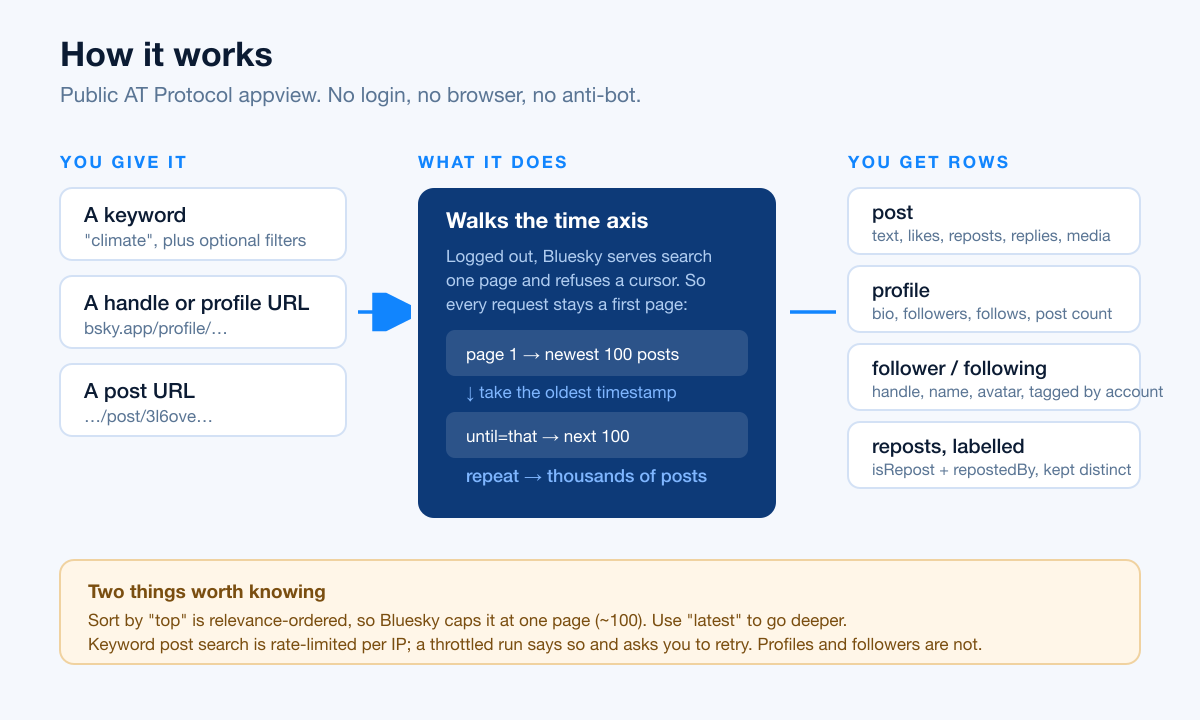
Logged out, Bluesky serves keyword search **one page at a time** and refuses to follow a cursor — its appview rejects any search request carrying one. Most Bluesky scrapers therefore stop at about 100 posts.
This Actor steps backwards through time instead. It takes the oldest post of each page and uses that timestamp as the next request's cut-off, so every request stays a *first* page and the walk keeps going. Measured on a live run: **349 unique posts across 2.5 days, zero duplicates**, for a request the one-page limit would have capped at 100.
That needs time-ordered results, so it works with `sort: "latest"`. A `top` search is relevance-ordered and genuinely cannot go past one page — the Actor says so in the log rather than pretending otherwise.
Profiles, followers, following, post threads and account search are ordinary cursor pagination and are not affected by any of this.
### Input
| Field | Type | Required | Notes |
| --- | --- | --- | --- |
| `searchQueries` | string\[] | no | Keywords to search. Returns posts by default. |
| `searchType` | enum | no | `posts` (default), `accounts`, or `both`. |
| `sort` | enum | no | `latest` (default, no result cap) or `top` (capped at ~100 by Bluesky). |
| `since` / `until` | string | no | Absolute date bounds, e.g. `2026-09-01`. Bluesky filters on its own `sortAt` (roughly the earlier of created and indexed). |
| `lang` | string | no | Two-letter language code, e.g. `en`. |
| `fromAuthor` | string | no | Only posts written by this handle or DID. |
| `mentionsAuthor` | string | no | Only posts mentioning it — brand monitoring. |
| `domain` | string | no | Only posts linking to this domain. |
| `hashtags` | string\[] | no | Only posts carrying these hashtags. |
| `startUrls` | array | no | Bluesky profile or post URLs. |
| `handles` | string\[] | no | Handles or DIDs. |
| `includePosts` | boolean | no | Also fetch each profile's recent posts. |
| `maxPostsPerProfile` | integer | no | Cap per profile. Default 100. |
| `includeFollowers` | boolean | no | Also export who follows each profile. |
| `includeFollowing` | boolean | no | Also export who each profile follows. |
| `maxFollowsPerProfile` | integer | no | Cap per profile. Default 500. |
| `maxItems` | integer | no | Cap across the whole run. Default 1000. The Apify free plan returns at most 50 rows whatever you set. |
| `proxy` | object | no | Apify Proxy, on by default. Post search is rate-limited per IP. |
#### Example input
```json
{
"searchQueries": ["climate"],
"searchType": "posts",
"sort": "latest",
"lang": "en",
"maxItems": 500
}
```
Lead generation — a competitor's follower list:
```json
{
"handles": ["apify.com"],
"includeFollowers": true,
"maxFollowsPerProfile": 2000
}
```
### Output schema
Every row carries a `type` field, so mixed runs split cleanly.
#### `type: "post"`
```jsonc
{
"type": "post",
"uri": "at://did:plc:z72i7hdynmk6r22z27h6tvur/app.bsky.feed.post/3l6oveex3ii2l",
"cid": "bafyrei…",
"text": "👋 Bluesky is an open social network…",
"createdAt": "2024-10-22T18:22:11.000Z",
"indexedAt": "2024-10-22T18:22:12.114Z",
"likeCount": 63673,
"repostCount": 9526,
"replyCount": 8579,
"quoteCount": 1204,
"bookmarkCount": 88,
"langs": ["en"],
"images": [],
"authorDid": "did:plc:z72i7hdynmk6r22z27h6tvur",
"authorHandle": "bsky.app", // on a repost, the ORIGINAL author
"authorDisplayName": "Bluesky",
"isRepost": false,
"repostedBy": null, // handle of the reposter when isRepost is true
"repostedAt": null,
"url": "https://bsky.app/profile/bsky.app/post/3l6oveex3ii2l"
}
```
#### `type: "profile"`
```jsonc
{
"type": "profile",
"did": "did:plc:z72i7hdynmk6r22z27h6tvur",
"handle": "bsky.app",
"displayName": "Bluesky",
"description": "official Bluesky account…",
"followersCount": 34586228,
"followsCount": 11,
"postsCount": 808,
"avatar": "https://cdn.bsky.app/img/avatar/plain/…",
"banner": "https://cdn.bsky.app/img/banner/plain/…",
"createdAt": "2023-04-12T04:53:57.057Z",
"indexedAt": "2026-09-01T10:14:02.881Z",
"url": "https://bsky.app/profile/bsky.app"
}
```
#### `type: "follower"` / `type: "following"`
```jsonc
{
"type": "follower",
"of": "apify.com", // whose list this row came from
"did": "did:plc:…",
"handle": "pfrazee.com",
"displayName": "Paul Frazee",
"description": "…",
"avatar": "https://cdn.bsky.app/img/avatar/plain/…",
"createdAt": "2023-04-22T09:11:40.002Z",
"indexedAt": "2026-08-30T17:03:55.410Z",
"url": "https://bsky.app/profile/pfrazee.com"
}
```
### Pricing
Pay per event: $0.005 when a run starts, plus $0.0015 for every row delivered. A run that Bluesky rate-limits to zero rows still costs the $0.005 start fee.
| Event | When | Rate |
| --- | --- | --- |
| Actor start | Once per run, per GB of memory | $0.005 |
| Result | Each post, profile, follower or following row | $0.0015 |
### What makes this richer than the competition
| Capability | Typical Bluesky Actor | This Actor |
| --- | --- | --- |
| Posts per keyword search | ~100 (the logged-out one-page limit) | Hundreds — 349 measured on one live run, by walking backwards through time |
| Reposts in an account's feed | Emitted as the account's own posts | Labelled `isRepost` + `repostedBy`, original author preserved |
| Follower / following export | Often absent or a separate paid Actor | Included, tagged with whose list it is |
| Short or throttled run | Silent — looks like a complete result | Status message plus a `RUN_REPORT` record naming requested vs delivered, for every input path |
| Search filters | Keyword only | Date range, language, author, mentions, domain, hashtags |
| Login required | Some ask for your Bluesky app password | Never |
### Use cases
- **Brand monitoring** — `mentionsAuthor` with your own handle returns every post mentioning you, with engagement counts, so you can spot a thread before it grows.
- **Social listening** — `searchQueries` plus `lang` and a date window gives a corpus for sentiment or topic analysis without touching a browser.
- **Lead generation** — `includeFollowers` on a competitor's handle exports their audience with handles, names and profile URLs.
- **Creator research** — a handle with `includePosts` returns an account's recent output and how each post performed, reposts labelled separately from original writing.
- **Feeding an LLM or agent** — every row is flat JSON with a `type` field; see the agent section below.
### FAQ
#### Why did my keyword search return nothing?
Bluesky rate-limits keyword post search per IP and answers with a `403`. Roughly a third of heavy search runs hit it. The run reports this in its status message rather than failing silently. Wait a few minutes and re-run — the cooldown lengthens each time it is tripped, so retrying immediately makes it worse. Profile, follower and following inputs are not rate-limited and always work.
#### Why did I get about 100 posts when I asked for more?
You are sorting by `top`. Bluesky serves logged-out relevance search a single page and refuses to page further. Switch `sort` to `latest`, which is time-ordered and lets the Actor walk backwards through time for far more.
#### Why does a post in my results have someone else's handle?
That row is a repost. `authorHandle` is always whoever wrote the post; `isRepost` and `repostedBy` tell you which account amplified it into the feed you asked for.
#### Do I need a Bluesky account or app password?
No. Everything runs logged out against the public AT Protocol appview.
### Notes & limitations
- **`sort: "top"` is capped at one page (~100).** Relevance order cannot be walked through time. Use `latest` for volume.
- **Keyword post search is rate-limited per IP by Bluesky**, which answers with a `403` and a cooldown that lengthens each time it is tripped. Roughly a third of heavy search runs hit it. The Actor rotates proxy IPs, backs off, keeps whatever it already collected, and tells you plainly when a run was cut short. Profiles, followers, following, post threads and account search are **not** rate-limited.
- **A run that returns nothing is reported as FAILED on purpose**, with the reason named. It is not silently passed off as success.
- Large accounts have millions of followers, so `maxFollowsPerProfile` bounds how much of one list a single run pulls.
- Engagement counts are a snapshot at scrape time.
### 🤖 For AI Agents & LLM Apps
**Purpose.** Reads public Bluesky (AT Protocol) data: posts by keyword, profiles, follower/following lists, single posts. No authentication anywhere.
**Minimal tested input.**
```json
{ "searchQueries": ["apify"], "searchType": "posts", "sort": "latest", "maxItems": 50 }
```
**Output fields (flat).** `type`, `of`, `uri`, `cid`, `text`, `langs`, `images`, `likeCount`, `repostCount`, `replyCount`, `quoteCount`, `bookmarkCount`, `authorDid`, `authorHandle`, `authorDisplayName`, `isRepost`, `repostedBy`, `repostedAt`, `did`, `handle`, `displayName`, `description`, `followersCount`, `followsCount`, `postsCount`, `avatar`, `banner`, `createdAt`, `indexedAt`, `url`.
**Billing.** $0.005 per run start (per GB), $0.0015 per row. Bound cost with `maxItems`.
**Behaviours an agent should plan for.**
- Branch on `type` — one dataset mixes posts, profiles and network rows.
- `sort: "top"` returns at most ~100 rows regardless of `maxItems`. Use `"latest"` when you need more.
- Post search can be rate-limited; a short run still succeeds and reports the shortfall in the run status message and in the `RUN_REPORT` key-value record (`{ emitted, maxItems, requestedMaxItems, sources: [{ source, kind, requested, delivered, stop, detail }] }`). Check it rather than assuming `maxItems` rows arrived.
- `authorHandle` is always the author. For reposts read `repostedBy` to learn who amplified it.
- A zero-row run exits FAILED with the cause in the status message.
### ⚠️ Disclaimer
This Actor collects only public Bluesky data through the public AT Protocol appview. It does not log in, does not bypass any login wall, and does not circumvent access controls. You are responsible for using the data in line with Bluesky's Terms of Service, applicable data-protection law (GDPR/CCPA where relevant), and any restrictions on personal data in your jurisdiction.
### Support
- Issues or feature requests: the Issues tab of this Actor in Apify Console.
- Custom needs:
### SEO Keywords
bluesky scraper, bluesky api, at protocol scraper, bluesky posts scraper, bluesky profile scraper, bluesky followers export, bluesky search api, scrape bluesky without login, bsky scraper, bluesky data extraction, bluesky keyword search, bluesky brand monitoring, bluesky lead generation, atproto scraper, bluesky social listening, export bluesky followers to csv, bluesky hashtag scraper, bluesky mentions tracker
# Actor input Schema
## `searchQueries` (type: `array`):
Keywords to search Bluesky for. By default each keyword returns matching posts with full text and engagement counts — switch "What keywords return" below to get accounts instead.
## `searchType` (type: `string`):
Whether a keyword returns posts, accounts, or both.
## `sort` (type: `string`):
Post search only. Latest is time-ordered, which lets this Actor walk backwards through time and return far more than one page. Top is relevance-ordered, and Bluesky caps logged-out relevance search at a single page of about 100 posts.
## `since` (type: `string`):
Only posts created on or after this date. Absolute date, e.g. 2026-09-01.
## `until` (type: `string`):
Only posts created before this date. Absolute date, e.g. 2026-09-01.
## `lang` (type: `string`):
Two-letter language code, e.g. en, de, pt.
## `fromAuthor` (type: `string`):
Handle or DID — returns only that account's posts matching the keyword.
## `mentionsAuthor` (type: `string`):
Handle or DID — returns only posts that mention it. Useful for brand monitoring.
## `domain` (type: `string`):
Only posts linking to this domain, e.g. nytimes.com.
## `hashtags` (type: `array`):
Only posts carrying these hashtags. Write them without the #.
## `startUrls` (type: `array`):
Bluesky profile or post URLs, one per line — https://bsky.app/profile/\ or https://bsky.app/profile/\/post/\. No login needed.
## `handles` (type: `array`):
Bluesky handles (e.g. bsky.app) or DIDs (did:plc:…) — each returns that profile.
## `includePosts` (type: `boolean`):
When on, every handle/profile above also returns that account's recent posts, not just the profile row.
## `maxPostsPerProfile` (type: `integer`):
Cap on posts fetched per profile when "Also fetch each profile's posts" is on.
## `includeFollowers` (type: `boolean`):
When on, every handle/profile above also returns the accounts that follow it — handle, display name, avatar and profile URL.
## `includeFollowing` (type: `boolean`):
When on, every handle/profile above also returns the accounts it follows.
## `maxFollowsPerProfile` (type: `integer`):
Cap on follower or following rows per profile. Large accounts have millions, so this stops a run from spending your whole budget on one of them.
## `maxItems` (type: `integer`):
Maximum rows to scrape across the whole run (posts + profiles + followers combined). Note for post search: Bluesky serves logged-out results one page at a time, so counts above ~100 are reached by stepping back through time and need sort "Latest". On the Apify free plan a run returns at most 50 rows regardless of this value.
## `proxy` (type: `object`):
Keyword post search is rate-limited per IP by Bluesky, so a rotating proxy is on by default. It reduces but does not eliminate the throttle — roughly a third of heavy search runs still come back short, and the Actor reports the shortfall. Profiles, followers and account search are not rate-limited; turn the proxy off if those are all you use.
## Actor input object example
```json
{
"searchQueries": [
"bluesky"
],
"searchType": "posts",
"sort": "latest",
"handles": [
"bsky.app"
],
"includePosts": false,
"maxPostsPerProfile": 100,
"includeFollowers": false,
"includeFollowing": false,
"maxFollowsPerProfile": 500,
"maxItems": 50,
"proxy": {
"useApifyProxy": true
}
}
```
# Actor output Schema
## `results` (type: `string`):
Posts with full text and engagement counts, profiles with follower and post counts, and follower or following lists tagged with the account they belong to.
# API
You can run this Actor programmatically using our API. Below are code examples in JavaScript, Python, and CLI, as well as the OpenAPI specification and MCP server setup.
## JavaScript example
```javascript
import { ApifyClient } from 'apify-client';
// Initialize the ApifyClient with your Apify API token
// Replace the '' with your token
const client = new ApifyClient({
token: '',
});
// Prepare Actor input
const input = {
"searchQueries": [
"bluesky"
],
"handles": [
"bsky.app"
],
"maxItems": 50,
"proxy": {
"useApifyProxy": true
}
};
// Run the Actor and wait for it to finish
const run = await client.actor("memo23/bluesky-scraper").call(input);
// Fetch and print Actor results from the run's dataset (if any)
console.log('Results from dataset');
console.log(`💾 Check your data here: https://console.apify.com/storage/datasets/${run.defaultDatasetId}`);
const { items } = await client.dataset(run.defaultDatasetId).listItems();
items.forEach((item) => {
console.dir(item);
});
// 📚 Want to learn more 📖? Go to → https://docs.apify.com/api/client/js/docs
```
## Python example
```python
from apify_client import ApifyClient
# Initialize the ApifyClient with your Apify API token
# Replace '' with your token.
client = ApifyClient("")
# Prepare the Actor input
run_input = {
"searchQueries": ["bluesky"],
"handles": ["bsky.app"],
"maxItems": 50,
"proxy": { "useApifyProxy": True },
}
# Run the Actor and wait for it to finish
run = client.actor("memo23/bluesky-scraper").call(run_input=run_input)
# Fetch and print Actor results from the run's dataset (if there are any)
print(f"💾 Check your data here: https://console.apify.com/storage/datasets/{run.default_dataset_id}")
for item in client.dataset(run.default_dataset_id).iterate_items():
print(item)
# 📚 Want to learn more 📖? Go to → https://docs.apify.com/api/client/python/docs/quick-start
```
## CLI example
```bash
echo '{
"searchQueries": [
"bluesky"
],
"handles": [
"bsky.app"
],
"maxItems": 50,
"proxy": {
"useApifyProxy": true
}
}' |
apify call memo23/bluesky-scraper --silent --output-dataset
```
## MCP server setup
```json
{
"mcpServers": {
"apify": {
"type": "http",
"url": "https://mcp.apify.com/?tools=fetch-actor-details,memo23/bluesky-scraper"
}
}
}
```
The hosted server signs you in with OAuth on first connect, so no API token belongs in this config. Clients without OAuth support can send an `Authorization: Bearer ` header instead, using a token from API & Integrations in Apify Console (https://console.apify.com/settings/integrations).
## OpenAPI specification
Download the OpenAPI definition: https://api.apify.com/v2/actors/naKOqTBbGEO6w97Cy/builds/PDAUUXv3eqd0K0KKn/openapi.json