# Canada411 Scraper (`memo23/canada411-scraper`) Actor
Scrape Canada411.ca listings: name, phone, street, city, province, postal code, and map coordinates. Name + city, reverse phone, street address, postal code, or canada411.ca URLs in. 100 rows per request, pure HTTP, no browser. JSON or CSV out. $1.00/1k listings.
- **URL**: https://apify.com/memo23/canada411-scraper.md
- **Developed by:** [Muhamed Didovic](https://apify.com/memo23) (community)
- **Categories:** Lead generation
- **Stats:** 2 total users, 1 monthly users, 100.0% runs succeeded, 0 bookmarks
- **User rating**: No ratings yet
## Pricing
from $1.00 / 1,000 listings
This Actor is paid per event. You are not charged for the Apify platform usage, but only a fixed price for specific events.
Learn more: https://docs.apify.com/actors/running/actors-in-store.md#pay-per-event
## What's an Apify Actor?
Actors are web data automations that power AI and operations. They run on the Apify platform to scrape websites, process data, connect APIs, and automate workflows.
In Batch mode, an Actor accepts a well-defined JSON input, performs an action which can take anything from a few seconds to a few hours,
and optionally produces a well-defined JSON output, datasets with results, or files in key-value store.
In Standby mode, an Actor provides a web server which can be used as a website, API, or an MCP server.
Actors are written with capital "A".
## How to integrate an Actor?
If asked about integration, you help developers integrate Actors into their projects.
You adapt to their stack and deliver integrations that are safe, well-documented, and production-ready.
The best way to integrate Actors is as follows.
- **AI agents and MCP clients** — the [Apify MCP server](https://docs.apify.com/integrations/mcp.md) at `https://mcp.apify.com` (remote, streamable HTTP, OAuth on first use).
- **Agentic workflows and local Actor development** — [Agent Skills](https://apify.com/.well-known/agent-skills/index.json) with the [Apify CLI](https://docs.apify.com/cli/docs.md): `npm install -g apify-cli`, then `apify login`.
- **JavaScript/TypeScript projects** — the official [JS/TS client](https://docs.apify.com/api/client/js/docs.md): `npm install apify-client`.
- **Python projects** — the official [Python client](https://docs.apify.com/api/client/python/docs.md): `pip install apify-client`.
- **Any other language** — the [REST API](https://docs.apify.com/api/v2.md).
For usage examples, see the [API](#api) section below.
For more details, see Apify documentation as [Markdown index](https://docs.apify.com/llms.txt) and [Markdown full-text](https://docs.apify.com/llms-full.txt).
# README
## Canada411 Scraper
Turn a Canada411.ca search into structured Canadian contact rows: name, phone, street, city, province, postal code, map coordinates, and profile link.
Name + city, reverse phone, street address, postal code, or a canada411.ca URL. JSON or CSV out.
### Why Use This Scraper?
- 100 listings per request, so a 1,600-result city search finishes in seconds
- Latitude and longitude on every row, read from the page's own map data
- Address already split into street, city, province, postal code
- Four lookup types in one run: name + location, reverse phone, street address, postal code
- Name × location lists cross-joined and de-duplicated automatically
- HTTP only. No browser, no proxy needed for Canada411
### Overview
Built for sales teams, skip tracers, researchers, and agencies who need Canadian white-pages rows from canada411.ca.
Every start type becomes **one dataset row per listing**. A name search, a reverse phone hit, a postal code sweep, and a `/res/` profile URL all emit the same flat shape. Rows are de-duplicated across all searches by Canada411 listing id.
### Supported Inputs
#### Names and locations
| Field | Example |
| --- | --- |
| `names` | `["Smith"]`, `["John Smith", "Tremblay"]`, `["Tim Hortons"]` |
| `locations` | `["Toronto, ON"]`, `["Montreal"]`, `["Quebec"]` |
Every name is searched in every location. `["Smith","Tremblay"]` × `["Toronto","Montreal"]` is four searches. Canada411 refuses a name search with no location ("Too many listings"), so at least one location is required.
#### Reverse lookups
| Field | Example | What comes back |
| --- | --- | --- |
| `phoneNumbers` | `["416-243-0072"]` | The residential listing on that number |
| `addresses` | `["48 Howbert, North York, ON"]` | Everyone listed at that street address |
| `postalCodes` | `["M9N 3L3"]` | Every listing in that postal code |
#### URL types
| URL type | Pattern | Example |
| --- | --- | --- |
| Search results | `/search/si/{page}/{name}/{where}/` | `https://www.canada411.ca/search/si/1/Smith/Toronto/` |
| Query-string search | `/search/?stype=…` | `https://www.canada411.ca/search/?stype=si&what=Smith&where=Toronto` |
| Person profile | `/res/{phone}/{name}/{id}.html` | `https://www.canada411.ca/res/4169670873/Mark-Smith/461154423.html` |
Search URLs are paginated automatically. `fr.canada411.ca` links work too.
**Unsupported:** yellowpages.ca business pages. Canada411 hands business numbers to Yellow Pages; those redirects are logged and skipped.
### Use Cases
| Audience | What they take from a run |
| --- | --- |
| Sales and outreach | Phone + full address per household, by city or province |
| Skip tracing and verification | Reverse phone and reverse address in bulk |
| Direct mail | Postal-code sweeps with street-level addresses |
| Researchers | Surname distribution by city with coordinates for mapping |
| Agencies | Cross-joined name × city lists in one dataset |
### How It Works
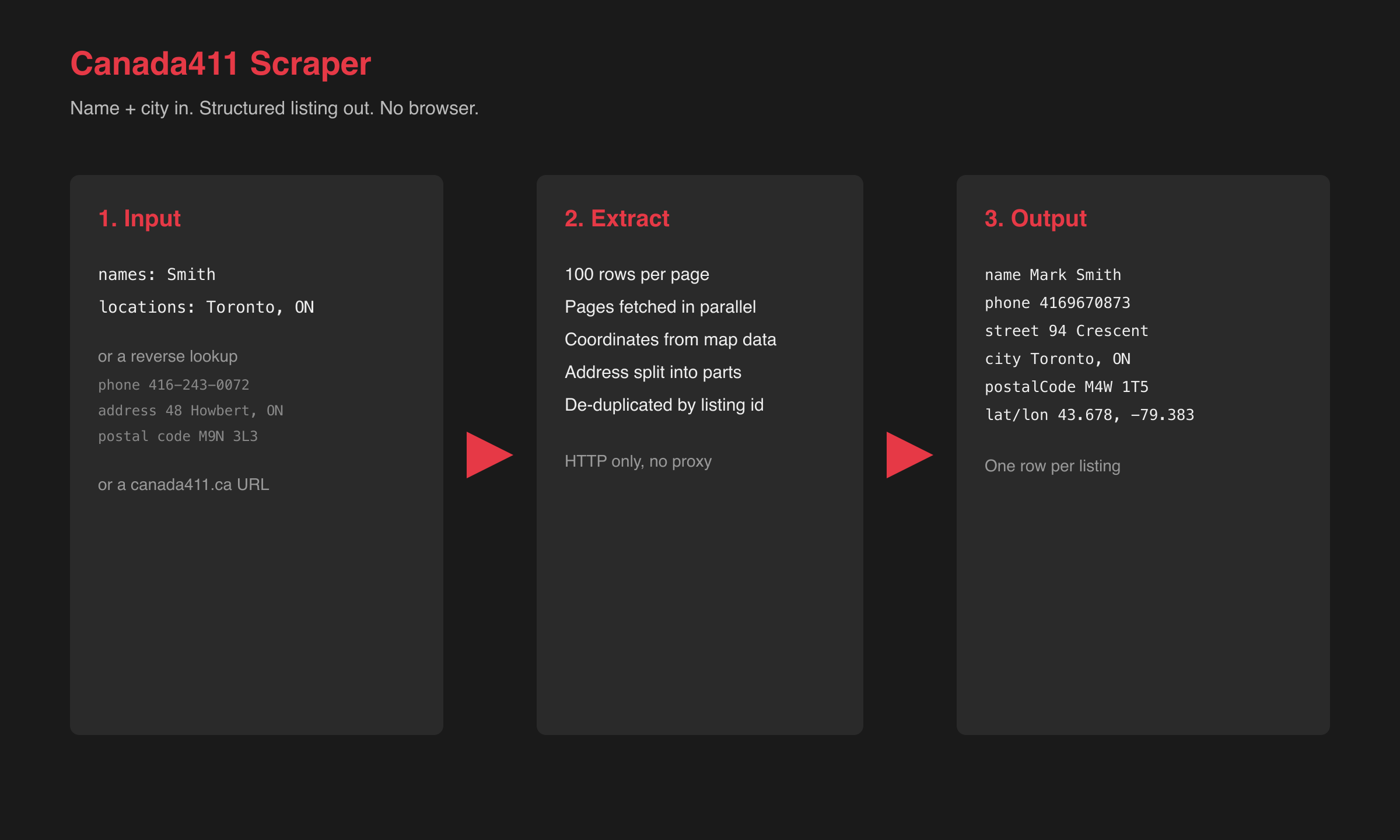
1. Expand `names` × `locations`, phone numbers, addresses, postal codes, and URLs into search jobs.
2. Fetch page 1 of each search with `pgLen=100` and read the total result count.
3. Fan out the remaining pages in parallel, stopping at `maxItems` or `maxPages`.
4. Parse each listing row and attach coordinates from the page's map data.
5. Split the address into street, city, province, postal code.
6. De-duplicate by listing id and push one row per person.
### Input Configuration
| Field | Type | Required | Notes |
| --- | --- | --- | --- |
| `names` | array | one of the start types | Person or business names, searched in every location |
| `locations` | array | with `names` | City, `City, PV`, or province |
| `phoneNumbers` | array | one of the start types | Canadian numbers, any format |
| `addresses` | array | one of the start types | `street, city, province` |
| `postalCodes` | array | one of the start types | Six-character codes |
| `startUrls` | array | one of the start types | canada411.ca search or `/res/` URLs |
| `maxItems` | integer | no | Default 50. Free users capped at 50. |
| `maxPages` | integer | no | Default 20 (2,000 rows per search). |
| `maxConcurrency` | integer | no | Default 5. |
| `proxy` | object | no | Optional. Default is no Apify proxy. |
#### Example input
```json
{
"names": ["Smith"],
"locations": ["Toronto, ON"],
"phoneNumbers": ["416-243-0072"],
"postalCodes": ["M9N 3L3"],
"maxItems": 200
}
```
### Output Overview
One flat row per listing. Contact and address fields sit at the top level. `searchType` and `searchTerm` tell you which input produced the row.
### Output Samples
Search: Smith in Toronto, ON.
```json
{
"listingId": "462614471",
"type": "person",
"name": "GLORIA SMITH SMITH",
"phone": "4162430072",
"phoneFormatted": "(416) 243-0072",
"address": "48 Howbert North York ON M9N 3L3",
"street": "48 Howbert",
"city": "North York",
"province": "ON",
"postalCode": "M9N 3L3",
"latitude": 43.711978912353516,
"longitude": -79.52639770507812,
"profileUrl": "https://www.canada411.ca/res/4162430072/GLORIA+SMITH-SMITH/462614471.html",
"searchType": "name",
"searchTerm": "Smith in Toronto, ON",
"scrapedAt": "2026-09-14T21:08:38.326Z"
}
```
A reverse address lookup (same run):
```json
{
"listingId": "461575075",
"name": "Lucia Dalla Nora",
"phone": "4162443330",
"street": "17 Howbert",
"city": "North York",
"province": "ON",
"postalCode": "M9N 3L1",
"searchType": "address",
"searchTerm": "48 Howbert, North York, ON"
}
```
### Key Output Fields
**Identity:** `listingId`, `type` (`person` or `business`), `name`, `profileUrl`
**Contact:** `phone` (digits only), `phoneFormatted`
**Place:** `address`, `street`, `city`, `province`, `postalCode`, `latitude`, `longitude`
**Provenance:** `searchType` (`name`, `phone`, `address`, `postalCode`, `url`), `searchTerm`, `scrapedAt`
Canada411 lists a landline per household, so `phone` is present on every row. `street` is empty when the directory only publishes the city (about 3% of rows in a Toronto sample).
### Pricing
| Event | When | Rate |
| --- | --- | --- |
| Actor start | Once per run, per GB of memory | $0.005 |
| Listing | Each unique listing in the dataset | $0.001 ($1.00 / 1k) |
| Contact phone | Row has a phone | $0.002 |
| Contact email | Row has an email | $0.05 |
Phone and email are billed only when that field is present. Canada411 is a phone book — email almost never appears.
### What makes this richer than the competition
| Capability | Typical Store actors | This actor |
| --- | --- | --- |
| Rows per request | 15 to 20 | 100 |
| Coordinates | None | Latitude and longitude on every row |
| Address | One string | Street, city, province, postal code |
| Lookup types | Name + city | Name + city, reverse phone, address, postal code, URLs |
| Provenance | None | `searchType` and `searchTerm` per row |
### FAQ
**Does it return businesses?** Canada411 lists some businesses in its white pages (a search for "Tim Hortons" in Toronto returns 81 rows). Yellow Pages business profiles are a different site and are not scraped.
**Why does a name with no location return nothing?** Canada411 refuses it with "Too many listings". Add a city or province.
**Why did my reverse phone lookup return zero rows?** The number is a business line. Canada411 redirects those to yellowpages.ca, which this actor logs and skips.
**Is the email or age included?** No. Canada411 publishes name, phone, and address only.
**Do I need a proxy?** No. Canada411 serves plain HTML with no bot challenge.
**French results?** Paste an `fr.canada411.ca` URL into `startUrls`. Names and addresses are the same; only the page chrome changes.
### Support
- Issues: [Actor Issues](https://console.apify.com/actors/pkEQfZPbaiBSLjuCZ/issues)
- Author site:
- Email:
### Additional Services
Bulk province sweeps, scheduled refreshes, or a private API wrapper:
### Explore More Scrapers
Directory cousins: [Yellow Pages US Scraper](https://apify.com/memo23/yellow-pages-us-scraper) and [PagesJaunes Scraper](https://apify.com/memo23/pagesjaunes-scraper-cheerio). More actors on [memo23](https://apify.com/memo23) and [didovic](https://apify.com/didovic).
### 🤖 For AI Agents & LLM Apps
Compact reference for AI agents calling this actor via the [Apify MCP server](https://mcp.apify.com) or the Apify API (actor: `memo23/canada411-scraper`).
**Purpose:** Extract Canada411.ca residential listings (name, phone, split address, coordinates) by name + location, reverse phone, street address, postal code, or URL.
**Minimal input:**
```json
{
"names": ["Smith"],
"locations": ["Toronto, ON"],
"maxItems": 10
}
```
**Output:** one dataset row per listing — `listingId`, `type`, `name`, `phone`, `phoneFormatted`, `address`, `street`, `city`, `province`, `postalCode`, `latitude`, `longitude`, `profileUrl`, `searchType`, `searchTerm`, `scrapedAt`.
**Behaviors an agent should know:**
- Always set `maxItems`. Free users are capped at 50.
- `names` needs at least one entry in `locations`. A name with no location is skipped with a warning.
- `phoneNumbers`, `addresses`, `postalCodes`, and `startUrls` each work on their own.
- Business phone numbers return zero rows (Canada411 redirects them to yellowpages.ca).
- Each listing is $0.001. A phone on the row is $0.002. An email is $0.05. Start is $0.005 per GB.
- Canada411.ca only. No email, no age, no relatives.
### ⚠️ Disclaimer
This Actor is an independent tool and is not affiliated with, endorsed by, or sponsored by Yellow Pages Digital & Media Solutions Limited or Canada411. All trademarks mentioned are the property of their respective owners.
The scraper accesses only publicly available Canada411 listing data — no authenticated endpoints, paid features, or content behind a login wall. Users are responsible for ensuring their use complies with canada411.ca Terms of Service, PIPEDA and provincial privacy law, CASL if they send outreach, and any contractual obligations of their own organization.
### SEO Keywords
canada411 scraper, canada411.ca scraper, scrape canada411, Canada white pages scraper, Canadian phone directory scraper, reverse phone lookup Canada, reverse address lookup Canada, postal code lookup scraper, Canada people search scraper, Canadian phone number scraper, Apify canada411, Canada residential listings data, skip tracing Canada, Canada 411 API
# Actor input Schema
## `names` (type: `array`):
Person or business name as you would type it into Canada411, e.g. Smith, John Smith, Tim Hortons. One row per name. Every name is searched in every location below.
## `locations` (type: `array`):
City, city + province, or a province, e.g. Toronto, Toronto, ON, Quebec. One row per location. Canada411 refuses name-only searches across all of Canada, so at least one location is needed.
## `maxItems` (type: `integer`):
Stop after this many unique listings across the whole run. Free plan is capped at 50.
## `phoneNumbers` (type: `array`):
One Canadian number per row, any format: 416-243-0072, (416) 243-0072, +1 416 243 0072. Returns the residential listing for that number; business numbers are not on Canada411.
## `addresses` (type: `array`):
Street number and name, then city and province separated by commas, e.g. 48 Howbert, North York, ON. Returns everyone listed at that address.
## `postalCodes` (type: `array`):
Full six-character postal codes, e.g. M9N 3L3. Returns every listing in that postal code.
## `startUrls` (type: `array`):
Examples: https://www.canada411.ca/search/si/1/Smith/Toronto/ or a /res/ profile link. Search pages are paginated automatically.
## `maxPages` (type: `integer`):
Each page holds 100 listings. 20 pages = up to 2,000 listings per name + location pair.
## `maxConcurrency` (type: `integer`):
How many pages to load at the same time. Higher is faster.
## `proxy` (type: `object`):
Not needed for Canada411. Only turn on if runs fail from your region.
## Actor input object example
```json
{
"names": [
"Smith"
],
"locations": [
"Toronto, ON"
],
"maxItems": 50,
"maxPages": 20,
"maxConcurrency": 5,
"proxy": {
"useApifyProxy": false
}
}
```
# Actor output Schema
## `overview` (type: `string`):
No description
# API
You can run this Actor programmatically using our API. Below are code examples in JavaScript, Python, and CLI, as well as the OpenAPI specification and MCP server setup.
## JavaScript example
```javascript
import { ApifyClient } from 'apify-client';
// Initialize the ApifyClient with your Apify API token
// Replace the '' with your token
const client = new ApifyClient({
token: '',
});
// Prepare Actor input
const input = {
"names": [
"Smith"
],
"locations": [
"Toronto, ON"
],
"proxy": {
"useApifyProxy": false
}
};
// Run the Actor and wait for it to finish
const run = await client.actor("memo23/canada411-scraper").call(input);
// Fetch and print Actor results from the run's dataset (if any)
console.log('Results from dataset');
console.log(`💾 Check your data here: https://console.apify.com/storage/datasets/${run.defaultDatasetId}`);
const { items } = await client.dataset(run.defaultDatasetId).listItems();
items.forEach((item) => {
console.dir(item);
});
// 📚 Want to learn more 📖? Go to → https://docs.apify.com/api/client/js/docs
```
## Python example
```python
from apify_client import ApifyClient
# Initialize the ApifyClient with your Apify API token
# Replace '' with your token.
client = ApifyClient("")
# Prepare the Actor input
run_input = {
"names": ["Smith"],
"locations": ["Toronto, ON"],
"proxy": { "useApifyProxy": False },
}
# Run the Actor and wait for it to finish
run = client.actor("memo23/canada411-scraper").call(run_input=run_input)
# Fetch and print Actor results from the run's dataset (if there are any)
print(f"💾 Check your data here: https://console.apify.com/storage/datasets/{run.default_dataset_id}")
for item in client.dataset(run.default_dataset_id).iterate_items():
print(item)
# 📚 Want to learn more 📖? Go to → https://docs.apify.com/api/client/python/docs/quick-start
```
## CLI example
```bash
echo '{
"names": [
"Smith"
],
"locations": [
"Toronto, ON"
],
"proxy": {
"useApifyProxy": false
}
}' |
apify call memo23/canada411-scraper --silent --output-dataset
```
## MCP server setup
```json
{
"mcpServers": {
"apify": {
"type": "http",
"url": "https://mcp.apify.com/?tools=fetch-actor-details,memo23/canada411-scraper"
}
}
}
```
The hosted server signs you in with OAuth on first connect, so no API token belongs in this config. Clients without OAuth support can send an `Authorization: Bearer ` header instead, using a token from API & Integrations in Apify Console (https://console.apify.com/settings/integrations).
## OpenAPI specification
Download the OpenAPI definition: https://api.apify.com/v2/actors/pkEQfZPbaiBSLjuCZ/builds/9WV1y50TvAct9m2MD/openapi.json