# Chick-fil-A Menu Scraper: Store Prices (`memo23/chick-fil-a-menu-scraper`) Actor
Chick-fil-A menu data at store level. Give it a street address, ZIP or location number and get ~70 priced products with the location's real prices, categories, descriptions and full store details — hours, phone, operator, GPS. Batch any number of stores. US residential proxy required.
- **URL**: https://apify.com/memo23/chick-fil-a-menu-scraper.md
- **Developed by:** [Muhamed Didovic](https://apify.com/memo23) (community)
- **Categories:** E-commerce, Lead generation
- **Stats:** 2 total users, 1 monthly users, 100.0% runs succeeded, 0 bookmarks
- **User rating**: No ratings yet
## Pricing
from $0.90 / 1,000 results
This Actor is paid per event. You are not charged for the Apify platform usage, but only a fixed price for specific events.
Learn more: https://docs.apify.com/actors/running/actors-in-store.md#pay-per-event
## What's an Apify Actor?
Actors are web data automations that power AI and operations. They run on the Apify platform to scrape websites, process data, connect APIs, and automate workflows.
In Batch mode, an Actor accepts a well-defined JSON input, performs an action which can take anything from a few seconds to a few hours,
and optionally produces a well-defined JSON output, datasets with results, or files in key-value store.
In Standby mode, an Actor provides a web server which can be used as a website, API, or an MCP server.
Actors are written with capital "A".
## How to integrate an Actor?
If asked about integration, you help developers integrate Actors into their projects.
You adapt to their stack and deliver integrations that are safe, well-documented, and production-ready.
The best way to integrate Actors is as follows.
- **AI agents and MCP clients** — the [Apify MCP server](https://docs.apify.com/integrations/mcp.md) at `https://mcp.apify.com` (remote, streamable HTTP, OAuth on first use).
- **Agentic workflows and local Actor development** — [Agent Skills](https://apify.com/.well-known/agent-skills/index.json) with the [Apify CLI](https://docs.apify.com/cli/docs.md): `npm install -g apify-cli`, then `apify login`.
- **JavaScript/TypeScript projects** — the official [JS/TS client](https://docs.apify.com/api/client/js/docs.md): `npm install apify-client`.
- **Python projects** — the official [Python client](https://docs.apify.com/api/client/python/docs.md): `pip install apify-client`.
- **Any other language** — the [REST API](https://docs.apify.com/api/v2.md).
For usage examples, see the [API](#api) section below.
For more details, see Apify documentation as [Markdown index](https://docs.apify.com/llms.txt) and [Markdown full-text](https://docs.apify.com/llms-full.txt).
# README
## Chick-fil-A Menu Scraper
**Paste a street address, get that Chick-fil-A's actual menu.** Prices as that restaurant charges them, every category, item descriptions, and the full store record — address, hours, phone, GPS and the operator's name. Batch as many locations as you like in one run.
| Input | Rows emitted |
|---|---|
| `4620 U.S. 280, Birmingham, AL 35242` | ~70 priced products at the restaurant nearest that address |
| `35242` (ZIP) | ~70 priced products at the nearest restaurant in that ZIP |
| `Birmingham, AL` (city) | ~70 priced products at the nearest restaurant in that city |
| Location number `00812` | ~70 priced products at that exact restaurant, address included |
> ⚠️ **A US residential proxy is required.** Chick-fil-A blocks non-US IPs at its edge. This actor defaults to Apify Residential pinned to the US; if you supply your own proxy, it must exit from a US IP.
### How it works
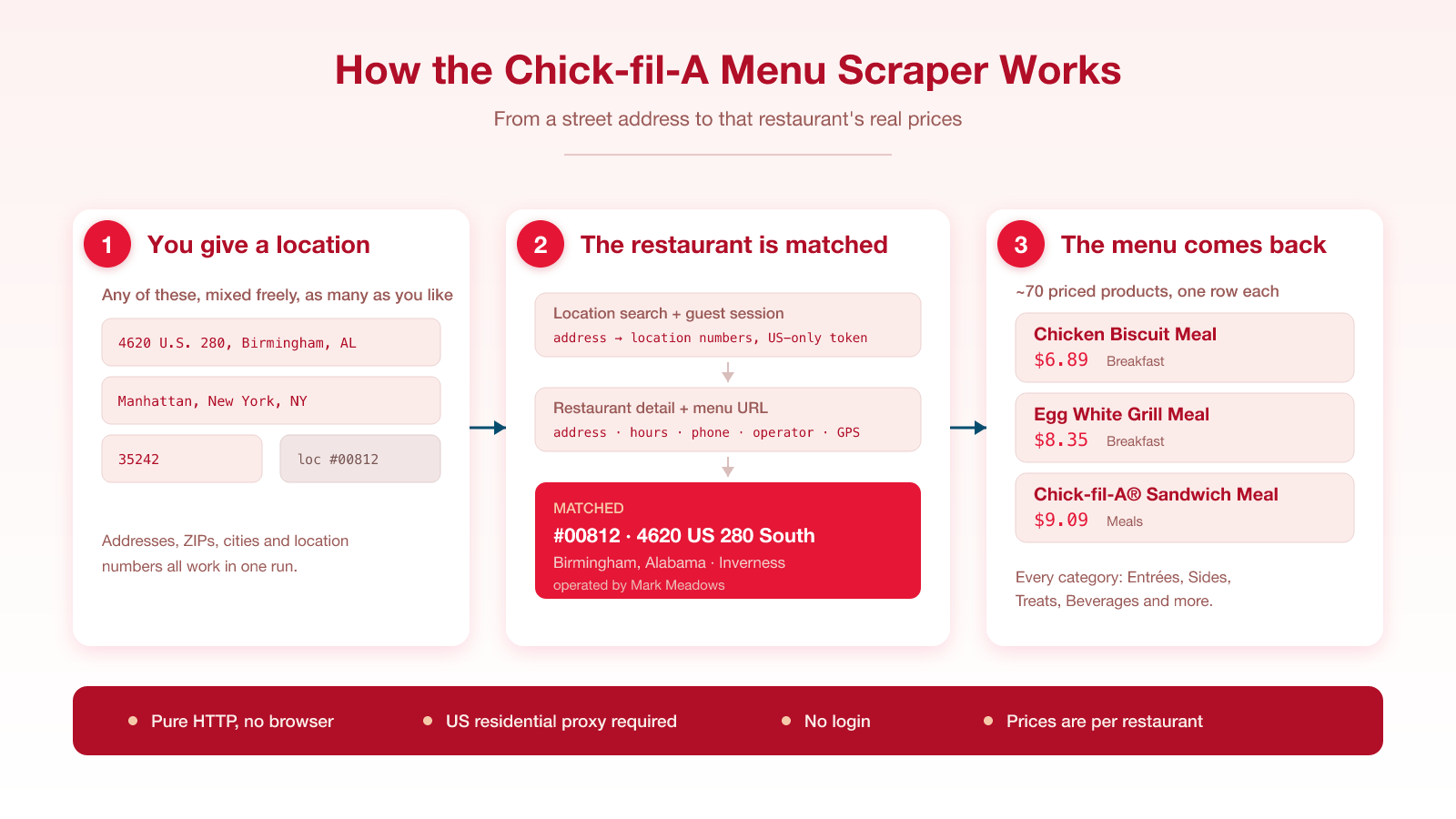
Each location is turned into a restaurant by Chick-fil-A's own location search, so spelling and abbreviations never matter — "Road" or "Rd", "West" or "W" resolve to the same store. The actor then reads the menu for that specific restaurant, so the prices are the ones that location charges.
Those prices are per-store. Chick-fil-A prints its national menu without prices for exactly that reason; the number a customer pays is set restaurant by restaurant, and this returns the real one for each location you give it.
### Input
| Field | Type | Required | Notes |
|---|---|---|---|
| `addresses` | array of strings | one of these two | Street addresses, ZIP codes or city names. Mix them freely. |
| `locationNumbers` | array of strings | one of these two | Chick-fil-A location numbers, e.g. `00812`. Returns the address too. |
| `maxStoresPerAddress` | integer | no | Restaurants per location, nearest first. Default `1`. |
| `includeUnpriced` | boolean | no | Also emit products with no set price. Default `false`. |
| `maxItems` | integer | no | Row cap. Default `5000`. |
| `maxConcurrency` | integer | no | Parallel HTTP calls. Default `6`. |
| `proxy` | object | no | US residential proxy. Defaults to Apify Residential (US). Required. |
#### Example input
```json
{
"addresses": ["4620 U.S. 280, Birmingham, AL 35242"],
"maxStoresPerAddress": 1,
"proxy": { "useApifyProxy": true, "apifyProxyGroups": ["RESIDENTIAL"], "apifyProxyCountry": "US" }
}
```
### Output schema
One row per orderable product per restaurant.
```jsonc
{
"type": "menu-item",
"locationNumber": "00812",
"storeName": "Inverness",
"storeAddress": "4620 US 280 South",
"storeCity": "Birmingham",
"storeState": "AL",
"storePostalCode": "35242",
"storeCountry": "US",
"storeCounty": "Shelby",
"storeLatitude": 33.42783,
"storeLongitude": -86.70817,
"storePhone": "+12059959925",
"operatorName": "Mark Meadows",
"searchedAddress": "4620 U.S. 280, Birmingham, AL 35242", // echoes your input
"itemId": "10143",
"itemName": "Chick-fil-A® Chicken Biscuit Meal",
"categoryName": "Breakfast",
"description": "A boneless breast of chicken seasoned to perfection…",
"tag": "CFACHICKENBISCUIT_MEAL",
"dayPart": "Breakfast",
"itemType": "MEAL",
"isMeal": true,
"servingSize": null,
"price": 6.89, // this restaurant's price, in USD
"currency": "USD",
"imageUrl": "https://www.cfacdn.com/img/order/menu/Mobile/…",
"scrapedAt": "2026-09-04T04:50:00.000Z"
}
```
#### Field coverage
Measured across 70 products from the Inverness (Birmingham) restaurant:
| Field | Coverage |
|---|---|
| `price`, `imageUrl`, store columns | 100% |
| `description` | 97% |
### Pricing
| Event | When it fires | Rate |
|---|---|---|
| Actor start | Once per run | $0.005 |
| Result | Per product row returned | $0.0009 |
A restaurant returns roughly 70 priced products, so one location runs about $0.07 plus the proxy traffic it uses. A US residential proxy is required, so each run also consumes residential proxy GB from whatever proxy you configure.
### What makes this richer than the competition
| Capability | Other actors | This actor |
|---|---|---|
| Chick-fil-A menu at all | None on the Store | Yes |
| Search by street address | — | Street address, ZIP, city and location number |
| Prices specific to the restaurant | — | Yes |
| Full store record (hours, phone, operator, GPS) | — | Yes |
| Batch many locations per run | — | Yes |
### Notes & limitations
- **A US residential proxy is required.** Chick-fil-A blocks non-US IPs at the Cloudflare edge, on both the login and menu APIs. A non-US exit returns zero rows; the actor fails fast with a clear message rather than looking broken.
- **United States only.** Chick-fil-A's US region is the only one this actor reads.
- **Spelling and abbreviations don't matter.** Chick-fil-A's own location search geocodes each address, so the wording never has to match its formatting.
- **Calories and macros are not returned.** Chick-fil-A serves nutrition from a separate endpoint; this actor returns the menu with prices, categories and descriptions. Nutrition may be added later.
- **Location numbers return the address too.** Unlike some chains, Chick-fil-A's restaurant search accepts a location number and returns the full address, so `locationNumbers` rows are complete.
### 🤖 For AI Agents & LLM Apps
**Purpose.** Returns the menu of a specific Chick-fil-A restaurant in the United States — per-store prices, categories, descriptions and the full store record. Requires a US residential proxy.
**Minimal tested input.**
```json
{ "addresses": ["4620 U.S. 280, Birmingham, AL 35242"], "maxStoresPerAddress": 1,
"proxy": { "useApifyProxy": true, "apifyProxyGroups": ["RESIDENTIAL"], "apifyProxyCountry": "US" } }
```
**Output fields (flat).** `type`, `locationNumber`, `storeName`, `storeAddress`, `storeCity`, `storeState`, `storePostalCode`, `storeCountry`, `storeCounty`, `storeLatitude`, `storeLongitude`, `storePhone`, `operatorName`, `searchedAddress`, `itemId`, `itemName`, `categoryName`, `description`, `tag`, `dayPart`, `itemType`, `isMeal`, `servingSize`, `price`, `currency`, `imageUrl`, `scrapedAt`.
**Behaviour worth knowing.**
- One row per product per restaurant; roughly 70 priced rows per restaurant.
- A US residential proxy is mandatory; a non-US exit yields zero rows.
- `addresses` accepts street addresses, ZIP codes and city names together.
- `searchedAddress` echoes the input string that produced the row.
- Prices are US dollars as numbers, never strings.
- Calories/macros are not included.
### ⚠️ Disclaimer
This actor collects publicly available menu information published by Chick-fil-A for its United States restaurants. It does not access private, personal or authenticated user data, and it does not attempt to bypass authentication — it uses the same public guest session the ordering website issues to anonymous visitors. Menu content, prices and trademarks belong to their respective owners; Chick-fil-A® is a registered trademark of CFA Properties, Inc., and this actor is not affiliated with, endorsed by or sponsored by Chick-fil-A. Prices and availability change frequently and by location — treat every row as a snapshot taken at `scrapedAt`, and verify anything you rely on for a purchase against the restaurant directly. You are responsible for using the output in line with applicable law and Chick-fil-A's terms.
### SEO Keywords
chick-fil-a menu scraper, chick-fil-a prices api, chickfila menu data, fast food menu scraper, restaurant menu api, chick-fil-a store locator api, menu price monitoring, fast food price tracking, chick-fil-a location prices, quick service restaurant data, menu item pricing dataset, restaurant price intelligence, store level menu pricing, competitive menu analysis, chick-fil-a operator data, us fast food data, chicken sandwich price by location, chick-fil-a breakfast menu, menu extraction api, restaurant data feed
# Actor input Schema
## `addresses` (type: `array`):
One US location per line. A street address, ZIP or city returns the nearest restaurant(s). Chick-fil-A's own location search geocodes each entry, so spelling and abbreviations never matter. Examples: '4620 U.S. 280, Birmingham, AL 35242', '35242', 'Birmingham, AL'.
## `locationNumbers` (type: `array`):
Location numbers, when you already know them (for example '00812'). These skip the location search and go straight to that restaurant.
## `maxStoresPerAddress` (type: `integer`):
How many restaurants to return per location, nearest first. Leave at 1 for an exact address.
## `includeUnpriced` (type: `boolean`):
Emit products that carry no set price (combos priced by configuration). Off by default so you are not charged for rows without a price.
## `maxItems` (type: `integer`):
Hard cap on dataset rows. A restaurant carries roughly 70 priced products.
## `maxConcurrency` (type: `integer`):
How many HTTP calls run in parallel. The default suits most runs.
## `proxy` (type: `object`):
A US residential proxy is REQUIRED — Chick-fil-A blocks non-US IPs at its edge. Defaults to Apify Residential pinned to the US. If you supply your own proxy, make sure it exits from a US IP or every run returns zero rows.
## Actor input object example
```json
{
"addresses": [
"4620 U.S. 280, Birmingham, AL 35242",
"10001"
],
"maxStoresPerAddress": 1,
"includeUnpriced": false,
"maxItems": 5000,
"maxConcurrency": 6,
"proxy": {
"useApifyProxy": true,
"apifyProxyGroups": [
"RESIDENTIAL"
],
"apifyProxyCountry": "US"
}
}
```
# Actor output Schema
## `results` (type: `string`):
No description
# API
You can run this Actor programmatically using our API. Below are code examples in JavaScript, Python, and CLI, as well as the OpenAPI specification and MCP server setup.
## JavaScript example
```javascript
import { ApifyClient } from 'apify-client';
// Initialize the ApifyClient with your Apify API token
// Replace the '' with your token
const client = new ApifyClient({
token: '',
});
// Prepare Actor input
const input = {
"addresses": [
"4620 U.S. 280, Birmingham, AL 35242",
"10001"
],
"proxy": {
"useApifyProxy": true,
"apifyProxyGroups": [
"RESIDENTIAL"
],
"apifyProxyCountry": "US"
}
};
// Run the Actor and wait for it to finish
const run = await client.actor("memo23/chick-fil-a-menu-scraper").call(input);
// Fetch and print Actor results from the run's dataset (if any)
console.log('Results from dataset');
console.log(`💾 Check your data here: https://console.apify.com/storage/datasets/${run.defaultDatasetId}`);
const { items } = await client.dataset(run.defaultDatasetId).listItems();
items.forEach((item) => {
console.dir(item);
});
// 📚 Want to learn more 📖? Go to → https://docs.apify.com/api/client/js/docs
```
## Python example
```python
from apify_client import ApifyClient
# Initialize the ApifyClient with your Apify API token
# Replace '' with your token.
client = ApifyClient("")
# Prepare the Actor input
run_input = {
"addresses": [
"4620 U.S. 280, Birmingham, AL 35242",
"10001",
],
"proxy": {
"useApifyProxy": True,
"apifyProxyGroups": ["RESIDENTIAL"],
"apifyProxyCountry": "US",
},
}
# Run the Actor and wait for it to finish
run = client.actor("memo23/chick-fil-a-menu-scraper").call(run_input=run_input)
# Fetch and print Actor results from the run's dataset (if there are any)
print(f"💾 Check your data here: https://console.apify.com/storage/datasets/{run.default_dataset_id}")
for item in client.dataset(run.default_dataset_id).iterate_items():
print(item)
# 📚 Want to learn more 📖? Go to → https://docs.apify.com/api/client/python/docs/quick-start
```
## CLI example
```bash
echo '{
"addresses": [
"4620 U.S. 280, Birmingham, AL 35242",
"10001"
],
"proxy": {
"useApifyProxy": true,
"apifyProxyGroups": [
"RESIDENTIAL"
],
"apifyProxyCountry": "US"
}
}' |
apify call memo23/chick-fil-a-menu-scraper --silent --output-dataset
```
## MCP server setup
```json
{
"mcpServers": {
"apify": {
"type": "http",
"url": "https://mcp.apify.com/?tools=fetch-actor-details,memo23/chick-fil-a-menu-scraper"
}
}
}
```
The hosted server signs you in with OAuth on first connect, so no API token belongs in this config. Clients without OAuth support can send an `Authorization: Bearer ` header instead, using a token from API & Integrations in Apify Console (https://console.apify.com/settings/integrations).
## OpenAPI specification
Download the OpenAPI definition: https://api.apify.com/v2/actors/Ra1i0vciTqM61agry/builds/dYYi42ytAug2GvzEC/openapi.json