# Chrono24 Scraper · All-in-One Watch Listings · $3/1k (`memo23/chrono24-scraper`) Actor
Chrono24 all-in-one scraper — auto-classifies detail, brand-index, model-index, and search URLs in one run. 35+ fields per listing: reference, year, movement, caliber, materials, dealer country, shipping policy, full image array. JSON-LD product data. Pure HTTP, no browser
- **URL**: https://apify.com/memo23/chrono24-scraper.md
- **Developed by:** [Muhamed Didovic](https://apify.com/memo23) (community)
- **Categories:** Agents, Lead generation, Automation
- **Stats:** 3 total users, 2 monthly users, 100.0% runs succeeded, NaN bookmarks
- **User rating**: 5.00 out of 5 stars
## Pricing
from $3.00 / 1,000 results
This Actor is paid per event. You are not charged for the Apify platform usage, but only a fixed price for specific events.
Learn more: https://docs.apify.com/platform/actors/running/actors-in-store#pay-per-event
## What's an Apify Actor?
Actors are a software tools running on the Apify platform, for all kinds of web data extraction and automation use cases.
In Batch mode, an Actor accepts a well-defined JSON input, performs an action which can take anything from a few seconds to a few hours,
and optionally produces a well-defined JSON output, datasets with results, or files in key-value store.
In Standby mode, an Actor provides a web server which can be used as a website, API, or an MCP server.
Actors are written with capital "A".
## How to integrate an Actor?
If asked about integration, you help developers integrate Actors into their projects.
You adapt to their stack and deliver integrations that are safe, well-documented, and production-ready.
The best way to integrate Actors is as follows.
In JavaScript/TypeScript projects, use official [JavaScript/TypeScript client](https://docs.apify.com/api/client/js.md):
```bash
npm install apify-client
```
In Python projects, use official [Python client library](https://docs.apify.com/api/client/python.md):
```bash
pip install apify-client
```
In shell scripts, use [Apify CLI](https://docs.apify.com/cli/docs.md):
````bash
# MacOS / Linux
curl -fsSL https://apify.com/install-cli.sh | bash
# Windows
irm https://apify.com/install-cli.ps1 | iex
```bash
In AI frameworks, you might use the [Apify MCP server](https://docs.apify.com/platform/integrations/mcp.md).
If your project is in a different language, use the [REST API](https://docs.apify.com/api/v2.md).
For usage examples, see the [API](#api) section below.
For more details, see Apify documentation as [Markdown index](https://docs.apify.com/llms.txt) and [Markdown full-text](https://docs.apify.com/llms-full.txt).
# README
## Chrono24 Scraper — Watch Listings, Brand & Model Search, Full Detail Specs
Paste any chrono24.com URL — a single listing, a brand page, a model page, or a search — and get a clean structured dataset with **40+ fields per watch**: reference number, year, movement, caliber, power reserve, jewels, case diameter, materials, dial, bracelet, seller, country, shipping, and the full image gallery. Talks to Chrono24's own mobile JSON API. **No Cloudflare wall, no headless browser, works on any proxy.**
---
### Why use this scraper
- **All Chrono24 URL kinds in one input** — paste a brand page, a model page, a search query, and individual listing URLs in the same array. Each is auto-classified and routed to the right API call. No separate actors per URL shape.
- **40+ fields per listing** — far beyond price + condition. Every detail row carries: brand, model, reference number, production year, condition, movement type, caliber name, power reserve, jewel count, case diameter + thickness + material, bezel material, crystal/glass, dial color + markers, bracelet material + color + length, clasp, lug width, gender, water resistance, functions, scope of delivery, seller type + country + member-since, plus the full description and image gallery.
- **Official mobile JSON API, not HTML scraping** — the actor speaks the same signed JSON API the Chrono24 iOS/Android apps use. That means structured, type-stable data (no brittle HTML parsing) and resilience to website redesigns.
- **No Cloudflare, no browser** — the mobile API endpoint isn't behind Cloudflare's challenge wall, so there's no CAPTCHA solver, no headless Chromium, and **no need for premium residential proxies** — datacenter or any residential pool works. Memory footprint ~512 MB.
- **Full filter control** — narrow by price, year, condition, movement, case material, dial color, bracelet, gender, seller type, country and sort order. Paste a filtered chrono24.com URL *or* set `searchParams` in plain words (`"steel"`, `"automatic"`, `"price descending"`) — they're resolved to Chrono24's ids for you.
- **Fast card mode** — set `fetchListingDetails: false` to emit ~15 fields per listing straight from the search response (id, title, subtitle, price, shipping, country, seller type, image gallery) at 50 listings per request — ideal for price-tracking dashboards.
- **CSV-friendly flatten** — every watch spec is flattened to a `specs_*` column (`specs_caliber`, `specs_casediameter`, `specs_year`…) for instant spreadsheet use.
---
### Overview
Chrono24 is the world's largest luxury watch marketplace — 500,000+ active listings (114,000+ Rolex alone), ~3 million users, ~10,000 watch brands. Whether you're a dealer monitoring inventory, an analyst tracking model price drifts, an arbitrage operator hunting cross-market spreads, or a collector building a database, you eventually need this data structured.
The actor authenticates to Chrono24's mobile API (`chrono24.app`) exactly like the official app — a one-time session handshake plus a per-request HMAC signature — then pages through search results and pulls full detail JSON per listing. Four URL shapes are auto-classified, so you don't tell the actor "what kind of URL this is"; you just paste URLs.
---
### Supported inputs
| Input | Pattern | What you get |
|---|---|---|
| **Detail page** — single listing | `/{brand}/{slug}--id{LISTING_ID}.htm` | 1 row with the full 40+ field spec sheet |
| **Brand page** — all of a brand | `/{brand}/index.htm` | every listing of the brand (e.g. 114k+ Rolex), 50/page, paginated |
| **Model page** — one model | `/{brand}/{model-slug}--mod{MODEL_ID}.htm` | every listing of one model (Daytona, Speedmaster, Nautilus…) |
| **Search** — keyword query | `/search/index.htm?query=…` | every match for the query (e.g. `patek nautilus`), paginated |
Mix any of these in the same `startUrls[]` array. JSON or CSV output.
**Filters are fully supported** — either paste a filtered/sorted chrono24.com URL (price, year, condition, movement, materials, location, sort are read straight from the query string), or set them once in `searchParams` using plain words (`"steel"`, `"automatic"`, `"new"`, `"price descending"`). See [Filters](#filters) below.
> Speaks Chrono24's mobile JSON API. No Cloudflare challenge, no browser, no CAPTCHA solver.
---
### Use cases
| Audience | Use it to… |
|---|---|
| **Watch dealers** | Monitor competitor inventory + price changes across brands daily. Alert when a target reference (`116610LN`, `5711/1A`, `15510ST`) appears under a threshold. |
| **Investment analysts** | Track average ask for blue-chip references over time. The `referenceNumber` + `specs_year` + `price` triple builds a per-cohort index. |
| **Arbitrage operators** | Cross-market spread mining — pull Chrono24 + other marketplaces in parallel, find >15% deltas after shipping normalisation. |
| **Insurance / appraisal** | Replacement-value lookups by reference + condition + year, with a defensible full spec sheet. |
| **Collectors** | Build a private database of every Submariner / Speedmaster / Royal Oak with movement, caliber, year, condition, seller country, photos. |
---
### How it works
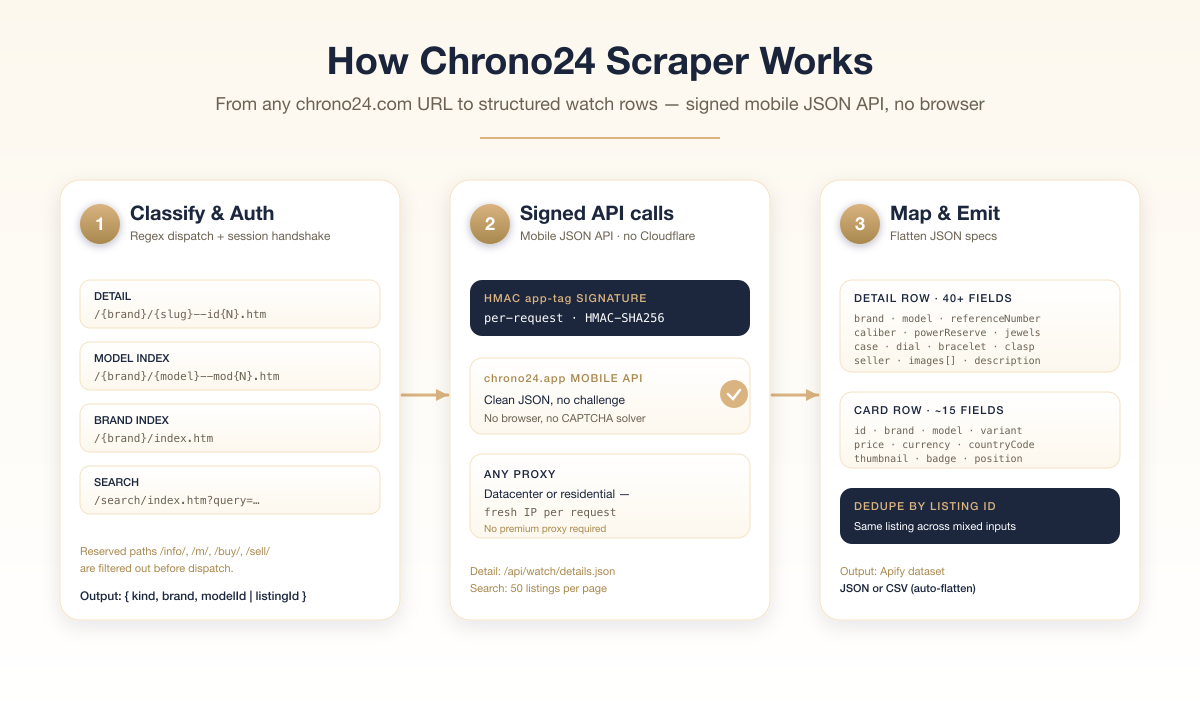
Three stages, all pure HTTP JSON:
1. **Classify & authenticate** — each input URL is matched against a deterministic regex set (detail / brand / model / search). The actor performs the mobile app's one-time session handshake to obtain a session cookie, and resolves brand slugs to their numeric manufacturer IDs from the API's brand catalogue.
2. **Signed API calls** — every request carries the mobile app's `app-tag` HMAC signature (computed per request over the URL, method, timestamp, nonce, and session), so the API returns clean JSON. A fresh proxy IP rotates in per request.
3. **Map & emit** — search responses page 50 listings at a time; in detail mode each listing's full spec JSON is fetched (concurrency-capped) and every attribute is flattened into `specs_*` columns. One row per listing, deduped by `listingId` across all inputs.
End-to-end live smoke test: a `patek nautilus` search (3,904 matches) returned 6 full detail rows in ~4 s through a datacenter proxy, 0 failures; an Omega brand page (55,770 listings) streamed 50 cards per request.
---
### Input configuration
Field | Type | Required | Notes
--- | --- | --- | ---
`startUrls` | `string[]` | yes | Any mix of detail / brand / model / search chrono24.com URLs. Auto-classified. Filters embedded in the URL (e.g. `?priceFrom=5000&sortorder=1`) are honoured.
`searchParams` | `object` | no | Filter passthrough merged into every brand/model/search call (price, year, condition, movement, materials, country, sort…). Accepts plain words (resolved to Chrono24 ids) or raw ids. See [Filters](#filters).
`fetchListingDetails` | `boolean` | no | Default `true`. After each search card, fetch the full detail JSON (40+ fields incl. caliber, materials, seller). Disable for fast card mode (~15 fields, 50/request, no per-listing fetch).
`maxIndexPages` | `integer` | no | Default `10`. Max pages of search pagination per brand/model/search URL (50 listings per page).
`flatten` | `boolean` | no | Default `true`. Flatten the nested `specs` object to `specs_*` top-level columns for CSV. Disable to keep nested JSON.
`includeRaw` | `boolean` | no | Default `false`. Attach the raw detail API payload as `rawJson` on each detail row.
`maxItems` | `integer` | no | Hard cap on rows emitted. Default `1000`. Free-tier users capped at `100`.
`maxConcurrency` | `integer` | no | Parallel detail fetches. Default `6`.
`proxy` | `object` | no | Any proxy works — the mobile API isn't behind Cloudflare. Datacenter is cheapest; residential is the safe default. You can also supply your own proxy URLs.
#### Example input
```json
{
"startUrls": [
"https://www.chrono24.com/rolex/daytona--mod2.htm",
"https://www.chrono24.com/omega/index.htm",
"https://www.chrono24.com/rolex/rolex-lady-datejust--id45070783.htm",
"https://www.chrono24.com/search/index.htm?query=patek+nautilus"
],
"fetchListingDetails": true,
"maxIndexPages": 5,
"maxItems": 500,
"proxy": { "useApifyProxy": true }
}
````
#### Filters
Two ways to filter — they stack (URL filters + `searchParams`, with `searchParams` winning on conflict):
**1. Paste a filtered browser URL.** Filter and sort on chrono24.com, copy the URL, drop it in `startUrls`. Price, year, condition, movement, materials, location and sort are read straight from the query string:
```
https://www.chrono24.com/rolex/index.htm?priceFrom=5000&priceTo=15000&sortorder=1
```
**2. Set `searchParams` once** — applied to every brand/model/search URL. Attribute filters accept **plain words** (resolved to Chrono24 ids automatically); price/year take raw numbers:
```json
{
"startUrls": ["https://www.chrono24.com/omega/index.htm"],
"searchParams": {
"priceFrom": 2000,
"priceTo": 8000,
"caseMaterials": "steel",
"movementTypes": "automatic",
"condition": "new",
"sortorder": "price descending"
}
}
```
Common filters (friendly values shown):
| Param | Accepts |
|---|---|
| `priceFrom`, `priceTo` | numbers (in `SETCURR`, default USD) |
| `year` | production year, e.g. `2020` |
| `usedOrNew` | `"new"`, `"used"` |
| `condition` | `"new"`, `"like new & unworn"`, `"very good"`, `"good"`, … |
| `movementTypes` | `"automatic"`, `"manual winding"`, `"quartz"` |
| `caseMaterials` | `"steel"`, `"yellow gold"`, `"rose gold"`, `"platinum"`, `"titanium"`, `"ceramic"`, … |
| `dialColor` | `"black"`, `"blue"`, `"green"`, `"meteorite"`, … |
| `braceletMaterial` | `"steel"`, `"leather"`, `"rubber"`, … |
| `gender` | `"men"`, `"women"` |
| `sellerType` | `"professional dealer"`, `"private sellers"`, `"chrono24 direct"` |
| `countryIds` | `"Germany"`, `"United States of America"`, … (or ISO codes `DE`, `US`) |
| `sortorder` | `"relevance"`, `"price ascending"`, `"price descending"`, `"newest"`, `"popularity"` |
Unrecognised labels are passed through unchanged and logged, so you can always use a raw Chrono24 id directly.
***
### Output overview
Two row shapes, set by the `rowType` field:
- **`detail`** — emitted for detail URLs and (when `fetchListingDetails: true`) for every listing found via brand/model/search. Carries the full spec sheet.
- **`card`** — emitted for listings on brand/model/search pages when `fetchListingDetails: false`. ~15 fields straight from the search response.
All rows include `listingId`, `listingUrl`, `price`, `currency`, `images[]`, and `scrapedAt`.
***
### Output samples
#### `rowType: "detail"` (real sample, abridged)
```jsonc
{
"rowType": "detail",
"listingId": "45070783",
"productId": 1122,
"listingUrl": "https://www.chrono24.com/rolex/rolex-lady-datejust--id45070783.htm",
"title": "Rolex Lady-Datejust",
"subtitle": "26 mm Bronze Diamond Dial Oyster Watch 6916 circa 1981",
"brand": "Rolex",
"brandId": 221,
"model": "Lady-Datejust",
"modelId": 53,
"referenceNumber": "6916",
"price": 3299,
"currency": "USD",
"priceNegotiable": false,
"conditionNew": false,
"availabilityText": "Item is in stock",
"country": "United States of America",
"sellerType": "Dealer",
"sellerCountry": "United States of America",
"sellerMemberSince": 2018,
"specs": {
"referencenumber": "6916",
"casediameter": "26 mm",
"year": "1981",
"condition": "Used (very good)",
"movementtype": "Automatic",
"caliber": "2030",
"powerreserve": "42 h",
"jewelnumber": "26",
"casematerial": "Steel",
"bezelmaterial": "Steel",
"glass": "Plexiglass",
"dialcolor": "Bronze",
"braceletmaterial":"Steel",
"clasp": "Fold clasp",
"gender": "Women's watch"
// …20+ more spec_* fields, flattened when flatten=true
},
"images": ["https://img.chrono24.com/images/uhren/45070783-…-ExtraLarge.jpg", "…"],
"thumbnail": "https://img.chrono24.com/images/uhren/45070783-…-ExtraLarge.jpg",
"sourceUrl": "https://www.chrono24.com/rolex/rolex-lady-datejust--id45070783.htm",
"scrapedAt": "2026-06-02T…"
}
```
#### `rowType: "card"` (real sample — `fetchListingDetails: false`)
```jsonc
{
"rowType": "card",
"listingId": "46108138",
"listingUrl": "https://www.chrono24.com/omega/seamaster-diver--id46108138.htm",
"title": "Omega Seamaster Diver 300 M",
"subtitle": "Blue No Wave Dial Complete Set",
"price": 4250,
"currency": "USD",
"shippingCost": 300,
"countryCode": "US",
"countryName": "United States of America",
"sellerType": "Dealer",
"stockInfo": "InStock",
"thumbnail": "https://img.chrono24.com/images/uhren/46108138-…-Square420.jpg",
"images": ["…", "…"],
"sourceUrl": "https://www.chrono24.com/omega/index.htm",
"scrapedAt": "2026-06-02T…"
}
```
***
### Key output fields
**Identity** — `listingId` (primary key), `referenceNumber` (best join key vs external watch DBs), `brand` + `model`, `productId`.
**Price** — `price` (numeric), `currency` (ISO 4217), `priceNegotiable`, `shippingCost`.
**Watch specs** (`specs_*` when flattened) — `year`, `condition`, `movementtype`, `caliber`, `powerreserve`, `jewelnumber`, `casediameter`, `casematerial`, `bezelmaterial`, `glass`, `dialcolor`, `braceletmaterial`, `clasp`, `lugwidth`, `gender`, `functions`, `waterresistance`, `scopeofdelivery`.
**Commerce** — `availabilityText`, `country`, `conditionNew`, `sellerType`, `sellerCountry`, `sellerMemberSince`.
**Media** — `images[]` (full resolution), `thumbnail`.
***
### FAQ
**Does this need a Cloudflare-bypass service or premium residential proxy?**
No. The actor uses Chrono24's mobile JSON API (`chrono24.app`), which is not behind Cloudflare's challenge. Any proxy works — datacenter (cheapest), any residential pool, or none for light use. This is the key difference from website scrapers, which hit Cloudflare on every request.
**How does it authenticate?**
It replicates the Chrono24 mobile app's request signing: a one-time session handshake plus a per-request HMAC signature header. You don't configure anything — it's automatic.
**Detail mode vs card mode?**
Detail mode (`fetchListingDetails: true`, default) costs one extra API call per listing but returns 40+ fields including caliber, materials, seller, and full description. Card mode skips the per-listing call and returns ~15 fields straight from the search response — 50 listings per request, much faster and cheaper.
**How do I scrape multiple brands or models in one run?**
Paste them all in `startUrls[]`. Mix brand pages, model pages, search queries, and individual listing URLs freely.
**Can I get the full image gallery?**
Yes. Detail rows return every photo at full (`ExtraLarge`) resolution; card rows return the gallery at `Square420`.
**Is currency normalised?**
No, by design. `price` is in the listing's native currency (`currency`). Normalise downstream against your own reference date.
**What about pagination?**
Brand/model/search URLs auto-paginate (50 listings/page) up to `maxIndexPages` or until `maxItems` is reached. A single Rolex brand page exposes 114,000+ listings across ~2,290 pages.
**How fresh is the data?**
Real-time — every run hits the live API.
***
### Support
- **Bug reports & feature requests** — open an issue on the actor's Apify page or email below.
- **Custom scraper builds** — see Additional Services.
- **Email** — `info@apifyscraper.com`
***
### Additional services
Need a custom watch-marketplace scraper (Bezel, WatchCharts, Hodinkee Shop, eBay watches), or this one extended with price-history reconstruction, seller-reputation enrichment, or image OCR for serial numbers? Reach out — most custom builds ship in 3-5 business days at fixed scope.
***
### Explore more scrapers
- [SoundCloud Scraper — Tracks, Artists, Playlists, Search & Bio Emails](https://apify.com/memo23/soundcloud-scraper)
- [TrustRadius Software Reviews Scraper](https://apify.com/memo23/trustradius-software-reviews-scraper-ppr)
- [Capterra Software & Reviews Scraper](https://apify.com/memo23/capterra-software-reviews-scraper-ppr)
- [TotalJobs UK Jobs Scraper](https://apify.com/memo23/totaljobs-search-cheerio-ppr)
- [Pinterest Pins & Boards Scraper](https://apify.com/memo23/pinterest-scraper-cheerio-ppr)
***
### ⚠️ Disclaimer
This Actor accesses publicly available data on Chrono24 for legitimate research, market intelligence, dealer-side competitive analysis, valuation, and personal-collection management purposes. Use of this Actor must comply with Chrono24 GmbH's Terms of Service and all applicable laws including data protection regulations (GDPR, CCPA, etc.). The Actor's authors are not affiliated with, endorsed by, or sponsored by Chrono24 GmbH. The "Chrono24" name and logo are trademarks of Chrono24 GmbH. Users must:
- Respect rate limits and avoid overloading Chrono24's infrastructure (the default concurrency with per-request proxy rotation is calibrated to stay well below any reasonable threshold).
- Not use scraped data to impersonate or defraud Chrono24 dealers or buyers.
- Use the data in compliance with applicable jurisdictions, especially around resale of personal data from seller pages.
- Not republish scraped images or copyrighted listing copy without permission from the original seller.
We do not store any scraped data; the Actor returns it directly to your Apify dataset for your authorized use.
***
### SEO Keywords
chrono24 scraper, chrono24 watch scraper, chrono24 listings scraper, chrono24 api, chrono24 api alternative, chrono24 data extraction, chrono24 bulk export, luxury watch scraper, rolex price scraper, omega listings scraper, patek philippe price tracker, watch marketplace scraper, watch arbitrage scraper, watch dealer inventory scraper, watch price tracker, watch market intelligence, reference number lookup, watch specs api, mobile api scraper, no-browser scraper, chrono24 json export, chrono24 csv export, web scraping, apify scraper
# Actor input Schema
## `startUrls` (type: `array`):
Full chrono24.com URLs to scrape. Brand/model/search URLs paginate automatically (50 listings per page) up to `Maximum index pages` per URL, until `Maximum items` is reached.
## `searchParams` (type: `object`):
Optional filter passthrough merged into every brand/model/search call (ignored for direct detail URLs). Keys are Chrono24 search params; values may be scalars or arrays. Applied on top of any filters already in a start URL.
**Friendly names are accepted** for attribute filters — write words, not ids:
• `caseMaterials`: "steel", "yellow gold", "titanium", "ceramic", …
• `movementTypes`: "automatic", "manual winding", "quartz"
• `condition`: "new", "very good", "good", …
• `dialColor`: "black", "blue", "meteorite", …
• `gender`: "men", "women"
• `sellerType`: "professional dealer", "private sellers", "chrono24 direct"
• `countryIds`: "United States of America", "Germany", … (or ISO codes US/DE)
• `sortorder`: "relevance", "price ascending", "price descending", "newest", "popularity"
Numeric params take raw values:
• `priceFrom`, `priceTo` — price range (in SETCURR currency, default USD)
• `year` — production year
• `usedOrNew` — "new" or "used"
Examples:
{ "priceFrom": 5000, "priceTo": 20000, "usedOrNew": "new", "sortorder": "price ascending" }
{ "caseMaterials": "steel", "movementTypes": "automatic", "condition": "new" }
## `fetchListingDetails` (type: `boolean`):
When enabled (default), each listing found via a brand/model/search page triggers a follow-up detail call to harvest the full mobile-API spec sheet (reference, year, movement, caliber, power reserve, jewels, case/dial/bracelet specs, seller, description — 40+ fields). Disable for fast card mode (~15 fields straight from the search response, 50 listings per request, no per-listing fetch).
## `maxIndexPages` (type: `integer`):
How many pages of search results to walk per brand/model/search input URL. The API serves 50 listings per page, so 10 pages = up to 500 listings per input URL. Detail URLs ignore this setting.
## `flatten` (type: `boolean`):
When enabled (default), the nested `specs` object is flattened to `specs_*` top-level columns (e.g. `specs_caliber`, `specs_casediameter`) and arrays-of-objects become JSON-stringified `*_json` fields. Disable to keep the raw nested shape.
## `includeRaw` (type: `boolean`):
When enabled, the raw detail-API payload is attached as a `rawJson` field on every detail row. Useful for accessing fields the actor doesn't surface explicitly. Off by default to keep rows small.
## `maxItems` (type: `integer`):
Hard cap on the number of rows emitted. A single detail URL emits 1 row. A brand/model/search URL fans out to 50 rows per page × however many pages the actor walks.
## `maxConcurrency` (type: `integer`):
Maximum number of detail fetches processed in parallel. 6-10 is the sweet spot.
## `minConcurrency` (type: `integer`):
Minimum number of detail fetches processed in parallel.
## `maxRequestRetries` (type: `integer`):
Number of retries before a failed request is given up. Each retry rotates to a fresh proxy IP.
## `proxy` (type: `object`):
The Chrono24 mobile API is NOT behind Cloudflare, so any proxy works — datacenter (cheapest), any residential pool, or Apify Proxy. A proxy is recommended so requests rotate IPs, but premium residential is NOT required. Defaults to Apify Proxy.
## Actor input object example
```json
{
"startUrls": [
"https://www.chrono24.com/rolex/daytona--mod2.htm",
"https://www.chrono24.com/omega/index.htm",
"https://www.chrono24.com/rolex/rolex-lady-datejust--id45070783.htm",
"https://www.chrono24.com/search/index.htm?query=patek+nautilus"
],
"searchParams": {},
"fetchListingDetails": true,
"maxIndexPages": 10,
"flatten": true,
"includeRaw": false,
"maxItems": 1000,
"maxConcurrency": 6,
"minConcurrency": 1,
"maxRequestRetries": 3,
"proxy": {
"useApifyProxy": true
}
}
```
# API
You can run this Actor programmatically using our API. Below are code examples in JavaScript, Python, and CLI, as well as the OpenAPI specification and MCP server setup.
## JavaScript example
```javascript
import { ApifyClient } from 'apify-client';
// Initialize the ApifyClient with your Apify API token
// Replace the '' with your token
const client = new ApifyClient({
token: '',
});
// Prepare Actor input
const input = {
"startUrls": [
"https://www.chrono24.com/rolex/daytona--mod2.htm",
"https://www.chrono24.com/omega/index.htm",
"https://www.chrono24.com/rolex/rolex-lady-datejust--id45070783.htm",
"https://www.chrono24.com/search/index.htm?query=patek+nautilus"
],
"searchParams": {},
"proxy": {
"useApifyProxy": true
}
};
// Run the Actor and wait for it to finish
const run = await client.actor("memo23/chrono24-scraper").call(input);
// Fetch and print Actor results from the run's dataset (if any)
console.log('Results from dataset');
console.log(`💾 Check your data here: https://console.apify.com/storage/datasets/${run.defaultDatasetId}`);
const { items } = await client.dataset(run.defaultDatasetId).listItems();
items.forEach((item) => {
console.dir(item);
});
// 📚 Want to learn more 📖? Go to → https://docs.apify.com/api/client/js/docs
```
## Python example
```python
from apify_client import ApifyClient
# Initialize the ApifyClient with your Apify API token
# Replace '' with your token.
client = ApifyClient("")
# Prepare the Actor input
run_input = {
"startUrls": [
"https://www.chrono24.com/rolex/daytona--mod2.htm",
"https://www.chrono24.com/omega/index.htm",
"https://www.chrono24.com/rolex/rolex-lady-datejust--id45070783.htm",
"https://www.chrono24.com/search/index.htm?query=patek+nautilus",
],
"searchParams": {},
"proxy": { "useApifyProxy": True },
}
# Run the Actor and wait for it to finish
run = client.actor("memo23/chrono24-scraper").call(run_input=run_input)
# Fetch and print Actor results from the run's dataset (if there are any)
print("💾 Check your data here: https://console.apify.com/storage/datasets/" + run["defaultDatasetId"])
for item in client.dataset(run["defaultDatasetId"]).iterate_items():
print(item)
# 📚 Want to learn more 📖? Go to → https://docs.apify.com/api/client/python/docs/quick-start
```
## CLI example
```bash
echo '{
"startUrls": [
"https://www.chrono24.com/rolex/daytona--mod2.htm",
"https://www.chrono24.com/omega/index.htm",
"https://www.chrono24.com/rolex/rolex-lady-datejust--id45070783.htm",
"https://www.chrono24.com/search/index.htm?query=patek+nautilus"
],
"searchParams": {},
"proxy": {
"useApifyProxy": true
}
}' |
apify call memo23/chrono24-scraper --silent --output-dataset
```
## MCP server setup
```json
{
"mcpServers": {
"apify": {
"command": "npx",
"args": [
"mcp-remote",
"https://mcp.apify.com/?tools=memo23/chrono24-scraper",
"--header",
"Authorization: Bearer "
]
}
}
}
```
## OpenAPI specification
```json
{
"openapi": "3.0.1",
"info": {
"title": "Chrono24 Scraper · All-in-One Watch Listings · $3/1k",
"description": "Chrono24 all-in-one scraper — auto-classifies detail, brand-index, model-index, and search URLs in one run. 35+ fields per listing: reference, year, movement, caliber, materials, dealer country, shipping policy, full image array. JSON-LD product data. Pure HTTP, no browser",
"version": "1.0",
"x-build-id": "oS0yQ550KeiudTPbP"
},
"servers": [
{
"url": "https://api.apify.com/v2"
}
],
"paths": {
"/acts/memo23~chrono24-scraper/run-sync-get-dataset-items": {
"post": {
"operationId": "run-sync-get-dataset-items-memo23-chrono24-scraper",
"x-openai-isConsequential": false,
"summary": "Executes an Actor, waits for its completion, and returns Actor's dataset items in response.",
"tags": [
"Run Actor"
],
"requestBody": {
"required": true,
"content": {
"application/json": {
"schema": {
"$ref": "#/components/schemas/inputSchema"
}
}
}
},
"parameters": [
{
"name": "token",
"in": "query",
"required": true,
"schema": {
"type": "string"
},
"description": "Enter your Apify token here"
}
],
"responses": {
"200": {
"description": "OK"
}
}
}
},
"/acts/memo23~chrono24-scraper/runs": {
"post": {
"operationId": "runs-sync-memo23-chrono24-scraper",
"x-openai-isConsequential": false,
"summary": "Executes an Actor and returns information about the initiated run in response.",
"tags": [
"Run Actor"
],
"requestBody": {
"required": true,
"content": {
"application/json": {
"schema": {
"$ref": "#/components/schemas/inputSchema"
}
}
}
},
"parameters": [
{
"name": "token",
"in": "query",
"required": true,
"schema": {
"type": "string"
},
"description": "Enter your Apify token here"
}
],
"responses": {
"200": {
"description": "OK",
"content": {
"application/json": {
"schema": {
"$ref": "#/components/schemas/runsResponseSchema"
}
}
}
}
}
}
},
"/acts/memo23~chrono24-scraper/run-sync": {
"post": {
"operationId": "run-sync-memo23-chrono24-scraper",
"x-openai-isConsequential": false,
"summary": "Executes an Actor, waits for completion, and returns the OUTPUT from Key-value store in response.",
"tags": [
"Run Actor"
],
"requestBody": {
"required": true,
"content": {
"application/json": {
"schema": {
"$ref": "#/components/schemas/inputSchema"
}
}
}
},
"parameters": [
{
"name": "token",
"in": "query",
"required": true,
"schema": {
"type": "string"
},
"description": "Enter your Apify token here"
}
],
"responses": {
"200": {
"description": "OK"
}
}
}
}
},
"components": {
"schemas": {
"inputSchema": {
"type": "object",
"required": [
"startUrls"
],
"properties": {
"startUrls": {
"title": "Chrono24 URLs",
"type": "array",
"description": "Full chrono24.com URLs to scrape. Brand/model/search URLs paginate automatically (50 listings per page) up to `Maximum index pages` per URL, until `Maximum items` is reached.",
"items": {
"type": "string"
}
},
"searchParams": {
"title": "Search filters (applied to every brand/model/search URL)",
"type": "object",
"description": "Optional filter passthrough merged into every brand/model/search call (ignored for direct detail URLs). Keys are Chrono24 search params; values may be scalars or arrays. Applied on top of any filters already in a start URL.\n\n**Friendly names are accepted** for attribute filters — write words, not ids:\n• `caseMaterials`: \"steel\", \"yellow gold\", \"titanium\", \"ceramic\", …\n• `movementTypes`: \"automatic\", \"manual winding\", \"quartz\"\n• `condition`: \"new\", \"very good\", \"good\", …\n• `dialColor`: \"black\", \"blue\", \"meteorite\", …\n• `gender`: \"men\", \"women\"\n• `sellerType`: \"professional dealer\", \"private sellers\", \"chrono24 direct\"\n• `countryIds`: \"United States of America\", \"Germany\", … (or ISO codes US/DE)\n• `sortorder`: \"relevance\", \"price ascending\", \"price descending\", \"newest\", \"popularity\"\n\nNumeric params take raw values:\n• `priceFrom`, `priceTo` — price range (in SETCURR currency, default USD)\n• `year` — production year\n• `usedOrNew` — \"new\" or \"used\"\n\nExamples:\n{ \"priceFrom\": 5000, \"priceTo\": 20000, \"usedOrNew\": \"new\", \"sortorder\": \"price ascending\" }\n{ \"caseMaterials\": \"steel\", \"movementTypes\": \"automatic\", \"condition\": \"new\" }"
},
"fetchListingDetails": {
"title": "Fetch full detail for each listing",
"type": "boolean",
"description": "When enabled (default), each listing found via a brand/model/search page triggers a follow-up detail call to harvest the full mobile-API spec sheet (reference, year, movement, caliber, power reserve, jewels, case/dial/bracelet specs, seller, description — 40+ fields). Disable for fast card mode (~15 fields straight from the search response, 50 listings per request, no per-listing fetch).",
"default": true
},
"maxIndexPages": {
"title": "Maximum pages per URL",
"minimum": 1,
"maximum": 2000,
"type": "integer",
"description": "How many pages of search results to walk per brand/model/search input URL. The API serves 50 listings per page, so 10 pages = up to 500 listings per input URL. Detail URLs ignore this setting.",
"default": 10
},
"flatten": {
"title": "Flatten nested fields for CSV-friendly output",
"type": "boolean",
"description": "When enabled (default), the nested `specs` object is flattened to `specs_*` top-level columns (e.g. `specs_caliber`, `specs_casediameter`) and arrays-of-objects become JSON-stringified `*_json` fields. Disable to keep the raw nested shape.",
"default": true
},
"includeRaw": {
"title": "Include raw API JSON on every detail row",
"type": "boolean",
"description": "When enabled, the raw detail-API payload is attached as a `rawJson` field on every detail row. Useful for accessing fields the actor doesn't surface explicitly. Off by default to keep rows small.",
"default": false
},
"maxItems": {
"title": "Maximum items to scrape",
"minimum": 1,
"type": "integer",
"description": "Hard cap on the number of rows emitted. A single detail URL emits 1 row. A brand/model/search URL fans out to 50 rows per page × however many pages the actor walks.",
"default": 1000
},
"maxConcurrency": {
"title": "Max concurrency",
"minimum": 1,
"maximum": 20,
"type": "integer",
"description": "Maximum number of detail fetches processed in parallel. 6-10 is the sweet spot.",
"default": 6
},
"minConcurrency": {
"title": "Min concurrency",
"minimum": 1,
"type": "integer",
"description": "Minimum number of detail fetches processed in parallel.",
"default": 1
},
"maxRequestRetries": {
"title": "Max request retries",
"minimum": 0,
"type": "integer",
"description": "Number of retries before a failed request is given up. Each retry rotates to a fresh proxy IP.",
"default": 3
},
"proxy": {
"title": "Proxy configuration",
"type": "object",
"description": "The Chrono24 mobile API is NOT behind Cloudflare, so any proxy works — datacenter (cheapest), any residential pool, or Apify Proxy. A proxy is recommended so requests rotate IPs, but premium residential is NOT required. Defaults to Apify Proxy."
}
}
},
"runsResponseSchema": {
"type": "object",
"properties": {
"data": {
"type": "object",
"properties": {
"id": {
"type": "string"
},
"actId": {
"type": "string"
},
"userId": {
"type": "string"
},
"startedAt": {
"type": "string",
"format": "date-time",
"example": "2025-01-08T00:00:00.000Z"
},
"finishedAt": {
"type": "string",
"format": "date-time",
"example": "2025-01-08T00:00:00.000Z"
},
"status": {
"type": "string",
"example": "READY"
},
"meta": {
"type": "object",
"properties": {
"origin": {
"type": "string",
"example": "API"
},
"userAgent": {
"type": "string"
}
}
},
"stats": {
"type": "object",
"properties": {
"inputBodyLen": {
"type": "integer",
"example": 2000
},
"rebootCount": {
"type": "integer",
"example": 0
},
"restartCount": {
"type": "integer",
"example": 0
},
"resurrectCount": {
"type": "integer",
"example": 0
},
"computeUnits": {
"type": "integer",
"example": 0
}
}
},
"options": {
"type": "object",
"properties": {
"build": {
"type": "string",
"example": "latest"
},
"timeoutSecs": {
"type": "integer",
"example": 300
},
"memoryMbytes": {
"type": "integer",
"example": 1024
},
"diskMbytes": {
"type": "integer",
"example": 2048
}
}
},
"buildId": {
"type": "string"
},
"defaultKeyValueStoreId": {
"type": "string"
},
"defaultDatasetId": {
"type": "string"
},
"defaultRequestQueueId": {
"type": "string"
},
"buildNumber": {
"type": "string",
"example": "1.0.0"
},
"containerUrl": {
"type": "string"
},
"usage": {
"type": "object",
"properties": {
"ACTOR_COMPUTE_UNITS": {
"type": "integer",
"example": 0
},
"DATASET_READS": {
"type": "integer",
"example": 0
},
"DATASET_WRITES": {
"type": "integer",
"example": 0
},
"KEY_VALUE_STORE_READS": {
"type": "integer",
"example": 0
},
"KEY_VALUE_STORE_WRITES": {
"type": "integer",
"example": 1
},
"KEY_VALUE_STORE_LISTS": {
"type": "integer",
"example": 0
},
"REQUEST_QUEUE_READS": {
"type": "integer",
"example": 0
},
"REQUEST_QUEUE_WRITES": {
"type": "integer",
"example": 0
},
"DATA_TRANSFER_INTERNAL_GBYTES": {
"type": "integer",
"example": 0
},
"DATA_TRANSFER_EXTERNAL_GBYTES": {
"type": "integer",
"example": 0
},
"PROXY_RESIDENTIAL_TRANSFER_GBYTES": {
"type": "integer",
"example": 0
},
"PROXY_SERPS": {
"type": "integer",
"example": 0
}
}
},
"usageTotalUsd": {
"type": "number",
"example": 0.00005
},
"usageUsd": {
"type": "object",
"properties": {
"ACTOR_COMPUTE_UNITS": {
"type": "integer",
"example": 0
},
"DATASET_READS": {
"type": "integer",
"example": 0
},
"DATASET_WRITES": {
"type": "integer",
"example": 0
},
"KEY_VALUE_STORE_READS": {
"type": "integer",
"example": 0
},
"KEY_VALUE_STORE_WRITES": {
"type": "number",
"example": 0.00005
},
"KEY_VALUE_STORE_LISTS": {
"type": "integer",
"example": 0
},
"REQUEST_QUEUE_READS": {
"type": "integer",
"example": 0
},
"REQUEST_QUEUE_WRITES": {
"type": "integer",
"example": 0
},
"DATA_TRANSFER_INTERNAL_GBYTES": {
"type": "integer",
"example": 0
},
"DATA_TRANSFER_EXTERNAL_GBYTES": {
"type": "integer",
"example": 0
},
"PROXY_RESIDENTIAL_TRANSFER_GBYTES": {
"type": "integer",
"example": 0
},
"PROXY_SERPS": {
"type": "integer",
"example": 0
}
}
}
}
}
}
}
}
}
}
```