# Dataroma Superinvestor Holdings Scraper (`memo23/dataroma-scraper`) Actor
Turn Dataroma into a spreadsheet of named-manager 13F holdings. Select Buffett, Burry, Klarman or leave empty for all 80+. Each row is one position with numeric shares, value, % and prices — not money strings. Optional quarter history stays on the same row. $2 per 1,000 holdings.
- **URL**: https://apify.com/memo23/dataroma-scraper.md
- **Developed by:** [Muhamed Didovic](https://apify.com/memo23) (community)
- **Stats:** 2 total users, 1 monthly users, 100.0% runs succeeded, 0 bookmarks
- **User rating**: No ratings yet
## Pricing
from $2.00 / 1,000 superinvestor holdings
This Actor is paid per event. You are not charged for the Apify platform usage, but only a fixed price for specific events.
Learn more: https://docs.apify.com/actors/running/actors-in-store.md#pay-per-event
## What's an Apify Actor?
An Actor is a serverless cloud program that runs on the Apify platform. It has two run modes.
In Batch mode, an Actor accepts a well-defined JSON input, performs an action which can take anything from a few seconds to a few hours,
and optionally produces a well-defined JSON output, datasets with results, or files in key-value store.
In Standby mode, an Actor provides a web server which can be used as a website, API, or an MCP server.
Apify vocabulary and the platform model are defined once, in the agent quickstart at https://apify.com/agents.md.
## How to integrate an Actor?
If asked about integration, you help developers integrate Actors into their projects.
You adapt to their stack and deliver integrations that are safe, well-documented, and production-ready.
Do not guess an integration path. Every one of them is in the agent quickstart at https://apify.com/agents.md: the Apify MCP server, Agent Skills with the Apify CLI, the JavaScript and Python clients, the REST API, and the account-free path for an agent with no human to sign in. It also carries the rule on stating cost before the first paid run.
For examples already wired to this Actor's own input schema, see the [API](#api) section below.
Each client library has reference documentation the quickstart does not restate: [JavaScript/TypeScript](https://docs.apify.com/api/client/js/docs.md) (`npm install apify-client`) and [Python](https://docs.apify.com/api/client/python/docs.md) (`pip install apify-client`).
# README
## Dataroma Superinvestor Holdings Scraper

Turn Dataroma's superinvestor pages into one typed row per stock holding. Pick Buffett, Burry, Klarman or any of the 80+ managers on the live list — or leave the list empty and take all of them.
Portfolio value, shares, reported price, and current price are numbers (`299253558000`, not `"$299,253,558,000"`). Recent activity is split into `Buy` / `Add` / `Reduce` / `Sell` plus a percent. Optional quarterly history attaches on the same row.
### Why Use This Scraper?
- Pick managers from a Console list (BRK, SAM, BAUPOST, …) instead of guessing raw IDs
- Empty selection follows Dataroma's live manager list — not a hardcoded "82"
- Typed money and share fields that sort and filter in CSV / Excel
- Activity parsed as `activityType` + `activityPercent` (`Add 45.24%`, `Reduce 5.89%`, `Buy`)
- Optional `history[]` from each holding's hist.php page (still one billed row)
- Optional ticker filter if you only want AAPL across a set of managers
- Direct HTTP, 512 MB default — no browser
### Overview
Built for analysts, fund researchers, and data teams who already use Dataroma and want the same 13F-derived holdings in a dataset.
One dataset row is one **current holding**. A Buffett run is ~29 rows (one per stock in the latest filing), not one row per manager. Sector mix is repeated on every row of that portfolio so a spreadsheet filter still works. Quarterly history is an array on the holding when you turn `includeHoldingHistory` on — it is not extra billed rows.
This is Dataroma's HTML tables, not EDGAR itself. Filing lag matches the site.
### Supported Inputs
| Input | What it is | Example |
|---|---|---|
| Manager IDs | Multi-select from the live Dataroma list | `BRK`, `SAM`, `BAUPOST` |
| Empty ID list | Every manager currently on managers.php | `[]` → all ~83 |
| Holdings URL | Optional paste of a portfolio page | `https://www.dataroma.com/m/holdings.php?m=BRK` |
| Tickers | Keep only those symbols | `AAPL`, `MOH` |
```json
{
"startUrls": [
"https://www.dataroma.com/m/holdings.php?m=BRK",
"https://www.dataroma.com/m/holdings.php?m=SAM"
]
}
```
**Unsupported:** EDGAR / 13F XML, WhaleWisdom, GuruFocus, insider Form 4, Congress trades, login-only Dataroma pages, and historical *portfolio snapshots* as separate rows (use `includeHoldingHistory` on each current stock instead).
### Use Cases
| Audience | Use case |
|---|---|
| **Long-only / family-office research** | Track what named managers added or cut last quarter |
| **Quant / data teams** | Feed typed holdings into a warehouse without parsing money strings |
| **Journalists** | Pull Buffett / Burry / Klarman positions for a story without copying tables |
| **Product & API builders** | Expose a holdings feed behind your own app |
| **Agencies** | Deliver a client-ready 13F-style extract without writing a scraper |
### How It Works
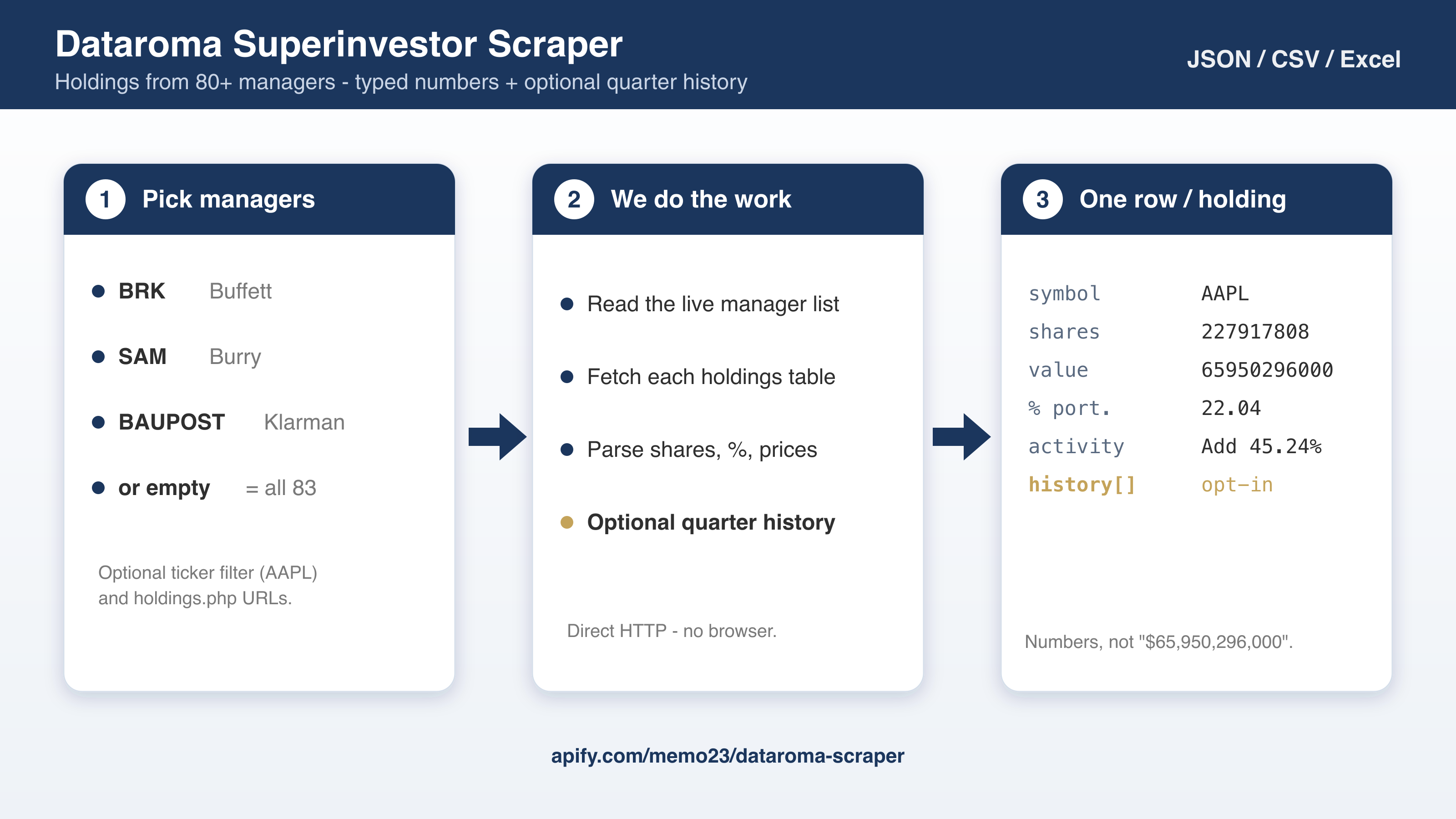
1. **Read the live manager list** from `dataroma.com/m/managers.php` (IDs + names).
2. **Fetch each holdings table** you selected (`holdings.php?m=BRK`, …).
3. **Parse one row per stock** — ticker, shares, %, prices, activity, sector mix — as numbers.
4. **(Opt-in) Attach quarter history** from `hist.php` for each current holding.
5. **Push** to the dataset (JSON / CSV / Excel). Billed per current holding.
### Input Configuration
| Field | Type | Default | Description |
|---|---|---|---|
| `superinvestors` | array | `[]` | Manager IDs. Empty = every live manager. Case-insensitive (`brk` → `BRK`). |
| `startUrls` | array | – | Optional `holdings.php?m=` URLs; IDs merge with `superinvestors`. |
| `symbols` | array | – | Optional ticker allowlist. Empty = all holdings in the selected portfolios. |
| `includeHoldingHistory` | boolean | `false` | Attach `history[]` (period, shares, %, activity, reported price). Still one billed row per current holding. |
| `maxItems` | integer | `10000` | Cap on holding rows (billing). Free Apify accounts are capped at 100. |
| `maxConcurrency` | integer | `5` | Parallel page fetches. |
| `proxy` | object | off | Dataroma answers a direct request today. Turn Apify Proxy on only if you start seeing blocks. |
```json
{
"superinvestors": ["BRK", "SAM"],
"maxItems": 50
}
```
```json
{
"superinvestors": ["BRK", "psc", "BAUPOST"],
"symbols": ["AAPL", "GOOGL"],
"includeHoldingHistory": true,
"maxItems": 20
}
```
### Output Overview
Each item is one current position at one manager. Identifiers (`superinvestorId`, `symbol`, `superinvestorUrl`) are always present on a successful parse. Money fields are numbers. `history` is `null` unless `includeHoldingHistory` is on.
A manager with zero stocks (empty portfolio on Dataroma) contributes no rows.
### Output Samples
Michael Burry / Molina Healthcare, with history enabled (trimmed):
```json
{
"superinvestorId": "SAM",
"superinvestorName": "Michael Burry - Scion Asset Management",
"superinvestorUrl": "https://www.dataroma.com/m/holdings.php?m=SAM",
"period": "2025 Q3",
"periodYear": 2025,
"periodQuarter": 3,
"portfolioDate": "2025-09-30",
"portfolioValue": 55001000,
"numberOfStocks": 3,
"symbol": "MOH",
"stockName": "Molina Healthcare Inc.",
"percentOfPortfolio": 43.49,
"recentActivity": "Buy",
"activityType": "Buy",
"activityPercent": null,
"shares": 125000,
"reportedPrice": 191.36,
"value": 23920000,
"currentPrice": 200.79,
"changeFromReportedPrice": 4.93,
"week52Low": 121.06,
"week52High": 244.89,
"sectorBreakdown": {
"Health Care": 43.49,
"Consumer Goods": 32.35,
"Financials": 24.16
},
"history": [
{
"period": "2025 Q3",
"periodYear": 2025,
"periodQuarter": 3,
"shares": 125000,
"percentOfPortfolio": 43.49,
"recentActivity": "Buy",
"activityType": "Buy",
"activityPercent": null,
"reportedPrice": 191.36
},
{
"period": "2025 Q1",
"periodYear": 2025,
"periodQuarter": 1,
"shares": 0,
"percentOfPortfolio": 0,
"recentActivity": "Sell 100.00%",
"activityType": "Sell",
"activityPercent": 100,
"reportedPrice": null
}
],
"historyUrl": "https://www.dataroma.com/m/hist/hist.php?f=SAM&s=MOH",
"stockUrl": "https://www.dataroma.com/m/stock.php?sym=MOH",
"scrapedAt": "2026-09-19T06:23:39.088Z"
}
```
### Key Output Fields
| Group | Fields |
|---|---|
| **Manager** | `superinvestorId`, `superinvestorName`, `superinvestorUrl` |
| **Filing** | `period`, `periodYear`, `periodQuarter`, `portfolioDate`, `portfolioValue`, `numberOfStocks`, `sectorBreakdown` |
| **Position** | `symbol`, `stockName`, `stockUrl`, `percentOfPortfolio`, `shares`, `value` |
| **Activity** | `recentActivity`, `activityType`, `activityPercent` |
| **Prices** | `reportedPrice`, `currentPrice`, `changeFromReportedPrice`, `week52Low`, `week52High` |
| **History** *(opt-in)* | `history[]`, `historyUrl` |
### FAQ
**How do I scrape one manager?**
Set `superinvestors` to `["BRK"]` (Buffett) or paste `https://www.dataroma.com/m/holdings.php?m=BRK` in `startUrls`.
**What if I leave Superinvestors empty?**
The actor reads the current managers.php list (83 names on 2026-09-19) and scrapes all of them. A full run is typically a few thousand holdings.
**Are values numbers or strings?**
Numbers. `portfolioValue` is `55001000`, not `"$55,001,000"`. Compact listing-page figures like `$2.05 B` become `2050000000`.
**What does includeHoldingHistory cost?**
Still one `dataroma-holding` event per *current* position. History is nested on that row. It does extra page fetches, so the run is slower.
**Is this official SEC data?**
No. Dataroma republishes public 13F filings. Use EDGAR if you need the raw filing.
**Do I need a proxy?**
Not in current tests. The site returned 200 over a direct request. Use the proxy field if that changes.
### Support
- Issues and feature requests: the **Issues** tab on this actor in Apify Console.
- Custom work:
- Website:
- Email:
### Additional Services
- Custom fields or a one-off full-manager dump:
- API access (no Apify platform fee, usage fee only):
### Explore More Scrapers
Same author, same export shape: jobs, reviews, and property scrapers on [memo23's Apify profile](https://apify.com/memo23).
### 🤖 For AI Agents & LLM Apps
Compact reference for AI agents calling this actor via the [Apify MCP server](https://mcp.apify.com) or the Apify API (actor: `memo23/dataroma-scraper`).
**Purpose:** Scrape current Dataroma superinvestor holdings (one row per stock) with typed numeric fields and optional quarterly history.
**Minimal input:**
```json
{
"superinvestors": ["SAM"],
"maxItems": 10
}
```
**Output:** one dataset row per holding — `superinvestorId`, `superinvestorName`, `superinvestorUrl`, `period`, `periodYear`, `periodQuarter`, `portfolioDate`, `portfolioValue`, `numberOfStocks`, `symbol`, `stockName`, `stockUrl`, `percentOfPortfolio`, `recentActivity`, `activityType`, `activityPercent`, `shares`, `reportedPrice`, `value`, `currentPrice`, `changeFromReportedPrice`, `week52Low`, `week52High`, `sectorBreakdown`, `history`, `historyUrl`, `scrapedAt`.
**Behaviors an agent should know:**
- Always set `maxItems`. Empty `superinvestors` scrapes every live manager (thousands of rows).
- IDs are case-insensitive. `startUrls` holdings.php links merge with `superinvestors`.
- `symbols` is an allowlist; omit it to keep every holding.
- `includeHoldingHistory` (default false) adds `history[]` and extra fetches; billing stays one event per current holding.
- Free Apify accounts are capped at 100 rows. Billed as PPE event `dataroma-holding`.
- Public Dataroma HTML only — not EDGAR XML, not insider Form 4.
### ⚠️ Disclaimer
This Actor is an independent tool and is not affiliated with, endorsed by, or sponsored by Dataroma or any of its subsidiaries. All trademarks mentioned are the property of their respective owners.
The scraper accesses only publicly available superinvestor holdings pages on dataroma.com — no authenticated endpoints, paid features, or content behind a login. Users are responsible for ensuring their use complies with dataroma.com's Terms of Service, applicable data-protection law (GDPR, CCPA, etc.), and any contractual obligations of their own organization.
### SEO Keywords
Dataroma scraper, scrape Dataroma, Dataroma API, superinvestor scraper, 13F holdings scraper, Buffett holdings scraper, Michael Burry scraper, Klarman holdings, hedge fund 13F data, superinvestor portfolio export, Dataroma holdings CSV, famous investor stock picks, 13F dataset, fund holdings API, Apify Dataroma
# Actor input Schema
## `superinvestors` (type: `array`):
Dataroma manager IDs. Empty = all live managers. ABI = Abrams Bison Investments; AKO = AKO Capital; AIM = Alex Roepers - Atlantic Investment Management; AP = AltaRock Partners; VAN = Arnold Van Den Berg - Century Management; GFT = Bill & Melinda Gates Foundation Trust; psc = Bill Ackman - Pershing Square Capital Management; LMM = Bill Miller - Miller Value Partners; HA = Bill Nygren - Oakmark Funds; fairx = Bruce Berkowitz - Fairholme Capital; OCL = Bryan Lawrence - Oakcliff Capital; ic = Carl Icahn - Icahn Capital Management; TGM = Chase Coleman - Tiger Global Management; tci = Chris Hohn - TCI Fund Management; SA = Christopher Bloomstran - Semper Augustus; DAV = Christopher Davis - Davis Advisors; AC = Chuck Akre - Akre Capital Management; CAS = Clifford Sosin - CAS Investment Partners; tp = Daniel Loeb - Third Point; abc = David Abrams - Abrams Capital Management; GLRE = David Einhorn - Greenlight Capital; MAVFX = David Katz - Matrix Asset Advisors; WP = David Rolfe - Wedgewood Partners; AM = David Tepper - Appaloosa Management; SP = Dennis Hong - ShawSpring Partners; DAC = Dodge & Cox Funds; HH = Duan Yongping - H\&H International Investment; FE = First Eagle Investment Management; FPA = First Pacific Advisors; ca = Francis Chou - Chou Associates; GC = Francois Rochon - Giverny Capital; CCM = Glenn Greenberg - Brave Warrior Advisors; ENG = Glenn Welling - Engaged Capital; GA = Greenhaven Associates; CM = Greg Alexander - Conifer Management; aq = Guy Spier - Aquamarine Capital; SSHFX = Harry Burn - Sound Shore; DCP = Henry Ellenbogen - Durable Capital Partners; HCM = Hillman Capital Management; oc = Howard Marks - Oaktree Capital Management; JIM = Jensen Investment Management; EC = John Armitage - Egerton Capital; AI = John Rogers - Ariel Investments; GLC = Josh Tarasoff - Greenlea Lane Capital; KB = Kahn Brothers Group; mc = Lee Ainslie - Maverick Capital; oa = Leon Cooperman; HC = Li Lu - Himalaya Capital Management; LT = Lindsell Train; MPF = Mairs & Power Funds; SE = Mason Hawkins - Southeastern Asset Management; SAM = Michael Burry - Scion Asset Management; PI = Mohnish Pabrai - Pabrai Investments; MUHL = Muhlenkamp; TF = Nelson Peltz - Trian Fund Management; PC = Norbert Lou - Punch Card Management; DA = Pat Dorsey - Dorsey Asset Management; pcm = Polen Capital Management; FFH = Prem Watsa - Fairfax Financial Holdings; PIM = Richard Pzena - Pzena Investment Management; RVC = Robert Vinall - RV Capital GmbH; RC = Ruane Cunniff LP; PTNT = Samantha McLemore - Patient Capital Management; CAU = Sarah Ketterer - Causeway Capital Management; BAUPOST = Seth Klarman - Baupost Group; LPC = Stephen Mandel - Lone Pine Capital; CHE = Steven Check - Check Capital Management; FS = Terry Smith - Fundsmith; TA = Third Avenue Management; MKL = Thomas Gayner - Markel Group; GR = Thomas Russo - Gardner Russo & Quinn; MP = Tom Bancroft - Makaira Partners; T = Torray Funds; TFP = Triple Frond Partners; TB = Tweedy Browne; VFC = Valley Forge Capital Management; VA = ValueAct Capital; vg = Viking Global Investors; VVP = Vulcan Value Partners; WIM = Wallace Weitz - Weitz Investment Management; BRK = Warren Buffett - Berkshire Hathaway; cc = William Von Mueffling - Cantillon Capital Management; YAM = Yacktman Asset Management. Default: empty.
## `startUrls` (type: `array`):
Optional https://www.dataroma.com/m/holdings.php?m=BRK URLs. Manager IDs are merged with Superinvestors. Example: https://www.dataroma.com/m/holdings.php?m=BAUPOST. Default: empty.
## `symbols` (type: `array`):
Optional ticker filter (AAPL, MOH, KO). Empty = every holding in the selected portfolios. Example: AAPL. Default: empty.
## `includeHoldingHistory` (type: `boolean`):
For each current holding, fetch Dataroma's hist.php page and attach a history\[] array (period, shares, % of portfolio, activity, reported price). Still billed as one row per current holding. Default: false.
## `maxItems` (type: `integer`):
Hard cap on holding rows across all selected managers. Controls billing. Free Apify accounts are capped at 100. Example: 25 for a smoke test. Default: 10000.
## `maxConcurrency` (type: `integer`):
How many Dataroma pages to fetch in parallel. Default: 5.
## `proxy` (type: `object`):
Optional. Dataroma currently responds to a direct request. Turn on Apify Proxy only if you start seeing blocks. Default: off.
## Actor input object example
```json
{
"superinvestors": [
"BRK",
"SAM"
],
"includeHoldingHistory": false,
"maxItems": 10000,
"maxConcurrency": 5,
"proxy": {
"useApifyProxy": false
}
}
```
# Actor output Schema
## `results` (type: `string`):
No description
# API
You can run this Actor programmatically using our API. Below are code examples in JavaScript, Python, and CLI, as well as the OpenAPI specification and MCP server setup.
## JavaScript example
```javascript
import { ApifyClient } from 'apify-client';
// Initialize the ApifyClient with your Apify API token
// Replace the '' with your token
const client = new ApifyClient({
token: '',
});
// Prepare Actor input
const input = {
"superinvestors": [
"BRK",
"SAM"
]
};
// Run the Actor and wait for it to finish
const run = await client.actor("memo23/dataroma-scraper").call(input);
// Fetch and print Actor results from the run's dataset (if any)
console.log('Results from dataset');
console.log(`💾 Check your data here: https://console.apify.com/storage/datasets/${run.defaultDatasetId}`);
const { items } = await client.dataset(run.defaultDatasetId).listItems();
items.forEach((item) => {
console.dir(item);
});
// 📚 Want to learn more 📖? Go to → https://docs.apify.com/api/client/js/docs
```
## Python example
```python
from apify_client import ApifyClient
# Initialize the ApifyClient with your Apify API token
# Replace '' with your token.
client = ApifyClient("")
# Prepare the Actor input
run_input = { "superinvestors": [
"BRK",
"SAM",
] }
# Run the Actor and wait for it to finish
run = client.actor("memo23/dataroma-scraper").call(run_input=run_input)
# Fetch and print Actor results from the run's dataset (if there are any)
print(f"💾 Check your data here: https://console.apify.com/storage/datasets/{run.default_dataset_id}")
for item in client.dataset(run.default_dataset_id).iterate_items():
print(item)
# 📚 Want to learn more 📖? Go to → https://docs.apify.com/api/client/python/docs/quick-start
```
## CLI example
```bash
echo '{
"superinvestors": [
"BRK",
"SAM"
]
}' |
apify call memo23/dataroma-scraper --silent --output-dataset
```
## MCP server setup
```json
{
"mcpServers": {
"apify": {
"type": "http",
"url": "https://mcp.apify.com/?tools=fetch-actor-details,memo23/dataroma-scraper"
}
}
}
```
The hosted server signs you in with OAuth on first connect, so no API token belongs in this config. Clients without OAuth support can send an `Authorization: Bearer ` header instead, using a token from API & Integrations in Apify Console (https://console.apify.com/settings/integrations).
## OpenAPI specification
Download the OpenAPI definition: https://api.apify.com/v2/actors/c4ohWg8RJKBUaueJ3/builds/G91huCvehF1qPrto8/openapi.json