# Dcard.tw Forum Scraper — Posts, Comments, Popular Feed (`memo23/dcard-scraper`) Actor
Scrape Dcard.tw forums — posts, comments, and the popular feed. Pull full post bodies, media, reactions, and the complete comment tree from any board (funny, relationship, tech_job). Cursor pagination walks whole boards. JSON or CSV out.
- **URL**: https://apify.com/memo23/dcard-scraper.md
- **Developed by:** [Muhamed Didovic](https://apify.com/memo23) (community)
- **Categories:** Social media
- **Stats:** 4 total users, 3 monthly users, 100.0% runs succeeded, 0 bookmarks
- **User rating**: No ratings yet
## Pricing
from $4.00 / 1,000 post scrapeds
This Actor is paid per event. You are not charged for the Apify platform usage, but only a fixed price for specific events.
Learn more: https://docs.apify.com/actors/running/actors-in-store.md#pay-per-event
## What's an Apify Actor?
An Actor is a serverless cloud program that runs on the Apify platform. It has two run modes.
In Batch mode, an Actor accepts a well-defined JSON input, performs an action which can take anything from a few seconds to a few hours,
and optionally produces a well-defined JSON output, datasets with results, or files in key-value store.
In Standby mode, an Actor provides a web server which can be used as a website, API, or an MCP server.
Apify vocabulary and the platform model are defined once, in the agent quickstart at https://apify.com/agents.md.
## How to integrate an Actor?
If asked about integration, you help developers integrate Actors into their projects.
You adapt to their stack and deliver integrations that are safe, well-documented, and production-ready.
Do not guess an integration path. Every one of them is in the agent quickstart at https://apify.com/agents.md: the Apify MCP server, Agent Skills with the Apify CLI, the JavaScript and Python clients, the REST API, and the account-free path for an agent with no human to sign in. It also carries the rule on stating cost before the first paid run.
For examples already wired to this Actor's own input schema, see the [API](#api) section below.
Each client library has reference documentation the quickstart does not restate: [JavaScript/TypeScript](https://docs.apify.com/api/client/js/docs.md) (`npm install apify-client`) and [Python](https://docs.apify.com/api/client/python/docs.md) (`pip install apify-client`).
# README
## Dcard.tw Scraper — Forums, Posts, Comments · Popular Feed 💰

Turn any Dcard forum (board) into a clean table of posts, with optional full post bodies and the complete comment tree. Paste a forum alias like `funny`, `relationship`, or `tech_job`, set how deep to go, and get one row per post with title, excerpt, author school and gender, like/comment/share counts, tags, media, and timestamps — plus the full comment thread when you want it.
Dcard is Taiwan's largest student forum, with millions of posts across hundreds of boards. This actor returns every public field a logged-out visitor can see, cleanly structured.
| Input | Row(s) emitted |
|---|---|
| Forum alias (`funny`, `relationship`, `tech_job`, …) | One row per post in that forum |
| Popular feed toggle | One row per post from the site-wide hot feed |
| `includePostDetail` on | Adds full HTML body, media, reactions, excerpt comments |
| `includeComments` on | Adds the full comment tree (floor, content, author, likes) |
> No Dcard account, login, or API key needed. Keep the default proxy setting and click Start.
### Why Use This Scraper?
- **Every public field, not just the card.** Listing rows give you title, excerpt, author school and gender, like/comment/share counts, tags, topics, media, and timestamps. Turn on detail for the full post body, reactions, and excerpt comments. Turn on comments for the complete thread.
- **Whole-forum walks.** Cursor pagination follows Dcard's own `before` cursor, so you can pull an entire board — not just the first page. The popular feed works the same way.
- **Comments with floor numbers.** Each comment carries its floor number (Dcard's threading model), content, like count, author school and gender, persona nickname, and sub-comment count — the same fields the app shows.
- **Works out of the box.** The default proxy setting is pre-configured. No Dcard account, cookies, or API key to set up.
- **Automatic retries.** A temporary error on a page is retried automatically, so a run finishes instead of stopping halfway.
- **Pay for what you keep.** Per-post and per-comment billing — you are not charged for pages walked, only for the rows that land in your dataset.
### Overview
The dataset is flat: **one row per post**. When you enable comments, the full comment tree is nested on each post row under `comments`. A spreadsheet export needs no joins — every post carries its forum, author, counts, and (optionally) its body and thread.
### Supported Inputs
| Input kind | Example | What happens |
|---|---|---|
| Forum alias | `funny` | Walks that board's posts via cursor pagination |
| Multiple forum aliases | `["funny", "relationship"]` | Walks each board in turn |
| Popular feed | `popularFeed: true` | Walks the site-wide hot feed |
| Forum + popular feed | both set | Walks each forum, then the popular feed |
Forum aliases come from the Dcard URL: `dcard.tw/f/{alias}`. Common ones include `funny`, `relationship`, `girl`, `boy`, `tech_job`, `second_hand`, `study`, `mood`, `talk`, `beauty`, `food`, `pet`, `car`, `finance`, `job`. The actor does not scrape individual post URLs — point it at a forum and it walks from the newest post backward.
Unsupported: search queries, user profiles, and private/draft posts.
### Use Cases
| Audience | What they do with it |
|---|---|
| Market researchers | Track sentiment and trending topics among Taiwanese university students |
| Social-listening teams | Monitor brand mentions across boards over time |
| NLP / ML teams | Build Taiwanese Mandarin corpora for sentiment, topic modeling, or toxicity detection |
| Journalists | Find viral student discussions and breaking campus news |
| Competitor analysts | See what products, apps, or services students are talking up or down |
### How It Works
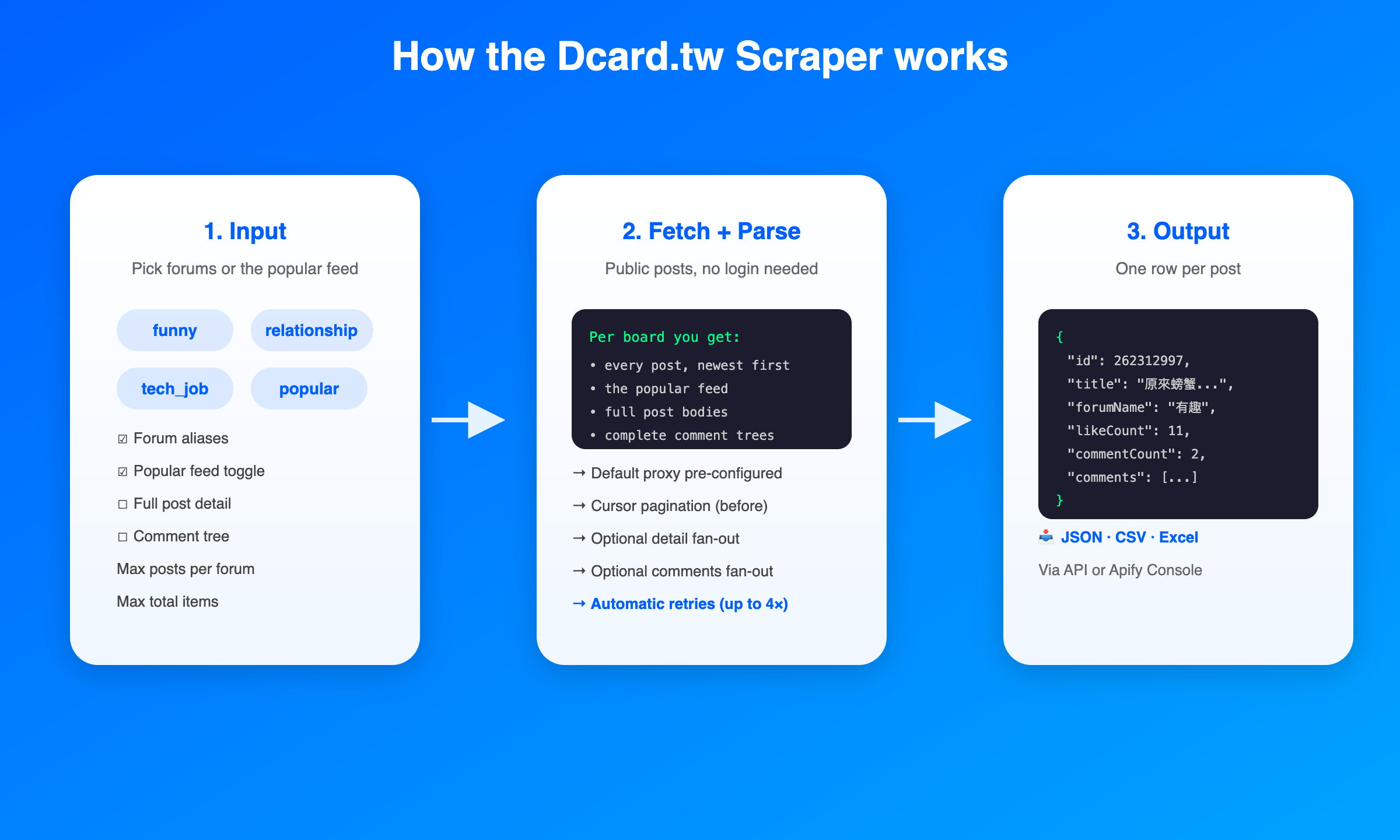
1. **You pick forums.** Give one or more board aliases (or switch on the popular feed).
2. **The actor walks each board.** Each board is paged via Dcard's `before` cursor — 30 posts per page, newest first, following the cursor until the board is exhausted or your cap is hit.
3. **Optional detail fan-out.** If you turn on full post detail, each post gets one extra request for its body, media, reactions, and excerpt comments.
4. **Optional comment fan-out.** If you turn on comments, each post gets one request per page of comments (30 per page), walked via the `after` floor cursor.
5. **Rows land in your dataset.** One row per post, with comments nested when enabled. Export to JSON, CSV, Excel, or via API.
### Input Configuration
| Field | Type | Required | Default | Notes |
|---|---|---|---|---|
| `forumAliases` | string\[] | one of this or `popularFeed` | `["funny"]` | Dcard board aliases to scrape, e.g. `funny`, `relationship`, `tech_job`. Found in the forum URL: `dcard.tw/f/{alias}`. |
| `popularFeed` | boolean | one of this or `forumAliases` | `false` | Pull the site-wide popular feed instead of, or in addition to, specific forums. |
| `includePostDetail` | boolean | no | `false` | Fetch each post's detail for the full HTML body, media, reactions, and excerpt comments. One extra request per post. |
| `includeComments` | boolean | no | `false` | Fetch the full comment tree per post. Requires `includePostDetail`. One extra request per page of comments. |
| `maxPostsPerForum` | integer | no | `50` | Cap per forum or popular feed. `0` = unlimited (walk the whole board). |
| `commentsPerPost` | integer | no | `50` | Cap on comments per post when `includeComments` is on. `0` = unlimited. |
| `maxItems` | integer | no | `1000` | Hard cap on total rows pushed across all forums. `0` = no cap. |
| `proxy` | object | yes | pre-configured | Keep the default; other proxy settings will not return data. Proxy usage is billed on your own Apify account. |
#### Example input
```json
{
"forumAliases": ["funny", "relationship"],
"includePostDetail": true,
"includeComments": true,
"maxPostsPerForum": 100,
"commentsPerPost": 50,
"maxItems": 500
}
```
### Output Overview
One row per post. When `includeComments` is on, the `comments` array on each row holds the full thread. When `includePostDetail` is off, `content`, `reactions`, `excerptComments`, and `comments` are `null`.
### Output Samples
A listing row (detail and comments off):
```json
{
"id": 262312997,
"title": "原來螃蟹也需要揉眼睛",
"excerpt": null,
"content": null,
"forumAlias": "funny",
"forumName": "有趣",
"author": null,
"gender": "M",
"school": "=_=",
"likeCount": 11,
"commentCount": 2,
"shareCount": 0,
"tags": null,
"topics": null,
"media": null,
"reactions": null,
"excerptComments": null,
"comments": null,
"createdAt": "2026-10-17T15:32:06.587Z",
"updatedAt": "2026-10-17T15:32:06.587Z",
"url": "https://www.dcard.tw/f/funny/p/262312997"
}
```
A detail + comments row:
```json
{
"id": 262313327,
"title": "遇到這個你會超車嗎?",
"excerpt": null,
"content": "https://megapx-assets.dcard.tw/images/08215290-0f51-493e-8b6a-0df3287fa5d5/1280.jpeg",
"forumAlias": "funny",
"forumName": "有趣",
"author": null,
"gender": "M",
"school": "生活智慧老谷哥",
"likeCount": 4,
"commentCount": 2,
"shareCount": 0,
"tags": null,
"topics": null,
"media": null,
"reactions": null,
"excerptComments": null,
"comments": [
{
"id": "1f67a6f5-d010-46a4-9b77-43653186bf32",
"floor": 1,
"content": "再撞一次?",
"likeCount": 0,
"gender": "M",
"school": "國立臺灣科技大學",
"personaNickname": null,
"subCommentCount": 0,
"host": false,
"pinned": false,
"createdAt": "2026-10-17T16:55:32.056Z",
"updatedAt": "2026-10-17T16:55:32.056Z"
},
{
"id": "5b49fd06-ee30-40dc-ab6c-9e13ac630695",
"floor": 2,
"content": "再來一次?",
"likeCount": 0,
"gender": "M",
"school": "請問誰見到月老一枚請還我",
"personaNickname": "請問誰見到月老一枚請還我",
"subCommentCount": 0,
"host": false,
"pinned": false,
"createdAt": "2026-10-17T18:48:37.842Z",
"updatedAt": "2026-10-17T18:48:37.842Z"
}
],
"createdAt": "2026-10-17T16:48:04.619Z",
"updatedAt": "2026-10-17T16:48:04.619Z",
"url": "https://www.dcard.tw/f/funny/p/262313327"
}
```
### Key Output Fields
**Post identity:** `id`, `forumAlias`, `forumName`, `url`
**Content:** `title`, `excerpt`, `content` (full HTML body, detail only), `tags`, `topics`
**Author:** `author`, `gender`, `school`
**Engagement:** `likeCount`, `commentCount`, `shareCount`, `reactions` (detail only)
**Media:** `media` (detail only), `excerptComments` (detail only)
**Comments (when enabled):** `comments[]` with `id`, `floor`, `content`, `likeCount`, `gender`, `school`, `personaNickname`, `subCommentCount`, `host`, `pinned`, `createdAt`, `updatedAt`
**Timestamps:** `createdAt`, `updatedAt`
### Pricing
Pay-per-event. You are billed for rows that land in your dataset, not for pages walked.
| Event | When it fires | Suggested rate |
|---|---|---|
| Post | One per post pushed to the dataset | $0.004 per post |
| Comment | One per comment fetched (only when `includeComments` is on) | $0.001 per comment |
Proxy usage is billed separately on your own Apify account, roughly 10 usage units per successful request. A run of 100 posts with comments off is about 4 list requests + 100 detail requests; the same run with comments on adds one request per page of comments per post.
### What Makes This Richer Than the Competition
| Capability | `bakos_bence/dcard-posts` | This actor |
|---|---|---|
| Forums | Posts only (separate actor for forums) | Forums + posts + detail + comments in one actor |
| Comments | Separate actor | Nested on each post row, no join needed |
| Full post body | Not in the posts actor | One toggle |
| Popular feed | Not offered | Built in |
| Cursor pagination | Per-actor | Whole-board walks, `0` = unlimited |
| Proxy setup | You configure it | Pre-configured default |
### Notes & Limitations
- **Keep the default proxy setting.** Other proxy settings will not return data. Proxy usage is billed on your own Apify account.
- **Automatic retries.** Temporary errors are retried up to 4 times per request. Runs can be slower at busy times but complete.
- **No individual post URLs as input.** Point the actor at a forum and it walks from newest backward. To scrape one post, point it at the post's forum and set a low `maxPostsPerForum`.
- **No search.** Keyword search is not in this version. It is a candidate for a later release.
- **Comment `id` is a UUID string**, not an integer (Dcard's wire format). Floor numbers are integers and are used for pagination.
- **Anonymous authors.** Many Dcard posts are anonymous. `school` may be a persona name rather than a real school when the author posts under a persona.
- **Content can be a media URL.** Image and video posts have their media URL in `content` rather than text. Check `media` for the structured media array.
### FAQ
**Which proxy should I use?**
Keep the default. It is pre-configured for Dcard, and other proxy settings will not return data.
**Do I pay for proxy usage?**
Yes. Proxy usage is billed on your own Apify account, separate from the actor's per-event pricing. Roughly 10 usage units per successful request. You can reduce cost by turning off `includePostDetail` and `includeComments` when you only need listing fields.
**How many posts are in a forum?**
Active boards like `funny` have hundreds of thousands of posts. Set `maxPostsPerForum` to a sane cap for your use case; `0` walks the whole board, which can take a long time and many requests.
**Can I scrape a single post?**
Not directly by URL. Point the actor at the post's forum and set `maxPostsPerForum` low. The actor walks newest-first, so a recent post will be in the first page.
**Why is `content` sometimes a URL?**
Image and video posts store their media URL in `content`. Text posts store their HTML body there. Check `media` for the structured media array when you need to tell them apart.
**Are comments included by default?**
No. Turn on `includeComments` (and `includePostDetail`, which it requires) to fetch the comment tree. Without those, `comments` is `null` and you save the extra requests.
**How fresh is the data?**
The actor walks from the newest post backward. A run started now returns posts from the last few minutes in the first page.
### Support
If the actor fails or returns unexpected results, open an issue on the actor's Apify Console page or contact the maintainer. Include the run ID and your input.
### Additional Services
Need a custom Dcard workflow — search, real-time monitoring, a specific board on a schedule, or delivery to your webhook/database? The maintainer takes custom work. Reach out through the Apify Console.
### Explore More Scrapers
- **[Reddit Scraper](https://apify.com/apify/reddit-scraper)** — Reddit posts, comments, and search
- **[TikTok Scraper](https://apify.com/clockworks/tiktok-scraper)** — TikTok videos, profiles, and hashtags
- **[YouTube Scraper](https://apify.com/streamers/youtube-scraper)** — YouTube videos, channels, and comments
- **[Threads Scraper](https://apify.com/apify/threads-scraper)** — Meta's Threads posts and profiles
### 🤖 For AI Agents & LLM Apps
Compact reference for AI agents calling this actor through the [Apify MCP server](https://mcp.apify.com) or the Apify API (actor: `memo23/dcard-scraper`).
**Purpose:** Dcard.tw (Taiwan's largest student forum) posts from any board alias, the site-wide popular feed, optional full post body, and the complete comment tree. One row per post, comments nested.
**Minimal input:**
```json
{
"forumAliases": ["funny"],
"maxPostsPerForum": 25,
"maxItems": 25
}
```
**Output:** one row per post: `id`, `title`, `excerpt`, `content` (detail only), `forumAlias`, `forumName`, `author`, `gender`, `school`, `likeCount`, `commentCount`, `shareCount`, `tags`, `topics`, `media` (detail), `reactions` (detail), `excerptComments` (detail), `comments[]` (when enabled: `id`, `floor`, `content`, `likeCount`, `gender`, `school`, `personaNickname`, `subCommentCount`, `host`, `pinned`, `createdAt`, `updatedAt`), `createdAt`, `updatedAt`, `url`.
**Behaviors an agent should know:**
- `forumAliases` OR `popularFeed` must be set. Both can be set in the same run.
- `includeComments` requires `includePostDetail`. Setting comments without detail is ignored.
- `maxPostsPerForum: 0` walks the whole board — can be tens of thousands of posts on active boards. Always set a cap unless you mean it.
- Keep the default `proxy` value. Other proxy settings return no data.
- Billing: per post pushed + per comment fetched. Pages walked are free.
- `content` may be a media URL for image/video posts, not text. Check `media` to distinguish.
### ⚠️ Disclaimer
This Actor is an independent tool and is not affiliated with, endorsed by, or sponsored by Dcard Taiwan LTD or any of its subsidiaries. All trademarks mentioned are the property of their respective owners.
The scraper accesses only publicly available Dcard forum content, as any logged-out visitor sees it. It does not log in and reads nothing behind the Dcard login. Users are responsible for ensuring their use complies with Dcard's Terms of Service, applicable data-protection law (Taiwan's Personal Data Protection Act, GDPR, and others) when storing or processing post or comment content, and their own organization's obligations. Do not republish post content in a way that misrepresents its authorship, and do not contact authors without consent.
### SEO Keywords
dcard scraper, dcard.tw scraper, dcard forum scraper, dcard posts scraper, dcard comments scraper, dcard popular feed, taiwan forum scraper, taiwanese student forum, dcard data extraction, dcard post collector, dcard comment tree, dcard board scraper, funny forum dcard, relationship forum dcard, taiwan social media scraper, dcard to json, dcard to csv, dcard dataset, dcard nlp corpus, taiwanese mandarin corpus
# Actor input Schema
## `forumAliases` (type: `array`):
Dcard forum aliases to scrape, e.g. "funny", "second_hand", "relationship", "girl", "boy", "tech_job". Found in the forum URL: dcard.tw/f/{alias}. The actor walks each forum's posts via cursor pagination up to Max posts per forum.
## `popularFeed` (type: `boolean`):
Pull from the site-wide popular feed (dcard.tw/f, Popular tab) instead of, or in addition to, specific forums.
## `includePostDetail` (type: `boolean`):
Fetch each post's detail page to add the full HTML body (content), media, reactions and excerpt comments. Off = listing fields only (title, excerpt, counts, author, dates). One extra request per post when on.
## `includeComments` (type: `boolean`):
Fetch comments for each post. Adds the full comment tree with floor number, content, likeCount, author school/gender and sub-comment count. Requires "Fetch full post detail". One extra request per post when on.
## `maxPostsPerForum` (type: `integer`):
Maximum number of posts to collect per forum (or from the popular feed). 0 = unlimited (walk the whole forum).
## `commentsPerPost` (type: `integer`):
Maximum comments to fetch per post when "Fetch comments" is on. 0 = unlimited (walk all pages).
## `maxItems` (type: `integer`):
Hard cap on total items (posts + comments) pushed to the dataset across all forums. 0 = no cap.
## `proxy` (type: `object`):
REQUIRED. Keep the default: it is pre-configured for Dcard, and other proxy settings will not return data. Proxy usage is billed on your Apify account.
## Actor input object example
```json
{
"forumAliases": [
"funny"
],
"popularFeed": false,
"includePostDetail": false,
"includeComments": false,
"maxPostsPerForum": 50,
"commentsPerPost": 50,
"maxItems": 1000,
"proxy": {
"useApifyProxy": true,
"apifyProxyGroups": [
"UNBLOCKER"
]
}
}
```
# Actor output Schema
## `results` (type: `string`):
No description
# API
You can run this Actor programmatically using our API. Below are code examples in JavaScript, Python, and CLI, as well as the OpenAPI specification and MCP server setup.
## JavaScript example
```javascript
import { ApifyClient } from 'apify-client';
// Initialize the ApifyClient with your Apify API token
// Replace the '' with your token
const client = new ApifyClient({
token: '',
});
// Prepare Actor input
const input = {
"forumAliases": [
"funny"
]
};
// Run the Actor and wait for it to finish
const run = await client.actor("memo23/dcard-scraper").call(input);
// Fetch and print Actor results from the run's dataset (if any)
console.log('Results from dataset');
console.log(`💾 Check your data here: https://console.apify.com/storage/datasets/${run.defaultDatasetId}`);
const { items } = await client.dataset(run.defaultDatasetId).listItems();
items.forEach((item) => {
console.dir(item);
});
// 📚 Want to learn more 📖? Go to → https://docs.apify.com/api/client/js/docs
```
## Python example
```python
from apify_client import ApifyClient
# Initialize the ApifyClient with your Apify API token
# Replace '' with your token.
client = ApifyClient("")
# Prepare the Actor input
run_input = { "forumAliases": ["funny"] }
# Run the Actor and wait for it to finish
run = client.actor("memo23/dcard-scraper").call(run_input=run_input)
# Fetch and print Actor results from the run's dataset (if there are any)
print(f"💾 Check your data here: https://console.apify.com/storage/datasets/{run.default_dataset_id}")
for item in client.dataset(run.default_dataset_id).iterate_items():
print(item)
# 📚 Want to learn more 📖? Go to → https://docs.apify.com/api/client/python/docs/quick-start
```
## CLI example
```bash
echo '{
"forumAliases": [
"funny"
]
}' |
apify call memo23/dcard-scraper --silent --output-dataset
```
## MCP server setup
```json
{
"mcpServers": {
"apify": {
"type": "http",
"url": "https://mcp.apify.com/?tools=fetch-actor-details,memo23/dcard-scraper"
}
}
}
```
The hosted server signs you in with OAuth on first connect, so no API token belongs in this config. Clients without OAuth support can send an `Authorization: Bearer ` header instead, using a token from API & Integrations in Apify Console (https://console.apify.com/settings/integrations).
## OpenAPI specification
Download the OpenAPI definition: https://api.apify.com/v2/actors/eaIj5Ysm6h3O4i1to/builds/FlUizcb6CAFxcyiHF/openapi.json