# DealSeek Scraper — Deals & Promo Codes (`memo23/dealseek-scraper`) Actor
Scrape DealSeek deals, promo codes, coupons, and price drops from the public JSON API the Android app uses. Search by keyword or ASIN, filter promo-only or coupon-only, sort by discount. Prices, merchants, categories, and Amazon links. Paste any dealseek.com URL. JSON or CSV out.
- **URL**: https://apify.com/memo23/dealseek-scraper.md
- **Developed by:** [Muhamed Didovic](https://apify.com/memo23) (community)
- **Categories:** E-commerce, Automation
- **Stats:** 2 total users, 1 monthly users, 100.0% runs succeeded, 0 bookmarks
- **User rating**: No ratings yet
## Pricing
from $2.00 / 1,000 deals
This Actor is paid per event. You are not charged for the Apify platform usage, but only a fixed price for specific events.
Learn more: https://docs.apify.com/actors/running/actors-in-store.md#pay-per-event
## What's an Apify Actor?
An Actor is a serverless cloud program that runs on the Apify platform. It has two run modes.
In Batch mode, an Actor accepts a well-defined JSON input, performs an action which can take anything from a few seconds to a few hours,
and optionally produces a well-defined JSON output, datasets with results, or files in key-value store.
In Standby mode, an Actor provides a web server which can be used as a website, API, or an MCP server.
Apify vocabulary and the platform model are defined once, in the agent quickstart at https://apify.com/agents.md.
## How to integrate an Actor?
If asked about integration, you help developers integrate Actors into their projects.
You adapt to their stack and deliver integrations that are safe, well-documented, and production-ready.
Do not guess an integration path. Every one of them is in the agent quickstart at https://apify.com/agents.md: the Apify MCP server, Agent Skills with the Apify CLI, the JavaScript and Python clients, the REST API, and the account-free path for an agent with no human to sign in. It also carries the rule on stating cost before the first paid run.
For examples already wired to this Actor's own input schema, see the [API](#api) section below.
Each client library has reference documentation the quickstart does not restate: [JavaScript/TypeScript](https://docs.apify.com/api/client/js/docs.md) (`npm install apify-client`) and [Python](https://docs.apify.com/api/client/python/docs.md) (`pip install apify-client`).
# README
## DealSeek Scraper — Deals & Promo Codes
Turn any DealSeek URL or keyword into structured deal rows: stacked discounts, typed promo codes, checkout coupons, merchant, category, and Amazon links.
Live public API. No browser. JSON or CSV out.
| Input | Row(s) emitted |
|---|---|
| Homepage, `/hot`, `/top` | Live deal feed |
| `/promo-codes` | Deals that include a typed promo code |
| `/brand/{name}` | Deals matching that brand query |
| `/dp/{ASIN}` | That ASIN, if it is still on the live feed |
| `query` keyword or ASIN | Matching deals (`?query=`) |
| `category` | Matching Amazon category (`Tech`, `Electronics`, …) |
> Pure HTTP against `https://api.dealseek.com/deals`. No browser, no Cloudflare bypass.
### Why Use This Scraper?
- Live feed, not a stale HTML scrape
- Promo codes and clip-at-checkout coupons on the same row
- Search by keyword or ASIN, or paste any dealseek.com URL
- Discount sort plus promo-only, coupon-only, and minimum-% filters
- DealSeek and Amazon links on every row
### Overview
DealSeek lists verified markdowns across Amazon and other retailers. This actor reads the same public JSON API the Android app uses and writes **one dataset row per deal**.
Each row has identity (`dealId`, `asin`), money (`price`, `discountedPrice`, `listPrice`, `discountPercentage`), codes (`promoCode`, `couponValue`), merchant, category, ratings, and URLs.
This is a **feed scraper**. It does not open Amazon checkout, verify a code at Amazon, or read logged-in DealSeek wishlists.
### Supported Inputs
Copy-pasteable `startUrls`:
```
https://dealseek.com/
https://dealseek.com/hot
https://dealseek.com/promo-codes
https://dealseek.com/brand/apple
https://dealseek.com/dp/B07KSY789L
```
Keyword / ASIN mode: set `query` to `airpods` or `B07KSY789L`. A `/dp/{ASIN}` or `/brand/{name}` start URL wins for that URL.
Unsupported: DealSeek account data, wishlists, and the unpublished `deals:read` OAuth scope. The website OpenAPI routes (`/api/verify-promo`, `/api/report-deal`) are not this actor's source.
### Use Cases
| Who | Why |
|---|---|
| Retail arbitrage | Watch markdowns and codes as they land |
| Price research | Stacked discount % vs list vs deal price |
| Affiliate / content | Promo codes with last-updated timestamps |
| Category monitoring | `Tech` or `Electronics` feeds on a schedule |
### How It Works
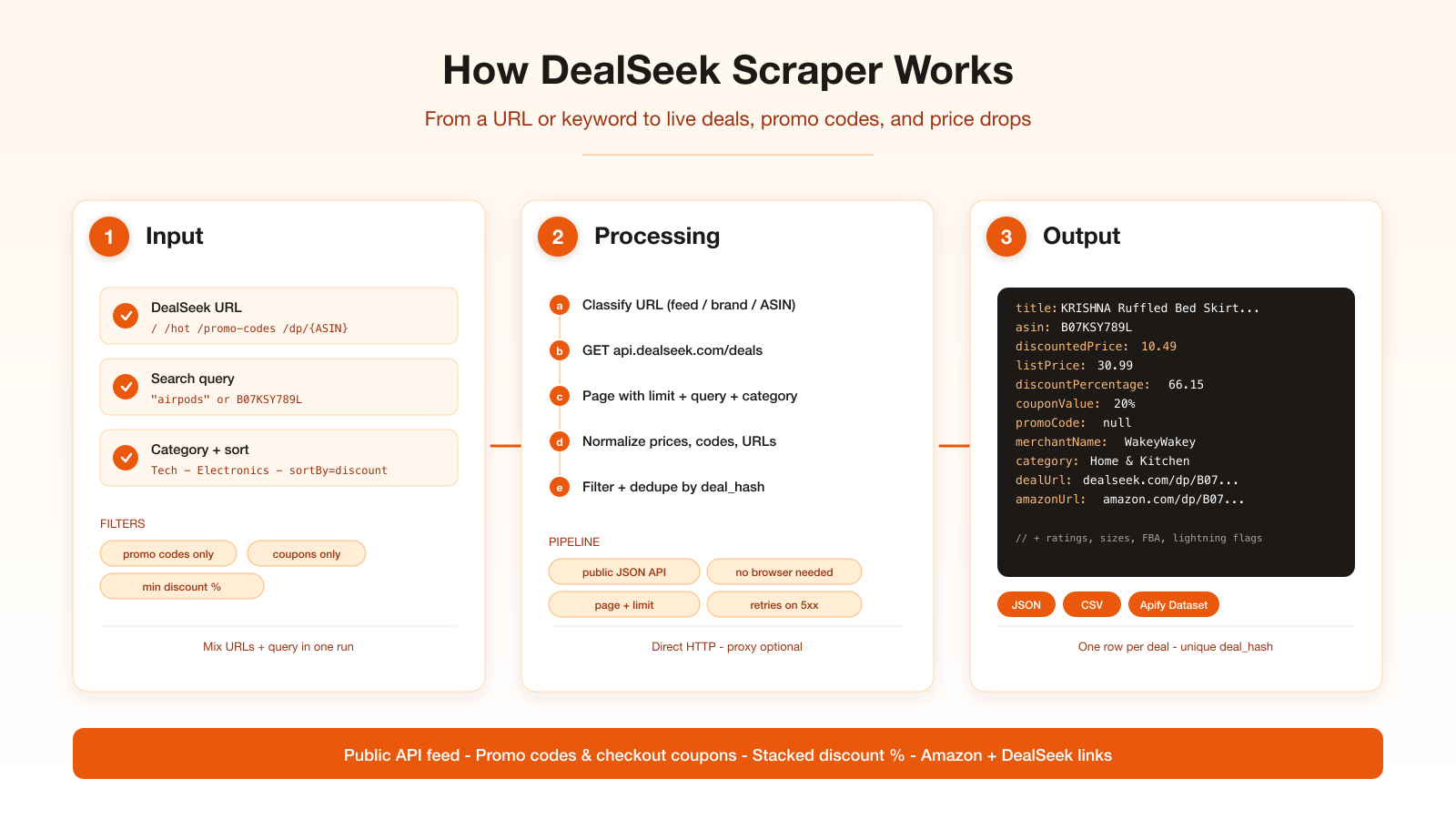
1. Classify each start URL (feed, brand, promo listing, or `/dp/{ASIN}`).
2. Call `GET https://api.dealseek.com/deals` with `page`, `limit`, and optional `query` / `category` / `sortBy`.
3. Normalize each API object into a stable row.
4. Apply optional client filters (promo-only, coupon-only, minimum discount).
5. Write one dataset row per unique `deal_hash`.
### Input Configuration
| Field | Type | Required | Notes |
|---|---|---|---|
| `startUrls` | array | no | Homepage, `/hot`, `/top`, `/promo-codes`, `/brand/{name}`, `/dp/{ASIN}` |
| `query` | string | no | Keyword or ASIN (`?query=`) |
| `category` | string | no | Exact DealSeek spelling (`Tech`, `Electronics`) |
| `sortBy` | enum | no | `default` or `discount` |
| `onlyPromoCodes` | boolean | no | Keep typed promo codes only |
| `onlyCoupons` | boolean | no | Keep checkout coupons only |
| `minDiscountPercent` | integer | no | Drop weaker markdowns |
| `maxItems` | integer | no | Cap (free users: 100). Default 100 |
| `proxy` | object | no | Off by default — the API is open |
`q`, `search`, `has_promo_code`, and `collection` query params are ignored by the API. Promo/coupon filters run after fetch.
#### Example input
```json
{
"startUrls": ["https://dealseek.com/"],
"maxItems": 100
}
```
Search:
```json
{
"query": "airpods",
"maxItems": 50
}
```
Promo codes only, steepest first:
```json
{
"sortBy": "discount",
"onlyPromoCodes": true,
"minDiscountPercent": 30,
"maxItems": 100
}
```
### Output Overview
One JSON object per deal. Prices are numbers. Empty strings from the API become `null`. Unique key is `dealId` (`deal_hash`).
### Output Samples
Feed or `/dp/{ASIN}` (live row, 2026-09-20):
```json
{
"type": "deal",
"source": "dealseek",
"dealId": "B07KSY789L-AP0PU5267UGRL-24.99-10.49-A1MIFLO2CFMTMY-20%----0-38.02-1789961100-50.00",
"asin": "B07KSY789L",
"parentAsin": "B07S2J82NB",
"title": "KRISHNA Ruffled Bed Skirt with Split Corners King, 100% Microfiber Hotel Quality, 18 Inch Drop Dust Ruffle Gathered Bedskirt with Platform, 78\" x 80\", Ivory",
"dealUrl": "https://dealseek.com/dp/B07KSY789L",
"amazonUrl": "https://www.amazon.com/dp/B07KSY789L",
"brandName": null,
"merchantName": "WakeyWakey",
"merchantId": "AP0PU5267UGRL",
"category": "Home & Kitchen",
"subcategory": "Bedding",
"price": 24.99,
"discountedPrice": 10.49,
"listPrice": 30.99,
"discountPercentage": 66.15,
"priceDropPercentage": 32.28,
"couponValue": "20%",
"promoCode": null,
"hasCoupon": true,
"hasPromoCode": false,
"hasPriceDrop": true,
"image": "https://m.media-amazon.com/images/I/71sYexyumqL._AC_SL1500_.jpg",
"avgRating": 4.4,
"ratingsCount": 1263
}
```
### Key Output Fields
| Group | Fields |
|---|---|
| Identity | `dealId`, `asin`, `parentAsin`, `title` |
| Links | `dealUrl`, `amazonUrl` |
| Money | `price`, `discountedPrice`, `listPrice`, `discountPercentage`, `priceDropPercentage` |
| Codes | `promoCode`, `couponValue`, `hasPromoCode`, `hasCoupon` |
| Merchant | `merchantName`, `merchantId`, `brandName`, `isFba` |
| Taxonomy | `category`, `subcategory`, `discounts` |
| Social | `avgRating`, `ratingsCount`, `likesCount` |
| Dates | `createdAt`, `lastUpdated`, `expiredAt`, `scrapedAt` |
### FAQ
**Does this decompile the APK?** No. The app talks to `api.dealseek.com`. That host is public (`GET /deals`, `GET /collections`, `GET /health`).
**Why is `brandName` often null?** The API leaves it empty on many rows. `merchantName` is the reliable seller field.
**Can I page forever?** The feed keeps returning deals well past page 100. Use `maxItems`.
**Single deal URL returned nothing?** The ASIN may have dropped off the live feed. Try `query` with the ASIN.
**Do I need a proxy?** Not by default. Turn one on only if your run IP is blocked.
### Pricing
| Event | When | Rate |
|---|---|---|
| Actor start | Once per run, per GB of memory | $0.005 |
| Deal | Each row written to the default dataset | $0.002 ($2 / 1,000 deals) |
Failed fetches and empty pages are not billed as deals. Free Apify users are capped at 100 rows per run.
### What makes this richer than the competition
There is no other DealSeek actor on the Store. Nearby deal scrapers (Slickdeals, DealNews, Groupon) return community posts, not DealSeek's verified feed with stacked discount math and typed promo codes.
### Notes & limitations
- `/deals/{asin}` does not exist; single-ASIN lookup uses `?query={asin}`
- Collection slugs from `GET /collections` are not a `/deals` filter
- Category must match DealSeek's spelling (`Tech` works; `tech` returns \[])
- `brandName` is often empty; use `merchantName`
### Support
Open an issue on the [actor page](https://apify.com/memo23/dealseek-scraper). Profile: [apify.com/memo23](https://apify.com/memo23).
### Additional Services
Custom fields, scheduled monitors, and private feeds — ask on the actor issues tab.
### Explore More Scrapers
- [eBay Search Scraper](https://apify.com/memo23/ebay-search-scraper-ppe) — active and sold listings across eBay markets
- [StockX Scraper](https://apify.com/memo23/stockx-search-scraper) — resale asks, bids, and last sale
- [Google Play Scraper](https://apify.com/memo23/google-play-scraper) — apps, reviews, search, developer emails
Full list at [apify.com/memo23](https://apify.com/memo23).
### 🤖 For AI Agents & LLM Apps
Compact reference for AI agents calling this actor via the [Apify MCP server](https://mcp.apify.com) or the Apify API (actor: `memo23/dealseek-scraper`).
**Purpose:** scrape live DealSeek deals from the public JSON API; one row per deal with prices, promo codes, coupons, merchant, and Amazon URL.
**Minimal input:**
```json
{ "startUrls": ["https://dealseek.com/"], "maxItems": 20 }
```
**Output:** one dataset row per deal — `dealId`, `asin`, `title`, `dealUrl`, `amazonUrl`, `price`, `discountedPrice`, `listPrice`, `discountPercentage`, `promoCode`, `couponValue`, `hasPromoCode`, `hasCoupon`, `merchantName`, `category`, `image`, `scrapedAt`.
**Behaviors an agent should know:**
- Always set `maxItems`; the feed pages past 100
- `/dp/{ASIN}` and `/brand/{name}` override `query` for that URL
- `onlyPromoCodes` / `onlyCoupons` / `minDiscountPercent` run after fetch
- Free users are capped at 100 rows
- Billing: $0.005 actor start (per GB) + $0.002 per deal row; empty pages are not charged
- No login, wishlist, or Amazon checkout verification
### ⚠️ Disclaimer
This Actor is an independent tool and is not affiliated with, endorsed by, or sponsored by DealSeek LLC or Amazon.com, Inc. or any of their subsidiaries. All trademarks mentioned are the property of their respective owners.
The scraper accesses only publicly available DealSeek HTTP API listings — no authenticated endpoints, paid features, or content behind a DealSeek login wall. Users are responsible for ensuring their use complies with dealseek.com's Terms of Service, Amazon's Terms of Service, applicable data-protection law (GDPR, CCPA, etc.), and any contractual obligations of their own organization.
### SEO Keywords
dealseek scraper, dealseek.com scraper, scrape dealseek, dealseek api, dealseek deals, dealseek promo codes, amazon promo code scraper, price drop scraper, coupon scraper, deal aggregator api, amazon deal feed, retail arbitrage data, promo code dataset, checkout coupon scraper, amazon asin deals
# Actor input Schema
## `startUrls` (type: `array`):
Optional DealSeek page URLs. Accepted: homepage (https://dealseek.com/), /hot, /top, /promo-codes, /brand/{name}, /dp/{ASIN}. Leave empty to scrape the live feed. Example: https://dealseek.com/dp/B07KSY789L. Default: https://dealseek.com/.
## `query` (type: `string`):
Optional keyword or Amazon ASIN sent as GET /deals?query=. Examples: airpods, B07KSY789L. A /dp/{ASIN} or /brand/{name} start URL overrides this for that URL. Default: empty (unfiltered feed).
## `category` (type: `string`):
Optional Amazon category string exactly as DealSeek spells it. Working values: Tech, Electronics, Home & Kitchen. Lowercase slugs (tech, beauty\_skincare) return zero rows. Example: Electronics. Default: empty (all categories).
## `sortBy` (type: `string`):
Feed order sent as sortBy. Use default for DealSeek's own ranking, or discount for steepest markdown first. Example: discount. Default: default.
## `onlyPromoCodes` (type: `boolean`):
When true, keep only deals that include a typed promo code (hasPromoCode). Coupon-only lightning deals are dropped. Applied after fetch — the API ignores has\_promo\_code. Default: false.
## `onlyCoupons` (type: `boolean`):
When true, keep only deals with an Amazon checkout coupon (hasCoupon / couponValue). Applied after fetch. Default: false.
## `minDiscountPercent` (type: `integer`):
Optional floor on stacked discountPercentage. Deals below this percent are dropped. Example: 30. Leave empty or 0 for no floor. Default: none.
## `maxItems` (type: `integer`):
Hard cap on dataset rows written this run. Free (non-paying) Apify users are capped at 100 regardless of this value. Example: 50. Default: 100.
## `proxy` (type: `object`):
Optional proxy. The public API is open (CORS \*) and does not need a proxy. Enable only if your run environment is IP-blocked. Default: useApifyProxy false.
## Actor input object example
```json
{
"startUrls": [
"https://dealseek.com/"
],
"sortBy": "default",
"onlyPromoCodes": false,
"onlyCoupons": false,
"maxItems": 100,
"proxy": {
"useApifyProxy": false
}
}
```
# Actor output Schema
## `overview` (type: `string`):
No description
# API
You can run this Actor programmatically using our API. Below are code examples in JavaScript, Python, and CLI, as well as the OpenAPI specification and MCP server setup.
## JavaScript example
```javascript
import { ApifyClient } from 'apify-client';
// Initialize the ApifyClient with your Apify API token
// Replace the '' with your token
const client = new ApifyClient({
token: '',
});
// Prepare Actor input
const input = {
"startUrls": [
"https://dealseek.com/"
],
"proxy": {
"useApifyProxy": false
}
};
// Run the Actor and wait for it to finish
const run = await client.actor("memo23/dealseek-scraper").call(input);
// Fetch and print Actor results from the run's dataset (if any)
console.log('Results from dataset');
console.log(`💾 Check your data here: https://console.apify.com/storage/datasets/${run.defaultDatasetId}`);
const { items } = await client.dataset(run.defaultDatasetId).listItems();
items.forEach((item) => {
console.dir(item);
});
// 📚 Want to learn more 📖? Go to → https://docs.apify.com/api/client/js/docs
```
## Python example
```python
from apify_client import ApifyClient
# Initialize the ApifyClient with your Apify API token
# Replace '' with your token.
client = ApifyClient("")
# Prepare the Actor input
run_input = {
"startUrls": ["https://dealseek.com/"],
"proxy": { "useApifyProxy": False },
}
# Run the Actor and wait for it to finish
run = client.actor("memo23/dealseek-scraper").call(run_input=run_input)
# Fetch and print Actor results from the run's dataset (if there are any)
print(f"💾 Check your data here: https://console.apify.com/storage/datasets/{run.default_dataset_id}")
for item in client.dataset(run.default_dataset_id).iterate_items():
print(item)
# 📚 Want to learn more 📖? Go to → https://docs.apify.com/api/client/python/docs/quick-start
```
## CLI example
```bash
echo '{
"startUrls": [
"https://dealseek.com/"
],
"proxy": {
"useApifyProxy": false
}
}' |
apify call memo23/dealseek-scraper --silent --output-dataset
```
## MCP server setup
```json
{
"mcpServers": {
"apify": {
"type": "http",
"url": "https://mcp.apify.com/?tools=fetch-actor-details,memo23/dealseek-scraper"
}
}
}
```
The hosted server signs you in with OAuth on first connect, so no API token belongs in this config. Clients without OAuth support can send an `Authorization: Bearer ` header instead, using a token from API & Integrations in Apify Console (https://console.apify.com/settings/integrations).
## OpenAPI specification
Download the OpenAPI definition: https://api.apify.com/v2/actors/CG7KKSxhm0J6QHRxB/builds/61DN8ZErEHbEquh3b/openapi.json