# Dribbble Scraper — Shots, Designers & Jobs (`memo23/dribbble-scraper`) Actor
Scrape Dribbble design shots, designer profiles, and design jobs. Shots by keyword, tag, designer or URL with likes, views, saves, tags, colors and designer info. Designer profiles with followers, bio and for-hire status. Design job board with company and location. AWS WAF bypassed via Unblocker.
- **URL**: https://apify.com/memo23/dribbble-scraper.md
- **Developed by:** [Muhamed Didovic](https://apify.com/memo23) (community)
- **Categories:** Social media
- **Stats:** 2 total users, 1 monthly users, 100.0% runs succeeded, 0 bookmarks
- **User rating**: No ratings yet
## Pricing
from $5.00 / 1,000 results
This Actor is paid per event. You are not charged for the Apify platform usage, but only a fixed price for specific events.
Learn more: https://docs.apify.com/actors/running/actors-in-store.md#pay-per-event
## What's an Apify Actor?
An Actor is a serverless cloud program that runs on the Apify platform. It has two run modes.
In Batch mode, an Actor accepts a well-defined JSON input, performs an action which can take anything from a few seconds to a few hours,
and optionally produces a well-defined JSON output, datasets with results, or files in key-value store.
In Standby mode, an Actor provides a web server which can be used as a website, API, or an MCP server.
Apify vocabulary and the platform model are defined once, in the agent quickstart at https://apify.com/agents.md.
## How to integrate an Actor?
If asked about integration, you help developers integrate Actors into their projects.
You adapt to their stack and deliver integrations that are safe, well-documented, and production-ready.
Do not guess an integration path. Every one of them is in the agent quickstart at https://apify.com/agents.md: the Apify MCP server, Agent Skills with the Apify CLI, the JavaScript and Python clients, the REST API, and the account-free path for an agent with no human to sign in. It also carries the rule on stating cost before the first paid run.
For examples already wired to this Actor's own input schema, see the [API](#api) section below.
Each client library has reference documentation the quickstart does not restate: [JavaScript/TypeScript](https://docs.apify.com/api/client/js/docs.md) (`npm install apify-client`) and [Python](https://docs.apify.com/api/client/python/docs.md) (`pip install apify-client`).
# README
## Dribbble Scraper — Shots, Designers & Jobs
Scrape **Dribbble** design shots, designer profiles, and the design job board in one actor. Shots by keyword, tag, designer, or URL with likes, views, saves, comments, tags, colors, and designer info. Designer profiles with followers, bio, and for-hire status. Design jobs with company and location.
| Input | Row(s) emitted |
|---|---|
| Shots mode + keyword (e.g. "mobile app") | One row per shot, 20+ fields |
| Shots mode + tag (e.g. "illustration") | One row per shot, 20+ fields |
| Shots mode + designer username | One row per shot from that designer |
| Shots mode + shot URL(s) | One row per shot, full detail |
| Designers mode + username/URL | One row per designer, 15+ fields |
| Jobs mode | One row per job, 7 fields |
> Apify Unblocker clears Dribbble's AWS WAF challenge. No browser, no CAPTCHA solver, no login.
### Why Use This Scraper
- **Three modes in one actor** — shots, designers, and jobs. Competitors charge separately for each.
- **AWS WAF bypassed** — Dribbble sits behind an AWS WAF JS challenge that blocks datacenter and residential proxies. Apify Unblocker clears it at the proxy layer.
- **Full shot enrichment** — likes, saves, views, comments, tags, color palette, designer info, media gallery, animated/video flags, dimensions, and rich-text description.
- **Designer intelligence** — followers, following, likes, bio, location, for-hire status, Pro badge, website, Twitter, Instagram, and email (from for-hire profiles).
- **Design job board** — title, company, location, featured flag, and company logo for every listing.
- **Flexible feeds** — popular or recent ordering, week/month/year/all-time timeframe filters, and per-source pagination caps.
### Overview
Dribbble.com is the leading portfolio platform for designers, sitting behind an AWS WAF bot challenge that returns HTTP 202 to unrecognised requests. This actor routes every request through Apify Unblocker, which solves the WAF challenge at the proxy layer and returns the real server-rendered HTML. The actor parses the embedded `newestShots` JSON and `shotData` objects with cheerio, plus the server-rendered DOM for designer profiles and job cards.
### Supported Inputs
#### Shots mode
- **Search keywords** — one feed per keyword (e.g. "mobile app", "dashboard")
- **Tags** — one feed per tag (e.g. "illustration", "branding")
- **Designers** — usernames or profile URLs to pull all shots from
- **Shot URLs** — individual shot URLs to scrape directly
- **Sort** — popular or recent
- **Timeframe** — week, month, year, or all time
- **Color filter** — hex color (without #)
- **With details** — enrich each shot with full detail-page stats
- **Max items** and **max pages** caps
#### Designers mode
- **Designer URLs** — usernames or profile URLs to scrape
- **Extract emails** — pull email, website, and social links from for-hire profiles
- **Max items** cap
#### Jobs mode
- **Job URLs** — individual job URLs to scrape directly
- **Max items** and **max pages** caps
### Use Cases
- **Design inspiration** — pull trending shots by keyword or tag with full engagement metrics.
- **Lead generation** — find for-hire designers with their follower count, location, and contact info.
- **Creative hiring** — scrape the Dribbble job board for open design roles with company and location.
- **Competitive analysis** — track which design styles and designers are trending on Dribbble.
- **Portfolio monitoring** — pull a designer's full shot history with stats over time.
### How It Works
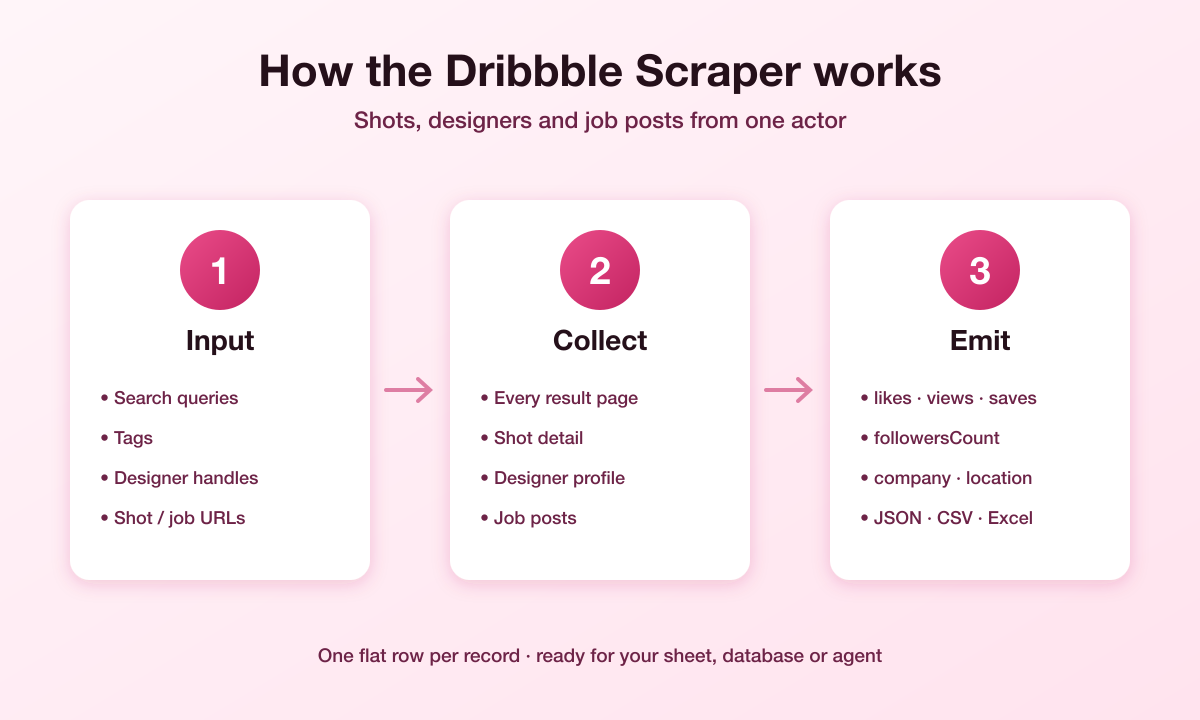
1. You pick a mode (shots, designers, or jobs) and provide keywords, tags, usernames, or URLs.
2. The actor builds the right Dribbble URLs and fetches them through Apify Unblocker.
3. Unblocker clears the AWS WAF challenge; the page returns server-rendered HTML.
4. The cheerio parser extracts shot rows from the `newestShots` JSON array and thumbnail containers, or designer/jobs data from the DOM.
5. In shots mode with details on, each shot's detail page is fetched for the full `shotData` object — likes, saves, views, comments, tags, colors, designer info, and media gallery.
6. The actor walks pages until results run out or your cap is hit.
7. Results land in the Apify dataset, ready to export as JSON or CSV.
### Input Configuration
| Field | Type | Default | Description |
|---|---|---|---|
| `scrapeMode` | string | `shots` | `shots`, `designers`, or `jobs` |
| `searchQueries` | array | `["mobile app"]` | Shots mode: keywords to search |
| `tags` | array | `[]` | Shots mode: tags to pull |
| `designers` | array | `[]` | Shots mode: designer usernames/URLs |
| `shotUrls` | array | `[]` | Shots mode: direct shot URLs |
| `designerUrls` | array | `[]` | Designers mode: usernames/URLs |
| `jobUrls` | array | `[]` | Jobs mode: direct job URLs |
| `sort` | string | `popular` | `popular` or `recent` |
| `timeframe` | string | `ever` | `week`, `month`, `year`, `ever` |
| `color` | string | — | Hex color filter (without #) |
| `withDetails` | boolean | `false` | Enrich shots with detail-page stats |
| `extractEmails` | boolean | `false` | Extract emails from for-hire designers |
| `maxItems` | integer | `50` | Max records across all sources |
| `maxPages` | integer | `10` | Max pages per source |
| `proxy` | object | Unblocker | Proxy configuration (Unblocker recommended) |
### Output Fields
#### Shot rows (`type: "shot"`)
- `shotId`, `title`, `url`, `imageUrl`, `gifUrl`, `videoUrl`
- `likesCount`, `savesCount`, `viewsCount`, `commentsCount`, `reboundsCount`, `attachmentsCount`
- `tags`, `colors`, `mediaGallery`, `description`
- `isAnimated`, `isVideo`, `isCaseStudy`, `isMultiShot`, `shotFormat`, `width`, `height`
- `postedOn`, `publishedAt`
- `designerUsername`, `designerName`, `designerUrl`, `designerAvatarUrl`, `designerIsTeam`, `designerForHire`, `teamName`
- `scrapedAt`
#### Designer rows (`type: "designer"`)
- `username`, `name`, `bio`, `avatarUrl`, `url`
- `followersCount`, `followingCount`, `likesCount`, `shotsCount`
- `location`, `availableForHire`, `isPro`, `isTeam`
- `email`, `website`, `twitter`, `instagram`, `skills`
- `scrapedAt`
#### Job rows (`type: "job"`)
- `jobId`, `title`, `company`, `location`, `url`
- `isFeatured`, `companyLogoUrl`, `scrapedAt`
### Pricing
Pay-per-event. You are charged per result returned, plus an optional detail event when shot enrichment is on, plus an email event when an email is extracted from a for-hire designer.
### FAQ
**Do I need Dribbble login?**
No. Apify Unblocker clears the AWS WAF challenge without any login.
**Why are some shots missing likes/views?**
The popular feed embeds engagement stats in a `newestShots` JSON array. Tag and search pages use a different layout without that JSON, so those rows only carry the title, URL, and image until you enable `withDetails`, which fetches each shot's detail page for the full stats.
**Why are some shot titles different from the page?**
The actor derives the title from the shot URL slug when the embedded JSON isn't available, which is cleaner than the tag-stuffed `![]() ` attribute Dribbble uses for SEO.
**Can I scrape a specific designer's shots?**
Yes. In shots mode, pass the designer's username or profile URL in the `designers` array. In designers mode, pass it in `designerUrls` to get the profile itself.
**Does it handle pagination?**
Yes. Each source (keyword, tag, designer, job board) paginates until results run out or `maxPages` is hit. `maxItems` caps the total across all sources.
### Changelog
- `0.0.11` — Match current Dribbble `div.shot2-item` shot containers; skip lazy-load placeholder images.
- `0.0.6` — Fix detail-mode dedup bug; derive shot title from URL slug.
- `0.0.3` — Initial release: shots, designers, and jobs modes with Unblocker.
# Actor input Schema
## `scrapeMode` (type: `string`):
What to scrape: design shots, designer profiles, or the Dribbble job board.
## `searchQueries` (type: `array`):
Shots mode. Keywords to search the Dribbble shot feed for, e.g. "mobile app", "dashboard". One feed per keyword.
## `tags` (type: `array`):
Shots mode. Dribbble tags to pull the shot feed for, e.g. "illustration", "branding". Spaces become hyphens.
## `designers` (type: `array`):
Shots mode. Designer usernames or profile URLs to collect all shots from, e.g. "strangehelix" or https://dribbble.com/strangehelix.
## `shotUrls` (type: `array`):
Shots mode. Individual Dribbble shot URLs to scrape directly (bypasses feed pagination).
## `designerUrls` (type: `array`):
Designers mode. Designer profile URLs or usernames to scrape, e.g. "strangehelix" or https://dribbble.com/strangehelix.
## `jobUrls` (type: `array`):
Jobs mode. Individual Dribbble job URLs to scrape directly.
## `sort` (type: `string`):
Shots mode. Ordering for keyword, tag and default feeds.
## `timeframe` (type: `string`):
Shots mode. Limit popular feeds to shots published within this window.
## `color` (type: `string`):
Shots mode. Optional hex color (without #) to filter shots by, e.g. "ff0000".
## `withDetails` (type: `boolean`):
Shots mode. Fetch each shot's detail page for full stats (saves, comments, tags, colors, designer info, description). Costs an extra detail event per shot.
## `extractEmails` (type: `boolean`):
Designers mode. Extract email, website and social links from for-hire designer profiles.
## `maxItems` (type: `integer`):
Maximum number of records to collect across all sources. Free plan is capped at 10.
## `maxPages` (type: `integer`):
Maximum number of pages to fetch per source (keyword, tag, designer, job board). Each page yields ~24 shots or ~24 jobs.
## `proxy` (type: `object`):
Apify proxy configuration. Defaults to Apify Unblocker, which is required to clear Dribbble's AWS WAF challenge. Switch to residential only if you know the WAF is not active.
## Actor input object example
```json
{
"scrapeMode": "shots",
"searchQueries": [
"mobile app"
],
"tags": [],
"designers": [],
"shotUrls": [],
"designerUrls": [],
"jobUrls": [],
"sort": "popular",
"timeframe": "ever",
"withDetails": false,
"extractEmails": false,
"maxItems": 50,
"maxPages": 10,
"proxy": {
"useApifyProxy": true,
"apifyProxyGroups": [
"UNBLOCKER"
]
}
}
```
# Actor output Schema
## `results` (type: `string`):
No description
# API
You can run this Actor programmatically using our API. Below are code examples in JavaScript, Python, and CLI, as well as the OpenAPI specification and MCP server setup.
## JavaScript example
```javascript
import { ApifyClient } from 'apify-client';
// Initialize the ApifyClient with your Apify API token
// Replace the '' with your token
const client = new ApifyClient({
token: '',
});
// Prepare Actor input
const input = {
"scrapeMode": "shots",
"searchQueries": [
"mobile app"
],
"tags": [],
"designers": [],
"shotUrls": [],
"designerUrls": [],
"jobUrls": [],
"sort": "popular",
"timeframe": "ever",
"color": "",
"withDetails": false,
"extractEmails": false,
"maxItems": 50,
"maxPages": 10,
"proxy": {
"useApifyProxy": true,
"apifyProxyGroups": [
"UNBLOCKER"
]
}
};
// Run the Actor and wait for it to finish
const run = await client.actor("memo23/dribbble-scraper").call(input);
// Fetch and print Actor results from the run's dataset (if any)
console.log('Results from dataset');
console.log(`💾 Check your data here: https://console.apify.com/storage/datasets/${run.defaultDatasetId}`);
const { items } = await client.dataset(run.defaultDatasetId).listItems();
items.forEach((item) => {
console.dir(item);
});
// 📚 Want to learn more 📖? Go to → https://docs.apify.com/api/client/js/docs
```
## Python example
```python
from apify_client import ApifyClient
# Initialize the ApifyClient with your Apify API token
# Replace '' with your token.
client = ApifyClient("")
# Prepare the Actor input
run_input = {
"scrapeMode": "shots",
"searchQueries": ["mobile app"],
"tags": [],
"designers": [],
"shotUrls": [],
"designerUrls": [],
"jobUrls": [],
"sort": "popular",
"timeframe": "ever",
"color": "",
"withDetails": False,
"extractEmails": False,
"maxItems": 50,
"maxPages": 10,
"proxy": {
"useApifyProxy": True,
"apifyProxyGroups": ["UNBLOCKER"],
},
}
# Run the Actor and wait for it to finish
run = client.actor("memo23/dribbble-scraper").call(run_input=run_input)
# Fetch and print Actor results from the run's dataset (if there are any)
print(f"💾 Check your data here: https://console.apify.com/storage/datasets/{run.default_dataset_id}")
for item in client.dataset(run.default_dataset_id).iterate_items():
print(item)
# 📚 Want to learn more 📖? Go to → https://docs.apify.com/api/client/python/docs/quick-start
```
## CLI example
```bash
echo '{
"scrapeMode": "shots",
"searchQueries": [
"mobile app"
],
"tags": [],
"designers": [],
"shotUrls": [],
"designerUrls": [],
"jobUrls": [],
"sort": "popular",
"timeframe": "ever",
"color": "",
"withDetails": false,
"extractEmails": false,
"maxItems": 50,
"maxPages": 10,
"proxy": {
"useApifyProxy": true,
"apifyProxyGroups": [
"UNBLOCKER"
]
}
}' |
apify call memo23/dribbble-scraper --silent --output-dataset
```
## MCP server setup
```json
{
"mcpServers": {
"apify": {
"type": "http",
"url": "https://mcp.apify.com/?tools=fetch-actor-details,memo23/dribbble-scraper"
}
}
}
```
The hosted server signs you in with OAuth on first connect, so no API token belongs in this config. Clients without OAuth support can send an `Authorization: Bearer ` header instead, using a token from API & Integrations in Apify Console (https://console.apify.com/settings/integrations).
## OpenAPI specification
Download the OpenAPI definition: https://api.apify.com/v2/actors/gd0RaTHX8wuSGZ05A/builds/EoNfvYltD24N7pCWM/openapi.json
` attribute Dribbble uses for SEO.
**Can I scrape a specific designer's shots?**
Yes. In shots mode, pass the designer's username or profile URL in the `designers` array. In designers mode, pass it in `designerUrls` to get the profile itself.
**Does it handle pagination?**
Yes. Each source (keyword, tag, designer, job board) paginates until results run out or `maxPages` is hit. `maxItems` caps the total across all sources.
### Changelog
- `0.0.11` — Match current Dribbble `div.shot2-item` shot containers; skip lazy-load placeholder images.
- `0.0.6` — Fix detail-mode dedup bug; derive shot title from URL slug.
- `0.0.3` — Initial release: shots, designers, and jobs modes with Unblocker.
# Actor input Schema
## `scrapeMode` (type: `string`):
What to scrape: design shots, designer profiles, or the Dribbble job board.
## `searchQueries` (type: `array`):
Shots mode. Keywords to search the Dribbble shot feed for, e.g. "mobile app", "dashboard". One feed per keyword.
## `tags` (type: `array`):
Shots mode. Dribbble tags to pull the shot feed for, e.g. "illustration", "branding". Spaces become hyphens.
## `designers` (type: `array`):
Shots mode. Designer usernames or profile URLs to collect all shots from, e.g. "strangehelix" or https://dribbble.com/strangehelix.
## `shotUrls` (type: `array`):
Shots mode. Individual Dribbble shot URLs to scrape directly (bypasses feed pagination).
## `designerUrls` (type: `array`):
Designers mode. Designer profile URLs or usernames to scrape, e.g. "strangehelix" or https://dribbble.com/strangehelix.
## `jobUrls` (type: `array`):
Jobs mode. Individual Dribbble job URLs to scrape directly.
## `sort` (type: `string`):
Shots mode. Ordering for keyword, tag and default feeds.
## `timeframe` (type: `string`):
Shots mode. Limit popular feeds to shots published within this window.
## `color` (type: `string`):
Shots mode. Optional hex color (without #) to filter shots by, e.g. "ff0000".
## `withDetails` (type: `boolean`):
Shots mode. Fetch each shot's detail page for full stats (saves, comments, tags, colors, designer info, description). Costs an extra detail event per shot.
## `extractEmails` (type: `boolean`):
Designers mode. Extract email, website and social links from for-hire designer profiles.
## `maxItems` (type: `integer`):
Maximum number of records to collect across all sources. Free plan is capped at 10.
## `maxPages` (type: `integer`):
Maximum number of pages to fetch per source (keyword, tag, designer, job board). Each page yields ~24 shots or ~24 jobs.
## `proxy` (type: `object`):
Apify proxy configuration. Defaults to Apify Unblocker, which is required to clear Dribbble's AWS WAF challenge. Switch to residential only if you know the WAF is not active.
## Actor input object example
```json
{
"scrapeMode": "shots",
"searchQueries": [
"mobile app"
],
"tags": [],
"designers": [],
"shotUrls": [],
"designerUrls": [],
"jobUrls": [],
"sort": "popular",
"timeframe": "ever",
"withDetails": false,
"extractEmails": false,
"maxItems": 50,
"maxPages": 10,
"proxy": {
"useApifyProxy": true,
"apifyProxyGroups": [
"UNBLOCKER"
]
}
}
```
# Actor output Schema
## `results` (type: `string`):
No description
# API
You can run this Actor programmatically using our API. Below are code examples in JavaScript, Python, and CLI, as well as the OpenAPI specification and MCP server setup.
## JavaScript example
```javascript
import { ApifyClient } from 'apify-client';
// Initialize the ApifyClient with your Apify API token
// Replace the '' with your token
const client = new ApifyClient({
token: '',
});
// Prepare Actor input
const input = {
"scrapeMode": "shots",
"searchQueries": [
"mobile app"
],
"tags": [],
"designers": [],
"shotUrls": [],
"designerUrls": [],
"jobUrls": [],
"sort": "popular",
"timeframe": "ever",
"color": "",
"withDetails": false,
"extractEmails": false,
"maxItems": 50,
"maxPages": 10,
"proxy": {
"useApifyProxy": true,
"apifyProxyGroups": [
"UNBLOCKER"
]
}
};
// Run the Actor and wait for it to finish
const run = await client.actor("memo23/dribbble-scraper").call(input);
// Fetch and print Actor results from the run's dataset (if any)
console.log('Results from dataset');
console.log(`💾 Check your data here: https://console.apify.com/storage/datasets/${run.defaultDatasetId}`);
const { items } = await client.dataset(run.defaultDatasetId).listItems();
items.forEach((item) => {
console.dir(item);
});
// 📚 Want to learn more 📖? Go to → https://docs.apify.com/api/client/js/docs
```
## Python example
```python
from apify_client import ApifyClient
# Initialize the ApifyClient with your Apify API token
# Replace '' with your token.
client = ApifyClient("")
# Prepare the Actor input
run_input = {
"scrapeMode": "shots",
"searchQueries": ["mobile app"],
"tags": [],
"designers": [],
"shotUrls": [],
"designerUrls": [],
"jobUrls": [],
"sort": "popular",
"timeframe": "ever",
"color": "",
"withDetails": False,
"extractEmails": False,
"maxItems": 50,
"maxPages": 10,
"proxy": {
"useApifyProxy": True,
"apifyProxyGroups": ["UNBLOCKER"],
},
}
# Run the Actor and wait for it to finish
run = client.actor("memo23/dribbble-scraper").call(run_input=run_input)
# Fetch and print Actor results from the run's dataset (if there are any)
print(f"💾 Check your data here: https://console.apify.com/storage/datasets/{run.default_dataset_id}")
for item in client.dataset(run.default_dataset_id).iterate_items():
print(item)
# 📚 Want to learn more 📖? Go to → https://docs.apify.com/api/client/python/docs/quick-start
```
## CLI example
```bash
echo '{
"scrapeMode": "shots",
"searchQueries": [
"mobile app"
],
"tags": [],
"designers": [],
"shotUrls": [],
"designerUrls": [],
"jobUrls": [],
"sort": "popular",
"timeframe": "ever",
"color": "",
"withDetails": false,
"extractEmails": false,
"maxItems": 50,
"maxPages": 10,
"proxy": {
"useApifyProxy": true,
"apifyProxyGroups": [
"UNBLOCKER"
]
}
}' |
apify call memo23/dribbble-scraper --silent --output-dataset
```
## MCP server setup
```json
{
"mcpServers": {
"apify": {
"type": "http",
"url": "https://mcp.apify.com/?tools=fetch-actor-details,memo23/dribbble-scraper"
}
}
}
```
The hosted server signs you in with OAuth on first connect, so no API token belongs in this config. Clients without OAuth support can send an `Authorization: Bearer ` header instead, using a token from API & Integrations in Apify Console (https://console.apify.com/settings/integrations).
## OpenAPI specification
Download the OpenAPI definition: https://api.apify.com/v2/actors/gd0RaTHX8wuSGZ05A/builds/EoNfvYltD24N7pCWM/openapi.json