# Facebook Events Scraper — Venue GPS, Start/End Times & Hosts (`memo23/facebook-events-scraper`) Actor
Scrape Facebook events by event URL or page/organizer. Returns name, description, start AND end times, timezone, venue with GPS coordinates, hosts, privacy, duration, categories and cover image. No login, no cookies, no tokens.
- **URL**: https://apify.com/memo23/facebook-events-scraper.md
- **Developed by:** [Muhamed Didovic](https://apify.com/memo23) (community)
- **Categories:** Social media, Agents, AI
- **Stats:** 12 total users, 11 monthly users, 100.0% runs succeeded, 0 bookmarks
- **User rating**: No ratings yet
## Pricing
from $4.00 / 1,000 event scrapeds
This Actor is paid per event. You are not charged for the Apify platform usage, but only a fixed price for specific events.
Learn more: https://docs.apify.com/platform/actors/running/actors-in-store#pay-per-event
## What's an Apify Actor?
Actors are web data automations that power AI and operations. They run on the Apify platform to scrape websites, process data, connect APIs, and automate workflows.
In Batch mode, an Actor accepts a well-defined JSON input, performs an action which can take anything from a few seconds to a few hours,
and optionally produces a well-defined JSON output, datasets with results, or files in key-value store.
In Standby mode, an Actor provides a web server which can be used as a website, API, or an MCP server.
Actors are written with capital "A".
## How to integrate an Actor?
If asked about integration, you help developers integrate Actors into their projects.
You adapt to their stack and deliver integrations that are safe, well-documented, and production-ready.
The best way to integrate Actors is as follows.
- **AI agents and MCP clients** — the [Apify MCP server](https://docs.apify.com/integrations/mcp.md) at `https://mcp.apify.com` (remote, streamable HTTP, OAuth on first use).
- **Agentic workflows and local Actor development** — [Agent Skills](https://apify.com/.well-known/agent-skills/index.json) with the [Apify CLI](https://docs.apify.com/cli/docs.md): `npm install -g apify-cli`, then `apify login`.
- **JavaScript/TypeScript projects** — the official [JS/TS client](https://docs.apify.com/api/client/js/docs.md): `npm install apify-client`.
- **Python projects** — the official [Python client](https://docs.apify.com/api/client/python/docs.md): `pip install apify-client`.
- **Any other language** — the [REST API](https://docs.apify.com/api/v2.md).
For usage examples, see the [API](#api) section below.
For more details, see Apify documentation as [Markdown index](https://docs.apify.com/llms.txt) and [Markdown full-text](https://docs.apify.com/llms-full.txt).
# README
## Facebook Events Scraper — Venue GPS, Start/End Times & Hosts
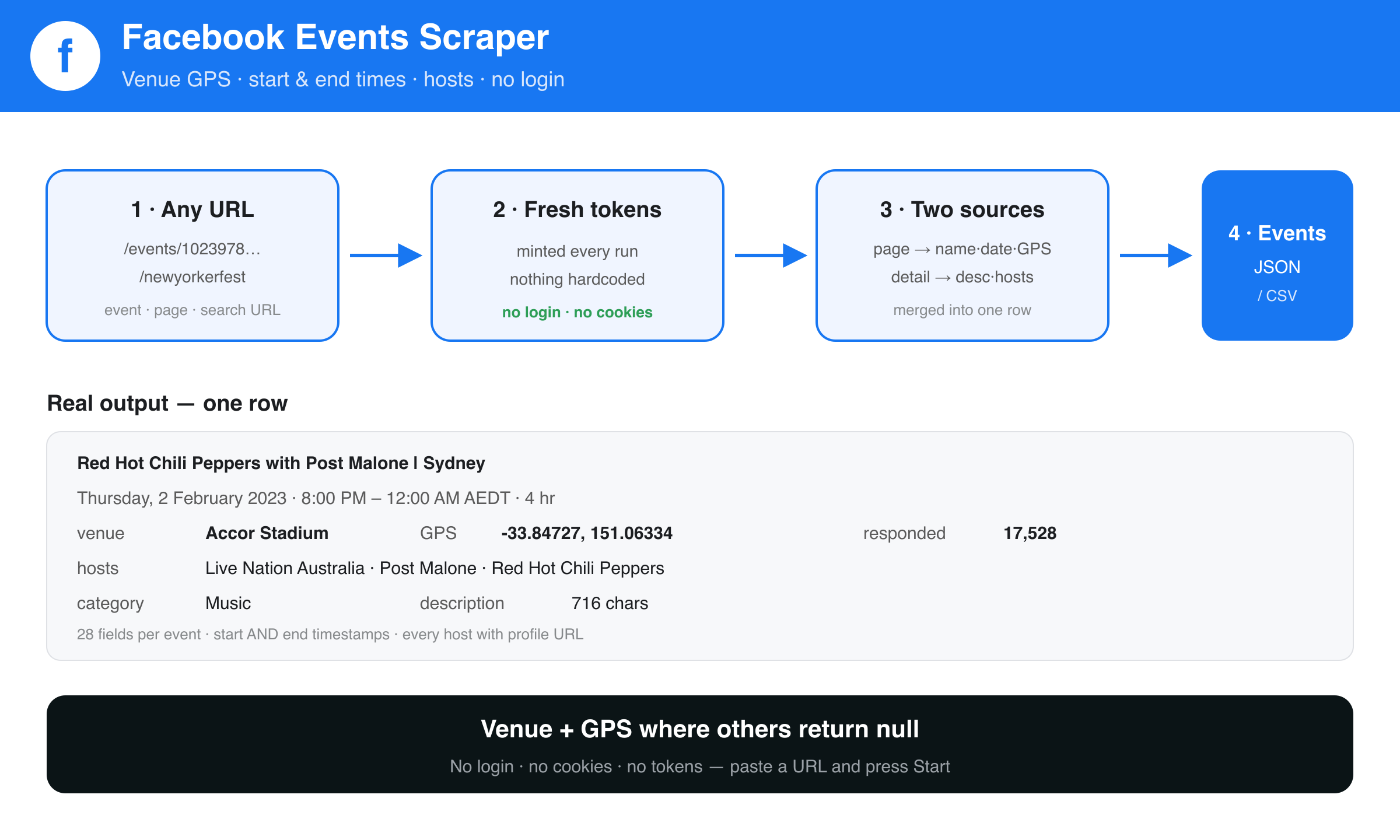
**Get the whole event, not half of it.** Paste a Facebook event URL or a page/organizer URL and get back the full record: name, description, **start *and* end time**, timezone, the **venue with GPS coordinates**, every host with their profile links, duration, categories and cover image.
> **No login. No cookies. No tokens.** Nothing to configure — press Start.
| You provide | You get back |
|---|---|
| An event URL — `facebook.com/events/1023978871819924` | That event, fully detailed |
| A page or organizer — `facebook.com/LiveNationAustralia` | Their events, merged from all three event tabs |
| A group — `facebook.com/groups/123456789` | The group's upcoming and past events |
| A city explore page — `facebook.com/events/explore/fr-paris/110774245616525` | Events happening in that city |
| A search URL copied from your browser | The events in those results |
### Why use it
- **Venue and GPS, not `null`.** Most Facebook event scrapers return an empty location field. This one returns the venue name plus latitude and longitude, so events land straight on a map.
- **End times, not just start times.** Both timestamps, in unix and ISO, plus the timezone.
- **Hosts as data.** Each host as a structured record with id, name and profile URL — not one flattened string.
- **Zero setup.** No Facebook account, no session cookie, no API key.
### How it works
1. The actor mints fresh Facebook page tokens at the start of every run, so nothing is hardcoded or expiring.
2. Each start URL is classified: direct event, page/organizer, group, city explore, or search URL.
3. Page URLs are read three ways — `/events`, `/upcoming_hosted_events` and `/past_hosted_events` — and the results de-duplicated, because Facebook serves a different slice on each. Groups and city pages resolve to their single tab.
4. Each event needs exactly **one** request: Facebook embeds the whole record — description, hosts, categories, venue, coordinates and response counts — in the event page itself.
### ⬇️ Input
Facebook Events Scraper takes URLs — paste them into `startUrls`. Five kinds work.
#### 🔗 Event URL
A specific event. Everything available is extracted for each one.
- `https://www.facebook.com/events/1023978871819924`
#### 📄 Pages and organizers
Give the page and the scraper reads **all three** of its event tabs and merges them, so you get more than any single tab returns:
- `https://www.facebook.com/LiveNationAustralia`
It fetches `/events`, `/upcoming_hosted_events` and `/past_hosted_events` and de-duplicates. On a busy page that is the difference between 8 and 16 events; on a quiet page all three return the same set and you simply get it once. You can also pass any one of those URLs directly if you only want that tab.
#### 👥 Groups
Both upcoming and past events of a group:
- `https://www.facebook.com/groups/GROUP_NAME/events`
#### 🌍 City explore
Every event Facebook is surfacing for a city:
- `https://www.facebook.com/events/explore/fr-paris/110774245616525`
Get the URL by opening Facebook Events and picking a city — the address bar gives you the slug and location id.
#### 🎯 Search URL with Facebook's own filters
Facebook's event search only returns results for URLs carrying its internal `sde` descriptor, which its front-end generates when you search. So: search on Facebook, apply whatever filters you want (online only, paid, date range, category), then copy the URL from the address bar and paste it in.
- `https://www.facebook.com/events/search?q=Comedy&sde=AbrQ9KopLfqYT7heXVVCxznkZYxRr9hU1JA4cdLbJhjgs56yyeHW3e833A9`
⚠️ **A bare keyword URL cannot work** — `facebook.com/events/search/?q=Party` returns *"We didn't find any results"* even for a logged-in person typing into Facebook's own search box. No scraper, login or token changes that. This Actor detects that URL shape and says so in the log rather than finishing silently with zero rows.
#### Mixing inputs
Pass as many URLs of any kind as you like in one run. `maxEvents` caps the **whole run**, not each URL, so a run is never more expensive than you set it.
```json
{
"startUrls": [
"https://www.facebook.com/events/1023978871819924",
"https://www.facebook.com/LiveNationAustralia",
"https://www.facebook.com/events/explore/fr-paris/110774245616525"
],
"maxEvents": 200
}
```
#### Input fields
| Field | Type | Required | Notes |
|---|---|---|---|
| `startUrls` | array | yes | Any mix of the five kinds above. |
| `maxEvents` | integer | no | Caps the whole run. Default `100`. |
| `proxyConfiguration` | object | no | Residential by default and recommended. |
### Output
One row per event. Real result, abridged:
```jsonc
{
"id": "1023978871819924",
"url": "https://www.facebook.com/events/1023978871819924/",
"name": "Red Hot Chili Peppers with Post Malone | Sydney",
"description": "Red Hot Chili Peppers are heading to Australia…",
"dateTimeSentence": "Thursday, February 2, 2023 at 8:00 PM – 12:00 AM AEDT",
"startTimestamp": 1675328400,
"endTimestamp": 1675342800,
"startTimeIso": "2023-02-02T09:00:00.000Z",
"endTimeIso": "2023-02-02T13:00:00.000Z",
"timezone": "UTC+11",
"duration": "4 hr",
"venueName": "Accor Stadium",
"latitude": -33.84726902893,
"longitude": 151.06334209442,
"usersResponded": 17528,
"isPast": true,
"isOnline": false,
"isCanceled": false,
"eventKind": "PUBLIC_TYPE",
"hostedBy": "Event by Live Nation Australia, Post Malone and Red Hot Chili Peppers",
"hosts": [
{ "id": "100064346752920", "name": "Live Nation Australia", "url": "https://www.facebook.com/LiveNationAustralia" },
{ "id": "100044283856936", "name": "Post Malone", "url": "https://www.facebook.com/postmalone" }
],
"categories": [{ "label": "Music", "url": "https://www.facebook.com/events/search/?…" }],
"coverImageUrl": "https://scontent.fsrg6-1.fna.fbcdn.net/…jpg",
"onlineUrl": null,
"ticketUrl": null,
"sourceUrl": "https://www.facebook.com/events/1023978871819924"
}
```
#### Key fields
| Field | Description |
|---|---|
| `startTimestamp` / `endTimestamp` | Unix seconds. `startTimeIso` / `endTimeIso` are the same in ISO 8601. |
| `venueName`, `latitude`, `longitude` | The venue and its coordinates. Online events report `Online event` with no coordinates. |
| `hosts[]` | Every host with `id`, `name` and profile `url`. |
| `usersResponded` | People who responded to the event. |
| `categories[]` | Facebook's own discovery categories, e.g. Music, Theater. |
| `onlineUrl` | For online events, the external stream or meeting link when Facebook exposes one. |
### Pricing
Pay-per-result. You pay for events returned, nothing else.
### Notes & limitations
- **Keyword event search does not work on Facebook itself.** A URL like `facebook.com/events/search/?q=Party` returns *"We didn't find any results"* — and it does so for a **logged-in user typing into Facebook's own "Search events" box**, verified in a real browser. No login, cookie, token or proxy changes this; it is Facebook's behaviour, not a scraper limitation. Any actor advertising Facebook event keyword search will return you an empty run. This actor detects that URL shape and tells you so in the log instead of finishing silently with zero rows. Use a page/organizer URL or a direct event URL instead.
- **Facebook embeds only ~8 events per tab.** This Actor works around that by reading all three page tabs and merging, which on a busy page yields roughly double (8 → 16 on a live test). Beyond that, Facebook holds the rest behind a scroll cursor this Actor does not follow, so a very large calendar can still be truncated. Direct event URLs are unaffected — pass a specific event's URL to guarantee it.
- `usersInterested` is deliberately **not** emitted. The interested count on an event page belongs to the related-events rail rather than the event you asked for, so reporting it would attribute another event's number to yours.
- `ticketUrl`, `onlineUrl` and `siblingEvents` (other dates of a recurring event) are populated only when Facebook exposes them, which is a minority of events.
- No `privacyInfo` field: Facebook ships it as an empty placeholder on the page, and it only restated `eventKind` plus `hostedBy`, which are both emitted as real fields.
- Past events remain fully scrapable; `isPast` tells you which.
### FAQ
**Do I need a Facebook account?** No. Nothing to log into, no cookie to paste.
**Can I scrape a venue's or promoter's whole calendar?** Yes — give the page URL and the actor reads its events tab.
**Why did my keyword return nothing?** Because a bare keyword can't work; see Notes above. Paste the browser search URL instead.
### 🤖 For AI Agents & LLM Apps
- **Purpose:** turn Facebook event or page URLs into structured event records with venue coordinates and precise timing.
- **Minimal input:** `{ "startUrls": ["https://www.facebook.com/events/1023978871819924"] }` — no auth.
- **Output fields:** `id, url, name, description, dateTimeSentence, startTimestamp, endTimestamp, startTimeIso, endTimeIso, timezone, duration, isPast, isOnline, isCanceled, eventKind, venueName, city, latitude, longitude, onlineUrl, coverImageUrl, usersResponded, hosts[], hostedBy, categories[], siblingEvents[], ticketUrl, sourceUrl`.
- **Billing:** pay-per-result; `maxEvents` bounds cost. One request per event.
- **Do not** pass bare keywords; only URLs are accepted.
### ⚠️ Disclaimer
This actor collects only publicly visible Facebook event information, without logging in or bypassing any access control. Use it in compliance with Facebook's Terms of Service and applicable law, including data-protection rules. You are responsible for how you use the data. This tool is not affiliated with or endorsed by Meta Platforms, Inc.
### SEO Keywords
Facebook events scraper, scrape Facebook events, Facebook event data, event API, Facebook event extractor, venue GPS coordinates, event listings scraper, Facebook page events, organizer events, event start end time, local events data, event aggregator, Facebook events export, no login Facebook scraper.
# Actor input Schema
## `startUrls` (type: `array`):
Facebook URLs to scrape. Five kinds work: (1) a direct event, e.g. https://www.facebook.com/events/1023978871819924 ; (2) a page or organizer, e.g. https://www.facebook.com/newyorkerfest — its events tab is read automatically; (3) a group, e.g. https://www.facebook.com/groups/123456789 ; (4) a city explore page, e.g. https://www.facebook.com/events/explore/fr-paris/110774245616525 ; (5) a search URL copied from your browser's address bar. Plain keyword searches are not supported — Facebook itself returns no results for them; see the README.
## `maxEvents` (type: `integer`):
Stop after collecting this many events. Example: 50. Default 100.
## `proxyConfiguration` (type: `object`):
Proxy used for every request. Residential is the default and is recommended — Facebook intermittently rejects datacenter IPs.
## Actor input object example
```json
{
"startUrls": [
"https://www.facebook.com/events/1023978871819924"
],
"maxEvents": 100,
"proxyConfiguration": {
"useApifyProxy": true,
"apifyProxyGroups": [
"RESIDENTIAL"
]
}
}
```
# API
You can run this Actor programmatically using our API. Below are code examples in JavaScript, Python, and CLI, as well as the OpenAPI specification and MCP server setup.
## JavaScript example
```javascript
import { ApifyClient } from 'apify-client';
// Initialize the ApifyClient with your Apify API token
// Replace the '' with your token
const client = new ApifyClient({
token: '',
});
// Prepare Actor input
const input = {
"startUrls": [
"https://www.facebook.com/events/1023978871819924"
],
"maxEvents": 100,
"proxyConfiguration": {
"useApifyProxy": true,
"apifyProxyGroups": [
"RESIDENTIAL"
]
}
};
// Run the Actor and wait for it to finish
const run = await client.actor("memo23/facebook-events-scraper").call(input);
// Fetch and print Actor results from the run's dataset (if any)
console.log('Results from dataset');
console.log(`💾 Check your data here: https://console.apify.com/storage/datasets/${run.defaultDatasetId}`);
const { items } = await client.dataset(run.defaultDatasetId).listItems();
items.forEach((item) => {
console.dir(item);
});
// 📚 Want to learn more 📖? Go to → https://docs.apify.com/api/client/js/docs
```
## Python example
```python
from apify_client import ApifyClient
# Initialize the ApifyClient with your Apify API token
# Replace '' with your token.
client = ApifyClient("")
# Prepare the Actor input
run_input = {
"startUrls": ["https://www.facebook.com/events/1023978871819924"],
"maxEvents": 100,
"proxyConfiguration": {
"useApifyProxy": True,
"apifyProxyGroups": ["RESIDENTIAL"],
},
}
# Run the Actor and wait for it to finish
run = client.actor("memo23/facebook-events-scraper").call(run_input=run_input)
# Fetch and print Actor results from the run's dataset (if there are any)
print("💾 Check your data here: https://console.apify.com/storage/datasets/" + run["defaultDatasetId"])
for item in client.dataset(run["defaultDatasetId"]).iterate_items():
print(item)
# 📚 Want to learn more 📖? Go to → https://docs.apify.com/api/client/python/docs/quick-start
```
## CLI example
```bash
echo '{
"startUrls": [
"https://www.facebook.com/events/1023978871819924"
],
"maxEvents": 100,
"proxyConfiguration": {
"useApifyProxy": true,
"apifyProxyGroups": [
"RESIDENTIAL"
]
}
}' |
apify call memo23/facebook-events-scraper --silent --output-dataset
```
## MCP server setup
```json
{
"mcpServers": {
"apify": {
"command": "npx",
"args": [
"mcp-remote",
"https://mcp.apify.com/?tools=memo23/facebook-events-scraper",
"--header",
"Authorization: Bearer "
]
}
}
}
```
## OpenAPI specification
Download the OpenAPI definition: https://api.apify.com/v2/actors/QjKmRaUmZvbCcayhE/builds/KP4rEymgVEDu1I5Qw/openapi.json