# Facebook Reels Scraper · Reactions, Comments, Video URL (`memo23/facebook-reels-scraper`) Actor
Analyze any Instagram hashtag into one flat row: total post count, related hashtags ranked and classified, average and median engagement, media-type mix, posts-per-day activity, and the top posters and posts. Bulk tags, no login, no cookies. Empty or missing tags are named and never charged.
- **URL**: https://apify.com/memo23/facebook-reels-scraper.md
- **Developed by:** [Muhamed Didovic](https://apify.com/memo23) (community)
- **Categories:**
- **Stats:** 1 total users, 1 monthly users, 75.0% runs succeeded, 0 bookmarks
- **User rating**: No ratings yet
## Pricing
from $3.00 / 1,000 reels
This Actor is paid per event. You are not charged for the Apify platform usage, but only a fixed price for specific events.
Learn more: https://docs.apify.com/actors/running/actors-in-store.md#pay-per-event
## What's an Apify Actor?
Actors are web data automations that power AI and operations. They run on the Apify platform to scrape websites, process data, connect APIs, and automate workflows.
In Batch mode, an Actor accepts a well-defined JSON input, performs an action which can take anything from a few seconds to a few hours,
and optionally produces a well-defined JSON output, datasets with results, or files in key-value store.
In Standby mode, an Actor provides a web server which can be used as a website, API, or an MCP server.
Actors are written with capital "A".
## How to integrate an Actor?
If asked about integration, you help developers integrate Actors into their projects.
You adapt to their stack and deliver integrations that are safe, well-documented, and production-ready.
The best way to integrate Actors is as follows.
- **AI agents and MCP clients** — the [Apify MCP server](https://docs.apify.com/integrations/mcp.md) at `https://mcp.apify.com` (remote, streamable HTTP, OAuth on first use).
- **Agentic workflows and local Actor development** — [Agent Skills](https://apify.com/.well-known/agent-skills/index.json) with the [Apify CLI](https://docs.apify.com/cli/docs.md): `npm install -g apify-cli`, then `apify login`.
- **JavaScript/TypeScript projects** — the official [JS/TS client](https://docs.apify.com/api/client/js/docs.md): `npm install apify-client`.
- **Python projects** — the official [Python client](https://docs.apify.com/api/client/python/docs.md): `pip install apify-client`.
- **Any other language** — the [REST API](https://docs.apify.com/api/v2.md).
For usage examples, see the [API](#api) section below.
For more details, see Apify documentation as [Markdown index](https://docs.apify.com/llms.txt) and [Markdown full-text](https://docs.apify.com/llms-full.txt).
# README
## Facebook Reels Scraper

Give it a Facebook page, get its reels back — each with the **reactions, comments and shares** that
most reel scrapers leave blank, plus caption, creation date, duration, thumbnail, direct video URL,
and the page's own name and follower count. One row per reel.
| Input | Rows emitted |
|---|---|
| `https://www.facebook.com/9GAGCute` | one row per recent reel, with engagement counts |
| `https://www.facebook.com/LeonardoDiCaprio` | same, for that page |
| a page with no reels | one error row naming it, not charged |
> Pure HTTP over a residential proxy. No browser, no login, no cookies, no third-party unlocker.
***
### Why Use This Scraper?
Two things break most Facebook reel scrapers: Facebook hands a **login wall** to data-centre IPs, so
they return nothing, and even when they do return reels they skip the **engagement counts**. This
runs over a residential proxy by default, so it gets the real page — and it recovers the reaction,
comment and share numbers from the page's own data. If a run genuinely finds nothing, it fails
loudly rather than reporting an empty success.
***
### How It Works
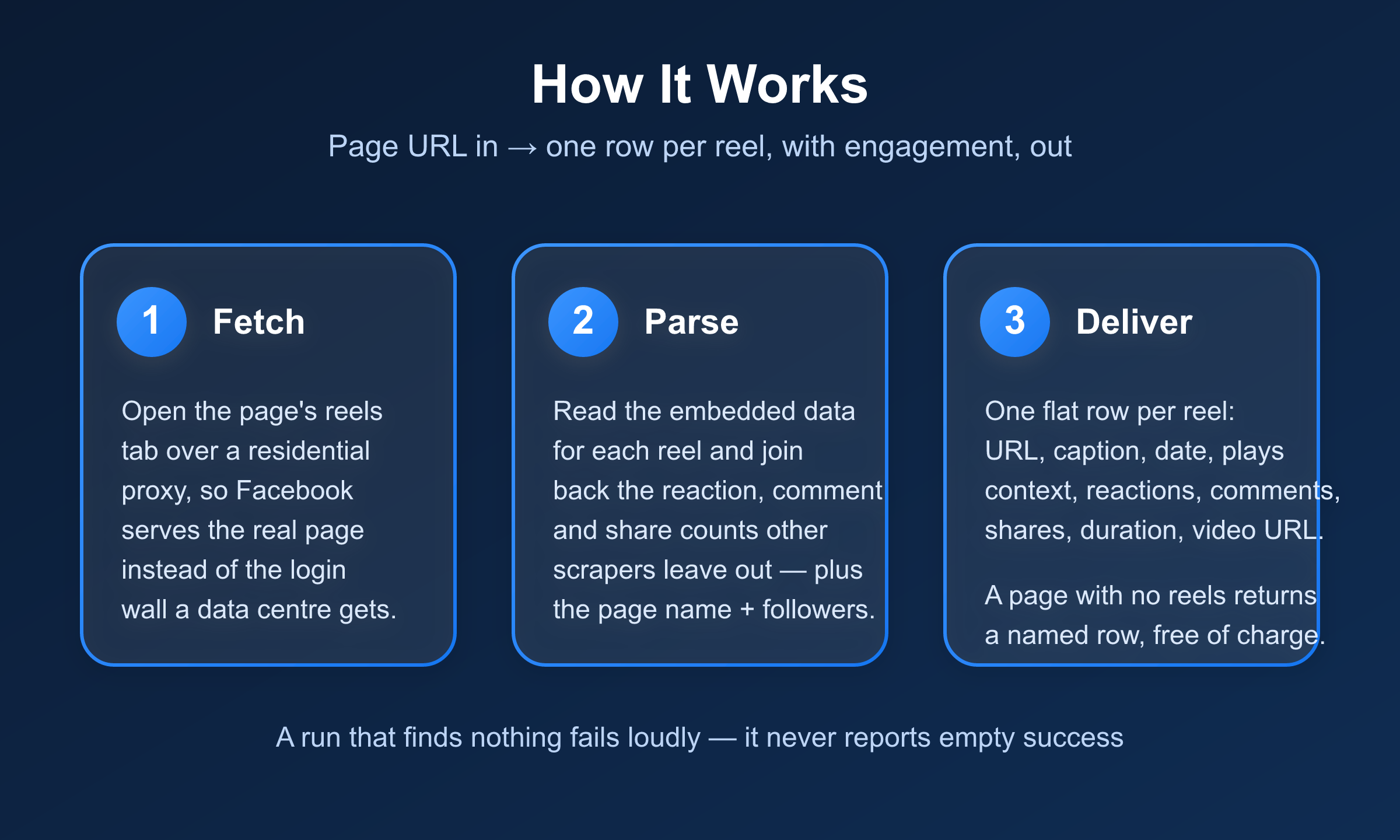
Each page URL is normalised to its reels tab and fetched over a residential proxy. The reels tab is
server-rendered, so the HTML already carries the page's most recent reels as structured data. The
Actor parses each reel and joins back the reaction, comment and share counts Facebook normalises
into a separate part of the response, then emits one flat row per reel. A page that returns no reels
becomes a named error row rather than a silently shorter list.
***
### Input
| Field | Type | Required | Default | Notes |
|---|---|---|---|---|
| `startUrls` | array | Yes | — | Facebook page/profile URLs. Main URL, handle, or reels-tab URL all work. |
| `resultsLimit` | integer | No | 20 | Max reels per page, newest first. The reels tab exposes ~10-12 per page in one pass. |
| `onlyPostsNewerThan` | string | No | — | Keep only reels created on/after this date (ISO). Older reels dropped, not charged. |
#### Example input
```json
{
"startUrls": [{ "url": "https://www.facebook.com/9GAGCute" }],
"resultsLimit": 20
}
```
***
### Output Schema
One row per reel, page context denormalised onto each row so a spreadsheet needs no second lookup:
```jsonc
{
"reelUrl": "https://www.facebook.com/reel/1310318585490776",
"reelId": "1310318585490776",
"caption": "meow code crashing",
"createdAt": "2026-08-25T12:55:49.000Z", // ISO 8601
"createdTimestamp": 1787662549, // epoch seconds, as Facebook gives it
"reactionsCount": 838,
"commentsCount": 15,
"sharesCount": 80, // exact when Facebook exposes a plain integer
"sharesText": "80", // Facebook's own label, e.g. "2.6K", when that is all it gives
"durationMs": 12138,
"durationSeconds": 12.1,
"thumbnailUrl": "https://scontent.xx.fbcdn.net/v/t15.5256-10/...",
"videoUrl": "https://video.xx.fbcdn.net/o1/v/t2/f2/...mp4", // direct, time-limited
"ownerId": "100077223652881",
"pageUrl": "https://www.facebook.com/9GAGCute",
"pageName": "9GAG Cute",
"pageId": "100077223652881",
"pageFollowerCountText": "3.7M", // Facebook's own rendered label
"scrapedAt": "2026-08-29T13:56:46.713Z"
}
```
#### Error rows
| `error` | Meaning | Charged |
|---|---|---|
| `invalid_url` | Not a facebook.com URL. | No |
| `page_not_found` | Facebook returned 404/410 — private, removed, or wrong URL. | No |
| `no_reels_found` | The page returned no public reels. | No |
| `no_reels_in_range` | All the page's reels are older than `onlyPostsNewerThan`. | No |
***
### What Makes This Richer Than the Competition
Built from the open complaints on other Facebook reel scrapers — missing likes/comments, "no results
without login", and "returns success with no stats":
| Capability | Typical reel scraper | This Actor |
|---|---|---|
| Reel URL, caption, creation date | yes | yes |
| **Reactions count** | often blank | yes |
| **Comments count** | often blank | yes |
| Shares | no | yes |
| Direct video URL | sometimes | yes |
| Duration + thumbnail | sometimes | yes |
| Page name + follower count | no | yes, on every row |
| Works from a data-centre run | no, login wall → empty | yes, residential by default |
| Empty run fails loudly | no, reports success | yes, never a silent-empty |
| Bad page named, not charged | no | yes |
***
### Pricing
Pay per event — you are charged per reel returned, never for the pages that come back as error rows.
| Event | When it fires | Rate |
|---|---|---|
| Actor start | Once per run | $0.001 |
| Reel | Each reel row delivered | from $0.003 |
Error rows (invalid, not found, no reels, out of range) are never charged.
***
### Notes & Limitations
The reels tab exposes roughly the **latest 10-12 reels per page** in one pass, so `resultsLimit`
returns what is available rather than an unlimited back-catalogue. This is a deliberate v1 boundary
in favour of reliability; deeper history would need cursor pagination.
`videoUrl` is a **direct, time-limited** Facebook CDN link — fetch or store the file promptly, as
the URL expires. `pageFollowerCountText` and `sharesText` are Facebook's own rounded labels
(e.g. "3.7M", "2.6K"); `reactionsCount` and `commentsCount` are exact integers.
***
### FAQ
**Do I need a Facebook account, login, or cookies?**
No. Nothing is authenticated. The Actor reads the same public reels a logged-out visitor sees.
**Why do other reel scrapers return nothing for me?**
Facebook serves a login wall to data-centre IPs. This Actor uses a residential proxy by default, so
it gets the real page.
**Can I get more than ~12 reels per page?**
Not in this version. It returns the page's most recent reels in one reliable pass. Deeper pagination
is a planned enhancement.
**Do I get likes and comments?**
Yes — `reactionsCount` and `commentsCount` on every reel, exact. That is the main gap this Actor
closes versus other reel scrapers.
**What if a run returns nothing?**
It exits FAILED with a reason rather than reporting success with an empty dataset — unless every
requested page was genuinely reel-less, which exits SUCCEEDED with a row per page explaining why.
***
### 🤖 For AI Agents & LLM Apps
**Purpose:** scrape a Facebook page's reels with engagement. Give it page URLs, get one flat row per
reel including reactions, comments and shares.
**Minimal tested input:**
```json
{ "startUrls": [{ "url": "https://www.facebook.com/9GAGCute" }], "resultsLimit": 20 }
```
**Output fields (flat, one row per reel):** `reelUrl`, `reelId`, `caption`, `createdAt`,
`createdTimestamp`, `reactionsCount`, `commentsCount`, `sharesCount`, `sharesText`,
`durationMs`, `durationSeconds`, `thumbnailUrl`, `videoUrl`, `ownerId`, `pageUrl`,
`pageName`, `pageId`, `pageFollowerCountText`, `scrapedAt`.
**Error rows** carry `pageUrl` + `error` + `message` and no reel fields. Branch on the presence
of `error`. Values: `invalid_url`, `page_not_found`, `no_reels_found`, `no_reels_in_range`.
**Billing:** one `reel` event per reel row, plus one actor start. Error rows are not charged.
**Behaviour worth knowing:** returns roughly the latest 10-12 reels per page in one pass;
`reactionsCount`/`commentsCount` are exact integers while `sharesText`/`pageFollowerCountText`
are Facebook's rounded labels; `videoUrl` is a direct time-limited CDN link; an empty run fails
loudly unless every page was genuinely reel-less.
***
### ⚠️ Disclaimer
This Actor collects only publicly available information from Facebook — the same reels any
logged-out visitor can see. It does not log in, use cookies, or access private content. You are
responsible for using the output in line with Facebook's terms and applicable data protection law,
including GDPR where personal data is involved.
***
### SEO Keywords
facebook reels scraper, facebook reels api, scrape facebook reels, facebook video scraper, facebook
reels views, facebook reels likes comments, facebook page reels, facebook reels downloader, facebook
reels engagement, facebook short video scraper, facebook reels data export, facebook reels metadata
# Actor input Schema
## `startUrls` (type: `array`):
Public Facebook page or profile URLs whose reels you want. Accepts the page's main URL (https://www.facebook.com/9GAGCute), a handle, or a reels-tab URL — each is normalised to that page's reels tab. Each item is an object like {"url": "https://www.facebook.com/9GAGCute"}. Non-Facebook URLs return an error row and are not charged.
## `resultsLimit` (type: `integer`):
Maximum number of reels to return per page, most-recent first. The reels tab exposes roughly the latest 10-12 reels per page in one pass, so higher values return what is available. Default 20.
## `onlyPostsNewerThan` (type: `string`):
Optional. Keep only reels created on or after this date. Accepts an ISO date (2026-01-31) or datetime. Reels older than this are dropped and not charged. Leave empty to keep all reels returned.
## `proxy` (type: `object`):
Optional, and only used for non-paying sample runs. Paying runs always use a built-in residential proxy because Facebook serves a login wall to datacenter IPs — you do not need to configure anything here.
## Actor input object example
```json
{
"startUrls": [
{
"url": "https://www.facebook.com/9GAGCute"
}
],
"resultsLimit": 20
}
```
# Actor output Schema
## `results` (type: `string`):
No description
# API
You can run this Actor programmatically using our API. Below are code examples in JavaScript, Python, and CLI, as well as the OpenAPI specification and MCP server setup.
## JavaScript example
```javascript
import { ApifyClient } from 'apify-client';
// Initialize the ApifyClient with your Apify API token
// Replace the '' with your token
const client = new ApifyClient({
token: '',
});
// Prepare Actor input
const input = {
"startUrls": [
{
"url": "https://www.facebook.com/9GAGCute"
}
],
"resultsLimit": 20
};
// Run the Actor and wait for it to finish
const run = await client.actor("memo23/facebook-reels-scraper").call(input);
// Fetch and print Actor results from the run's dataset (if any)
console.log('Results from dataset');
console.log(`💾 Check your data here: https://console.apify.com/storage/datasets/${run.defaultDatasetId}`);
const { items } = await client.dataset(run.defaultDatasetId).listItems();
items.forEach((item) => {
console.dir(item);
});
// 📚 Want to learn more 📖? Go to → https://docs.apify.com/api/client/js/docs
```
## Python example
```python
from apify_client import ApifyClient
# Initialize the ApifyClient with your Apify API token
# Replace '' with your token.
client = ApifyClient("")
# Prepare the Actor input
run_input = {
"startUrls": [{ "url": "https://www.facebook.com/9GAGCute" }],
"resultsLimit": 20,
}
# Run the Actor and wait for it to finish
run = client.actor("memo23/facebook-reels-scraper").call(run_input=run_input)
# Fetch and print Actor results from the run's dataset (if there are any)
print(f"💾 Check your data here: https://console.apify.com/storage/datasets/{run.default_dataset_id}")
for item in client.dataset(run.default_dataset_id).iterate_items():
print(item)
# 📚 Want to learn more 📖? Go to → https://docs.apify.com/api/client/python/docs/quick-start
```
## CLI example
```bash
echo '{
"startUrls": [
{
"url": "https://www.facebook.com/9GAGCute"
}
],
"resultsLimit": 20
}' |
apify call memo23/facebook-reels-scraper --silent --output-dataset
```
## MCP server setup
```json
{
"mcpServers": {
"apify": {
"type": "http",
"url": "https://mcp.apify.com/?tools=fetch-actor-details,memo23/facebook-reels-scraper"
}
}
}
```
The hosted server signs you in with OAuth on first connect, so no API token belongs in this config. Clients without OAuth support can send an `Authorization: Bearer ` header instead, using a token from API & Integrations in Apify Console (https://console.apify.com/settings/integrations).
## OpenAPI specification
Download the OpenAPI definition: https://api.apify.com/v2/actors/btd6CWWaT08QxwbM4/builds/TRV8UroFFHfYKpLeq/openapi.json